


Motorola Moto G Getting a Little Brother?

Amongst all the speculation surrounding the allegedly upcoming Motorola flagship (currently coined “X+1″ by the media), another new Moto phone is purportedly in the works. Though this model is on the other end of the model spectrum, and is expected to reside just under the existing Moto G in terms of specs and affordability.
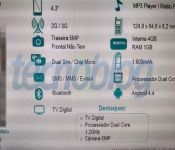
Currently dubbed “Moto-E” by the Italian site androidworld.it, this new model further emphasizes the “more phone for everyone” mantra brought on by the Moto G and arguably the Nexus 4 before that. The spec comparison reads as such:
Moto-E (Moto-G)
- Display: 4.3″ (4.5″)
- Processor: 12.GHz dual-core (1.2 GHz quad-core)
- RAM: 1GB (1GB)
- Internal storage: 4GB (8GB)
- Rear camera: 5MP (5MP)
- Front camera: None (1.3MP)
- Battery: 1900mAh (2070mAh)
The height and width appear almost identical; the one noticeable dimension is the depth of the device. At 6.2mm, it appears to be almost half of the Moto G, which checks in at 11.6. This sveltness will definitely be appealing to a lot of potential buyers.
The distribution plans for this phone is not mentioned, but it can be deduced that Motorola would have a very similar game plan; meaning pretty much worldwide.
The post Motorola Moto G Getting a Little Brother? appeared first on AndroidGuys.
Rufus Cuff wants to dominate the wearable market and your forearm

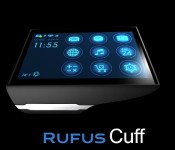
We told you to put on your disappointment pants for the Galaxy Gear 2, but for the Rufus Cuff we suggest rolling up your absurdity sleeves. Seriously, given its three-inch screen you might just have to. This wearable boasts a built-in mic, a camera, a speaker, web browser, voice control, GPS and full access to the Google Play store — if the Cuff sounds like a smartphone that straps to your wrist, well, that’s basically what it is. It connects to your Android or iPhone via Bluetooth for mobile data, making calls and sending texts, but it’s running a full version of Google’s mobile OS and can hook on to WiFi if you’re in a cellular dead-zone or if your phone’s battery runs out.
While the gizmo doesn’t exactly look practical (we’re pretty sure that it won’t play nice with the cuffs of a slim-cut oxford), as of this writing it’s has raised over $150,000 of its $200,000 IndieGoGo goal, with a handful of days to go. If you dig the idea of strapping one of these monstrosities on your wrist, all it takes is a $249 pledge.
Filed under: Wearables, Mobile
Source: IndieGoGo
OnePlus One phone and its swappable covers leak out in new pictures

Former Oppo exec Pete Lau announced his plans to make “the perfect smartphone” a few months ago, and now the OnePlus One is almost here. Its launch is scheduled for April 23rd, but Android Authority points out these pictures posted on a forum that claim to show press renders of the device itself and “StyleSwap” covers that will let owners customize its looks. Not-so-shockingly, what we’re seeing looks a lot like the Oppo Find 5, although the only question left is whether they’re authentic or just a fan’s creation. We’ve already gotten a sneak peek at the CyanogenMod software it will run, and we know how much it costs, but official word on everything else will have to wait until Wednesday.

Filed under: Cellphones, Mobile
Via: Engadget Chinese
Source: Android Authority, OnePlus BBS
AllCast’s screen-mirroring magic arrives on Amazon’s Fire TV App Store

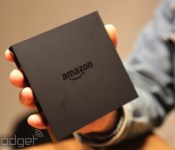
Been putting off sideloading AllCast’s SDK to your brand new Amazon Fire TV? Well, friend, your procrastination has paid off. Now, all you have to do to install the casting and screen-mirroring app is download it straight from the Amazon App Store. So long as you also have AllCast installed on an Android device, you can beam photos, videos and music from your phone or tablet to Amazon’s set-top box. Plus, you can use the app to view images and videos saved on Google+ and Dropbox. If you don’t plan to pick up a Fire TV (waiting for the second one, eh?), you can still use AllCast with a number of other devices, including Chromecast, Xbox One, Roku, Apple TV and a smattering of smart TVs.
Filed under: Household, HD, Amazon
Source: Koushik Dutta (Google+), Amazon

Color Cables: Glow in the Dark, Charge & Sync Cables Review

You may have caught our preview post of a great Indiegogo campaign that caught our attention, and the kind guys over at Color Cables sent us a few review units over to check out.
Functionality
Let me set the scene for you – it’s 11pm, the baby is asleep in the cot and the 10% battery remaining warning has just flashed up on your device. You need your charger but it’s pitch black; can’t turn the light on to find the charger cable for fear of waking the little one it’s taken oh so long to get to sleep. Here’s where Color Cables steps in!
Harnessing the light it has absorbed during the day from sunlight and also artificial light, the Color Cables emit a glow, easily illuminating them in a dark room.

The cables can charge and sync a variety of different devices depending on the connector you purchase. Micro-USB, 30-Pin, and Lightning connectors are all available to cater for the range of latest devices.
Design
The Color Cables are extremely well made and feel very solid, with the connectors slotting easily into the device and fit snug. I’ve used some very bad cables where the connectors hang halfway out of the port and feel very flimsy; the Color Cables do not disappoint in their build quality.

The cables come in a range of different colors and lengths at varying prices, but all offer the charge and sync feature, as well as harnessing light to offer a glow. The Color Cables do not work out of the box, and that’s understandable given they have to harness the available light in order to then emit it when it detects darkness. It took around 48 hours for it to absorb sufficient light to work, but I had to move one of my other chargers since it never glowed presumably because it wasn’t getting the necessary light during the day.
Overall, the cable is a simple but great idea that is executed extremely well and they function exactly as you would expect the Color Cables to, offering accessibility without compromising charge time or functionality.
If you like the look of the Color Cables then be sure to check out their website. Stick around at AndroidGuys as we’ll be giving some of these charging cables away over the next few days.
The post Color Cables: Glow in the Dark, Charge & Sync Cables Review appeared first on AndroidGuys.
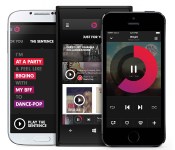
Beats Music update lets you subscribe from inside the iOS app

Odds are that you weren’t riveted by Beats Music when it first arrived, but the streaming service has just delivered a pair of big updates that may give you a good excuse to tune in. For the iOS app, the biggest improvement is visible when you’re signing up — you can now subscribe from within the software rather than heading to the web. The move makes it that much easier to keep the music flowing after your trial is over, and may just help Beats grow its fledgling customer base.
Not that Beats is neglecting its Android app by any means; you get a “brand spanking new widget” for your home screen if you’re running Google’s mobile platform. Both the Android and iOS releases also share some common improvements, including the ability to find Facebook friends who use Beats, better social network linking and thousands of new tracks in the Sentence playlist generator. There’s no guarantee that either refresh will have you rethinking that Rdio or Spotify subscription, but it’s hard to knock upgrades that make it easy to start listening.
Filed under: Cellphones, Internet, Software, Mobile
Via: Recode, Droid-Life
Source: App Store, Google Play

Samsung to start charging about the price of a gallon for “Milk”

Were you one of the many enjoying your free “Milk”? Well, Milk Music is having a price increase for a new premium service.
Samsung will still be providing its free basic service, but will be including ads. Currently the service is ad-free as part of a special introductory offer. The premium service will cost you $3.99 for ad-free music after the introductory offer ends.
Milk Music is a streaming radio service powered by Slacker and offered to select Galaxy models. The current device list incldues: Galaxy Note II, Galaxy Note 3, Galaxy S III, Galaxy S4, Galaxy S5.
Unfortunately Samsung has not given many details about what the premium service will include, only that it will be ad-free and have “some exclusive features” for a price of $3.99 a month. What are those features? I guess we will have to wait to find out.
Samsung has not publicized a date for the new service to be available. Meanwhile if you own one of the the noted lucky Galaxy devices, you can download the app at the Google Play Store or with Samsung Apps.
Source: Samsung Tomorrow
The post Samsung to start charging about the price of a gallon for “Milk” appeared first on AndroidGuys.
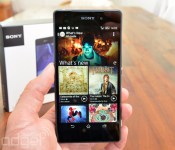
Sony Xperia Z2 review: a big, powerful slab of a phone

It’s been nearly three years since I reviewed the Xperia Neo, manufactured by what was then Sony Ericsson. The Neo represented just the second generation of Xperia phones running on Android, from a period when Sony was finding its feet in the world of mobile and still chucking out plenty of duds (I’m looking at you, Tablet P). Fast-forward to today and things have changed dramatically under Kaz Hirai‘s stewardship. I’ll tell you this right now: The Z2 is an easy phone to recommend, at least for those living in countries where it’ll definitely be available (a list that includes the UK and Canada, but not yet the US). The only real caveat is the handset’s huge, monolithic construction (a far cry from puny, 126-gram Neo). As you’ll see, if you can get past its size, the Z2 addresses some of the most serious gripes we had with its predecessors, the Xperia Z and Z1, particularly with respect to its LCD display. In fact, in some respects, it’s far ahead of any other Android phone currently on the market.
Let’s deal with the size thing right away. It’s not merely a question of weight, because the Z2 is only 18 grams heavier than the Galaxy S5, which is about as light as phones in this category come nowadays. Sony has actually done an excellent job of keeping the Z2′s weight down: Somehow, magically, it’s a few grams lighter than the Z1, yet it packs a larger display and a waterproof/dustproof casing, with tough, heavy flaps around the slots and micro-USB port.
No, the problem here is with the weight distribution. The Z2 feels wider and taller than it needs to be, and its center of gravity just doesn’t feel very… centered. By contrast, the similarly heavy HTC One (M8) feels like its density is gathered around the spine of the device, so that it rests solidly in the hand. None of these handsets are especially conducive to one-handed use, but the Xperia Z2 is the worst of the bunch in this respect; I dropped it four times in the space of a week, which is a record even for me, and I found it unwieldy for reading in bed, too.

The other issue with the Z2′s design is its blockiness. Visually, I find this attractive — it’s part of Sony’s metal-and-glass design statement, which is further aided by the thinness (just 8.2mm, or one-third of an inch). In daily use, however, the absence of curvature and shaved-off corners can be annoying — even for someone who’s used to carrying something enormous like the Galaxy Note 3. Check out the video above and you’ll see a shot of our own Jamie Rigg putting the phone into his pocket. The ridges of all four corners of the phone are actually visible through the denim of his jeans. (Seriously, watch the video. I had to go through the awkwardness of filming a colleague’s crotch just to make it for you.)
Having said this, it’s worth remembering just how much technology is packed into the Z2: a 5.2-inch display, a big camera module, the extra ruggedness I’ve already mentioned, a microSD slot, a widely compatible LTE modem and all the other gubbins listed in the table below.
| Sony Xperia Z2 | |
|---|---|
| Dimensions | 146.8 x 73.3 x 8.2mm |
| Weight | 163g |
| Screen size | 5.2 inches |
| Screen resolution | 1,920 x 1,080 |
| Screen type | Triluminos LCD with 16.7 million colors |
| Battery | 3,200mAh Li-ion (non-removable) |
| Ruggedness | IP55 and IP58 waterproof and dustproof |
| Internal storage | 16GB (12GB free) |
| External storage | MicroSDXC |
| Rear camera | 20.7MP (1/2.3-inch sensor, f/2.0 lens with 27mm equiv. focal length) |
| Front-facing cam | 2MP stills, 1080p video |
| Video capture | 1080p, 4K |
| NFC | Yes |
| Radios |
HSPA+ (850/900/1700/1900/2100); GSM GPRS/EDGE (850/900/1800/1900); LTE (Bands 1, 2, 3, 4, 5, 7, 8, 13, 17, 20) |
| Bluetooth | v4.0, aptX, A2DP |
| SoC | Qualcomm Snapdragon 801 (MSM8974AB) |
| CPU | 2.3GHz quad-core Krait 400 |
| GPU | Adreno 330 |
| RAM | 3GB |
| Entertainment | MHL, USB OTG, WiFi Direct, DLNA, Miracast, FM radio |
| WiFi | Dual-band, 802.11a/ac/b/g/n |
| Wireless Charging | No |
| Operating system | Android 4.4.2 (Sony-specific UI) |
Something not mentioned in the table: The Z2 apparently has active noise-canceling, to reduce background hubbub when you’re talking to someone through a headset. This only works with specific Sony headsets, and our review sample didn’t come with one, so I didn’t test the feature. Nevertheless, you may see some retailers bundling a pair of compatible earphones (the MDR-NC31EM). And they’re worth a look, too, if only because they’re worth £30 ($50) as a standalone purchase.
More usefully, Sony has also made room for stereo speakers. These are still a bit tinny compared to HTC’s BoomSound, but they’re infinitely better than the single speaker on the Z1. The old model’s speaker was easily blocked by the palm of your hand when the device was held in landscape mode, but now, the speakers are forward-facing and very hard to block — a big tick for Sony.
Display

If any of the above paragraphs left you glum, it’s OK — things mostly get more positive from here on out, and this section is perhaps the most glowing of the lot. The dodgy display that prevented me from wholeheartedly recommending the Z1 has been replaced by something infinitely better: an entirely new, enlarged 1080p panel that has much better brightness, contrast and viewing angles. The difference is obvious and totally welcome, but as a result the Z2′s “Triluminos” display is also a bit less Sony-ish.
This is a manufacturer that has historically trodden its own path with respect to displays, to the point where Sony TVs and, to some extent, Sony phones, have forsaken deep black levels and vivid colors preferred by the likes of Samsung in favor of more detail and more natural color reproduction. With the Z2, however, it looks like Sony has seen a commercial need to deliver something more akin to its rivals and more familiar to potential buyers. I know a couple of people (just one, actually) who really liked the Z1′s display and who might be annoyed by this change of heart, but to my eyes it’s all good. We’re now looking at a display that is at least on a par with other top-end LCD panels.
A couple of notes about setting up the display: Colors tend to be a bit warm, but you can adjust white balance and add a touch of blue in the settings — a tweak that I tried and then decided to keep. I also permanently disabled Sony’s “X-Reality for mobile” engine, because this post-processing effect has gone too far: It makes things look unnaturally saturated, and it also makes 1080p movies look pixelated due to over-zealous edge sharpening.
Software

When you first boot up the phone, you’ll be confronted by Sony’s typical array of media and social feed widgets, which I reckon many users will remove as they begin to personalize the device. By the time you’re done tailoring (perhaps by switching out the stock keyboard for something better, and losing the swirly PlayStation-style animated wallpaper), Sony’s skin and various additions shouldn’t get in your way.
Nevertheless, the manufacturer does leave some residue on your Android experience, and it has to be said that this lingering aesthetic feels dated. Whereas HTC and even Samsung have recently tarted up their skins, and Apple has made the stark shift to iOS 7, Sony’s icons, fonts and layouts feel like they’re stuck in 2012.
Accessing settings is also a bit old-fashioned: You have to open the notifications pulldown, select “quick settings” and then make do with basic toggles, which means most settings (like brightness or selecting a WiFi network) then take a couple more taps before you actually make the desired change. Stock Android, HTC Sense and TouchWiz all handle these mundane things with fewer presses.
One bit of software that’s unnecessarily obnoxious is called “What’s New,” which promotes recent (and mostly paid-for) content from Sony’s music, video and gaming empire. It might be of occasional interest in its app form, but it’s an unnecessary widget and — more seriously — it’s an encumbrance to those who make regular use of Google Now. Instead of just swiping up from the onscreen home button to get into Google’s special card-based interface, which was all that was required on the Z1, you now have to sweep up and to the right, so as to avoid accidentally launching “What’s New” instead.
Having said all this, if you’re a Sony fan, it could be nice to have Sony’s ecosystem readily at hand on the Z2. This is especially true if you already have a Music Unlimited or Video Unlimited subscription, or if you want to play a few Android games using your PS3 controller, or quickly mirror your phone on your Sony smart TV using NFC. The PlayStation Mobile store, however, is still lackluster and short on compelling games.
Camera

Still photography
The Xperia Z2′s 20-megapixel camera is carried over from the Z1, and that’s a good thing. You can check out our Z1 review for an in-depth look at picture quality, including comparisons to the current king of mobile imaging, the Lumia 1020. Suffice to say, this is still the closest you can get to the image quality of a traditional point-and-shoot on a standard-shaped Android phone (i.e., not a Galaxy “Zoom” phone). That means you’ll be able to capture decent snaps even if you decide to leave the house without a dedicated camera.
The Z2′s meaty images don’t result solely from the high resolution, but also from the size of the sensor: at 1/2.3 inches, the chip can suck in significantly more light than any of its Android rivals. Coupled with large JPEG sizes of up to 9MB (albeit, unfortunately, with no RAW option), this yields photographs with less noise and less of the flat “digital” feel that you’d normally expect from a phone camera.

With this sort of optical strength, the camera app almost doesn’t need its plethora of effects and gimmicks, but it supplies them anyway. This extends to the now-obligatory “background defocus” effect, which is a hollow imitation of what the HTC One M8 can do with its depth sensor.
On the whole, I wish Sony had concentrated more on making its camera app more flexible and more suitable to manual photography, the way Nokia has done in recent years. There’s no easy way to control ISO or shutter speed in order to get creative using the stock app; the only quick adjustments that can be made are white balance and exposure compensation. It could have also helped us out with better post-production tools, as the one supplied is extremely basic. As things stand, we’ll just have to go elsewhere for our photography tools.
Video recording
To some extent, Sony’s unnecessary gimmicks also stretch to video recording, since we now have a 4K recording option that only a few people with 4K displays might be able to appreciate. (If you’re reading this on a 4K display, make sure you choose the full-res setting on the YouTube video above and, unlike the rest of us, you’ll be able to see what these clips really look like).
The good news with 4K is that Sony hasn’t crushed the frame rate as much as I feared, so the footage isn’t ruined by compression artifacts. The camera stores about 450MB of data for each minute of 3,840 x 2,160 footage, which equates to 7.5 MB/s — that’s nearly four times higher than the data rate of video recording on the Z1, befitting the quadrupling of the resolution. This is a roundabout way of saying that 4K clips from the Z2 should at least look similar to the 1080p clips we’re already used to, with the bonus of higher resolution if and when it’s needed.
Unfortunately, my sample footage was let down by the Z2′s microphone, which couldn’t really handle a windy day by the river, as well as by its lack of optical image stabilization (there’s only digital stabilization on offer here) and the fact that it’s almost impossible to keep your left index finger away from the lens. If you intend to use the Z2 for serious videography, consider investing in a decent mount, along with Sony’s new stereo microphone accessory, the STM10 (£30/$50).
Battery life and performance
| Sony Xperia Z2 | Xperia Z1 | HTC One (M8) | |
|---|---|---|---|
| Quadrant 2.0 | 19,100 | 22,145 | 25,548 |
| Vellamo 2.0 | 1,597 | 2,891 | 1,804 |
| AnTuTu 3.2 | 32,574 | 29,377 | 30,100 |
| SunSpider 1.0 (Chrome browser) | 935 | 762 | 772 |
| GFX Bench T-Rex Offscreen (fps) | 27.2 | 23 | 28.2 |
| GFX Bench Manhattan Offscreen (fps) | 11.8 | N/A | 11.1 |
| CF-Bench | 36,699 | 31,702 | 38,526 |
|
Minion Rush median frame rate* |
31 | 31 | 28 |
| Minion Rush battery drain (% per hour)* | 22 | 24 | 22 |
| Battery rundown test | 13.5 | 12.5 | 11.5 |
| *Measured using GameBench Beta. | |||
Our usual battery of benchmarks largely confirmed my expectations: The Z2 benefits hugely from its upgraded processor, the Snapdragon 801. There are a couple of freak numbers in the table — especially the poor Quadrant and SunSpider scores. However, a number of the other disparities between the Z2 and the HTC One M8 could potentially be explained by the fact that the M8 has been programmed to run benchmarks in a so-called High Performance Mode — so it could simply be that Sony doesn’t mess with clock speeds to the extent that its rival does. On the whole, the performance scores are strong, with gaming benchmarks being broadly on par with the M8.
Moreover, due to the inclusion of a larger 3,200mAh battery, the stamina has increased greatly and is now probably the best of the recent batch of flagships. I say “probably” because these things depend largely on how often it’s under load and how much use you make of the various battery-saving features. From our experience with the Z2, it has great longevity when it’s mostly in standby, but it gets hot and can occasionally be inefficient when asked to handle more taxing activities. This led to a couple of instances where the battery depleted faster than I expected, but on the whole, I never had less than a third of the battery left by late evening. Our standard looped video corroborates (and perhaps slightly exaggerates) this advantage: The phone lasted a full 13 hours and 30 minutes — three and half hours longer than the Galaxy S5.
LTE and HSPA+ performance was solid, with connection strength and data speeds being consistent with other phones we’ve tested on O2′s network in London. The phone didn’t drop its data connection even when, during a couple of instances, the reception indicator showed zero bars. With a couple of bars of signal strength, I got up and down speeds of around 7 Mbps, which is what I expected. Call quality and reliability held no nasty surprises either. I tried calls with and without background-noise suppression and “speaker voice enhancement,” and neither I nor the other party noticed much difference, but in all cases, the audio quality was good.
Wrap-up

I’ve had a bit of a roller coaster ride with the Xperia Z2, but I can at least summarize it all with one last trough, and one crest.
The downer is that, personally, I wouldn’t buy this phone. If I wanted the Z2′s camera, coupled with its high-quality display and fast processor, I’d wait to buy it in a smaller version of the handset — which hasn’t been confirmed yet, but must surely be on the horizon given the level of interest in the Z1 Compact. If I wanted a phablet, I’d get a Galaxy Note 3 or hold out for a Note 4. And if I wanted a big, premium non-phablet, I’d probably go for the HTC One M8 — it has a more enticing, more comfortable design, along with a nicer UI and better stock apps (especially in the camera department).
More objectively, though, I can see what Sony was trying to create with the Z2, and it has arguably succeeded in the areas that matter most. There’ll be people out there who appreciate its gorgeous display, solid battery life and granite-like charm, and these attributes are inextricably linked to the phone’s size. If you think that might be you, go ahead. This is a safe purchase, the best Sony phone that has ever been, and definitely among the top three Android phones currently on the market.
Filed under: Cellphones, Mobile, Sony
Google could be working on an even cheaper Nexus

If the Nexus 5 wasn’t budget enough already. a new report has surfaced that suggests Google has partnered with MediaTek for a very low-priced Nexus smartphone.
With Nokia lining up their budget Android handsets aimed at developing markets, it’s expected that the MediaTek processor will power the Nexus device that could sell for only $100 in order to further spread the Nexus brand.
Whilst details are scarce at the moment, it certainly makes sense for Google to offer a budget Nexus device running pure Android to not only advertise Nexus, but also promote Android as Google intended.
SOURCE: mtksj
The post Google could be working on an even cheaper Nexus appeared first on AndroidGuys.

Don’t wait for SportsCenter, SlingPlayer update brings the highlights in real-time

Slingbox has pushed out a handful of updates for SlingPlayer on iOS and Android, adding new features on both platforms. On the Android side, Slingbox joined forces with sporting-app Thuuz. Now if you have to skip watching the Giants game for work, SlingPlayer will let you know Tim Lincecum is using his secret mustache powers to pitch a no-hitter . If you can sneak away from your meeting for a “bathroom break,” a link within the app will instantly tune you into the hair-raising action. The sports app won’t be integrated into the iPhone version of SlingPlayer until this summer, but iOS users can still download it on its own to try out now.
While iOS users will have to wait until football season for Thuuz, they did get a little something new this week.Up until now, if you wanted to sling some Scandal to your Apple TV via Airplay you’d have to sacrifice your phone for the duration of the marathon. If you tried to back out of the app to respond to your bosses emails (he’s probably wondering why you’re watching Scandal instead of working) your video would stop playing. The update allows you to put the app in the background, so you can start streaming and then go back to your game of Angry Birds (you’ll beat those piggies eventually, we promise). Keeping with the exclusive theme, right now the feature is iPhone only. However, the plan is to bring the fun to the iPad this summer — just in time to use your tablet as a second screen during premiere season.
Filed under: Home Entertainment, Wireless, HD, Mobile
Via: Slingbox
Source: Google Play, iTunes

