


New Android Dialer Leaks?! Galaxy Note 4 to Have Wraparound Display? – ManDroid Quickie

Time for some Android news quick status. the @googlenexus Twitter account leaked out an interesting screenshot, that many are speculating to be the new Android dialer. Galaxy Note 4 might finally see that YOUM display, and Motorola might have a more budget friendly phone. Nothing wrong with that at all.
News Topics
New dialer screenshot leals
Galaxy Note 4 may have the YOUM display
Moto E leaked specs
Nexus 5 and Galaxy S5 go head to head
//<![CDATA[
ord = window.ord || Math.floor(Math.random()*1E16);
document.write('’);
//]]>
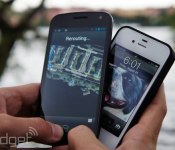
Google offered to help Samsung with Apple patent battle costs

Confirming what a lot of us thought already, Google is more than a little interested in Apple and Samsung’s continuing court battle. New evidence revealed by Apple’s lawyers outlines emails from Google that offered to foot some of the damages (if Samsung lost), as well as cover part of the legal costs in the current trial. This would cover two of the five patents that Apple is fighting over. Google lawyer James Maccoun confirmed that it would help Samsung as part of the Mobile Application Distribution Agreement, the framework that allows Samsung to use Google-made apps on its Android devices. According to Maccoun’s taped deposition: “As I read it, Google’s essentially offering to defend Samsung to the MADA and does offer to defend some [patent] claims.”
Apple is looking to claim $2.2 billion from Samsung over five patents, while in return (you know how these things go), the Korean company is claiming a smaller $7 million for infringing two of its patents. Samsung had already stated that four of Apple’s patents are covered by Google’s Android OS, and has called in engineers to testify to that effect. The details of exactly how much cash Google will be willing to offer up haven’t been disclosed, although it’s likely hoping it won’t have to pay a thing.
Filed under: Cellphones, Software, Apple, Samsung, Google
Source: WSJ
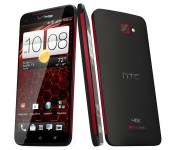
HTC’s Droid DNA gets a bite of KitKat on April 24th

Don’t worry, Droid DNA fans — HTC may have given the One series its first batch of Android 4.4 KitKat upgrades, but it still has plenty of love for Verizon’s late 2012 flagship. The phone maker’s Mo Versi now expects the DNA to get an over-the-air update to Google’s newer OS (and the Sense 5.5 interface) starting on April 24th. That’s weeks later than what HTC anticipated back in the fall, but it’s still proof that the company is committed to supporting more than just its latest and greatest devices.
Filed under: Cellphones, Mobile, HTC, Verizon
Source: Mo Versi (Twitter)

How to host a website on your Android device

As you may already know, there are plenty of hosting companies out there, some expensive, some not. Some are dependable, some have terrible up time, and some simply shouldn’t be allowed to offer hosting. Even after looking through a list of some of the best options, finding the perfect hosting company can be a rather difficult thing to do. So why not host your site yourself?
Thanks to your Android device’s capabilities you can host a website by yourself. Note this is not meant to be the perfect solution for anyone and everyone. But, it’s helpful for developers who want to test their website or people who want to learn and test capabilities of their Android.
Here’s how to host a website on your Android device:
Setting up the Server
1. Install and run KSWEB on your Andriod device. The app allows a 6-day free trial, after which you will be required to pay $2.99 for the full version in-order to keep your site running. Other alternatives include My FTP Server (Free) and Pixel Media Server (Free). For the purpose of this article we will use KSWEB.

2. Once opened, locate the IP Address given on the KSWEB and access it through your computer, or access the ‘localhost:8080′ link through your phone.

3. Go to “Tools” and click on Start, your browser should now open. The default username and password is ‘admin’ for both.

4. (Optional but Recommended) Select ‘system settings’ and change password from ‘admin’ to something else. Do this again for MySQL. Go on KSWEB settings and enter a MySQL Password.

Making your Server accessible though the Web
1. Enter your router’s IP Address in a browser to access it’s admin page.

2. Create a Static IP available for your Android Device. Access your DHCP settings and select an IP range that your router allows you to use.

3. Access ‘port forwarding’ and change the ports to 80 and 8080. This allows your router to communicate with your Android device and it’s server.

4. Access the WiFi settings on your Android Device, and long press the name of your WiFi network until you see the pop-up. Click ‘Modify network,’ and check advanced settings. Change IP Settings to Static and IP Address to the Static IP set in step 2.

5. Find out your IP Address. An easy way to this is by Googling “What is my IP.” People will use the IP Address to access your site so make sure to capture it correctly.

For now your site will show blank; you have to give out IP to people in-order for them to access your site. Also, your Android device has to be on at all times in order for this to work.
By installing Keep Screen On Free you can allow your server to be on almost always. As for the content of your site, install FTP Server, you can now add files to your site after you change the ports for FTP. This method obviously doesn’t even come close to some of the best hosting services available, but it’s “free” and simple to set-up.
Have you hosted a website from your Android before? Did we miss anything? What would you recommend to others hoping to do something similar?
The post How to host a website on your Android device appeared first on AndroidGuys.
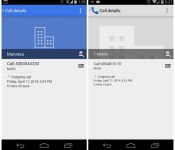
Google tweets screenshot of new Dialer app

It seems like the Google Nexus account may have accidentally tweeted out an image of the new Android Dialler app in response to a support request on Twitter.
Ok so it’s not the most exciting leak in the world, but it shows yet another app that may be updated independant of the Android Operating System itself, and also shows that the Dialler app is due to get a splash of blue colour.
@karlyeh26 To get to this screen on your phone, go to: Phone > Clock Icon > click phone # you want to see pic.twitter.com/IFxjwmKa40
— Google Nexus (@googlenexus) April 17, 2014
I wonder what else Google has up it’s sleeve for redesigning the look of Android as it moves into a flatter UI design?
[Via Phandroid]
The post Google tweets screenshot of new Dialer app appeared first on AndroidGuys.
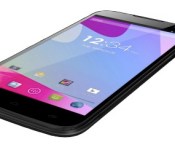
BLU’s latest smartphone is big, cheap and contract-free

When it comes to offering a vast selection of Android smartphones on the cheap, BLU Products is a company that quickly comes to mind. And now we can add another one to its budget-friendly lineup: the Blu Studio 6.0 HD. As its moniker would imply, this is a 6-inch handset, with a 1,280, x 720 display, a quad-core, 1.3GHz chip (Mediatek MT6582, if you’re so inclined) and a decent 3,000mAh battery inside. Perhaps what’s most interesting here, however, is that the 6.0 HD will be available unlocked for a mere $250, which is a great price if you’re looking for a phone this size and not interested in any carrier contracts.
BLU has made itself known for bringing a ton of different options to market. We’re talking smartphones like the Studio 5.5, which sells for $179 off contract; or the $349 Life Pure, which is also unlocked and sports a 5-inch, 1080p screen. Just don’t expect the BLU Studio 6.0 HD to be running the latest and greatest version of Android, since it’s set to come with 4.2.2 when it starts shipping next month.
Filed under: Cellphones, Mobile
Source: Android Headlines, Android Police

ROCKI: PLAY Review – Enable WiFi Streaming to any Speaker System

ROCKI: PLAY is a fantastic little product that was born as a result of a massively successful Kickstarter project, and I’m lucky enough to have gotten my hands on one courtesy of the lovely ROCKI team and their marketing partners.
Tech Specs
- Wifi 802.11b/g/n (AP / Hotspot mode supported)
- Music Formats Supported : MP3, FLAC, WAV, AIFF
- Music Streaming Services Supported : TBC pending licensing request with the respective music streaming services
- ROCKI App versions : Android, iOS, HTML5 (for Windows Phone, PC & Mac)
- Connectors : 3.5mm Stereo (Audio) / MicroUSB (Power/Charging)
- Included : 3.5mm to 3.5mm Audio Cable, 3.5mm to RCA Audio Cable, USB Charging Cable, USB Charger
- Battery : 900mAH
- Dimensions: 92 x 54 x 17mm / 48g
Design
We’ll start off by looking at the design, and the standout feature when you first check the ROCKI out.
The device is simply beautiful!
With a polygon type feel to it, the ROCKI just screams to be looked at, and is not one of those devices you’ll want to hide away behind a cupboard or cabinet in your living room – you’ll want to put this on show for all to see.
It’s worth pointing out that I didn’t get 5 separate ROCKI devices, since the image below shows the removable covers that can be applied to the ROCKI unit – yes, that’s right, not only does it look fantastic, but you can also change the colour of it without too much effort at all. The covers are made of a rubbery material and feel very well made and solid, not like they’d easily rip in your hand when applying pressure.

The ROCKI easily fits in the palm of your hand and has a flat bottom so can be placed flat on a surface easily. There is an aux out as well as a micro-USB port for charging on the side of the device. There is also a boot pinhole button on the bottom of the device to reset everything should you wish to return the device back to factory settings.
Functionality
Not only does the ROCKI look the part but it brings a function to the market which currently is pretty much only achieved (well) by Apple’s AirPort express, and ROCKI even offers benefits over those too.
ROCKI will take any aux of phono feed from any set of speakers and will make itself a wireless receiver to enable music streaming to that once old and forgotten speaker system through the ROCKI iOS and Android app, or through a little workaround we documented using AllCast.

Once the ROCKI is all set up and connected to speakers, it works pretty much like any other AirPlay receiver for those that are used to that technology. The ROCKI app will locate the ROCKI unit on your wireless network and offer it as an option to stream your locally stored music to from your Android or iOS device.
Currently that’s really the only downside to ROCKI in that the app can only stream locally stored music content on your mobile device. Support for Spotify and Deezer is confirmed to be coming to the app, and that will really round off the functionality for the ROCKI device.
However, since I was using a rooted device paired with AllCast, the ROCKI just acted like another AirPlay speaker on my network and could receive audio from Spotify with no issues, outside of the ROCKI app. Since this isn’t native functionality, to maintain the full experience, you should wait for official support through the ROCKI app, but it’s a little workaround for the mean time.

Audio sent to the ROCKI is crystal clear, with no degradation from what I could hear anyway. The device performed extremely well and never failed to perform on demand when called upon. The battery has still only been charged a few times having survived several hours per day of being switched on.
Overall
The only issues I had with ROCKI is the initial setup where I came into a few issues with the device connecting to my WiFi network. For some reason it would not complete the initial setup when connecting to one of my wireless networks, and would tell me I had entered the incorrect password. ROCKI support was fantastic and offered their assistance immediately, but eventually it accepted my password and proceeded to complete the initial setup. I must stress that this is the only issue I’ve had with ROCKI and it has been super stable since, and a pleasure to use.
The ROCKI is deservant of one of our highest review scores yet, and really only is let down by the limitations of the accompanying app only being able to play local content since most people do rely on streaming services to retrieve their content. However, when Spotify and Deezer support is added, and here’s me hoping Google Music All Access, the ROCKI is undeniably a must have device.
The ROCKI: PLAY is now available to order from their website starting at only $49.00, and I definitely recommend everyone orders one!
The post ROCKI: PLAY Review – Enable WiFi Streaming to any Speaker System appeared first on AndroidGuys.

You can now pay for your Domino’s Pizza with Google Wallet

Domino’s has already made it pretty easy to order your favorite pizza using your smartphone, but today things are getting even simpler for US Android device owners. Today the company confirmed that it’s added Google Wallet to the list of supported payment types in its Android app, allowing you to complete an order using the same details you’d typically download apps or rent movies with. If app-based ordering wasn’t already affecting your impulse spending, dispatching a deep dish with even fewer screen presses might be a blessing or a curse.
Filed under: Internet, Software, Mobile, Google
Via: Domino’s
Source: Domino’s Pizza (Google Play)
Motorola Moto E specifications leaked, to be priced similar to the Moto G
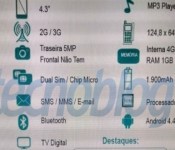
After being acquired by Google, Motorola feels like a completely different smartphone brand. Its past few releases such as the Moto X and the Moto G have been very well received. The Moto X was a high-end smartphone with a twist, while the Moto G was solidly performing a mid-range smartphone with focus on the basics. Motorola is now reportedly working on the Moto E which will be priced at $230 (unlocked off-contract).

Motorola Moto E Leaked Specifications
According to the leaked image, the Moto E will be equipped with a 1.2GHz dual-core processor, 1GB of RAM and 4GB of ROM. A screen measuring 4.3 inches diagonally might feature an HD (1280 x 720 pixels) resolution, similarly to the Moto G. It will come with a 5MP primary rear-facing camera and a front-facing secondary camera as well. The battery is tipped to be a 1900 mAh one. Software wise, it will come with Android 4.4 KitKat, similar to all the Motorola smartphones that are on sale right now. Along with Wi-Fi and Bluetooth, connectivity also includes dual SIM card slots, a feature which has huge demand in countries like India and China.
Similar to the Moto G, this device could be heading to developing countries like China and other Indian sub-continent countries. The Motorola Moto G which was priced at ~$200 (INR 12, 499) in India turned out to be a huge hit due to its affordable price tag, inclusion of dual SIM card slots and getting the basics right. The device appears to be very slim at just 6.2mm which might also mean that it could be a more stylish version of the not-so-attractive Moto G. Not only Motorola, even Google is working on a cheaper variant of its Nexus smartphone powered by a MediaTek processor.
//<![CDATA[
ord = window.ord || Math.floor(Math.random()*1E16);
document.write('’);
//]]>

Entry-level HTC Desire 210 to be revealed soon in India
In spite of releasing a great high-end smartphone last year, HTC is still in a financial trouble. The main reason for this is that they focussed only on the high-end market with the HTC One, HTC One Max and the HTC One Mini. They lost focus of the entry-level and mid-range market which is a formidable source of cash-flow. But looks like HTC won’t be repeating the same mistake this year. They’ve already announced a great device in the mid-level price range, the HTC Desire 816. We’ve learnt from BGR India that HTC Desire 210, an entry-level Android smartphone will be revealed shortly in an “exclusive preview” press event which is to be held in India.

According to the report, the Desire 210 will feature a 4-inch WVGA screen, a 1.2GHz dual-core MT6572 processor from MediaTek, a 5MP camera and a VGA front-facing camera. It could be released with a price tag of INR 8,990 ($150). With the said specifications and price, the HTC Desire 210 will compete directly with best-sellers such as Samsung Galaxy S Duos 2 and Sony Xperia E1 Dual.
Source: BGR India
//<![CDATA[
ord = window.ord || Math.floor(Math.random()*1E16);
document.write('’);
//]]>
 AIVAnet