


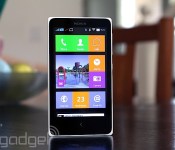
Nokia X review: What happens when Nokia makes an Android phone?

For a company now under Microsoft’s rule, Nokia has serious grit. The phone maker announced an Android phone called the X just two months before completing its merger with Microsoft. Even more intriguing is the fact that this is no run-of-the-mill Android device: The X comes with a Windows Phone-like launcher, offers Microsoft services and will be sold for around $120 in developing markets. While it may not be a powerful smartphone, it has many unique qualities that help it stand out from the low-end crowd. What’s it like, and should Microsoft invest in its success?
Hardware
The X doesn’t stray from Nokia’s signature design language. In fact, if I were to briefly see it in the wild (not knowing what it was), I’d easily confuse it for an Asha 500-series device. Just like the Ashas, the X has square corners, straight edges, a large bezel and a removable plastic back cover with a matte finish, although it lacks the transparent casing of the Ashas. My review unit is a white, dual-SIM Nokia X, but it also comes in black, blue, yellow, red and green.
Everything about the X looks and feels simple. A volume rocker and power button grace the right side, while a micro-USB port and 3.5mm headphone jack are located on the bottom and top, respectively. Keeping with Nokia’s usual style, the left edge remains devoid of any buttons. And just like the Asha 503, the front of the X features only a capacitive back button and earpiece. It lacks a front-facing camera, and when you flip the phone over, you’ll notice a rear 3.2-megapixel camera with no LED flash.
Fortunately, I had no problem holding the 4-inch, 10.4mm-thick device, although these days, such a handset is considered quite small. If you’re coming from an Asha or older 3.5-inch iPhone, you’ll likely appreciate the size of the device; just to put things in perspective, it’s 5mm wider and 1mm thicker than the iPhone 4s. Nokia will come out with a 5-inch version of the device known as the XL in the near future, so hang tight for a little longer if you’d rather go with something bigger.

Because it’s an inexpensive handset (it starts at $123 USD), the X was never intended to be a lavish device. It exists primarily to bring a modern smartphone OS to developing markets at a lower cost, so the specs are about as minimal as you can get these days. It comes with a low-power processor, WVGA display, limited internal storage (1.2GB user-accessible), small battery and so on. In other words, it’s ideal as someone’s first smartphone.
The X uses a 4-inch IPS LCD panel with WVGA (800 x 480) resolution. At a pixel density of 233 pixels per inch, the display is reasonable compared to other Android phones sold at around the same price. As expected from this kind of screen, the viewing angles are decent and whites are bright, but unfortunately, colors are unsaturated and there’s a lot of light unnecessarily bleeding out from the sides of the display. Those rough patches aside, the screen is actually pretty good for such an inexpensive device.
For connectivity, the X is a basic, entry-level 3G device suited for developing markets, though it sports a limited number of frequencies. It comes with quad-band GSM/EDGE and dual-band (900/2100) HSPA, which maxes out at 7.2 Mbps down and 5.76 Mbps up. You’ll also get WiFi 802.11b/g/n, Bluetooth 3.0 and GPS.
Software

The one area of the X that should appeal to both power users and first-time smartphone buyers alike is the firmware. In short, it’s unlike anything anyone has ever seen. Since the X is positioned between Nokia’s Lumia series and the Asha lineup, it’s not surprising that it uses a proprietary interface that takes elements from both devices, even though it technically runs on Android AOSP (version 4.1.2, to be exact). This means you can still use most apps, widgets and launchers supported on the platform, but just like on many Chinese devices running Android, you won’t have access to Google Play Services like Gmail, Contacts, Calendar and so on.
Nokia’s Android launcher

The default launcher on the X is tile-based, much like Windows Phone. The tiles can even be resized — two different options are available — and you can change the color of each one to fit your own way of organizing the phone. There’s enough space for three small tiles, or one large and one small tile, if you prefer. However, this system differs from Windows Phone in that Live Tiles aren’t supported, so most tiles don’t change at all when you make them larger (only specific ones, such as the gallery, add more functionality to the tile when enlarged).
You won’t have access to a standard Android app tray, but you can create folders if you like to download a bunch of apps. This action is done by long-pressing any tile, which also allows you to move apps around and add widgets at your leisure.
There are plenty of other gestures that you’ll need to learn as well. Tugging down on the launcher brings up a search bar (think Spotlight for iOS 7). Swiping down from the top opens up a type of quick-settings menu, which shows toggle switches for connectivity and music, as well as a list of devices or networks you’re connected to. There’s also a shortcut to your settings. Swiping up from the bottom reveals a menu that corresponds with whatever app you’re using.
Finally, a swipe to either the left or right brings up the Fastlane. This is a feature carried over from Asha (you can even trace its roots back to MeeGo), and it serves as Nokia’s version of the notification menu. It shows recently opened apps, notifications, alarms and your current music selection. Some alerts, such as texts and calls, are actionable, so you can respond to them within Fastlane itself; if you want to clear out your alerts, you can do it individually or all at once. You can also customize the list so unwanted items are filtered out. (Pro tip: Tapping the back button from the home screen will take you to Fastlane as well.)
There’s also a special lock screen that shows your recent notifications. Swipe left on an individual alert to remove it, or swipe right to jump directly into that app. You can also swipe up from the bottom to clear them all out, if you don’t want several notifications taking up all your screen space.
Just like on Nokia’s latest Lumia devices, the X features a Glance screen that lets you view the date, time and symbols for each type of notification awaiting you. Sometimes it works; sometimes it doesn’t. Additionally, you can double-tap on the screen to wake it, but I couldn’t get this to work very consistently. Unlike most Android devices, which offer reasonable multitasking options, the X is much more restrictive. You can only get to the Fastlane from the home screen, which means you can’t multitask without exiting your current app completely.

Nokia doesn’t bombard you with Microsoft services, but it does make them more readily available than, say, their Google equivalents. Skype is preloaded, but you can also get OneDrive and Outlook in the Nokia Store. Curiously, it almost feels like the company wants to avoid looking like it’s blatantly pushing Microsoft products, even though that’s exactly what it’s trying to do.
That doesn’t mean Nokia’s avoided bloatware altogether, however. You’ll still get too many preloaded apps: Opera browser, WeChat, Viber, BBM, Nokia MixRadio, Here Maps and 10 games. Many of them can be uninstalled, aside from the Nokia-branded offerings. Most core apps — dialer, messaging, calendar, camera, alarms, internet, music and email, for instance — were made by Nokia, and are thoughtfully designed. (I especially like the alarm, which was inspired by the MeeGo-based N9.) Even the keyboard has a Nokia flair that offers neat swiping gestures.
Using Android on the X

The best part is: If you don’t like Nokia’s interface, no sweat — just download a new launcher and use that as your default instead. I tried a few and each one made it feel like I was using a real Android device, but there are still some catches you should be aware of. Most importantly, Google Play Services aren’t allowed on the X (without rooting, at least). This means you don’t have the full suite of the company’s services: Play Store, Music, Games, Calendar, Voice, Google+, Contacts — the list goes on. Primarily, this is because Nokia wants to focus on selling Microsoft’s offerings instead, including Skype, Outlook, OneDrive and so on. This is actually a good idea on Nokia’s part, when you consider the first-time smartphone buyer (or anyone else who hasn’t been fallen under Google’s spell): If Windows Phone is too expensive, at least the X is a cheaper option that introduces users to Microsoft’s ecosystem in a roundabout way. In theory, once consumers are able to buy fancier phones, they’d be more inclined to give WP a closer look because they’re already tied into Microsoft services.
This kind of setup is enough to confuse most users. Along with this mix of Microsoft services, Windows Phone and Asha, the X is, at its core, an Android device. Thus, it supports most Android apps, but the means of obtaining those apps are not as cut and dry as they should be. The Nokia Store is the official place to go, but it doesn’t offer the same library as the Play Store. Instead, Nokia curates apps: It invites developers to add lines of code that make their apps compatible with Nokia’s special UI, and then submit their apps and wait for its approval. It’s quite the process, and judging by the limited number of available apps in the Store, it seems that a lot of developers haven’t bothered with it yet.
So what happens if the app you really want isn’t in the Nokia Store? To Nokia’s credit, the company’s made it possible to download or sideload any app you want — though it isn’t easy. If you can’t find the app you want in the Nokia Store, it suggests a list of third-party app stores for you to check out. Currently, it lists SlideME, Aptoide, 1Market and Yandex as options, and, by using this method, I was able to get the app I wanted around 95 percent of the time. Of the numerous searches I conducted, only a small handful produced no results. The problem is that it takes much longer to find the app you want (if you find it at all), and you have to go into individual stores if you’re looking for an update. Lastly, you can load any APK file onto the phone via microSD and internet links, though you won’t get updates unless you manually sideload them.
Camera

There isn’t much to say about the fixed-focus 3.2MP camera. The pictures aren’t fantastic (especially for Nokia), but it’s not fair to hold such an inexpensive phone to standards set by fancier devices. Since the X is intended for many first-time smartphone users on a limited budget, this camera will fit their needs quite well. It’s got a 1/5-inch sensor size and f/2.8 aperture lens, and Nokia even throws in a few manual settings to sweeten the deal, including ISO, white balance, exposure, sharpness and face detection.
Predictably, you’re not going to get great images at night. The phone simply doesn’t have the right specs to do low-light shots any justice. That said, the photos I took during the day actually looked about as good as one would expect from a camera like this; while the limited dynamic range and lack of autofocus make it difficult to have an enjoyable experience, I came away impressed by the color reproduction.
Performance and battery life

At such a low price point, the expectations for a phone’s performance differ from that of a midrange or flagship model. The X comes with a 1GHz dual-core Cortex-A5 Snapdragon S4 Play, an Adreno 203 GPU and 512MB RAM (the X+ and XL will come with 768MB). In plain English, this means it’s good enough to handle most basic phone functions, but it’s geared toward first-time smartphone users and developing markets, and isn’t meant to keep up with high-end, quad-core smartphones.
Looking at it from that point of view, I wanted to see a phone that’s usable, responsive and consistent. I didn’t expect it to make computations incredibly fast, nor did I need it to load games like Asphalt 8 on a dime. Still, it had to support all of the core apps and a few extras without crippling the user experience.
With these criteria in mind, the X has its share of good and bad traits. The mesh of various UI elements from different platforms will drive an Android aficionado nuts, but the X is also designed to keep things simple. As long as the user isn’t venturing too far into the weeds (sideloading apps, for instance), it’ll be easy enough for someone to figure their way around the phone. And while it may be a bit confusing for some, the learning curve and user experience are more reasonable than an Asha phone. In fact, as time goes by and the price of the X goes down, I wouldn’t be surprised to see this series completely replace the Asha lineup.

However, it isn’t a very responsive device. I noticed a lot of delays between my touch and the screen indicating that I’d done anything. There were plenty of times in which I had to repeat gestures over and over until it finally figured out what I wanted it to do. And at least a couple times a day, I long-pressed the back button to go to the home screen, only to be greeted by a lengthy pause and “please wait” message. I also noticed that the screen would randomly flash on and back off again, and it sometimes turned on in my pocket without being prompted (this caused frequent redials and misfiring emails to people I rarely talk to anymore). At times, notifications showed up later than they should have, and occasionally they didn’t even show up at all.
Because of all this, I can’t say that the X has consistency. Too often, I’d repeat the same action only to get different results. A handset that has a mind of its own isn’t something I can tolerate in any phone, regardless of how much it costs. In addition, it was often a pain to get even the most basic services set up on the X.
Call quality is mediocre at best, as most of my conversations have been full of static and the other end of the line is typically muffled. Additionally, my experience connecting the X to Bluetooth devices was inconsistent. On the other hand, the meager 1,500mAh battery lasted longer in regular smartphone use than I would’ve expected, although processor-heavy tasks did worse. After a day of moderate use, my review unit still had 30 percent leftover, and light phone users should be able to squeeze out at least two or three days, if not more. The phone didn’t fare well in our endless-video rundown test, making it only four hours before dying; in the X’s case, this isn’t so much an indicator of a horrible battery as it is the inability of the processor to handle such activities efficiently.
The competition

Pricing will vary depending on region, but the X officially retails for around $120. It’s positioned between the higher-end Lumias and lower-end Ashas, although, as I mentioned earlier, I wouldn’t be surprised to see the X make the Asha lineup irrelevant if it drops in price in the next couple years. Its current cost, however, is about the same as the Samsung Galaxy Star Pro, a comparable device with similar specs. The X has 3G support and a better camera, but it also has a confusing ecosystem based on Microsoft services; the Star Pro, on the other hand, has full access to Google services and features a more familiar TouchWiz interface. It’s also uncertain what kind of support Nokia will offer the X now that it’s officially under Microsoft’s wings, so it may make more sense to go with something like the Star Pro, which has a more robust ecosystem.
Wrap-up

Microsoft’s in a pickle. On one hand, its brand-new acquisition just came out with a product running its competitor’s OS; on the other, that same product might be key to gaining mindshare in developing markets, which is one of the bloodiest battlefields in mobile right now. It’s hard to feel confident in the X’s future because Microsoft may choose not to invest in the series, focusing resources on cheaper Windows Phones instead. Because of this uncertainty, the X needs to be an absolutely stunning device and a fantastic value if I’m going to recommend it — and unfortunately, it’s not.
For its cost, it has respectable features and solid hardware, but it doesn’t have enough redeeming qualities to help it pull ahead of its competition. The specs are comparable to a sub-$150 Android smartphone. However, the ecosystem is more confusing and the performance doesn’t quite meet my expectations for a budget device. Plus, who knows how long Microsoft will keep it around and update it? Nokia’s still a trusted brand, and it’ll get a lot of interest in developing markets regardless of the competition, but I was ultimately too frustrated to recommend this over other similarly priced models.
The X works better as a possible Asha replacement than a full-on smartphone experience, and perhaps that will happen in the next year or two. I’m more confident in the performance of low-end Windows Phones like the Lumia 520 than I am in comparable Androids, and a dual-SIM Lumia in this price range would be a much more compelling deal.
Edgar Alvarez contributed to this review.
Filed under: Cellphones, Wireless, Mobile, Microsoft, Nokia, Google

Play: The simple, mesmerizing Impossible Road

You can now play anything from first-person shooters to role-playing epics on mobile devices, but there’s still plenty of love out there for casual time-killers. Impossible Road has recently arrived on Android after a year-long residency in the iOS App Store, and it’s one of those games you can splurge an hour on at home, or poke at for five minutes on the bus. Your mission: Guide a ball down a winding track for as long as possible — kind of like a never-ending Super Monkey Ball level, but set on the Rainbow Road track of Mario Kart legend. Admittedly, there isn’t much originality to the gameplay, but Impossible Road does have a quirky and compelling visual style. You’re an all-white ball in an all-white world, with the only definition and sense of space given by a ribbon-like track of changing blues that stretches to infinity below. The almost tribal techno soundtrack is a little busier than what’s on screen, and it manages to match the pace of the game well, while also being a constant reminder of your inevitable doom.
Like most games with “impossible” in their titles, it’s not particularly easy, so if you want a shot at leaderboard fame, you better pull out something spectacular. Apart from blips where the track thins momentarily, your journey is obstacle-free, but the twists and leans of the randomly generated runs are challenging enough. Luckily, the tight and sensitive control scheme helps out as much as it can. Impossible Road made the right choice in opting for touch-based steering, as we couldn’t see a game of this speed working well with gyroscopic control. Sticking to the track like glue is key in Impossible Road, not just because you need to pass through checkpoints to improve your score, but because flying off the side is almost certain death. The nicely tuned in-game physics allow you to control the ball with high precision, but get out of the groove on a particularly meandering section and it’s easy to plunge into the abyss. You’re afforded a generous amount of air control to try and get back on course, but float for a couple of seconds and the run comes to an end with a crescendo of white noise.
While you’re always chasing the next high score, truth is you’ll probably spend the majority of time racking up mediocre ones. It’s good, then, that you can still reap a lot of satisfaction from events like nailing a really hard section, or recovering from a nigh-fatal fall. And, for advanced players, you can make it more interesting by purposefully “jumping” to short-cut sections of the track. Success is improbable, but not..
Impossible road is available on smartphones and tablets now for £1.49 via the Android Play and iOS App Stores.
Source: Impossible Road (Android), (iOS)

Ventev Featured Highlight: Latest Power Solutions Reviewed

Ventev is an electronics company that produces high quality mobile accessories. Lately they’ve stepped up with power solutions that we’re sure to love, and we got a chance to take a look.
Ventev Powercell 6000+

The Powercell 6000+ is a quick charging dual USB external battery bank powered inside by a 6000 mAh battery as the name implies. With built-in AC Adapter prongs, you’ll surely be able to quickly recharge your battery pack. I was able to charge various smart devices around 2-3 times before needing a recharge itself. According to the manufacturer, you can get up to 25 hours of talk time depending on your device and usage, and I concur.
From tablets to smartphones, this bad boy can handle the charge while you’re on the go. You can find this product on the eStore at Ventev.
Rating: 8/10
Powercell 5000

Like the product above, just as the name implies, this external pack sports a 5000mAh battery. Ventev wants you to be able to charge more of your devices as well, so again we have dual USB support. Charging of the external battery pack is done conveniently over standard MicroUSB, which I’m betting we all have a few extra of.
This product is easy on the go but may be a slight bit more of a challenge to charge without AC prongs, like the item above. You can find this product on the eStore at Ventev.
Rating 7.5/10
Dashport Dual-USB (R2240) Car Charger

This is your standard USB Car Adapter, with a few extra talents. You have an additional USB port, however this car charger can also handle your power hungry tablets up to 2.4amps. I truly love this product.
You can find this product on the eStore at Ventev.
Rating: 8.5/10
Powerdash (R900) Car Charger

This is not your average USB Car Adapter. This little guy sure has a trick up its sleeve, with a built in battery for a few hours of extra talk time after you unplug it from your car. This car charger is great for top-offs.
You can find this product on the eStore at Ventev.
Rating: 10/10
ChargeSync Lightning

Unfortunately for those iOS users out there, Apple didn’t do a good job with creating their Lightning USB Cables. They are thin, easily breakable, and very expensive for something you’ll burn through every 8-10 months, which if you have a family with younger kids, could be more frequently. Ventev responds by creating a better, stronger, and longer durable 8pin Lightning cable capable of up to 2.4amps for iPhone, iPod, and iPad users alike. Ventev made a strong, flat, and tangle resistant 3-Foot durable Lightning cable in an array of color options with a Lifetime Warranty, could it get any better?
You can find this product on the eStore at Ventev.
Rating: 9.5/10
ChargeSync Micro

For us Android users as well as owners of MicroUSB devices and accessories, (Smartphones, Tablets, Bluetooth speakers, keyboards, external battery packs, etc.), Ventev makes a great MicroUSB cable in a variety of color options. When it comes to cables these days, usually there is not much to say – they either work or they don’t – and Ventev’s ChargeSync cables work well and are very durable, whether you chose MicroUSB or Lightning options.
You can find this product on the eStore at Ventev.
Rating: 8.5/10
Overview
Ventev has added some great accessories to their lineup to keep you powered. Ventev has a good variety of products that can help you on the go, and my experience with the products above has been quite nice. Be sure to check out their Cases and Protection section as well.
The post Ventev Featured Highlight: Latest Power Solutions Reviewed appeared first on AndroidGuys.

Firefox gets a big redesign that’s all about customization

Firefox has had a tough time standing out among browsers — Chrome gives you Google’s ecosystem, while both Internet Explorer and Safari have the luxury of being system defaults. Why would you choose Mozilla’s software over the others? As of today, customization may be the answer. The organization has just released the finished version of Firefox 29, a major overhaul that makes personalization easy on the desktop. Its new customization mode lets you put any feature or service in the toolbar or menu bar; if you just have to keep a Pinterest add-on available at all times, you can make it happen. It’s quicker to customize your bookmarks, too.
The redesign minimizes clutter beyond just the new menu bar, with an overall slimmer design that hides tabs you’re not using. Syncing between devices is also simpler — whether you’re using the browser on the desktop or an Android device, you now just have to sign in to get your open tabs, bookmarks and login details from other devices you use. There’s no certainty that the Firefox makeover will tempt you away from competing web clients, but it may be time for another look if you haven’t checked out Mozilla’s work in a while.
Filed under: Internet, Software
Source: Mozilla, Google Play

Scratch Wireless Service review
<img width="640" height="360" src="http://www.androidguys.com/wp-content/uploads/2014/04/ScratchWirelessLogo.jpg" class="attachment-medium wp-post-image" alt="Scratch Wireless Offers Free Cellular Service to Those on WiFi as well as free off network SMS." style="display: block; margin-bottom: 5px; clear:both;" data-attachment-id="65636" data-orig-file="http://www.androidguys.com/wp-content/uploads/2014/04/ScratchWirelessLogo.jpg" data-orig-size="640,360" data-comments-opened="1" data-image-meta=""aperture":"0","credit":"","camera":"","caption":"","created_timestamp":"0","copyright":"","focal_length":"0","iso":"0","shutter_speed":"0","title":""" data-image-title="ScratchWirelessLogo" data-image-description="<p>Scratch Wireless Offers Free Cellular Service to Those on WiFi as well as free off network SMS.</p>
” data-medium-file=”http://www.androidguys.com/wp-content/uploads/2014/04/ScratchWirelessLogo.jpg” data-large-file=”http://www.androidguys.com/wp-content/uploads/2014/04/ScratchWirelessLogo.jpg” />
Scratch Wireless is the way to free wireless service for many. Let’s face it, unless you’re always on the road, most of us are connected to WiFi for a great portion of the day. This is where Scratch Wireless comes in hand at no cost, provided you have their device.
The Scratch Wireless Logic

Scratch operates on a WiFi First outlook, in a general 24-hour period, most of us are going from home to work, schools, friends’ homes, family’s homes, etc, and back where you’ll be on WiFi. Scratch Wireless wants to make things much easier for those who don’t want the hassle of being tied to a hefty monthly bill.
WiFi Connectivity is all around us – from home to work, friends homes, coffee shops, bars, book stores, and so much more. Why not take advantage of these connections?
So when you purchase a Scratch device, (more on that below), you’ll get a phone number assigned (or transferred) once you’re hooked up to WiFi, you’ll be free to make and receive phone calls, send and receive text and picture messages, browse the internet and more – just like you would on any traditional network. Now whenever you happen to be away from WiFi networks, Scratch is partnered up with Sprint, so with that same phone number, you can stay connected to everyone via text messaging. So the wonderful thing about Scratch is that everything I’ve just mentioned is for the low price of free, with a Scratch Wireless device.
Day Passes are available for those who need limited voice and data access away from WiFi.
Scratch Service
Again with a great price (or lack thereof), great plan features, and unlimited off-network SMS, Scrach is definitely ideal for the less travelling of us adults, collage students, and even teens. At first experience, the service was superb – I was able to make and receive calls without issue, clear call volume, no significant delay issues, no issues with SMS or MMS, etc. Odd enough, using the same WiFi networks, my starting process had a few big bumps in the road.
While at first quality was great, that changed a bit soon after. I had difficulty with call quality, occasional call drops, and delay issues. I soon got in touch with Scratch Customer Support and did basic checks to make sure I was connected to a strong network, had the latest versions of the Scratch application, etc. While it may have taken a bit, I had to make some changes to my WiFi and service was once again optimal.
So on some networks there may be connection issues from time to time, usually quality is great.
The Scratch Device

Scratch Wireless uses a specially pre-programmed Scratch/Sprint Motorola Photon Q. This device, (pictured above), is not quite your newest generation Android device, but it certainly gets the job done. The Q is running Android 4.1.2 Jelly Bean and is compatible with just about all applications found on the Google Play Store.
A bit bulkier than you’ll see with today’s devices, the Q is more akin to the Droid 4. You can still play your favorite games, use your favorite apps, and optionally use the sliding physical back-lit QWERTY keyboard.
Overall
Scratch Wireless is a great is a great alternative to the money-thirsty vampires that we call carriers for those almost always connected to WiFi. The takeaway is the service plan and quality, as Scratch plans to add more devices to the lineup in the upcoming years.
Head on over to learn more about Scratch Wireless and the WiFi-First revolution, and get your invite to join.
The post Scratch Wireless Service review appeared first on AndroidGuys.
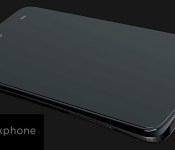
Privacy focused Blackphone to feature a Tegra 4i chipset

Running a modified version of Android called PrivatOS, the smartphone for the privacy concerned, made by Swiss mobile manufacturer SGP, just got a decision on the chipset it’ll be using.
SGP, a joint venture between Silent Circle and Geeksphone, have settled on using a Tegra 4i chipset for their Blackphone. SGP have also updated the spec sheet for the device, so here’s the full rundown:
– Tegra 4i quad-core 2GHz ARM Cortex-A9
– HSPA+/WCDMA, LTE
– 4.7-inch 720p HD display
– 8-Megapixel rear-facing camera
– 5-Megapixel front-facing camera
– 2000mAh battery
– MicroSIM and MicroSD slot.
The Blackphone is built on a custom Android 4.4 KitKat build which, hence the name, implements a number of security and privacy features for those who are concious of the issues with their device impacting their privacy.
“Blackphone’s design offers the best features on the market, from stunning video displays and app multi-tasking to enhanced battery life—in addition to signature features such as award-winning private-encrypted voice and video calls and text messaging with attachments from Silent Circle, anonymous browsing and mobile VPN protection from Disconnect, and private-encrypted cloud storage from SpiderOak”
The Blackphone has been up for pre-order since 24th February for $629 or $375 and is due to ship in June. At least now with the full specs disclosed early adopters will see how much phone their money will get them.
The post Privacy focused Blackphone to feature a Tegra 4i chipset appeared first on AndroidGuys.
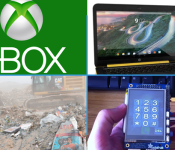
Daily Roundup: Raspberry Pi cellphone, HP’s Android laptop, and more!

You might say the day is never really done in consumer technology news. Your workday, however, hopefully draws to a close at some point. This is the Daily Roundup on Engadget, a quick peek back at the top headlines for the past 24 hours — all handpicked by the editors here at the site. Click on through the break, and enjoy.

Raspberry Pi modded into a $160 cellphone
Combine a Raspberry Pi with a little know-how and you can build almost anything, including a phone. Programming savant David Hunt used $158 worth of off-the-shelf-parts to whip up his own touchscreen cellphone, and he’ll teach you how to do it too.

Leaked HP video hints at a 14-inch laptop running… Android
A leaked clip found by Notebook Italia teases a new HP Slatebook 14 with a 1080p display and quad-core NVIDIA chip. What’s so special about it? The laptop appears to be running a recent build of Android, not Chrome OS.

Xbox Entertainment Studios has at least 12 projects in production, committed to half
Xbox Entertainment Studio’s future plans remain ambiguous, but today, its push into original programming became a bit more clear. According to XES president Nancy Tellem, the studio has 12 projects in the works and Microsoft is “committed” to at least six of them.

E.T. unearthed: The dig for legendary Atari cartridges in pictures
A documentary crew recently traveled to a landfill in Alamogordo, New Mexico hoping to prove the existence of E.T. The Extra-Terrestrial, a legendary Atari game. And to the excitement of sci-fi enthusiasts everywhere, it appears the team was successful.
You also might like:
Filed under: Misc

Plastic HTC ‘M8 Ace’ aims at Galaxy S5 with same specs, lower price

HTC may have poked fun at its competitors’ plastic flagship devices in the past, but it looks like the Taiwanese company will soon be offering one as well. And no, we’re not talking about the Butterfly line here. According to a reliable source of ours, HTC’s upcoming “M8 Ace” — which was teased by @evleaks earlier this month (as pictured above) — will actually feature a plastic unibody instead of aluminum. Additionally, the M8 Ace will apparently pack almost identical specs as the Galaxy S5, including a 5-inch 1080p display plus a 2.5GHz, quad-core Snapdragon 801 SoC. But here’s the twist: HTC’s phone will be much more affordable, which could pose a huge threat to Samsung if true.
What remains to be seen is whether the M8 Ace will also get the M8′s Duo Camera feature. According to an earlier rumor by Chinese site TMTpost, a phone matching our source’s aforementioned description could launch next month for as cheap as CN¥3,000 (about $480) unsubsidized, which would be quite attractive; though we’ll have to wait and see what the camera situation is.
Filed under: Cellphones, Mobile, HTC
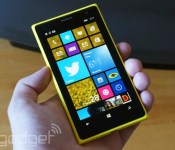
Windows Phone thrives in Europe, but struggles in China and the US

Microsoft’s quest for smartphone market share is hitting a few roadblocks, it seems. Kantar estimates that Windows Phone is still gaining ground in Europe, where it’s up year-over-year to 8.1 percent of sales in the first quarter of 2014. However, it’s taking a bruising in other areas. In the US, Windows swung from increases this fall to a slight dip in the winter; while it’s still doing relatively well at 5.3 percent of US share, it’s not posing much of a threat to Android or iOS right now. The platform also took a drubbing in China, where its share was nearly cut in half to exactly one percent thanks to the rise of budget Android handsets.
Not that it was all sunshine and roses for the industry heavyweights. Android made strides in China, the US and parts of Europe, but it sank in Australia, Europe and Japan. Some of these losses were due to a recovery from Apple, according to Kantar. The iPhone is still having trouble in China and the US, but it clawed back share in Australia and Europe. It’s also dominant in Japan; 57.6 percent of local smartphone buyers chose iOS hardware this quarter.
Whether or not these trends continue through the spring isn’t certain. Windows Phone may get a helpful boost from the launches of the Lumia 630 and 930, while Android may get a lift from Samsung’s Galaxy S5 flagship. There’s also the wildcard of the 8GB iPhone 5c. Although it’s not dramatically cheaper than its 16GB counterpart, it could draw a few mid-range buyers to Apple. It’s safe to say that Microsoft will be watching very closely — now that it owns Nokia’s device business, it has even more incentives to see Windows Phone succeed.

Filed under: Cellphones, Mobile, Apple, Microsoft, Nokia, Google
Source: Kantar Worldpanel

Hidden codes for your Android device you probably didn’t know

Baked deep into Android is a bunch of secret codes that will enable of a variety of statistics and settings on your device that you probably didn’t know existed, as well as some diagnostic tests you can perform on the hardware.
These settings are not enabled by default, and that’s for a reason. Take care when using these and we’re not responsible if you mess your device up.
1. Get information from your phone and battery, including usage and statistics.
*#*#4636#*#*
2. Factory format your device
*2767*3855#
3. Get information your camera
*#*#34971539#*#*
4. Open a file copy screen to backup your media
*#*#273283*255*663282*#*#*
5. Enter service mode
*#*#197328640#*#*
6. Perform various tests on your device
*#*#232339#*#*- WLAN test
*#*#232338#*#* – Shows WiFi MAC address
*#*#1472365#*#* – GPS test
*#*#1575#*#* – Another GPS test
*#*#232331#*#* – Bluetooth test
*#*#2664#*#* – Touch screen test
Drop us a comment in the section below if you found out any useful information about your device that you didn’t know before by using these codes.
The post Hidden codes for your Android device you probably didn’t know appeared first on AndroidGuys.
 AIVAnet

