


Get “physical” with Fusion [App of the Day]

Aspiring physicist or just a student looking to learn more about astrophysics? Fusion is an addicting game that makes learning fun.
The game starts where you are in control of creating your own universe by colliding the elements together. These reactions create larger elements and raises the temperature of the core of the star. Be careful and move quickly because the star is constantly cooling. You goal is to get the temperature to the top of the thermometer to complete the level.
As the elements are flying across your screen be quick to pair them together to create the reaction. The game isn’t fantasy, it’s based upon real astrophysics. The reactions in the game are somewhat representative of how they happen in reality, building elements through fusion.
Some of the highlights of this fun, addicting, and challenging game are that you can create 110 different elements and isotopes from Hydrogen-1 to Uranium, unstable isotopes will decay into more stable isotopes, and create rare isotopes via neutron capture.
After creating your star, you get to play through a star’s full life cycle from birth until death. If you are lucky, you might even be able to die in a massive supernova. The route a star takes during life to death is different every time ensuring a fun game experience that will never get dull. When your star dies, new stars are formed.
The game doesn’t end there though, you are able to expand your universe. You can create up to 17 different star and remnant types including all types of dwarfs, giants, supergiants, nebulas, neutron stars, quark stars, and black holes. Fill up your galaxy and new galaxies will form. Be creative though because you can customize the name of each galaxy and star.
A future update will allow players to track which elements and isotopes they have made on an interaction periodic table of elements.
Fusion is a free app that is ad-based on the Google Play.
The post Get “physical” with Fusion [App of the Day] appeared first on AndroidGuys.
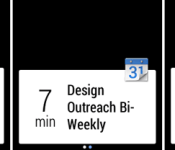
Google employee shows what to expect from Android Wear notifications

There’s plenty we know about Android Wear already: It’s Google’s software platform for wearables; it’s designed to allow you to interact with your phone and with Google Now straight from your wrist; and numerous manufacturers, from HTC to Motorola, have Wear-powered smartwatches coming in the near future. Now there’s even more we can glean, thanks to increasing activity at Google’s developer hubs. For example, in-house developer advocate Timothy Jordan has just highlighted the three examples shown above as being some of his favorite Wear notifications so far — including a slightly panic-inducing warning from a Nest thermostat. (Don’t worry, a follow-up message reassures everybody that the smoke is clearing.)

There’s also a regular calendar notification on show, a message from a game (Clash of Clans), and what looks to be the playback of a StarShipSofa science fiction podcast. The origin of each notification is identified by an icon in the top right corner, or by a background image. Meanwhile, although these particular examples are all short enough to fit on a single screen, Google has also recently demonstrated how longer notifications can spread over multiple screen using right-to-left swipes. In fact, Mountain View insists that it only requires a tiny bit of code to add this functionality to the notification system of an existing Android smartphone app, which hopefully means it’ll be easy for third-party app developers to make their full-length notifications work on Wear.
Filed under: Cellphones, Wearables, Software, Mobile, Google

Lookout alert system sends you email when it detects thief-like activities

Getting your phone stolen can make your stomach drop in the blink of an eye, that’s why some security app devs, like Lookout’s, try to make it easier by offering anti-theft features. The app’s latest version comes with a new tool suite called Theft Alerts, which, as you can tell, gets the digital sirens blaring when it detects unusual activities. Lookout studied the common ways thieves deal with stolen phones and now sends out emails when someone removes your SIM card, enables Airplane mode, turns off your device and removes the app as the phone’s administrator. You can then decide whether to use the other weapons in Lookout’s arsenal, including those that let you lock and wipe a phone remotely.
The software has also long been able to capture and email a picture of the thief (snapped by the phone’s front cam) who tries and fails to enter the correct PIN. With this update, though, that feature, along with the other new additions, becomes exclusive to paid users. Luckily, everyone can try out these premium add-ons for free until September 31st… unless you have an iOS device, in which case, you sadly have limited access to the tool suite. Oh, if you’re prone to typing in incorrect PIN codes or accidentally deleting apps, don’t worry — Lookout won’t flood your inbox if you take time to customize the Theft Alerts suite.
[Image credit: Getty Images/Flickr RF]

Filed under: Cellphones, Tablets, Mobile
Source: Lookout

Google’s camera app now lets you shoot in different aspect ratios

Google isn’t done getting its Android camera app up to the standards set by third-party software — not by a long shot. The company is now rolling out an update to Google Camera that lets you choose the aspect ratio for your photos, not just the resolution. If you prefer a movie-like widescreen look to all your pictures, you can crop the image to match. Fans of family portraits, meanwhile, will be glad to hear that the timer has returned; also, creative types can shoot panoramas with fisheye and wide-angle lens effects. The refresh isn’t available on every supporting Android device just yet, but we’d give it a few days — it should hopefully arrive in time for your next big photo safari.
Filed under: Cellphones, Mobile, Google
Via: Android (Google+), 9to5 Google
Source: Google Play

Pocket’s new paid service gives you a permanent reading collection

Read-it-later apps like Instapaper and Pocket are handy for digesting large articles, but they’re really just pulling up optimizing internet links. What if your favorite story disappears a few years from now? Pocket now has a solution to that long-term problem. Its new Pocket Premium service saves a permanent copy of any article you flag, giving you access even if the host site goes down or changes the content.
The upgrade also brings in a deep search option that scours entire texts, and it suggests tags to help you find what you’re looking for in the future. If archiving is your thing, you can sign up for Premium at either $45 per year or $5 per month. That’s a lot if you rarely look at something more than once, but it could be a bargain if you can’t bear to be without memorable reading material.
Filed under: Cellphones, Tablets, Internet, Mobile
Via: The Verge
Source: Pocket (1), (2)
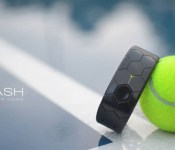
Smash’s new wristband helps perfect your tennis swing

We’ve come a long, long way since the days when smart wristwear did little more than track your footsteps. Need proof? Smash has unveiled a wearable dedicated to tennis. The wristband uses motion sensors to track many aspects of your swing, ranging from spin to your favorite shot types. Once you’re done attacking the ball, you can check your performance through a connected Android or iOS device — it’ll be clear if your volleys need more power, or your backhand is inconsistent.
Smash is crowdfunding its gadget with hopes of shipping it in February. If you’re looking to improve your game, it’ll currently take a $129 Australian pledge ($119 US plus $10 in shipping) to get the finished wearable; wait until the planned release and the device will set you back $199 AUD ($184 US). That’s as much as some nicer general-purpose fitness trackers, but it may be justified if you absolutely have to be victorious on the tennis court.
Filed under: Wearables
Via: TechCrunch
Source: Kickstarter, Smash
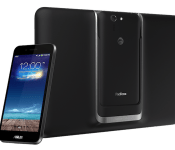
ASUS’ modular PadFone X is finally coming to AT&T for $199

AT&T promised back in January that it would launch ASUS’ PadFone X hybrid, but the device has been stuck in limbo ever since — the carrier hasn’t given out much more than specs for the phone-and-tablet combo. Today, though, there’s finally a date to mark on your calendar. The PadFone X should be available on June 6th for $199 on a two-year contract, or $23 per month if you buy it on an 18-month Next payment plan.
The hardware hasn’t changed in the space of half a year, although it’s still reasonably current. The core phone is a 5-inch Android device with a speedy Snapdragon 800 processor, 16GB of expandable storage and a 13-megapixel rear camera; the 9-inch tablet shell provides a bigger screen for the docked phone as well as an extra battery and wireless charging. You can’t exactly call this a timely launch, but it’s still big news for Americans who’ve previously had to import ASUS’ two-in-one device concept.
Filed under: Cellphones, Tablets, Mobile, ASUS, AT&T

BBC’s major iPlayer update comes to iOS and Android

Incredibly, Windows Phone users were the first to see the BBC’s big mobile iPlayer refresh, but platform parity has now been restored. Continuing its ongoing iPlayer revamp, the Beeb has launched updated versions of its iOS and Android apps, bringing with them up-to-date channel pages, themed programme collections and clearer categories. Both apps now sport a fresh new UI, making it easier to browse and find programmes, and displays subtitles on downloaded shows for the first time. Other sections of the app like Favourites, Downloads and Search remain unchanged, but the BBC says it intends to deliver new features “at regular intervals,” including options like Live Rewind and continuous play. However, the most notable upcoming feature is likely to be Netflix-like cross-platform playback, allowing you to play, stop and pick up where you left off on any device.
Filed under: Mobile
Via: BBC Media Centre
Source: BBC iPlayer (App Store), (Google Play), Windows Phone

Virgin Media’s TV Anywhere app now works on the latest Android devices

Virgin Media’s TV Anywhere Android app has been available since November, but its rollout has been hampered by limited device support. After the company opened the app to Nexus 5 owners earlier this year, it’s finally made the streaming service available to most powerful Android smartphones and tablets that money can buy. If you own Samsung Galaxy S5, Sony Xperia Z2 or HTC One (M8), you’ll now be able to stream over 90 channels and remotely control your TiVo box while on the move. There is a minor catch, however: the company notes that while the new devices can download TV Anywhere from the Play Store, they’re not officially supported. In the company’s own words: “We expect them to work, we have not been able to test all of them due to the large number of Android devices available.” The list of supported devices is updated regularly, though, so for now, check out the list below to see if your Android smartphone or tablet makes the grade.
The full list of new devices: Samsung Galaxy S5, Samsung Galaxy Note 8, Sony Xperia Z2, Sony Xperia M2, Sony Xperia Z2 tablet, Sony Xperia M, HTC One (M8), HTC One Mini, HTC One Sensation, HTC One Max, HTC Desire HD, Motorola Moto X, Motorola RAZR I, Motorola Xoom 2, Motorola Xoo ME, Lenovo Ideatab A1000, Lenovo Ideatab S6000, Barnes and Noble Nook HD, Barnes and Noble Nook HD+, Huawei Ascend Y300, LG G2, LG GPad 8.3, Samsung Galaxy Note PRO 12.2, Samsung Galaxy Note 10.1, Samsung Galaxy S Duos 2.
Filed under: Cellphones, Home Entertainment, Internet, Software, Mobile
Source: TV Anywhere (Google Play)
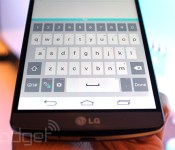
The LG G3 has a keyboard that grows, shrinks and learns

Despite an occasionally groan-inducing press conference in London, there’s little denying that LG’s new G3 has plenty going for it (personal aside: I’ve never been more smitten by an LG phone). It’s usually the little things that make the biggest difference, though, and the G3′s thoughtful Smart Keyboard seems to fall right into that category. Why? Because it pays attention.
The keyboard will slowly shift the way it interprets your touches as it learns how you type, though it won’t actually look any different. Do you always type S’s when you want A’s? The G3 will try to discern your meaning and expand the sensing area for the A key if it “thinks” you’re having trouble. That’ll sound more than a little familiar if you’re a BlackBerry buff: a very similar feature is baked into BlackBerry 10′s soft keyboard. You can also manually change the size of the G3′s keyboard, too, a real boon for those of us suffering with sausage fingers or bum eyes. You’ll only be able to stretch and compress the keyboard so much though — at their largest (see above), the keys are spacious and plenty accommodating for my gorilla thumbs, and the smallest is well-suited for preserving precious screen real estate. Throw in the ability to change the symbol keys that appear on either side of the spacebar and you’ve got yourself a pretty flexible way to jot down your innermost ruminations. On some level, it seems a little silly to get worked up over a keyboard (especially when LG has spent the better part of our morning/evening lauding other technical achievements), but it’s always nice to see companies shape our user experiences in subtle, smart ways.
Filed under: Mobile
 AIVAnet