


Android podcast apps with Chromecast support

Here at Androidguys we love the Chromecast and were massive fans of all the cool casting apps that make this tiny device what it is but this little streaming dongle is not just limited to beaming photos and on-line media up onto the TV. If you’ve got any kind of sound system hooked up to your TV and a Chromecast wedged in the back of it then you’re all set-up to listen or watch your favourite pod casts in all their glory on the big screen and through what ever sound system your rocking.
Over at Chromewatching, were always updating the ever growing list of pod cast apps which have Chromecast support but we wanted to highlight the ones that we like and which we hope you will too.

Pocket Casts is beautifully designed with a stunning phone and tablet interface which makes flipping through the app and finding content so easy and enjoyable. It’s an extremely robust app with all the bells and whistles you’d expect but with a few extra features like its sync option to keep your subscribed pod casts and progress up to date across other devices, smart playlists to organize your pod casts and an episode download scheduling feature so you can get the latest episode when it suites you. And of course, a seamless experience when you click that cast button.

Pocket Cast is not a free app and probably not the cheapest but you can guarantee continuous development and improvements that keeps this app at the top of its game.

Podcast Addict takes a cleaner and more simple approach to a pod cast app which makes it very easy to find your favourite content, however, it does have a lot of areas to navigate but it’s not a chore and becomes straight forward once familiar with the interface. When adding pod casts, there’s quite a few options to choose from. You can search for them manually, add an RSS feed, browse by top pod casts, import via OPML, and even browse popular pod cast networks like Twit, Revision 3, BBC, and others. All in all, it’s a great free pod cast app especially with its casting option.

Podcast Addict is a free app which is not bad for what it can do, so it worth a shot to try it out.

A rival to Pocket Cast, Upod Podcast player is the new kid on the block and that’s why we like it. It has all the usual features that you’ll find on the other big pod cast apps but uPod tweaks these to take them a little further, one of which is where video files can have the video component disabled for audio-only listening.The UI is clean un-cluttered and has an email like inbox concept to manage your pod casts, something that quite different to the rest of the apps out there, and you can link uPod to your Google account for backup and sync across devices.

UPod’s free 7 day trial is a great way to give this app a test run and then decide to pay for the full version.

Next on our list of favourite pod cast apps is DoggCatcher. This one has been around since the beginning of Android but this doesn’t mean that its stuck in the past, the developers of DoggCatcher have evolved it with time and now with Chromecast support, it is still one of the go to pod cast apps for the Android faithful. Managing your pod casts with this app is a breeze and it packs many features that are comparable to others in this list but DoggCatchers edge is its highly configurable settings and the amount of information that can be clearly displayed within its UI.

DoggCatcher is available as a Lite version (free) which still gives you a tester of what the app can do, but its best to upgrade to see what it can really do.

BeyondPod is yet another pod casting app that offers Chromecast support for listening to your favourite shows on the big screen. Featuring a clever downloading engine, you have complete control of how many pod casts to download at once and how long to keep the old versions, with new downloads being performed unobtrusively in the background. BeyondPod also supports variable playback speeds and also a convenient widget to offer full control of your playback even outside the app.

BeyondPod is a free download on the Google Play Store.
Why not give these apps a try and see what casting them to your TV really looks and sounds like, and drop us a comment below telling us what your favourite podcast app is.

The post Android podcast apps with Chromecast support appeared first on AndroidGuys.
Rom of the Week: Paranoid Android

ROM of the Week is dedicated to highlighting our favorite custom ROMs and builds for Android users. If you’re the type who likes to tinker and push their device to new limits then this column is for you.
Note that this isn’t the sort of thing that every AndroidGuys reader will enjoy; however, it can be an eye opener. Our hope here is that we help you discover something new and exciting that you can do with your favorite smartphone. Enjoy!
This week’s ROM of the Week goes to Paranoid Android. There is really only one word to describe PA, “Awesome!” The developers that have created/working on PA over the years have constantly kept it up-to-date with the latest Android builds and are always thinking of better features to incorporate.Well lets get down to it and see why PA made the ROM of the Week.
Like a majority of ROMs out there for Android, they all start with Google’s vanilla version of Android and begin to modify it with features they think are necessary or cool!
PA is a rom geared more towards power users, so if you’re just a beginner, you might want to look into AOKP, Cyanogenmod or get a stable release. Now, why do I say this? Well, PA has always been on the edge of the latest features which curiously find themselves incorporated into Google’s latest Android release, so it can be buggy at first.
In PA you can change almost every aspect of the OS and some of my favorite features are Halo and Hybrid Mode. Halos are essentially apps that live on the edge of your screen (very similar to Facebook chat heads) and when a notification arises you have quick and easy access to it. You can also drag it onto the “X” to disable the halo all together. It is a really quick and easy way to move around without opening and closing a bunch of apps.
Hybrid Mode is also an awesome feature that allows you to make your phone go into “Tablet mode” where your phone will have a tablet looking interface. It is a neat feature to experiment with, now some people don’t like it especially if you’re on a device with a screen smaller than 4.5 inches, but on my Nexus 5 it is great!
Now if you head over to PA’s website, you will notice they only “officially” support Nexus and Oppo devices, however support is available to legacy devices which you can find here.
The features really speak for themselves and thanks to user @noodles90 for all the hard work in putting these together! Check out the features below or if you’re having JavaScript issues, you can check them out on the next page.
The post Rom of the Week: Paranoid Android appeared first on AndroidGuys.
KitKat is now on nearly 14 percent of Android devices

You know how Apple was keen to point out that only 9 percent of Android users (technically, 8.5 percent) were running KitKat in May? Well, that figure’s now out of date. Google has published fresh usage stats which show that 13.6 percent of Android owners are using KitKat as of early June. That’s still far from a majority, but it represents 60 percent jump in a single month. It’s not hard to see why the newer OS would be making such big strides. Major new phones like the HTC One and Galaxy S5 have had more time on the market, and KitKat upgrades are still making their way to older gadgets.
While the data will no doubt be welcome to Google, it also shows that quite a few people are hanging on to ancient devices. Jelly Bean still has the lion’s share at 58.4 percent (down from 60.8), while 28 percent are using Ice Cream Sandwich and older (a dip from 30.7 percent). These aging platforms are bound to fade away, but that may take some time — many pre-Jelly Bean phones are budget models sold in developing markets like China and India, where it’s not as easy to upgrade to the latest and greatest hardware.

Filed under: Cellphones, Tablets, Mobile, Google
Source: Android Developers
LG G3 review: the company’s best phone yet

Bigger, higher resolution, simpler to use. That’s how we described LG’s latest flagship, the G3, when we finally got our hands on it last week. The headline feature is, without a doubt, that Quad HD (2,560 x 1,440) screen. I’ve been gazing at it intensely since the review unit landed in my hand. But, the G3′s not just a one-trick pony; there’s a lot going on under that “metallic skin.” Good thing there’s a full Engadget review here to tell you all about it.
Hardware
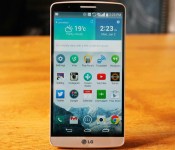
I already mentioned that display, but LG’s not scrimped on the rest of the spec sheet. In fact, it pretty much reads like an Android fan’s wish list. That means a 2.5GHz Snapdragon 801 processor, 3GB of RAM, 32GB of built-in storage, a 13-megapixel camera and, of course, that QHD screen. There’s also an option with 2GB of RAM and 16GB of storage if you don’t need all that memory (and like having more money). As for the design, the G3 has a sharp, modern look with subtle curves and a brushed-metal finish. Compared to Samsung’s “don’t ever change anything” approach, LG appears positively progressive, especially if we think back to the Optimus G. Last year’s G2 was a decently built, smart-looking phone, and the G3 inherits some of its charm (not to mention the G Pro 2′s). The primary difference between the G2 and its successor is, of course, the size. The G3′s 5.5-inch display makes the handset much larger — we’re well into (excuse the term) “phablet” territory here, despite this being marketed as a mainstream flagship.
In fact, the G3 has a bigger panel than the original Samsung Galaxy Note, which blew some people’s minds when it launched with its then-wrist-bending 5.3-inch display. But times change, and a 5.5-inch screen is no longer out of the ordinary. So, yes, this is a big phone — and while it definitely feels bigger than, say, the G2 or a Nexus 5, it’s worth remembering that other mainstream handsets like the OnePlus One carry a display the same size as the G3′s. In fact, both the Galaxy Note 2 and OnePlus One rock a 5.5-inch screen — the difference being both those phones sport wider frames. Perhaps I’ve adapted to larger phones over the years, but the G3 is easily the most comfortable handset of this size I’ve encountered to date. That said, it’s definitely still going to be a stretch for some people.

For example, as with the G2, all three of the physical buttons are located around the back, just under the camera lens. If you like to hold your phone firmly around the base, your digits need to travel quite a distance to reach them. And once they do, the combination of your grip around the bottom and your extended finger creates a kind of lever. So, when you try and push the button, there’s often not enough resistance and you need to either adjust your grip, or use your other hand. You’ll likely get the one-handed technique down with time, but it won’t suit every hand. A related issue is that the circular main/central button, which locks or unlocks the phone (the other two are primarily for volume control), is much more flush to the back of the handset. This is generally a good thing, as it means the G3 sits flat on a desk, but it also means that you’ll sometimes find yourself prodding at the camera lens situated just above it (which is also flat and round). Symmetry fans will love the G3′s rear, though, as the inclusion of an infrared laser for the camera gives it a nice, balanced design.
The “metallic skin” paint job (another one of LG’s marketing terms) is basically to brushed metal what Samsung’s latest phones are to leather — they look legit, but feel like plastic. It’s pleasing to the eye, and gives it a classy appearance, but if you’re a fan of cold, hard metal, it’s a bit disappointing. Luckily, it’s at least less susceptible to fingerprints than glossier materials — something that couldn’t be said for the G2. By contrast, the front is almost entirely dominated by the display; the bezels are narrow, save for the modest chin at the bottom, so the only splash of that metallic color up front is the thin strip at the bottom.

LG made a fair amount of noise over that floating arc design (i.e., the curved back). The idea being that, to counter the width increase that a bigger display commands, you taper the edges in, thus creating an illusion (in the hand) of holding a thinner, narrower device. I’d say it mostly works. The official specification claims the sides of the G3 measure just 2.7mm (0.1 inch) at their thinnest, growing to a still-reasonable 8.9mm (0.35 inch) at their thickest. The Galaxy Note 3 is only 3.6mm (0.14 inch) wider than the G3, but it’s much flatter, and feels all the broader for it in side-by-side comparisons.
The rest of the hardware is more utilitarian, but for those who want to know, here’s a quick run-through. The radios include 2G (GSM/EDGE), 3G (HSPA+ 42 Mbps/HSPA+ 21 Mbps) and LTE (SVLTE, CSFB, CA, VoLTE RCS, MIMO). There’s Bluetooth 4.0 (with aptX), 802.11a/b/g/n/ac, GPS and GLONASS, a 3,000mAh removable battery, IR blaster, microSD card slot, wireless charging and NFC. There’s also support for SlimPort and USB OTG. The 2-megapixel front camera has, groan-inducingly, been rebranded as the “selfie-camera.” Our handset has a subtle gold hue, but it’ll mostly be available in black and white (plus red and violet, depending on the market).
| LG G3 | |
|---|---|
| Dimensions | 146.3 x 74.6 x 8.9mm (curved) |
| Weight | 5.26 oz. (149g) |
| Screen size | 5.5 inches |
| Screen resolution | 2,560 x 1,440 (534 ppi) |
| Screen type | IPS LCD |
| Battery | 3,000mAh Li-Ion (removable) |
| Internal storage | 32GB |
| External storage | Up to SDXC standard/2TB theoretical |
| Rear camera | 13MP with OIS |
| Front-facing cam | 2.1 |
| Video capture | 3,840 x 2,160 (4K)/30 fps |
| NFC | Yes |
| Radios |
SK Telecom/ Korean Model: LTE (800/1800/2600) |
| Bluetooth | v4.0 |
| SoC | Qualcomm Snapdragon 801 |
| CPU | 2.5GHz quad-core |
| GPU | Adreno 330 |
| RAM | 3GB |
| Multimedia | SlimPort/DLNA |
| WiFi | Dual-band, 802.11a/b/g/n/ac |
| Wireless Charging | Yes |
| Operating system | Android 4.4.2 (near stock) |
Display

Did you hear? It’s Quad HD. That’s 2,560 x 1,440 if you prefer pixels, or 534 pixels per inch if screen density is your metric of choice. That’s not bad if we’re just going by numbers. The G3 isn’t the first phone with a screen of this resolution, but it’s the first of the current wave of flagships from the big names. In fact, I’m surprised Samsung didn’t endow the GS5 with a similar screen. That company loves being the first with such features, and (like LG) it makes panels itself, so it’s certainly capable. But, perhaps this is an indicator of just how far LG has come in the phone game.
Before we delve into how the display actually performs, there’s a bit of background worth mentioning. At the G3′s launch event, LG went out of its way to refute Steve Jobs’ claim that the iPhone’s Retina display surpasses what the human eye could detect in terms of detail. The truth, said LG’s Dr. Ramchan Woo, is more complicated than that. The theory is that the print world has known the resolution tipping point for some time. When it comes to displays, though, the digital ppi doesn’t directly translate from print dpi. In fact, it needs to be roughly double. LG’s calculations led to a magic number of (based on two x 270) 540 ppi, which the G3′s QHD panel just misses, at 534 ppi. Close enough, we guess.

So, how does it look? The short answer is: pretty great. The long answer, though, is more nuanced. High-resolution videos and images look pin-sharp and beautifully recreated — especially, and unsurprisingly, the pre-loaded (and optimized) content included in the Gallery app. Colors look vivid but not oversaturated; blacks are dark; and viewing angles are decent (though not quite as good as we’d expect from an IPS panel). The reality is, for most of your daily/vanilla Android usage — browsing, navigating menus and so on — that high resolution doesn’t make itself obvious. By that, I mean that everything looks more or less the same as, say, a regular HD display on a competing phone. Basically, then, if you were hoping for the OS to suddenly pop out at you with newfound crispness, it doesn’t. Icons do look sharper compared to, say, a Nexus 5. But even then, it’s only when you look at them side by side that you’ll notice.
All told, while it’s a great display, it’s a bit like having an HDTV in 2004. Great if you can get the content for it, otherwise it’s just a good TV. Over time, more and more apps and content will be made for such resolutions, but for now, they’re scarce. In fact, the resolution appears to make some apps incompatible — and unfortunately, the Play Store hides apps that won’t run on your phone. Usually this is to stop older handsets from downloading apps they can’t handle. But, if you try searching for Candy Crush Saga, for example, it won’t come up. So, whether intentional or not, it appears some developers haven’t optimized their apps for 2K/QHD displays yet.
Software

“Simple” was easily the dominant buzzword LG chose when marketing the G3. “Simple is the new smart,” and, “To be simple is to be great,” were some of the slogans of choice. That manifests itself in the G3 in a few software tweaks that (hopefully) improve the Android experience. As with any custom take on Google’s software, though, it can be a risk. Unique features can be as much a hindrance to the seasoned user as they are a help to the beginner (if they’re a help at all). Sometimes, though, you can strike gold and create something useful enough that it gets adopted by everyone, even on stock Android (think: Swype-style keyboards). Has LG cracked any such nuts this time?
Probably the “simplest” part of the software is the camera. Open it; point at your subject; tap the screen; and you’re done — picture taken. That’s the default mode, anyway. You can still access all the options (though there are fewer, in the name of simplicity), and change things up, but for the most part, this setup will serve you well. The main Android interface is flatter than before, and despite being a skinned version of the OS, it’s a relatively light one. It’s pretty much the standard Android home screen, just with LG’s custom weather widget at the top, which you can of course remove if you please.

There are other new touches peppered discreetly around the UI. One interesting addition is what LG calls “Smart Notice.” To use an obvious analogy, it’s like Google Now, just more focused on your usage of the phone. For example, if there’s a number you call often or receive calls from, it’ll suggest you add it to your contacts. Or, perhaps you skipped a call with a message saying you’ll call the person back? If, some time later, you don’t, it’ll prompt you to do so. In my testing, I didn’t get many notifications — just some birthday reminders — but I suspect this is a feature that becomes far more valuable over time. As with Google Now, Smart Notice have the potential to occasionally dazzle you, or even creep you out with its prescience; mostly, though, it’s out of sight.
Another addition is “Smart Tips,” which you can find by swiping right from the home screen. It sits in a window of its own that’s important enough to get a tiny “G” symbol instead of the usual bullet point along the bottom of the screen. It shares this space with LG Health (yep, an S Health rival). Open Smart Tips, and you’ll see a menu of options that by default includes Camera, Knock Code and Smart Notice. Bizarrely, all each menu does is open up a page with short YouTube tutorial videos embedded! I’m not sure what’s smart about that. They’re undoubtedly tips, though, so the name is at least half right. I did go back in later and see that different topics were available, so I guess the smart part might be that it learns what it thinks you need to bone up on. The weird thing is that Smart Tips occupies 50 percent of that special home screen (the one with the aforementioned “G” symbol), yet it isn’t something you’d refer to that often. You can remove the entire home screen if you like, but perhaps the better option would have been to devote that space to something other than LG Health and Smart Tips.
The rest of that screen is less wasteful. This is where you’ll find LG Health, the company’s health-tracking app. It’s also a bit of a dark horse. LG gave it nary a mention in the run-up to the phone’s launch, but it’s a well-implemented, surprisingly competent tool. When HTC launched the One (M8), it made a big deal about the phone’s new sensors and its Fitbit integration, allowing the phone to double as a fitness tracker. The problem was, it wasn’t very good — especially given the dedicated sensors. LG’s understated implementation, on the other hand, is pretty solid. I punched in my vitals (age, sex, weight, etc.) and checked back a little later. Sure enough, it had logged what seemed like an accurate amount of steps (it matched my Garmin tracker’s step count). I’ve also walked with the phone in hand, watching it count up accurately.

LG Health also allows you to log activities such as runs, walks, hikes and even inline skating sessions. This records a GPS-based map route and gets filed into a calendar for later viewing. You can pull up some basic statistics (calories burned, etc.) and even compete with friends. It’s perhaps not as feature-rich as a dedicated platform like RunKeeper or Strava, but for a freebie add-on that requires no extra hardware, it’s pretty good. As a bonus, I didn’t notice any impact on battery life, either.
Two other features LG was keen to make sure everyone knew about were Knock Code and the new keyboard. KnockOn was a new feature with the G2, and a bit of a novelty. Sure, it was kinda cool, but it was a party trick at best. Knock Code is its more powerful successor, and has already replaced KnockOn on the G2 and Flex. It’s here with the G3 right from the start, though, and it’s pretty handy — especially if you’re not a fan of the rear button configuration. Setup is easy; tap in a pattern, choose a fallback PIN and you’re set. Now, you can wake your phone and go straight to the home screen using your chosen tap pattern. This means you can open your phone quickly while keeping some sort of relative security. Of course, if anyone spots/guesses your code, you’re toast. Given that the backup is a PIN, it shares the same level of security as just having a four-digit code. A double-tap will still wake the G3 up, but only as far as the Knock Code entry screen (when enabled).
What of that new keyboard? The biggest news is that you can change its height to your preference. The reality is that most people will likely keep it as is, given that the “about halfway up” default is probably fine for most. Another useful feature: If you hold down the space bar and slide left or right, the cursor moves within the last typed word, which comes in handy for fixing typos quickly. The keyboard is also meant to learn your tap habits, so that if you keep thumbing “U” when you mean “I,” it’ll figure that out and fix those taps for you automatically. It’s hard to see if this is really happening with any consistency. I’m a swipe-input (or “Path” as LG calls it) kinda guy anyway, so this feature won’t be of much use if that’s your preference (or if you prefer another third-party keyboard). Still, it’s nice to know LG is trying to improve the experience.
Camera

I already touched on the camera UI. Basically, what you need to know is that the default UI is extremely minimal. Android’s menu ellipses are in one corner, and a back button can be found diagonally opposite. Give the screen a tap and, boom, you just took a photo. Like that, huh? It’s pretty nice. If simplicity’s not your jam, or you want to get into the options, you can do that too. You can even get the on-screen shutter button back if you wish. The number of camera modes, however, has been cut from 14 to four (dual, panorama, magic focus and auto). LG has also pared back the number of menu options overall, keeping things pretty simple.
There are no manual options for ISO, white balance or any of those types of settings. To make up for it, there’s a voice shutter option, which takes a picture when you say: “Whiskey,” “smile,” “cheese,” “LG” or “kimchi.” Amusingly (unsurprisingly?), the only one we could get to work reliably on our Korean version was “kimchi.” This feature works for both front and rear cameras, so it might be more useful for selfies. That said, there’s that hand-gesture option too. When using the front-facing camera, if you bring a hand into view and wait a moment, blue lines appear around it letting you know it’s been recognized. Then you can just make a fist and the camera counts down from three before taking a snap. It’s pretty cute. If you keep the camera in the most basic/default mode, with no menus to distract you, you’ll mostly be good to go. I was expecting that, as the whole screen has become a shutter button, I’d be taking accidental photos all the time just by holding the phone. But that hasn’t turned out to be the case.
Probably the main talking point, other than that 13-megapixel sensor, is the infrared laser focus system. This is something of a first on any camera, according to LG, and it’s a technology the firm originally developed to keep its robot vacuum cleaners from banging into walls. The conical laser can apparently focus the camera in just 220ms, blowing the competition (the GS5 and HTC One, for example) away. Those handsets take up to 300ms to focus, the company claims. That extra 80ms counts, we guess. In practical terms, while the camera definitely does focus and take pictures quickly, if no one had told us about this new feature, we most likely wouldn’t have noticed too much of a difference. It’s definitely quick, though, and that’s what counts.
As for the pictures themselves? Pretty impressive. There are, however, a few lighting situations that seem to cause it trouble. Sometimes when the sun is in shot, or at dusk, pictures can look a little washed out. Other times, the camera performed quite well, especially in lower light conditions. Taking photos around London as the sun went down, I was impressed by how low the noise was and how well colors were reproduced. Even at night, the G3 can pull off some good shots, provided you have a steady hand. The OIS also seems to help when taking candid shots, where you’ve gone from pocket to photo relatively quickly (and probably shakily), especially when using the screen as a shutter button.
The selfie camera around the front is different story. LG gave it larger pixels to help it under low-light conditions (where most selfies are taken, according to its research) but the result is a soft image that appears cartoonish at times, especially if you jack up the “beauty” filter. There’s a “flash,” too — but in reality it just shrinks the preview and projects a bright screen to light up your face. It’s nice that LG cares about selfies so much, but the flash doesn’t work well. If video’s more your thing, you can shoot up to 4K (if you have something to view it on.) Interestingly, there’s no native/2K option, though, which might have made more sense.
Performance and battery life

Given that LG has kept things light on the software front, there’s not a lot of bloatware going on. The main concern for both performance and battery life is probably that display. The first thing I noticed was the smallest amount of delay when flicking through menus. Everything opens quickly, and the scrolling is plenty smooth, but there’s just the tiniest of moments between moving your finger and the menu following along. It’s hard to tell if this has to do with the power needed to keep that display updated, or if it’s just the result of all the software and hardware elements combined. Either way, it’s the first time I’ve noticed anything like this with a box-fresh phone. To be clear, this is minor, but it’s something I noticed all the same.
There are a few other things we must mention at this point, too. The handset we were given is actually a Korean carrier model. That means there are likely some software tweaks that won’t be present on the official US/European models. It also means I was unable to test the LTE. As such, most of the performance and battery life observations are likely to be very close to, but perhaps not exactly what you can expect once the G3 goes official over here later this month.
| LG G3 | HTC One (2014) | LG G Pro 2 | |
|---|---|---|---|
| Quadrant 2.0 | 25,548 | 25,548 | 18,349 |
| Vellamo 2.0 | 1,405 | 1,804 | 1,672 |
| 3DMark IS Unlimited | 16,662 | 20,612 | 17,241 |
| SunSpider 1.0.2 (ms) | 918 | 782 | 727 |
| GFXBench 3.0 Manhattan Offscreen (fps) | N/A | 11.2 | 8.7 |
| CF-Bench | 24,667 | 40,223 | 36,840 |
| SunSpider: Lower scores are better; results compiled on Chrome. HTC One benchmarked on Android 4.4.2 | |||
With that caveat out of the way (and the benchmarks in), I can confirm it generally performs like a boss. During my usual routine tests of gaming (both casual and a bit of Real Racing), browsing and everyday business use, the G3 held up just as well as the HTC One and Galaxy S5. That is to say, its ample processor and RAM capacity mean it can handle pretty much anything you throw at it.
As for the less tangible aspects of usage (those that can’t be measured in numbers), it’s still good news. While I don’t have a huge dislike of Samsung’s TouchWiz interface, LG’s much cleaner UI reminds you how old-fashioned and dated the interface Galaxy users have to endure can feel. The near-stock experience is appreciated, and if LG ever makes a Nexus/Google Play version of the G3, I’d suggest it’s only really an issue for the Android purist.

Battery life was an area of particular concern. With so many pixels to take care of, the processor has some extra lifting to do. Add to this the fact that the screen is LCD (i.e., backlit) and not OLED (which only lights the required area), and you might think it’s a recipe for disaster. In fact, I was pleasantly surprised to find that the G3 can easily go a whole day (and often a bit more) without needing a top-up. This is without LTE running, but still with the moderate to heavy usage that being an Engadget editor requires. As for the more formal battery test, the 3,000mAh cell managed a reasonable 10 hours. We’ll be sure to repeat this test once we get a model with local LTE support.
LG says that to compensate for the demands of the display, it did some serious thinking about power consumption, making savings wherever it could. Whatever it did, it seems to have worked. If you’re a power user, or just like to be on the safe side, that cell is removable, meaning you can carry a spare if you like. The only downside is how long it takes to charge over USB. To be fair, the phone does tell you as much when you plug it in, so you can’t say you weren’t warned.
The competition
With the paint still wet on both the Galaxy S5 and the HTC One (M8), those two would seem like the likeliest rivals for your affection. Along with the G Pro 2, perhaps. The problem is, LG’s being tight-lipped about the official US price for the G3, which makes comparisons difficult. One UK retailer has pegged it at £500, and the Korean version can be bought right now for about $800 and up if you’re really impatient, but I would’t put much stock in those prices, as things could well change (we’ll update this review if they do). Pricing issues aside, the LG G3 might not have the depth-perceiving camera of the HTC One, or the heart rate monitor of the GS5, but it beats them both on a far more important (and future-proofing) feature — that display. Much of the rest will come down to design and software preference — and of course that price.
Wrap-up

I’ll admit, when I first laid hands on the G3, I wasn’t sure. I wanted it to be metal (as it appeared to be), but it wasn’t. I wanted it to be a bit smaller and more like the Nexus 5, but it wasn’t. I didn’t think I’d like the rear placement of the buttons, and I don’t. But, like two cops with different ideologies forced to work together on a crime, before long, these perceived negatives turned out to be charming qualities. The smooth, curved lines of the G3 make it feel like a much smaller phone. Those rear buttons mostly just need some muscle memory to get used to. And that metallic skin: It might not be metal, but it sure looks better than the G2 (or any Galaxy phone). That just leaves the positives. The display might not be quite as impressive as I’d hoped, but it’s still shines given the right content.
The camera is a great workhorse and will really turn out some good images, even under low light. All told, there’s little to complain about, save for the fact that our test unit was a Korean-specific model (I’d like to test the LTE and see how the battery holds out). So, when we finally do know the price, we can make a better call, but assuming LG doesn’t do something crazy, this should be one of the best Android phones you can buy right now.
Daniel Orren and Edgar Alvarez contributed to this review.
Filed under: Cellphones, Mobile, LG
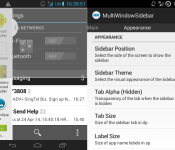
Get the Samsung-like MultiWindow Sidebar on any Android device [APK Download]

One of the better features of Samsung’s TouchWiz is the ability to house regularly accessed apps in a sidebar that recesses at the side of the screen at the touch of a button. Samsung also allow multiple windows to be stacked allowing two different apps to be viewed or worked on at the same time.
The guys over at XDA have created an APK that mimics the Samsung MultiWindow and Sidebar and it supports all devices running Android 4.0 and above. The split view has been made to compliment XMultiWindow & XHaloFloatingWindow Xposed Modules, so it is recommended to install those also.

• Choose the apps to appear in the sidebar with Select Apps
• Choose the method to launch apps using App Launch Mode
• (Optional) Enable Start on Boot
• Start the sidebar using Toggle Service
To Launch Apps, there are 2 modes.
• Tap an app to open it
• Drag an app to the respective location on the screen
You can customize what apps (PA Halo, XHaloFloatingWindow, XMultiWindow or Normally) to open when tapping or dragging.

MultiWindowSidebar_v1.2_250514.apk
VIA: XDA
The post Get the Samsung-like MultiWindow Sidebar on any Android device [APK Download] appeared first on AndroidGuys.
Google Hangouts updated to V2.1.223 [Download APK]

Everyone’s favourite messaging app Google Hangouts has just been updated to version 2.1.223 and with it brings some pretty minor changes, but noteworthy nonetheless.
It seems in Google Hangouts version 2.1.223 you’re now able to set custom sounds for messages and hangout calls, which can be accessed in the “People & Options” section of the Menu.
The update is slowly rolling out to the Google Play Store so either hit below to grab it from the Store, or this link to download the Hangout version 2.1.223 APK file.
VIA: Droid-Life
The post Google Hangouts updated to V2.1.223 [Download APK] appeared first on AndroidGuys.

Route-tracing robot shows where bike lanes should be

Tired of having to share the road with cars while you’re biking? You’re not alone. The marketers at Radwende have built a route-tracing art robot to make a case for more bike lanes in Wiesbaden, a German city frequently considered hostile to pedal pushers. The machine draws the paths of riders who use Android and iPhone tracking apps during their journeys, creating a crowdsourced cycling map whose lines get bolder based on traffic. The more people travel down a given street, the clearer it is that a bike lane is necessary.
The robot is currently sitting inside of Wiesbaden’s Museum of Fine Art, where it will be drawing until July 2nd. There isn’t any word of Radwende taking its project on tour, but there is a way to get a map for posterity. If you’re in Wiesbaden, you can buy a print for €150 ($204) or less — the price goes down one euro for every kilometer you ride while using the app, so you have a strong motivation to get some exercise before you show up. Even if the city doesn’t pay much attention to the artwork, it’s visual proof that technology can solve urban planning problems.
Filed under: Transportation, Internet
Via: Fast Company
Source: Radewende (translated)
Icon packs that you must have on your Android device

I’m an icon addict to the point of where I really need some serious intervention. But don’t call anyone quite yet, just let me present to you what I want to show off today, then decide if you want to make that call. That’s right, I’m going to show you some of the newest, hottest, most amazing icon packs in the Google Play Store today that you need to have installed on your mobile device. You can check out some of our older posts on this same subject here: Android Icons You Must Have.
The good thing about the icon packs that I’m going to show you today is that they are so very simple to install and easy to set on your device. And when you do get them set on your device, they will theme your homescreen icons as well as all of your icons in your app drawer. That way everything looks nice, neat and uniform. Now, let’s get started with the first icon pack of several for the day.
NOTE: THIS ARTICLE IS SPREAD ACROSS FOUR PAGES
KooGoo by DJSkarpia

I’m a sucker for round icons and I think Andrea Corvi knows this because he’s been doing a lot of them for some time now. He has become skilled at getting me to spend my hard earned money. KooGoo is a nicely done icon pack that is simple and clean, yet has enough detail that each icon stands out as being quite unique. For $1.89 you get over 1,700 icons, 16 docks for Nova Launcher, 88 wallpapers and the app even has Muzei support which is something I really enjoy. These icons are updated very frequently and will continue to be done so for quite some time.

Neon Glow by Samer Zayer

Neon Glow by Samer Zayer is something a bit different than what we’ve been seeing here as of late. It’s not a long shadow icon set and this is really nice to see Samer go and produce something really different. Neon Glow is just that, an icon that looks like those neon signs you see in your favorite bar or restaurant. Dark backgrounds with very vivid and bright colors.
Priced at only $1.49, Neon Glow gives you 1,100+ icons, all sorts of wallpapers via the cloud, several docks for use within Nova Docks and Muzei support. Well worth much more than the asking price and you also get some amazing icons along the way.

The post Icon packs that you must have on your Android device appeared first on AndroidGuys.

Android 4.4.3 is Finally Here! HTC One E8 Officially Announced! – The ManDroid Show

Android 4.4.3 is finally here my friends. Some of have it. Most of you don’t. In a perfect world, we would all have it. But in the Android eco-system, it takes some time to get the latest Android, but we must be patient friends. HTC announced the HTC One E8, which is pretty much just the plastic version of the HTC One M8. Let us know how much you are loving Android 4.4.3.
News Topics
Android 4.4.3 OTA update for the Nexus 7
HTC One E8 announced
ASUS Padfone S is the Padfone X
Son Xperia Z Ultra 2 teased
//<![CDATA[
ord = window.ord || Math.floor(Math.random()*1E16);
document.write('’);
//]]>

Google Glass test update lets you see notifications by shifting your eyes

If you’ve worn Google Glass, you know that it can be a pain to tilt your head back every time you want to check a missed alert. You might not have to move so awkwardly in the future, though. Google has posted an as yet unannounced Glass update with an experimental “notification glance” feature. As it implies, you only have to point your eyes toward the display to turn it on and see a recent notification. The catch? Right now, the new trick doesn’t apply to general use; Android Police notes that you can’t shift your gaze just to take a picture or get directions. Nonetheless, the glance option should be very helpful for Explorers who’d like to keep their head movements (and funny looks from others) to a minimum.
Filed under: Wearables, Google
Source: Android Police, XDA-Developers

