


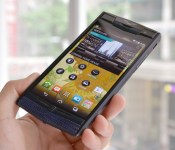
This is what a $22,000 Android phone feels like

With Vertu finally offering an up-to-date luxury phone, we naturally had to check out the Signature Touch up close and personal. After all, it’s not everyday that one gets to play with a $21,900 phone for free (though you can do so at any Vertu boutique, as long as you’re nicely dressed). For those who haven’t caught up with the announcement, we’re looking at a 4.7-inch 1080p display, a 2.3GHz quad-core Snapdragon 801 chip, 64GB of storage, 13MP/2.1MP cameras, a 2,275mAh battery, Qi wireless charging, NFC and a handful of LTE bands. With the exception of the battery (which, to be fair, is already much larger than those on previous models), these are all very decent for an Android 4.4 device.
As hinted by its name, the Signature Touch continues the legacy of the Signature series by carrying its iconic features. Under Vertu’s new lead designer, Ignacio Germade, the masculine “V-spine” design and the D-ring latch (for popping open the Micro SIM tray cover) remain; though the ceramic ear pillow is now smaller and makes way for a titanium chin, instead of being surrounded by a metallic bezel. Another notable change is that the stereo speakers — developed in partnership with Bang & Olufsen — are now facing the front, which makes a lot more sense than the sideway speakers on the similar-looking Ti.
The ringtones produced by the London Symphony Orchestra sounded exceptional on those speakers, which isn’t a surprise. According to Hutch Hutchison, Vertu’s Head of Concept Creation and Design, each ringtone is tuned for optimal effect on each model, rather than just copying the same audio files to the whole range. A new addition on this end is the set of Dolby Digital Plus effects, which should come in handy for watching movies and playing games.
Another big collaboration on the Signature Touch lies within its 13-megapixel and 2.1-megapixel cameras. We’re still surprised that Vertu managed to get renowned camera maker Hasselblad to help optimize the imaging performance; though sadly, we’ll have to wait for the final camera software before we can judge the results.

As with all Vertu devices, the Signature Touch has a dense, expensive feel with its 192g weight and hard metallic body. We didn’t dare to do any torture test, but the grade 5 titanium body, the fifth-gen sapphire screen and the conditioned leather should stand the test of time. In addition to the usual drop test and steel ball test, the company’s also made sure that this hand-assembled phone would operate just fine from as low as -45 degrees Fahrenheit all the way up to 176 degrees Fahrenheit.
The Signature Touch comes in a range of skins and colors. You start at $10,300/£6,750 with the basic “Jet Leather” (black and silver) or “Claret Leather” (red and silver), followed by other skin options (lizard or alligator) plus PVD coating option for the titanium frame, and capping at $21,900/£14,350 for the maxed-out “Pure Jet Red Gold” edition (black and gold). We actually liked the “Pure Navy Lizard” and the “Damson Lizard” the most for their unique textures, whereas Vertu’s CEO Max Pogliani currently carries an equally exotic “Jet Alligator” customized with a black PVD titanium body (by default it’s a bare metal body).
The lucky folks who have the cash to spare tend not to have a problem picking their favorite variants. In fact, some are known to buy multiple versions of the same model, thus also accumulating years worth of bundled one-year concierge service in the process (it’s otherwise “just” £2,000 or about $3,400 annually for the classic service, or double that to continue having a dedicated agent). If we were given a chance to try this service, we’d totally just get a butler to write up this article while we sit by the pool at an exclusive clubhouse.
Disclaimer: This article was not written by a butler.
Filed under: Cellphones, Mobile

You can now push YouTube live-events to Chromecast with your mobile device

Chromecast users have been able to throw live YouTube broadcasts to Google’s streaming stick via their PCs for a bit now, but the search giant recently added a perhaps more convenient way to do that task. Now, you can use your mobile device to push as-they’re-happening videos to your flat-screen via Mountain View’s HDMI dongle. Pretty neat, right? Google tells us that while the Google+ post is the first time its spoken publicly about the new mobile feature, the functionality soft-launched “a little while ago.” The ability could come in handy if you’d like to tune into live-broadcasts via PlayStation 4 this fall, or, in the more immediate future, you can rage along to this year’s Electric Daisy Carnival live from Las Vegas. And before you ask, the answer is most definitely no, you don’t have enough glow-in-the-dark headbands for Paper Diamond’s set at the Sin City EDM festival.
Filed under: Cellphones, Home Entertainment, HD, Mobile, Google
Source: Google Chrome (Google +)
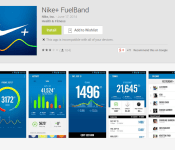
Fuelband app is finally available on Android

Nike said that it won’t make an Android application for Fuelband, that was February last year. More recently they announced they’ll focus on software rather than hardware, in other words won’t make any more Fuelbands. Well, be it as it may, they’ve released an Android app for Fuelband. There’s a catch though, this application will… Read more »
The post Fuelband app is finally available on Android appeared first on SmarterWatching.
Read the rest at the source, SmarterWatching.com
The post Fuelband app is finally available on Android appeared first on AndroidGuys.
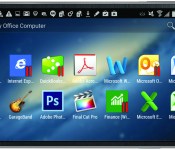
Parallels Access now available on the Android OS

Parallels Access is a very popular app on iOS that allows you to run Windows and Mac apps on your iOS device. Using your PC or Mac as a server, your iOS device would be able to run desktop apps with Parallels Access, and with control your PC or Mac using your iOS device, as long as your PC or Mac was running as a server. Finally, after a long wait and many come-close and ever some better knock-off apps, Parralells Access is available on the Android OS.
The app is free to download, but it does require a ($19.99/year) membership to actually use, after a 2-week trial. Considering all of the other apps on the Play Store, along with some basic root features, the fact that the app comes with an annual price tag might be a huge turn-off for many Android users. Yet Parallels is a very reputable remote desktop developer and it’s probably one of the best remote desktop services available at the moment.
The remote desktop options are far from perfect, but many do require this service, and if you do Parallels should be a huge must-try on your list.
The post Parallels Access now available on the Android OS appeared first on AndroidGuys.

Android 4.4.3 Suffering Issues? Moto X+1 Boot Animation! – ManDroid Quickie

How is your Tuesday going my Android friends? Hopefully it is going well, and hopefully you aren’t one of those suffering from the issues that Android 4.4.3 is having. Only issue I’ve seen is that Google Now force closes every now and then, but nothing like others are seeing. The Moto X+1 boot animation has apparently leaked online, so if you haven’t checked it out yet, hit the link below. Enjoy the video.
Android News
Android 4.4.3 issues
Moto X+1 boot animation
Samsung Galaxy Tab line
Angry Birds Transformers
//<![CDATA[
ord = window.ord || Math.floor(Math.random()*1E16);
document.write('’);
//]]>
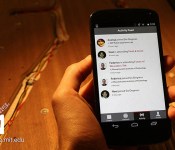
Marriott and MIT want to turn your hotel into a social network

If you travel often, you know that it’s hard to socialize at hotels; short of a chance encounter, you’ll probably end up drinking at the bar by yourself. MIT and Marriott may have a better solution in store with their Six Degrees app. The mobile software uses LinkedIn to find connections between you and other guests. You’ll know if someone is a college alum, works at the same company or shares your love of scotch. Staff can organize events if there are enough people with common interests, and there’s even an LED-equipped table that lights up a line between visitors when there’s a match.
It’s still early goings for Six Degrees. Marriott is just beginning to test the app this month, and there could be some necessary refinement before the company launches a pilot project in a dozen locations. Provided everything works out as planned, though, you might just look forward to business trips — when the entire hotel is a social network, you could have a lot more to do than watch TV reruns in your room.
Filed under: Cellphones, Internet, Mobile
Via: Consumerist
Source: Fast Company

Nike finally introduces a Fuelband app for Android

Despite rumors of the Nike+ Fuelband’s demise (and a cozy relationship with Apple), the sportswear maker has finally expanded its compatibility by releasing a sync app for Android. Just like the iOS companion app, it communicates with Nike’s wearable fitness tracker over Bluetooth, but this one only works with the newer Fuelband SE and a select list of Android phones. Requiring Android 4.3 and Bluetooth LE support, right now that list includes the Samsung Galaxy S3, Samsung Galaxy S4, Samsung Galaxy S5, HTC One, Nexus 5 and the Moto X. Last year Nike denied it even had an Android app in the works, and yet here we are. The feature list looks comparable to the iOS version, but coming more than two years after the Fuelband originally launched, we’re wondering how Nike+ will fit into the health and fitness plans being laid out by Apple, Google and the rest.

New app. New challengers. Same hustle. Introducing the Nike+ FuelBand App for Android: http://t.co/QvdKa9EGRq pic.twitter.com/MMrp7vPzDi
– NikeFuel (@NikeFuel) June 17, 2014
Filed under: Wearables, Mobile
Source: Nike, Google Play
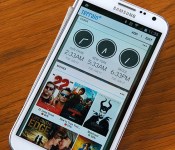
Terrain Android launcher helps you organize and find your content

Samsung’s Accelerator division has just spawned a new Android launcher that aims to help you see and find everything on your phone. Called Terrain, it resembles a stock Android home screen at first glance, but from there you can launch the three main features. The first is the Sidebar which brings up your content in familiar card form with a swipe from the left, letting you glance your top Spotify songs, Facebook news feed, Instagram pictures, Reddit threads and more. You can then tap each card for a deeper dive. The Phone Search option checks all your apps and contacts and also searches the web, Google Maps, Play or Yelp, to name a few. Finally, there’s the alphabetically organized All Apps drawer to see your programs at a glance. So how well does it work? Read on for more.
I’ve played with a lot of launchers, including Nova and Aviate, and Terrain seems quite robust for a first release. It was fairly simple to add and edit content from the sidebar, helped along by the initial launch suggestions. After a little time, I had a sidebar showing Facebook feeds, favorite contacts, a calendar, Spotify tracks, my Instagram feed and for lulz, the xkcd cartoon, all organized how I wanted. There are 60 content cards in total from categories like utilities, local (weather and traffic), social and news. Searching contacts was more convenient than using Samsung’s stock contact app and let me dial or send a text message without fussing. It was also arguably quicker to search less-used apps that weren’t on my home page, like Vivino. Finally, the app seemed just as fluid as my go-to launcher, Nova.
Though reasonably glitch-free, it was occasionally a bit slow to find feeds like technology (which include feeds from Engadget, Re/Code, CNET and the Verge). In addition, it was missing a few key social apps like Vine and requires you to download separate apps to pull feeds from Instagram and Spotify — a bit of a kludge. But it seemed stable on my last-gen Galaxy Note II with KitKat and came with enough news, social and entertainment apps to be useful right away — and the folks behind it said that more cards and content are rolling out soon. If you feel like giving it a try yourself, check Terrain’s home page or download it from Play.
Filed under: Cellphones, Software, Mobile
Source: Terrain
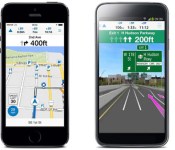
Garmin’s new app lowers the price of premium navigation

While Garmin is no stranger to mobile navigation apps, it has continued charging $30 or more for its StreetPilot software even after breaking out some components as in-app purchases. That’s a hard bargain in an era when phones offer GPS tricks like lane assistance for free. Clearly, the company is aware of this discrepancy — it just unveiled Viago, an app for Android and iPhones that tries to bridge the pricing gap. Fork over $2 ($1 until July 13th) and you’ll get worldwide maps alongside lane assistance, realistic junction views, speed limits, weather and traffic. You only pay more for the features you want, and some of them are unique — Real Directions gives you directions based on landmarks rather than street names, while Active Lane Guidance simplifies taking that next off-ramp.
Viago is likely to be a better deal than earlier releases, especially now that the interface is simpler and less focused on replicating dedicated nav units. However, Garmin still faces an uphill battle. Some of the features the company wants you to buy, such as offline maps and mass transit directions, are available for no charge on both Android and iOS. With upgrade prices typically ranging between $5 and $20, you may have to shell out a lot more than $2 to equal or beat what your handset can already do. If you’re eager for a do-it-all mapping tool, however, Viago is ready and waiting.
Filed under: Cellphones, GPS, Mobile
Source: Garmin
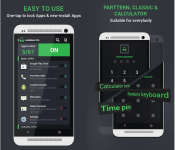
Lock down your Apps with Lockdown Pro [App of the Day]

Everyone appreciates privacy, and sometimes just having a pin code or unlock pattern on your device is not satisfactory enough to feel like your information contained within your device is protected enough – especially if you’re wife insists on knowing that unlock code!
This is where Lockdown Pro steps in as it provides a way of restricting access to certain apps and information such as emails, messages, and even photos.
In addition to being able to lock down specific apps, it can also restrict installing/un-installing apps, and even incoming calls.
Lockdown Pro features include:
- One-tap to lock Apps.
- Auto lock new-install app.
- Taking pictures after wrong password.
- Auto send email with some info and pictures of the person who wants to access your phone.
- Auto lock & unlock when you get in/out your setting locations.
- Auto lock & unlock when connect/disconnect with wifi.
- Active lock apps with a SMS
- Three password modes: Pattern Lock, Classic Lock & Calculator Lock
- Fake Error Message (Distract from unauthorized access.).
- Random keyboard password
- Time pin password (Ex: If the time is 13:12, your PIN will be 1312)
- Themes store (so many beautiful themes for your choice)
- Screen timeout: The screen will never turn off when running registered app
- Auto-Rotate: The screen of your device will not auto-rotate when running registered app.
- Prevent uninstall Lockdown Pro & clear the memory on some devices (Activate Device administrator)
- Lock Deactive Device administrator
- Hide Lockdown Pro icon (Remove Lockdown Pro icon on App Draw & Home screen)
Lockdown Pro is completely free and isn’t even ad-supported. So if you’re wanting to restrict certain parts of your Android device from prying eyes, then check out Lockdown Pro in the Google Play Store.
The post Lock down your Apps with Lockdown Pro [App of the Day] appeared first on AndroidGuys.
 AIVAnet