


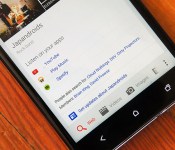
Google now offers links to music apps when you search for bands on Android

Google is making it a little bit easier to start listening to musicians you’re researching. If you search for a band on Android the results will now show quick links to the artist’s page in your music apps. So, lets say someone suggests you check out Kvelertak (which we can tell you is excellent advice). Now when you Google the Norwegian metal band you can simply tap on the Spotify link to start listening immediately. Or, if you’re a big fan of music videos, you can quickly launch YouTube after searching for Solange. Right now the feature is limited to the US, but it does work with a broad range of apps, including Rdio, iHeartRadio, TuneIn, YouTube, Spotify and Google Play. Other countries and services like Deezer will be added in the future.
Source: Google
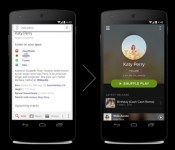
Google Now learns a new quick links trick when you perform a music search

Google Now keeps on moving forward, adding in new features all the time. This time they’ve added a small, but a nifty one.
If you decide to search for music of some kind, Google will (as it did thus far) show you the results of your search. However, from now on it will offer you quick links to listen directly via your favorite music apps. This is quite convenient considering it’s skipping a few steps this way, you don’t have to open those apps manually in order to listen the music you’ve searched for.
As we said, this is just a small addition to the service, but a very useful one. We hope Google will keep on adding features like this in the future like they did thus far.
Source: Twitter (Google)
The post Google Now learns a new quick links trick when you perform a music search appeared first on AndroidGuys.

Path spins out dedicated messaging app that’ll let you text businesses too

Today, Path has joined the likes of Facebook by splintering off one of its most popular features — messaging — into its own app. Simply called Path Talk, the standalone messenger comes just a year after the introduction of private messaging into the social network. But that’s not all. In concert with Path Talk’s launch, the company has also announced the acquisition of TalkTo, a service that lets you text any local business like you would a person and get a response. And, you guessed it, one of the standout new features of Path Talk will include the ability to do exactly that.
But before we delve into that, let’s begin by explaining what Path Talk brings to the table. When Path started in 2010, its aim was to be a social network unlike any other. It was focused on close personal friends instead of just random acquaintances or high school classmates you hardly remember. It’s why the app initially restricted the friend list to just 50 people, to force you to be selective in what and to whom you share your life’s private moments. Since then, the niche network has evolved, loosening that restriction to 150 and most recently, it’s released that limit entirely. Now you can have as many friends on Path as you want, and it’s reporting as many as 4 million daily active users. As other social networks like Facebook and Twitter are gaining more traction, it seems it’s a good time as any to seek out new ways to grow.
“We feel that breaking out messaging into its own app was by far the best way to go about delivering it to users,” Dave Morin, CEO and co-founder of Path, tells us. Additionally, Path Talk is just the first of many apps the outfit plans on breaking out from its main offering. “We want to break Path up into multiple applications […] Our vision really is to be an application company.” Indeed, that’s why Path Talk and Path can be used independently. If you don’t want to use the Path app, but want to use Talk, you can do that.

When you first download Path Talk, you’re prompted to log in with your Path credentials. “Path is this umbrella, and you have these two apps under that,” explains Cynthia Samanian, a Path product manager. Indeed, Path Talk looks and feels a lot like the main Path app, and maintains a similar design language throughout.
If you’re already a Path user, the people list will have all your friends already on it. You can also give the app access to your address book, which will tell the app who among your contacts has a Path account, and those people will also be added. If your friends aren’t on Path, you’re able to add them by sending them a SMS invite to download the app.
Just like Snapchat and Slingshot, Path Talk messages are ephemeral — they expire after 24 hours. “Most conversations aren’t recorded and saved forever,” explains Cynthia Samanian, a Path product manager. “We’ve all opened up message threads only to find a conversation that happened two weeks ago and gotten confused,” says Morin. “Thinking about context is really important — we want you to have the best possible conversation you can have as soon as you enter a messaging thread with somebody.”
To that end, one of the key features of Path Talk is something called ambient status. It essentially lets your friends know a little something about you based on the data it gleans from your phone. When enabled, ambient status can display your location (along with weather, if applicable), whether you’re nearby, the name of the song you’re listening to, if you’re low on battery, if you’re working out or even if you’re in transit, say in a car or a bus. There’s a special ambient status tab that lists them all, or you can simply figure it out based on the icon or colored dot on the Friends or Messages tab.
“Most people start a messaging app thinking they need to start a conversation with someone for a reason,” says Samanian. “What this ambient status thing does is give some information about him or her beforehand, to act as kind of a conversation starter.” Morin says, for example, that different status types can lead to different interactions. If you see some friends are nearby, you can text them to meet up. A low battery status would indicate the person you’re texting is likely about to drop out. “How many times are you just about to tell someone you love them and then their phone dies?” asks Morin. “This makes sure that’s never a problem.”
Music sharing has always been a key feature of Path’s core app, and it’s the same with Talk. If you see a friend is listening to a song, you’re able to tap the music icon to see what he’s playing and get a short preview of the tune. The app will display the song that’s playing in the default Music app if you’re using iOS, but if you’re on Android, songs played on any app — say Rdio or Spotify — will show up. However, Morin says that might change with the arrival of iOS8 in the next few months.

If you happen to have all of these ambient status options turned on, Path Talk has a prioritization system that figures out which status to best display. For instance, a low battery status is probably more important than where you are or what music you’re rocking out to, so that’ll show up next to your name over all the other options.
As for actual messaging, it works much the same way it did on the Path app. With Talk, you’ll just have to tap the top to open a new conversation tab with either one or more people. Just as before, you’re able to incorporate stickers, photos, song embeds, voice messages and location pins mid-conversation. If you’re short on time, you can also choose to drop in a green check as a quick “Yes” response. If you hold down on the check, you’ll see three other options: an X to indicate “No,” a question mark as a sort of ping and a phone icon. When selected, it’ll drop a “Call me” link that opens up the phone dialer complete with the sender’s phone number.
Now, back to the acquisition of TalkTo. A three and a half year old service, it essentially lets you send a text to a phone number of a place instead of having to call it. So rather than calling up a restaurant to see if it has reservations or phoning Best Buy to find out if it has a particular item, you can just send a text message to the phone number via TalkTo. Acting as a broker, TalkTo will then figure out the best way to get that request across, either by email or sending an actual text to someone’s cell phone. If a place isn’t yet responding on their own, well, TalkTo actually has a call center with agents to make an actual phone call on your behalf.

“In every case that you’re asking the question, in the same way you text a friend, you’ll get a response,” says Stuart Levinson, CEO and co-founder of TalkTo. “This is the service — you’ll never have to worry about if it’ll work for this store or that. It’ll be ubiquitous.” This very feature will be added to Path later this summer, and it’ll be called Place Messaging.
“We really envision messaging as a hub for your life,” says Morin. “Not just friends and groups, but also businesses […] Having all of it in one central messaging hub is a very powerful idea.”
Aside from Path Talk, the company is also making a few interface changes to its main app. Obviously, the messaging function is now gone from Path — tapping on a message bubble will simply kick you over to Talk instead. The UI has improved as well, with a new tabbed navigation bar for quicker access to various sections and a new chooser that’s more intuitive.
Path Talk is available for Android and iOS, and should be ready to download from both app stores starting today.
Source: Path
Android Wear Introduced in New Video from Google Developers

Android Wear will be in our lives hopefully sooner than later, and the developers over at Google wanted to make sure we knew what it was all about. The video below was posted on the Google Developers YouTube channel, and it gives you all kinds of info about Android Wear. And when I say info, I mean in-depth info of how Android Wear works, and where they want to take it. Android Wear will be appearing on the LG G Watch and the Moto 360, but many of us still have hopes for that Nexus Watch we keep hearing about. So check out the video below to get educated with Android Wear. Let us know how excited you are to get a watch with OS running on it.
//<![CDATA[
ord = window.ord || Math.floor(Math.random()*1E16);
document.write('’);
//]]>
Android 4.4.4 rolling out to Nexus 4, 5, 7 and 10

Earlier this month Google started rolling out Android 4.4.3 update to certain Nexus devices and now we have yet another update by Google; 4.4.4 is here.
Suffice it to say, Android 4.4.3 update caused issues on certain devices. People have been reporting issues with bluetooth and wi-fi signal most of all. This might be the reason Google is pushing yet another update so soon after the 4.4.3 update. Other than certain Nexus and Google Play Edition devices only Moto X, G and E have received 4.4.3 update thus far. Google has released factory images for Android 4.4.4 (KTU84P) update, although it doesn’t seem to be available OTA just yet. The only differences seem to be under the hood, as we said probably squashing some bugs and stuff.
Do you have Android 4.4.3 on your device(s) and are you having issues with it?
VIA: Phandroid
The post Android 4.4.4 rolling out to Nexus 4, 5, 7 and 10 appeared first on AndroidGuys.

The next version of Android will enhance battery life, speed up apps

Several months ago, Google added an experimental runtime option to speed up apps in Android 4.4 KitKat. A runtime, for the record, supports the apps running on your device — without it they’d be nothing but piles of useless code. Called ART (short for Android Runtime), that same mode will become the default when Mountain View releases the next version of its operating system. Developers spotted tweaks to Android’s open-source code indicating the upcoming change, and the update looks to be a positive one. Without getting bogged down in details, ART essentially makes apps run faster and more efficiently, with the downside being that they’ll take up slightly more space on your phone, as well as lengthier install times.
ART will likely replace the current app-running software Dalvik as the default on Android, though the latter option could still be available. In addition to enhancing app performance, ART is said to slightly increase battery life. Even if the gains are small, that’s good news for anyone using the most popular mobile OS in the world. And with Google I/O just a week away, we may hear about the next version of Android very soon.
Filed under: Software, Mobile, Google
Via: Phone Arena, Android Authority
Source: XDA Developers
Yes, Nokia has released an Android launcher

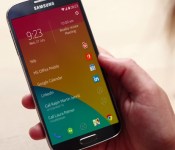
The Android launcher scene might be getting a little out of control — even Nokia (whose X phones are now under Microsoft’s wing) is getting into the game. The Finnish firm has just released Z Launcher, a home screen replacement that gets you to frequently-used apps, contacts and sites as quickly as possible. The software learns your habits and surfaces the content you’re most likely to use based on where you are, what you’re doing and the time of day. It might put your calendar app at the top when you’re in the middle of the workday, or highlight Instagram when you’re out on the town. You also don’t have to dive into the app tray if you’re looking for something specific; you can draw an item’s first letter to bring up a narrow set of results.
Z Launcher’s interface may be simple, but getting a copy may prove tricky. It’s currently available only to a limited number of users in a rough alpha release. And while the alpha should run on many Android phones, Nokia has only tested on the Nexus 5 and recent Galaxy S models — don’t be surprised if other devices throw a fit. We’ve also noticed that the launcher download process is hit-or-miss, so you may have to be patient. Still, this is your big chance at seeing how Nokia designs an interface for other companies’ handsets.
Filed under: Cellphones, Mobile, Nokia
Source: Z Launcher

Stock Email Android App Makes its Way into the Play Store [APK Download]

Google continues to place their stock apps into the Play Store, and we can now add the stock email app to the list. Some of the features added to the app include, extra security for Gmail accounts, printing to the app, improved account setup, and of course, bug fixes.
Sadly the app can’t be placed on all devices out there. As of now, Nexus devices are compatible with the update and that is about it. This is just one more app to add to the list that Google has pulled from the base Android OS to better support consumers without having to mass release a device update to solve an Email issue. We have the apk download for you below, so like everything you download and place on your device, install at your own risk. Let us know how it runs.
//<![CDATA[
ord = window.ord || Math.floor(Math.random()*1E16);
document.write('’);
//]]>

BlackBerry is getting Amazon’s catalog of 200,000 Android apps

BlackBerry users haven’t exactly had an abundance of apps to choose from lately, due in no small part to the once-legendary phone maker’s dwindling market share. However, the company just reached an app library deal with Amazon that could give you a reason to hang on to that Q10 or Z30. When BlackBerry 10.3 launches in the fall, it will have access to the Amazon Appstore’s catalog of 200,000-plus Android apps — you’ll have little trouble finding Minecraft, Netflix and other big-name titles.
BlackBerry’s own app library isn’t going away. However, you can’t count on the official media stores lasting for much longer; BlackBerry World’s music and video sections are shutting down on July 21st. While you’ll still have access to your existing purchases, you’ll have to look to third-party services for anything new. That’s unfortunate if you regularly shop for flicks and tunes from your phone, but the larger Android library might help mitigate the loss.
Filed under: Cellphones, Mobile, Amazon, Blackberry
Source: Inside BlackBerry

Live from Amazon’s phone announcement in Seattle!

Look, Amazon didn’t exactly hide the fact that today’s mystery product announcement would be its long-rumored 3D phone. But with the exception of the occasional picture, the company did a decent job of keeping its new handheld device out of the public eye. Now Amazon’s ready to show off the new Kindle Fire phone (or whatever it ends up being called), and we’re here to bring you the news as it happens. Enjoy!


Filed under: Cellphones, Wireless, Mobile, Google, Amazon
 AIVAnet