


Android “L” update screenshots leak

Google has been extremely active as far as Android updates go. At the beginning of June they released Android 4.4.3, followed by Android 4.4.4 which came not even a month after the 4.4.3 update. Now we have some leaked screenshots which could be taken from Android’s next big update, just a day ahead of Google I/O.
These images were discovered in Google’s Chromium Tracker by Reddit user Doopl. They were removed since then. You may notice the “L” icon in the notifications bar on the left as well as the bell icon on the right. It is said they might symbolize “Limited Notifications” mode which should include pop-up notifications and “Limited Interruptions” which should prevent those from appearing. You can also see a chrome window in the background floating in the middle which might suggest yet another option within the OS or Chrome browser itself which would be a welcomed addition to the experience.

These screenshots were taken in 1280×768 resolution which matches up to Nexus 4′s screen resolution, coincidence? Maybe. What do make of this? It would be sweet if Google implemented features like these and if possible announce all of this at Google I/O this year, although this might be just a rumor, nothing else.
Source: Reddit
Via: AndroidAndMe
The post Android “L” update screenshots leak appeared first on AndroidGuys.
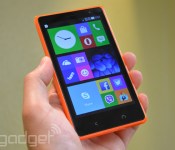
Nokia’s fourth Android phone does dual-SIM for just €99

After the Nokia X, X+ and XL, the Microsoft Devices team is back with its fourth Android-based budget smartphone dubbed the X2 Dual SIM, and the best part about it its €99 (about $135) off-contract price. That’s very attractive given the range’s pretty “inner glow” design, and the specs are also decent for what it is. We’re looking at a 4.3-inch WVGA ClearBlack LCD screen, a dual-core 1.2GHz Snapdragon 200 chip, 1GB of RAM, 4GB of storage, microSD expansion of up to 32GB (plus 15GB of free OneDrive cloud storage), 5MP/VGA cameras and a removable 1,800mAh battery. If this sounds like your kind of phone then look out for it as it goes global in July.
With its 4.3-inch screen, the X2 sits between the X and XL in terms of size, and it feels just right in my hand with a secure grip — the latter courtesy of the straight sides that subtly round off to the curved backside. The unit we got to play with is orange, but you can also get it in green, yellow, dark gray and white. With the exception of the matt dark gray version, these colors come with the series’ signature glossy, translucent plastic casing — which is, by the way, removable to access the Micro SIM slots, the microSD slot and the battery.

As before, Nokia doesn’t emphasize the fact that the X series runs on a heavily skinned Android. The X2 runs on a new version called the “Nokia X Software Platform 2.0,” which looks very similar to its predecessor. Users will find the three similar home screens welcoming you, with the main one featuring a Windows Phone-like tile UI, and you swipe right for the Fastlane for the recent apps, and swipe left for the new apps list that’s basically a carbon copy of the one from Windows Phone. The software felt slick during our brief hands-on, and the 5-megapixel AF camera was similarly responsive. Not a bad package overall.
Filed under: Cellphones, Mobile, Nokia
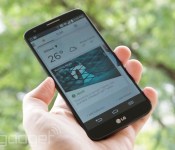
Aviate’s ever-changing Android home screen is now available to everyone

Just several months after it first surfaced, Aviate’s self-organizing Android home screen is now available to everyone, with no invitation required. The finished launcher remains focused on presenting just the apps and info you need at the time you need them. You may get news when you’re at home in the morning, navigation apps during your commute or restaurant reviews when out at night. It also categorizes apps to help you find them a little sooner, and plugging in your headphones will both show relevant apps as well as online content related to the tracks you’re playing.
However, it’s clear that Aviate has received more than just new branding since Yahoo took the reins. You can now reach favorite contacts with a swipe up from the home screen, and you can track your sleeping habits. Multiple day-to-day tasks are also just a bit easier; you’ll get commute time estimates based on weather, single-step conference calls and alerts for big changes in weather. I’ve given Aviate a quick spin, and it still isn’t going to satisfy power users who want to fine-tune every last aspect of their Android home screen. However, its simplicity and context-savvy presentation are still appealing — it’s easy to use, and saves a bit of time when checking for headlines or trying to find that new camera app. Provided you like that hands-off approach to managing your phone, you can try Aviate for yourself at the source links.
Filed under: Cellphones, Mobile
Source: Google Play, Yahoo Aviate (Tumblr)

OnePlus One explains why full production is delayed

The OnePlus One showed up on the scene as one of the most anticipated Android devices of the new year. But, due to its low costs and high specs its popularity quickly decreased due to their invite system. This has caused outrage from the public and many former followers of OnePlus have turned against the newly formed company and ridicule its use of contests and invite system. Their slogan “Never Settle” has been turned against them to “Never Selling”. In response to this, OnePlus staff member Carl has posted in their forums addressing the lack of units ready for sale.

In Carl’s own words, “As a startup, survival is a big concern. Sitting with excess inventory is something that can quickly kill us.” To prevent a quick death to the new company, they underestimated the appeal their device would have to the general public and ordered only a small amount of components for building the actual device.
It takes three months to obtain the pieces needed just for the display and touch sensors which are a vital part to any smart phone today. OnePlus wishes to assure everyone that they are doing their best to increase production and get as many OnePlus Ones out there for the public to purchase.
Production is expected to pick up next week just as they had said before, but the production and availability of the OnePlus One is not matching the increase the rise of demand being seen by OnePlus.
The post OnePlus One explains why full production is delayed appeared first on AndroidGuys.
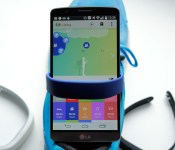
Sony SmartBand review: a fitness tracker that goes beyond fitness

When you hear the word “wearable,” there’s a good chance you think of a wristband, probably one that tracks your activity. Ever since Nike launched the FuelBand, your lower arm has become the main focus for fitness tech. Already the rot is setting in, though. Nike is rumored to be leaving the game completely (even if recent events suggest otherwise). Everyone else is still trying to decide what exactly a wrist-worn gadget should do. No one device appears to have figured out the magic formula. Most bands stop at counting steps and logging sleep. But Sony decided to try something different with its $100 SmartBand wearable. It still does the step-tracking thing, just along with other stuff — like, y’know, logging your entire life. As much as it can with a motion sensor and mobile phone, anyway. So how is it? I strapped one on to find out.
Hardware
It’s a bit confusing, but Sony calls the small sensor bit “Core,” but when sold with the wristband, it’s known as SmartBand. The Core part is similar to the sensor you get with a Fitbit Flex or Garmin Vivofit. It’s about an inch long by half an inch wide, and curved to fit your wrist. On one edge is a button, plus three small LEDs. There’s a micro-USB port on one of the short ends, and that’s basically it. The band is textured on the outer side and feels comfortable on the skin, even after prolonged use. As with other trackers, there’s a choice of two sizes in the box, and the big strap is larger than any other band we’ve seen. So, even if your wrists are like oak trees, it should still fit. The clasp is a small metal circle with two pins on one side, and a brushed finish with a Sony logo on the other. In terms of style, it still has that generic “sporty” look, but it’s more understated and visually pleasing compared to others I’ve tried (which is most of them), and the clasp adds a subtle metal detail to the otherwise plain rubber band. If, heaven forbid, you might want something other than black, there’s a bunch of colors to choose from, with a pack of three costing $25.

In keeping with the rest of Sony’s mobile hardware, the SmartBand is IP58 water- and splash-proof. As for compatibility, you’ll need a phone running Android 4.4 (with Bluetooth LE) to join in the fun, but NFC isn’t a requirement; that just makes pairing a lot easier. The three LEDs are your only visual output, but there’s vibrating feedback too. The battery lasts about five days between charges, depending on how much you use that vibrating feedback. I never had it last less than four, which is the minimum for any wearable, really. Fortunately, it also charges fairly quickly, going from dead to full in under an hour.
Setup
Press and hold the lone button, and the SmartBand will vibrate into life. Once on, it’ll go straight into pairing mode. I set it up with an LG G3, which has NFC. This makes things mildly easier, as all the Bluetooth pairing is done automatically, and the Play store loads up a download page for the required Smart Connect app. Once that’s installed, it’ll do the same for an app called Lifelog, and you’re set. If you’re not familiar with Smart Connect, it means you probably haven’t used any Sony accessories before. It’s the company’s “hub” for anything that connects to your phone (Bluetooth headphones, etc.). You’ll know if you have it installed because it pops up (a little annoyingly) when you connect almost anything to your phone.

Smart Connect is where you’ll change the SmartBand’s basic settings. Lifelog, on the other hand, is where all the, well, life-logging goes on. Again, it’s a confusing arrangement having two separate apps (technically it’s three, but the SmartBand settings app is embedded in Smart Connect). Think of it as one for settings, and the other for the fun stuff, and you’ll be mostly right. If you don’t have NFC in your phone, setup is almost the same, just with some manual steps to get the devices paired.
With pairing complete, and the apps installed, you’re ready to get logging. For your troubles, you’ll also be rewarded with two persistent notifications in Android. One from Smart Connect telling you which mode the band is in (more on this later), and one from Lifelog letting you know it’s, er, logging. Both seem a little pointless, and are nothing more than a permanent annoyance, occupying oft-valuable notification space. You can use them to get into the apps quickly, but I’d still prefer to be able to dismiss them.
Software

Right at the top, I mentioned how Sony was trying to do something different than other fitness trackers. This is where Lifelog comes in. The app is as much a part of the product as the hardware is. This is arguably true with Jawbone’s Up and Fitbit, et cetera, where the software adds functionality beyond the basic tracking, but Lifelog takes a completely different approach. Whereas Up will let you manually log food, and give you additional health-related data, Lifelog tracks what you do with your phone. For example, take a picture, and Lifelog makes a note of that. Browse the internet, and it will tally how long you were online. It’ll also keep tabs on where and when you did everything (if you let it). The idea is that, in combination with the motion/activity data, you can build up a “bigger picture” of how you spend your day.
Lifelog tracks 12 different activities, with some overlap. These include: steps, total minutes walking, total time running, calories burned, hours slept, time spent on social networks and number of photos taken. It’ll also log time spent with music, movies, games, books and the internet. You can create “Life Bookmarks” by double-tapping the SmartBand’s button (or via the app), and Lifelog will record a snapshot of what you were doing, where you were doing it, the weather at the time and so on. If all this sounds a little hectic, it’s not. The app is simple, with a timeline running along the top (showing the last few hours) and your daily totals for each activity in tiles below.

Click on any activity’s tile, and you drill down into more detailed stats. For example, prod the steps tile, and you’ll get an hourly breakdown of the day. There are also tabs to show your activity by week, month and year. You can set your desired daily goal for each activity here too. So, if you want to set a goal of 30 minutes of mobile gaming a day, you can — it won’t stop you from going over (now there’s an idea), but you can see at a glance how close you are to that target. The squares for each activity change hue, from faint to vivid, throughout the day as you progress toward your goal, providing a quick progress overview. Cute circular icons also appear on the timeline above an avatar (representing you) every time an activity is logged (e.g., a camera icon for a photo).
The timeline is probably the centerpiece of Lifelog. In the middle is the aforementioned avatar — a man or woman permanently gazing at a phone (so true). The background changes color reflecting the time of day, which is marked out in hourly intervals. Lifelog hooks into AccuWeather, and will show different graphics on the timeline to let you know if the sun was shining at the time, or if it was raining on your life parade. Perhaps more usefully, you can scroll into the future and see how the weather should be at that time (like a micro weather app).
The real party piece is that you can scroll back and forth in time to get a very quick visual overview of your entire life (well, the bit you can log with a phone anyway). It’s cute and creepy all at the same time. Especially when you scroll back and watch your onscreen self just standing there, then sleeping, then standing. Should you log any exercise, your avatar will do a little running animation for that period, before going back to glumly looking at the phone again. If it didn’t highlight the sad reality so elegantly, perhaps I wouldn’t mind as much.
Logging life

I honestly don’t know how I feel about it all. On the one hand, I dig being able to break down how I spend my day. On the other, I feel like I am writing a pointless diary that no one will ever want to read (including me). In reality, it’s a more juiced-up version of what you get with any self-quantifying data. It’s as useful or useless as you deem it to be. One thing’s for sure, if you spend too much time on Twitter, or playing Dumb Ways to Die, you’re soon going to know about it with Lifelog. Some metrics definitely feel more useful than others:
Calories
The app asks for your basic details (e.g., height, age) and estimates your caloric expenditure based on standard guidelines, coupled with your recorded physical activity. You can set a goal of calories you’d like to burn, but it’s hard to gauge how accurate it is without sophisticated tools. As a guide, it’s nice to know, but I don’t find myself referring to it often.
Steps, time walking and exercise
These simply log the total amount of time you spend either walking or jogging. The app guesses at distance totals with moderate accuracy (about 70 percent and upwards, similar to the step-count accuracy). It doesn’t plot a route of your walking, but the app does grab your location sporadically (with permission), so you do get a rough path on a map. The best thing about the exercise tracking is that it’s automatic. In my testing, it picked up my treadmill running after about a minute. These stats are not as accurate as other trackers, but are still good overall guides.
Sleep
Through the settings, you can tell the app to automatically enter sleep-logging (or “night”) mode at set times, which is much better than having to remember and switch it to night mode manually — most sane people will give that habit up very quickly. The problem is when you’re not actually sleeping at those times, it’ll either log you as having light sleep or, to its credit, assume you woke up temporarily. As with similar devices, it determines light and heavy sleep based on movement. You can ask it to wake you up at the optimal time within a half-hour window. If you’re sleeping like a log the whole time, it’ll just buzz you awake at the target time regardless. I like the alarm feature, but as for sleep logging? I already know I don’t get enough sleep, thanks.
Communications
Like to natter on Hangouts, Gmail, Twitter and Snapchat? You get the picture. Lifelog reports the total amount of time you spend on each of these apps, and aggregates it into a lump sum figure of time spent basically chatting. I’m not sure how useful this is, but it’s there for your significant other or parents to see and tell you off about. Thanks, Sony.
Photos
My Instagram is pretty dull, but it’s fun to be able to see when and where you decided to take a photo. If you’re skimming through your timeline, it partly serves as a mini bookmark, letting you spot a moment when you found something interesting. If you click the camera icon, it’ll show you thumbnails of the pics you took too. Not entirely useless. Note: You can’t edit what shows up in this section. Meaning, any and all photos could pop up here.
Music
I listen to streaming DJ mixes almost all day long, so this isn’t much use to me. If you’re a normal person, though, you might enjoy being able to see when you were listening to song X or band Y, especially if those moments hook in with other events (like a great workout).
Movies
If you’re an avid viewer, it’ll put a number on how much time you spend squinting at Orange Is the New Black. Then you can set a goal to do that less (and do the right thing, and watch it on a TV instead).
Gaming
Depending on your gaming habits, this metric might serve the dual purpose of signaling bathroom visits, and time spent waiting for public transport.
Books
I much prefer reading either a real book, or on my Kindle. I tested it on the phone to make sure it logs the Kindle app (it does). So that’s nice.
Browsing
This is probably the surprise winner for me. I know I browse a lot. Like, a real lot (given my job, that’s hardly surprising). It’s still, without doubt, the thing I do most on my phone, along with messaging. I knew this, but having it quantified motivates me to trade some of that time for steps, or running.

Individually, it’s unlikely any of these analytics will make a huge impact to how you decide to spend your day in the future. It’s the big picture Sony is gunning for here. It feels like it’s more about passive logging for long-term data accumulation and later reference than shocking you into change. Or, possibly, logging mostly for logging’s sake — something people clearly enjoy doing (look at Foursquare, for instance).
The whole lifelogging thing is cool, but there are some other useful features beyond that. I already mentioned how if you go for a run, you don’t need to tell the SmartBand; it’ll just figure it out and start recording. If you take your phone with you, it’ll even log where you went (though not a detailed GPS track). This is different to other trackers like the Jawbone or FuelBand that require you to tell them you’re working out. It might seem like a small detail, but the less a wristband demands of your time and attention, the better it’s doing its job.
In use

If you can pull yourself away from the Lifelog app long enough, the SmartBand has a few other tricks up its sleeve. For example, if you have an Xperia phone, the SmartBand will vibrate to alert you of any alarms you set on the handset. Then, you can tap the wristband’s button to dismiss them. It can also be used as a basic notifier for email, SMS and almost any other app you might have. Need to stay on top of those Netflix notifications? No problem. For this, you don’t need to have one of Sony’s phones; it works with any Android handset. It may be silent, but it’s fairly difficult to miss — I personally found the notifications feature very useful. There’s an “out of range” alert, too, that tells you when you leave your device behind (i.e., it goes “out of range”). That’s good if you’re the forgetful type, but less so as an anti-theft device. The robbers will already have had a head start by the time you get your three pulses.
There are two things I’ve struggled with during my time with the SmartBand. The first one is privacy. Lifelog doesn’t share any data that you wouldn’t be comfortable putting on Facebook, theoretically. Put it all together in a timeline, though, and you’re leaving a personal snail trail that anyone who picks up your phone can access. Again, no big deal in theory, but I’m sure it won’t be long before the app betrays you, and reveals to a colleague you were in the pub when you said you were running an errand, or tells a significant other that you were actually playing games and not out for a jog like you said you were. Social networks have been doing this for ages though, so I guess users know the risks.

The second is this question: Who is this for? There are better fitness trackers out there if that’s what you’re after (the Garmin Vivofit and Fitbit Flex, to name but two). As for lifeloggers, they might be better off with something like Autographer or the Narrative Clip. I guess some might find permanently wearing a camera a little creepy — intrusive, even. If there is a secret sauce here, I feel it’s discretion. The SmartBand and Lifelog app are low-key, out of view and record a bit of everything (not just steps, not just location or photos). For some people, this will likely be a very appealing prospect. It’s not going to be for everyone, but if the internet has taught me anything, it’s that people like to keep logs of things, and SmartBand is screaming in the direction of that crowd.
Curiously, there are two scarcely used controls that, if supported well, could actually make the SmartBand compelling to more people. The first is remote app control. Sony has a couple of Android apps that can be controlled by the SmartBand. One obvious example is a camera shutter app. This ends the tyranny of the arm-length selfie. Prop your phone up somewhere, and trigger the camera with the SmartBand’s button. Other apps that play nice include a “find your phone” tool and, confusingly, OfficeSuite 7. Either way, much like Sony’s SmartWatch 2, you can make use of the hardware button to interact with third-party apps. If more widely supported, this would definitely broaden the SmartBand’s appeal.
The second control is “tap” input. Similar products like Misfit’s Shine and the Fitbit Flex rely on taps as the main interaction method. In my experience, it doesn’t usually work too well, but I can see the appeal when there’s no display to help navigate. SmartBand uses taps to control Android’s media player. One tap for pause, two to skip forward and three to skip back. Handy. The strange part is that this input mechanism isn’t used for anything else. Why not use it with third-party apps like the button, or to dismiss calls, et cetera? Just throwing ideas out there, Sony.
Wrap-up

I think there’s a trick being missed here. As it stands, the SmartBand feels like it’s living up to about 75 percent of its true potential. Lifelog is clearly meant to be the focus. The app isn’t perfect — I’d love to be able to drill down into even more detail, or have the option to share (compete?) with friends. But, I like the premise. Even though a lot of it’s of limited use to me, there’s a certain demographic that’ll go nuts for the ability to create a trail of their daily lives. Here’s where part of the experience is missing: Lifelog is crying out for a social component (as long as it’s optional). It seems like a strange omission. The ability to add friends, share your life with them and add interactivity to Lifelog feels like a day-one feature. Not for the privacy-conscious, of course, but there are many people who like to share their lives, and this would be a great tool for them. The other untapped potential refers to playing nice with third-party apps. Again, it seems ripe for exploiting.
The 75 percent of potential that is being lived up to makes the SmartBand a wearable that will, for once, appeal to people other than the fitness crowd. If you’re not into activity tracking, there aren’t many wristbands aimed at you. As with its SmartWatch 2, Sony has built something that tries to do a lot of things adequately, rather than one or two things excellently. Perhaps, most important of all, Sony’s tried to do something — gasp — different. With a little refining, and ongoing software support, this tracker-come-notifier could earn a loyal following. Especially if the company’s recent Core concepts hint at future plans. Just make sure you tap that final 25 percent, Sony.
Filed under: Cellphones, Wearables, Mobile, Sony
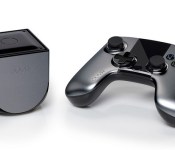
How would you change the OUYA (founding backer edition)?

OUYA was one of Kickstarter’s biggest success stories, and in a way, we all felt a little chunk of pride. After all, this was a console that the community had created, which would topple Sony and Microsoft’s duopoly at the top of the gaming market, all for just $100. The higher the promises, and our expectations rose, however, the further they had to fall. When our Tim Stevens reviewed the first edition of the hardware, he found that the controller and UI fell far short of what was expected. The game library was nothing to be excited about, and the company is now offering its games store on other platforms — somewhat negating the point of the console in the first place. So, our question to all of you is this: had you been sat in those initial meetings with Julie Uhrman and Yves Behar, what would you have told them to do differently?
Source: Engadget Product Forums
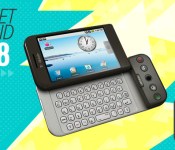
Gadget Rewind 2008: T-Mobile G1 (HTC Dream)

In 2005, a small Palo Alto-based mobile software company called Android Inc. was quietly folded into Google’s growing empire. The acquisition led to the release of the company’s first-ever “Google phone” three years later: the T-Mobile G1 (or HTC Dream as it was mostly known outside of the US). Google’s philosophy for the G1 centered on one-click search and a rich web experience, and leveraging T-Mobile’s 3G network was essential to its success. The G1 was also the first smartphone to run the open-source Android operating system and after just six months on the market, it earned a fifth-place spot amongst top-selling smartphones in the US.
 Andy Rubin, one of the co-founders of Android who went on to become SVP of mobile and digital content at Google, wasn’t new to the mobile device game. His earlier venture, Danger Inc., had found success in 2002 with its Hiptop smartphone, which was rebranded by T-Mobile as the Sidekick. It’s not surprising then that the G1 ended up as a T-Mobile exclusive — after all, its pop-out keyboard was reminiscent of the Sidekick’s swivel screen design. And for consumers in search of an alternative to the BlackBerry smartphones that dominated at the time, the G1 was a welcome option.
The T-Mobile G1 was an odd-looking duck. It was chunky due to the phone’s pop-out keyboard, with slightly larger dimensions than the sleek iPhone 3G released the same year. The G1′s physical keyboard was a necessary evil considering the inaugural Android operating system (1.0) didn’t include a virtual one — this despite its 3.2-inch capacitive touchscreen. That wasn’t the G1′s only design quirk: It also featured a slanted “lip” on its front face that housed a trackball and physical navigation buttons.
Its unique build aside, the G1′s main attraction was its open-source Android environment. With it, Google aimed to stimulate app development and “future proof” the OS with developer contributions over time. The Android Market (now known as Google Play) also debuted in tandem with the G1, offering around 50 applications at the time. All those apps were free, too, since the Market had yet to implement a payment system.
Multitasking, copy and paste, pull-down notifications and home screen widgets: These were some of the fresh features the G1 ushered in. It also, unsurprisingly, came deeply integrated with Google services such as Gmail and Maps. And without a proprietary music application of its own at the time, Google turned to Amazon to provide an MP3 app.
The G1 may have been an unfinished product when it was released, but Google addressed its shortcomings with iterative software updates — now a common and accepted practice for Android devices. Early OS fixes tackled glaring oversights like the G1′s missing virtual keyboard and lack of video-recording ability for its 3-megapixel rear camera.
 A T-Mobile rep compares Apple’s iPhone 3G (at left) with the G1.
A year after the G1′s launch, Verizon released the massively popular Motorola Droid with a slightly tweaked version of Android; a device that would prove a boon for Android device sales and mindshare. Still, Google continued on its own parallel path with HTC, releasing the MyTouch series and the G2. Eventually, however, Google abandoned its partnership with T-Mobile and HTC in favor of its Nexus line: reference devices that would run the latest, unadulterated versions of the Android operating system.
Google’s G1 smartphone holds an important place in the company’s history. Not only was it the first of many devices to run the Android OS, but it also stood out as an open-source alternative to Apple’s iPhone and closed iOS ecosystem. Android’s openness and flexibility led to its rapid adoption by a variety of manufacturers seeking to topple Apple’s success — it also helped that it was free to license. The G1, though primitive in comparison to the current crop of Android devices, was Google’s first step toward the mobile phone market domination it enjoys today.
Did you own a T-Mobile G1? Add it to your Engadget profile as a device you had (or still have) and join the discussion to reminisce or share photos of your device with other like-minded gadget fans.
[Image credit: T-Mobile / HTC (G1 front view); JENS SCHLUETER/AFP/Getty Images (iPhone/G1)]
Filed under: Cellphones, Mobile, Google, T-Mobile

Android 4.4.4 Already Here! T-Mobile Announces Uncarrier 5 and 6! – The ManDroid Show

I hope your Saturday is going well my Android friends. ManDroid Show is a little late this week but it is here. Android 4.4.4 is already out in the ild, sadly it is not a remedy for those bugs in Android 4.4.3. T-Mobile shocked the carrier world once again, by announcing Uncarrier 5 and 6, Don;t know what else they can do to change the game. Enjoy the show!
Andorid 4.4.4
Uncarrier 5
Uncarrier 6
Amazon Phone
//<![CDATA[
ord = window.ord || Math.floor(Math.random()*1E16);
document.write('’);
//]]>

Facebook’s company trip to Africa leads to more efficient Android app

Facebook recently rolled out an update for Android devices that’s supposed to speed things up for users. If that update delivered on its promise, then you’ve got the company’s trip to Africa to thank — that’s how Facebook’s engineers got a taste of how slow the app can be on low-end phones with developing nations’ internet speeds. One of the social network’s engineers, Alex Sourov, detailed in a blog post how they bought several low-end Android phones in Africa to test out their app, which didn’t only crash repeatedly, but also loaded really slowly. Even worse, they ended up consuming a month’s worth of data plan within 40 just minutes trying to use the app. It became apparent that they needed to give their Android app an overhaul if the social network wants to reach even more people around the globe — so they did.
In order for Facebook to load faster on single-core devices, the engineers tweaked the app so its features don’t load all at once when you launch it, and cached News Feed entries load up much earlier. Then, they decided to move away from JPEG and PNGs and transmit Facebook images using Google’s WebP format, which consumes a lot less data. The app now also only loads images in resolutions and sizes that match the device’s screen size — it doesn’t automatically download a full-size high-res pic, for instance, unless you specifically click on it. Finally, Facebook has reduced its app size by 65 percent in hopes that it’ll play better with phones and tablets with small RAM sizes and limited storage capacities.
[Image credit: Marco Paköeningrat/Flickr]
Filed under: Misc, Mobile, Facebook
Source: Facebook

CNET: Samsung, Motorola and LG will launch Android Wear watches next week

Next week is Google’s big developer conference, and according to a rumor from CNET, Samsung will be at center stage with a smartwatch running Android Wear. The usual unnamed people in the know suggest Samsung’s watch could even be a giveaway for attendees. Motorola and LG are also named as launching devices, although whether that includes the G Watch we’ve seen so much of is unknown. Google’s video for developers gives a lot of hints at what the Android Wear experience will be like, but even with a number of smartwatches already on the market, we’re ready to see what hardware innovation is still possible. The other factor is Samsung’s internal decision between Android and its own OS, Tizen. It’s launched Tizen-based watches and phones, switched the original Galaxy Gear device to Tizen from Android, and prepared for TVs based on it.
Filed under: Wearables, Samsung
Source: CNET

