


6 best new Android apps you might want to take a look At [SP]
There are hundreds of thousands of apps out there that you can get for your phone, tablet, and even your desktop computer. However, some of the best apps available are Android-based. This is because of the open market and code-sharing available to Android developers. If you’re looking for the hottest new Android apps, look no further.

Android Apps via Siddartha Thota
Image via Flickr by Siddartha Thota
Themer
Have you ever wanted to make your phone look just a little different than the standard? Themer allows you the ability to really customize your phone so that it looks how you want. This is one of the features of Android mobile phones that you simply don’t get with iOS smartphones. With Themer, you’ll be able to find different wallpapers, widgets, and icon packs. It’s extremely easy to set up and revert if you decide that you don’t like the theme you’ve come up with.
Find Themer on the Play Store.
Fences
Getting your phone automated is one of the best ways to ensure that you never go into a business meeting with your phone blasting your favorite song. You can use Fences to create virtual areas around different locations. These areas allow you to automate what happens to your phone while you are inside or outside of them. Do you go to the same theatre every week? Create a fence around the theatre so that your phone automatically goes to silent when you enter the building, and returns to normal when you leave. The great thing about this app? It’s completely free.
PingTune
Sharing music with friends is one of the best ways to get your favorite bands heard and appreciated. With PingTune, you can share your favorite music and chat with your friends at the same time. The app is being marketed as the go-to music and messaging platform. On top of being able to send songs to your friends, you can send just a snippet of a song. You can use different tabs to keep all your shared music in one place.
Find PingTune on the Play Store
Secret
Are you dying to know about the biggest secrets in the tech industry? Does gossip from the latest celebs, or even the guy next door interest you? If so, you need to check out Secret. This app is now available on Android, and is garnering a lot of buzz. The problem with Secret is that not everything that is posted is true. However, you’re likely to find some insider tips that will make you salivate. Gossip from Silicon Valley posted here doesn’t have any names attached to it. Because of this, it’s hard to verify what is real and what is not. In the long run, when you’re using Secret, you’re likely to be one of the first to know what’s coming out soon.
Roomer
Consider this – you have a vacation planned and have booked your hotel room in advance. However, for one reason or another, you can’t make it on your trip. It’s past the cancellation date, and now you’re out of luck. If you have Roomer on your Android phone, you’re not dead in the water yet. This app allows you to sell your previously booked hotel rooms. If you’re on a trip and need a room, use Roomer to help you find the perfect hotel. You can use the app or the desktop version to get a room nearly anywhere.
Downcount
Do you have an event coming up in the near (or distant) future? Have you ever wanted to know exactly how long it is until your event? Downcount allows you to count down the days on your phone. You can set up multiple different events, and see them all in one clear, simple design. On top of this, you can even count up with the app. How many days have you been alive? Find out with Downcount. You need to keep in mind, however, that this app doesn’t count seconds, minutes, or hours. It only shows you the days.
Find Downcount on the Play Store
There are a ton of new apps coming out every month. Android offers great new apps all the time that can help you stay social, get organized, and more. When you browse the Google Play Store, you can find the newest apps in any category.
//<![CDATA[
ord = window.ord || Math.floor(Math.random()*1E16);
document.write('’);
//]]>
The post 6 best new Android apps you might want to take a look At [SP] appeared first on AndroidSPIN.
Wico and Goophone Beat Apple to Market with Android-Based iPhone 6 Clones
Months before Apple is expected to release its next-generation iPhone, functional iPhone 6 clones already are starting to appear in China’s mobile phone marketplace. One of the first clones, the Wico i6, is profiled by 86DIGI (via Nowhereelse.fr) in a two-part hands-on video.
(Note: Contains fairly loud soundtrack of The Carpenters’ “Top of the World”)
Like most clones, the Wico i6 is quite detailed for a fake, with authentic-looking FCC labeling and the characteristic Apple branding. The phone also closely mimics the rumored styling of the 4.7-inch iPhone 6 with a thin chassis that houses a side-mounted power button and elongated volume buttons.
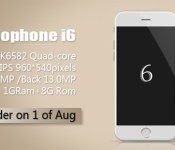
Wico isn’t the only clone maker ready to enter the mobile phone black market, however. Chinese clone maker Goophone has also announced (via GizChina.com) that it is preparing the Goophone i6 for release in August, ahead of Apple’s expected September iPhone launch.

The GooPhone also borrows its styling from the rumored schematics of the iPhone 6 and pairs it with a quad-core Mediatek MT6582 chipset, 1GB RAM and 13 megapixel rear camera. Similar to previous Goophone clones, the i6 model is powered by the Android operating system.
Engadget giveaway: win a G3 smartphone courtesy of LG!

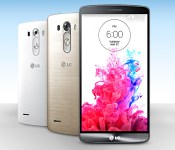
As the classic refrain goes, three is a magic number — and that certainly sums up LG’s latest smartphone, the G3. It’s fronted by an extra-sharp, 5.5-inch quad HD (2,560 x 1,440) display and wrapped in a smooth metal exterior. The G3′s rear button controls offer a distinct twist on the smartphone interface, and you’ll find both a very quick, laser-focused 13-megapixel camera as well as enough battery power to get you through the day. Want one? LG is more than willing to share the love, as it’s giving away brand new G3s to three lucky Engadget readers this week. Oh, and you get to choose from one of the big four carriers (AT&T, Sprint, Verizon and T-Mobile) — you probably won’t have to switch networks just to get LG’s latest. This particular giveaway is only for those in the US, but since the G3 is available worldwide, you can always pick one up. So, what are you waiting for? Head on down to the Rafflecopter widget below for your chance to win a G3 of your very own. It might just be your lucky day.
- Entries are handled through the Rafflecopter widget above. Comments are no longer accepted as valid methods of entry. You may enter without any obligation to social media accounts, though we may offer them as opportunities for extra entries. Your email address is required so we can get in touch with you if you win, but it will not be given to third parties.
- Contest is open to all residents of the 50 States and the District of Columbia, 18 or older! Sorry, we don’t make this rule (we hate excluding anyone), so direct your anger at our lawyers and contest laws if you have to be mad.
- Winners will be chosen randomly. Three (3) winners will each receive one (1) LG G3 smartphone (for AT&T, Sprint, Verizon or T-Mobile).
- If you are chosen, you will be notified by email. Winners must respond within three days of being contacted. If you do not respond within that period, another winner will be chosen. Make sure that the account you use to enter the contest includes your real name and a contact email. We do not track any of this information for marketing or third-party purposes.
- This unit is purely for promotional giveaway. LG and Engadget / AOL are not held liable to honor warranties, exchanges or customer service.
- The full list of rules, in all its legalese glory, can be found here.
- Entries can be submitted until July 23rd at 11:59PM ET. Good luck!
Filed under: Cellphones, Mobile, LG
[Discussion] Is your Nexus 4 having soft key issues on Android 4.4.4?
 There are currently only a handful of devices that can be updated to Android 4.4.4, including Nexus, Motorola and Sony devices. Of those devices, it’s the ones that are most closely related to Google that have apparently suffered severe teething issues. One particular issue that has been brought to our attention is the fact some Nexus 4 owners have been reporting that their soft keys have stopped functioning after updating to Android 4.4.4. With all of these issues with Android KitKat, Nexus owners have had varied experiences, even with seemingly identical devices, so we’d thought we’d ask: is your Nexus 4 having soft key issues on Android 4.4.4?
Perhaps the most unusual thing about this particular issue is that it appears to manifest as a hardware issue where the bottom of the panel stops operating, and there are pages and pages of users making note of the issue, though it seems entirely up for debate whether the real cause is the Android 4.4.4 update or a deeper hardware issue. There has been no official word on what the root cause of the issue is, and users are reporting very mixed experiences with lodging RMA’s with Google or requesting digitizer replacement from LG. By now, most Nexus 4′s will already be out of warranty, which has created a rather harrowing situation for some users whose device has essentially been rendered useless.
Have you been experiencing any issues on your Nexus 4 on Android 4.4.4? Anything to the degree that is described above? Let us know your story in the comments.
Thanks @Dibang69 for the tip!
//<![CDATA[
ord = window.ord || Math.floor(Math.random()*1E16);
document.write('’);
//]]>
The post [Discussion] Is your Nexus 4 having soft key issues on Android 4.4.4? appeared first on AndroidSPIN.
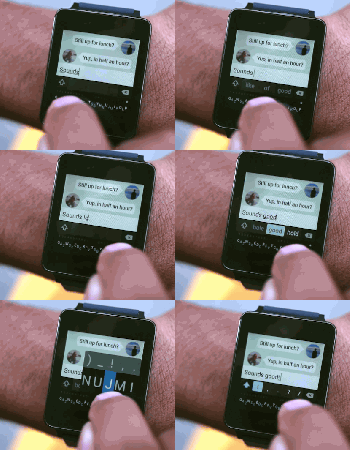
Minuum’s Android Wear keyboard makes smartwatch typing a fidgety reality

If you thought talking to your smartwatch was awkward, how about a tiny keyboard? Minuum’s single-line keyboard app (which even made it to Google Glass) is coming to Android Wear — and the beta sign-up sheet’s right here.
Via: Techcrunch
Source: Minuum
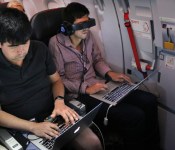
Hacking the friendly skies: creating apps for wearables at 36,000 feet

Few activities are as taxing, time-consuming and mentally draining as air travel, and there are hundreds of thousands of travel-related apps to help us get from point A to point B with as little hassle as possible. But there’s always room for improvement, especially now that wearables like Android Wear, the Pebble smartwatch and embedded sensors are growing in popularity. While it’s already possible to scan boarding passes or receive flight notifications on smartwatches, there are surely other use cases that would ease the burden of flying. Wearable World, which teaches wearable-related startups the ins and outs of the business, partnered with American Airlines to create what it’s billing as “the first in-air wearables hackathon.” Teams were asked to come up with the best travel app for wearables, and the finalists got to jump on one of the airline’s newest planes to polish their app and show it off to real-life passengers.

Calling it an “in-flight hackathon” is debatable, since the biggest chunk of the event actually took place on the ground in San Francisco. In traditional hackathon style, 200 developers had 24 hours to create a travel-related wearables app from scratch. Finalists were chosen and given 30 days to work on their app before it was time to get on an Airbus A321T from San Francisco to JFK Airport. Here, the four teams tested their creations in a real-life setting, which included going through security, boarding the plane, using in-flight WiFi (Gogo was a sponsor) and limited workspace in Economy Class. This was their last chance to make any tweaks based on their in-flight experience. The next day, each finalist boarded another A321T bound for San Francisco and pitched several people on the flight who acted as judges.

The winning app came from UsTwo (the creators of Monument Valley), and is handy for family or close friends that like to monitor where you are in your travels. As you arrive at the airport, make it through security, board the plane, take off and land, the app pushes notifications to both you and another person of your choice. Even though two devices are involved, each one shows different information based on who’s using it; your device (and smartwatch, if applicable) shows flight information, boarding passes and other details that may help you get to the plane, while your loved one will get updated on what stage of the experience you’re in. When you’re in-flight, they’ll also be able to follow your plane’s location.
Since GPS isn’t available indoors, the app relies on a network of common-use iBeacons placed at various points within the airport (known as the SITA registry, it’s currently undergoing a trial run at Dallas/Fort Worth Airport). The beacons communicate with your phone as you pass by, and the app will send notifications as it detects each one along the way. The primary issue is that the app relies on these beacons in order to work in every airport. As a result, it may be limited to use in specific locations at first.

Next up was InFlight Social, an app that wants to connect you with other people on the plane. When you get on the flight and connect to WiFi, InFlight Social can detect if anyone else on the plane is using the app; then, by looking at your Facebook and LinkedIn accounts, it will determine if anyone has mutual friends or associates. Once a connection is established, the app will check Concur to see where the two of you are going — perhaps both of you are going to the same conference or staying at the same hotel, so why not split a cab or car rental? Or, if that’s not really your thing, you can send your new pal a welcome gift online via MasterCard. The problem is that many travelers prefer to keep to themselves and will balk at the idea that other people can see their travel itinerary, even if both of you know the same people. Fortunately, your information can only be picked up by others if you download the app, opt-in to the service and are connected to Gogo.
Proximity Signage was put together by NewAer, a company that licenses proximity-advertising software to other businesses. As you step off the plane, digital signs will be there to greet you with personalized suggestions on where to go based on your connecting-flight info, along with travel and shopping preferences. If you’re getting to another flight, the signs provide you with gate information as well as a map and a place to get your favorite coffee along the way; if you’re at your final destination, it could tell you how to get to baggage claim or ground transportation. To address privacy concerns, as soon as you walk by the sign, the personal messages are deleted and replaced with a generic screen. (The company said that wearables easily fit into this situation, but no demonstrations took place.)

The company refers to the tech, which is already available to developers, as “reverse iBeacons”; whereas iBeacons ping your phone incessantly whenever you pass by, in this case your phone actually pings the signs and relays profile information. The software can easily be extended to other uses, such as personalized advertising at mall kiosks, file exchanges between mobile devices, automatic check-ins to locations and even unlocking your car.
Finally, if you have pets in the cargo area of the plane, Furry Flyers will be helpful. Embed a sensor into your pet’s collar that tracks their location, heart rate, temperature and other conditions. It also includes a handy checklist of your pet’s lengthy onboarding process, so you can make sure they’ll get on. If the team finds success with the app, it wants to eventually make it possible for you to talk to (and perhaps even see) your dog or cat during the trip. This may put an anxious pet owner at ease during the flight — as long as everything is going well for Fluffy. If things take a turn for the worse, well… your travels just became much more stressful.

None of these apps are available yet, and some of them may never make it into an app store. But the hackathon served its purpose: It gave developers an opportunity to come up with creative travel-related uses for wearables, Bluetooth beacons and smartphones. As the tech continues to grow in popularity, the more impact these types of events can have. And when it comes to travel, any app that makes life easier is a welcome one.
Filed under: Cellphones, Wearables, Software, Mobile
Alleged Sony Xperia Z3 sized up next to the original Samsung Galaxy Note

In past few weeks, we have seen the Sony Xperia Z3 a few times, and according to the information we have so far, it looks like a worthy successor to the Sony Z series. Xperia Z3 will be running a Snapdragon 801 chip with the latest version of Android. However, folks over at XperiaBlog managed to get their hands on some new pictures of the Xperia Z3, alongside the Samsung Galaxy Note.
 The picture above gives us an idea about the dimensions of the Z3, it’s almost equal to the original Galaxy Note, but a little less wider. Also, another picture is shared below which shows that Xperia Z3 will have slightly round edges unlike the predecessors.
 Do you think the Xperia Z3 will be the best ‘Z’ yet? Let us know in the comment box below.
Source: XperiaBlog
The post Alleged Sony Xperia Z3 sized up next to the original Samsung Galaxy Note appeared first on AndroidGuys.

120 Sports brings its new online network to Android

Just as it promised, 120 Sports has now made its debut on Google’s mobile platform. With today’s Android arrival, this MLB-, Time Inc.-backed online network, which hopes to be the internet’s ESPN, marks its first expansion outside of iOS and the web since launching last month. In case you’re not familiar, 120 Sports offers live sports coverage every day, doing so in two-minute clips which can be enjoyed in real-time or on-demand. The app itself looks and feels pretty smooth, both on iOS and Android, focusing on detailed imagery and content that’s easily accessible via a simple tap. “As we go to Android, we’re looking to grow our audience base there and continue to expand our programming,” 120 Sports President Jason Coyle said to Engadget, adding that he’s really excited for what’s to come next for the young network.

Google’s Play Store is getting a big, visually intensive makeover

Many would argue that the Google Play Store for Android is useful in its current form, but pretty? Not so much. However, there are now signs that it’s going to be much better-looking — if not necessarily more functional. Android Police has obtained a wealth of screenshots hinting at a big Play Store revamp that borrows more than a few pages from the company’s new Material Design handbook. Extra-large artwork is everywhere, and there are now a slew of icons that make it clear what you’ll be getting, such as mature content. The layout isn’t perfect; there’s a lot of scrolling, for example, and some of the sharing features appear to be buried at the bottom. With that said, the new storefront is billed as a work in progress with no definite release date. It wouldn’t be out of the question to see a few tweaks before the store reaches your mobile device of choice.
Filed under: Cellphones, Tablets, Mobile, Google
Source: Android Police

Sony’s next flagship phone allegedly shown off with new body, same camera

The jump from Sony’s Xperia Z1 to the Xperia Z2 was relatively minor, so don’t be surprised if this familiar-looking leak turns out to be legit. According to a Baidu Tieba user from China, we’re looking at a prototype of Sony’s upcoming Xperia Z3 aka L55t (China Mobile variant with TD-LTE) which is, surprise surprise, running on a more powerful Snapdragon 801 MSM8974AC chipset (the Z2 uses MSM8974AB) plus Android 4.4.4. Judging by the photos, this device shares the same height as the original Galaxy Note and hence the Xperia Z2, meaning the screen size should stay at 5.2 inches. Likewise, the Z2′s 20.7-megapixel camera is here to stay. What makes this prototype stand out is its new, simpler body design, which is a surprise given how the range’s appearance has changed little since the Xperia Z. That is, unless, this phone turns out to be just a variant of the Z2, so only time will tell if our guess is right.
Filed under: Cellphones, Mobile, Sony
Source: Baidu Tieba

