


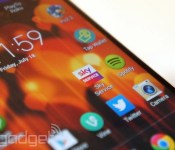
Sky’s new Service app lets you manage your account on the move

Sky’s got a plethora of mobile apps to keep you entertained on the go, but has until now neglected customers who find admin just as fun. Much like mobile carriers have apps for general account management, the new Sky Service app for Android and iOS lets subscribers view and pay bills, check the details of their TV packages and manage their broadband router restrictions. The app also allows you to reset your TV PIN if the kids have cracked it while you’re out, request a customer service call-back, reschedule an engineer visit and alter which Sky+HD box the Sky+ app records to if you have a multiroom setup. Not the most exciting tasks, but handy to have in your pocket nonetheless.
Filed under: Home Entertainment, Internet, Software, HD
Source: Sky

Vertu, maker of the $22,000 smartphone, is considering luxury wearables

Last month was a special one for Max Pogliani: Not only did it mark his first anniversary as Vertu’s CEO, but it also saw the launch of his very own baby, the Android-powered Signature Touch. This new phone’s up-to-date specs have already silenced critics; and despite the luxury market’s slowdown, the Italian exec said his team’s managed to sell more units than anticipated, and their figures for the first half of this year already beat those from all of last year. Vertu’s not stopping there, as it plans to expand its portfolio with an even more affordable smartphone, as well as new accessories like audio products and maybe even smart wearables.
Vertu’s hand-assembled phones are currently offered in three tiers: the Signature featurephone line (powered by Nokia’s Series 40 OS), the mid-range Android line (the Constellation) and the aforementioned high-end Signature Touch Android line. They all feature a varying amount of premium materials like calf leather, alligator skin, lizard skin, ceramic, sapphire (for the screen), titanium, ruby and sometimes gold; and they go through rigorous durability tests as well. The Signature Touch benefits further from camera tuning by Hasselblad and wallpapers from the National Gallery (London), on top of the pre-existing ringtones plus notification sounds produced by the London Symphony Orchestra.
The company’s next mission is to refresh and reposition its mid-range phones; but interestingly, it’s also considering an entry-level smartphone that would still be “truly Vertu.” Pogliani, who reports to chairman and Nokia veteran Anssi Vanjoki on a weekly basis, likened this to Porsche offering the 911 and the Boxster side by side: Both are priced very differently, but are quite good in their own right, and their satisfied owners wouldn’t judge those who bought the other model.

“Technology will be more and more a merging factor and not a differentiation point.”
“For me, there is space to further segment, provided that the product we put in the range will make sense in the overall spectrum, and will not cannibalize the products that are already there,” the CEO said during our interview in Hong Kong. “Technology will be more and more a merging factor and not a differentiation point. The key things will be more working on the design, materials and services part. There, we will differentiate the models, hence the product offer and therefore the price points.”
Don’t misunderstand the expansion of Vertu’s Android offerings, though. Pogliani assured us that feature phones would live on with new variants to come, as many Vertu customers still prefer using their phones just for calls, enjoying weeklong battery life and appreciating the series’ classic design. According to the exec, the voice-centric Signature series still makes up 30 percent of his overall sales.
Pogliani didn’t mention how much the potential entry model would cost, but as a reference, the mid-range Constellation starts from about $6,000, while the more premium Signature Touch has a $10,300 base model. Funnily enough, the comparatively basic Signature phones start at a staggering $16,150, which is mainly due to the extra precious materials used — especially for the buttons — plus the extra work put into polishing and assembling them. If you’re flush with cash, a maxed-out, off-the-rack Signature costs $168,450, and you can pay even more for customization; but it’s still a feature phone, of course.
It’s worth remembering that those prices cover more than just the hardware and the software. These luxury phones come with Vertu’s services, which include personalized lifestyle-content curation, exclusive access to special events and venues, Silent Circle communication encryption and one year’s worth of concierge service — with the premium models offering a dedicated agent, a feature that Pogliani implemented shortly after his appointment. To extend the concierge service, you can pay £2,000, or about $3,400, per year for the classic service, or double that to keep your dedicated agent.

Alternatively, some customers — which, according to Pogliani, generally include the likes of entrepreneurs and opinion leaders — already have multiple years of concierge subscription through buying numerous Vertu phones. As to why anyone would buy a single Vertu phone, let alone several, that’s something the rest of the population still struggles to comprehend. Echoing his predecessor, Pogliani pointed out that those buying multiple Vertus are no different from people who collect cars, watches, suits, wines or any other luxury item. And, over the years, these customers have apparently become more sophisticated. They are developing a lot of understanding behind the luxury brands they patronize, and they yearn for “something with real substance” rather than items made just for the sake of showing off.
“The essence of luxury: It’s something that you absolutely don’t need, but if you are into it, you can’t live without it.”
“Since they are exceptional people, they want to have access to exceptional things — things which are a little bit beyond the ordinary things that everybody can have — when it comes to something which is with them day and night,” the CEO continued. “Nobody has to buy a Vertu phone. You don’t need a Vertu phone, but if you like it — if you appreciate quality craftsmanship and design, and also services and technology — then you buy a Vertu phone. Like [how] you buy a Bentley car or a luxury watch. You don’t need a Bentley car to go from A to B, but it’s much better to do it in a Bentley car than in another car.
“That’s the essence of luxury: It’s something that you absolutely don’t need, but if you are into it, you can’t live without it. That’s my personal definition.”
Pogliani added that this shift in consumers’ attitude towards luxury is most apparent in China, where it remains one of Vertu’s biggest markets alongside Russia. While folks in other emerging luxury markets like Japan took 20 years to develop this discernment in their purchasing choice, their Chinese counterpart spent just two to three years to do the same. And despite the local luxury market’s hiccup due to China’s ongoing crackdown on corruption, Pogliani sees a healthier and more sustainable growth moving forward, which will be mutually beneficial for the brands and the Chinese economy.

With the launch of the Signature Touch, Vertu’s also starting to offer more advanced accessories instead of just cases and pens. We had a go with the company’s aluminum over-ear headphones co-developed with Bang & Olufsen, and while their $750 price tag is much higher than their mainstream premium counterparts, the sound quality, noise isolation and comfort were superb. Vertu’s new aluminum Bluetooth speaker also looked and sounded pretty good, but it’s harder to justify its $600 price when companies like Bose and Logitech can offer similar performance at one-third of the cost. We’d stick with the headphones for that kind of money. Then you’ve also got the Qi wireless charger that works with the Signature Touch, but with its single function and aluminum/leather design, the $600 price is hard to stomach. On the other hand, owners can proudly tell their friends that they have the world’s most expensive wireless charging pad lying on their desk.
Unlike most of our readers, Vertu’s customers aren’t early adopters of technology.
In an era where the word “wearables” is buzzing, it’s no surprise that Vertu is exploring this space as well, but Pogliani is in no hurry. Unlike most of our readers, Vertu’s customers aren’t early adopters of technology, so it needs to find out if they even want a smart wearable for what it is today. The CEO referred to the segmentation study his team conducted last year — the largest Vertu had ever done — to look at the markets from the luxury consumption and the technology consumption perspectives, in order to match and identify segments that are sizable enough to build a specific product proposition.
“So we will do the same for the accessories and extensions, and see if there is a demand and an opportunity and a credibility for us to develop in this space,” the CEO said, while implying that he wanted more truly practical functions on wearables. “For example, if we launch ourselves into luxury watches, it will probably not be very well accepted because we have no credibility in that area yet.
“Product differentiation should start from a very well-established competence and recognition of this competence in the core business where you are. From there, you can start to differentiate, but step by step, I believe,” he said.

One major market that Vertu has yet to properly tackle is the US. Right now, the phone maker graces the country with just one boutique in each of these cities: New York, Las Vegas and Los Angeles; and elsewhere, it is represented by local retail partners. But things are about to change. For one, there’s apparently an “exponential” growth in demand for the Signature Touch in the US, partly due to its wide range of supported LTE and HSPA bands.
Pogliani also believes the recently announced five-year deal with Bentley will help boost Vertu’s stateside reputation, as the British automaker has a big presence across the pond. Compared to its previous seven-year partnership with Ferrari (in which all seven limited edition models were sold out), Vertu will see a deeper integration with its new pal, going beyond design collaboration to actually making the phone a part of the car — something that wasn’t possible with Ferrari, for various reasons. The first of the five “Vertu for Bentley” phones is due in October, and chances are it’ll be a fancy variant of the Signature Touch.
No matter who Vertu hooks up with, the truth remains that it is still by far the leader in the luxury phone market — one that it pioneered as far back as 1998. Some brands, like Dior, Aesir and Mobiado have long given up, whereas those that are still around like TAG Heuer, Gresso, Tonino Lamborghini and Savelli struggle to win us over with their lazy specs and occasional lack of soul. It shouldn’t be that hard to get the basics right, but if the luxury consumers have truly evolved, then these other players have a serious amount of catching up to do — especially with Vertu now ready to take a bigger bite out of this niche market.
Filed under: Cellphones, Mobile

Google Maps for mobile now helps bikers avoid steep hills

Summer’s in full swing and the weather’s nice, so how about ditching your gas-guzzlin’ ride for something human-powered? If you do, Google’s latest update to Maps on mobile wants to help make biking a little easier. New features for two-wheeled transportation include routes based on elevation so you can avoid any strenuous climbs and, as Android Police reports, there’s apparently a tool to compare different itineraries based on elevation as well. Should you to stick to a car for getting around (air conditioning is awfully nice), Mountain View didn’t forget about you, either. A handful of voice commands have been added for checking what traffic is like ahead of you, estimated arrival time and next-turn reminders, among others. Unlike the familiar “OK, Google” voice-prompt though, these orders aren’t fully hands-free just yet.
Meaning, we don’t recommend searching for the on-screen microphone button to initiate the app’s listening mode while you’re in traffic — fumbling to activate a route overview isn’t worth causing an accident over. If you want to take the app for a test-drive, however, check out the source link.
[Image credit: johnthescone/Flickr]
Filed under: Cellphones, Mobile, Google
Via: Android Police
Source: Google Play
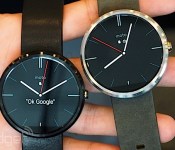
Google confirms Android Wear will support custom watch faces

Since its beginnings, the Android platform has been known for being heavily customizable. As such, it’s not exactly a surprise to hear Google say its new smartwatch ecosystem, Android Wear, is due to support watch faces from third-party developers. However, having actual confirmation makes for perfect peace of mind. In a Google+ post, Android’s VP of Design Matias Duarte affirmed this would be the case, stating that the Wear team is already working on a custom watch face API. “Customization has helped Android thrive, and the same will be true for Android Wear,” he wrote. The incoming API will make it “as simple as possible” for devs to make all-around great watch faces, ones which can look good, not drain a battery and blend well with the watches card-based UI. Duarte said “some” of these things won’t be available until later this year, but that they are, without a doubt, on their way. So, don’t worry, soon enough you’ll have better choices to deck out that fancy, smart tick-tock wearable of yours.
Filed under: Misc, Peripherals, Wearables, Google
Via: Android Police
Source: Matias Duarte (Google+)

Reboot: Welcome to the World of Wallpapers!

Welcome back to the World of Wallpapers!
This is a reboot of an old series held by Cliff Wade. Here, I will be running you through various wallpapers and wallpaper apps of all kinds. Like many of you, I suppose, I am a big believer in making my phone mine. Sadly, I don’t have the skill to create my own wallpapers, so I use other people’s work to make my home screen exactly as I like it! To kick things off, I will be introducing two apps and one wallpaper artist who does not have an app yet.
Behang by Ted Bates Jr.

First up to the plate is Behang, a paid app coming in at $1.99, but well worth the price of admission. If you are not keen on spending $1.99, you can always head on over to his site and download whatever walls you desire. Behang was created by Ted Bates Jr. who can be found on Google+ or Twitter. All of his walls are cloud based meaning that the app does not require updates in order to add more walls to his collection. Every wallpaper is unique and created by knokfirst. The real beauty of Behang is not just the dazzling walls, but the app itself. Behang can be used as a base app to add extensions on to. This means that you can download other apps from the Play Store and they will be added into Behang. All you have to do is change the source. Ted Bates had some help with this monster of an app. Anthoney Kiniyalocts was the developer behind this master piece. Ted Bates is the wallpaper creator.
Nóloc by Richard Colón

Next up is an extension to the previously mentioned Behang. Nóloc costs $1.50 on the Play Store. With Nóloc, you get photography type wallpapers that were taken and edited by Richard Colón. You can find Richard on Google+. While Nóloc has a fine collection of walls to use on your device, the app comes with an added bonus. Nóloc has over 18 high quality Zooper widgets to go along with its beautiful walls. These widgets require Zooper Pro to be installed in order to use them. While you can’t use the walls without Behang installed, and you can’t use the widgets without Zooper Pro installed, everything you are paying for is quality work and the designers earned their two dollars with beautiful products that I use in almost every home screen I create.
Partimus Prime (Jesus Partida)

Partimus is a talented individual who is a member of the GFX Bandits. He also is on the design team for Vanilla Android as well. He creates wallpapers and custom boot animations and who knows what else! He does not keep his work in one place, but you can find posts of his walls on his Google+ account or on his Google+ page. Yes, his account and his page are two separate things, but whatever he posts to his page, he seems to share to his G+ account as well. He is the mastermind behind the banner for the World of Wallpaper Reboot!
The post Reboot: Welcome to the World of Wallpapers! appeared first on AndroidGuys.
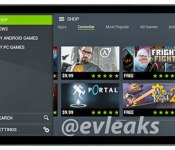
NVIDIA’s Shield tablet leaks with Tegra Note styling

We’ve been hearing rumblings about NVIDIA’s slate-style Shield successor, and now we have a face to go with the info. Thanks to noted leaker @evleaks, we’re given a glimpse of the gaming tablet’s front side. From the looks of it, speakers line the top and bottom (or left and right in landscape) of the display with what appears to be a front-facing camera as well. All told, the gunmetal gray color scheme drapes a design that resembles last year’s Tegra Note. As far as internals go, previous rumblings point to 7.9-inch screen with 2GB of RAM and a quad-core Tegra K1 CPU, complete with Unreal Engine 4 abilities. What remains to be see is if that controller we got a peek at a while back is an accessory to wrangle traditional controls or if the new NVIDIA slate will also double as a home console for PC title streaming. We shouldn’t’ have to wait long for a proper introduction though, as the company has already hinted that the official reveal will happen before the end of 2014.
Filed under: Gaming, Tablets, NVIDIA
Source: @evleaks

IRL: A 24-inch AOC monitor that doubles as a gigantic Android tablet

What can you do with 24 inches of Jelly Bean that you can’t do with 10? Manufacturers like Acer, Asus and ViewSonic have been building oversized Android-powered devices for a couple years now; I was determined to find out why, so I spent a few weeks with AOC’s own all-in-one. The hybrid external monitor will run you $370 on Amazon — more than twice what you’ll pay for a comparable 1080p screen — but this pricier model adds stock Android 4.2.2 with a touchscreen interface. With the tap of a button, the integrated quad-core processor and eight gigs of storage spring into action, effectively converting this otherwise ordinary monitor into a complete Android-powered machine. There’s even an integrated 720p webcam, and with stock Jelly Bean on board, you can install whatever apps you’d like from Google Play.
But where exactly should you install such a device? Based on the AOC A2472PW4T’s marketing materials, it seems that the company thinks its all-in-one would be a good fit for the kitchen. So that’s where I put it. There aren’t any water-resistant elements to speak of, so I kept it away from the sink and did my best to avoid spills. Greasy fingers are inevitable when you’re preparing a scratch-made meal, however, so I did a fair amount of wiping after I worked through my one and only Android-powered cooking session.
I’ve used a laptop to display web recipes before, but this was my first experience cooking with an app. I went with the first one I spotted in the category, Allthecooks, which had plenty of user-submitted options and a handy shopping list feature that could sync with my phone. I typed in my two key ingredients of chicken and maple syrup (of which I seem to have an infinite supply) and after a few taps and swipes, I landed on lunch. The finished product looked nothing like the picture, but I can hardly fault AOC for my inability to follow instructions. It tasted delicious, at least, though I’m still not convinced that protein and syrup should ever meet on the dinner plate.

Even though I’ve since moved the AiO back to my desk, I consider my first (and probably last) Android-in-the-kitchen experience to be a success. I just don’t need a gigantic tablet in my life. Thankfully, there’s quite a bit of flexibility here. The display tilts at either 15 or 57 degrees, depending on whether you want to use the AiO as a monitor or as an extra-large slate. There’s a standard VGA connector and an HDMI port, so you can plug in just about any PC.
On the “Smart All-in-One” microsite, AOC plays up the device’s multimedia capabilities, including what the company describes as “superior sound,” which supposedly comes from the integrated 2-watt speakers. The music I played sounded distorted and tinny — “superior” to a low-end smartphone, perhaps, but not much else. You also get an audio input, headphone jack, an SD card slot, three USB ports and even an Ethernet port. There’s also integrated WiFi — getting online is as easy as it is with an Android tablet or a smartphone. You can attach a wired keyboard and mouse, using the same peripherals with Android as you do with your PC.

PC mode (or Mac mode, in this case) is my preference going forward. If you prefer Android to Windows or Mac OS, or your home doesn’t have enough computers to go around, it might make sense to use the AOC with Android, but the mobile operating system is designed for media consumption, not creation — Jelly Bean can’t replace a desktop OS, regardless of how large it may scale. If you’re looking for a very basic all-in-one, this should meet your needs, but while it’s capable of serving as a dedicated second screen to your laptop or a primary display for your desktop, there are plenty of far cheaper alternatives that offer better performance in a slimmer form factor, to boot.
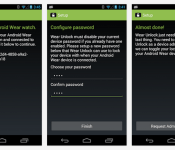
Watch This App: Wear Unlock

So you’ve got an Android Wear device and now you’re looking for some Android apps to go along with it. We’ve got you covered. Our Watch This App column is designed to help educate readers in the various apps available for the platform and highlight the best of the bunch. Watch This App: Wear Unlock… Read more »
The post Watch This App: Wear Unlock appeared first on SmarterWatching.
Read the rest at SmarterWatching.com!
The post Watch This App: Wear Unlock appeared first on AndroidGuys.

Both LG G Watch and Samsung Gear Live are now available at BestBuy

LG G Watch and Samsung Gear Live are the only 2 available Android Wear smartwatches at the moment. Some of you are eagerly awaiting Moto 360, are content with your current smartwatch in form of a Pebble or something similar and others don’t want a smartwatch at all. There are though those of you who… Read more »
The post Both LG G Watch and Samsung Gear Live are now available at BestBuy appeared first on SmarterWatching.
Read the rest at SmarterWatching.com!
The post Both LG G Watch and Samsung Gear Live are now available at BestBuy appeared first on AndroidGuys.

Google’s Wallet apps now handle your gift cards

Gift cards are supposed to be pleasant surprises, but they can frequently be headaches; assuming you remember to bring them in the first place, you have to keep tabs on any leftover credit. They should be easier to manage after today, though. Google has just rolled gift card support into the Wallet apps for both Android and iOS. All you have to do is either snap a photo of a card or type in its info. After that, you can safely leave the plastic at home. Some merchants, such as AMC, Best Buy and Whole Foods, will also show the remaining balance on their cards.
If you aren’t fortunate enough to have any gift credits on hand, don’t fret — there are a few upgrades for people who still have to pay with their own money. You can now ask for payments from friends through either the app or Gmail, and you can send your own payments using a debit card. Spanish-language users will also be glad to know that the app now works in their native tongue. The new features are US-only at the moment, but we wouldn’t rule out expanded availability in the long run.
Filed under: Cellphones, Internet, Mobile, Google
Source: Google Commerce, App Store, Google Play

