


Happy 7th birthday to Android… and AndroidGuys!

November 5, 2007
It was exactly seven years ago today that Android officially became a thing. Whereas the world was anxiously awaiting Google’s first smartphone, (likely the gPhone), Google went much bigger in scope. Instead of launching a specific device we got Android and the Open Handset Alliance. Forget one phone, let’s talk about unlimited phones.
Android is open source; it can be liberally extended to incorporate new cutting edge technologies as they emerge. The platform will continue to evolve as the developer community works together to build innovative mobile applications.
With 34 partners announced at the time, including T-Mobile, HTC, and even eBay, we were hooked. This was going to be a really fun field to watch. You see, it was also on November 5, 2007 that we started AndroidGuys. At the time there were five of us watching the space closely; we decided we’d track all of the goings-on. So, we created a little blog between us to share everything we could find. A few days later we had the domain picked out and we were on our way.
If you were paying attention in the early days you knew there was very little to talk about. It would be nearly a year until we saw our first hardware, the T-Mobile G1. We had to read the tea leaves, work closely with developers, and do whatever we could to create content. What started out as 10-15 minutes every few days would grow into full-time jobs and not enough time in the day to track it all.
Here’s the video that kicked it all off:
How prescient is that?! Nearly everything envisioned has turned out to be true. We just can’t read thoughts… yet.
Our focus has shifted over time. In the middle years we were doing what we could, keeping up with every single rumor, leak, firmware update, and whisper. Today, our focus is on existing users and helping them get more out of their devices. That means more emphasis on apps, wallpapers, widgets, accessories, and other fun stuff.
Little did we know at the time that we’d see tablets, cameras, watches, cars, TV’s and other products powered by versions of Android. Hundreds of products, millions of apps, and more than a billion activated devices later, and we’re still climbing.
I’m extremely proud of the site and the team I have in place. What’s more, I’m also incredibly gracious of the help we’ve had along the way. This is one of those cases where if you truly love something it never feels like work. Thanks to the guys and gals that have my back this has been nothing short of a dream come true. We’re seeing tremendous growth as of late and look forward to serving you guys for many years to come.
The post Happy 7th birthday to Android… and AndroidGuys! appeared first on AndroidGuys.

Google bringing SD card support back to Android in 5.0 Lollipop

It was long thought that Google wanted to phase out external storage in Android, opting for cloud-based solutions, not including SD card slots in Nexus devices and slowly removing SD card functionality in AOSP Android. However, Google is adding some new APIs to Android 5.0 to allow easy access to SD cards after bringing back limited SD functionality in Android 4.4. The new APIs will grant developers access to SD card directories and files after the user grants the application permission once.
Many manufacturers include SD support in their devices by default, but its nice to see Google listening to users and adding native support. Cloud storage is great but traditional expandable storage is nowhere near obsoletion and Google has made a wise move by supporting SD cards in their upcoming version of Android. Do you still use an SD card? Let us know in the comments below!
Source: Android Developers
Via: Phone Arena
Come comment on this article: Google bringing SD card support back to Android in 5.0 Lollipop
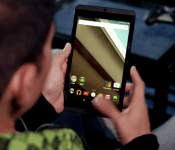
NVIDIA gives a sneak peek of Android Lollipop on the NVIDIA SHIELD Tablet
 With Android Lollipop officially released, the race is on to see which devices are going to be the quickest to be updated to the hugely overhauled operating system. Nexus devices are obviously a given to be one of the first, and Motorola devices are sure to be a close second, but who will follow after that? Well, if the latest sneak peek from NVIDIA is anything to go by, then Android Lollipop on the NVIDIA SHIELD Tablet appears to be a lock for sometime in November which would see it beat plenty of major Android players. Check out NVIDIA’s video which details some of the UI changes in Lollipop and NVIDIA’s own apps:
The speed of NVIDIA’s software update is presumably hugely helped by the fact the version on the SHIELD Tablet is incredibly close to stock Android, and it looks to take full advantage of the SHIELD Tablet’s Tegra K1 processor to make those new animations silky smooth. The SHIELD Tablet remains one of the most powerful Android tablets you can get at the moment – the Nexus 9 of course being the other tablet possessing a Tegra K1 – and is sure to benefit hugely from Lollipop’s improvements. As per the video, NVIDIA says the Android Lollipop on the NVIDIA SHIELD Tablet should be available sometime in November.
What do you think about Android Lollipop on the NVIDIA SHIELD Tablet being released in November? Let us know your thoughts.
Source: YouTube
//<![CDATA[
ord = window.ord || Math.floor(Math.random()*1E16);
document.write('‘);
//]]>
The post NVIDIA gives a sneak peek of Android Lollipop on the NVIDIA SHIELD Tablet appeared first on AndroidSPIN.
Download and Install Google Play Services version 6.1.88 APK (Material Design)

The updates keep rolling in for Google’s app real estate, and Google Play Services is next on the list to get updated to version 6.1.88, although the particular version will depend on your device.
To find out the right version of Google Play Services for your Android device, go to Settings -> Apps -> Google Play services, and look at the last 3 numbers in the parentheses. From there, you’ll something like -XYY where X is 0 for pre-Lollipop and 7 for Lollipop+, and YY is a specific variant id. -738 means you need the APK that has -738, etc.
The types are:
- Version number has -X10 – universal armeabi CPU
- Version number has -X12 – 160 DPI & armeabi CPU
- Version number has -X14 – 240 DPI & armeabi CPU
- Version number has -X30 – universal armeabi-v7a CPU
- Version number has -X32 – 160 DPI & armeabi-v7a CPU
- Version number has -X34 – 240 DPI & armeabi-v7a CPU
- Version number has -X36 – 320 DPI & armeabi-v7a CPU
- Version number has -X38 – 480 DPI & armeabi-v7a CPU
- Version number has -X70 – x86 CPU
The official Google Play Services version 6.1.88 APK can be downloaded by clicking here.
Why Download?
If you’re the type of person who likes to stay on the cutting edge of software then you’ll want to get your hands on the file. And, given software updates can take days or weeks to fully roll out, this ensures you’re moving up in the line.
What’s the Risk?
We’ll only share files or links to files that we feel can be trusted. Google does a great job of signing apps, checking them for malware, and protecting users. If you’re not sure whether you want to download the app at this time, simply wait for your update to arrive. No harm, no foul.
The post Download and Install Google Play Services version 6.1.88 APK (Material Design) appeared first on AndroidGuys.
Google and LG will license each other’s patents for the next decade

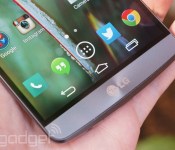
Samsung isn’t the only Android device maker getting cozy with Google’s patents, apparently. LG has just entered into a cross-licensing deal with Google that will let the two companies use each other’s patents (including new ones) for the next 10 years. The two sides are coy about just why they’ve forged the long-term pact, although there are few possibilities. For a start, one or both sides may simply want to borrow the other’s features — a blanket agreement eliminates the chances of lawsuits and simplifies the licensing process. There’s also a chance that Google is using the deal to guarantee that LG won’t stray too far from the official Android strategy. It’s not certain that this is the case, though; unlike Samsung, LG hasn’t been in a rush to replace Google software and services with its own. Whatever the motivations, it’s doubtful that these companies will duke it out in the courtroom any time soon.
Filed under: Cellphones, Mobile, Google, LG
Source: LG Newsroom
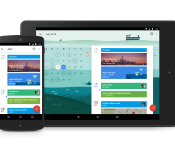
Download and install latest Google Calender 5.0 APK (Material Design)

Google has just promoted Google Calender to Material Design! In Google Calender 5.0, you get a completely redesigned app along with Gmail and Google Now reminder integration. This is all right in align with what we reported yesterday.
The widget is also redesigned with Material Design in mind and a whole lot of other goodies inside! You can explore the new app yourself and any Android 4.03+ device.
The latest official Google Calender 5.0 APK can be downloaded by clicking here.
Why Download?
If you’re the type of person who likes to stay on the cutting edge of software then you’ll want to get your hands on the file. And, given software updates can take days or weeks to fully roll out, this ensures you’re moving up in the line.
What’s the Risk?
We’ll only share files or links to files that we feel can be trusted. Google does a great job of signing apps, checking them for malware, and protecting users. If you’re not sure whether you want to download the app at this time, simply wait for your update to arrive. No harm, no foul.
The post Download and install latest Google Calender 5.0 APK (Material Design) appeared first on AndroidGuys.
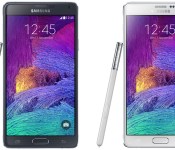
How and where to buy: Note 4 and Note Edge

The Galaxy Note 4 is the newest Note to be offered by Samsung. The Note series has been one of the most successful series of Android phones to be offered. This year Samsung outdid themselves in the form of offering a spec monster. With a Quad HD screen, a top in processor, 3GB of ram, and metal frame Note fans agree this is a worthy successor for a phone know to have all the latest and greatest tech. Here at AndroidGuys we want to let you the user know when and where you can get the hottest products Android has to offer.
This year Samsung offers two distinct versions of the Note 4. The first is the same Note people recognize and the second and odd brother the Note edge. Both devices offer the same specifications with the only difference being the Note edge offers and odd curved screen on the side and a more familiar polymer frame. While the Note 4 has been readily announced and rumored to have been pushed up this year the Note edge seems to be a rare oddity with availability and release dates here and there.
First up the Note 4
- Availability: The Note is available on all the major carriers in the U.S. and is available worldwide. The key for people outside the U.S. is to purchase the correct note for your carrier. Just like years before Samsung offers multiple variants for different markets with the last release tomorrow Nov. 5th.
- Cost: $720.00 to 849.99 off contract depending on carrier. $299.99 for a two year agreement. There are also payment plans for $0 plus tax starting at $31.29 per month for 24 months and going up from there depending on carrier and finance terms.
The note 4 is also available through Amazon, Best Buy, and Ebay.
Note Edge
The Note Edge is an oddity with its curved screen on one side. Early rumors suggested Samsung used it to show off a bit with its technology in screens and never intended for its release. However the Note edge is a production phone and will be available after the Note 4.
- Availability: The Note Edge release date was for a time as mysterious as the phone itself. The official releases date is November 14th. AT&T will have pre-orders starting November 7th. T-Mobile also announced availability starting Nov. 14th. Sprint and Verizon expected to offer the edge soon.
- Cost: $860.00 on T-mobile and $945.99 on AT&T. $399.00 for a 2 year contract agreement with AT&T. AT&T will offer a $0 down and $39.42 a month as will T-mobile for $0 down and $36.25 a month for 24 months. Sprint and Verizon no word on price or plans.
The Note Edge will be available in more markets such as Europe later this year and possibly into 2015. Pricing for models outside the U.S. peg it a just under $1000.00.
The Note 4 appears to be readily available and no stock issues are apparent. AndroidGuys will update as soon as any new news is available for the Note 4 and Note Edge. We will also alert to any price change or sales for each model as soon as its available.
Amazon Note 4, AT&T Note 4, Sprint Note 4, Verizon Note 4, T-Mobile Note 4, Best Buy Note 4
Note Edge AT&T, Note Edge T-Mobile
The post How and where to buy: Note 4 and Note Edge appeared first on AndroidGuys.
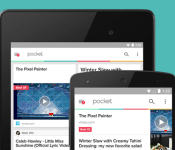
Pocket for Android gets Material Design update and Google Now integration

Pocket, previously entitled Read It Later, is currently pushing out a much-anticipated compatibility update for its official Android application via the Play Store. In terms of added functionality, this upgrade brings a completely revamped user interface that conforms with Lollipop’s Material Design guidelines, adds support for Google Now and transports a handful of bug fixes and speed optimizations.
What’s really eye-catching in this update, in our opinion, is the Google Now integration. Pocket is one of the first applications on the market to support this recently-announced service. So once updated, you’ll be able to say “Search for ___ on Pocket” to retrieve an article that you had previously saved to your ‘Read Later’ list.
Here’s a sneak peak at what you can expect from the Version 5.7 update:

The full changelog can be seen below:
- New simple, modern, and bold visual design
- Support for Android 5.0 (Lollipop)
- Bug fixes and improvements
To install the update, simply open up the Play Store on your device, toggle the hamburger menu by swiping in from the left-hand side of the screen, select ‘My Apps’ and click on Pocket. Next, hit the update button, and the application will instantly start to download and install the upgrade from the Google Play servers. Alternatively, you can scan the QR code below to initiate the procedure.
Source: Pocket
Come comment on this article: Pocket for Android gets Material Design update and Google Now integration
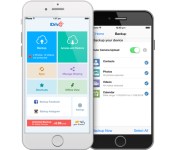
iDrive promises unlimited cloud-based phone backups for $5 per year

You probably know to keep backups of your smartphone’s data in the cloud, but backing up everything can be an expensive proposition in an era when 128GB phones are a practical reality. That won’t be quite as much of a sore point now that iDrive’s new Unlimited Mobile Backup option is here. As the name implies, the subscription service lets you back up your Android, iOS and Windows Phone devices without fretting about storage limits. Everyone can at least safeguard calendars, contacts and media (including Facebook and Instagram photos); if you’re on Android, you can also preserve call logs, text messages and whole apps.
The backups are encrypted to prevent snooping, with multiple versions of files in case you need to revert to earlier copies. You can even restore backups across platforms, so you don’t have to worry about losing valuable info when you switch ecosystems. The real allure, however, is the price. iDrive’s unlimited mobile plan lets you back up as many as five devices for $5 per year — not too shabby when it frequently costs much more to get general-purpose online storage.
Filed under: Cellphones, Storage, Internet, Mobile
Source: iDrive
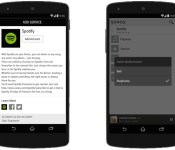
Sonos’ multi-account beta lets you keep playlists to yourself

Sonos’ whole-home audio gear is tailor-made for families, but you’ve had to use a single account for each music service — not so hot if you’d rather not share your Spotify rap playlists with the kids. You won’t have to squabble over whose account gets priority for much longer, though. A new Sonos controller app beta lets you switch accounts on the spot, so you won’t have to sign in every time you want to hear your carefully curated tunes. The upgrade also provides a few additional perks, depending on the platform you use; Android users can finally control a Sonos setup from the lock screen, while Playbar owners should get better sound staging and balancing. You can try the beta today if you’re using Android, a Mac or a PC, and the finished software should reach everyone before the end of the year.
Filed under: Home Entertainment, Software, HD, Mobile
Source: Sonos

