


Disney Movies Anywhere service comes to Android with a link to Google Play

After years of development Disney unveiled its digital movie service on iOS earlier this year and today it’s coming to Android too. When it launched, Disney Movies Anywhere had an unprecedented deep link to iTunes, and now on Android it’s sharing a similar tie with Google Play. For users it’s apparently as seamless as can be — as long as they have a Disney account, any movies they unlock will be viewable on either family of devices (or the DMA website). The agreement covers access to around 400 Disney, Pixar and Marvel movies, and to make the sign-up worth your while, Disney is throwing in a free copy of Wreck-it Ralph for anyone that signs up and links an account.
Going cross-platform makes Disney’s KeyChest-based system much more appealing — and conveniently timed for the launch of Nexus Player / Android TV — but we’re still waiting to see if a tie-up with the likes of Amazon or Ultraviolet can fulfill the promise of unlocking a single copy in one store or with a Blu-ray / DVD purchase, and then being able to watch it anywhere, on any device. The Android app isn’t live yet, but you can check out a demo video for now (embedded after the break).
Filed under: Home Entertainment, Internet, HD, Mobile, Google
Source: Disney Movies Anywhere (YouTube), Disney Movies Anywhere
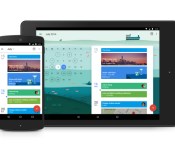
Google Calendar is next up on the Material Design update train

Google has been releasing a slew of updates for their own applications to go alongside the release of Android 5.0, Lollipop. The latest app to jump on the update train, is Google Calendar. This update brings the Material Design found across Android 5.0, and it also brings a few new features to the forefront as well. We’ve seen updates to Gmail, Inbox, as well as the apk’s for various system apps, but the next one up is Google Calendar.
Before we touch on those updates, it must be stated that Google is really knocking the Material Design concept out of the park. After testing out the Developer Preview for Android L, I really began to notice that Google was about to release the largest update to Android that I had ever seen. Now with apps being updated, and new apps being created, everything that Google wanted to do with Material Design and Android Lollipop, is coming full circle.
Back to our regularly scheduled programming.
As I stated above, the latest update for Google Calendar doesn’t just provide us with updated aesthetics. Google finally added some additional functionality to the app, and I really can’t wait to get my hands on it and dive into it.
The first big feature that Google has added, is integration with email. Now, every time that you get hotel reservations, or get an invitation to an event, Google Calendar will recognize that you got that email, and automatically create events. Sure this could get a little hairy if you get a lunch invitation with that one person who you REALLY don’t want to go with, but this will really come in handy for any other events that you actually WANT to go to.
 Assists is next on the list, and this is where Google really gets to flex its’ muscles a bit. As you are creating an event within Calendar, Assist will automatically suggest titles, addresses, or even contacts to invite to the event. As with most things nowadays, Assist will learn from your habits, and eventually, you will be able to schedule an event by just writing one word.
While not having the opportunity to get a hands-on with the Calendar update yet, from the looks of it, the feature I’m most excited for is Schedule View. This is where Google decided to really show off the Material Design within Calendar. Instead of just looking at your monthly, weekly, or daily views, Schedule View does all sorts of things to your various events. For example, if you’re planning on heading out with the guys to grab some drinks, Calendar may add a fun image to the background of the event. If you’re planning a vacation to NYC, Calendar will pull up one of the many iconic images of the New York City skyline. While it’s nothing crazy, Google wanted to add a little something extra to the Calendar app.
As for availability, the Calendar update is available today on any devices running Android 5.0 Lollipop. If you’re one of those folks that doesn’t know when or if your device will be getting Lollipop, don’t worry. Calendar will also work on any devices running Android 4.1 and above. The update will come eventually through the Play Store in the coming weeks. Oh, and Google decided to throw a little teaser in there for iPhone users, stating that they are working on an update for the iPhone app as well.
The post Google Calendar is next up on the Material Design update train appeared first on AndroidGuys.
Meet Pujie Black, one slick watch face
We’re back at you with another great watch face for your Android Wear smartwatch, and this time it’s with Pujie Black- Wear Watch Face. The watch face comes with an app to customize the settings and colors of the face. You can toggle the digital clock, analog clock hands, and much more in the app…. Read more »
The post Meet Pujie Black, one slick watch face appeared first on SmarterWatching.
Read the rest at SmarterWatching.com!
The post Meet Pujie Black, one slick watch face appeared first on AndroidGuys.
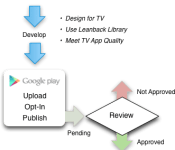
Bringing an app to Android TV is pretty simple, Google shows how
There is a lot riding on Android TV considering how Google TV flopped and drifted away. To ensure its success, Google wants to make it as simple as possible for developers to take their apps and games and bring them over to Android TV. Its Nexus Player is on the market, so consumers are going to expect content for consumption.
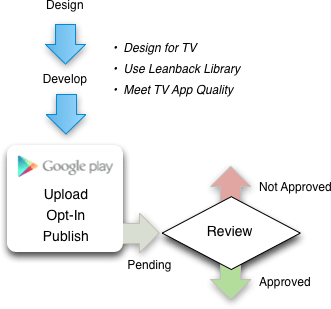
These are the steps necessary to distribute your app or game with Android TV:
- Understand guidelines and requirements
- Develop a great app for TV
- Test for TV App Quality
- Opt-in to Android TV and publish
- Track your review and approval
As always, Google wants developers to follow the recommended guidelines because everything should be familiar for an Android TV user. Tailoring an app or game for a television is vital because that is the platform’s go-to display. Scaling has to be just right. Then, the developer must aligns what it is publishing with Google’s TV App Quality test. From there, the developer has to submit the app or game and wait to see if Google approves upon review.
Source: Android Developers
Come comment on this article: Bringing an app to Android TV is pretty simple, Google shows how

Engadget Daily: Nexus 9 and Parrot Zik 2.0 reviews, a tour of Android Lollipop and more!

Google’s Nexus 9? Check. What about Android Lollipop and Parrot’s super-fly Zik 2.0 headphones? We have you covered. Read on for the rest of our news highlights from the last 24 hours, including Taylor Swift’s breakup with Spotify and our review of Google’s set-top box, the Nexus Player.
Filed under: Internet

Amazon’s latest Fire TV update lets you play a wider range of games

If your Fire TV box regularly doubles as a game console, today’s your lucky day. Amazon has released an update that lets you play a wide range of “tablet-style” games so long as you have the media hub’s official game controller; you don’t have to worry about tracking down gamepad-friendly titles. It’s a worthy upgrade if you aren’t an avid gamer, too. You can now mirror the screen of any Android device, not just those linked to your Amazon account. Also, you can bring your set-top with you from the US to the UK, or vice versa — if you move across the Atlantic, you won’t run into trouble. The Fire TV upgrade should be live right now, so have at it if you’re an owner.
Filed under: Gaming, Home Entertainment, HD, Amazon
Via: Android Police
Source: Amazon

Samsung’s Galaxy Tab S now packs speedy LTE-Advanced data

Samsung isn’t saving extra-quick mobile data for its smartphones. The company has unveiled a version of the Galaxy Tab S 10.5 with 225Mbps LTE-Advanced inside, giving the tablet a very fast connection while away from WiFi. It’s enough to grab 421 songs in a single minute, if you believe the official estimates. It’s otherwise the same Android slate you’ve seen before, although that’s not a bad thing given the slim profile and super-vivid display. The catch? You’ll likely have to move to get one. Samsung has only announced the upgraded Tab S for South Korea, where it will cost 799,700 won ($743). Given that other countries haven’t hopped on the LTE-A bandwagon yet, you could be waiting a while before this device (or more likely, one of its sequels) comes your way.
Source: Samsung Tomorrow (translated)

KitKat now powers over 30% of all Android devices

Google has just published its latest distribution figures for the Android operating system. The numbers were uploaded to the official Developer Dashboard blog and reveal a consistent growth in the amount of users running KitKat (4.4), whilst older versions of the OS continue on their long path towards extinction.
As is the norm, this data was collected by recording which operating systems customers were running when they accessed the Google Play Store over a 7-day period, which ended on Tuesday, November 3, 2014. This consequently gives Google an insight as to which version of Android is running on active devices all around the world. The team at Mountain View then break down this information and condense it into a pie chart for us to comb through.
You’ll immediately notice that Cupcake, Donut, Eclair and Honeycomb are missing from the chart – this doesn’t mean they no longer exist, because they do. In actual fact, they’re absent because the earlier builds of the operating system can no longer access the updated version of the Play Store. However, Google did create a separate post suggesting that “versions older than Android 2.2 accounted for about 1% of the devices that checked in to Google servers.”
As you can see Froyo is almost at the point of being wiped out, holding just 0.6% of the Android market share — down 0.1% from September’s reading. Gingerbread has decreased dramatically, now measuring in at 1.6% under last month’s 11.4%.
The amount of users running Ice Cream Sandwich (4.0.3 – 4.0.4) seems to have reduced slightly, too, with total market distribution dropping down to 8.5%. That’s a 1.1% decrease from last month’s 9.6%. The data also exhibits that the usage of Jelly Bean (4.1.x – 4.3) has also declined, dropping down from 53.8% to 50.9%.
KitKat (4.4) is the only version of the operating system to face an increase this month, with an inflation of a whopping 5.7%, now weighing in at 30.2% of the total market share. Clearly, more people are purchasing Android 4.4-compatible smartphones and tablets, which is great as it means that the operating system can continue to expand, without leaving any users with outdated devices behind.
Do you want to find out more about these latest distribution figures? If so, simply head on over to the Android Developer Dashboard by clicking the source link below.
Source: Android Developer Dashboard
Come comment on this article: KitKat now powers over 30% of all Android devices
VyprVPN Review

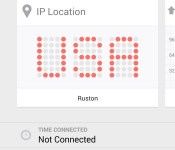
Online security is becoming a must for many people out there who are feeling like they are under surveillance at all times. VPNs (Virtual Private Networks) are the most common form of online privacy; however, some people are looking for the simplest way while others want more control. VPN application VyprVPN from Golden Frog offers a solution for both. VyprVPN offers a simple user interface, but it allows for deeper customization within the settings. After opening the application, users are presented with a “Connect” button, a location section, and a bottom portion that shows how long you were connected to the VPN and what your IP address is.

After pressing connect, the application switches to a dark theme, representing you hiding in the shadows away from prying eyes. You can watch your IP address and location change before your eyes. Swiping to the left shows a Speed Graph that gives upload and download speeds. One more swipe gives you a Connection Log, showing information about when you connected to the VPN and what protocol you are using. Under the settings tab, you find the options for those who want to tweak their network. You have the option to change the protocol, use a third-party DNS, automatically connect on untrusted Wi-Fis, and manage trusted Wi-Fi networks.


Now the big question, how well does it work? In short, extremely well. I am using a 2013 Motorola Moto X on AT&T LTE in Louisiana. On Wi-Fi I experienced no speed loss at all. In fact, sometimes the speeds were faster with the service on. On LTE, the story is different. My download speed dropped by up to 90% at some points and the upload speeds reduced to around half. That being said, the speeds are still very usable and a decent price to pay for the security of online privacy.
You can get a free trial of VyprVPN, and once it has expired, you are given three different paid options. VyprVPN basic, VyprVPN Pro, and VyprVPN Premier, each with an increase in price. You can check out the differences on their website here. Overall, VyprVPN provides a VPN application that will please both those who simply want more privacy and those who want to tweak their settings.
What we liked:
- Easy to use
- Lots of settings to tweak
- Good data speed on Wi-Fi
- Good user interface
What we did not like:
- Slow data speed on LTE
- Packages can get expensive
- No free version aside from trial
The post VyprVPN Review appeared first on AndroidGuys.
Google says Android 5.0 Lollipop rolling out today

Whilst we all anxiously await Android 5.0 Lollipop to land on our devices and for manufacturers to announce their rollout plans, Google has dropped a hint today in a blog post that suggest it may be sooner than we think.
On the official Android Blog, in which Google is talking about designing the perfect Lollipop, it appears the new Android operating system will start to roll out today.
Design is a major focus for Lollipop—the latest version of Android—which begins to roll out today.
Are Google just talking about the availability of Lollipop in the form of the Nexus 9, or will we begin to see the Nexus lineup getting their Android 5.0 treatment in the next few hours?
Hit that update button furiously, and let us know if you get the Android 5.0 Lollipop update on your device in the comments below.
The post Google says Android 5.0 Lollipop rolling out today appeared first on AndroidGuys.
 AIVAnet