


The best money-making apps
andresr/Getty Images
Whether it’s selling your clothes at a consignment shop, or never missing the chance to pick a penny off the ground, who doesn’t like to make a few extra dollars? The truth is, there is real money just hiding beneath something that you use every day — your phone. We’ve already rounded up the best budget apps, but what if you’re looking to earn some crash as opposed to track it? Fortunately, the apps featured below will help when your 9-5 simply isn’t cutting it.
Ibotta
Why not get money back for your everyday purchases? The Ibotta app helps you save money while shopping. All you do is check the app before you head out to shop, travel, or dine out, and add those cash-back deals to your phone. When you’re finished shopping, simply snap a pic of your receipt within the app and Ibotta will award you with cash back. The app works with your favorite retailers, too, including Best Buy, Lowes, Safeway, eBay, and many more.
Download now for:
iOS Android
Ebates
Similar to Ibotta, Ebates awards you with up to 40 percent cash back on items you would normally buy. There are more than 2,500 participating stores — including Walmart, Amazon, Groupon, and Expedia — and you can set the app to notify you when there are new coupons available. If you choose a specific item you want to purchase, Ebates will also show you which stores are selling said item and how much cash back you would receive from each store. Moreover, Ebates is currently offering a $10 bonus when you make your first purchase.
Download now for:
iOS Android
Shopkick
Think of Shopkick like a game, one that awards you gift cards as you earn points, aka “kicks.” To earn them, you accomplish daily challenges, which might require you to walk into a nearby store or scan products in a scavenger hunt. Like Ibotta, you can also earn extra points by taking a picture of your receipt. Then, you just cash in those “kicks” for gift cards to Starbucks, Walmart, Target, Amazon, or one of the many other participating vendors.
Download now for:
iOS Android
Field Agent
Bored on a Sunday afternoon and want to do something more than just watch Netflix? Field Agent pays you for completing small jobs as you’re doing what you’re already doing, whether that’s shopping in stores, running errands, or even simply hanging around your house. The app asks you to take photos, answer questions, express opinions, or complete other small tasks. Each job generally pays somewhere between $2 and $12, and is available on a first-come, first-served basis.
Download now for:
iOS Android
DietBet
Let’s be real, no one really likes working out, but what if you were rewarded for doing it? With DietBet, you bet on yourself to lose weight with a group of other players. You choose one of two game types, Kickstarter, which challenges you to lose 4 percent of your weight in four weeks, or Transformer, which tasks you with losing 10 percent of your weight in six months. If you meet your weight-loss goal by the end of the game, you split the pot with the other players. DietBet claims that 96 percent of its players have lost weight and winners take home an average of $58.
Download now for:
iOS Android
StepBet
StepBet pays you to do what you do every day: Take steps. Like DietBet, you place a bet on yourself, and if you accomplish your goal, you will split the pot with others in the game. You don’t have to move more or longer than the others in the game, just simply hit your goals and cash out. StepBet uses a signature algorithm to provide each player with daily step goals, and it will automatically count your steps using a variety of devices, including those from Apple, Fitbit, and Garmin. All you have to do is walk, climb, or even dance, anything to get your steps in and hit your goal.
Download now for:
iOS Android
Sweatcoin
The No. 1 app in health and fitness for the iPhone, Sweatcoin, converts your outdoor steps into gadgets, fitness kits, services, and experiences. You can also donate your Sweatcoins to partnering charities. Once downloaded, the app tracks and verifies your steps using your phone’s accelerometers and GPS location, before converting those steps into Sweatcoins. Every 1,000 steps you take outside converts into 0.95 Sweatcoin. It’s that simple.
Download now for:
iOS Android
Google Opinion Rewards
With Google Opinion Rewards, you can answer quick surveys and earn Google Play credits with ease. Once installed, you will be prompted to answer basic questions about yourself. Google will then send you a survey once a week, which will allow you to earn up to $1 in Play credit. Although the payout isn’t substantial, it’s easy, simple, and will eventually pay for a cup of coffee.
Download now for:
iOS Android
iPoll
As the name might imply, iPoll lets you earn gift cards and airline credits by simply sharing your opinion. You will be asked to provide some basic information about yourself, which will help determine which missions are best for you. Once a new mission is available, you will be notified. The missions revolve around a range of topics, and include product reviews, in-store shopping experiences, ad testing, and brand awareness. Once you’ve completed your mission, you’ll receive a slew of credits, which you can then exchange for cash or gift cards to your favorite brands.
Download now for:
iOS Android
Foap
Foap is a way to turn your photos directly into dollars. The app lets you upload your photo collection and sell it to well-known brands, including Bank of America, Air Asia, and Pepsi, among others. Foap also distributes your photos through partners like Getty Images, to help you sell even more photos. With Foap, you can upload as many photos as you want, and you’ll receive 50 percent of the commission every time you sell a photo. The feedback aspect of the app, which allows you to receive input from a growing international community of photographers, is just a plus.
Download now for:
iOS Android
Slidejoy
Ever unlock your phone, only to forget why you were on it in the first place? Slidejoy is an app that lets you make money just by checking promotions or the latest headlines. Once registered, you will receive a card with news, or an advertisement, every time you unlock your phone. Slide up to see more news, right to access your home screen, left to see more information, and down to access your notifications. You don’t have to slide left to make money — just use your phone as you normally would.
Download now for:
Android
Editors’ Recommendations
- I tried Blendle, the ‘Netflix of journalism,’ for a week and went broke — but you might not
- Easily settle your debts with these 11 money-transfer apps
- Get smart: The best educational apps for iPhone and Android
- The best hiking apps
- The best recipe apps for Android and iOS
It’s now easier to tell Google exactly what data it can use to advertise to you
Online privacy could be on the rise in 2018. After the Cambridge Analytica scandal prompted Facebook to tweak how users can control their ad experience on the social media website, it looks like Google is also stepping up to give you a little more control. The company has announced a revamp of the slightly old and outdated Ad Settings, which Google says “makes it easier to understand and control how ads are tailored to you.”
By the looks of it, the new Ad Settings website will make it a whole lot easier to see the kinds of data that Google is using to advertise to you. The interface is organized based on topics — so you’ll be able to see a list of topics that Google thinks you’re interested in.
According to Google, data used for advertising is collected in three different ways. For starters, it estimates users’ interests based on their web activity when they’re logged in. Second, it uses data that you’ve directly given the company through your Google account, like your age and location. Last but not least, data is collected from advertisers that partner with Google when you visit their website.
So how does that relate to the new Ad Settings? Well, Google is basically allowing users to turn off whether or not they want ads tailored to them based on one of those metrics. That’s a pretty huge move for Google, whose entire business model is based on advertising — it means that, theoretically, you could tell Google that you don’t want any ads based on data collected by partner websites.
Of course, before you get too excited about the heightened privacy, there’s a distinction to make. Google is allowing users to tailor the ads being served to them based on data collected — it’s not necessarily allowing users to tell Google not to collect certain types of data.
Revamping Ad Settings isn’t the only thing Google is doing to bolster advertising transparency. The company is also expanding the “Why this ad?” link to all Google ads, including those on YouTube and “almost all” websites that partner with Google to show ads. When you click on “Why this ad?” you’ll basically be shown what data Google is using to suggest the ad to you. For example, you might click on it on YouTube and be told that the ad is being served based on the video you’re watching and data that has been collected while you were signed in to Google.
The new features are a pretty big move for Google, and one that should help appease some privacy advocates. Still, many will want Google to go a step further and allow users to tailor the data that’s actually collected — not just what data is used in advertising.
Editors’ Recommendations
- How to clear cookies
- Waze Local makes it easy for small businesses to advertise on Google’s Waze app
- Top family-friendly Google Play Store apps track children’s personal data
- The Google News App fuels your interests, provides a balanced perspective
- Over 60 ARCore apps are now available from the Google Play Store
The BlackBerry KEY2 is awesome, but I desperately want a Priv 2 slider

Let your backbone slide…
Like a lot of folks, I’m looking forward to having a BlackBerry KEY2 I can call my own and keep until I wear a hole in it. It’s not going to set any Android sales records, but it is the right phone for me and that’s all that really matters. It’s going to be a great sequel to my KEYone and I have a feeling I’ll get just as much use from it.
But I have a confession — I still like the BlackBerry Priv. Maybe enough that I’d like a BlackBerry Priv 2 more than a KEY2.
Carrying a torch
I know everyone who ever used a BlackBerry (or was even in the vicinity to a person who was using one) loves the BlackBerry Bold. With good reason, too, because it was an extremely well-built phone designed when BlackBerry was at its prime. I had a Bold 9000 and loved it. But it wasn’t my favorite BlackBerry, even if it was the best BlackBerry.
The BlackBerry Priv had a bit of Torch 9800 DNA inside and is one of my favorite Android phones.
That would have been the BlackBerry Torch. I can hear the groans, but I’m just a sucker for a good slider. A full-size phone with a vertical sliding keyboard does it all. You have a big screen (though nobody would call that 3.2-inch display big nowadays) that slides up and away to reveal a great set of tactile keys that satisfy the part of you that knows tactile keys are simply awesome. When it’s closed, a Torch was compact and sturdy and perfect for bumpy rides in a pocket or briefcase. When open, you had the keyboard and trackpad right there where thumbs could get furious and make words. The best words.

You know, just like the Priv. Well, except for maybe the sturdy part. You had a big screen (and actually big this time) that you could poke at or even watch a movie on, and a flick of the thumb exposed the sexy keyboard underneath. Even though the Priv didn’t age very well and got a little janky once the storage was filled up, I still enjoyed using it. I know I’m not alone.
I’d love for a Priv 2 to replace a Motion 2 or live alongside one. I’m flexible like that.
BlackBerry has tic-toc’d with a keyboard model and a touch-only model since they moved to Android, and this year could be the same. Except instead of a Motion 2, it could be a Priv 2 with the same specs as the KEY2 and 100% more sliding. I get that the partnership with TCL is new and it might not be a wise business decision to make three models. I’m flexible like that. But I’d love seeing three models, too.
I’ll be satisfied using my KEY2 when it gets here, and don’t see any serious complaints about it. But I wouldn’t say no to getting a slick new slider to live in my pocket instead. I know I’m not the only one. I can’t be the only one.
In the comments, tell me I’m not the only one, and let the powers that be know we want a Priv 2!
See at BlackBerry Mobile
BlackBerry KEY2
- BlackBerry KEY2 hands-on preview
- BlackBerry KEY2: Everything you need to know!
- BlackBerry KEY2 specs
- BlackBerry KEYone review: Coming home
- Join our BlackBerry KEY2 forums!
BlackBerry
Have you received the June 2018 security patch on your Pixel?
The update first started rolling out on June 4.
At the beginning of each month, Google pushes out a new security patch to ensure that Android is as up-to-date and secure as possible for its millions of users.

Google’s own Pixel phones are often the first to receive the new security patches, and while some got the latest June 2018 version as soon as it was released, others still appear to be waiting quite a few days after it was launched.
Right now in the AC forums, here’s what our users are saying.
sleepnclass
06-09-2018 03:28 AM“
Hi guys, I still haven’t received the June Security Update on my Panda. It’s running release software. I’ve tried restarting and checking for updates but still nothing. Anyone else have this problem? Thanks.
Reply
Morty2264
06-10-2018 08:46 PM“
My Pixel 2 got the update about a week ago.
Reply
LifeInAnalog
06-14-2018 04:20 AM“
..June has arrived everywhere except on my beautiful 2XL 🙁
Reply
TraderGary
06-11-2018 01:23 AM“
2 XL 128 here on Project Fi and I too got the June update on the day it was released.
Reply
Seeing as how the rollout seems to be split down the board with our forum members, we now want to hear from you — Have you received the June 2018 security patch on your Pixel yet?
Join the conversation in the forums!
The best over-the-air antennas, according to CordCutters.com
 The ClearStream 2MAX is a great option for an over-the-air antenna. ($52 on Amazon.)
Bigger isn’t always better, but where you point it definitely matters.

Well. Now that we’ve established the (controversial!) pecking order of the best over-the-air streaming boxes, it’s time to turn to the other side of that coin. Because a streaming box without an antenna is just a brick.
Here’s the thing about antennas, though. For the most part the technology hasn’t changed all that much over the years. Yes, it’s gotten better. But there haven’ been any real seismic shifts. An antenna is an antenna. But the best thing about today’s antennas is that they don’t have to be huge to get the job done. They don’t have to look like something you’d hang laundry off of. (Though some great ones still do.)
No, more important is where you put it — outdoors and higher is always better than indoors and lower — and whether it’s pointed in the direction of the broadcast towers. You can tweak things, for sure, but that’s the really important part.
Read: The best over-the-air antennas, according to CordCutters.com!
Introducing CordCutters.com
- The hardware you need
- All about streaming services
- What channels are on which service
- FREE over-the-air TV
- How to watch sports
- Join the discussion
Get the latest deals
How to clean your Lenovo Mirage Solo

VR headsets can get funky quickly if you don’t take care of them.
The Lenovo Mirage Solo is the first standalone Google Daydream headset, letting you move around in a virtual world without needing to use your smartphone. All that moving around means the headset will get dirty if you don’t stay on top of cleaning it.
Here’s how to clean your Lenovo Mirage Solo!
- Materials you’ll need
- How to clean the lens
- How to clean the shell
- How to clean the foam facepad
Materials you’ll need
There aren’t any pieces you can remove from the headset for easy cleaning, so you’ll need to just tidy things up where they are. Here’s what you’ll need to clean the headset:
- Alcohol cleaning wipes
- One wet cloth
- One dry cloth
- A nylon brush
How to clean the lens
The lens and cameras are the most important pieces of the headset, and the easiest to mess up if you’re not careful. Don’t use any detergents or alcohol on the lens or cameras, and don’t expose the cameras to direct sunlight when you let it air dry. Instead, just clean the lens with a damp cloth (use distilled water if you can), then wipe it dry with another cloth.
How to clean the shell
Since the shell is hard plastic, it’s safe to use the alcohol wipes on it. Be sure none of the alcohol leaks onto the black area surrounding the cameras, then let it air dry afterwards.
How to clean the foam facepad
The facepad can’t be removed like on the Daydream View, but gently brushing with a nylon brush will get rid of most debris. If you need to use liquids, be sparse: dip the brush into a mild detergent solution, shake off the excess liquid, then brush the cloth pieces.
When all is said and done, let the Mirage Solo air dry for an hour before using it again. Don’t expose the headset to direct sunlight — whether it’s drying or not — since this could damage the cameras.
That’s it!
Cleaning a VR headset doesn’t take much work, but you need to be careful about what cleaning products you use on which pieces. Is there something we missed? Let us know down below!
See at Amazon
June 2018 security patch breaking Nokia 7 Plus handsets on Android P beta
Nokia’s aware of the issue, but how did this happen in the first place?
When Google announced the availability of its Android P open beta at I/O in May, we were surprised to learn that this was being opened up to third-party OEMs for the very first time. The Nokia 7 Plus is one of the few non-Pixel phones you can test out Android P on right now, but for users that decided to try out the new software, the recent June 2018 security patch is causing all sorts of problems.

According to user Xavito83, they received an OTA update to download the June 2018 patch like normal on their Nokia 7 Plus running the Android P beta. However, rather than simply upgrading their phone with the latest security fixes, the update installed a full ROM of Android 8.1 Oreo, corrupted the system, and forced the user to completely restore/factory wipe their phone.
Shortly after Xavito83 shared this story, a number of other users were quick to share similar experiences, saying that the June patch “freezes everything” and that the update causes “.com.androidphone” to completely stop working until a hard reset is done.
Moderator Laura has since responded to these complaints, saying:
Hi everyone, I try to get some info on that and will pass them on to you all as soon as I can.
I suppose bugs like this aren’t entirely unexpected seeing as how this is the first time OEMs have been allowed to join the Android Beta Program, but at the same time, it seems like sending an OTA update of Oreo to phones running Android P is a pretty big faux pas.
If you’ve got a Nokia 7 Plus on the Android P beta, did you encounter this bug?
Nokia 7 Plus review: Come for the value, stay for the excitement
Android P
- Android P: Everything you need to know
- Android P Beta hands-on: The best and worst features
- All the big Android announcements from Google I/O 2018
- Will my phone get Android P?
- How to manually update your Pixel to Android P
- Join the Discussion
Bluedio A2 review: Stylish, affordable Bluetooth headphones with USB-C

Who said good-looking Bluetooth headphones with USB-C charging had to cost an arm and a leg?
USB-C has been around for years, and yet the vast majority of Bluetooth headphones still use older Micro-USB charging cables. Earbuds with USB-C charging have been slowly filtering in — like the OnePlus Bullets — but most over-ear headphones to offer USB-C charging have been in the wallet-scaring range — like the Bowers & Wilkins PX.
While Micro-USB cables are a dime a dozen and certainly not hard to pack along, I missed the days when my phone and my headphones could charge from the same cable, and so I sought out a pair of USB-C charging Bluetooth headphones that wouldn’t break the bank or grate on my music-loving ears.
Bluedio checked all the boxes and then some with the Bluedio A2 Bluetooth Headphones, including a box that I had all but given up on: cuteness.
Bluedio A2 Bluetooth Headphones

Price: $47.99
Bottom line: These affordable headphones fit heads big or small, charge with the same USB-C as most of our phones — including fast charging — and come in a cute, bright blue pattern.
The Good
- Good grip, even on smaller heads
- Simple, fast USB-C charging
- Double as wired headphones if battery dies
- Great price and value
The Bad
- The styles are a bit extreme
- Long-press to change tracks get old fast
- Mic is a bit tinny
- Sound gets a little muddy at times
See at Amazon

Bluedio A2 Bluetooth Headphones What I like
The nickname for the Bluedio A2 headphones is Air, and the headphones are aptly named. Lightweight and flexible, it’s easy to wear these headphones for hours on end, whether you’re sitting and watching a movie, running errands around town, or jumping around to your favorite songs in the dark. The A2 headphones grip my petite head firmly, so much so that they almost do a better job blocking noise passively than some of my active noise-canceling headphones do. If you have a petite head and find headphones slipping off frequently, these might be perfect for you.
These may be the cutest headphones I’ve ever owned.
Bluedio offers 2 styles for the A2: Doodle is the darker gray-orange model with a graffiti motif, and China offers a refined blue and white pattern with silver and white accents. I’m normally hesitant to purchase white headphones, afraid they’ll discolor with use and prolonged contact with my sweaty, oily head, but China’s pattern was too darling to say no to.
Now don’t go thinking these are all style and no substance. The sound from these headphones is surprisingly crisp for a pair of $50 Bluetooth headphones, and while bass gets muddy from time to time, the A2s sound just fine for streaming music and movies. These Bluetooth headphones were easy to pair and held a connection three rooms away at the TV station with my Samsung Galaxy S9+.
If your battery runs dead, you can also listen to music with the A2s using a standard 3.5mm aux cord or via USB-C, which can be used for charging and data. The headphones fold up for easy stowing in your bag, backpack, or the included hard-shell carrying case, which also holds the included USB-C charging cable and auxiliary cable.

Bluedio A2 Bluetooth Headphones What I don’t like
These are affordable Bluetooth headphones, so I can forgive them for not having active noise-canceling or NFC pairing. Pairing Bluetooth headphones the old-fashioned way still takes less than a minute, and the grip on the A2 headphones is good enough to passively block out much of the noisy world, even when listening to soft music. But would it have really broken the bank to separate the volume and track controls into separate buttons?
The controls on the Bluedio A2 headphones rely on a simple three-button setup that integrates into the silver Bluedio panel on the right earcup. The multifunction button is fairly standard and easy to use, and volume control is a quick tap away, but I’m a notorious track skipper. Skipping tracks with the Bluedio A2 headphones takes 2-3 seconds, and that can feel like an eternity when YouTube Music’s mixtape serves up a dud. It’s not the end of the world — it’s encouraging me to use Google Assistant’s voice controls more often — but it is a definite compromise.

It’s also worth noting that while some phones — like the Google Pixel 2 — will showcase the A2’s battery level, other phones will not, in which case you’re not going to know what the battery level is until it gives you a low battery warning. Bluedio claims the A2 headphones are good for up to 33 hours of listening or a whopping 1300 hours of standby, and while I haven’t seen a low-battery warning yet, I’ve also been topping them off so I don’t get caught with dead headphones.

Bluedio A2 Bluetooth Headphones Should you buy them?
These headphones are affordable, fitting, functional, and undeniably adorable. The Bluedio A2 headphones may not have professional-grade sound or active noise-canceling, but the battery will get you a long weekend easily before it asks for a charge. And since it uses the same USB-C to charge that most new phones and Chromebooks do, you don’t need to dig out an old Micro-USB charger just for your headphones.
4
out of 5
I think these are going to be my daily driver headphones for a while. They grip my head better than the Samsung Level On Pro headphones do, and costing less than $50, I’ll feel a little less guilty for how hard I am on them. The A2’s are about 50 times cuter than the Samsungs, too, and after decades of bland, black headphones, I am ready for some cute.
See at Amazon
Roku’s Ultra 4K streaming player is down to its lowest price ever
Get the best for less.

Right now you can pick up the Roku Ultra 4K streaming media player for just $79.99, which is $20 lower than it normally sells for. This price is actually the lowest it’s ever sold for, beating the previous low by $5. Roku makes some of the best streaming hardware, so if you’ve cut the cord already or are considering doing so, you’ll want to have one of these attached to your TV.
The interface is easy to navigate, and most popular streaming services have apps available. You can easily access Netflix, Hulu, Sling, and HBO Now from dedicated buttons on the remote. There’s also a voice search feature built into the remote, and a headphone jack. The Roku Ultra streams compatible content in 4K, and the box has a USB port and microSD slot. The Roku Streaming Stick is currently available for $39.99 as well.
If you haven’t cut the cord, you should consider using your savings to check out DIRECTV NOW’s offer that scores you 3 months of service for $30. Not interested in 4K content but still want a Roku device? DIRECTV NOW has another promotion which scores you a free Roku Streaming Stick when you pay for one month of service. This makes it $35 for both the streaming media player and a month of access to DIRECTV NOW’s channel lineup. Odds are this discount won’t stick around for long, so be sure to grab one now, before it’s gone.
See at Amazon
How to use Bluetooth headphones or speakers with your Lenovo Mirage Solo headset
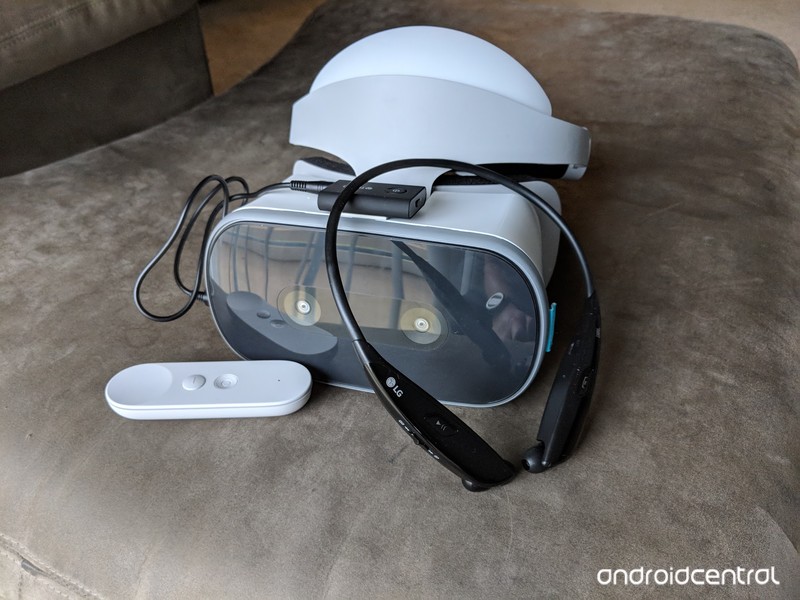
Make your VR experience truly wire-free.
As great as it is the use the Lenovo Mirage Solo without a smartphone, that also limits the accessories you can use with it. There’s no official Bluetooth support, so gamepads and Bluetooth headphones are out of the question. 3.5mm headphones are supported, but that’s about it.
Kinda. There’s a way to use Bluetooth headphones or speakers with the Lenovo Mirage Solo. Here’s how to to do it!
What you’ll need
The workaround is getting a Bluetooth transmitter with an audio-in jack. The one I’m using was $30 at the time of writing, but there are plenty of great choices for about the same price. This one features Micro-USB for charging, which is much better than dealing with a proprietary charger. It includes a 3.5mm cable in the box as well, so the only other thing I needed was some double sided tape from my toolbox.
See at at Amazon
How to set things up
As far as your Mirage Solo is concerned, it’s delivering audio to a wired connection. The wireless connection happens between the transmitter and your headphones or speaker.
The trickiest part of this setup is actually pairing the transmitter with your headphones or speaker. Neither of the devices will have a screen for you to see what’s available to pair, so it’ll take some trial and error.
While you’re getting things set up, I’d recommend turning off Bluetooth on your PC, laptop and smartphone, just so neither device tries to pair with the wrong device.
Once the transmitter and your audio device are paired, that’s really it. Using the double-sided tape to keep the transmitter in place on top of the headset doesn’t add an appreciable amount of weight, and you can’t see how janky it looks when you’re wearing the headset.
What say you?
Do you use Bluetooth speakers or headphones with your VR headset? Let us know down below!

