


Wait, what? These ridiculous hacks will make you do a double-take
Hacking is serious business these days: There’s always another attack that might have stolen your online information, another device that may be spying on you, or another vulnerability that you have to watch out for until it gets patched. That’s no fun.
That makes it easy to forget the first hacks were jokes and pranks, invented by coders looking to push a computer to its limit. While most of the world has forgotten that, some still hack with a more lighthearted approach. Here’s what happens when digital attacks get silly.
The “Godzilla ATTACK!” road warning
Sometimes the simplest hacks are the best. Take this 2014 hack of traffic warning signs—which are programmed with basic warnings about serious traffic issues or repair ahead. This hack replaced the warning on a San Francisco sign with, “Godzilla Attack! Turn Back!”
Interestingly, this coincided with other traffic sign attacks on the other side of the country, so we’re guessing someone was passing along an easy way to break traffic software security. State and federal agencies heaved heavy sighs, and put the signs on a long, long list of, “Things way overdue for security upgrades.” But we’re giving this prank extra points, because it was relatively harmless and probably made the drive home more enjoyable. It also spawned a series of amusing copy-cat road sign hacks.
Wait, what? These ridiculous hacks will make you do a double-take
Hacking is serious business these days: There’s always another attack that might have stolen your online information, another device that may be spying on you, or another vulnerability that you have to watch out for until it gets patched. That’s no fun.
That makes it easy to forget the first hacks were jokes and pranks, invented by coders looking to push a computer to its limit. While most of the world has forgotten that, some still hack with a more lighthearted approach. Here’s what happens when digital attacks get silly.
The “Godzilla ATTACK!” road warning
Sometimes the simplest hacks are the best. Take this 2014 hack of traffic warning signs—which are programmed with basic warnings about serious traffic issues or repair ahead. This hack replaced the warning on a San Francisco sign with, “Godzilla Attack! Turn Back!”
Interestingly, this coincided with other traffic sign attacks on the other side of the country, so we’re guessing someone was passing along an easy way to break traffic software security. State and federal agencies heaved heavy sighs, and put the signs on a long, long list of, “Things way overdue for security upgrades.” But we’re giving this prank extra points, because it was relatively harmless and probably made the drive home more enjoyable. It also spawned a series of amusing copy-cat road sign hacks.
Adobe Spark Post is finally available on Android
You can download the open beta right now.
Adobe Spark Post (a graphic design suite) has been making headlines with its iOS app for some time, and after building up a following there, fans have been demanding that Adobe make an Android version of it. After months and months of patiently waiting, that day has finally come.

You can download Adobe Spark Post for Android right now, and while not every single feature from its iOS counterpart is here, Adobe plans on changing that soon. Spark Post is releasing as an open beta initially, but it’ll only stay that way as Adobe puts the finishing touches here and there.
In its current form, the Spark Post Android app gives you access to all of the filters, fonts, colors, shapes, and templates you’d find in the iOS version. The UI has been updated to adhere to Material Design guidelines, and features such as Magic Text, auto-resize, and more are all here.


In the near future, Adobe says it plans on adding animations, an icon library, integration with Adobe Stock, and plenty of other goodies.
If there are certain features you’d like to see added before others, you can send Adobe your feedback and help pave the future for Spark Post’s Android presence.
Download: Adobe Spark Post (free)
Google Podcasts: Everything you need to know!
An AI-powered app that syncs with your Google Home.

Google has been slowly dipping its toes into the warming podcast waters of the past few years, first bringing native support to Google Play Music and then, more recently, launching playback, curation, and downloads within the Google Feed.
Now, Google is launching a dedicated app for podcasts, and here’s what you need to know!
The latest Google Podcasts news
June 19, 2018 — Google Podcasts launches on Android

Google is taking the wraps off its long-awaited Podcasts app, which is now available. The app, which is detailed below, syncs between Google Home devices and phones using Google Assistant.
What is Google Podcasts?


It’s an app that’s very similar to the functionality you’ll find when searching for podcasts on the mobile web right now. That means Google not only finds the podcast you were searching for, but using what it calls “AI-powered features,” it curates personalized recommendations of other shows that you’ll like, too.
Where is it available?
Google says it’s available in 47 Play Store languages. It should be available in your country, but if it isn’t let us know in the comments below!
How many podcasts are there in Google Podcasts?
Around two million, according to Google, and that number should expand very quickly.
What’s the interaction with Google Assistant and Google Home?

Glad you asked! For the first time, Google Podcasts will allow synchronization between a Google Home and your phone, since Assistant is the link between them. That means that if you’re listening to a show on a Home and need to leave, you can continue listening on the phone.
Right now, the synchronization only appears to be one-directional. I can ask my Google Home to “resume playing ‘This American Life’” and it picks up where my phone left off, but the progress doesn’t appear to be synching back to my phone.
What other features does Google Podcasts have?


Not a whole lot. Once you start playing a podcast, you can tap to go back 10 seconds or forward 30 seconds. you can speed up or slow down playback between 0.5x and 2x. You can play and download podcasts for listening later on, and you can mark a podcast as played.
In the settings, you can decide when podcasts will be removed from your device, either after they’re played or after they’ve been inevitably neglected.
Is there much of a difference between Google Podcasts in search and Google Podcasts the app?
Not really, but the latter is a bit more robust. Right now, podcasts in search is a bit hidden because it’s only accessible when you search for a particular podcast and somehow, often accidentally, navigate to the main portal. It’s not a great experience.
On the other hand, Google Podcasts is a native app that feels very much at home on a modern Android phone. It’s designed with Material Theme, which helps it fit in with recent Google releases like Tasks, and there are more personalization elements.
How does Google Podcasts compare to popular Android apps like Pocket Casts and Stitcher?
It’s a bit more bare bones, as most Google products are when they first launch, but the goal with Google Podcasts is to provide a unified experience between the phone and Google Assistant-based products like speakers.
Where can I download it?
Right here!
Download Google Podcasts (free)
Become a Salesforce wizard with this $39 certification bundle
Salesforce is a huge asset for many companies looking to become more efficient, and they are willing to pay experts big bucks to help them out. Wouldn’t it be nice to learn the skills you need now so that when the next big opportunity presents itself you could be in the running? Sounds expensive and time-consuming, right? Well, it doesn’t have to be.
Meet the Salesforce Administrator Certification training bundle, a great way for you to learn these new skills and move towards getting certified.

With this bundle you’ll get:
- Access 30 hours of content 24/7
- Configure & manage Sales & Service Cloud
- Gain insight into each of the functional Salesforce user groups
- Implement automation, security, debugging, data validation, & customize apps
- Deploy applications & manage changes on the Force.com platform
- Develop new applications using Salesforce Platform App Builder
- Configure a Salesforce user interface
Normally, this would all set you back over $1000, but right now you can pay a fraction of that. For just $39 you can learn these new skills, and gain a new certification. This price won’t last long, so be sure to grab it while you can now!
See at Android Central Digital Offers
Android Central and Mobile Nations, Inc. are not affiliated with or sponsored or endorsed by salesforce.com, inc.
Evie Launcher’s update positions it as a perfect replacement to Google Now Launcher

Evie Launcher has finally given its users its most-requested feature.
One of the best launchers on the market has seen a surge of new users in the wake of Google Now Launcher’s death — almost a million new users in just the last month — and it’s not hard to see why. Evie Launcher is quick as a whip, offers just enough customization without overwhelming inexperienced Android users, and is 100% free. The launcher has been quiet for much of 2018, but the wait for a new update has been answered with Evie’s biggest update in 18 months, an update that answers some of its users’ biggest requests.
Gestures are 200% better, with room to grow
Evie Launcher has long had a few basic but beautifully effective gesture options — including swipe up to open the app drawer and double-tap to sleep. Other gestures were less effective; swiping down on the home screen didn’t open the notification shade it instead opened Evie Search. Now, we can finally set what each of Evie Launcher’s eight gestures to one of six Evie shortcuts available.


This has been the most-requested feature for Evie Launcher for a while, and it’s wonderful to finally see it come. The only catch with Evie’s gestures over those of Nova Launcher or Action Launcher is that Evie is missing one of the most popular gesture shortcuts on Android: the ability to launch an Android app or shortcut from a gesture — for example I use the two-finger swipe gestures on most launchers to connect and disconnect from the Bluetooth speaker in my bedroom.
Even without the ability to set apps as gesture actions, Evie Launcher’s new gesture system is worlds better now that user can pick what each gesture does.
You can finally ditch Evie Search and its persistent search bar
Being able to switch the swipe down gesture from Evie Search to Expand Notifications — or any of the other gesture options — is a great start, but Evie Launcher is letting us ditch Evie Search entirely. That’s right, my friends, you can kiss that persistent search bar goodbye and toggle it off in Evie’s Homescreen settings section.


For an added bonus, if you want search in your Evie Launcher setup that ties into Google Assistant, set one of your desired gestures to Voice Search. This will trigger a Google Assistant voice search window. Please note that this is a voice search only; you cannot switch to keyboard input as you could if you triggered Google Assistant via long-press of the home button or “OK Google” hotword detection.
Stay informed with Evie Feed
As more and more people move to Evie Launcher from Google Now Launcher, its developers have chosen to add a Google Now-style news feed to the left-most panel of the home screen. It’s called Evie Feed, and while it’s not quite the Google feed that other launchers have added over the last year, it also doesn’t require a non-Play Store plugin to work.
Evie Feed allows you to personalize its feed based on publications and topics you like. For instance, you can follow The New York Times — or you could follow Android Central — and you can follow Entertainment and Technology news, and Evie Feed will tweak your feed to suit your tastes. If you use Evie Launcher on multiple devices, Evie Feed will not sync between devices right now, as Evie Launcher does not collect any personally identifiable information.

Still free, easy, and fast
Evie Launcher big update is rolling out to users today on Google Play, and with it is a reassurance that “Evie Launcher will remain 100% free, with our full set of features available to everyone.”
Whether you’ve been an Evie user for a while or are still looking for a launcher that’s simple without being limited, now is the perfect time to give Evie Launcher a fresh look. It lets you get things set up the way you want, and then gets out of the way to let you enjoy more of what you want on your Android phone.
Download Evie Launcher (free)
How to log your water intake on Fitbit Versa and Ionic
Third-party apps coming to the rescue!

As much as I love the Fitbit Versa and Ionic smartwatches, there’s one important feature that’s missing out of the box — a built-in way for tracking the water you drink throughout the day.
I hope we see Fitbit integrate this into the watches in the near future, but in the meantime, app developers have been quick to offer third-party solutions for keeping tabs on your water intake.
There are a number of apps you can choose from for doing this, but in my experience, Water Logged by Tyler Leonhardt has been the most reliable. As such, here’s a guide on how to install and customize the app so you can start logging your water right on your wrist!
Download Water Logged
First thing’s first, we need to actually install the Water Logged app. To do this:
Tap on the Ionic / Versa icon near the top right of the Fitbit app.
Tap Apps.
Tap All Apps.


Tap the search bar near the top right and search for “Water Logged.”
Tap on the app and then tap the red Install button.


Log in / customize the app
Now that Water Logged in installed, you’ll need to link it with your Fitbit account so it can sync your logged water to the Fitbit app.
From the Water Logged page, tap Settings.
Tap Fitbit Login at the top of the settings page and enter your Fitbit account info.
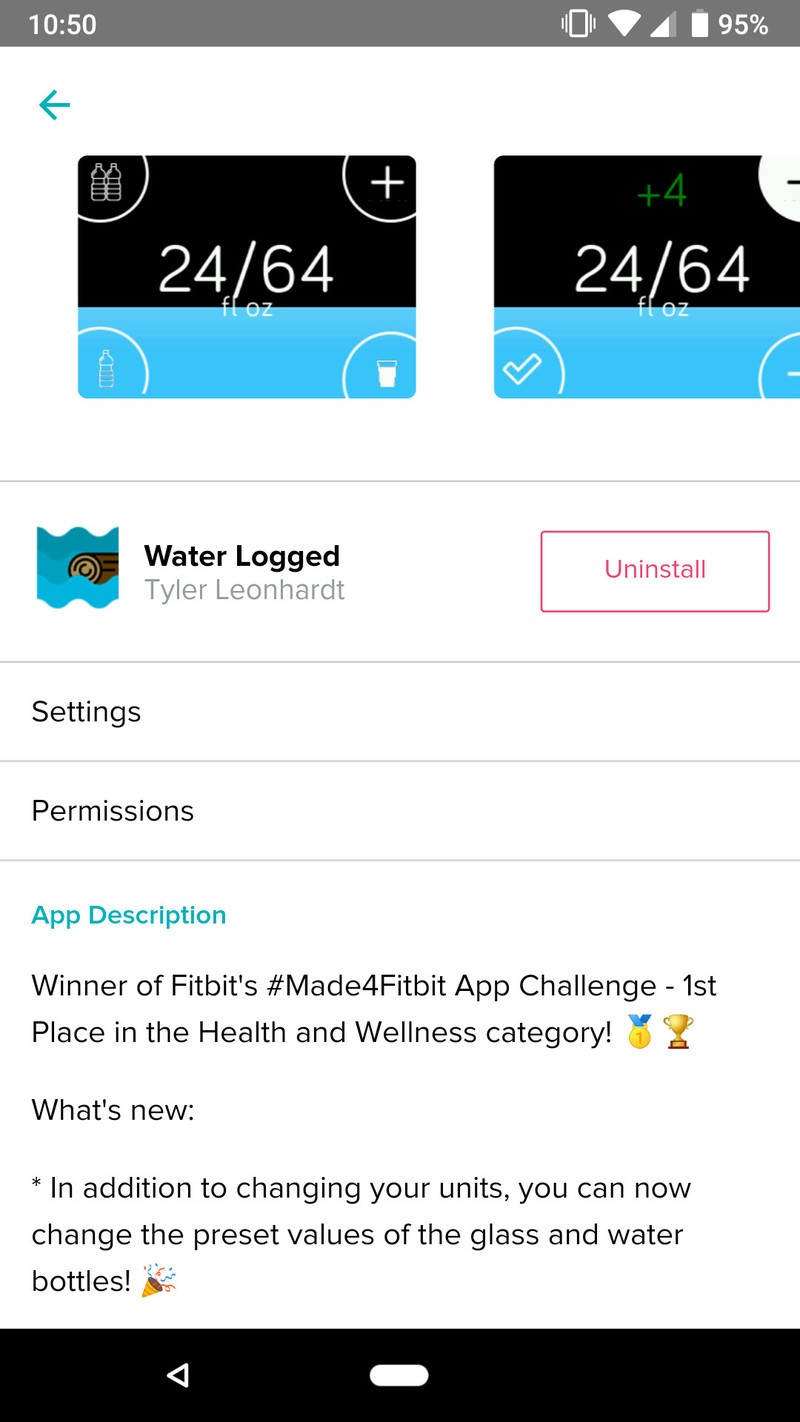

After logging in, you’ll see a few options under the Configuration tab. If you tap on Units, you can switch between fluid ounces and milliliters.


Glass, One Bottle, and Two Bottles will automatically log 8oz, 16oz, and 32oz, respectively, but you can change these amounts by tapping on them and entering a new number.
Using Water Logged
With Water Logged installed, it’s time to start using the app!


Upon opening it, you’ll see how much water you’ve drunk out of your daily goal. The icon in the upper-left corner will add Two Bottles, the one below it will add One Bottle, and the icon at the bottom right adds a Glass. If you tap the + icon, you can manually increase and decrease by one oz/ml. When you’re done, tap the checkmark icon at the bottom left and the amount you entered will be added.
After tapping any of the buttons in Water Logged, it’ll automatically sync with your Fitbit account so your info is updated in the app. Additionally, you can tap in the middle at any time to trigger a manual sync.
Start logging!
With all that said, you’re ready to start tracking your water intake right from your wrist! If you have any additional comments/questions, feel free to sound off in those comments below.
Best apps for Fitbit Versa and Ionic
Fitbit

- Fitbit Versa vs. Fitbit Ionic: Which should you buy?
- Fitbit Versa hands-on: Fitbit’s finally getting serious about smartwatches
- Fitbit Versa and fitness: Everything you need to know
- Best Fitbit fitness tracker
Fitbit Ionic
Fitbit Versa
Fitbit Charge 2 HR
Samsung Galaxy Note 9 rumors: Release date, specs, price, and features!
Here’s everything we know about the Galaxy Note 9!
Now more than ever, Samsung’s Galaxy S+ phones are becoming eerily similar to the Note series. The Note used to be Samsung’s way of touting all of the latest and greatest tech it had to offer, and while this is still the case, the same can be said for this year’s Galaxy S9+.

Samsung needs more than just the S Pen to make the Note 9 stand out from its own phones and the rest of the competition, and luckily, all signs are pointing to something exciting for this year’s release. Here’s what we know so far!
June 13, 2018 — A large 4,000 mAh battery might be present
There are a lot of aspects that make the Note series unique, and one of those has long been huge batteries. The Note 7 had the largest to-date in 2016 at 3,500 mAh, but after those started exploding and catching fire, Samsung decided to play it safe in 2017 by kicking things down to 3,300 mAh in the Note 8.
This year, however, Samsung might start going back in the right direction. According to Ice Universe on Twitter who’s been fairly accurate about Samsung rumors in the past, they’re “100% sure” that the Note 9 will come with a 4,000 mAh battery.
June 6, 2018 — This is what the Galaxy Note 9 might look like
We’ve been talking about the Galaxy Note 9 for months at this point, but up until now, we haven’t had a definitive idea as to what the phone will look like. Thankfully, 91Mobiles partnered with @OnLeaks to scratch that itch for us.
As you can see in the video above, the Note 9 will look very similar to last year’s Note 8. The front will be home to a large, notch-free Infinity Display while the back houses two rear cameras and a fingerprint sensor. The way the cameras and fingerprint sensor are positioned is slightly different compared to the Galaxy S9, but even so, there’s no mistaking this for a modern Samsung phone.
The bottom frame also shows a slot for the S Pen, USB-C port for charging the Note 9, a speaker grill, and 3.5mm headphone jack.
What specs can we look forward to?
Samsung’s Galaxy Note phones are always home to some of the best specs around, and the Note 9 shouldn’t be any different.
Based on the current rumor mill and what we’ve seen from other 2018 flagships, here’s what we think we’ll see this year.
| Operating system | Android Oreo |
| Processor | Qualcomm Snapdragon 845 or Exynos 9810 |
| Screen | 6.3-inch Quad HD (2960 x 1440) Super AMOLED panel 18.5:9 aspect ratio |
| RAM | 6GB |
| Storage | 64GB to 256GB |
| Expandability | microSD up to 2TB |
| Battery | 4,000 mAh |
| Connectivity | USB-C 3.5mm headphone jack |
| Security | Fingerprint sensor Iris scanning Face unlock |
| NFC | Yes |
When will the Galaxy Note 9 be released?
Samsung typically releases its Galaxy Note series in the second-half of the year, often in mid-to-late August.
According to a report from Bloomberg on June 1, Samsung plans on unveiling the Galaxy Note 9 on August 9 in New York City. Samsung’s yet to confirm this information, but based on past Note releases, we have no reason to believe it’s false.
How much will the Galaxy Note 9 cost?
Pricing for the Note series has steadily been going up each year, as has the majority of the smartphone industry.
The Galaxy Note 8 costs $950 unlocked, and I’d expect the Note 9 to cost either the same or slightly more. Apple proved with the iPhone X that people aren’t afraid to shell out $1000+ for a new smartphone, and I don’t consider it to be out of the question for Samsung to follow suit with the Note 9 – especially if it adopts newer technologies like an in-display fingerprint sensor.
Samsung Galaxy S9 & S9+: Everything you need to know!
Samsung Galaxy Note 9
- Samsung Galaxy Note 9 rumors: Release date, specs, price, and features!
- Is it best to buy the Galaxy S9 or wait for the Note 9?
- Do you plan on upgrading to the Note 9?
- Galaxy Note 8 review
- Join our Galaxy Note 9 forums
Updated: June 19, 2018: Added a spec sheet based on rumors and past 2018 flagships.
Sony announces PlayStation Hits lineup featuring PS4 games for $20
It’s time to delve into some of the PS4’s best games.
Remember PlayStation’s Greatest Hits titles back in the day? From the original PlayStation all the way up to the PlayStation 3, there were tons of older video games which recieved the ‘Greatest Hits’ label, along with a nice drop in price down to $20 or $25. As for the PlayStation 4 though, there have only been a couple of games which recieved the honor. Considering the console has been out for close to five years now, the absence of the Greatest Hits program has become more pronounced to gamers. Today, PlayStation fixes all of that with its announcement of the PlayStation Hits lineup.

Beginning June 28, fifteen select PlayStation 4 games will drop in price down to $19.99 in US retail stores and the PlayStation Store, many of which are PlayStation-exclusive titles. In Canada, the games will start at $19.99 CAD, though some will be priced slightly higher. The games included in the lineup will have their covers updated with a red banner which reads ‘PlayStation Hits’ underneath the standard blue PS4 header.
The games which are first being featured in the PlayStation Hits lineup include Bloodborne, Battlefield 4, Doom, Driveclub, Infamous Second Son, Killzone Shadow Fall, The Last of Us: Remastered, LittleBigPlanet 3, Metal Gear Solid V: The Definitive Experience, Project CARS, Ratchet & Clank, Street Fighter V, Uncharted 4: A Thief’s End, Yakuza Kiwami, and Yakuza 0.
It’s likely we’ll see more additions to the PlayStation Hits line soon enough. Until then, these games should be a fun way to spend the rest of the year while waiting for new releases from this year’s E3, like Spider-Man, Shadow of the Tomb Raider, and Call of Duty: Black Ops 4.
See at PlayStation
How to prepare your Google account for when you pass away

Your loved ones have enough to worry about when you shuffle off this mortal coil. Preparing your Google account is easy and something we all need to do.
It’s not something we like to talk or even think about, but we’re all going to die one day. I sincerely hope that day is far off for all of us and the time between now and then is filled with happy memories, but when it does happen your friends and family probably aren’t going to think about your Google account and all the personal information you have stored there. It might seem trivial to some, but for others, it’s important that this all be given to someone who can take care of it all responsibly.
Your Google account holds more than just your search history. You may have active credit information or even funds in Google Pay, Google Photos will likely be filled with memories your friends and family will want to see, or you might have important documents in Google Drive. Any information about you will be important to those you leave behind and letting it sit idle forever on a server isn’t the answer. Thankfully, Google has a simple service that lets you decide what happens to everything about you the company has once your account becomes inactive.
Hand your data to a trustee through Google
 This is the information you can send to someone once your account has become inactive.
You don’t have to set up instructions about what Google is to do with your data after you die, and a family member can get some information from Google, including everything that’s yours in services like Drive or Photos. Your next of kin will need to contact Google about your account and let them know you are deceased. Proof of death will be required and they won’t have access to your account; they will only get specific items.
We can work with immediate family members and representatives to close the account of a deceased person where appropriate. In certain circumstances we may provide content from a deceased user’s account. In all of these cases, our primary responsibility is to keep people’s information secure, safe, and private. We cannot provide passwords or other login details. Any decision to satisfy a request about a deceased user will be made only after a careful review.
A better way is to use Google’s Inactive Account Manager. It allows you to be very specific about what is done with your digital information after your account has been inactive for a set length of time. You can specify how long that time is and exactly what data is to be shared.

I’m not ready to pass away just yet, but I did take a look at the tool and set up my accounts. It was a simple process that only took a few minutes and everything is very specific. You can get a reminder emailed and texted to you before the Inactive Account Manager fires because of inactivity, you can set up one or more people to administer your data — nobody is given access to your account — and have them be verified via SMS before they are given access, and you can even send a personal message to the trustee of your digital fingerprint. Finally, you can decide if your account should be terminated 90 days after these messages are sent or kept alive.
The person(s) chosen will get a polite and succinct message that tells them that you wanted to give them your data after your account ceased to be active, exactly what sort of data they will be given, and a link to download it all.
Give your login information to a trustee

If you would rather hand the keys to your accounts to a loved one instead of simply having google transfer your digital property, it’s almost as easy. In the safe place you keep documents like marriage and birth certificates, your will, or the deed to your home you need to also keep a small portable flash drive with the right information on it.
You can simply place your login details in a text file so the right person can sign in and take care of the account, or you can use something like the portable version of Keepass Password Manager. Have the master password for Keepass in your will; if you haven’t yet made out your last will and testament (you really should do this) you can email it to the people who will need it and let them know what it is for. You should never write your passwords down normally, but sending a message to someone and having the tool the password will open in a different location and (hopefully) locked away means this time you can make an exception.
I know this can be a sensitive subject for many, but death is inevitable. Your loved ones are more important than anything in your Google account and the best thing you can do to prepare is to make sure you cherish the time you have with them. If you do have to administer account data for a loved one who has passed on, Google assured me that the people you need to talk to have been trained how to swiftly and effectively work through the process, and more importantly, are caring and kind.
Lastly, if you’re reading this because you’re thinking of ending your own life, please call 1-800-273-8255 and talk to someone first. There are people who care about you, even if you don’t know them.

