


Bluetooth speakers, all-in-one computers, speedy SSDs, and more are all discounted today
Whether you’re looking for new tech gear or household items, we’ve got you covered.
We found plenty of great deals today that include big discounts on the Logitech UE Megaboom Bluetooth speaker, the WD Black 500GB SSD, Apple’s iMac all-in-one computers, and more! Time’s running out to take advantage of these prices, so hurry!
View the rest of the deals
If you want to know about the deals as soon as they are happening, you’ll want to follow Thrifter on Twitter, and sign up for the newsletter, because missing out on a great deal stinks!
Spigen Liquid Crystal case for Galaxy S9 review: A clear winner

Not every case needs to be expensive to be functional and protective.
Since just a few days after I got my Galaxy S9, I’ve been using Samsung’s official Alcantara case and loving it. It’s soft, and it lets me keep the phone mostly protected without sacrificing the premium look and feel. But here’s the thing: I paid $50 for a thin case that doesn’t even cover the bottom of the phone.
Cases don’t have to be expensive or be made out of fancy materials like Alcantara or leather to fulfill their purpose, though. First and foremost, a case serves to protect your phone from the inevitable scratches and drops it’ll encounter over the months and years to come. Ideally, it looks good too, and doesn’t add too much thickness to your phone so it still fits comfortably in your hand and pocket. The Spigen Liquid Crystal case checks all of those boxes for only $10.99.
Spigen Liquid Crystal case for Galaxy S9

Price: $10.99
Bottom line: This is a slim, clear case that shows off the color of your phone and doesn’t break the bank.
The Good
- Thin, clear design that lets you see your phone’s design
- Tactile button covers
- Smooth bottom edge with wide port cutouts
- Available in 7 total finishes
The Bad
- Front edge is a little sharp
- Not as protective as some thicker cases in Spigen’s lineup
See at Amazon

Thin and clear
Spigen Liquid Crystal What I like
For $11, there’s not much to complain about here. The Liquid Crystal case is simple in design, covering the back, sides, and bottom of the phone in a thin layer of TPU (that’s thermoplastic polyurethane — basically plastic). There’s a bit of branding along the case — a Spigen logo, manufacturing details, and a callout to the case’s Air Cushion technology that, in theory, absorbs the shock from drops and protects your phone from damage.
The Liquid Crystal case is just one of Spigen’s many cases for the Galaxy S9, and it’s one of the thinnest in the selection at just 0.4 inches. I got the clear finish, but the Liquid Crystal is also available in matte black, along with a collection of flashier designs with glitter or floral print. No matter which finish you get, it comes lined with a small dotted pattern inside, which adds a bit of visual texture and prevents weird bubbling patterns.
To be totally honest, I wasn’t expecting much from a cheap, thin case like this. The last clear case I got years ago had horribly stiff buttons and sharp edges along the port cutouts on the bottom, but none of that is true with the Liquid Crystal. The buttons are still very tactile and clicky, and the bottom of the case is smooth, which is especially important if you’re the type to hold your phone in one hand with the bemoaned pinky shelf. There’s also plenty of space around the camera cutout, where a sloped design guides your finger straight to the fingerprint sensor — it’s by far my favorite part of the case.

Rough around the edges
Spigen Liquid Crystal What doesn’t work
My only gripe with the case is that it’s a bit rough along the front edge. It’s nothing terrible and it certainly won’t scratch your hand, but it can be a bit annoying to feel when your thumb slides from the case to the screen. One of the corners is also a bit sharp around the back — again, nothing serious, but the fact that only one corner is like this makes me question Spigen’s consistency when making this case. Still, for how little you’re paying, a few slight imperfections are forgivable.
clearly a good deal
Spigen Liquid Crystal case for Galaxy S9
For $11, the Liquid Crystal case definitely blew through my expectations. It’s got just enough material to protect your phone from damage — at least, in the event of a minor fall — but it’s thin enough that you’ll barely notice it’s there. Especially since I have the blue Galaxy S9, I really appreciate being able to see the finish of my phone clearly through the case, which is something my more expensive Alcantara case can’t offer, beyond the exposed bottom edge.
4
out of 5
Unless you need something more protective (in which case Spigen’s Pro Guard series may be a better fit), the Crystal Clear case is a fantastic option for Galaxy S9 owners that won’t break the bank. Of course, there’s also a larger model available for the Galaxy S9+, as well as most other popular phones. I’m not entirely sure that it’ll replace my Alcantara case, but … I’m also not sure that it won’t.
See at Amazon
Get up to $35 off a new Amazon Fire TV Cube by trading in your old streaming device
Got a Chromecast or Roku sitting around collecting dust?
Trade in whatever media streaming player you own and Amazon will give you up to $35 in credit towards a new Fire TV Cube or 4K Fire TV. Amazon only recently announced the Fire TV Cube, and it’s currently set to come out on June 21. You can get a huge discount off the price with this trade-in offer and go from an older, streaming device, to one that syncs easily with your smart home and streams in 4K. If you want to get your hands on Amazon’s newest device, this is best deal we’re going to see on it for quite some time.

So the way this works is you trade in any Roku, Apple or Google streaming device and Amazon will give you up to $2.99 as an Amazon gift card. This works with pretty much any device, whether it’s an old Roku streaming stick or Google Chromecast Ultra. Once your trade-in is accepted by Amazon, add a Fire TV Cube or 4K Fire TV to your cart and bonus savings up to $35 will be taken out automatically during checkout. The money you get depends on the condition of the product, but Amazon will tell you the maximum amount you’re eligible for on the final screen before you confirm the trade-in. For example, the Roku streaming stick will get you $25 off either the 4K Fire TV or Fire TV Cube, and the Chromecast Ultra can get you $25 off the first but up to $35 off the Cube.
Sending in the device is easy, too. Pick the device you want to trade in from Amazon’s list, answer a question about the condition of the device, and then print the shipping label Amazon creates for you. You have seven days from when you submit the trade-in to mail it to Amazon.
The Fire TV Cube is a big deal. Essentially, imagine the way you use an Echo Dot now to control all the wirelessly connected appliances around your home. Then imagine that control plugged into your TV so you can control everything plugged in there with your voice as well. That’s what you get with this new device. It’s a way to turn on the TV, play your favorite DVD, adjust the volume on your home audio system, dim the lights, and get your microwave to cook some popcorn all without moving from the best spot on the couch.
See on Amazon
Moto Z3 Play: Everything you need to know!

Motorola packs a punch for round three of the Z Play.
Motorola’s Moto Z Play line has gone through a lot of changes in the few short years it’s existed. The original Z Play was an excellent alternative to the much more expensive Moto Z and offered tremendous battery life with support to take it even further with Moto Mods.
The Z2 Play decreased the battery capacity while increasing the price by $50, and this year with the Z3 Play, we’re met with the same 3,000 mAh battery and $499 price tag of its predecessor while also getting dual cameras, a full glass back, and a new on-screen gesture system.
If your interest has been peaked by the Z3 Play, here’s everything you need to know!
Check out our hands-on preview
If you want to know what it’s like to play around with the Moto Z3 Play, why not take a look at our hands-on coverage?
AC’s Daniel Bader got a chance to go up close and personal with the Z3 Play, and you can read and watch his thoughts in both written and video form ✍️📺.
Moto Z3 Play hands-on preview: Three’s company
Review the specs
If you like playing the numbers game, the Moto Z3 Play does a pretty solid job at holding its own compared to other phones in its price range. Some of the highlights include a Snapdragon 636 processor, Android 8.1, and a healthy 4GB RAM.
To learn even more about what makes the Z3 Play tick, check out our full spec rundown below.
Moto Z3 Play Specifications
See how it compares to the Z2 Play

The Moto Z3 Play might be newer and flashier than last year’s Z2 Play, but should owners of its predecessor shell out another $499 to upgrade?
You’ll find a lot of improvements with the Z3 Play, such as a newer processor and slimmer bezels, but the Z2 Play still puts up a fight in mid-2018 with a 3.5mm headphone jack (something the Z3 Play doesn’t have), a more traditional fingerprint sensor, and sturdier aluminum back.
This one’s a toss-up in a lot of ways, so be sure to give our detailed, hands-on comparison a look.
Moto Z3 Play vs. Moto Z2 Play: Should you upgrade?
Motorola’s toying with a new on-screen gesture system

Previous Moto phones have featured a unique navigation system that replaces Google’s on-screen buttons in favor of a series of swipes performed on the front-facing fingerprint sensor.
With the Z3 Play, Motorola’s evolving that idea and taking some inspiration from Android P by moving those gestures from the fingerprint sensor and making them on-screen. Swiping left goes back, Swiping right brings up your recent apps, and a single tap takes you home.
It’s unclear if Motorola will continue to offer this once Android P rolls around, but it’s a fun and unique way to make your way around the phone.
The fingerprint sensor is in a unique place

A quick glance at the Z3 Play might lead you to believe that Motorola forgot to include a fingerprint sensor, but there is one there if you know where to look.
An indented area on the right side of the phone is where the Z3 Play’s fingerprint sensor lies, and because of its position, the power/lock button has been moved to the left.
This positioning of buttons could cause for some confusion/irritation in day-to-day use, but at the very least, it’s a unique implementation we really don’t see all that often.
There are dual cameras

One of the biggest upgrades to the Z3 Play over its predecessors lies with its camera. This is the first entry in the Z Play lineup to come equipped with dual rear cameras, and on the Z3 Play, we’ve got a 12MP and 5MP combo.
Motorola’s upgraded processing should allow for improved low-light photos compared to the Z2 Play and the secondary lens allows for much better (if not the best) portrait shots.
You’ll also find features such as 4K video recording at 30 FPS and a built-in cinemagraph tool.
It’s compatible with all existing Moto Mods

Motorola promised its lineup of Moto Mods would work on Moto Z phones for three full years, and it’s keeping that promise with the Z3 Play.
This is the last Z Play phone that’ll work with all existing Moto Mods, and in mid-2018, you have a lot of them to choose from.
Motorola’s done a great job at building up its library of Mods over the years, with some of the highlights including a Nintendo Switch-like gamepad, external speaker, an assortment of battery packs, and much more.
Here’s every Moto Mod you can buy for the Moto Z series
You’ll pay $499 to own the Z3 Play

If you’re interested in picking up the Moto Z3 Play, Motorola’s charging $499 for it.
For comparison’s sake, the Moto G6 offers a vastly similar experience for around $260 less and the OnePlus 6 costs $30 more while offering a much more capable processor, better cameras, and a headphone jack.
The Z3 Play certainly isn’t a bad phone, but unless you plan on making full use of the Moto Mod ecosystem, don’t be afraid to broaden your horizon’s and see what else is out there.
See at Motorola
Verizon and AT&T will stop selling real-time location data of its users
T-Mobile’s conducting an “internal review” into the matter.
Last May, U.S. carriers came under fire after it was discovered that they were tracking real-time location info of their subscribers and then selling that information to third parties. Following a heap of backlash over security and privacy concerns, both Verizon and AT&T have confirmed they’re ending this practice.

First reported by The Associated Press, Verizon sent a letter to Oregon Democratic Senator Ron Wyden (who’s been particularly critical of this topic) on June 15 announcing that it would stop selling this data to brokers who then sell it to other companies.
Shortly after Verizon made this announcement, AT&T followed suit and confirmed it was doing the same thing.
As for T-Mobile and Sprint, things are still up in the air. Although T-Mobile hasn’t permanently stopped selling real-time user location, it did say in a statement to The Verge that:
While we continue to review the facts and determine next steps, as of May 25th we have suspended all services with LocationSmart. Our ongoing internal review also includes our relationship with Zumigo and, if warranted, we will take additional action.
Sprint hasn’t made any official statement on the matter, but if/when that changes, we’ll update this article accordingly.
While @Verizon & @ATT have now pledged to stop selling customer location data to shady middlemen, @TMobile & @sprint seem content to keep selling customers’ private information, Americans’ privacy be damned.
— Ron Wyden (@RonWyden) June 19, 2018
LocationSmart, one of the companies Verizon, AT&T, and other carriers sell location info to, can use this information to pinpoint the real-time location of someone in just under 15 seconds. The data is obtained using cell towers, and while it’s slower and less accurate than GPS, allows the tracking to happen seamlessly in the background without alerting the person in question.
This is a huge move from Verizon and AT&T, and I expect we’ll hear from T-Mobile and Sprint following in their footsteps shortly. U.S. carriers are still going to collect your location info, but the fact that they’re no longer selling it to other businesses is a big step forward.
What do you think of this news?
All major U.S. carriers give your real-time location info to third parties
Carriers

- Which unlimited plan should you buy?
- Verizon’s Unlimited plans: Everything you need to know
- Everything you need to know about the T-Mobile ONE unlimited plan
- Everything you need to know about the AT&T Unlimited plan
- Everything you need to know about Sprint’s Unlimited Freedom plan
- Join the Discussion

Jump Force for PlayStation 4: Everything you need to know
Naruto, Goku, and more are coming to the same fighting game.

Anime fans know all too well how heated discussions over crossover battles can get. Can anyone beat Naruto? Is Goku the strongest Super Saiyan? What would happen if these two iconic characters clash?
While we’re often left to our own devices to imagine these things – there’s a whole YouTube series on it, even – Bandai Namco is finally making it possible to let you figure it out in video game form. That’s thanks to Jump Force, a new fighting game that features popular anime characters from the weekly Shonen Jump manga publication. Let’s jump right into everything you need to know about it!
What is Jump Force?
Jump Force is an anime lover’s dream. Nostalgic feelings of those Saturday mornings you spent watching Goku charge up his powers for 8 episodes of Dragon Ball Z or Naruto finally getting a handle on his nine-tailed fox rush through your veins. You live for those anime fights.
And until now, those anime fights were mostly contained within their own universes. Now you can bring these characters into the same fighting game and have them battle it out for real.
Anime showdown

For now, we know that Jump Force features characters from four popular anime and manga series. Those would be Naruto, Dragon Ball Z, One Piece, and Death Note. You’ll be able to fight with various popular characters from those series, with Naruto and Sasuke from Naruto, Goku and Frieza from Dragon Ball Z, and Luffy and Zoro from One Piece being confirmed.
Ryuk and Light Yagami from Death Note are confirmed as in-game characters, however, it’s noted that they won’t be playable. We’re not sure what sort of role they’ll have in the game. They could be support characters that you call on to help you during battle, but there has been no specific mention of their exact intent.
The characters emerge with a high degree of detail and a mouth-watering graphical art style. It’s weird to see some of these characters in 3D for the first time – the 3D version of Luffy, for instance, felt like a big shock – but Bandai Namco has seemingly done an excellent job with character modeling to make each character feel familiar. It’s also impressive how cohesive everything looks despite these characters coming from vastly different styles of animation and art.
Inviting gameplay
Jump Force is a 3vs3 Tag Battle fighting game played on a circular 3D plane akin to the Naruto Storm games, meaning you will select an opening fighter and two other characters to be tagged in at any time during a fight. Curiously enough, all three of your fighters share the same health bar, so tagging fighters in is less about extending your health pool and more about allowing you to pull off cool tag team combos or managing matchups.
To that end, Jump Force won’t be difficult for anyone to get into. Early gameplay shows that it’s an approachable fighting game. You can button mash and pull off some meaty combos if you’re not big on learning the intricacies of fighting game mechanics. Each face button on the controller can be mashed to pull off different moves.
That’s not to say there won’t be an opportunity for more engaging combat, though. Advanced mechanics such as tag juggling and a special meter will give more serious players an edge, though it doesn’t look like it’ll be so much of an edge that a newcomer will feel oppressed.
Some may write Jump Force off for that reason, and that’s fine. But it’s clear that Bandai Namco found it important to let even the most casual anime fan enjoy this rare mashup game.
When can you play it?
Jump Force is scheduled to launch in 2019. There’s no hard release date set just yet, but we do know it’ll be available on the PlayStation 4, Xbox One, and PC once it finally arrives. You can pre-order the game at Amazon.com right now for $59.99.
See at Amazon
Be sure to keep it tuned here for further updates about the game as we’re sure to learn more about the roster, fighting mechanics, and pre-order bonuses as we inch toward release.
MacRumors Exclusives: Save 20% on Elevation Lab’s ‘DraftTable’ and 40% on RAVPower’s 7.5W Charger
There are a few exclusive deals we have to share today, beginning with a partnership with accessory company Elevation Lab. Over on Amazon, our readers can purchase Elevation Lab’s DraftTable or DraftTable Kit for 20 percent off, marking the accessories down to $39.96 and $55.96 respectively. Just head to Amazon and enter the code MACLAB20 during the checkout process before the code expires on Friday, June 22 at 11:59 p.m. PT.
DraftTables work with all sizes of iPad Pro (and even accommodate the iPad mini) and are designed to ensure a rock-solid base for working on Apple’s tablet, with wide angle adjustment that ensures comfort for all-day workflows. The slightly more expensive DraftTable Kit also includes Elevation Lab’s ArmRest so you can draw for hours without fatigue and the PencilStand which locks to a flat surface so it can’t tip over.
In our second exclusive deal this week, we’ve partnered with RAVPower to kick off a string of exclusive discounts that will be launching every week over the course of the summer. Things are starting with a 40 percent discount on RAVPower’s 7.5W HyperAir Fast Wireless Charging Pad that’s compatible with iPhone X, 8, and 8 Plus, and can be purchased for just $23.99 with code MACRUMP34, down from $39.99 — the best price in the accessory’s history according to the company.
This sale will last through next Monday, June 25 at 11:59 p.m. PT, and then one week from today we’ll continue the RAVPower sale event with another exclusive discount for our readers. We’ll be keeping a tab on the sale in our Deals Roundup as it continues, so be sure to head there for the latest information.

In other RAVPower discount news, the company also released a new collection of exclusive discount codes for our readers, with savings as high as 36 percent off:
- Dual USB Car Charger with 3ft Lightning Cable – $8.39 with code RUMORS025, down from $11.99
- Ultra-Slim Wireless Charging Pad – $8.49 with code RUMORS083, down from $11.99
- 2-Pack 3ft + 6ft MFi Certified iPhone Cables – $11.99 with code RUMORS003, down from $15.99
- 40W 4-Port USB Wall Charger – $13.99 with code RUMORSC26, down from $17.99
- 10,000 mAh Portable Charger – $20.99 with code RUMORS077, down from $29.99
- 10,000 mAh Solar Portable Charger – $23.99 with code RUMORS082, down from $29.99
- 10W Fast Wireless Charging Pad – $23.99 with code RUMORS066, down from $37.99
- 22,000 mAh Power Bank with USB-C – $37.49 with code RUMORS009, down from $49.99
- 10,400 mAh 7.5W Portable Charger – $49.99 with code RUMORS080, down from $65.99
- 27,000 mAh AC Plug Universal Power Bank – $99.99 with code RUMORS055, down from $129.99
These codes will be available for our readers for most of the summer, expiring on July 31 at 11:59 p.m. PT. As usual, you can head over to our full Deals Roundup for even more sales going on this week, including discounts on Mac software from StackSocial, a one-day Amazon Gold Box deal on a Late 2015 5K iMac, and more.
Related Roundup: Apple Deals
Discuss this article in our forums
watchOS 5 Beta 2 Includes Functional Walkie-Talkie App
In the first watchOS 5 beta, the Walkie-Talkie app, which is one of the key new features in the update, was unavailable and said only “Coming Soon,” but in the second watchOS 5 beta, the Walkie-Talkie feature is available.
When you launch the Walkie-Talkie app after installing the second beta update, you’ll be able to scroll through your contacts and choose a person to connect to. The person on the receiving end of your Walkie-Talkie message will hear their Apple Watch beep and then they’ll see a screen that will allow them to approve a connection.
At the current time, it appears that you can only choose “always allow” when opting to enable a connection with a person.
Once a two-way connection is established, you simply press and hold down on the talk button to communicate, as does the person on the other end. Conversations, which we’ve been testing, are crisp and clear even over long distances.
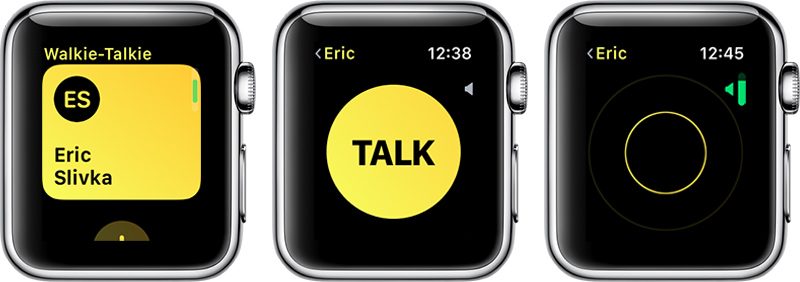
If your Apple Watch is on silent mode, Walkie-Talkie ignores it, so you’re still going to hear Walkie-Talkie beeps and incoming conversations. The same is true for Do Not Disturb Mode and Theater Mode, but there is a Walkie-Talkie volume toggle accessible by turning the Digital Crown. With a push-to-talk connection turned on, you and the person you’re connected to can chat at any time, with no additional approval options available.
You can have multiple Walkie-Talkie conversations going at once, with each conversation listed in the app.
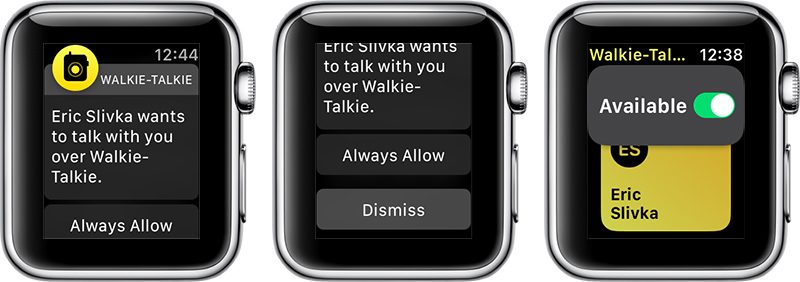
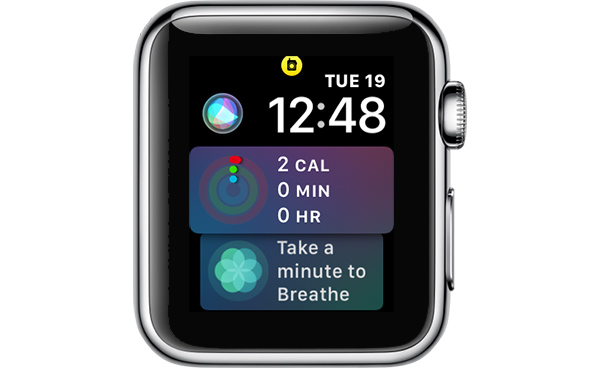
While a Walkie-Talkie conversation is enabled with another person, both of you will see a yellow Walkie-Talkie icon at the top of the Apple Watch.
If you want to mute a Walkie-Talkie conversation so you can no longer be contacted, you can scroll up on the Walkie-Talkie app interface and toggle off the “Available” icon. When unavailable, if someone tries to speak to you, they’ll see a message that you are unavailable, and you’ll receive a notification.
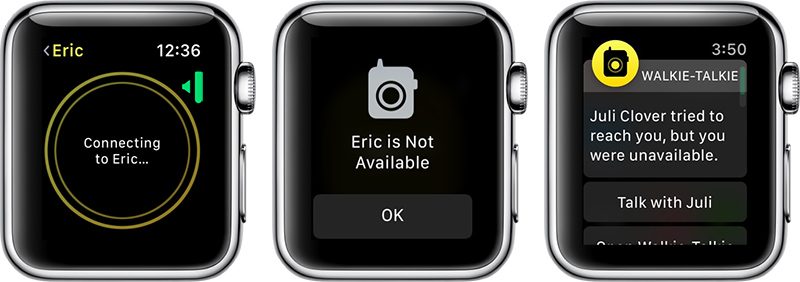
If you want to resume your conversations with people, you can turn the toggle back to “Available” and everything will work as normal. Both people in the conversation need to have themselves set to “Available” in the Walkie-Talkie app for it to be fully functional.
Walkie-Talkie and the other watchOS 5 features will be limited to developers until watchOS 5 is released in the fall, as Apple does not provide betas of watchOS to the public.
Related Roundups: Apple Watch, watchOS 4, watchOS 5Buyer’s Guide: Apple Watch (Neutral)
Discuss this article in our forums
What’s New in iOS 12 Beta 2: Screen Time Updates, Battery Usage Tweaks and More
Apple this morning released the second beta of iOS 12 to developers, and as expected, there are tweaks and changes to many of the new features introduced in iOS 12.
Changes to Screen Time include new options to sort by device and view additional details on a per app basis, while tweaks made to Battery Usage make it easier to see which apps are eating up battery. There are several other smaller changes in iOS 12 beta 2, which we’ve listed below.
– Battery Usage – The charts for activity and battery level for the last 24 hours have been redesigned in iOS 12 beta 2, and some of the wording has been updated in this section.
– Screen Time – Apple has removed a toggle for clearing Screen Time data, and the interface for adding time limits to apps from the main Screen Time screen has been tweaked. In the first beta, when you tapped an app it went right into the limits interface, but now tapping on an app displays more info on the app, including daily average use, developer, category, and more, and lets you tap to set a limit. There’s also a new splash screen when opening Screen Time for the first time.

– Screen Time By Device – There’s now an option to view activity on a single device or all devices.

– Notifications – There’s a new toggle in the Notifications section of the Settings app that allows you to toggle off Siri Suggestions for individual apps. In iOS 12, Siri makes suggestions about limiting the notifications you receive from apps that aren’t often used.
– Password AutoFill – There’s a new interface for autofilling a password saved in iCloud Keychain.

– Voice Memos – There’s a new introductory splash screen for Voice Memos in iOS 12 beta 2.
– Face ID – When unlocking content using Face ID, the iPhone X now says “Scanning with Face ID.”
– Photos – The text size for the “Media Types” and “Albums” listings in the Photos app is now much bigger, making it easier to read.
– Photos Search – In iOS 12 beta 2, Photos appears to support more advanced searches. For example, if you search for a specific date like July 10, it will show all photos from all years taken on July 10. This is different than the behavior in iOS 12 beta 1.
– iPhone apps on iPad – When you open iPhone apps on the iPad, like Instagram, they’re now displayed in a modern device size (iPhone 6) in both 1x and 2x mode.

There are also multiple known issues in the second developer beta of iOS 12, with full details available from Apple’s developer site. We’ve listed a handful of the more prominent problems users might run into:
- The Weather widget is not functional.
- Universal Links might not open the expected target app.
- Netflix might unexpectedly quit when downloading a video.
- Twitter might display a blank login screen.
- Playback might not pause when one AirPod is removed from your ears.
- CarPlay might not connect to certain vehicles.
- Group FaceTime calls can’t be initiated between iOS 12 beta 2 and iOS 12 beta 1. FaceTime calls may also be interrupted by a poor connection message, and FaceTime might unexpectedly quit.
- Screen Time must be re-enabled after installing iOS 12 beta 2, and all Screen Time settings are reset after updating.
- Voice Memos might not sync between devices even when iCloud syncing is enabled.
iOS 12 is limited to developers at the current time, but Apple has promised a public beta for its public beta testing group before the end of June, so we could be seeing a public beta as soon as later this week.
Related Roundup: iOS 12
Discuss this article in our forums
Google’s A.I. tools can predict death risks more accurately than hospitals
Google is beating hospitals at their own game — at least when it comes to death risk assessment. Google’s Medical Brain team has begun training its artificial intelligence system to evaluate the risk of death among hospital patients, and results for the time being are more accurate than those provided by existing medical tools.
Google first detailed its new system in a paper published in the Journal Nature in May. At the time, company researchers noted, “These models outperformed traditional, clinically used predictive models in all cases. We believe that this approach can be used to create accurate and scaleable predictions for a variety of clinical scenarios.”
The results, of course, are rather morbid. Alas, Google’s algorithms aren’t looking for ways to save people — just how likely they are to beat the odds. In one major case study, Google used its A.I. to evaluate a patient with breast cancer. In the 24 hours after she was admitted to the hospital, Google’s system gave her a 19.9-percent chance of dying in the hospital, significantly higher than the 9.3 percent chance the hospital’s Early Warning Score submitted. Unfortunately, less than two weeks later, the patient passed away.
So how did Google do it? The A.I. examined the 175,639 data points found in the patient’s electronic medical records, which included interpreting and evaluating handwritten notes. As Google says, the inclusion of all this information is what differentiates this A.I. from previous approaches.
“In general, prior work has focused on a subset of features available in the EHR, rather than on all data available in an EHR, which includes clinical free-text notes, as well as large amounts of structured and semi-structured data,” Google’s paper reads.
In total, Google has analyzed 216,221 hospitalizations and 114,003 patients, which comes to more than 46 billion data points from all EHRs. And its results are particularly promising for healthcare professionals. Google’s ability to efficiently and accurately parse through stacks and stacks of data could be a real boon to hospitals, ultimately resulting in improved patient care.
Moving forward, Google wants to work on A.I. tools that can predict not only death risk, but also symptoms and diseases. The tech giant is no stranger to working in the healthcare industry, especially as related to prediction. Earlier in 2018, DeepMind worked with the Department of Veterans Affairs, examining its 700,000 medical records and predicting potentially fatal changes in patients’ conditions. And Google also wants to provide doctors with a voice recognition system that would cut down on the time-intensive practice of writing notes.
Editors’ Recommendations
- The tech behind cryptocurrency could save lives by fixing medical records
- Doctors can steer this robot through your guts with an Xbox-style controller
- Fitbit to use Google Cloud to share medical data with doctors
- Google done weaponizing A.I., will still work with military and governments
- Ditch all romaine lettuce and check your eggs — a bad month for food recalls

