


Best Smart Locks that Support Amazon Alexa
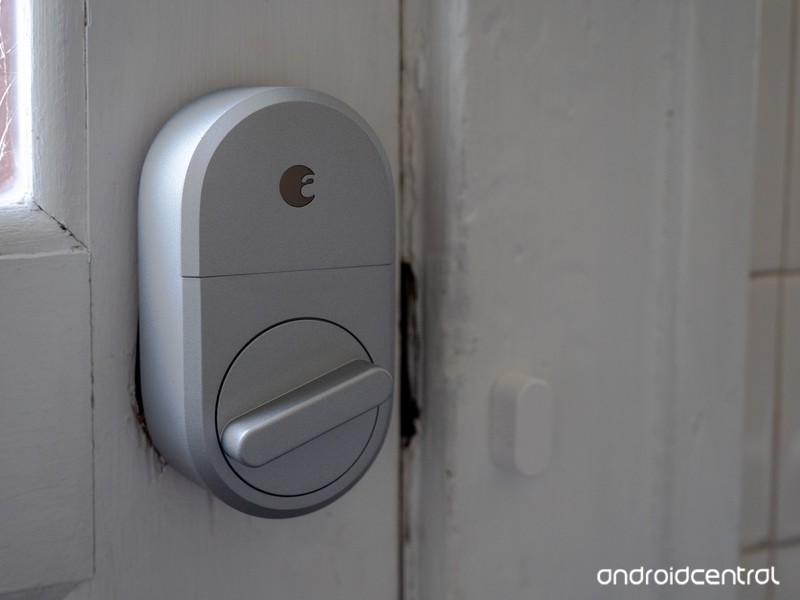
Smart locks don’t have to be a pain to install or use, or prohibitively expensive.
Making your home smarter seems to be all the rage these days. There are smart speakers, smart TVs and other accessories to let you control your life with your voice. One of the most noticeable improvements in a home can be from installing smart locks, so you never have to fish a key out again.
These are the best smart locks that support Amazon Alexa!
- August Smart Lock, 3rd Generation
- Schlage Camelot Touchscreen Deadbolt
- Yale Assure Lock
- Kwikset SmartCode Deadbolt
- Kevo Convert
August Smart Lock, 3rd Generation
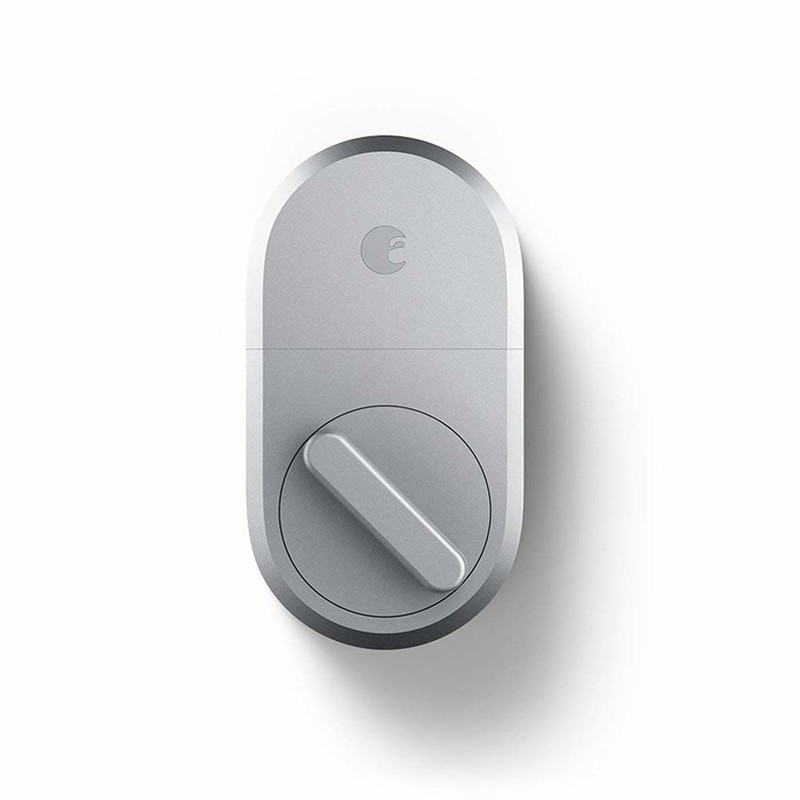
One of the highest rated choices comes courtesy of August. Its 3rd Generation Smart Lock looks the part of a standard deadbolt, provided you have a single-cylinder deadbolt; other designs unfortunately aren’t compatible. You can lock and unlock the door with an Alexa command, or the door will automatically unlock as your approach it with your smartphone. You can automatically create guest “keys” for friends’ phones, with a set expiration date. This makes the August Smart Lock an ideal choice for anyone who owns an Airbnb, or if you need to let a friend in so they can check on your pets. Installation is easy: you just need ten minutes and a screwdriver.
August’s 3rd Generation Smart Lock is available in silver for $129 or dark gray for $137.
See at Amazon
Schlage Camelot Touchscreen Deadbolt
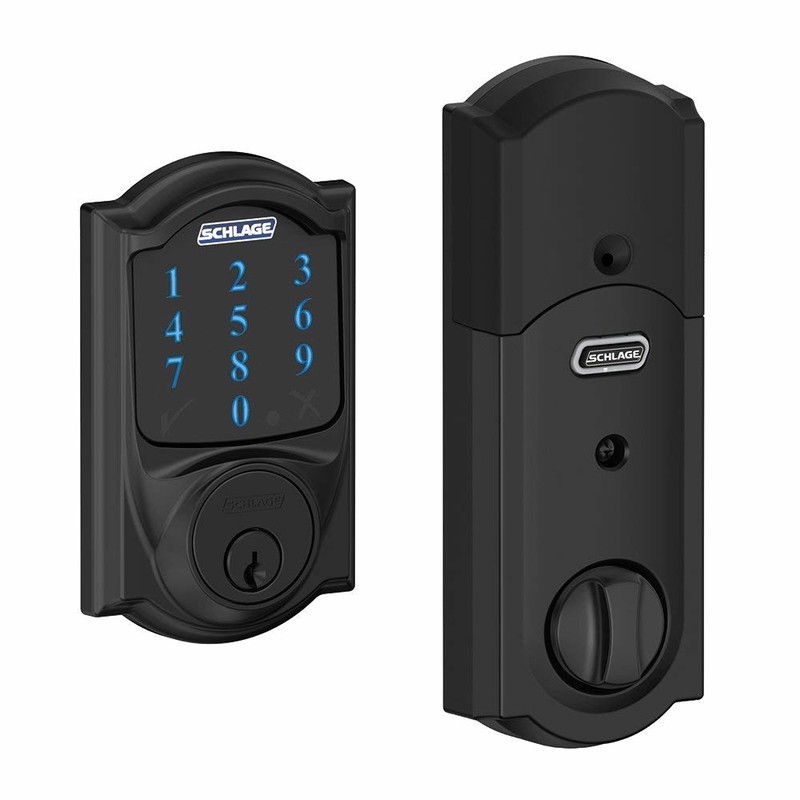
If you leave your phone at home often — say, if you only take your smartwatch out for a jog — having a backup way to get back in your house is important. A physical key is always a good backup, but a PIN may be more convenient. If that sounds like something that’s important, Schlage has the perfect smart lock for you. You can lock and unlock your door with Alexa (with a hub, sold separately), or lock and unlock it from anywhere in the world with a smartphone app. The touchscreen is fingerprint resistant, so you won’t give away the PIN you use to unlock the door. The lock runs off of four AA batteries, so you don’t need to mess with the wiring in your home. Finally, you can set up alerts to tell if someone is trying to tamper with the lock or force their way inside.
Schlage’s Camelot Touchscreen Deadbolt is available in aged bronze, bright chrome, matte black or satin nickel between $176 and $183.
See at Amazon
Yale Assure Lock
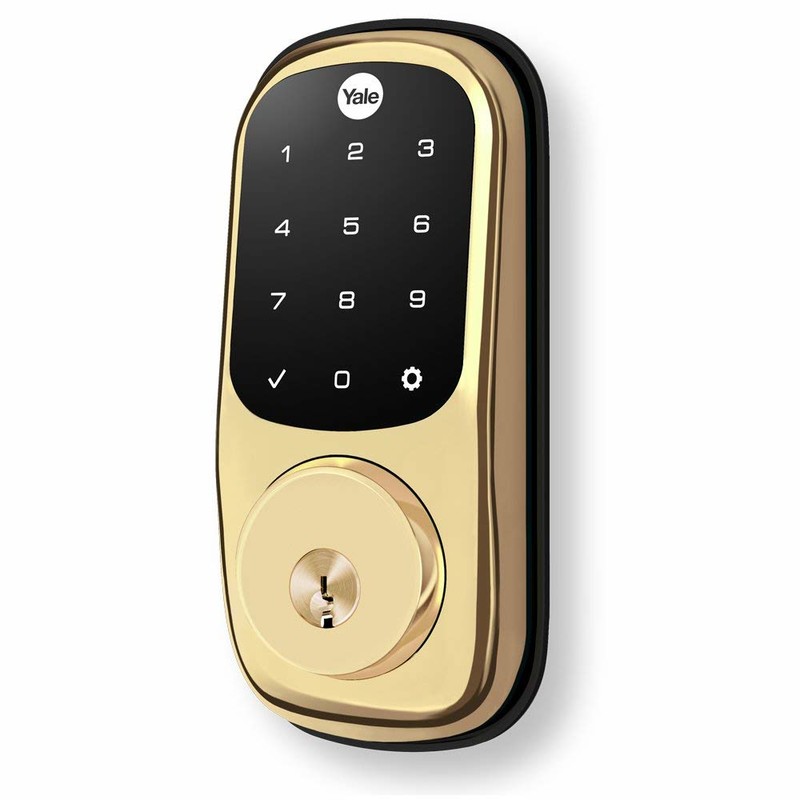
Another great option for those that want to enter a PIN comes from Yale. Its Asure Lock works perfectly with Alexa — with an additional purchase of a hub — and you can manage the lock from anywhere in the world with a smartphone app. The lock can remember 250 unique PIN codes, so you can assign codes to guests without worrying that they have your master PIN. You can also lock every code out of the lock at once, in case something goes wrong. The lock operates on four AA batteries, and users note this was enough to power the lock for at least a year. There are two physical keys included if you need them as well, and installation just takes a few minutes and a screwdriver.
The Yale Assure Lock is available in bronze, brass and nickel between $175 and $200.
See at Amazon
Kwikset SmartCode Deadbolt
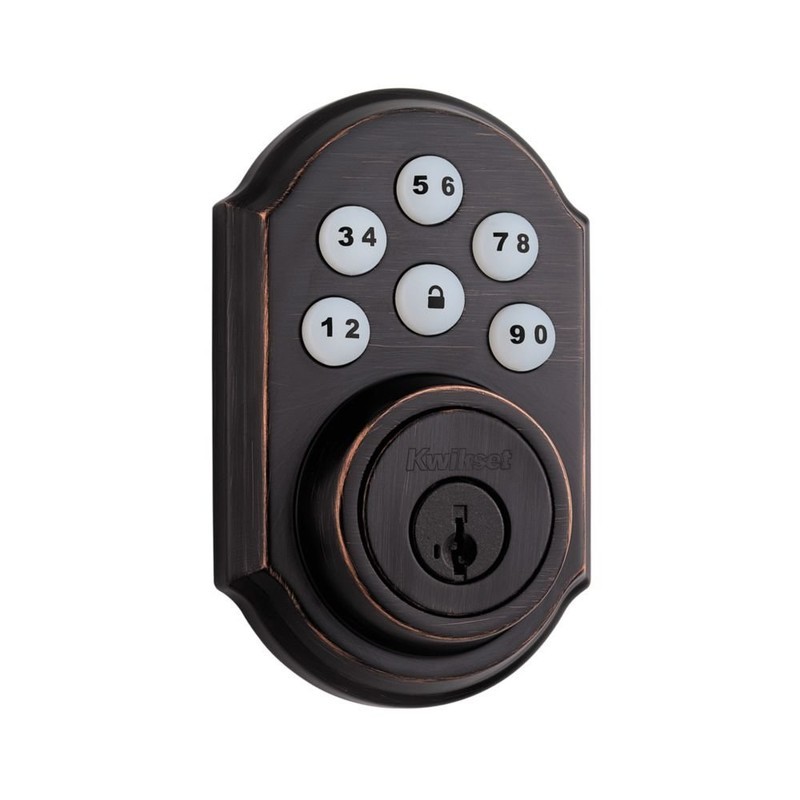
A more traditional — read: non-touchscreen — option is the Kwikset SmartCode deadbolt. Because it uses regular buttons, there’s less of a chance of someone guessing your PIN because of leftover fingerprints. As with the other options, you can control this lock with your voice with Alexa, provided you purchase a hub. You can use up to 30 codes for the door, so you can give out guest codes without worrying about master access. If you forget to lock the door, it will automatically lock itself after thirty seconds. The lock operates on four AA batteries, though these are not included. Installation takes only a few minutes and a screwdriver.
Kwikset’s SmartCode Deadbolt is available in brass, nickel and bronze between $144 and $156.
See at Amazon
Kevo Convert
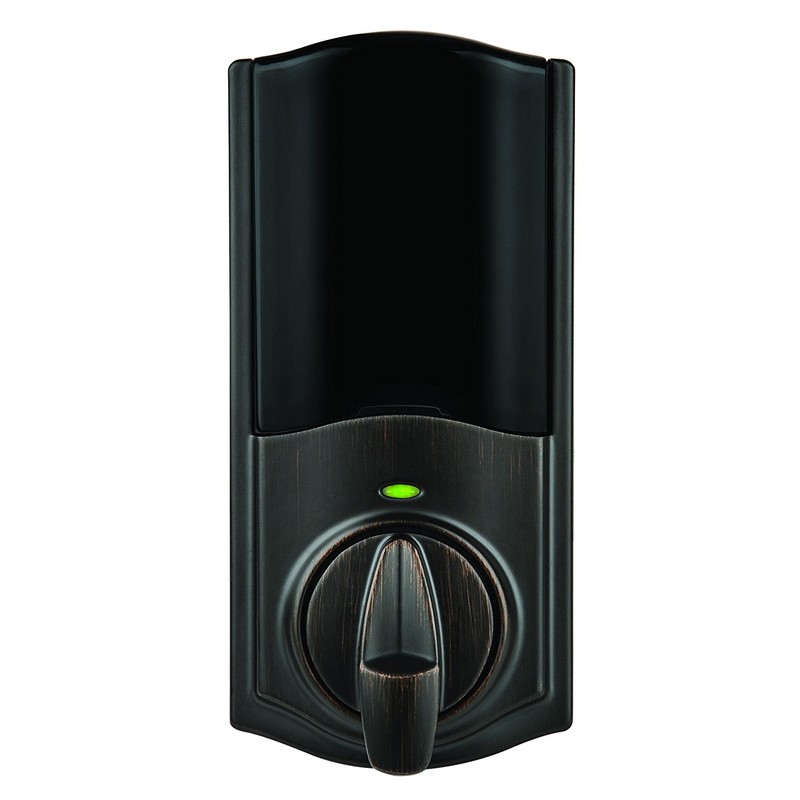
If you can’t replace your entire lock because you’re renting your apartment or house, Kevo has the next best thing for you. The exterior lock stays the same, so your landlord can still access your space. But the interior lock can be switched out, so the whole system becomes smart. Pairing the lock with your smartphone will mean it will automatically unlock in Bluetooth range, and you can set it up to automatically lock after 30 seconds. If you purchase the Kevo Connected Hub, you’ll be able to operate the lock with Alexa, or control the lock from anywhere in the world. You can also send eKeys to your guests’ smartphones, or lock any guest out remotely.
The Kevo Convert is available in bronze or nickel for $120.
See at Amazon
What say you?
Which lock is the best for you? Let us know down below!
Amazon Testing Collaborative Shopping List Feature on iOS App and Website
Amazon has begun testing a small but useful new feature across its iOS app and mobile/desktop websites, allowing users to invite friends and family members to collaborate on a shopping list together. Amazon customers have long been asking for such a feature, and it seems like a small set of them have been selected to test it out ahead of a potential wider launch in the future (via Android Police).
On iOS, after you open the Amazon app and navigate to one of your wish lists, you’ll see a new prompt that says “Invite others to add or remove list items.” If you tap this, you’ll get the usual iOS sharing sheet with options like AirDrop, Message, E-Mail, and simply copying a URL to share with someone.
Once the recipient gets the list invite, Amazon will open up in a browser (both mobile and desktop appear to work), and your list will now effectively appear as one of their own in their Amazon account. They’ll be able to view it, add items to it, remove items, edit quantity, and edit comments. Collaborative lists will be designated as such at the top of the list near its name with two user icons and a “Shared” banner.
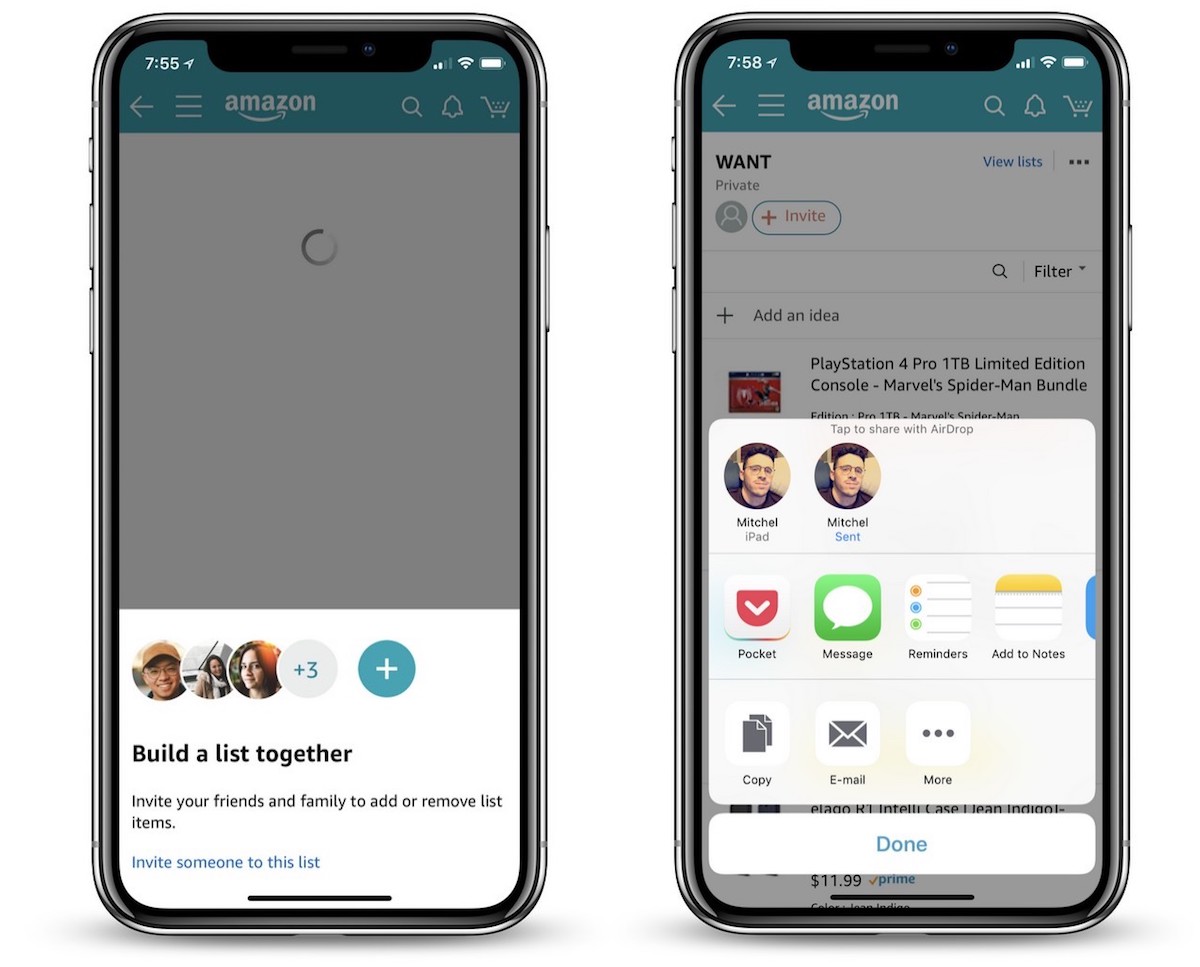
Once multiple members are sharing a list, a new conversation icon will appear on the right of the list’s page and act as a hub for users to send messages and discuss items on the list. Above this is an ellipsis icon that lets the list’s original owner manage members and remove any they don’t want to be able to access the list anymore. It appears that a few of these features are missing for some users at the time of writing, likely due to the feature still being in a testing phase.
The feature is in testing on iOS and Amazon.com on mobile and desktop websites, but Android Central reports that it does not appear to be on the native Android app yet. As with all feature tests, it’s unclear when — or if — collaborative shopping lists on Amazon will roll out to all users.
Tag: Amazon
Discuss this article in our forums
Apple Offers Free Repairs of Products Damaged in Japan Floods
Apple has announced that it will repair any Mac, iPhone, Apple Watch, iPad, iPod, or Thunderbolt Display directly damaged by heavy rains in Japan in July, free of charge, so long as the product is actually repairable.
Affected customers can contact Apple by dialing 0120-27753-5 to arrange for pick up of any eligible products through the end of September, according to a notice on Apple’s website spotted by Japanese blog Mac Otakara.
Apple will service the damaged products free of charge and then return them to customers, although there may be delays, as delivery services by courier companies are suspended in some areas due to damage from the floodwaters.
Record rainfall in southwestern Japan in July resulted in widespread flooding, landslides, burst riverbanks, and collapsed buildings across the region.
Tag: Japan
Discuss this article in our forums
Moto E5 Play review

Research Center:
Moto E5 Play
Motorola’s G- and E-series smartphones have been the bedrock of budget phones for the past few years. This year, there’s plenty more competition to choose from, but many of our favorites still come from Motorola — ranging from the Moto G6 to the Moto E5 Plus. The latest budget addition we’re looking at is the cheapest phone the Lenovo-owned company has to offer, the Moto E5 Play.
You can’t buy the Moto E5 Play unlocked, but it is available at a variety of carriers including Verizon, and Sprint. Each carrier is charging a different price, from as little as $70 to $192. If it’s available at your carrier for under $150, and you don’t want to pay much for a smartphone, you should buy the E5 Play.
There are compromises — the camera isn’t great, and this phone won’t receive the upcoming version of Android. But with a full day’s worth of battery (that’s also removeable), a solid display, decent performance, and a nice design, the Moto E5 Play is a real bargain.
Basic design, satisfactory display
There’s nothing impressive or special about the Moto E5 Play’s design. It’s about as basic as a phone can look, with chunky bezels surrounding the screen on the front, and a textured, cheap-feeling plastic back.
Sitting up top is the front-facing camera and a flash, with the earpiece right in between. This is the only speaker on the phone, and while it sounds decent indoors, it’s easily drowned outside. A volume rocker is situated on the right side, and the power button is underneath it.


There’s thankfully a headphone jack at the top, and you’ll find a MicroUSB charging port at the bottom. We do wish Motorola went with the universal and convenient USB Type-C charging port, but the company confirmed to Digital Trends that all its 2019 phones will have a Type-C port.
The slightly curved edges help with grip, and the phone is lightweight, which helps make it comfortable to hold. Flip it around, and the back feels minimal and organized. There’s a circular single-lens camera module at the top, which sticks out from the back ever-so-slightly, and it also houses the flash. Below it is an indented fingerprint sensor, complete with Motorola’s logo.
There’s nothing impressive or special about the Moto E5 Play’s design.
The fingerprint sensor is placed in a comfortable spot, and it’s fairly responsive. You should know the Virgin Mobile, Cricket Mobile (Moto E5 Cruise), and Boost Mobile variants of the E5 Play don’t include a fingerprint sensor, which is disappointing.
We like how simple the back of the phone looks — the textured black pattern also adds a nice touch, even if it does feel cheap. You can pop the back on and off to access the SIM slot, removable battery, and MicroSD slot. Removable batteries are a dying fad with smartphones, but there’s still strong interest in them because it’s more convenient to swap out batteries instead of lugging around a heavy portable battery charger. That being said, we’ve yet to find a place that sells the Moto E5 Play’s battery.
Moto E5 Play Compared To

Cat S61

Alcatel Idol 5

Lenovo Moto G5S Plus

HTC U11 Life

Sony Xperia XZ1

Lenovo Moto G5 Plus

ZTE Axon 7 mini

Meizu Pro 6

Huawei Honor 8

Nextbit Robin

Huawei Honor 7

Huawei P8

Motorola Droid Turbo

Sony Xperia Z3

LG G2
The 5.2-inch LCD display on the front has a 16:19 aspect ratio with a 1,280 x 720 pixel resolution. The screen looks sharp and colorful, but we did have trouble seeing it outdoors in direct sunlight. We found ourselves often keeping the brightness on the higher side to comfortably see and read what’s on the screen. Despite the lower HD resolution, we didn’t have any issues or problems with video quality when watching movies and shows on the Moto E5 Play.
As for durability, there’s no IP rating for the phone so you’ll want to keep it away from water. Motorola does say there is a water-repellent coating for slight water exposure to protect it in the rain or from accidental spills. We did drop the E5 Play once on concrete (at a height of around 1 and a half feet), and the phone only suffered a minor ding on the side. Just to be safe, you’ll probably want to grab a case.
Decent performance
The Moto E5 Play is powered by Qualcomm’s Snapdragon 425 or Snapdragon 427, depending on the carrier it’s sold from. For example, Virgin Mobile, Boost Mobile, and Sprint sell the model with the Snapdragon 427, whereas the rest — including Verizon — sell the slightly-weaker Snapdragon 425 model. Ours has the Snapdragon 425, but all models come with 2GB of RAM.
Performance is average — apps will open slowly, and there’s a bit of stutter when scrolling in apps like Twitter or Facebook. But moving throughout the user interface, like the Settings menu and the home screen, didn’t pose any problems or lag.
Here are a few benchmark results:
- AnTuTu 3DBench: 43,358
- Geekbench CPU: single-core 651; multi-core 1,789
- 3DMark Sling Shot Extreme: 53
The Moto E5 Play actually scored higher than the Moto G6 Play (41,158 on AnTuTu), which is more expensive. Benchmark scores aren’t the best measure of real-world performance, though, and we didn’t run into any problems that would categorize the Moto E5 Play as unusable. We were generally able to complete day-to-day tasks without much frustration. It’s when you want to do multiple things within a short time period that the phone starts to frustratingly slow down. If you’re not a power user, we think you’ll be satisfied here.
 Brenda Stolyar/Digital Trends
When it comes to gaming, we didn’t run into any major hiccups playing The Sims Mobile. The game did lag a little when swiping through different parts of the map, but the graphics look great and we were still able to enjoy the game.
There’s only 16GB of storage on the Moto E5 Play, which is easy to fill up in a short amount of time. Thankfully, a MicroSD card slot lets you add up to 128GB of additional storage if you need it.
No Android P
The Moto E5 Play ships with Android 8.0 Oreo, and the only updates you can expect to see are for security. Motorola confirmed to Digital Trends that the Moto E5 Play will not receive Android P, so that might be something to consider before purchasing the device. Android P is the next version of Android that’s set to release around the end of August.
Regardless, the software experience is almost stock Android — uncluttered and simple to use. There’s very little bloatware, with just your standard suite of Google apps pre-installed, and you can swipe right from the home screen to access the Google Feed. Press and hold the home button to activate Google Assistant.
Not all the features are available here. We’re sad to see some of our favorite gestures not included.
There is the Moto app that’s standard on all Motorola phones, but not all the features are available here. We’re sad to see some of our favorite gestures not included — such as making a chopping gesture twice to turn on the flashlight, or twisting the phone twice to open the camera. You can touch the screen with three fingertips to capture a screenshot, put your phone face down to activate do not disturb mode, pick up the phone to stop ringing, and swipe down to the left or right of the screen to shrink the screen for one-handed mode. That’s about it. We didn’t use any of these features.
Thankfully Moto Display is available, so you can see notifications fading in and out of the lockscreen. There’s also access to the blue-light filter, and Attentive Display, which keeps the screen on while you’re looking at it.
Decent camera, poor low-light shots
As with most budget smartphones, the camera on the Moto E5 Play struggles in low-light environments. The 8-megapixel rear camera does take passable photos in broad daylight — they can look a little flat sometimes — but there are some surprisingly good photos that come through.
Previous
Next
1 of 9


But as soon as there isn’t enough light, the camera drops in quality. Even an overcast sky is enough to make the photos look dull, grainy, and lacking in detail. Things get worse indoors with low lighting, as the results can often look unrecognizable — adding flash only makes them look worse and washed out. The option to adjust the exposure in the viewfinder didn’t make much of a difference.
Previous
Next
1 of 4


The 5-megapixel front-facing camera isn’t too impressive for selfies either. Look close and every photo looks blurry and grainy. The built-in Face Beauty feature also made us look strange — it seemed to have airbrushed not only our skin (to make us look more pale) but also our eyebrows and pieces of our hair. Not very flattering.
While the camera app itself is quick to open, we saw some lag when snapping a photo, which we’ve often found to be a problem on Motorola phones.
Day-long battery
With a 2,800mAh battery powering the Moto E5 Play, we were able to get a full day out of the smartphone. This includes accessing email notifications, using social media and productivity apps, taking photos, along with text messaging. On average, we found that our device was at about 85 percent by noon (having taken it off the charger at around 8:30 a.m.), and by the end of the workday at 5 p.m., it was around 74 percent.
You don’t have to worry about it dying on you before the day is over.
By about 10 p.m., the phone hit 68 percent and that was after catching up on apps like Instagram, Twitter, and news on our commute home. With lighter phone usage, the phone could definitely last into the second day, so you don’t have to worry about it dying on you before the day is over.
It also comes with either 5-watt or 10-watt charger (depending on the carrier), which allows for better rapid charging capabilities.
Price, availability, and warranty information
The Moto E5 Play isn’t available unlocked yet, so you’ll have to purchase it through a carrier, where it varies in price. At Verizon, it’ll cost $70, whereas Boost Mobile sells it for $80. Under Cricket Wireless, it’s known as the Moto E5 Cruise, and it will only set you back $40, but you need to sign up for a new line or upgrade your existing device. By transferring your number, you could even get the device for free.
 Brenda Stolyar/Digital Trends
You can also purchase it from Best Buy — but it is a bit pricier — ranging from $95 to $130 depending on the carrier it’s locked in with. Xfinity Mobile sells it for $120, but it’s the most expensive on Sprint, which is carrying the phone for $192. Keep in mind that many of the more expensive versions have the Snapdragon 427 processor, which is slightly better. We don’t think the performance difference will be noticeable though.
Motorola offers a standard one-year warranty that protects against manufacturer defects. Accidental drops or water defects aren’t covered.
Our Take
For such a cheap price, the Moto E5 Play packs in all the basics you need for a solid smartphone experience.
Is there a better alternative?
Yes, if you’re eyeing a Moto E5 Play that’s more than $130, we recommend taking a look at the Moto E5 Plus. It has a massive 5,000mAh battery, more RAM, and a slightly better processor that should provide an overall better experience. It also comes with the useful Moto gestures.
Our favorite budget pick is the Nokia 6.1 for $270, with the standard Moto G6 following it swiftly behind. There’s also the Honor 7X worth considering, since it’s only $200. You can learn more in our best cheap phones guide.
How long will it last?
The Moto E5 Play should last you around two years. Since it’s made of plastic, you don’t have to worry about shattering it compared to all-glass phones.
It might receive a few security updates, but this is the only Android version you will get, so you will likely want to upgrade yourself by the two-year mark.
Should you buy it?
Yes, but it depends on the price from the carrier. We don’t think it’s worth purchasing if the carrier is selling a model without a fingerprint sensor, or if it costs more than $130. Otherwise, this phone is a really good bargain.
The MacBook Pro’s tight security comes with an annoying compromise
(in)Secure is a weekly column that dives into the rapidly escalating topic of cybersecurity.
The launch of the 2018 MacBook Pro has been rife with controversy, with issues ranging from the performance to the keyboard. While we’re at it, let’s throw one more log on the fire, shall we?
The new MacBook Pros come with what Apple calls the T2 coprocessor — a chip first featured in the iMac Pro. Although its main reason for inclusion is Siri voice activation, it also has important implications on security and storage. Better security is great, but unfortunately, the T2 coprocessor isn’t without problem.
The return of the T2
The T2 coprocessor brings all sorts of security features to the MacBook Pros. In its press release, Apple says it has “support for secure boot” and “on-the-fly encrypted storage,” two features that first came when the T2 showed up in last year’s iMac Pro. These security features might not sound like a big deal, but they’ll have a much larger effect on users than activating Siri with your voice.
As soon as the Apple logo appears, the T2 is in control, and acts as Apple’s “root of trust.”
Apple’s never been all that forthcoming about the exact processes these chips control, but there are a few things we know the T2 does handle. That includes Boot-up, storage, and the Touch Bar/Touch ID. Not only are these processes the Intel CPU and third-party controllers no longer must handle, it keeps them protected in Apple’s closed system of stopgaps.
A great example is the boot-up process, which is now partially handled by the T2. As detailed in initial reports about the coprocessor in the iMac Pro, the T2 verifies everything about the system before it’s allowed to move forward. As soon as the Apple logo appears, the T2 is in control, and acts as Apple’s “root of trust” to ensure that everything checks out.
Encrypted storage is equally important. Because the functions of the conventional disk controller have been replaced by the T2, the coprocessor now has direct control over the storage in your MacBook Pro.
Apple’s T2 coprocessor
That kind of access allows Apple to ensure every piece of data in the SSD is automatically protected and encrypted. That lets Apple to do things like secure your biometric data outside of the SSD. Right now, that’s just the TouchID sensor, but in the future that could include something like FaceID.
However, some reports were made to bring these new security features to the MacBook Pro.
The T2’s Achilles’ heel
While the MacBook Pro’s new storage is fast and safe, the technology has introduced a new problem as well.
In older models of the MacBook Pro, technicians had access to a data access recovery port on the logic board. Thanks to a special tool Apple developed, this port enabled the data of your SSD to be saved — even on a failed logic board. Because memory has been soldered on to the board of MacBooks since 2016, this was the only way to save the data if something went awry on your computer. It was as simple as bringing your dead laptop to a local Apple Store.
But now, thanks to a breakdown by iFixit, we know that data access recovery port is missing on new MacBook Pros. Apple may have another backup plan for recovering data, but none that it has shared so far.
Apple made it much harder to save your data from the system.
What does this have to do with security? Well, according to sources in contact with MacRumors, this data recovery port was “likely removed because 2018 MacBook Pro models feature Apple’s custom T2 chip, which provides hardware encryption for the SSD storage.”
In other words, to add this extra dose of security with its new processor, Apple’s made it much harder to save your data from the system. That’s great for security, but not great if your MacBook fails.
And, according to internal documents obtained by MacRumors, Apple technicians are advised to encourage users to back up their systems using Time Machine. So, while you can try to stay backed up or possibly send your whole system to a very expensive data recovery specialist, Apple’s ability to service its own products has dwindled. The reliability and service that set Apple’s products apart shrinks by the day.
As with many issues regarding Mac these days, it’s one step forward, two steps back.
Editors’ Recommendations
- The Apple T2 chip in the latest MacBook Pros offer a deeper level of security
- If you own a 2018 MacBook Pro, you will want to maintain data backups
- Apple’s T2 chip may be causing issues in iMac Pro and 2018 MacBook Pros
- Apple’s MacBook Pro problem will make you want to backup your files ASAP
- MacBook Pro 13-inch with Touch Bar review
Watch Virgin Galactic’s tourist spacecraft reach its highest altitude to date
Any of the hundreds of people who’ve already paid $250,000 for the ride of a lifetime with Virgin Galactic will be eyeing their ticket with growing excitement following another successful test flight by the team on Thursday, July 26.
For the third time in four months, Richard Branson’s private space company achieved a flawless rocket-powered supersonic test flight of VSS Unity, the two-crew, six-passenger spacecraft that will one day take paying space tourists some 62 miles (100 km) above the surface of the Earth.
Following a smooth release from carrier aircraft VMS Eve at 46,500 feet (14,175 meters) over California’s Mojave Desert, pilots Dave Mackay and Mike Masucci fired up the spacecraft’s rocket motor before embarking upon a near-vertical climb at 2.47 times the speed of sound to an altitude of 32 miles (50 km), Virgin Galactic said in a report on its website.
Notably, Thursday’s test flight took Unity to its highest altitude yet, and about halfway to its target altitude at the edge of space.
It also enabled the team to gather valuable data in a number of areas, including supersonic aerodynamics and thermal dynamics. Other sensors aboard Unity measured precise cabin conditions during powered flight.
After landing safely back at Mojave Air and Space Port, chief pilot Mackay described the experience as “a thrill from start to finish.”
He added: “Unity’s rocket motor performed magnificently again and Sooch pulled off a smooth landing. This was a new altitude record for both of us in the cockpit … and the views of Earth from the black sky were magnificent.”
Sooch was no less enthusiastic about the experience: “Having been a U2 pilot and done a lot of high altitude work, or what I thought was high altitude work, the view from 170,000 feet was just totally amazing.”
The pilot described the flight as “exciting and frankly beautiful,” adding, “We were able to complete a large number of test points which will give us good insight as we progress to our goal of commercial service.”
With the team’s confidence growing, Branson said this week that a commercial service for so-called “space tourists” could launch by the end of this year.
Branson, who’s already training for a place on the debut flight, said recently that Virgin Galactic is neck and neck with Blue Origin — owned by Amazon boss Jeff Bezos — in the race to launch the first commercial space tourism service.
But never far from the team’s mind is the disaster Virgin Galactic suffered in 2014 when one of its pilots died in a failed test flight.
“Ultimately, we have to do it safely,” Branson said recently. “It’s more a race with ourselves to make sure we have the craft that are safe to put people up there.”
Virgin Galactic suspended air operations for two years following the tragedy before embarking on a glide test of its then-new spaceplane, VSS Unity, in 2016.
Editors’ Recommendations
- Watch Richard Branson’s Virgin Galactic test its tourist spaceplane
- Virgin Galactic wants to launch space tourism flights from an Italian spaceport
- Virgin Galactic ‘neck and neck’ with Blue Origin in space tourism race
- Blue Origin sends New Shepard space capsule to its highest altitude yet
- This crash-tastic video shows why rocket launches aren’t easy
These New Smart Displays include Google Assistant

Smart Displays are coming first from JBL, Lenovo, LG, and Sony.
One of the big trends from CES 2018 was Google’s response to the Amazon Echo Show. In 2017, Google matched the Amazon’s Echo Dot with the Google Home Mini, and this year it took aim at the Show with its new smart displays with Google Assistant built in.
Smart Displays are Google Assistant-powered speakers that also feature screens, and while we likely won’t see a Google Home-branded one until later in the fall, there are already four companies that have announced Smart Displays of their own. Let’s take a look at what we know so far.
- Lenovo Smart Display
- JBL Link View
- LG ThinQ View WK9
- Sony’s yet-to-be-announced Smart Display
Lenovo Smart Display
The first of these gadgets announced was the Lenovo Smart Display. You’ll be able to get Lenovo’s Smart Display with either an 8-inch or 10-inch display, and while the 8-inch model opts for a traditional plastic back, the 10-inch unit has a gorgeous bamboo one.
Both models have an odd wedge on the back, and this allows you to position the Lenovo Smart Display either vertically or horizontally. There are buttons for adjusting speaker volume, and there’s even a switch that places a physical lens cover over the front-facing camera that’s used for video calls.
Lenovo will sell the 8-inch Smart Display for $199, and upgrading to the larger 10-inch one will cost you $249. It’s on sale starting July 27.
See at Lenovo
JBL Link View

JBL’s Smart Display goes by the name of the Link View, and while it serves the same general purpose as the Lenovo Smart Display, its design is quite a bit different. JBL has only announced one version of the Link View so far, and it comes with an 8-inch screen. There’s a 5MP camera above it and a JBL logo at the bottom and both the left and right side are flanked by two 10W stereo speakers that are paired with a passive radiator on the back to enable “rich, deep bass.”
The body as a whole favors an oval shape versus the rectangular nature of the Lenovo Smart Display, and while you won’t find any bamboo back here, it’s arguably the sleeker of the two thanks to the all-black paint job. Along with this, there’s also support for Bluetooth, Google Cast, and IPX4 splash resistance.
Pricing details have yet to be announced, but JBL says the Link View will be available at some point this summer.
LG ThingQ View WK9
LG’s first foray into the world of Smart Displays comes in the form of the LG ThinQ View WK9, and while we’ll have to get hands-on time with the device before we can make any final judgments, it currently looks like the most underwhelming of the Smart Displays we’ve seen so far.
The large, boxy design looks boring and not all that aesthetically pleasing, and while the 8-inch touchscreen display itself should be fine, the fact that there’s no tilt to it like there is on Lenovo and JBL’s options could make for some difficult viewing angles.
Speaker tuning from Meridian Audio still has us interested, however, and this paired with the two front-facing stereo speakers will likely create a solid audio experience. Similar to the other Smart Displays on this list, you’ll also find Chromecast support.
LG simply says that the WK9 is “coming soon” with a hefty price of $299.99.
Sony’s yet-to-be-announced Smart Display
Google confirmed that Sony will be releasing a Smart Display, but a month on from CES and we still know literally nothing about it. Neither specs or renders for the speaker have been released, and as such, there’s not a whole lot we can say about it right now.
As soon as details are released, we’ll be sure to share them with you!
Might Google Assistant and the Lenovo Smart Display be the whole-home hub the Echo Show isn’t?
Updated July 2018: Added the latest information available.
4 reasons you should buy an unlocked Xiaomi Mi Mix 2 from Amazon in the U.S.
The Mi Mix 2 combines an interesting design aesthetic with global LTE bands, and is available for $399.

The Mi Mix 2 continues to be one of the best phones Xiaomi has released to date. The phone took the first-gen Mi Mix’s design aesthetic —with ultra-thin bezels on three sides — and shrunk it down to a more manageable 5.99-inch display.
The phone has a unique design that sets it apart from the rest of the devices in this segment, and it has global LTE connectivity. The latter suggested a wider release in Western markets, and while Xiaomi rolled out the Mix 2 in Europe earlier this year, the phone isn’t officially available in the U.S.
That’s where Amazon comes in. The unlocked 6GB/64GB version of the Mi Mix 2 is currently listed on Amazon.com for $399, and the listing is backed by the retailer’s 30-day Prime guarantee. Here’s why you should consider picking up a unit.
It has global LTE connectivity
The most compelling reason to purchase the Mi Mix 2 in the U.S. is global LTE connectivity. The phone has 24 FDD-LTE bands, making it compatible with most carriers around the world.
The sheer number of LTE bands on offer means you should have no issues when using the Mi Mix 2 on either AT&T and T-Mobile. Here’s the full list of FDD-LTE bands supported by the device: 1/2/3/4/5/7/8/12/13/17/18/19/20/25/26/27/28/29/30/34/38/39/40/41.
Snapdragon 835 is still incredibly fast
Like all Xiaomi phones, the Mi Mix 2 offers incredible hardware for the asking price. You get a 2.45GHz Snapdragon 835, 6GB of RAM, 64GB of internal storage, dual SIM connectivity, Wi-Fi ac, Bluetooth 5.0, 12MP rear camera, 5MP front shooter, and a 3400mAh battery.
The Snapdragon 835 may not be quite as fast as the current-gen Snapdragon 845, but it still has a lot of grunt. You won’t notice any lag during day-to-day usage, and the 6GB of RAM is more than adequate for multitasking.
Xiaomi has also ironed out a lot of the UI bugs with the latest MIUI 9 release, while introducing new features like navigation gestures that are akin to what you get on the OnePlus 6.
The design is one of the best around
Xiaomi turned a lot of heads with the first-gen Mi Mix, and the Mi Mix 2 retains a similar design aesthetic. The phone has razor-thin bezels on three sides, and the 5.99-inch FHD+ (2160×1080) 18:9 display is one of the best you’ll find in the $400 category.
Another interesting design choice is the positioning of the front camera module: Xiaomi decided to put the camera sensor in the bottom bar, thereby allowing the brand to come up with a way to avoid a cutout at the top of the phone.
The Mi Mix 2 has a layer of Gorilla Glass 4 up front for the screen, and the back is made out of ceramic. There’s an aluminum mid-frame to add rigidity to the device, and the ceramic body in particular gives it a reassuring heft. It also feels great to hold in-hand.
You’ll easily get two-day battery life
Xiaomi’s MIUI custom ROM has a wealth of options that let you eke out the most out of the 3400mAh battery. The Mi Mix 2 consistently delivers a day-and-a-half’s worth of usage from the battery, and more often than not you’ll be able to get two-day battery life from the device.
And when you do need to top up, there’s Quick Charge 3.0 built in. The one downside with the Mi Mix 2 is that it doesn’t have a 3.5mm jack, but it is hardly the only device in this segment to eschew the analog port. If you don’t mind that particular omission, there’s plenty to like in the device.
It is because of global LTE compatibility that it was initially suggested that the Mi Mix 2 would go on sale officially in the U.S., but that wasn’t meant to be. Still, with the phone now available for just $399, it’s a great time to pick up the device unlocked.
See at Amazon
Modern Dad does the Lenovo Smart Display
Yes, you do need to spend another 10 minutes with a smart display.
You’ve read the Android Central review. … You’ve marveled over Mr.Mobile. And now we’ve got one more look at the Lenovo Smart Display — Google’s answer to the Amazon Echo Show — from ye olde Modern Dad himself.
If you think it’s weird writing about yourself in the third person like this, that’s where you’re right. But if you think the Lenovo Smart Display is basically a Google Home with a touchscreen running a scaled down version of Android meant for the internet of things, which in its early days and most certainly will improve over time — well, you’re also right.
But that’s what it is, and that’s what it will be, and to be completely honest I’m still finding new little gems and features tucked into this thing, even after a week of use. So here’s another 10 minutes with the intriguing first entry into a lineup of smart displays.
Modern Dad
- Subscribe on YouTube
- See the gear
Subscribe to the Modern Dad newsletter!
LinkedIn Adds Voice Messaging Feature to its Mobile App
LinkedIn has introduced a new voice messaging service that’s built in to the latest version of its mobile app.
Called LinkedIn Messaging, the feature gives users the ability to record and send audio messages up to one minute long.
Voice messaging is rolling out now in the LinkedIn app on iOS and Android, and you can receive voice messages on mobile and on web. This feature will be available globally to all members in the next few weeks.
We hope this makes it easier than ever to communicate when you want, how you want with your professional community.
Voice messages are recorded by tapping the microphone icon on the mobile messaging keyboard. Users then tap and hold the microphone symbol in the circle to record their voice message and release their finger to send.
The business networking platform is touting voice messages as an easier way to communicate when you’re on the go or multi-tasking, but many account holders will likely be wary of the feature given the already high volume of unsolicited messages sent over LinkedIn.
LinkedIn is a free download for iPhone available on the App Store. [Direct Link]
Tag: LinkedIn
Discuss this article in our forums

