


2016 Tesla Model S 60 review – Roadshow
The Good Instant torque off the line is always a good thing. Autopilot is one of the best driver assist programs on the market today.
The Bad City dwellers without access to a garage or charger will find themselves planning their lives around the needs of the car. Do you really want to live that way?
The Bottom Line If you have the personal infrastructure to support charging the Model S at home, the 60 kWh battery is a good option for those who want electric power and cutting-edge features at Tesla’s lowest price.
Suffering from a migraine, I could either drive the 2016 Tesla Model S 60 home from the office for my medicine, and risk not being able to make it to the next Supercharger station, or head straight over to the Supercharger station in San Mateo, charging the car’s battery but potentially facing a pain-related vomiting session.
And thus went my week in Tesla’s current most-affordable electric vehicle. I was constantly weighing the car’s need for electricity against my own personal needs and wants.
When it comes to specs, the only thing to care about in an electric car is kWh, or kilowatt hours. The Model S 60 has a, you guessed it, 60 kWh battery. That’s enough to power it from nothing to 60 miles per hour in 5.5 seconds and to a top speed of 130 miles per hour. Of course, should you choose to hammer down that right pedal, expect the 210-mile driving range of the Model S 60 to drop. Precipitously.
 Emme Hall/Roadshow
If you want a bit more electric oomph, the Model S 60 can be upgraded at any time to 75 kWh for 259 miles of range, and there is an all-wheel drive version available with 218 electric driving miles. As it stands, the rear-wheel drive 60 kWh trim line starts at $66,000, making it the most affordable Tesla currently available.
Aside from the badge there isn’t much to distinguish this base Tesla from the uber-pricey upper trims, but this year a few changes have taken shape across the model lineup. Where once a kind of stand-in grille looked out from the front fascia, it is now completely closed up. The LED headlights have been tweaked a bit from 2015, but by and large the rest of the car remains the same.
When the good is the bad
The big drawback to driving a Model S is that they are legitimately fun to drive. I know that sounds weird but stay with me. My rear-wheel-drive test car was a blast behind the wheel. Power was immediate and I shot off the line every chance I got. While in the twisties, the electrically driven Model S was always ready to power out of a turn with just the slightest touch of my foot on the right pedal.
The chassis tuning makes the Model S more of a cruiser than a corner carver, and tipping the scales at well over 4,000 pounds doesn’t do the car any favors. Still, the batteries are under the floor of the Model S, giving it a low center of gravity to help with the fun factor.
But that fun comes at a price. The more aggressively the car is driven, the more quickly the batteries drain. Unfortunately, the Roadshow garage has only a 120-volt outlet, requiring that I park the car for up to 12 hours to get a full charge. A 240-volt charger can replenish the Tesla in about 4 hours, and using one of Tesla’s adapters at a Level 3 DC fast charging station can get you there even faster.
By far the most convenient way to fill up is at a Tesla Supercharger station. It’s free and will give you 205 miles of range in about 45 minutes. Tesla means for these to be used as long-distance charge points only. As such, there are over 600 Superchargers on major highways throughout the country. Tesla has also partnered with various destinations like restaurants, hotels and resorts. But be warned: the stations at these places aren’t necessarily Superchargers and many of them require you to be a patron.
As for the Bay Area, there are four Supercharger stations, but none in downtown San Francisco. There are no destination chargers where I live in the East Bay, and there isn’t an extension cord long enough to go from my apartment to the street, which left me in a bit of a pickle as I tried to decide between my head exploding from a migraine and the Tesla’s need for electricity.
Sony PlayStation 4 Pro review – CNET
The Good The PS4 Pro outputs a 4K- and HDR-compatible signal, and promises better visuals as well as increased frame rates for compatible games. The console includes a 1TB hard drive, and it works with all PS4 games, apps and accessories to date.
The Bad Out of the gate, we didn’t notice a drastic overall difference in quality when comparing standard and Pro games side-by-side. Specific information on game improvements can be shoddy. The PS4 Pro does not play UHD 4K Blu-ray discs.
The Bottom Line The PlayStation 4 Pro doesn’t show major, noticeable improvements in the handful of games we were able to test early, but that could change with titles coming in the months and years ahead.
Closing in on 50 million units sold, it’s safe to say Sony’s PlayStation 4 has been a huge success, significantly outpacing its closest competition, Microsoft’s Xbox One.
But just three years since its debut, Sony is releasing a hardware step-up model of the PS4, aptly called the PlayStation 4 Pro. As you can guess by the name, this isn’t the PlayStation 5. The new model, hitting stores on November 10 for $399 in the US (£349 and AU$559), is fully compatible with all of the existing games, apps and nearly all the PS4 accessories currently on the market (or in your personal collection).
But the PS4 Pro promises to deliver better, smoother graphics than its predecessor. You’ll only get that graphical upgrade on titles with a free downloadable software patch installed. The most noticeable improvements will also likely require TVs with support for 4K resolutions and HDR, the high contrast mode that can offer bright whites and more gradient blacks.
 View full gallery
The PlayStation 4 Pro is being labeled as a step-up model, and is not a PlayStation 5.
Sarah Tew/CNET
For console gamers who have always looked with envy upon a $3,000-plus PC gaming rig with daisy-chained video cards running games at super-high resolutions, it’s certainly a compelling upsell. But, spoiler alert, our initial few days with the PS4 Pro didn’t leave our jaws dropping with what we saw. In fact, we often struggled to see any discernible difference between the same games on a Pro and a regular PS4 when played side-by-side on nearly identical 4K TVs.
On the other hand, we were only able to test about half a dozen games. That’s because the bulk of those update patches for compatible games haven’t even been released yet.
If that sounds totally unsatisfying, it is. Which is why we’re withholding a rating and a final judgment on the PS4 Pro until we get to spend time with more of those games. But the wait may go on into 2017 until we get to see some new titles that are being developed for the PS4 Pro from the ground up, or at least with it in mind.
In the meantime, here’s an overview of our initial experience with the PS4 Pro.

View full gallery
There just aren’t enough games that take advantage of the PS4 Pro’s specs, yet.
Sarah Tew/CNET
What’s new and different about the PS4 Pro
The PlayStation 4 Pro is essentially a PS4 with better hardware inside that’s designed to improve the performance and visuals of what’s currently possible on a standard PS4. Not every PS4 game can take advantage of the Pro, but no matter what it will play any PS4 game you throw at it.
A regular PS4 game will need a downloadable patch to support PS4 Pro’s upgrades, but it’s still unclear what exactly each patch will provide. For any given title, a Pro update will bring some or all of the following enhancements: Better performance and/or framerates, higher output resolution and/or textures as well as HDR support. That latter feature, however, is also available on the non-Pro PS4 consoles following a September software update. Judging from the updates we’ve seen so far, there doesn’t seem to be any rhyme or reason in regard to which games get what.
Only a small number of games with Pro patches were live for us before review time, but Sony promises that 30-plus games will have Pro patches at launch, totaling 45 by the end of 2016. Starting next year with games like Horizon Zero Dawn, Days Gone and Mass Effect Andromeda, we’ll start to see a “PS4 Pro Enhanced” badge on the box art of games that have Pro support already built in. Sony says that almost every game released on PS4 from here on out can have Pro perks.

View full gallery
This badge will help label games that are enhanced for the PS4 Pro.
Screenshot of Sony’s website
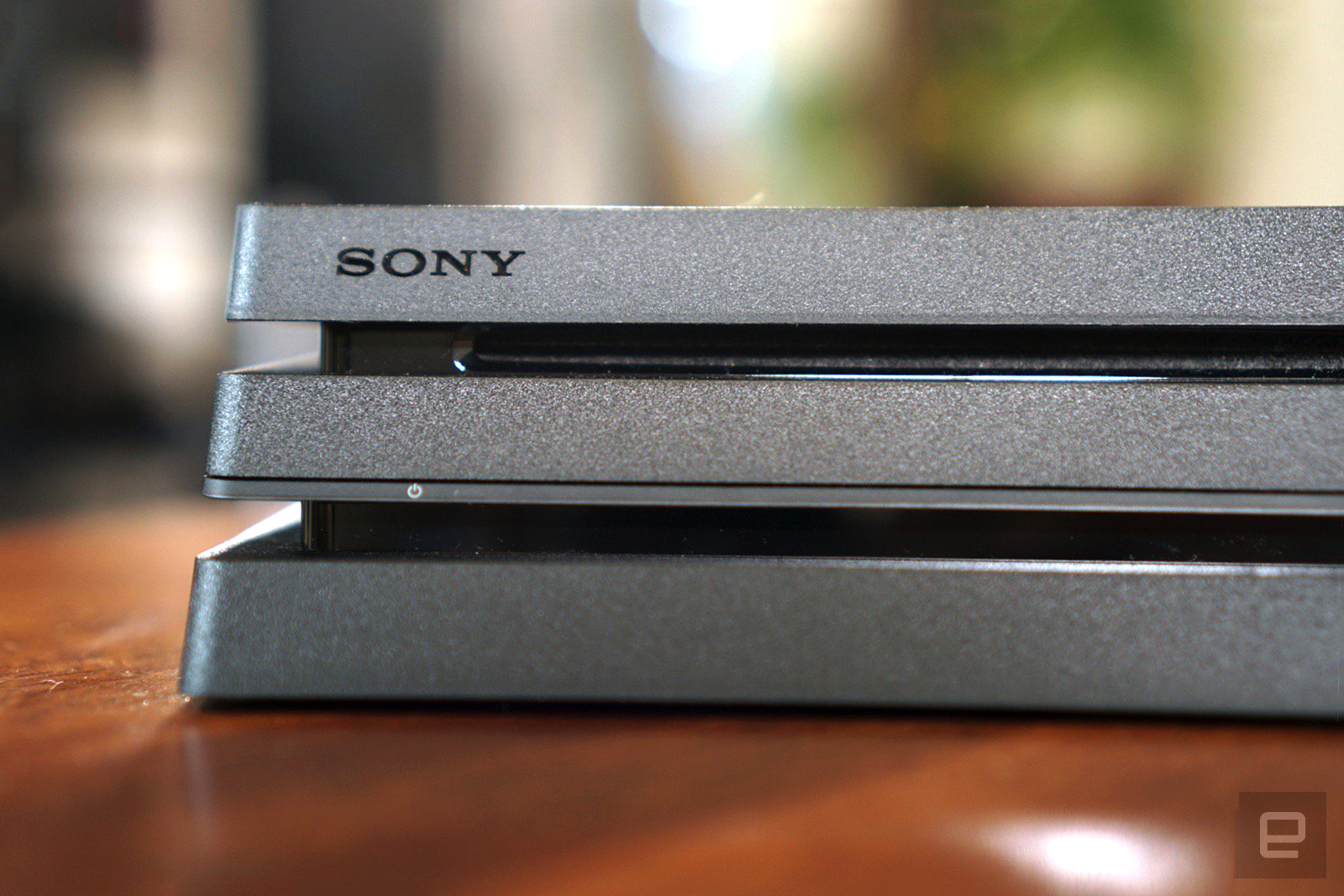
Physically, the PS4 Pro looks like a beefier PS4 Slim. Its footprint is a bit larger but it’s not much bulkier than the original 2013 PS4. It casts a thin, horizontal LED light (blue, orange and white) from the front of the unit when in different modes of operation.
Thankfully, the Pro brings back the optical audio port that the Slim omitted while adding an extra USB port around back. Like the Slim, the Pro also supports the fastest Wi-Fi protocols (802.11ac), and it also has dual-band support (it can use both a 2.4GHz or 5GHz signal).
Sony has confirmed that the console makes use of the SATA-III specification too, which theoretically means you could install an SSD to take advantage of quicker read times. (Although, all PS4s support user-upgradeable storage with standard 2.5-inch drives.)
We’re testing that out separately and will report on what we find. Either way, it’s nice to know anyone can still swap out the stock drive for a new one.

View full gallery
The PS4 Slim and PS4 Pro side-by-side.
Sarah Tew/CNET
Other exclusive features
The PS4 Pro will launch with Netflix support at 4K resolution in addition to a YouTube app with 4K and HDR compatibility. More apps will open up support for 4K and HDR features as the platform matures.
Also exclusive to the PS4 Pro is improved bandwidth for the Remote Play and Share Play options, that let players stream gameplay over the internet to other locations. Both modes will be able to share, stream and play at 1080p, which is a bump up from the standard PS4’s 720p cap.
Of course we need to bring up the most glaring of missing features: 4K UHD Blu-ray playback. For whatever reason, the PS4 Pro cannot play these discs (unlike the Xbox One S). Standard Blu-rays will be upscaled to fit 4K screens, however.
The technical gap
One of the big frustrations of our initial experience with PS4 Pro-compatible games was trying to manage our expectations. That’s because Sony’s labelling of which games support which video upgrade is vague at best.
By looking at a title’s version history from the PS4 menu, you can get a tiny bit of insight as to what’s been added. For instance, The Last of Us: Remastered says the latest version offers “PS4 Pro Support,” but Shadow of Mordor simply states “4K Support.”
There’s an inconsistency here that’s tough to follow, not to mention we don’t know if 4K really means what people might think it means. On Sony’s PS4 Pro site, a disclaimer reads that the console offers “dynamic 4K” which means, as they explain with a footnote, “Dynamic 4K gaming outputted by graphic rendering or upscaled to 4K resolution.”
We’re not sure that means native 4K (3,840×2,160 resolution), which is four times what you can get from a “standard” HDTV’s 1,920×1080 resolution. Considering the notion that PCs with much more impressive hardware than the PS4 Pro can struggle to even reach native 4K at 30 frames per second (the absolute minimum required for smooth gameplay or video), it may seem hard to believe the PS4 Pro can output such a technically demanding video signal without some serious compromises. Well, it doesn’t.
Indeed, the Pro uses some common tricks of the trade, including anti-aliasing, checkerboard rendering and geometry rendering. Effectively, that means that the games have horizontal resolutions including 1728p, 1800p or 1952p. Then, the games upscale to 2160p as needed, all the while balancing graphical sharpness with the all-important frame rate. (Indeed, this same upscaling technique is also widely used in the last generation of game consoles, too.)
Shortcut Labs Flic Single Purpose Smart Button Release Date, Price and Specs – CNET
Launched on Indiegogo in 2014, Shortcut Labs’ Flic offered a novel concept: give users an app-connected button that can trigger almost anything, and they’ll figure out what to do with it. The company raised nearly a million dollars.
The keys to Flic’s success were customization and affordability. But now, the company is introducing a new type of device that mixes up its successful recipe: Flic Single Purpose Smart Buttons.
There are currently five Single Purpose Buttons: FlicFind, FlicSelfie, FlicLights, FlicMusic, and FlicLocation. All of them exchange the original Flic’s flexible interface for a single dedicated purpose. The reduced flexibility comes with a lower price tag of $20 (about £16), leaving users with an affordable entry-point into the world of smart buttons.
 Shortcut Labs
Here’s what each Single Purpose Flic does:
- FlicFind will set off an alarm on your phone when you can’t find it around the house.
- FlicSelfie will take a photo on your phone from across the room.
- FlicLights will control your connected LEDs.
- FlicMusic will control your Spotify playlists.
- FlicLocation will send your GPS location to select contacts in case of emergency.
Part of the appeal of the original $34 Flic was how its flexibility allowed users to experiment. But it seems Shortcut Labs is aiming for a broader audience than experimenters or early adopters. Not only are these latest buttons available at an immanently buyable price point, but they will be sold in Best Buys around the U.S. and Harrod’s in the UK.

The original Flic Smart Button.
Chris Monroe/CNET
The only question is, will they work well enough? Each of these devices is driven by the same basic mechanism behind the original Flic: a Bluetooth radio that connects to your phone and triggers various mobile functions, like sending a text or playing music. Each Single Purpose Flic will trigger their basic commands using the same tap, double-tap, and long-hold actions of the original device. It was a simple and mostly effective interface.
The problem is, Flic boasted over 60 unique functions, so users could forgive an interface for being only “mostly” effective. For these Single Purpose Flics to shine, on the other hand, reliability is a must. Shortcut Labs co-founder Pranav Kosuri says the company has been focused on sharpening performance, but whether that work pays off remains to be seen.
I’m excited to get my hands on the new Single Purpose Flics. They will certainly make smart buttons more appealing to everyday people, and they might even win some converts to the more expensive original Flic. It all just depends on their performance.
Sony’s PlayStation 4 Pro is a perfect way to show off your 4K TV
The PlayStation 4 Pro is a new breed of console. It’s not going to replace the original system. Instead, it’s meant to tide over gamers who’ve upgraded to new 4K TVs with fancy high-dynamic range (HDR) lighting features. It’s a more significant step up than the Xbox One S, which is mostly centered around upscaling 4K content, but it’ll directly compete with Microsoft’s bigger console upgrade, Project Scorpio, next year. Welcome to the new era of gaming systems, which is beginning to resemble the world of PC games with a multitude of minor upgrades, rather than completely new system generations. (Nintendo, ever the iconoclast, is trying to do something both new and traditional with the Switch.)
There’s no doubt that the $399 PlayStation 4 Pro is the closest we’ve gotten to high-end PC-quality graphics on a home console. But the thing is, it’s not going to be a major upgrade for existing PS4 owners. And to really see the benefits of its faster hardware, you’ll have to wait for games to get upgraded. At the very least, though, it’s a welcome reward for anyone who’s held off on buying a PlayStation 4 until now.
Hardware
Take Sony’s original PlayStation 4 design, add another sharply angled layer on top, and you have the the PlayStation 4 Pro. You could call it a triple-decker PS4. It’s a tad taller than the original, but otherwise they look near-identical, with the same general shape and black plastic case. The PlayStation 4 Pro extends a bit farther back than before, likely to make room for both a larger power supply and more powerful components.
The PlayStation 4 Pro’s front buttons are physical, rather than touch-sensitive, and they’re separated now, with the power button on the far left and eject on the far right. (The original PS4’s buttons are incredibly tiny and located right above and below each other, which has led to plenty of frustration among gamers.) There are two USB 3.0 ports on the front, just like before, and an additional one in the rear. The latter is useful for connecting the PlayStation VR neatly without taking up on of the precious front USB ports.. Alongside the HDMI port is a standard power connection, an “Aux” output for the PlayStation camera, an optical audio port (which is notably absent from the PS4 Slim), and an Ethernet jack.
But forget aesthetics: What’s most important is what’s under the hood. And much of that is drool-worthy. The PS4 Pro packs in a speedier eight-core CPU; a new 4.2 teraflop AMD Polaris GPU that’s twice as fast as the original PS4; a 1TB hard drive; and 8GB of RAM. Just like the PS4 Slim, it also adds an 802.11ac 5GHz WiFi radio, which should make downloading games and large updates significantly faster. On paper, the PlayStation 4 Pro sounds more like a decent gaming PC than a console.
Sony’s revamped DualShock 4 also comes with the PS4 Pro, after first making its debut with the PS4 Slim. It’s functionally identical to the original controller, except the LED lighting from the front now carries over to a thin strip above the touch panel. That’s useful for figuring out things like which character you’re controlling in a multiplayer game. There are a handful of other minor aesthetic tweaks too, like using gray for the triggers and some buttons, but they’re honestly too minor to mention. If you’ve held a DualShock 4 before, you won’t feel much of a difference here.
While the PS4 Pro is packed to the gills with fresh hardware, there is one surprising omission: a 4K Blu-ray drive. That’s something the Xbox One S includes, and for $100 less than the PS4 Pro, too. Forgoing 4K Blu-ray particularly is surprising because Sony is one of the main backers of the Blu-ray format. It would be like if Microsoft chose to dump support for Word files in its next OS; it’s hard to fathom why they’d do it. Sony says it’s focusing on 4K/HDR streaming with the PS4 Pro (more on that below), but that doesn’t completely explain why it’s seemingly cutting off its own format at the knees. Did Sony forget that the PlayStation 2 was one of the big reasons DVDs took off so quickly?
In use

I’ve long argued that 4K isn’t something consumers should get too worked up about, at least not yet. But, in preparation for testing the PlayStation 4 Pro, I bit the bullet and purchased LG’s 55-inch B6 OLED TV. So, for once, I was actually excited about 4K. We’re also at the point where that format is finally beginning to make sense for mainstream consumers. 4KTVs are getting cheaper (I was astounded to find an OLED set under $2,000), there’s more high-resolution content out there, and HDR also makes a compelling case for upgrading (even more so than 4K itself).
Basically, it seems like we’ve finally reached a point where 4K isn’t just something being forced on us by TV makers. So it makes sense for Sony to jump aboard the bandwagon and introduce a console centered entirely around it.

I should also point out that I’m coming at this console after shifting much of my AAA gaming over to my PC. If I can get even better quality for the same price, and still pipe it conveniently to my living room from my PC, why would I choose a lesser console experience? Indeed, the PS4 Pro’s very existence seems designed to tempt PC gamers.
After excitedly connecting all of the necessary cables, I booted up the PlayStation 4 Pro and was honestly a bit disappointed just to see the same old PS4 home screen. It makes sense for Sony to avoid fragmenting its software too much, but still, I’d like something to indicate it’s different. Then I started playing some games upgraded to support the new console, and my mood changed considerably.

The games
I started off with The Last of Us: Remastered, a game that I know well after playing through it on the PS3 and a bit on the original PlayStation 4. It’s one of the first titles to get patched for the new console, an upgrade that adds an HDR mode and general improvements to make it hit 60 frames per second more consistently. While that might not sound very exciting, it means there’s a much bigger visual change here than a mere resolution bump. On supported TVs, HDR leads to higher contrast, greater color definition and much deeper blacks than we’re used to.
The Last of Us: Remastered is already an incredible-looking game, but the addition of HDR breathes new life into its environments. You can pick out more depth in the clouds and post-apocalyptic fauna, and pointing the camera at the sun makes it seem almost eye-searingly bright. It’s a good change for the most part, though it sometimes made environments seem artificially oversaturated with color. I didn’t really notice much of an overall performance upgrade either, but there might be some evidence of that later in the game. On my 1080p plasma TV, I didn’t notice any difference playing the game on the PS4 Pro versus the original console.
Sony is leaving it up to developers to figure out ways to tap into the PS4 Pro’s power. For the most part, devs will include some combination of rendering games at a higher resolution than 1080p, packing in more visual effects and delivering a smoother overall experience. As I’ve reported before, most PS4 Pro titles won’t render natively at 4K, though that’s not something you should get too hung up on. Running at something like 2160p (2K) with more graphical bells and whistles should still lead to much better looking games than on the original PS4. Wisely too, Sony isn’t allowing developers to charge for PS4 Pro support either.
Infamous Second Son lets you choose between playing in a higher resolution than 1080p, or better overall performance. And I quickly noticed that I’d much rather have the game running at higher frame-rates. Smoother gameplay suited Infamous’s fast, action-heavy setup more than a resolution bump. Unfortunately, though, the game also seemed to slow down quite a bit whenever I tried to play in the higher resolution mode.
You’ll have a similar set of choices in Rise of the Tomb Raider. You can either have it run at higher frame-rates in 1080p; get more visual effects at 1080p and 30 fps; or run the game in 4K at 30 frames per second. Again, I leaned towards the non-4K options. What most impressed me is that the game looked like I was running it off of a PC, no matter which mode I chose. Tomb Raider’s HDR support in some ways made it seem even more impressive than on PCs. The environments simply “popped” a bit more; things like the sun bouncing off snow and flames through the game seemed realistically bright, and character models were lit more dramatically.

When it comes to PlayStation VR, the PS4 Pro has even more potential to be useful. VR is the sort of thing where any hardware upgrade could improve your experience considerably. I was only able to test out the console in Sony’s PlayStation VR Worlds, but I noticed that the environments and characters were all sharper, and frame rates seemed generally smoother. It didn’t seem to improve head and hand tracking much, but the upgrades make PSVR seem like a more viable competitor to PC-powered VR moving forward.
One peculiar issue: You can’t run PlayStation 4 Pro games in HDR while the PSVR is connected. Sony’s VR system relies on a passthrough box that apparently can’t handle an HDR signal. That could be a huge inconvenience to many gamers, since it means you’ll probably have to constantly connect and disconnect the PS VR box whenever you’re using it.
While Sony is also positioning the PlayStation 4 Pro as something players with 1080p sets can enjoy, it doesn’t seem worth an upgrade for those consumers yet. You’ll notice the better graphics in games like Rise of the Tomb Raider, but you won’t see any of the HDR benefits. And I just have a hard time recommending a $400 upgrade for minor performance improvements. If you’re a 1080p TV owner who plans to upgrade to 4K eventually, it’s still worth waiting on the PS4 Pro, since it’ll probably be cheaper by the time you get a new tv.
4K media
So how do you get 4K video content when there’s no 4K Blu-ray player on the PlayStation 4 Pro? For now, mainly through Netflix and YouTube. Sony said it’s pinning its hopes on 4K streaming taking off in the future, though strangely enough, it hasn’t yet announced plans to bring the technology to the PlayStation Store. The company recently launched a 4K streaming store for its latest Bravia TVs, but I wouldn’t be surprised to see that reach the PS4 Pro eventually. Both Amazon and Vudu also have a healthy library of 4K content, but they haven’t yet upgraded their apps for the PS4 Pro.
The competition

There’s no doubt about it: The PS4 Pro’s greatest competitor right now is … the PlayStation 4. You might be able to find a decent discount on the original model, and I wouldn’t be surprised to see the Slim discounted for Black Friday. At normal pricing, though, the PS4 Pro is only $100 more than the PS4 Slim. It makes sense to pay a bit more now to future-proof your investment, rather than just settle for an underpowered console you might end up replacing sooner. Complicating things even further, Sony has also enabled HDR on all PlayStation 4 models, which makes it less of a must-have feature for the Pro.
Honestly, the PS4 Pro doesn’t really have direct competition until Microsoft’s next-gen “Project Scorpio” console debuts next year. That system will have an even more powerful 6 teraflop GPU, which could potentially allow developers to reach 4K more easily. Still, it’s hard to get too excited for Scorpio until we know more about it.
You might also consider a decent gaming PC instead of the PS4 Pro, but you’ll probably have to spend closer to $700 to get something that can handle today’s games. And of course, you’ll be out of luck if you’re interested in Sony’s exclusives. But if you can afford it and you care about graphics quality, a PC will deliver the best gaming experience.
Wrap-up

So who is the PlayStation 4 Pro actually meant for? After testing it out for the past week, I’d say it’s for people who haven’t yet bought a PS4 and want to show off their fancy new 4K/HDR sets. And of course, there are the hardcore gamers who will snap up any piece of hardware that promises to be faster. Most consumers are better off waiting until more games get patched for the new system, and until Sony figures out its 4K media strategy.
Kobo Aura One review – CNET
Instead of going small with its new top-of-the-line e-reader, Kobo, now owned by online retailer Rakuten, has gone big. The Aura One sports a 7.8-inch E Ink display that’s significantly larger than the 6-inch E Ink displays found on all of Amazon’s Kindle e-readers.
Even with that bigger screen, at 230 grams or 8.1 ounces, this Aura is thinner and a touch lighter than the earlier Aura H20, which has a 6.8-inch screen. Bottom line, you’re getting more screen without adding any weight.

The Aura One compared to the Kindle Paperwhite.
Sarah Tew/CNET
I personally prefer the Kindles’ smaller form factor, and the svelte Kindle Oasis in particular, but some people like to bump up the font size and a larger screen allows you to display more lines of text. While it’s a little hard to get your whole hand around the device, it’s designed to be held in one hand, and the back of the device has a rubberized, textured finish that makes it a little easier to grip.
Like the Aura H20, this e-reader is waterproof, though it doesn’t float. Its got a higher IPX8 rating, which means it can be submerged in up to 2 meters of water for up to 60 minutes (the Aura H20 is rated to be submerged in up 1 meter for 30 minutes). Currently, no Kindle is waterproof, although Barnes & Noble’s Nook GlowLight Plus is.
Other upgrades include an ultra high resolution 1,872×1,404, 300-pixels per inch display, 8GB of onboard storage instead of the typical 4GB and an improved integrated lighting system that allows you to adjust not only brightness but color temperature (basically, a “day” and “night” mode).

The slim Aura only weighs 230 grams or 8.1 ounces.
Sarah Tew/CNET
As you’d expect from a Kobo e-reader, you can shop for e-books in the integrated Kobo store (Kobo also has apps for iOS, Android, Windows BlackBerry 10 devices, as well as Mac and Windows PCs). But in the US, Canada, the UK, Australia and New Zealand, you can also check out library e-books via OverDrive, which Kobo’s parent company scooped up last year. (Yes, you can do also get those free library books on Kindle and Nook devices, but not by tapping the screen right on the reader as you can with the Aura One.) Other supported formats include EPUB, PDF and MOBI, as well as various image file formats, HTML, and comic book file formats.
Available for $230 in the US on September 6, the Aura One is fairly pricey, but that seems to be a trend these days in the e-reader market, as dedicated E Ink e-reading devices become niche products, with higher-end models geared to avid readers willing to pay extra for special features. (It also hits the UK on September 6 at an undisclosed price, and will follow to Australia later this year. The US price converts to AU$300 and £175.)
The value proposition here is that you’re getting a so-called “open” e-reader that has a large, crisp E-ink display and is safe to use in the bathtub or the pool.

The device is fully waterproof and has textured back.
Sarah Tew/CNET
We’ll have a full review of the Aura One after we’ve put it fully through its paces. In meantime, have a look at its specs, courtesy of Kobo:
- Price: $249 (CA) $229 (US) €229 (EU)
- Display: 7.8-inch Carta E Ink HD touchscreen with ultra-high resolution of 1,872×1,404, 300ppi
- Device size: 195.1 x 138.5 x 6.9mm, weight: 230g
- Connectivity: Wi-Fi 802.11 b/g/n and Micro USB
- Processor: i.MX6 Solo Lite Freescale, 1 GHz
- Light: Fully adjustable built-in ComfortLight PRO technology. Auto-adjusting colour temperature and brightness
- Waterproof: HZO Protection meets IPX8 rating. Waterproof for up to 60 minutes in up to 2 meters of water.
- Storage: 8GB (stores more than 6,000 e-books)
- Battery: Up to 1 month, depending on usage
- Content: More than 5 million titles in books, comics and kids’ titles. Library access via OverDrive (CA, US, UK, AU, NZ only)
- TypeGenius: 11 fonts, over 50 sizes, plus sharpness and lighting settings
- Kobo Picks: Personal recommendations based on your reading habits. Advanced Reading: Highlighting, dictionary, notes and bookmarks.
- Stats and awards: Learn more about yourself as a Reader and track your progress through books with reading stats. Enjoy spontaneous reading awards just for reading. Sharing: Share your favorite passages, quotes and books to your Facebook timeline
- Supported file formats: EPUB, EPUB3, PDF and MOBI e-books; JPEG, GIF, PNG, BMP and TIFF images; TXT, HTML, XHTML and RTF text; CBZ and CBR comic books
- Languages: English, French, German, Spanish, Dutch, Japanese, Italian, Portuguese and Turkish
Kobo Aura One (pictures)
See full gallery


1 – 4 of 16
Next
Prev
Roku’s $30 Express player is more intriguing than its high-end Ultra
Few tech companies are as reliable as Roku. Every year, like clockwork, it releases a new round of streaming video boxes, each a bit faster and better than what came before. There’s the occasional welcome surprise, like the $50 Roku Stick that debuted earlier this year, but for the most part the company’s strategy has focused on incremental improvements, not dramatic ones. Roku’s latest batch of players mostly fit that mold, but they’re notable for two things: reaching a low $30 price point with the Express, and delivering a $100 player that supports 4K and HDR.
That would be enough for a killer lineup, but there’s also a flagship model with more bells and whistles: the $130 Ultra. After spending time with both the cheapest and priciest new Roku players, I was surprised to find myself more intrigued by the possibilities of a $30 player than a high-end powerhouse.
Hardware
Let’s start with the Roku Express, which looks nothing like any of the company’s other players. It’s as if someone took one of Roku’s typical designs, shrunk it down and then chopped it in half. It’s pretty small, resembling a stack of USB sticks stuck together. Notably, though, it’s not nearly as small as the more expensive Roku Stick.
If I had to use one word to describe the Express, it would be “functional.” It’s not attractive or much of a centerpiece device; instead it’s something you’d just stick in front of your TV and forget about. Its singular purpose is to get you 1080p HD streams at the lowest price possible. The Express has an HDMI socket on the back and is powered through a micro-USB port. And yes, it can easily be powered by the typical USB connections you’d find on a TV, if you want to avoid connecting it to an AC adapter.

If you’re looking for old-school RCA video connections, which were typically the main selling point of Roku’s low-end gear, you’ll have to consider the $40 Express+. It’s pretty much the same as the Express performance-wise, except it adds those older connections.
The Roku Ultra, on the other hand, looks like a covert military weapon next to the toy-like Express. It’s basically a dead ringer for the Roku 4 — and most of the company’s relatively recent players, for that matter. On top of the usual HDMI connector, it also features an SD card slot and an Ethernet jack. Notably, it’s also the only Roku device this year to include an optical audio port (which is useful if you’re stuck with a soundbar that doesn’t take HDMI audio) and a USB port for local storage. And if you’re particularly adept at losing your remote, you can also hit the button on top of the Ultra to locate it.
If the name wasn’t enough of a hint, the Roku Ultra is basically made for true power users. It supports 4K and HDR, but strangely enough, it’s not the only player this year to do so. The $100 Roku Premiere+ also offers both of those features, making it a potentially better choice if you have no need for USB and optical audio.

As usual, Roku isn’t giving us much information about the components powering its devices. The company claims the Express is faster than the $50 Roku 1 it’s replacing, and that the Ultra uses a “fast” quad-core processor (but so do the cheaper Premiere and Premiere+). And you can forget about any other technical details, like RAM or onboard storage. Ultimately, what you need to know is that both the Express and the Ultra offer a performance boost over what came before.
When it comes to remotes, the Express features Roku’s most basic offering yet. It has the company’s typical button layout — a four-way directional pad, playback controls and shortcuts for Netflix, Hulu, Sling TV and Google Play. It also relies on infrared to communicate with the Express, so you’ll have to point it at the box whenever you want to control it. The Ultra, on the other hand, includes the company’s full-featured wireless remote with voice search. Its layout is mostly the same, except it has a shortcut to Showtime (really?) instead of Google Play, and it includes two extra buttons for games. And of course, the Ultra’s remote also has a headphone jack, something that Roku diehards are particularly fond of.
Software

If you’ve seen any of Roku’s previous players, there aren’t many surprises with its latest OS. It sports the same black and purple aesthetic, with a heavy focus on lists for the main menu. The company’s big innovations last year were the addition of voice search and the ability to follow actors and movie titles. Unfortunately, there aren’t any major software upgrades for these players yet.
I have the feeling I’m beginning to sound like a broken record for criticizing Roku’s archaic interface design — just go back and look at my reviews of the Stick and Roku 4. But, quite honestly, it’s still worth pointing out. Apple, Amazon and even TV manufacturers like Samsung and LG have made tremendous strides with their streaming interface designs over the past few years. I can understand if Roku doesn’t want to rock the boat too much for its fans, but a little effort would be nice. The company’s mobile app, for example, got a spiffy redesign last year that makes it much easier to use. So what’s the holdup for Roku’s core OS?
At the very least, you probably won’t be staring at Roku’s dull UI for too long. App developers like Netflix and Hulu can make attractive software for Roku’s platform. And while they don’t reach the level of what we’re seeing on the Apple TV, they’re still more visually arresting than Roku’s menus.
In use

Getting started with both players is relatively simple. Just plug them into a power source, hook up an HDMI cable and you’re good to go. After choosing a WiFi network, you just have to sit back and wait for the players to download apps (since I’ve been testing these players for a while, they automatically downloaded around 50 apps during setup). Not surprisingly, the Roku Express took a bit longer to get going, since it’s restricted to slower 2.4GHz WiFi networks. The Ultra, thanks to its speedier processor and support for 802.11ac/5GHz networks, was able to go through the initial setup process around two to three times as fast.
The most surprising thing about the Roku Express: It’s perfectly fine for basic HD streaming. Sure, moving around menus isn’t lightning fast, and it takes a few seconds more than the Ultra to start streaming an HD title on Netflix and Hulu, but heck, it’s a $30 gadget. The fact that it works as well as it does feels impressive. The Express is ideal for throwing on additional TVs in your home, or for gifting to relatives who haven’t yet gotten aboard the streaming bandwagon. The only major issue is dealing with its IR remote, which makes typing in search requests, usernames and passwords a bit cumbersome, since you always have to point at the box.

It’s worth noting, though, that the Roku Express is significantly slower than the Roku Stick. The latter is smaller and sports a faster quad-core processor, and it doesn’t exhibit any hiccups when it comes to moving about menus or streaming media. The Stick’s performance is so good that I said in my review that it made 1080p set-top boxes obsolete. But of course, at that point I didn’t consider the possibility that Roku would be able to drive the price of its boxes down to $30.
If you’re looking for the fastest Roku experience today, then the Ultra is for you. Doing just about anything on the player is lightning fast, be it navigating complex apps or jumping into HD streams on Netflix and Roku. The only area you might notice some slowdown is with 4K/HDR streams, which are more dependent on the speed of your internet connection than the box itself. On my 802.11ac WiFI network, the Ultra took two to three seconds to launch 4K titles on Netflix, Amazon and Vudu. It sometimes took a few more seconds for it to bump up from a low-resolution image to something high-res.
While 4K is a decent upgrade if you own a very large TV, it’s the addition of HDR that will really change how you watch things. That technology allows for a wider color range, deeper blacks and higher contrast than what we’re used to. If you have a television that supports HDR, you’ll quickly notice a bit more depth in shows like Jessica Jones and Chef’s Table on Netflix. In Daredevil, HDR allowed me to see much more detail in the dark fight scenes, and in Amazon’s Mozart in the Jungle it breathed new life into the show’s NYC setting.
Unfortunately, Roku only supports the HDR 10 standard at the moment, not the competing Dolby Vision standard. But while there are some functional differences between the two formats, Amazon, Netflix and Vudu are currently supporting both, so you won’t miss out on much. To make it easier to find high-resolution content, Roku unveiled a special 4K section in its channel store last year. Now that same area highlights apps that feature HDR content as well. Just be ready to sign up for subscriptions or rent films to bask in the glory of HDR.
The competition

Here’s where things get interesting. At the low end, the Roku Express is a solid choice if you’re looking for the cheapest possible streaming solution. But if you need analog connections, you’ll have to spring for the $40 Express+. And if you’re worried about performance issues, it’s probably worth shelling out a bit more for the $50 Roku Stick. That device is significantly faster and more portable, so you can easily bring it with you around the house, or to hotels as you travel. Amazon’s $40 Fire TV stick is another good option, though it doesn’t have as many apps as Roku, and the $90 Fire TV doesn’t yet support HDR.
If you don’t need the optical audio and USB ports on the Ultra, you’d be better off with the $100 Roku Premiere+. That player has 4K and HDR capabilities, and from what I’ve seen it’s just as fast as the Ultra otherwise. The Premiere+ is also a sign that there might not be much of a market left for high-end set-top boxes, especially now that the hardware to play back 4K/HDR content is getting cheaper.
And what of the $149 Apple TV? Last year, Apple’s player was a decent competitor to the Roku 4, even though it was stuck with 1080p content. This year, with a multitude of 4K/HDR players on the market, the Apple TV just won’t fly anymore. Apple might soon unveil a newer player with 4K support, but until then, you’re better off avoiding the current model.
Wrap-up

If there’s one thing we can take away from Roku’s lineup this year, it’s that you don’t have to spend much to get a good streaming player. The $30 Express completely redefines what a set-top box can be, and it’s hard to imagine how Roku can drive down costs even more. And while the Ultra is a fantastic device, most people would be better off spending less for the $100 Premiere+. All of this is good news for consumers, though it might be worrying for Roku, whose business mostly relies on selling these video players.
Ninja Coffee Bar CF092 review – CNET
The Good Ninja’s updated Coffee Bar CF092 automatically brews in many styles and for various container sizes. The machine also comes with its own motorized milk whisk.
The Bad With brewing temperatures that are much too high, the Ninja Coffee Bar CF092 makes coffee that tends to taste bitter. The coffee maker’s milk frothing tool whisks dairy but doesn’t steam or heat it. Above all else, it costs more than other home brewers that perform better.
The Bottom Line All the Ninja Coffee Bar CF092’s extra features can’t justify its steep price or poor brewing ability, which makes superb drip coffee makers such as the Bonavita BV1900TS a better bargain.
Modern coffee tastes have moved way beyond your basic mug of drip. These days, java drinkers hanker for a variety of beverages, including stiff shots of espresso, creamy lattes, refreshing iced coffee and practically everything in between. Kitchen appliance maker SharkNinja, formerly Euro-Pro, feels its new $200 Ninja Coffee Bar CF092 can satisfy many of these cravings right from your countertop.
While the flexible coffee maker does automatically brew in many different container sizes and even boasts its own built-in milk frother, it doesn’t live up to SharkNinja’s hype. More expensive than its predecessor the $140 Ninja Coffee Bar CF080 (itself a mediocre performer), this pricey machine brews coffee that tastes worse. You’d be much better off buying a $190 Bonavita BV1900TS to make big pots of quality drip. For delicious single portions of joe choose the $16 Oxo Good Grips Pour-Over, which serves superb coffee one cup at a time.
Ninja’s new coffee bar machine offers many…
See full gallery


1 – 2 of 14
Next
Prev
Design and features
Constructed from thick, black plastic parts with faux-chrome highlights, the Ninja Coffee Bar certainly doesn’t look like a premium coffee maker. Placed next to luxury competitors like the $299 Technivorm Moccamaster KBT 741 and the $580 Ratio Eight, which use metal, glass, even wood within their frames, the Coffee Bar looks downright cheap. Even the spartan stainless-steel chassis of the $190 Bonavita BV1900TS makes the Coffee Bar look chintzy by comparison.

The updated Ninja Coffee Bar still has the same retro appliance look.
Tyler Lizenby/CNET
Still, I do find the retro appliance styling of the Ninja somewhat charming. Its large buttons labeled in capital letters are easy to read and easy to press, too, since they’re well-spaced from one another. This coupled with lots of bright LED lights, sharp lines and angled surfaces give the Coffee Bar a decidedly 1980s alarm clock appearance, which I admit isn’t for everyone.
Underneath its unique styling, the Ninja Coffee Bar is still a traditional coffee machine. Essentially a rectangular tower standing 14.8 feet tall and sprawling 11.6 inches wide by 7 inches deep, this is one big machine and takes up even more space than the massive Moccamaster KBT 741.
On the left side of the appliance you’ll find a 43-ounce glass carafe that sits on a circular hot plate. Above that is a brew basket that accepts either the bundled permanent filter or disposable paper filters (Type 4). SharkNinja also equipped the coffee maker with a handy drip-stop switch, placed at the foot of the basket.

The water tank has ridged sides, which help ensure a tight grip when you remove it.
Tyler Lizenby/CNET
Like its predecessor, the updated Coffee Bar has a removable water reservoir. The clear plastic tank (54 ounce capacity) sports a series of fluted ridges along its sides that are easy to grip. There’s also a hand-size indentation on its right edge, which makes it a cinch to grab as well.
Below the reservoir is the Ninja Coffee Bar’s main control area. It includes a “Multi-Serve Dial” for selecting the coffee container size you plan to use (ranging from small 9.5-ounce cups to 43-ounce carafes). Here too are buttons to engage specific types of brewing programs. Five in all, the keys are labeled Classic Brew, Rich Brew, Over Ice Brew, Specialty and Cafe Forte. Each brew style is designed to create coffee of varying strength, with Classic the weakest and Rich Brew slightly stronger. Cafe Forte is stronger still, while Specialty is the most intense, with an almost espresso-like concentration.

Select the brew size to match your coffee container.
Tyler Lizenby/CNET
The entire coffee machine rests on top of a trim, flat pedestal, which houses a few more controls such as the power key along with buttons to command the hot plate. There’s a tiny LCD screen here, too, which displays a digital clock and allows you to set a time for delayed brewing.

A milk frothing arm swings out from behind the coffee maker.
Tyler Lizenby/CNET
The Coffee Bar’s most novel feature, however, is a motorized frothing whisk that’s designed to aerate milk for frothy cafe drinks like lattes and cappuccinos. The whisk is attached to an arm that lives in back of the appliance and swivels forward when it’s ready for action.
Performance and taste
SharkNinja makes breathless claims about this new Ninja Coffee Bar system, going so far to say the gadget offers a “Better than a coffeehouse experience. At home.” Sadly, this statement could not be further from the truth, since the coffee the Coffee Bar makes is substandard and at times completely undrinkable.
Powerbeats3 Wireless Earphones review – CNET
The Good The Beats Powerbeats3 Wireless offers an improved fit, very good sound for Bluetooth sports headphone, reliable operation, and strong battery life (12 hours), thanks to Apple’s W1 chip. Pairing is dead-simple for iOS users and the headphones also work just fine with Android phones.
The Bad Competing models are just as good or better and cost less; not a major upgrade over Powerbeats2 Wireless.
The Bottom Line The PowerBeats3 Wireless is a decent step up over its predecessor, but it’s no bargain in an increasingly crowded market for wireless sports headphones.
When you have one of the best-selling wireless earphones in the world, what do you do for an encore?
Well, the safest choice would be to make some small but not insignificant changes — tweak around the edges so to speak — but mainly leave what got you to the top alone. And that’s exactly what Beats has done with the Powerbeats3 Wireless, the latest iteration of its uberpopular Bluetooth sports headphone.
As you can see from looking at it, the core Powerbeats design has remained intact, and the Powerbeats3 Wireless looks a lot like the Powerbeats2 Wireless — and not surprisingly its list price is the same ($200/£170/AU$260). It’s available in black, white, siren red, shock yellow and flash blue. And like the previous model, they’ll still hold up to sweat and rain — just don’t expect them to survive a full-on dunking in water.

Beats has slightly lengthened the earbud post (the Powerbeats3 Wireless is on right) and changed its angle to enable a better fit for more people.
Ariel Nunez/CNET
You have to look closely to find the design tweaks but they’re there. For starters, Beats has slightly altered the design of the earbud post, lengthening it a bit and slightly altering its angle in an effort to improve the fit of the headphones and allow more people to get a tight seal.
This new model did fit me a little better, but I still couldn’t get a tight seal from one of the four included eartips, so I tried a few I had lying around from other headphones I’ve been testing and ending up with a foam Comply tip that maximized sound quality. (If Beats had extended the earbud post a few more millimeters, one of the supplied tips probably would have gotten me that elusive tight seal).

The earhook design is one of the headphone’s signature design traits and part of the reason people find it appealing.
Sarah Tew/CNET
It’s important to get that seal, because if you do, this is one of the better-sounding Bluetooth sports headphones out there, with good detail, strong bass, and pretty open sound. However, if you don’t, it will sound thin and mediocre and you’ll be disappointed, particularly since it costs $200. To be clear: The sound is the same as that of the Powerbeats2 Wireless; Beats has not upgraded the sound, only the fit.
As for other changes, you get a new protective carrying case (it reminded me of a coin purse), which I liked, and the Remote Talk inline remote has been redesigned and significantly improved. The remote’s slimmer and the buttons are more response — you can adjust volume, skip tracks forward and back and answer and end calls.
Plextor S2C review – CNET
The Good The Plextor S2C is significantly faster than any regular hard drive, and it has a low price.
The Bad Compared with other SSDs, the drive is slow when performing heavy tasks.
The Bottom Line The Plextor S2C is an inexpensive replacement SSD drive for an aging computer, but is slow compared to top SSDs.
Visit manufacturer site for details.
The Plextor S2C wasn’t made to impress. It’s a 6Gbps SATA standard solid-state drive (SSD) that aims to do its job on the cheap. And its job is straightforward: replace the traditional hard drive on a computer.
 View full gallery
The S2C SSD (left) and a traditional hard drive it aims to replace.
Dong Ngo/CNET
While the S2C’s speed can’t compare to most SSD drives I’ve reviewed, it’s still so much faster than any regular hard drive that’s it’s worth getting — especially given its relatively bargain-level price. The 512GB version has an MSRP of just under $134 in the US, or about 25 cents per gigabyte. The price roughly converts to £110 in the UK and AU$175 in Australia. And like all SSDs, you can expect the street price to be even lower.
So how well does it perform and how exactly does it stack up against other SSDs? In copy tests the S2C had one of the fastest real-world read speeds I’ve ever seen, delivering 433 megabytes per second. However, its write speed was terrible, topping out at just 148MBps. That’s the lowest write speed of any SSD I’ve tested.
Haiku Home Haiku Light review – CNET
The Good Haiku’s smart ceiling lights look terrific and work reliably well — especially the built-in motion detectors. A native integration with Alexa lets Amazon Echo owners control the lights using simple voice commands.
The Bad The Haiku lights aren’t as well-connected as some other options — there’s no SmartThings support, no IFTTT channel, and no integration with Apple HomeKit.
The Bottom Line Haiku’s high-fashion smart lights are priced like a luxury, but they look and act the part.
Visit manufacturer site for details.
There are plenty of smart lighting options that you can control with an app or even with your voice, but you’ll find few perfect solutions for smartening up an all-in-one, built-in recessed fixture. In many cases, there might not be any bulb at all to swap out, and most smart switches won’t let you dim the lights.
Enter Haiku Home, the smart home division of Lexington Kentucky’s Big Ass Solutions (known best for its eponymous Big Ass Fans). In addition to smart ceiling fans, the brand offers high-end indoor/outdoor recessed lighting fixtures with connected smarts. Along with flipping the switch like normal, you can control them using the Haiku app, using the same remotes and smart switches that control Haiku fans, or by connecting them with Amazon’s Alexa for voice-activated lighting changes. They’ll also change between warm and cool color temperatures, and turn on and off automatically based on motion below.
The Haiku Lights don’t come cheap, starting at $149 a pop. But they look terrific and work exceptionally well, offering seamless smarts for high-end smart homes. If you’re looking for something luxurious, or if you’ve already bought into the Haiku ecosystem with a ceiling fan or two, then they deserve some consideration.

Chris Monroe/CNET
We installed several Haiku Lights in the CNET Smart Home to test out their connected capabilities. And, by and large, they’re some of our favorite things in the place. The motion sensors are swift and responsive — whenever one of us walks in through the garage, a light in the entryway “sees” us and lights up the entire hallway for us. After two minutes of inactivity (you can customize this length in the Haiku app on your Android or iOS device), they dim back down, ready to light up again whenever someone passes through.
That sort of “set-and-forget” approach is the Haiku Light’s strongest asset. It’s been months since I programmed these things, and they’ve worked perfectly ever since. None of us have needed to use the app for anything. They just work.
Of course, you can still turn the lights on and off at the switch like normal — doing so won’t reset any of your settings. There’s also a handy little remote that’ll let you control any individual light you point it at. And, if you’re an Amazon Echo user, you can ask Alexa to turn the lights on and off, or dim them up and down. They’re compatible with the Nest Learning Thermostat — though Haiku’s integration is obviously geared more towards its ceiling fans.
They’re also nice and bright. Haiku pegs them at a healthy 1,348 lumens each, which is roughly halfway between a 75 and 100W bulb. Couple that brightness with the circular overhead design, and you get a nice, even dispersion of light from each one, and more than enough brightness for most needs (we typically keep the ones in the CNET Smart Home dialed down to about 50 or 60 percent).

Haiku Home
The Haiku Light lineup
| $149 | $149 | N/A | N/A | N/A |
| $199 | $199 | $199 | $199 | $299 |
Haiku’s lights come in five different finishes, and prices vary depending on which style you choose. Standard white and black “Select” models come cheapest at $149 if you’re willing to pass on color tunability and stick instead with a single, yellowy tone of light. For fifty dollars more, you can go with a “Premier” model — that’ll add in the cool, bluish white, daylight end of the spectrum, and let you dial in on your exact white light shade of choice.
 AIVAnet