


Asus ZenFone 6 leak shows the most peculiar notch we’ve ever seen
This is….unique.

Notches on smartphones are commonplace these days. It’s obvious that not everyone is a fan of them, but they’re no longer surprising or unexpected. A new leak from HDBlog in Italy has revealed a few hands-on photos of the upcoming Asus ZenFone 6, and while it does have a notch, it’s unlike anything we’ve ever seen before.
The actual size of the notch is quite small and reminiscent to the one found on the Essential Phone, but its placement is what’s causing for a lot of commotion. Rather than being placed in the center at the top of the display, it’s positioned at the far right. Another leak showed this same thing about a week ago, fueling the idea that this is the real deal.
Looking through these new photos, we can also see that the ZenFone 6 will have a large-ish chin below the display, dual rear cameras, a USB-C port for charging, and even a 3.5mm headphone jack.
The ZenFone 6 will likely be a pretty typical mid-range Android phone whenever it’s released, but it’ll be interesting to hear Asus’s reasoning for this notch placement. It’s quite the eyesore to my eyes right now, but that could change once we actually get a look at the phone in-person.
What’s your take on this new notch style?
The Pixel 3 should have had face unlock as an example for OEMs to follow
Amazon is giving everyone free shipping on everything for the holidays
Get your ship together.

If you’re lacking in the Prime membership department, this year you won’t have to sigh wistfully whilst looking in the windows of Amazon’s free shipping department. Starting today, for a limited time, Amazon is offering all customers free shipping with no minimum purchase required.
This offer applies to hundreds of millions of items, and it’ll work on orders that will arrive in time for Christmas. So if you’re ordering something with a massive shipping delay, this promotion may not apply, but basically everything else is fair game. Pair the shipping offer with some choice Thrifter deals and you’ll have yourself a recipe for success this holiday season.
Amazon isn’t the only merchant slashing shipping fees. Both Target and Best Buy are offering similar promotions. We haven’t heard anything yet from Walmart, but it’s safe to assume at this point that we will.
While this offer will undoubtedly come in handy on Black Friday, you can start taking advantage of it now. Check out Amazon’s Early Black Friday deals, and get inspired with Amazon Holiday gift guides.
Of course, if you want more benefits, like free videos, music streaming, books, and guaranteed shipping speeds, you may want to try out a free 30-day trial of Amazon Prime.
See at Amazon
These are the best phones for playing PUBG Mobile

PUBG Mobile is a graphics-intensive game that demands a powerful phone, and the Razer Phone 2 is your best option.
Our Pick
Razer Phone 2

$799 at Amazon
The gaming phone refined.
For this second iteration, Razer kept everything that made the Razer Phone such a great gaming phone — the latest Snapdragon chipset, 8GB of RAM, and that buttery-smooth 120hz display — and then doubled down on the other important stuff that makes for a great phone including a brighter display, water-resistance, wireless charging, and improved camera sensors and software.
Is it a good time to buy the Razer Phone 2?
The Razer Phone 2 is one of the newest phones you can buy right now. It’s not likely to be made available on a wireless plan deal through a carrier, but you’re able to buy unlocked versions through Amazon and Razer.
Reasons to buy
- Brighter display with 120hz refresh rate
- Software optimization for gaming
- Better camera hardware and software
- Front-facing speakers with Dobly Atmos are epic
Reasons not to buy
- No headphone jack
- Pricy to buy outright

Advertisement
Why you should buy the Razer Phone 2
PUBG Mobile is a fast-paced and competitive game that requires a powerful phone to get the most out of it. Playing at the highest graphics settings lets you scan farther distances when looking for enemies, so you can get the jump on them before they see you.
Razer Phone 2’s design is perfectly suited for PUBG gamers who want to play on the highest graphics settings.
Razer’s phone design is perfectly suited for PUBG gamers, with specs and a display capable of running the game at the highest graphics settings, along with front-facing speakers that are nice and loud, so you can hear the more subtle sounds. Even the blockish design is pretty great with no slippery curves to contend with Then, there’s the massive battery, which is enhanced by the gaming optimization features built into the Razer Phone’s software that let you prioritize game performance or battery life. It can also block incoming notifications, so a distraction won’t result in an early demise.
Unfortunately, the first Razer Phone fell short in a number of areas that held it back from being more than just a great phone for gaming. With the Razer Phone 2, Razer appears to have fixed many of the biggest gripes against it while also including some flashy RGB on the back for fun.
A Razer Phone 2 won’t make you a better PUBG player, but it will let your skills grow without ever impeding your gameplay — plus you gotta love that RGB, baby!
Alternatives to the Razer Phone 2
If you’re not down with Razer’s blocky designed phone, we’d recommend these other great phones from Samsung and OnePlus.
The Best Display
Samsung Galaxy S9+

$805 at Amazon
The most gorgeous screen you’ll see on a phone
Samsung has refined its top flagship to make the performance slightly faster and the display slightly brighter for an all-around better experience for mobile gamers.
The Galaxy S9+ is a great gaming phone because it’s just a great phone, period. When it comes to playing a game like PUBG Mobile, the best differentiator the Galaxy S9+ has going for it is its brilliant Infinity Display.
This phone has the top-end specs you’d expect and easily handles running PUBG itself, but you also get some other great hardware features like a headphone jack, a microSD card slot, water resistance, and support for wireless charging that make it a better phone overall.
I personally think this phone is not as comfortable to hold for lengthy gaming sessions without a case, but it’s arguably a better phone overall than the Razer Phone, so if camera performance and a sleek design for your phone are your top priority, this is a great option.
Value Pick
OnePlus 6T

$549 at OnePlus
Latest from OnePlus offers great value
The OnePlus 6T is a great option for anyone who wants to save some money on a device with flagship specs.
With a game like PUBG Mobile, you’re going to want to play on a newer phone to get the best performance from the game itself. These days, to buy a brand new flagship phone can mean dropping up to or over $1,000.
Enter the OnePlus 6T. Starting at just $549, the latest comes with a Snapdragon 845 and 6GB of RAM base, with an option for 8GB if you so desire. The display is big and bright, too, which makes for a better time trying to track down enemies across a field.
Bottom line
PUBG Mobile is an intense game that can be scaled down to play on low-end devices, but for the best experience, you’re going to want a phone that’s been designed to run games at their highest settings. Thanks to Razer addressing the issues that held back its first mobile attempt, the Razer Phone 2 is a genuinely compelling option that makes mobile gaming that much better.
Credits — The team that worked on this guide

Marc Lagace is the Apps and Games Editor at Android Central. He’s been a gamer for most of his life and actually took a university course on Video Game Theory — which he aced! You can reach out to him on Twitter @spacelagace.
This is the lowest price we’ve ever seen on the 32GB Nokia 6.1
Talk to me.
The Nokia 6.1 Android One 32GB unlocked smartphone is down to $199.99 on Amazon. This smartphone has sold for around $230 since August and was going for as much as $270 before that. It has never dropped below $230 before, so this is a fantastic deal.

The Nokia 6.1 got a 4.5 out of 5 from our review. We said Nokia’s 2018 smartphone delivers on the three major things a budget phone should deliver on: “a lag-free experience in day-to-day usage, a sturdy chassis, and timely updates.”
The phone is made with a solid block of aluminum, has a Snapdragon 630 mobile processor, 3GB RAM, Android One for the latest Android updates, 32GB of onboard storage, and more. It uses a bright 5.5-inch HD screen made with Corning Gorilla glass and USB-C charging that powers it to 50% in 30 minutes.
If 32GB isn’t enough for you, you can add a microSD card with more of your favorite music and media. Samsung’s 64GB Evo Select microSD card is down to just $14 and is a good option.
See on Amazon
Add Bluetooth to nearly any car with this $7 AmazonBasics kit
Go hands-free with this discounted Bluetooth kit.
Update: This product is down to one of its lowest prices ever today!

The AmazonBasics Bluetooth Hands-Free Car Kit is on sale for only $6.86 right now which is an insane deal. It sometimes sells for as much as $30. It is currently an add-on item however, meaning it can only be shipped in orders totaling $25 or more.
You don’t need to replace your head unit or trade in your current car, all you need is this hands-free Bluetooth kit and a few minutes of time to install it. All you do is plug the power cable into the cigarette lighter socket and then the 3.5mm audio cable into the Aux input of your vehicle. Then simply pair your phone with the setup, and voila, you have Bluetooth to receive calls, listen to music and more.
There are other similar products that enable you to begin using Bluetooth in your vehicle too. They might not be as affordable, but you’d likely find higher sound quality by choosing an option like Nulaxy’s Bluetooth FM Transmitter or the Aukey Bluetooth Receiver kit, which comes with a powerful USB car charger too. As an owner of the second suggestion, I’m a huge fan of how easy it is to start playing my favorite songs while I’m trying to get on the road in a hurry.
See at Amazon
Get some nice budget Bluetooth headphones with the $50 Jabra Move
Easy listening.
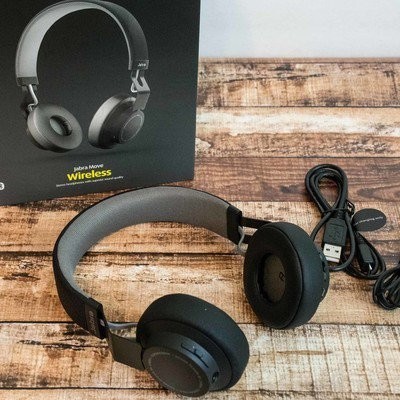
Amazon has the Jabra Move Wireless Stereo Bluetooth Headphones on sale for $50.27. While the discount fluctuates a bit depending on the pair you go with, this is available in black, gold, red, and cobalt, and these normally cost $65.
These ultra-lightweight headphones let you listen to music and take phone calls. The 40mm Dynamic Drivers will keep your music sounding great, and the wireless connectivity means you can listen from your phone, tablet, laptop, and other devices. The battery lasts for up to 8 hours on a single charge, and the customer reviews are solid.
You might want to pick up a carrying case with your purchase, and this one is available in coordinating colors.
See at Amazon
Grab a 6-quart Instant Pot programmable pressure cooker for $70
What’s for dinner?

The Instant Pot Duo60 6-quart 7-in-1 multi-use programmable pressure cooker is down to $69.95 on Amazon. The pressure cooker normally sells for around $100. Its lowest price ever was a drop to $60 on Prime Day, but it hasn’t reached that price on Amazon since. We’ll see some discounts on it for Black Friday, but those tend to sell out in minutes, and they won’t be much steeper than today’s deal. In this instance it’s probably wiser to just get it while it’s in stock if you’re determined to get one for the holidays. You may also see a clippable coupon to save you almost $2 off, which just sweetens the deal even more.
You can use this as a pressure cooker, slow cooker, rice and porridge cooker, yogurt maker, cake maker, egg cooker, saute/searing, steamer, warmer, and sterilizer. The customer reviews are insane, too. It’s very user-friendly to boot. You’ll get a few different accessories, including a steam rack (with handles), recipe booklet, two different spoons, a measuring cup, and a user manual.
If you need recipe inspiration, check out The Instant Pot Cookbook. You might also want a tempered glass lid so you can see what’s going on.
See at Amazon
Review: 2019 Acura RDX Offers Novel Touchpad Infotainment Controls, but CarPlay Doesn’t Fully Support Them
As part of my continuing series of articles looking at how car manufacturers have integrated CarPlay into their infotainment systems, I’ve taken a look at the 2019 Acura RDX, the popular crossover SUV from Honda’s luxury brand. Acura has been gradually rolling out CarPlay support across its lineup over the past few model years, and the new 2019 RDX is the first of this model to support the feature.
My test vehicle was a well-equipped RDX with Acura’s Super Handling All-Wheel Drive (SH-AWD), Technology package, and an A-Spec trim designed for those who want a bold look.
The Technology package adds a premium ELS Studio audio system that offers 12 speakers, Acura’s navigation system, two rear USB charging ports, parking sensors, and blind spot and rear cross traffic warning systems.
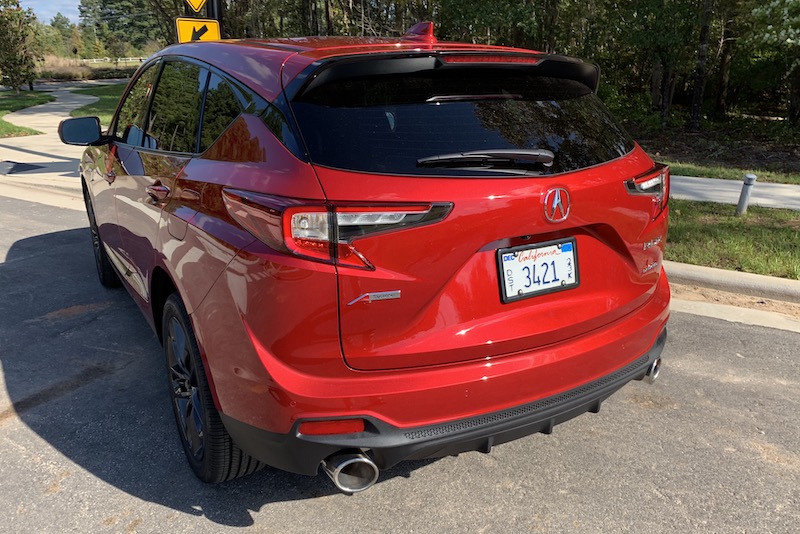
The A-Spec package adds larger 20-inch wheels in “Shark Gray,” special exterior accents like a unique front bumper with LED fog lights, dual oval exhaust, and prominent badging. Inside, the A-Spec package adds a sport steering wheel that feels great in the hands, and leather seats in either full black or red with black inserts, including heated and ventilated front seats. Regardless of seating color, red is a prominent highlight color in other areas of the A-Spec cabin, including on the instrument panel and nighttime ambient lighting. The audio system is also upgraded to 16 speakers, including four embedded in the roof of the vehicle.
There’s an additional Advance package that includes some other nice features such as rain-sensing windshield wipers, a heads-up display, a surround-view camera system, and 16-way power front seats including thigh extensions and side bolsters, but interestingly that package is not available on models equipped with the A-Spec package.
Acura tells me it’s received some feedback from customers who would have liked to add some of these Advance package features to an A-Spec vehicle, so it’s potentially something Acura will be taking a look at for the future as it weighs customizability against the simplicity of minimal trim packages.
Infotainment System Overview
Acura’s built-in infotainment system handles all of the usual functions, including radio, SiriusXM, Bluetooth phone connectivity, voice control, optional navigation and more. A beautiful 10.2-inch widescreen center display is standard, as is CarPlay support, which is a welcome decision compared to some other manufacturers that offer it only with certain trims or as a standalone option for an extra charge.
 Acura RDX’s center stack with high-mount infotainment display
As part of its research, Acura’s product development team determined that the optimal placement for a large infotainment display is mounted high on the dashboard and pushed back from the driver, minimizing the distance the driver’s eyes need to travel from the road to glance at the display. What that means, however, is that touchscreen operation is infeasible, as it requires a stretch to reach even the near side of the display.
Manufacturers have come up with various solutions to the infotainment control issue, with some keeping the display close enough for touchscreen operation while others use some form of control knob to allow for scrolling through and selecting onscreen options.
 True Touchpad Interface
In the RDX, Acura has launched a new True Touchpad Interface (TTI) within easy reach in the center console, and while it’s not the only car to offer touchpad control of the infotainment system, it does offer a unique absolute positioning design where the small touchpad maps directly to the display above – pressing the top left corner of the touchpad activates the icon or menu option at the top left of the display, for example.
The TTI system takes a little bit of getting used to, but once you get the hang of it and stop trying to swipe around to the button you want on the display, it’s a simple and natural way to navigate through various options, and the RDX has a comfortable palm rest below the touchpad to support your hand.
The touchpad is surrounded by a raised border that makes it easy to tell where your finger is by feel, and as your finger rests on various areas of the touchpad, the corresponding function on the display highlights to let you know where you are. Once the desired function is highlighted, a press on the touchpad in that location registers your selection.
 Display highlighting Navigation icon corresponding to location being touched on TTI
Similar to some other widescreen infotainment systems, Acura’s system in the RDX allows for two separate content windows, a large primary one taking up the majority of the screen, and then a smaller one off to the right side that can show options such as a clock or a secondary function of the system.

For example, if you have navigation up on the main part of the screen, the secondary portion of the display can show your current audio selection, whether it be radio, SiriusXM, or another source.
The TTI system includes a secondary touchpad, a thin strip along the right side that corresponds to the secondary content zone of the display above. Swiping up or down on this portion of the touchpad scrolls through the available content screens like clock or audio information, and pressing this strip swaps the two content zones, such as bringing the audio content over to the primary zone of the display while pushing navigation off to a small map on the right side. It’s a handy system that makes it easy to manage multiple functions of the infotainment system.

Above the TTI touchpad is a set of three physical buttons: a Back button, a Home button, and a Cards button that lets you quickly access the available content for the secondary zone of the display without needing to scroll through the options one by one.
 Top right physical button brings up card options for secondary display zone
The TTI touchpad can also be used to input handwriting for operations such as spelling out a destination or a phone number. In practice, I found this to be quite finicky and generally had a hard time getting the system to recognize the characters I was intending to draw.
 Steering wheel and multi-information dashboard display
(Voice control button is at lower left on steering wheel)
Of course, the TTI is only one way to control the infotainment system, with voice being the other primary system. The new RDX includes a revamped natural language voice recognition system, meaning you don’t need to use specific phrasing for the system to recognize your requests. I found the system to be quite good at recognizing requests using a variety of wordings, while a fairly natural-sounding voice offered audio feedback and navigation prompts.
Interface
One of the great features of Acura’s infotainment system is the customizability of the home screens. Much like an iPhone, the system supports multiple pages of “apps,” such as navigation, radio, SiriusXM, Bluetooth, Aux, Hotspot controls, CarPlay, and more.

By pressing and holding on an app icon using the touchpad, you can enter an edit mode that lets you move the icon around the home screen or to a different page. This lets you put your most frequently used functions on the front page and in the most easily accessible locations such as in the corners.
 Edit mode for rearranging home screen icons
These home screen icons aren’t limited to just general functions like navigation or radio. Various “Favorites” like frequently used destinations, specific phone contacts, and radio stations can be added directly to the home screen with their own icons, allowing for one-touch access. And for apps you know you’ll never use, you can delete them entirely from the home screen.
 “Home” favorite for one-touch access to navigation route home
Built-in Navigation
I found Acura’s built-in navigation to be quite powerful, easily recognizing a variety of addresses and POIs while providing accurate directions and estimated arrival times, as well as helpful voice prompts. The system makes it easy to set favorite destinations or select from recent ones, or you can quickly search for nearby POIs in various categories.
 Navigation search results
Several different views are supported, including 2D and 3D views with available “north up” and “heading up” options for 2D mode. The system also shows helpful information like distance to next maneuver, direction and street name of the next turn, follow-up maneuvers, and lane guidance. You can also easily add waypoints if you need to make a stop on the way to your final destination.
Aside from the standard navigation mode, the system also offers an exploration mode, which lets you easily zoom and pan around the map for an overview of routes and traffic conditions, and you can select locations and POIs directly from the map.
CarPlay
As with nearly every other car manufacturer, Acura’s CarPlay implementation is a wired one, so you’ll need to plug your phone into a USB port in the center console in order to get CarPlay up and running.
 Center console with phone slot and cupholders
Fortunately, the center console in the RDX includes a convenient slot housing the required USB port and providing simple and space-saving storage of your phone and cable while connected to the system. A sliding metal cover can hide away your phone and other small items in the neighboring cup holders.
 Center console with sliding cover closed
CarPlay shows up as its own app on the RDX’s home screen, making it easy to hop into CarPlay as needed. And as with other apps, you can customize its location on the home screen.

Once you enter CarPlay, you’ll be greeted with the familiar 4×2 grid of app icons from your iPhone, taking up the primary zone on the RDX’s display. The secondary display zone is not dedicated to CarPlay, so it can show content from the native system such as a navigation route in progress or the current audio information.

As usual, I won’t delve too much into the specifics of CarPlay itself, as that’s generally a consistent experience from vehicle to vehicle, but the one aspect that does vary is system control. CarPlay can support both direct touchscreen manipulation and selection highlighting via off-screen control methods such as knobs and jog wheels. But as you’ll quickly find when you enter CarPlay for the first time on the RDX, it doesn’t support absolute touchpad positioning, and that’s a disappointing realization.
You can certainly control CarPlay using the touchpad, but it’s a traditional trackpad mechanism where you have to swipe in various directions to move the highlights on the user interface to the desired function. You can’t just tap on the touchpad in the location where your intended CarPlay icon or menu option is displayed.
What this means is that the method of controlling your infotainment system differs depending on whether you’re in the native Acura system or in CarPlay, and that takes a bit of brain processing power to remember as you rapidly switch back and forth between the systems. Here’s hoping that Acura and Apple are working together to bring absolute touchpad positioning to CarPlay, as it’s a handy control mechanism.
In fact, Android Auto isn’t supported at all on the RDX at the moment, as Acura says it’s still working with Google on developing the ability for Android Auto to recognize absolute touchpad positioning, and so Android Auto support won’t be coming until a future software update.
 Waze on CarPlay
The hardware Back and Home buttons on the RDX do work with CarPlay to some degree, although the integration could be improved a bit. The Back button does typically reverse through your previous actions, backing up through menus and even moving out of apps back to the CarPlay home screen. I did find a few apps such as Google Maps and Waze, however, where pressing the Back button yielded a chime but didn’t actually step back to the previous action.
The hardware Home button always takes you back to the Acura home screen, even if you’re in CarPlay, and it would be nice if the system could intelligently take you back to either the CarPlay or Acura home screen depending on which system you’re currently in, with perhaps a second press of the button in CarPlay mode taking you all the way out to the Acura home screen.
CarPlay can of course also be controlled via voice, and that functionality is accessible through the same steering wheel button used for Acura’s built-in voice assistant. A short press on the button brings up Acura’s system, while a long press brings up Siri.
I mentioned earlier that the dual-zone display lets you quickly swap back and forth between different functions in the Acura infotainment, but CarPlay is a bit limited in that regard. If you’re using Acura’s navigation and listening to music via CarPlay, the integration works fine and the secondary display zone will say “Apple CarPlay” and show the currently playing track and artwork, whether you’re using Apple’s Music app or another service like Pandora or Spotify.

Pressing the right-side strip on the TTI will then conveniently bring your CarPlay audio over to the primary zone and slide the Acura navigation over to the right side.

With the cards options for the secondary display zone, you can even assign audio to both zones, displaying the traditional CarPlay “Now Playing” interface in the primary zone and album artwork in the secondary zone.

Things don’t work quite as well when you’re using other functions. For example, if you’re using CarPlay navigation in the primary display zone and SiriusXM in the secondary zone, swapping the zones will move the SiriusXM controls to the primary zone, but there’s no “mini” mode for CarPlay’s maps apps to show in the secondary zone.
 SiriusXM on left, CarPlay Apple Maps on right
As a result, all you’ll see on the right is a CarPlay-like icon and text saying “Apple CarPlay” and “Route Active” with no details on the navigation in progress. You will, however, still receive navigation voice prompts.
Ports and Connectivity
If you’re looking to charge your devices in the RDX, you’ll find several options, including the prominent USB port in the center console that gives your device access to the infotainment system. Another USB port is located underneath the center stack adjacent to a large storage space.
 Ports under the center stack
If you have the Technology package, you’ll get two more USB ports on the rear of the center console, giving your rear passengers convenient accessing to charging. All of the USB ports in the RDX offer 2.5A charging, so even devices like iPads with demanding charging loads will refuel fairly quickly.
 Rear USB ports
Hotspot capabilities come standard on the 2019 RDX, although you’ll have to subscribe to an AT&T data plan. Conversely, you can tether the car to your phone’s cellular connection to support internet-connected features of the infotainment system.
Wrap-up
I came away impressed with the overall driving experience of the 2019 Acura RDX, and the infotainment system is one of the best I’ve tested with a powerful navigation system, a terrific widescreen center display, and a unique but natural-feeling touchpad control interface. CarPlay works well, and I appreciate the ability to use the secondary display zone to show details on apps from the built-in system while using CarPlay. It’s a handy way to take advantage of CarPlay navigation and SiriusXM radio simultaneously, for example, and keep tabs on everything at once. It’s a welcome enhancement to CarPlay’s one-app-at-a-time experience.
The most significant negative is the lack of full True Touchpad Interface support in CarPlay, and hopefully that’s something Apple will address at some point. TTI is a solid control mechanism, but I feel like CarPlay hampered my ability to become fluent with it simply because I was constantly switching between CarPlay and Acura’s system.
As a result, I still found myself dragging my finger around on the touchpad even when using the native Acura system rather than heading straight for the area corresponding to my desired target. I have no doubt the interface would have become second nature more quickly without CarPlay and the built-in system constantly fighting to retrain my brain.
The 2019 Acura RDX starts at an MSRP of $37,300 with CarPlay supported on all vehicles including the entry-level Standard trim. The Technology package adds $3,200 to the total cost, and if you want even more you can opt for either the A-Spec package for a further $3,000 or the Advance package for $4,900, both on top of the Technology package. SH-AWD is an additional $2,000 on all levels.
Related Roundup: CarPlayTag: Acura
Discuss this article in our forums
Apple Now Has 132K Full-Time Employees, Spent $14.2B on R&D in 2018 Fiscal Year
Following the conclusion of its 2018 fiscal year, which ended September 29, Apple today filed its annual Form 10-K [PDF] with the SEC. We’ve combed through the exhaustive, legalese-rich 72-page report so you don’t have to.
Highlights:
- 9,000 more employees: Apple has 132,000 full-time employees as of the end of its 2018 fiscal year, up from 123,000 a year prior.
- R&D expenses rose nearly $3 billion: Apple spent $14.2 billion on research and development in its 2018 fiscal year, a nearly 23 percent increase over the $11.5 billion it spent in its 2017 fiscal year.
- Apple continues to execute its share repurchase program: Apple had 23,712 shareholders of record as of October 26, 2018, down from 25,333 as of October 20, 2017. There were 4,754,986,000 outstanding shares of Apple stock as of the end of its 2018 fiscal year.
- Genius Bar expenses are down: Apple’s expenses from warranty claims totaled $4.1 billion in its 2018 fiscal year, down from $4.3 billion in its 2017 fiscal year and $4.6 billion in its 2016 fiscal year.
- CapEx to drop: Apple anticipates utilizing approximately $14 billion for capital expenditures during its 2019 fiscal year, down from $16.7 billion in its 2018 fiscal year. The capital is used towards Apple’s manufacturing equipment, data centers, corporate facilities, and retail stores.
- Apple snaps up more office space: Apple owned 16.5 million square feet and leased 24.3 million square feet of building space as of September 29, 2018. By comparison, Apple owned 13.4 million square feet and leased 23.0 million square feet of building space as of September 30, 2017.
Apple’s annual Form 10-K also acknowledges that “international trade disputes” could adversely affect its business, almost certainly referring to an ongoing trade dispute between the United States and China:
International trade disputes could result in tariffs and other protectionist measures that could adversely affect the Company’s business. Tariffs could increase the cost of the Company’s products and the components and raw materials that go into making them. These increased costs could adversely impact the gross margin that the Company earns on its products. Tariffs could also make the Company’s products more expensive for customers, which could make the Company’s products less competitive and reduce consumer demand. Countries may also adopt other protectionist measures that could limit the Company’s ability to offer its products and services. Political uncertainty surrounding international trade disputes and protectionist measures could also have a negative effect on consumer confidence and spending, which could adversely affect the Company’s business.
Apple’s annual Form 10-K can be viewed or downloaded in a variety of formats from the company’s Investor Relations website.
Note: Due to the political nature of the discussion regarding this topic, the discussion thread is located in our Politics, Religion, Social Issues forum. All forum members and site visitors are welcome to read and follow the thread, but posting is limited to forum members with at least 100 posts.
Tags: AAPL, SEC
Discuss this article in our forums
Top 4 Ways to Market Your Business
Marketing your company can now be done in a number of different ways. This is the case due to the expansion of technology and innovation, and as a result the tools available at your disposal that you can use. One example of this can be pointed to social media channels, which have now become a necessary marketing platform if the modern business wants to reach their target audience. In addition to this, it’s necessary to have a strong online presence via a website, engage in email marketing and remain consistent in everything that you do. For more information on these aforementioned tips, continue reading.
- Social media channels
The very first way to ensure that you are searchable and are able to embark on various marketing endeavors is to create social media channels. This includes Instagram and Facebook, as well as another that you consider would be important for targeting your audience. Nowadays many people spend a lot of time on these various platforms, and you would miss out on communicating with consumers if you do not establish yourself on them as well. Not to mention, some people now get their source of daily news from these various outlets.
- Have a website
A business without a website is not credible. Even the average person has a website, whether it’s for their hobby or to showcase their portfolio. It has become easier than ever to create one, and it can even assist with your various sales efforts if you set up an e-commerce component. Of course, don’t forget that the quality of content you post is incredibly important if you want consumers to re-visit your site and tell their friends and family about you. Make sure that it is user-friendly and thus easy to navigate, and you will improve your company’s visibility as a result of it.
- Email marketing
A cost-effective method for promoting your business is through free email marketing. There are plenty of online software programs that offer the necessary templates and know-how for how to do this. All that will be necessary from your part is to come up with the content that will captivate people’s attention when they open up the email. No matter what message you are trying to promote, whether it’s a sales promotion or welcoming a new subscriber, you can easily communicate and reach anyone.
- Consistency
Once you get into the groove of marketing, you need to remain consistent. In other words, stick to the branding that you have set up for yourself, and remember to post on a regular basis. This includes on your website and social media, and also stay in contact with your audience by reaching out to them. This could be done through the aforementioned email marketing tactics or another way.
How many of the steps already outlined have you taken in order to properly market your goods and services? At the end of the day, if you don’t put in the effort and money behind it, consumers will not know about you and the result is falling behind on your profitability, and not to mention your competitors. Strive towards success at all times and continue marketing your various goods and services.

