


How to port your number to Mint Mobile

Mint Mobile is a prepaid carrier operating on T-Mobile’s network that sells its plans in multi-month bundles so you can save money. You can buy three or six months at a time, or even pay for the whole year at once, with up to 10GB of LTE each month. Should you decide to try out Mint Mobile, porting your number from another carrier is a fairly simple and painless process.
Products used in this guide
- Mint Mobile: SIM card ($45+)
- Mint Mobile: Samsung Galaxy S9 ($699)
Porting your number
Before starting the porting process, it’s important to note that your phone number must remain active on your previous carrier throughout the process. If you cancel your old service before moving to Mint, you likely won’t be able to recover your phone number — at least, not without going through a much more tedious process.
Once you’ve decided on a plan and received your Mint Mobile SIM card, starting the porting process is easy.
We used the Samsung Galaxy S9 for the purposes of this guide, but any Mint-compatible phone will do. You can get them for as low as $59.
Visit mintmobile.com and click Activate near the top of the page.
Enter your activation code. You’ll find the code on the back of your SIM card, above the “active by” date.

Click Start or Resume your Activation.
Enter the account number, PIN or password, and ZIP code associated with your previous carrier. You’ll find your account number at the top of most paperwork, including phone bills and receipts, but if you’re unsure about any information, you should call your existing carrier’s customer service line.
That’s it! Once you’re done, you can create a Mint Mobile account to keep track of your plan, but the porting process should be out of your hands and your number will change over automatically. Depending on various factors like your previous carrier, the transfer could be instant or take up to 48 hours — just be patient.
Once the number transfer is complete, you’ll receive a welcome text from Mint confirming your phone number, and in most cases, your existing service will cancel automatically. From here, all that’s left is to enjoy your new service!
Our top equipment picks
Try Mint Mobile risk-free
Mint Mobile SIM card

$45+ at Mint Mobile
Try Mint Mobile with a 7-day money back guarantee
Mint’s plans are extremely affordable, but they won’t do you any good if the service doesn’t work in your neck of the woods. You can try Mint for three months for as little as $45, and if it doesn’t work out within the first week you can get a full refund — though they’re pretty confident you’ll stick around.
Mint-compatible phone
Samsung Galaxy S9

$699 at Mint Mobile
One of the most well-rounded Android phones around
You can use almost any unlocked GSM-compatible phone on Mint Mobile, so long as it supports T-Mobile’s network. Mint also sells a number of popular Android (and iOS) phones, including the highly regarded Galaxy S9, and you can even finance it through Affirm.
Verizon Prepaid is getting cheaper, now supports tablets and big families

You don’t have to run a credit check or sign up for an expensive plan to try out the largest carrier in the U.S. Starting today, Verizon’s prepaid plans are getting more affordable with a $5 auto pay discount per line. You can get unlimited talk, text, and data with 500MB of LTE for $30 a month, though most people will want more than half a gigabyte of high-speed data on their plan.
$35 will get 3GB of data each month, and you can add up to nine additional lines to your prepaid plan (10 total, up from 5 previously) for $25 each on the 3GB plan. For $45, you’ll get 8GB, with additional lines costing $30 each, and the $65 plan offers unlimited LTE data with $45 additional lines.
Each plan supports sharing your data allotment to other devices with mobile hotspot, save for the unlimited LTE plan, and both the 8GB and unlimited plans include free unlimited calling to Canada and Mexico. You can mix and match plans to best suit everyone’s needs on the account, and of course, each line gets it own data allotment rather than pulling from a shared amount.
Those lines don’t necessarily have to be phones, either; Verizon Prepaid now supports tablets and Jetpacks (Verizon’s dedicated mobile hotspots) with the same pricing.

Amazon offers $10 smart bulbs and plugs as early Black Friday deals heat up
Amazon’s celebrating Alexa’s birthday with a present for you.

After launching a big sale for Alexa’s birthday and revealing some of its best upcoming Black Friday deals, Amazon has just kicked off a smart home sale that we doubt any holiday sale will beat. You can get a LIFX Mini LED Smart Bulb or Wemo Mini Smart Plug for just $10 using promo code SMART10 at checkout. The only downside here is that not everyone is eligible for the discount. Per the terms and conditions of the offer, it will only work if you have an Amazon Echo device or Sonos One speaker connected to your account and it’s your first smart home purchase.
Given how popular Echo and Sonos are, we’re pretty sure a big portion of you should be able to take advantage. The LIFX smart bulb regularly sells for $24 on average there, while the Wemo smart plug can be found for $29 on average; meaning either one you choose, you’re getting a great deal. There’s even a coupon you can clip on the LIFX bulb’s product page to save a little bit extra. Amazon is sweetening the offer even more by also extending a 20% discount to a range of smart home products, including the Ring Video Doorbell 2, Ring Floodlight Camera, and various TP-Link accessories.
Both the smart bulb and the smart plug work with Amazon Alexa, which means if you have a device like the Echo Dot, you can ask Alexa to turn off the LIFX bulb or power on something plugged into the Wemo smart plug and begin controlling them with your voice. They also work with Google Assistant and Apple HomeKit.
At Amazon, the LIFX bulb features a rating of 3.7 out of 5 stars based on nearly 300 reviews while the Wemo smart plug has a rating of 3.8 out of 5 stars based on over 11,000 reviews. While that indicates some middling opinions, it’s worth keeping in mind that most of those reviewers paid full price and might have changed their tune if they’d only paid $10.
See at Amazon
Court says Qualcomm has to license patents to rivals like Intel and Samsung
A U.S. federal court ruling could potentially see Qualcomm licensing its modem patents to other chip makers.

A preliminary ruling by a U.S. federal court judge could change the way Qualcomm operates its licensing business. The ruling was part of a larger antitrust lawsuit that has been filed against Qualcomm by the Federal Trade Commission, and states that the company will have to license its standard essential patents to rivals.
The court found limiting access to standard essential patents could allow Qualcomm to “achieve a monopoly in the modem chip market and limit competing implementations of those components.” Under the new ruling, Qualcomm will have to license the patents needed to build a modem to rivals like Intel or Huawei.
Thus far, Qualcomm has licensed its tech directly to manufacturers, but sharing its essential patents could allow chip vendors like Intel and Samsung to build modems of their own. That’s great news for the industry as it opens up the field for modems, but considering how closely Qualcomm guards its standard essential patents, the company wouldn’t have been too happy with today’s verdict.
OPPO R17 Pro with three cameras and waterdrop notch arrives in Europe
The R17 Pro has a narrow notch, three cameras, and a gradient finish at the back.

OPPO unveiled its first phone in European markets earlier this year with the Find X, and the brand is now introducing the R17 Pro in the region under the RX17 Pro moniker. The R17 Pro debuted a few months ago in China, and forms the basis for the OnePlus 6T.
The phone has an evocative design with a gradient pattern at the back that’s dubbed Radiant Mist. There’s a 6.4-inch FHD+ AMOLED screen up front with a resolution of 2340 x 1080, and the device has a smaller waterdrop notch. The display is backed by a layer of Gorilla Glass 6.
Under the hood, you get a Snapdragon 710 along with 8GB of RAM and 128GB of storage as standard, and unlike the OnePlus 6T, the secondary SIM card slot can hold a MicroSD card. Round the back, there’s a primary 12MP wide-angle shooter joined by a 20MP sensor and a 3D imaging sensor that’s primarily used for AR. The R17 Pro has a HDR-enabled 25MP front camera as well.
The phone loses out on the 3.5mm jack, but you do get NFC, Wi-Fi ac, Bluetooth 5.0, and a 3700mAh battery with SuperVOOC charging. The charging tech allows the device to go from flat to 40% in just 10 minutes. On the software front, the R17 Pro is running ColorOS 5.2 based on Android 8.1 Oreo.
The R17 Pro will be available starting November 16 for €599. Who’s interested?
How to restore your apps and settings to a new Android phone

Whether you’re upgrading to a new device or are resetting your phone, it’s incredibly easy to restore your apps and settings. Google automatically backs up information like contacts, calendar entries, call logs, texts, Do Not Disturb settings, and more to the cloud, allowing you to pick up from where you left off. Here’s how you can restore your apps and settings when moving to a new Android phone.
Products used in this guide
- Amazon: Nokia 7.1 ($349)
- Amazon: Xiaomi Mi A2 ($229)
How to enable the Android backup service
Before we get started with restoring data, you have to make sure that the backup service is running on your current phone. Here’s how you can get started:
Open Settings from the home screen or app drawer.
Scroll down to the bottom of the page.
Tap System.
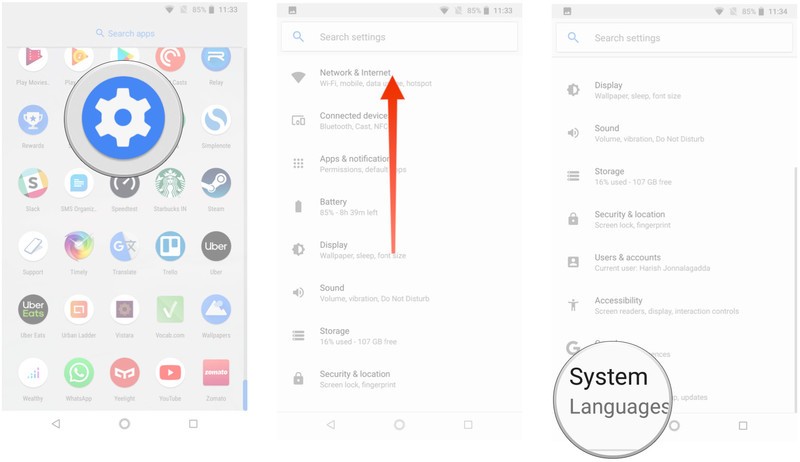
Select Backup.
Ensure the Back up to Google Drive toggle is selected.
You’ll be able to see the data that is being backed up.

Now that you’ve enabled the Android backup service, your system settings and app data will be automatically saved to Drive. When you’re switching to a new phone, you can rely on the service to restore your settings, apps, and associated data.
Note: The menu layout may not look exactly as above on your phone, but any phone running Nougat and above should have an equivalent of Backup & reset.
How to restore apps and settings on a new Android phone
Restoring apps is straightforward, and you’ll be able to do so during initial configuration. If you’re using the Google Now or Pixel Launcher, your home screen background, icon and widget layout, as well as the folder structure, is now saved to the cloud, allowing you to restore your settings to a new handset and retain your home screen layout.
Select the language and hit the Let’s Go button at the welcome screen.
Tap Copy your data to use the restore option.
Connect to a Wi-Fi network to get started.
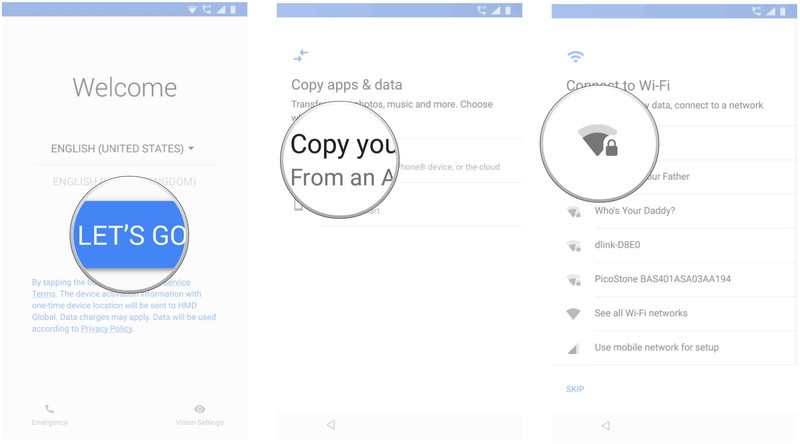
At the next screen, you’ll see all the restore options available. Select A backup from an Android phone if you have your old phone handy. In this instance, we’ll go with the A backup from the cloud option.
Sign in to your Google account (if you haven’t already, set up two-factor authentication).
Select I agree to Google’s Terms of Service to proceed.

You’ll see a list of backup options. Select the relevant one to restore data.
Hit Restore if you want all the data and settings from your previous device restored.
Hit Apps to choose what apps to install on your new device.
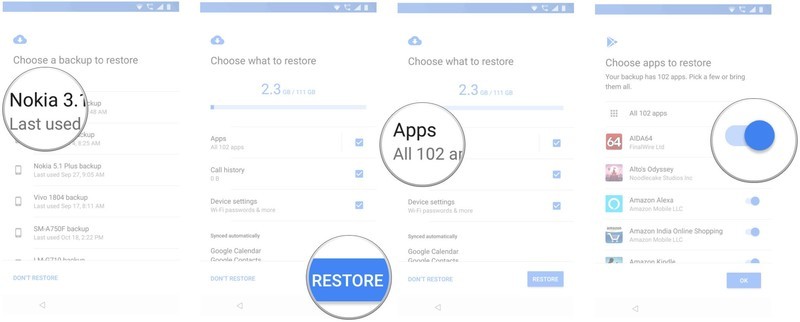
Your data will be restored in the background. In the meantime, you can set up a screen lock and biometric authentication.
Hit Set up screen lock to get started.
Choose a mode of screen unlock and add your fingerprint.
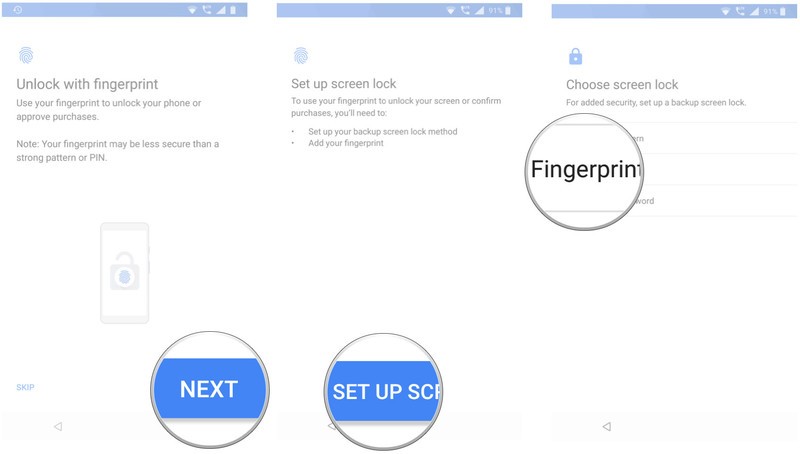
You can set up Google Assistant after you’re done registering your fingerprints.
Select Get Started to use Voice Match.
Train Assistant to recognize your voice and hit Done to finish.
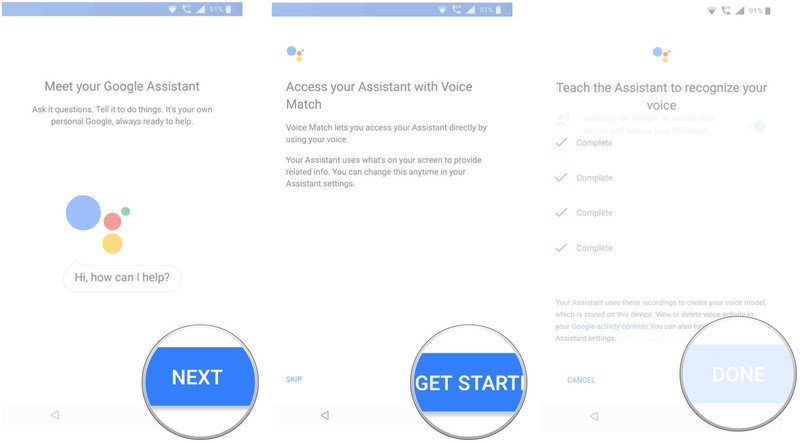
That’s it! Once the initial setup is completed, apps and settings will be restored in the background.
Where does all the app data get stored? Google is backing up the app data to Drive, allocating 25MB for each app. Data used by the backup system doesn’t count toward your storage quota. Meanwhile, developers can choose to select what app data gets stored in the cloud, and you can opt-out of the service at any time through your device settings.
Your privacy
Gathering data and sending it off to a remote server means it’s outside the app sandbox and depends on Google — as well as the people who made your phone — to do the right things. That may not always be the case, as phone manufacturers have a lot of leeway when they make an Android-powered phone. Google’s thoughts on the issue:
Caution: Because the backup transport can differ from device to device, Android cannot guarantee the security of your data while using backup. Be cautious about using backup to store sensitive data, such as usernames and passwords.
Google provides plenty of documentation on how to use the Backup service, so developers have the means to be cautious and do the right thing with sensitive data. Don’t let this scare you away from using the service, but you do need to be aware.
The ability to restore apps and settings is available on all current phones running Android 6.0 and above, although you will encounter a few variations in the initial configuration if you’re using a phone from the likes of Samsung, LG, Huawei, and other manufacturers that use a custom skin.
Our top equipment picks
Nokia is back
Nokia 7.1

$349 at Amazon
The best that Nokia has to offer in the U.S.
The Nokia 7.1 combines a gorgeous screen with robust hardware and great cameras. It’s available unlocked from Amazon and you can use it on GSM carriers like T-Mobile and AT&T as well as MVNOs like Metro or Cricket Wireless.
Best of Android One
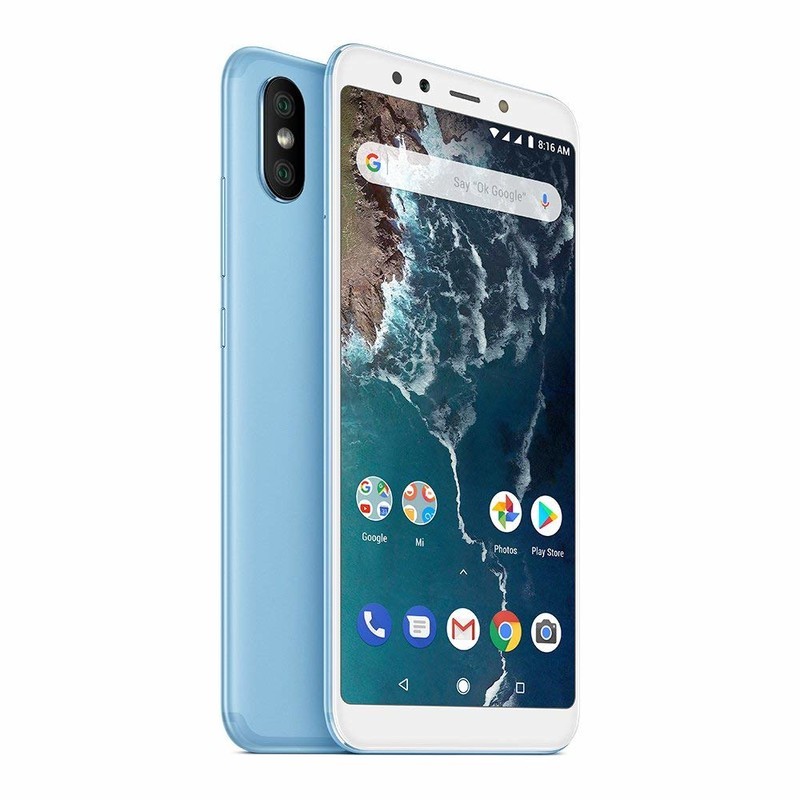
Xiaomi Mi A2
$229 at Amazon
Great hardware at an affordable price.
Xiaomi’s Mi A2 is one of the best options currently available if you’re looking for a phone under $300. With great hardware backed by Android One, the device has plenty to offer. While it’s not officially available in the U.S., you can get a global variant and use it on T-Mobile and AT&T.
Amazon Echo Plus (2nd gen) vs. Sonos Play:1 — Which should you buy?
I listen to a lot of music — and control a lot of connected devices — so I know the ropes when it comes to smart speakers.
Amazon Echo Plus
Alexa’s got skills

$149 at Amazon
Pros
- Powered by Alexa
- Built-in smart home hub
- Multiroom audio with other Echo devices
Cons
- Can’t stream all music services
- Sound doesn’t match Sonos quality
The Echo Plus is a great sounding speaker at the center of your smart home, with plenty of smart features right out of the box.
Sonos Play:1
Sonos lacks smarts

$149 at Amazon
Pros
- Amazing sound for its size
- Can stream all the top music services
- Plays nicely with other Sonos speakers
Cons
- No native Alexa support
- No built-in smart home controls
The Sonos Play:1 is a great sounding speaker that checks all the right boxes. It’s not a “smart” speaker, but it can still get the job done.
Unless you are already deep in the Sonos ecosystem or you’re only looking to just play music, the Amazon Echo Plus edges out the Sonos Play:1 in a few key areas. Sonos can’t be beaten when it comes to sound quality, but the native Alexa support and smart home hub capabilities give the Echo Plus the winning combo.
Audio Lowdown
There are tons of options these days when it comes to smart speakers. While you, of course, want to get the best sound you can, you’ll also want to keep things simple at the same time. The Echo Plus has the advantage of having much to offer in a compact package.
| Multiroom Audio | Yes | Yes |
| Native Alexa Support | Yes | No |
| Smart Home Hub | Yes | No |
| Bluetooth | Yes | No |
Sounding Off

The battle for space in your connected home is an ongoing one — and won’t be stopping anytime soon. Adding smart devices like lights, locks, cameras, and speakers most often require adding a hub of some sort as well. The Echo Plus is dual-duty in that it can act as a hub for many of your smart devices — freeing you from additional hardware — and also sounds great at the same time.
Unfortunately, the Play:1 doesn’t have anything smart about it. It works with other Sonos speakers to play music from wherever you choose, but making it “smart” requires adding … wait for it … a separate Amazon Echo device.
Multi-room audio is something that both of the speakers offer, toting the ability to easily stream to other devices in their respective families. Sonos, known for their ease of use and seemingly endless networking, can easily stream pretty much any music service under the sun. The Echo Plus, however, is limited to a smaller set of services, Amazon Music obviously being the top dog. This is where the Play:1 steals some thunder from the Echo Plus — it’s first and foremost a speaker. Anything beyond that is just an afterthought.
Echo Has Smarts

Alexa support is becoming more and more of a selling feature for devices, and here it’s no different. Buying an Echo product from Amazon, you get Alexa support right out of the box, which means you can ask it questions, add things to your shopping list, play music, request something be played on your Fire TV — the list goes on. While the Sonos isn’t completely lacking in this area, you will need to add an Echo of some sort (Plus, Dot or Show) to your smart home in order to take full advantage of these features on the Play:1. Even then, you can just control music on your speakers — and only if you’re in earshot of your Echo device.
Where the Sonos does salvage a few points is from the dead-simple setup and great networking features. Your Sonos speakers all play well together if you’re looking to spread the listening love across your entire home. While the Echo’s multiroom audio works well, it’s not nearly straightforward as Sonos. Sonos does what it does very well — playing music from nearly any service whenever and wherever you want it — and it’s hard to see that changing anytime in the near future.
Let’s not forget that the Echo Plus also sports Bluetooth, so unlike Sonos, you can connect your phone directly to it to stream rather than routing through the cloud.
Listen Up
If you’re aiming solely to listen to music and don’t need any smart features, Sonos wins almost every time. But in the connected home where you’re looking to do more with less, the Echo Plus is the slight winner here as it adds Alexa support, Bluetooth, and smart home hub features that you won’t find in the Sonos Play:1.
Amazon Echo Plus
Alexa’s got skills
$149 at Amazon
Sweet spot of smarts and sound.
While the Echo Plus may not sound as great as the Sonos Play:1, the built-in smarts and Alexa integration make it our top pick.
Sonos Play:1
Sonos lacks smarts
Lacks features for the smart home.
$149 at Amazon
The Sonos Play:1 does what it does extremely well. It sounds amazing but lacks any smart features out of the box.
How long do you plan on keeping the Galaxy Note 9 for?
Something new is always right around the corner.
If you want a big Android phone that can do everything and then some, the Samsung Galaxy Note 9 is still one of the best handsets you can get. The Note 9 is chock-full of software features, its S Pen is more functional than ever before, and its gorgeous AMOLED display is still one of the best we’ve ever seen.

There’s no denying that the Note 9 is a great phone, but with new devices being released all the time, it can be hard to keep your existing phone in your pocket and not go for something else.
With that being the case, how long do you plan on keeping the Note 9 for? Here’s what the AC forum community has to say:
LdotAdot13
11-05-2018 09:44 PM“
if the S10 wows me, I’ll buy it. If not I’ll wait and see what the Note 10 looks like. I usually keep my phone’s until a new one comes out.
Reply
frederickdawg
11-05-2018 08:29 PM“
12 months.
Reply
PraetorianGuard14
11-05-2018 08:49 PM“
Two years, maybe three. Should be enough time for 5G to settle in.
Reply
monicakm
11-05-2018 08:56 PM“
I just can’t imagine a phone having anything else that could entice me to upgrade. It’s the epitome of, the pinnacle of cell phone technology 😀
Reply
What about you? How long will you be keeping your Note 9?
Join the conversation in the forums!
Samsung Galaxy Note 9
- Samsung Galaxy Note 9 review
- Galaxy Note 9 vs. Note 8
- Where to buy the Galaxy Note 9
- Galaxy Note 9 specifications
- Is the Note 8 still a good buy?
- Join our Galaxy Note 9 forums
AT&T
Verizon
T-Mobile
Samsung
Amazon
Best replacement keyboard for your Kano Computer
Sometimes your keyboard breaks, which is also known as the worst thing in the entire universe. Well, no need to worry. These are some great replacement keyboards that’ll help your Kano Computer to shine in the way it deserves. These keyboards will be compact and slim, wireless and completely easy to set up. They also won’t be lacking in quality, so you’ll definitely not have to worry about that.
Keyboards with touchpads
Small but reliable
Riii Miniature Wireless USB Keyboard with Touchpad

Perfect for those out there who would rather just sit with their keyboard on their lap, no fuss involved. It comes with an auto sleep and wake feature, meaning that battery life and power consumption won’t be strained when you leave the keyboard alone for a few hours. What it lacks in size, it makes up for with quality.
$34 at The Pi Hut
Compact and slim
Logitech Wireless K400

This is an easy-to-use and comfortable keyboard, with large keys and a USB dongle included to set up the keyboard to your Kano Computer as quick as a flash. Touchpad included, in case of faulty or broken mouse.
$23 at Amazon
Fashionable and supportive
Victsing Ultra-Slim Wireless Keyboard

An incredible range that’ll allow you to use your keyboard from up to 10 meters away. It’s designed with frosted keycap and rubber support, allowing you to feel that little more fashionable while comfortable.
$20 at Amazon
Keyboards without touchpads
Okay, so you’ve got your keyboards with touchpads. But what about if you don’t want a touchpad included, and just want a regular wireless keyboard for your monitor?
Curved and stylish
Logitech K350 2.4Ghz Wireless Keyboard

Do you like your keyboard with curves? This wireless keyboard from Logitech boasts a curved layout that guides hands into just the right position. What’s more, you can add a compatible mouse to the keyboard, if you so choose.
$34 at Amazon
Long-lasting and robust
Logitech Wireless K270

Plug and play, with a tiny receiver included, so you can add a number of compatible devices to this keyboard. It also boasts a long-lasting battery life of three years, with three AAA batteries included when you buy.
$30 at Amazon
Portable and ULTRA slim
TeckNet Ultra Slim 2.4G USB Wireless Keyboard
This one has an ultra-slim design, making portability no issue. The keys are also very quiet, so noise irritation won’t be a problem. It’s also incredibly easy to set up with a Nano USB receiver.
$15 at Amazon
So now, not only do you have a range of quality keyboards with a touchpad, but those without a touchpad too. It’s up to you now whether you’d like the best of both worlds or not. The one keyboard that stands out for me, however, is the Logitech Wireless K400 with its smooth interface and a built-in touchpad. All of the keyboards included here have their own fantastic qualities: silent keys, portability, slim and stylish, as well as putting comfort first. No matter what, you’ll find something here that will appeal to you.
Improve your drive with a $14 iClever Bluetooth FM transmitter
Smarten up your old car stereo.

If you’re sick of listening to the same songs and commercials over and over on the radio during your commute but your car stereo system does not support Bluetooth, then an iClever Bluetooth FM Transmitter is the device for you. You can pick one up for $14.39 today by using coupon code BP2O8W8M at checkout, taking almost $10 off the asking price.
The iClever device is powered by your car’s cigarette lighter socket. Simply plug it in, tune it and your radio to an unused frequency in your area and hook your phone up via Bluetooth and you’re ready to go. You’ll then be able to play all your favorite tracks from phone and use services like Apple Music or Spotify to stream on your existing in-car system. It’s also great for avid podcast listeners or Audible fiends.
There’s a built-in mic for taking hands-free calls on the go and, if you prefer, the transmitter supports a microSD card up to 32GB in size if you want to load up some music rather than using the Bluetooth connection.
See at Amazon
 AIVAnet