


Apple News Gaining Dedicated ‘Election Night’ Tab With Real-Time Results
Apple will replace the existing “2018 Midterm Elections” channel in Apple News on November 6 with a new “Election Night” section, providing readers with real-time results of Election Day 2018 (via TechCrunch). The change will happen at 8:00 p.m. ET on November 6 and showcase live results, updates on key races, the latest developments, and more.
To ensure that readers can quickly keep tabs on results, Apple will also replace the central “Digest” tab in Apple News with the Election Night section. Apple is partnering with the Associated Press for the update, using its real-time election results to create dynamic infographics and a complete list of federal election results in every state, as well as House and Senate seats.
The AP’s data will allow Apple News to send out special alerts at the top of the Election Night feed — or as a push notification if users choose — to note if the balance of power in either the House or Senate has changed. All of these infographics and results data will automatically update every minute, and there will still be a manual page refresh option to force an immediate update.
Readers can expect the usual news coverage and live video feeds from existing Apple News partners as well:
Another section will focus on the latest developments – meaning breaking news headlines and stories related to election night coverage. This will feature news from a variety of sources including Axios, Politico, The Washington Post, Fox News, CNN, The New York Times, CBS, and others.
CBS News, CNN, and Fox News will also contribute video clips to the Election Night hub, while ABC will offer a live video feed. Another live video feed from NBC News will appear in a widget alongside the Live Results infographic.
Apple says that having a wide range of various news sources was necessary to ensure that all voters were informed about the election, no matter their political leaning. The company also notes that all of the Election Night coverage is not being driven by algorithms, and the November 6 update will see an “all-hands-on-deck” situation for the Apple News team.
This preference for human curation was recently highlighted in a report by The New York Times, which talked with Apple News editor in chief Lauren Kern about how her team approaches daily news curation for Apple. The company’s decision to lean more heavily on human-led news selection instead of algorithms is the opposite strategy of rivals like Google News and Facebook, and Kern argues that Apple’s way is “really the only legitimate way to do it at this point.”
Note: Due to the political nature of the discussion regarding this topic, the discussion thread is located in our Politics, Religion, Social Issues forum. All forum members and site visitors are welcome to read and follow the thread, but posting is limited to forum members with at least 100 posts.
Tag: Apple News
Discuss this article in our forums
“Vouwbare Samsung Galaxy F krijgt naast 7,3 inch display toch 2e scherm”
Er lijkt meer bekend te zijn geworden over Samsung’s vouwbare telefoon. De Galaxy F lijkt inderdaad in geopende toestand een 7,3 inch scherm te krijgen. Daarmee valt het in dezelfde categorie als een kleine tablet. In gesloten toestand zou aan de buitenkant nog altijd een 4,6 inch scherm te gebruiken zijn. Beiden zouden van het type OLED zijn.
In onze eerdere render gingen we er vanuit dat het toestel van slechts één display gebruik zou maken; een 7,3 inch groot OLED exemplaar. Deze zou niet helemaal in het midden gevouwen worden zodat altijd nog een gedeelte zichtbaar zou zijn. Handig voor notificaties, de tijd of het weerbericht. Ten tijde van het maken van onze render gingen er al geruchten over een 2e secundaire scherm maar wij hebben dat toen op deze manier geïnterpreteerd.
Ook scherm aan buitenkant Samsung Galaxy F
Nu zwellen de geruchten over een 2e scherm opnieuw aan. We horen zelfs al een schermformaat; 4,6 inch. Daarmee zou het toestel in gesloten toestand bruikbaarder moeten zijn al neemt hierdoor wel de dikte en het energieverbruik toe. Samsung zou in november willen beginnen met de productie van beide schermen waarna rustig begonnen kan worden met de productie van de Galaxy F. Door de verwachte hoge prijs en complexiteit tijdens de fabricage wordt niet gerekend op hoge productieaantallen.
Ontvang een e-mail wanneer de Galaxy F verkrijgbaar is
Aanpassingen Android
De bron van het verhaal bevestigt onze interpretatie van het scharnier-mechanisme. Deze laat namelijk een kleine opening bij de vouw zodat het scherm niet beschadigt. Hierdoor zal het toestel in gesloten toestand wel dikker zijn dan traditionele smartphones. Grootste uitdaging blijft de interface. Android houdt momenteel geen rekening met een dergelijke vormgeving. Samsung zou naar verluidt nauw samenwerken met Google voor de nodige aanpassingen. Een glimp op de vernieuwde interface krijgen we mogelijk 7 november te zien tijdens het Samsung Developer Conference. Dat vindt plaats in San Francisco, niet geheel toevallig om de hoek bij het hoofdkantoor van Google.
Nvidia RTX DLSS: Everything you need to know
Alongside the fastest graphics cards ever built for consumers, Nvidia’s Turing-generation of GPUs also made possible some intriguing new features for gamers everywhere. Ray tracing is the easiest to wrap your head around, but deep learning supersampling, or DLSS, is a little more nebulous.
Even if it’s more complicated to understand though, DLSS has the potential to be the greatest feature of Nvidia’s 2000-series graphics cards, improving visuals and increasing performance in the same breath. To help you understand just how it works, here’s our guide to everything you need to know about Nvidia’s RTX DLSS technology, so you can decide whether it’s enough of a reason to upgrade to a new 2080 or 2080 Ti.
What is DLSS?
Nvidia hasn’t been very clear on what exactly deep learning super-sampling actually is, but it does provide a few broad strokes descriptions of it. It revealed the following in its breakdown of the Turing Architecture:
“DLSS leverages a deep neural network to extract multidimensional features of the rendered scene and intelligently combine details from multiple frames to construct a high-quality final image. DLSS uses fewer input samples than traditional techniques such as temporal anti-aliasing (TAA) while avoiding the algorithmic difficulties such techniques face with transparency and other complex scene elements.”
Aliasing creates the jagged edges of an object in a scene, and the process known as “anti-aliasing” helps mitigate that effect. In all it’s different forms, whether it’s multi-sampling, fast approximate, or temporal, they work by approximating what should appear in the gaps between pixels. DLSS works a little like that, but that’s not the whole picture.
DLSS also leverages some form of super-sampling to arrive at its eventual image. That involves rendering content at a higher resolution than it was originally intended for and using that information to create a better-looking image. But super-sampling typically results in a big performance hit because you’re forcing your graphics card to do a lot more work. DLSS however, appears to actually improve performance.
What does DLSS actually do?
“Average” Preset | Close-up
DLSS provides a better looking overall image without using as much of the graphics card’s main processing capabilities as traditional anti-aliasing techniques. In theory, that should free up those resources for additional rendering tasks, thereby opening up the possibility of greater detail levels or higher frame rates, depending on the preferences of the user.
The technical director of Final Fantasy XV recently claimed that DLSS has a dramatic impact on performance when applied to the game, effectively giving gamers a better looking and higher-frame-rate experience. We haven’t seen any examples of this outside that benchmark and Epic’s Infiltrator demo as of yet. Final Fantasy XV isn’t considered to have a great implementation of other AA techniques like TAA either, but it’s still encouraging.
With no actual games available to test these claims as of yet, it’s hard to nail down exactly what DLSS is doing, but some have taken steps to figure it out all the same. TomsHardware performed a relatively detailed investigation using the Final Fantasy XV benchmark which utilizes DLSS. He was able to force the demo to run without anti-aliasing, providing a unique insight into the difference between the demo with DLSS, TAA, and no anti-aliasing.
The results were far from cut and dry, with some instances where DLSS looked better than TAA, and some where no anti-aliasing at all seemed preferable. In most cases though, DLSS performed best at 4K resolution and seemed to improve image quality the longer a scene ran and the more information it had to draw from to create its composite images.
The testing also discovered that a scene with DLSS running at 4K resolution actually ran faster with higher framerates than no anti-aliasing at all, providing a hint of what DLSS might actually be doing under the hood.
How does DLSS work?
Nobody is quite sure how DLSS works just yet, but we do have some hints. By Nvidia’s description, we could surmise that it uses AI to render the final image seen by gamers, drawing from different rendered frames to construct an altogether cleaner image with less of an overhead. But it’s not as simple as that.
TomsHardware’s testing suggests that DLSS might actually be rendering a scene at a lower resolution than it was set for, then upscaling certain elements of it to give the impression of a better overall image. That would explain the higher frame rates when DLSS was enabled versus no AA solution at all, and could be why TAA occasionally results in a better-looking image. Technically, it’s rendering at a higher resolution.
It also appears that DLSS might actually employ some measure of anti-aliasing as part of its rendering process, which would explain why games that employ TAA have been the first to offer it as a feature.
It may be that with DLSS, what we’re looking at is a real-time implementation of Nvidia’s screenshot-enhancing Ansel technology. It renders the image at a lower resolution to provide a performance boost, then applies various effects — including, it seems, anti-aliasing — to deliver a relatively comparable overall effect to raising the resolution. The tensor-core-powered AI component is effectively inferring how the final image should look and creating that from its lower-resolution source.
Uncertain, but intriguing
DLSS still isn’t exactly understood. We’ll need to see a number of additional, real-time gaming examples to truly tell what it does, how it does it, and whether it’s something that’s worth upgrading our hardware for. Even at this early stage though, it is intriguing.
Deep learning supersampling has the potential to give gamers who can’t quite reach comfortable frame rates at resolutions above 1080P, the ability to do so with inference. If that turns out to be true, DLSS could end up being the most impactful feature of the new generation of Nvidia’s RTX Turing cards. They aren’t as powerful as we might have hoped, the ray tracing effects are pretty but could have a big negative effect on performance, but DLSS could give us the best of both worlds: Better-looking games that perform better too.
The best place for this kind of technology could be in lower-end cards like the rumored GTX 2060 or GTX 2050. If DLSS gives them the ability to render at higher resolutions and detail levels than their GPU core and memory would typically allow, that could make them very desirable, especially considering the inflated price of the higher-end alternatives.
However, the problem remains that this is an Nvidia technology that requires new hardware and compatible software. At this time, that latter component is notably absent. The list of games that will introduce this feature currently sits at 25, which is great if you plan to play ARK: Survival Evolved, We Happy few, Darksiders III, or PUBG, among others, but it does leave us a little concerned about the future of DLSS.
It could be that in a year or two it’s a commonplace feature in most games due to its ease of implementation and the dominance of RTX GPUs in gamer systems. But if game developers don’t implement DLSS en masse, it may end up as something far more niche and unsupported. It could end up like the often (surprisingly) controversial Nvidia Hairworks, which is nice to have, but not a must-have feature.
Editors’ Recommendations
- A.I. makes Nvidia’s RTX 2080 twice as powerful as the GTX 1080
- ‘Final Fantasy XV’ dev claims Nvidia’s new card greatly improves performance
- Nvidia GeForce RTX GPUs: Everything you need to know
- Nvidia GeForce RTX 2070 joins the ray tracing future on October 17 for $499
- Nvidia GeForce RTX 2080 vs. RTX 2080 Ti
Google strips the color from its redesigned apps, but a little goes a long way
A splash of color. That’s how Google’s first official design language kicked off back in 2014. Material Design was unveiled at Google I/O 2014, introducing a colorful set of guidelines that strove to create consistency in the world of Android apps.
“Material Design is inspired by the physical world and its textures, including how they reflect light and cast shadows,” according to Google’s Material Design website. “Material surfaces reimagine the mediums of paper and ink.”
Third-party app developers took their time in following these guidelines for their apps, with some ignoring them altogether, but others in the Android community took it as gospel. It was quick to shun apps that didn’t adopt Google’s standards, and those that did were put on a pedestal. By 2015, many of Google’s core services utilized the Material Design language. Eventually, this design expanded to Google’s services on the web and on Apple’s iOS.
“Material surfaces reimagine the mediums of paper and ink.”
The design of these apps were “fresh and very opinionated,” Matias Duarte, vice president for Design at Google, said in a meeting with several journalists during Google I/O 2018. Take a look below. Google heavily embraced the use of color, giving each of its apps a specific tone to identify with. Google Fit had a red and orange icon, and the app featured orange accents; Google Play Newsstand was filled with purple highlights.
-
1.
Google Play Newsstand, left, Google Play Store, right. -
2.
Google Fit, left, Google Now, right.
But gone are the colorful days of Material Design. You may have noticed Google has been updating the look of its apps throughout the year. There’s a new font it’s using called Google Sans, but more noticeable is the lack of color in all these redesigns. At the panel, Google’s designers said the use of white space will allow the product to shine, but color is still present, and it’s being used to highlight meaningful actions.
“Color remains an important design tool and brand signifier within the Google Material Theme,” Duarte told Digital Trends in an email. “You will continue to see color being used meaningfully in the Google Material redesign of Google products — some specific examples include the red and blue selected states and icons within Gmail and Google Drive’s recent redesigns.”
Much of the color seen in these app redesigns are Google’s brand colors — red, green, blue, and yellow — which Duarte said are “intended to be used with purpose and intent, not for decoration.” When you see these colors in an app, it usually means there’s an action to go with it that’s being powered by Google. For example, the redesigned Google News app replaced Google Play Newsstand, and there’s no hint of purple anymore. The only color in the interface is the “Full Coverage” icon, which when tapped, curates a list of stories around the subject so you get all sides and not just your preferred sources. This is being powered by Google’s artificial intelligence, and it’s why it’s the only colorful icon in the app.
Google said in testing, users felt more positive about its brand when it used Material theme, judging it to be more useful and intuitive. Take a look below at a handful of redesigned Google apps within the past year. They all predominantly feature white, with color kept to a minimum.
-
1.
Google Play Store -
2.
Google News -
3.
Google Home -
4.
Android Messages -
5.
Google Fit -
6.
Google Photos -
7.
Google Tasks -
8.
Google Calendar
The use of white space does highlight the content in the product, and you can see where color is being used to highlight actions, such as the floating action button in the Google Fit app on the bottom right.
It’s not all pure white, though. Google has also added a “Dark Theme” to a handful of these apps, a consistent vocal request from the Android community. Duarte told Digital Trends that the team created a dark theme color palette for “Android Auto, Android Wear (now Wear OS), Android TV, and Google Cloud.” In the past year, we’ve seen this dark theme expand to the Google News app, YouTube, and even the Android Messages app.
There are still a handful of Google apps yet to adopt the new style, like Gmail (on mobile), Google Trips, elements of Google Maps, and Google Drive. Duarte said he hopes the redesigns will take place quickly — and they have for the most part — and it’s likely we can expect them to continue to roll out in 2019.
Editors’ Recommendations
- Keep Notes is the latest app to get Google’s Material Design makeover
- Google Fit hands-on: Bare-bones, but effective
- How to turn on YouTube’s Dark Theme for Android and iOS
- Opinion: Apple needs to modernize its antiquated annual app update routine
- Google Assistant gets a touchy-feely makeover, adds voice purchasing
Fix your smartphone all on your own with the $8 AmazonBasics Repair Kit
Pair this with a detailed YouTube video and you’ll be good to go.

Finding the opportunity to get your smartphone repaired can be a huge drain on your free time. Instead of waiting around, the AmazonBasics Smartphone Repair Kit is on sale today at Amazon for just $7.58. That marks its lowest price ever and saves you $3 off its average price.
This handy repair kit is suitable to help with your smartphones, game consoles, watches, eyeglasses, and more. It features a precision aluminum screwdriver with a telescopic handle along with two mini pry bars, an opening pick, a SIM card ejector tool, and a suction cup which all come packaged in a durable zippered travel case. Its 1 and 3/4-inch S2 screwdriver bits can fit into extremely tight spaces and a pentagonal size is included for iPhone and iPad repairs.
AmazonBasics backs up this kit with a one-year limited warranty, while over 120 customers left a review resulting in a rating of 3.8 out of 5 stars.
See at Amazon
Amazon’s Prime-exclusive Moto X4 is down to just $200 right now
Great phone for even less!
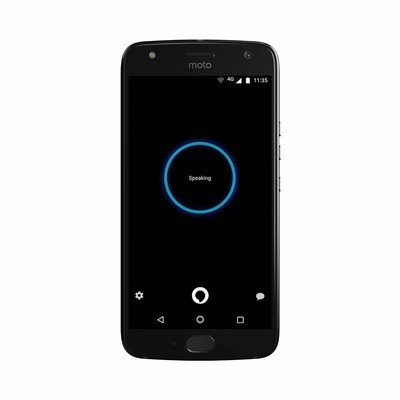
Amazon has the Prime-exclusive Moto X4 on sale for $199.99, which is $50 lower than it normally sells for. It’s an unlocked phone that is compatible with all major U.S. carriers. It has 32GB of storage inside, and Amazon’s Alexa built-in as well. Recently, Amazon removed the lock screen ads on the Prime-exclusive devices in favor of pre-loading a few extra apps, which makes this an even better value.
Be sure to check out our full review of the Moto X4 and grab one for yourself now.
See at Amazon
These are the best media remotes you can get for PS4
Consoles have come a long way since their early years, and this means that they’re useful for a lot more than just playing video games. Whether you use your PlayStation 4 for its apps or to watch movies and listen to music, the DualShock 4 controller isn’t exactly designed for non-gaming related activities in mind. That’s where media remotes come in, like PDP’s excellent Cloud Remote for PS4 that’s officially licensed by Sony.
Redesigned perfection
PDP Cloud Remote

PDP’s Cloud Remote for PS4 is quite possibly the best you can get. Its Cloud-assisted technology makes it easily programmable and its redesigned look modernizes it for today’s market. Unlike its Universal counterpart, it isn’t cluttered with too many buttons and can still control the volume on your television.
$30 at Amazon
Multi-purpose
PDP Universal Remote

PDP’s Universal Remote looks outdated with a blocky design and way too many buttons, but its compatibility may make up for that. On top of working with PS4, this remote can also control up to three other devices like a TV, cable box, and audio receivers via infrared.
$30 at Amazon
Basic functionality
PDP Bluetooth Enabled Remote

PDP’s Bluetooth Remote is cheaper than its siblings, but it also features less functionality. This remote is good for those who only need the basics. It features a similar design to that of the Cloud Remote, though it has fewer dedicated buttons.
$22 at Amazon
Though other brands of media remotes are on the market, PDP is by far the most reliable and the most common that you will come across. And with Sony’s official blessing, it’s hard to go with any other. Price points all generally range between $20 to $30, so your best bet is grabbing a PDP product like the Cloud Remote.
Keep your battery green with this one-day Anker charging accessory sale
These discounts expire today, so grab ’em while you can!

As part of its daily deals, Amazon has dropped the price of a number of Anker charging accessories including wireless chargers, car chargers and multi-port wall adapters. These are some of the best prices we’ve seen for these items, so be sure to pick up what you need before the promotion ends tonight.
Some of our favorite deals include:
- Anker Powerline USB 3.0 to USB-C cable, 3-pack – $10.98 (Was $15)
- Anker Roav SmartCharge car charger and FM transmitter – $13.99 (Was $29)
- Anker 10W wireless charger – $15.29 (Was $22)
- Anker PowerPort 4-port wall charger – $17.99 (Was $28)
- Anker PowerWave 7.5W wireless charging stand – $36.99 (Was $50)
Be sure to check out the whole promotion and make the most of these limited-time prices.
See at Amazon
When are RED’s Hydrogen One modules coming?

Best answer: There’s no official release date on any of RED’s modules at the moment, but the company says to expect them starting in early 2019.
AT&T: RED Hydrogen One ($1295)
What type of modules is RED making?
We’ve seen RED tease a number of modules that attach to the back of the Hydrogen One via its magnetic pogo connectors, adding new and often camera-centric features to the phone. The most notable module in the lineup is an attachable lens mount, which includes its own dedicated sensor and allows Hydrogen One users to attach camera lenses made for virtually any camera, no matter the mount type.
For professional photographers and videographers, that means you should be able to use the same lenses you usually attach to your dedicated camera body, be it from Canon, Nikon, Sony, or Panasonic. These modules will also be stackable and support passthrough charging, meaning that you can attach an extended battery module at the same time — the downside, of course, being added thickness.
RED has at the very least given a projection of “early 2019” for the 2D Cinema lens mount module.
If you’re familiar with the rest of RED’s cameras, this lens mount module brings over some of the company’s best technologies, including 5K video recording and the use of the REDCODE RAW format (otherwise known as R3D), which offers 9:1 compression and flexible adjustments in post.
We’ve seen a few other modules hinted at, as well; there’s an 8K camera capable of shooting in RED’s new Holographic 4-View format that uses the Hydrogen One as a display, which makes perfect sense since it’s currently the only device capable of displaying H4V. Last year, the patent filings for the Hydrogen One also hinted at a full-blown shoulder rig, with the Hydrogen One at the center of it all.
When will these modules be released?
Unfortunately, taking on such ambitious projects means spending tons of time on research and development. That makes it hard to give a definitive release date on any of these modules, but RED has at the very least given a projection of “early 2019” for the 2D Cinema lens mount module. As for the rest … we’ll just have to wait and see.
Our pick
RED Hydrogen One

$1,295 at AT&T
Modules can make the difference
The Hydrogen One isn’t for everyone, but the upcoming modules could make it a much better phone — and more importantly, a better tool for content creation — for its target audience. They can also be the difference between the Hydrogen One being a forgettable luxury device or an absolute must-have for creators.
What’s your favorite Pixel 3 feature?
Google’s latest phone does a lot right.
As you’ve probably seen from both Andrew and Daniel’s reviews, we’re pretty smitten with the Google Pixel 3. Although it may not be the prettiest phone released this year, it provides a wonderful day-to-day experience thanks to its cameras, display, software, and more.

There are a lot of reasons to love the Pixel 3, but what’s the phone’s best feature?
Here’s what the Android Central forum community has to say!
bhatech
10-29-2018 11:58 PM“
Google’s take on Android, Fast Android platform updates, security updates, that camera.
Reply
Dean Liensdorf
10-29-2018 12:21 PM“
What I like about my Pixel 2 are the camera, the stock Android OS, and getting updates on a regular basis.
Reply
BTSyndrome
10-29-2018 12:24 PM“
The small size of my 3 !!! & my first Google phone ever. Loving it!
Reply
puch96
10-29-2018 01:25 PM“
#1 : Stock Android
#2 : The CameraReply
TraderGary
10-29-2018 11:55 PM“
#1 for me with my Pixel 3 XL would have to be the Screen!
This would be my choice since my 2 XL was great except for its screen quality.
Every day when I use my Pixel 3 XL I look at that fabulous screen and smile!Reply
What about you? What’s your favorite Pixel 3 feature?
Join the conversation in the forums!
Google Pixel 3 and Pixel 3 XL
- Google Pixel 3 and 3 XL review
- Google Pixel 3 and 3 XL: Everything you need to know!
- Google Pixel 3 vs. Pixel 3 XL: Which should you buy?
- Google Pixel 3 and 3 XL specifications
- Join our Pixel 3 forums
Best Buy
Verizon
Google Store
Project Fi
 AIVAnet