


Pokémon Go to Integrate With Apple’s Health App
In an upcoming update, popular augmented reality game Pokémon Go will gain support for the Apple Health app, developer Niantic announced today.
Adventure Sync, a new feature, will use walking distances pulled from Apple Health to let you earn candy and hatch eggs even when the Pokémon Go app isn’t running.
Niantic says Adventure Sync will also provide Pokémon Go users with a weekly summary on incubator and candy progress right alongside activity statistics.
Through the trainer profile, Pokémon Go users will be able to see the number of kilometers walked each week, and rewards will be available for each milestones that’s reached.
Adventure Sync is “coming soon” and alongside Apple Health on iPhones, it will work with Google Fit on Android devices.
Pokémon Go can be downloaded from the App Store for free. [Direct Link]
Discuss this article in our forums
DT Daily: Drone-snatching eagles, streamer Disguised Toast, and more
It’s official: DT Daily is up and running. In our premiere episode, we touched upon the future of food delivery and the launch of the Boring Company’s first high-speed tunnel, not to mention the challenge with building your own personal brand in the age of Instagram and other social media behemoths.
In Wednesday’s episode, host Greg Nibler and guest Adrien Warner ran through an assortment of reader comments as well as the latest headlines, from Apple’s forthcoming Netflix competitor, to the latest iteration of Facebook Messenger, to Spatial’s new augmented-reality glasses.
Later in the show, Nibler sat down with Emerging Tech Editor Drew Prindle to discuss the dangers associated with modern drones, as well as the regulations the Federal Aviation Administration (FFA) has recently put in place to combat rouge UAVs (unmanned aerial vehicles). The two also talked about other potential anti-drone measures, including eagles and the aptly named “SkyWall 100,” both of which are currently being utilized in some capacity or another.
Drones weren’t the only things on the DT Daily agenda for Wednesday, however.
Nibler and Digital Trends brand manager BJ Frogozo also spoke with notable Twitch streamer Disguised Toast about the origins of his professional career, the current nature of the Twitch economy, and TwitchCon, an annual event in which streamers and their communities celebrate, educate themselves, and broadcast alongside other like-minded streamers. Toast even made a few suggestions for budding streamers looking to start their own Twitch channel. (Hint: Don’t start with Twitch.)
Kim Wetzel, Digital Trends’ smart home editor, also made a guest appearance alongside Sony’s new robotic dog, Aibo. The sixth-generation, A.I.-powered companion is one of the most advanced robots to hit the consumer market in recent years, one that is set to launch in mid-December to the tune of $2,900. Still, if you’re in the market for a robo-pooch who can wag its tail, shake, and learn a batch of other commonplace tricks, there’s really alternative.
DT Daily airs Monday through Friday at 9 a.m. PT, with highlights available on demand after the stream ends. For more information, check out the DT Live homepage, and be sure to watch live for the chance to win a $100 Amazon gift card, among other prizes.
Editors’ Recommendations
- Twitch streamer Disguised Toast has advice for getting into streaming
- I ran into LG’s Cloi robot at the airport in South Korea. Here’s what happened
- ‘Hellboy’ reboot screenwriter could helm animated ‘Diablo’ series on Netflix
- For Monaris, it’s a photography career launched on an iPhone and Instagram
- ‘AWD’ vs. ‘4WD’: What’s the difference between the two?
Italy fines Apple and Samsung for slowing down older phones
Feel like your Galaxy phone or iPhone has been slowing down? You’re not alone in your suspicions — Italy fined Apple and Samsung on Wednesday, October 24 for slowing down older phones with software updates.
Italy’s antitrust agency handed both Apple and Samsung fines of 5 million euros ($5.7 million) each for intentionally slowing down handsets with software updates. Apple was fined a further 5 million euros (for a total of $11.4 million) for also failing to inform customers on how to maintain and replace an iPhone battery.
The investigation and subsequent fine came about following the actions of various Italian consumer groups, who complained that software updates were intentionally slowing older hardware down, and pushing customers into buying new phones. This practice, known as planned obsolescence, is obviously viewed with anger by most consumers, and steps have been taken in some countries to make it illegal.
The additional fine for batteries makes the reasoning behind Apple’s fine crystal clear. Apple was forced to admit in early 2018 that it was intentionally slowing down older iPhones. Apple’s reasoning behind the slowdown was actually pretty solid, and despite the bad overtones, it maintained that its intentions were good. According to Apple, older batteries were unable to cope with the strain of maximum processing power, so older iPhones with correspondingly older batteries were throttled to protect against sudden shutdowns.
Apple apologized for the action, added an option to turn the throttling off in iOS 11.3, and offered cut-price battery replacements for a host of older iPhone models. But it wasn’t enough to keep the governmental wolves from the door, and following sustained customer outrage, consumer watchdogs began to investigate the Cupertino, California company. What we see today appears to be the result of an investigation into that same scandal.
Samsung’s fine, on the other hand, was linked to the Galaxy Note 4. According to customer complaints, Samsung pushed out a 2016 update that had not been optimized for the Galaxy Note 4. As a result of the update, owners complained their performance was significantly impacted. The investigation noted the update put too much stress on the Note 4’s older hardware, and caused various malfunctions, including unwanted restarts. This appears to be similar to the effects that Apple were intending to avoid with its own throttling.
Editors’ Recommendations
- Apple vs. Qualcomm: Everything you need to know
- Pocophone F1 by Xiaomi review
- Apple iPhone XS vs. Samsung Galaxy S9: 2018’s biggest flagships clash
- Apple iPhone XS Max vs. Samsung Galaxy Note 9: Powerhouse face-off
- Samsung Galaxy Note 9 vs. Apple iPhone X: Battle of the ultra-premium smartphones
Gorillaz send Casio’s G-Shocks into space in ambitious new collaboration
Previous
Next
1 of 9

Andy Boxall/Digital Trends
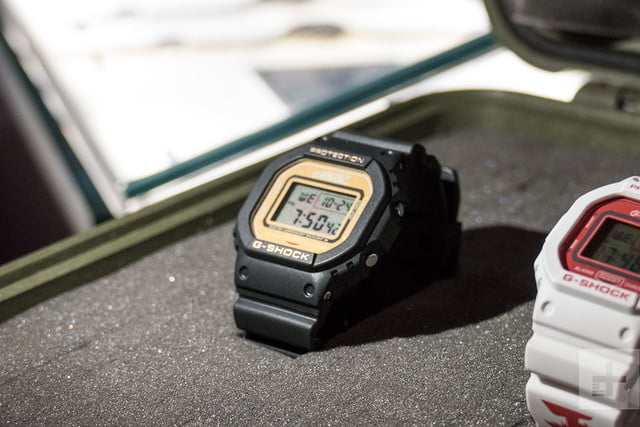
2D DW-5600 G-Shock Andy Boxall/Digital Trends
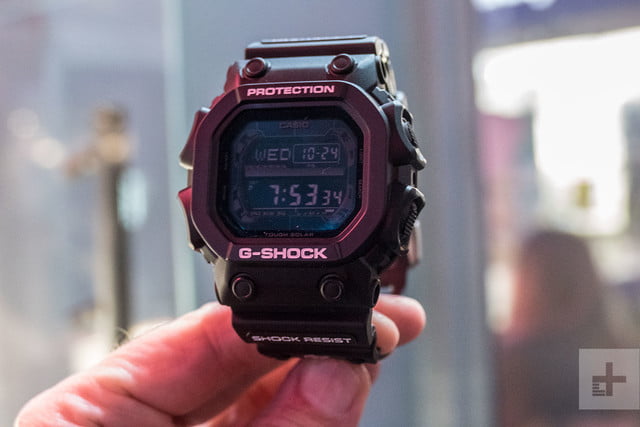
Russel GX-56 G-Shock Andy Boxall/Digital Trends

Russel GX-56 G-Shock Andy Boxall/Digital Trends

Noodle DW-5600 G-Shock Andy Boxall/Digital Trends

Noodle DW-5600 G-Shock Andy Boxall/Digital Trends

Noodle DW-5600 G-Shock Andy Boxall/Digital Trends

Murdoc DW-5600 G-Shock Andy Boxall/Digital Trends

Murdoc DW-5600 G-Shock Andy Boxall/Digital Trends
Virtual pop group Gorillaz are the latest to form a partnership with Casio’s G-Shock, resulting in a collection of four new watches each made to represent the members of the band, in a continued celebration of G-Shock’s 35th anniversary. Casio has been teasing the collaboration for several weeks, and has now unveiled the watches at its store on Carnaby Street in London ahead of the official launch.
While collaborations are nothing new to Casio — it has partnered with many companies ranging from New Era and Burton snowboards to conservation group I.C.E.R.C. — the Gorillaz series is one of its most comprehensive and ambitious. In addition to the watches, an animated short film featuring the group has been made, and is being slowly released in the lead-up to release. The second part of the short film was debuted at the London event.
It was explained the film’s story is somewhat inspired by the words of G-Shock creator Kikuo Ibe. In a 2016 interview, he said, “What I dream of is in 50 years time to create a watch that people can wear in outer space. My dream is for aliens and humans to be wearing G-Shock in outer space.” The short film takes that premise, incorporates an animated Mr. Ibe, then adds some crazy visuals, the Gorillaz, and the new G-Shock watches. Visitors to the Carnaby Street store in London are greeted by the Gorillaz vehicle hanging from the ceiling, having “crash landed” at the end of the second installment of the film.
How about the watches? These aren’t part of G-Shock’s connected range, so do not feature Bluetooth or fitness tracking technology. Instead, three will be based on the DW-5600, one of the most iconic G-Shock designs, while a fourth model is based on the GX-56 G-Shock, or “King” as it’s colloquially known. The four band members — 2D, Murdoc, Noodle, and Russel Hobbs — are represented, with their own watches featuring profile images of each character on the strap and the case back, plus on the DW-5600, custom backlights with the band’s logo. The GX-56 is tied to Russel Hobbs, and has a Gorillaz logo on the body.
The DW-5600 watches cost 120 British pounds each, or around $155, while the GX-56 is 150 pounds, or around $192. Each comes in a custom box and tin. Murdoc and 2D’s watches will be released on November 15, followed by Russel and Noodle’s on December 15. This is a limited edition, and only 1,000 of each will be made. They’re likely to prove very popular among fans of the virtual band and collectible G-Shock watches alike.
Editors’ Recommendations
- Casio Pro Trek Smart WSD-F20 review
- The best movies on Netflix right now (October 2018)
- The best action movies on Netflix right now (October 2018)
- The best movies on Hulu right now (October 2018)
- The best free movies on YouTube
Consoling players: The Xbox Game Pass program is coming to PC
Microsoft’s Xbox Game Pass subscription program is a great way for those purchasing an Xbox One late in the generation to build up their library of games in a hurry, as it gives its members unlimited access to a growing vault of first-party and third-party titles. It’s currently only available on Xbox One, but according to CEO Satya Nadella, that’s going to change.
During an earnings call on October 24, Nadella was discussing monetization strategies with the Xbox brand when he let slip that Xbox Game Pass would be coming to PC. Nadella didn’t elaborate on when the service would be arriving on PC, but likened its implementation to the cross-platform support the company has given to Minecraft over the last few years.
Nadella went on to describe the company’s plans for streaming as “the natural sequence” of events following Microsoft’s development of cloud technology. This kicks off with the development of Project xCloud, a game streaming service that will allow players to enjoy their favorite Xbox games on a wide variety of devices, including mobile phones. They will support controllers as well as special touch interfaces to make them easier to play on a small screen, and the program will begin rolling out in 2019. It’s rumored that two separate next-generation Xbox devices are being developed, as well, with one of them designed solely for streaming while the other is a more traditional console.
In addition to Xbox Game Pass, Microsoft also has the Xbox Play Anywhere program, which gives those who buy a digital copy of a game access to both the Xbox One and PC versions. These games also support cross-save and cross-platform play, so those who only game on one system can still play with their friends on the other.
If you’re looking for other publishers’ games to play on your PC, consider a subscription to Origin Access, as well. The service offers early trials to new Electronic Arts games, as well as a vault of older titles that you can play for as long as you stay subscribed. A similar program called EA Access is also available on Xbox One.
Editors’ Recommendations
- For $22 a month, an Xbox One system could soon be yours
- ‘PlayerUnknown’s Battlegrounds’ gets a full release on Xbox One in September
- Xbox One vs. Xbox One S: Is a mid-tier upgrade worth your money?
- Check out the best Xbox One deals and bundles for October 2018
- Xbox One S vs. PlayStation 4 Slim: Which console is worth your money?
Lenovo Yoga C930 Review
Research Center:
Lenovo Yoga C930
Lenovo’s Yoga 9-series has served as that companies premium thin-and-light 2-in-1 for a few years now, with the Yoga 910 and 920 featuring a unique watchband hinge that identified it at the top of Lenovo’s heap. The 360-degree convertible market has grown increasingly competitive, though, and Lenovo’s offerings were getting a bit stale. Enter the 2018 revision, the Yoga C930, which makes some significant changes to keep the line fresh.
We received a review unit equipped with an 8th-gen Intel Core i7-8550U, 12GB of RAM, a 256GB PCIe solid-state drive (SSD), and a 13.9-inch Full HD (1,920 x 1,080 or 158 PPI) display. That configuration is priced at $1,300, which is actually $100 less than the base configuration of a Core i5, 8GB of RAM, and a 256GB SSD that you’ll find at the Lenovo site. Buyers can choose up to 16GB of RAM, a 1TB SSD, and a 4K UHD (3,840 x 2,160 or 317 PPI) for $2,200.
The Yoga C930 isn’t just a quick refresh of the previous version but rather aims to perfect what was already a very capable thin and light 2-in-1. Did Lenovo add enough to lift this venerable machine to new heights?
Lose some panache, gain some volume
Lenovo’s Yoga notebooks have always aimed at more of an understated design aesthetic than, say, HP’s Spectre line. The Yoga 920 was a case in point – it was a solid color, albeit a choice between bronze, copper, and platinum, and it eschewed any of the burnished or chrome metal accents you’ll find on many other notebooks. That is, except for the watchband hinge, which stood out as the 9-series’ most iconic feature.
But this time around, the watchband hinge is gone. In its place are two hinges that stand out for entirely different reasons. One is a small hinge on the left with a subtle Lenovo logo. The other hinge is the one that matters, and it’s more than just a new look. It’s a “Rotating Sound Bar,” as Lenovo calls it, and it incorporates a set of speakers and Dolby Atmos tuning for what promises to be a greatly enhanced audio experience. More on that later, but it certainly contributes to the aesthetic.
The hinge is the most recognizable change from the previous versions, but it’s not the only one. There are also now only two colors available, Mica and Iron Gray. We reviewed the latter, and we found it attractive, if not a bit understated. Lenovo also rounded the 2-in-1’s lines along the rear edges, an apparent adjustment to accommodate the change in hinge style.
The first thing you’ll notice about the Yoga C930 is that the hinge now hides impressive sound inside.
We think that both the HP Spectre x360 13 and the Dell XPS 13 offer more striking designs, but we can’t fault Lenovo’s approach either. It’s a simplistic and conservative notebook that doesn’t draw attention to itself, and that might appeal to business types who’d rather use something that fades into the background instead of stand out.
The Yoga C930 is also a svelte notebook given its 13.9-inch display and ultra-small 4.9mm bezels (compared to the XPS 13’s at 4.0mm). It’s thin at 0.57 inches, although that’s not quite as thin as the Spectre x360 (0.54 inches) or the XPS 13 (0.46 inches). It’s also light at 3.0 pounds, but again it’s beat out by the Spectre x360 (2.78 pounds) and the XPS 13 (2.67 pounds). The Yoga 920 was a bit thinner at 0.50 inches and almost the same weight at 3.02 pounds. By any measure, you won’t find the Yoga C930 to be too large or heavy to easily carry around — although whether you’ll use it as a tablet with just one hand depends on your exercise regimen.
Mark Coppock/Digital Trends
The 2-in-1 remains a recognizable member of the Yoga 9-series in one important way: It’s built like a tank. The Yoga C930 retains the line’s all-metal build, and as usual, there’s no flex to the keyboard deck or the bottom of the chassis. The lid is equally inflexible, at least until you apply way more torsional force than you should. You’ll find few notebooks in this class that match the C930’s robust build, and neither the HP nor the Dell qualify.
Alternatives
Dell XPS 13
HP Spectre 360
Asus Zenbook 13
Surface Pro (2017)
Speaking again of the hinge, this is a 360-degree convertible 2-in-1, and the hinge is vital to the experience not only of opening the notebook but also moving the display through its four modes — clamshell, tent, media, and tablet. Lenovo nailed the hinge even while stuffing all those audio components inside. You can open the display with one hand, the hinge is smooth through its full range, and the display remains display firmly in place exactly where you want it to be.
The intake and exhaust vents are both located along the rear of the bottom chassis underneath the display, which is another nice touch to the Yoga C930’s design. That means that you can use the notebook on your lap without worrying about blocking cool air from getting inside and keeping the heat down.
Connectivity is typical for this class of premium thin and light machine. You’ll find two USB-C ports along the left-hand side, and they both support full-speed Thunderbolt 3 and can charge the notebook with the included USB-C charger. A USB-A 3.1 port sits beside them for legacy support, and a 3.5mm combo audio jack is located there as well. Only the power button resides on the right-hand side. Of course, you’ll connect wirelessly via 2×2 MU-MIMO 802.11ac Wi-Fi and Bluetooth 4.2 radios.
Solid inputs despite its shallow keyboard
The Yoga C930 offers the usual Yoga-style keyboard, meaning it’s a chiclet keyboard with wide keys and a mechanism that’s slightly shallow. Despite the lack of copious travel, there’s still a snappy feel that manages to avoid a harsh bottoming action. It’s not as comfortable a keyboard as the Spectre x360’s, which is one of our favorites, but it’s better than the harsher feel of the deeper keyboard on the Asus ZenBook Flip 14.
The touchpad is a real positive, though. It’s quite large for such a small notebook, and it supports Microsoft’s Precision Touchpad protocol. That means Windows 10’s multitouch gestures work perfectly, and you can also make do with the touch display for scrolling and quick button taps.
The Yoga C930 includes Lenovo’s newest Active Pen, which is a smaller version – not as comfortable to use as the Microsoft Surface Pro 6’s Surface Pen – that slots into a spring-loaded housing that also keeps the pen charged. We found it the pen to provide good support for Windows 10 Inking thanks to its support for 4,096 levels of pressure sensitivity. That’s as good as the Surface Pen and four times the Spectre x360’s version.
In a nice touch that’s carried over from the newest ThinkPad machines, the Yoga C930’s webcam has its own physical privacy screen. It’s hard to see, but above the webcam there’s a sharply ridged slider dubbed the “TrueBlock Privacy Shutter” that physically blocks the webcam when you’re not using it. That way, nobody can remote in and spy on you in awkward moments.
Finally, a fingerprint scanner provides Windows 10 Hello password-less login, and it’s placed in the increasingly common location to the upper-right of the keyboard deck. The scanner worked flawlessly in our testing, allowing us to log in quickly with just a quick tap of a registered finger. There’s also an option for an infrared camera for facial recognition.
If only the display were as good as the audio
Lenovo offers two display options for the Yoga C930. We reviewed the 13.9-inch IPS display at Full HD resolution, but there’s also a $200 4K UHD option with support for Dolby Vision high dynamic range (HDR).
Our colorimeter tests made us wish Lenovo had sent us the presumably superior 4K HDR display instead. The contrast was the lowest among similar machines at 660:1 at 100 percent brightness, which is also on the low side at 294 nits, just under our preferred 300 nit cutoff. That’s both slightly worse than the Spectre x360’s results and well under the 2-in-1 class leader Surface Pro 6.
The C930’s color gamut was also on the low end of our comparison group at 70 percent of AdobeRGB, and color accuracy was just okay at a delta of 1.86 (less than 1.0 is considered perfect). Gamma was fortunately perfect, meaning videos and images are neither too light nor too dark.
In our subjective tests, the display was less appealing. Colors didn’t pop as they should, blacks looked more grey than we like, and generally, we didn’t like the display as much as on 2-in-1s like the Spectre x360 and the Surface Pro 6. We’re sure that Lenovo is sourcing a better panel for the 4K HDR version, but our review unit didn’t impress us.
Mark Coppock/Digital Trends
Audio quality is a different story completely. As we mentioned earlier, Lenovo abandoned the watchband hinge and replaced it with a Dolby Atmos-tuned soundbar that crams custom-designed tweeters into the hinge. It’s part of an audio system that employs downward firing woofers in the chassis and vibration buffers to help create a clean sound. Lenovo contends that the sound is 3D, and we can attest that it remains excellent in all 2-in-1 modes.
First, the audio gets very loud for a notebook. You can fill a medium-sized room with plenty of volume, and you can crank things all the way up without worrying about distortion. Second, it’s not just pure noise – mids and highs are awesome for listening to tunes, there’s a surprising amount of stereo separation, and you’ll even notice some actual bass. Movies and TV shows are particularly impressive.
You can use the included utility for adjusting the music as well, optimizing it for the source material. Overall, we were impressed with the audio quality and once again found ourselves wishing for the 4K HDR display. We’re certain that it would make for an ideal Netflix binging notebook when the display is flipped around in media mode.
Performance covers all your productivity needs
Intel’s 8th-generation Core processors are consistently good performers, with a reliable balance between speed and efficiency. Our review unit used the quad-core i7-8550U, a fast CPU that usually lets a notebook churn through the typical productivity tasks. We’ll note that Lenovo didn’t manage to squeeze in Intel’s latest 8th-generation Whiskey Lake CPUs that are a bit faster and more efficient, and that’s a shame.
The Yoga C930 did well in our benchmarks, starting with Geekbench 4 where it scored towards the top of our comparison group in both the single-core (4,717) and multi-core (14,885) tests. That was in line with the Spectre x360, and significantly faster than notebooks based around the Core i5-8250U. Our review unit also came with 12GB of RAM.
In our real-world Handbrake test that converts a 420MB trailer to H.265, the Yoga C930 was among the fastest notebooks in its class. It beat out both the ThinkPad X1 Yoga and the XPS 13, and it crushed the much slower Surface Pro 6. Our Handbrake test is a good measure of a notebook’s ability to control heat and maintain performance, and the Yoga C930 did well.
Lenovo used a Hynix PCIe SSD in the machine, and that resulted in decent storage performance. The Yoga C930 wasn’t quite as fast as the Spectre x360 and XPS 13 review units in reading data, and its performance when writing data was also on the low end. That is, it was relatively slow for a PCIe SSD, but it was still faster than SATA SSDs and of course trounced spinning hard disk drives. You won’t find access and saving data to slow things down.
Overall, the Yoga C930 is a speedy little laptop. It was more than fast enough for all the tasks we threw at it, and you’ll find it fully capable of keeping you productive. You’ll also find heat well-controlled, with the chassis remaining comfortable to hold and the fans spinning up only when the CPU is challenged.
Integrated graphics mean limited gaming options, as usual
The Yoga C930 is limited to Intel UHD 620 integrated graphics, so you won’t be buying the notebook if you’re a hardcore gamer. You’ll at least need to consider something like the Asus ZenBook Flip 14 that includes a discrete Nvidia GeForce MX150 GPU if you want anything better than very casual gaming.
In short, the Yoga C930 performed as we expected. Scores in the synthetic 3DMark benchmark suite were in line with the other similarly equipped thin and light notebooks in our comparison group. The same held for Rocket League, where the Yoga C930 managed a playable 53 frames per second (FPS) at 1080p and performance mode and a less-than-playable 23 FPS in high-quality mode.
Stick with older titles or casual games, or be prepared to suffer low framerates and a fair amount of frustration.
A smaller battery equals… better battery life? Well, almost
The Yoga C930 has 60 watt-hours of battery capacity, which is down from 70 watt-hours in the Yoga 920. That’s a significant drop, and we were disappointed — there was no reason for us to expect that less battery capacity in an equally configured notebook would yield equal longevity.
We were mostly wrong. As it turns out, Lenovo worked some magic on the Yoga C930, squeezing out significantly improved battery life in two of our three tests.
In our most aggressive test, which runs the Basemark web benchmark until the battery does out, the Yoga C930 lasted for almost four and three-quarters hours. That’s a good score that beats out the HP Spectre x360’s just over four hours and the Dell XPS 13’s (with a 4K display) roughly three and a half hours. The Yoga 920 lasted about for about three and a third hours, way behind its replacement.
When browsing the web, the Yoga C930 lasted a very strong 10 and a half hours. The Spectre x360 couldn’t quite make it to nine hours, and the 4K XPS 13 barely passed nine hours before it shut down. The Full HD XPS 13 with a Core i5 did better, almost matching the Lenovo. The Yoga 920 ran out in just over eight hours.
Lenovo Yoga C930 Compared To
Asus ZenBook 13 UX331UA
Samsung Galaxy Book 2
Microsoft Surface Pro 6
Asus Zenbook Flip 14 UX461UN
Samsung Notebook 9 Pen
Lenovo ThinkPad X1 Yoga (2017)…
Lenovo Yoga 720 15-inch
Lenovo Yoga 720 13-inch
Acer Spin 7
Acer Switch Alpha 12
HP Spectre x360 13-w023dx
Dell Inspiron 13 7000 Special…
Asus Transformer Book T300 Chi
Lenovo Yoga 2 Pro
Sony Vaio S Series
On our test that loops an Avengers trailer from the SSD, the Yoga C930 managed just over 13 hours. Once again, that’s a very good result, but it does fall behind the Yoga 920 that was among our leaders at almost 14 hours. It was also a bit behind the Spectre x360 that lasted for almost 14 and a half hours, while the 4K XPS 13 suffered from its high-resolution display just around 10 and a half hours. The Full HD XPS 13 lasted a for almost 14 hours.
Sure, the Yoga C930 dropped an hour behind the Yoga 920 in the video looping test, but since productivity performance was much improved, we’re not going to complain. The Yoga C930 will certainly last you a full working day on a charge, and then some. You can safely keep your AC adapter at home.
Our Take
The Lenovo Yoga C930 is an extremely well-built 360-degree convertible 2-in-1 that offers excellent performance and battery life. Its display and keyboard fall slightly behind the competition, and it has a very conservative aesthetic. However, its audio quality is in a class of its own for such a thin and light machine. The Yoga C930 is a meaningful improvement over its predecessor, the Yoga 920, and it maintains its place as one of our favorite notebook 2-in-1s.
Is there a better alternative?
HP’s Spectre x360 13 is the Yoga C930’s most direct 2-in-1 competitor, and it’s an excellent notebook in its own right. It’s better looking than the Lenovo, in our opinion, while not providing quite the same solid build quality. Its performance and battery life are similar, and it comes in at a lower price of $1,250 (on sale for $1,050) albeit with only 8GB of RAM to the Yoga’s 12GB in our review unit. The Spectre x360 can be configured with 16GB of RAM, a 1TB SSD, and a 4K display for $1,800 ($1,600 on sale). HP just announced a new version with Intel’s very latest Whiskey Late 8th-generation CPUs, and so that’s one to consider.
You could also stick with a clamshell notebook if you don’t care about flipping the display around, and in that case, the Dell XPS 13 is a great alternative. It offers similar performance and lesser but still strong battery life, and we think it’s better looking and offers an enhanced thermal design. The XPS 13 is also a bit more expensive at $1,460 for the same configuration with 8GB of RAM, although it’s currently on sale for $1,260. And you’ll spend much more for 16GB of RAM, a 1TB SSD, and a 4K display, at $2,500 (2,300 on sale).
How long will it last?
Given its robust build quality and excellent components, the Yoga C930 will last for years of productive work, and you’ll enjoy the best in expansion capabilities with its Thunderbolt 3 ports. Lenovo provides the industry-standard one-year warranty.
Should you buy it?
Yes. The Yoga C930 offers one of the best build qualities you’ll find in a 2-in-1, and it’s a great performer. Battery life is good enough that you could choose the 4K HDR display to complement the superior audio provided by the innovative soundbar and have one of the best movie-watching machines around.
Lenovo Yoga Book C930 review
Research Center:
Lenovo Yoga Book C930
Experimental, concept devices rarely see the light of day. One exception to that trend is the Yoga Book C930, a new device from Lenovo that makes the “2-in-1” label feel so 2017.
This new Yoga Book doesn’t just hope to replace your laptop and iPad, it also wants to make you ditch your Kindle and Wacom digitizer — all in a single $1,000 device. A new e-ink screen powers all that new functionality, streamlining it all in one place at the cost of a physical keyboard.
You won’t be able to pass by the Yoga Book 2 without playing with it, but is it something you’d want to use day after day?
Unlike anything you’ve ever seen, including the original
The Yoga Book C930 isn’t the first of its kind. Its predecessor, the original Yoga Book, was another experimental laptop put out by Lenovo back in 2015, and this new Yoga Book follows in its footsteps. It’s dark grey, incredibly slim, and has a touch of personality thanks to the now-iconic Yoga watchband hinge. It’s as sleek a laptop as they come.
Open, though, and it’s a completely different animal.
In fact, you’ll realize it’s something different as you open it. Because of its thin profile of only 0.39 inches (which is only 0.06 inches thicker than just the tablet portion of the Surface Pro 6), it’s hard to open with one hand. It was a problem with the original Yoga Book, which was even thinner.
So, rather than pry it apart with your fingernails, Lenovo has engineered a “knock-knock” feature that uses the reverse polarity of magnets to push it open with a gentle double-knock on the edge of the lid. It might sound silly, but it’s useful. If nothing else, it’s one of the of the coolest party tricks a laptop has ever pulled.
The Book C930 isn’t the revolutionary typing surface it needs to be.
Once you inside, you’ll be greeted by two 10.8-inch screens. There’s a conventional LCD screen up top, and an e-ink screen where the keyboard should be. You can use the keyboard-screen in three different modes – as a keyboard, an e-reader, or a digital note-taking device.
The Yoga Book C930 is a tiny bit heavier than the original, though it’s still only 1.71 pounds. That’s lighter than the Samsung Notebook 9, making this the lightest laptop ever — if you even consider this to be a laptop.
Cut into its slim slide is just a handful of ports and buttons. The C930 gives you two USB-C 3.1 ports, a power button, a volume rocker, and a headphone jack. You can charge out of either USB-C port, which are conveniently located on either side of the device. That’s not a lot of options, but it’s on par with the other thin laptops like the MacBook Pro or Dell XPS 13.
Riley Young/Digital Trends
The Yoga Book C930 does offer LTE, though Lenovo didn’t include a SIM card to test it out. It’s a fantastic feature to see Lenovo include, keeping up with trends in other 2-in-1s such as the Samsung Galaxy Book 2.
A whole new way to type, swipe, and draw
The new Yoga Book doesn’t have a keyboard. Instead, the e-ink display defaults to a digital keyboard. A lot rides on this concept. Physical keyboards are much thicker and nowhere near as versatile. Does an e-ink touchscreen offer the best of all worlds?
Well, not really.
Even after spending hours and hours typing on the device, we couldn’t type accurately without glancing down.
Typing on the Yoga Book C930 doesn’t feel that different from typing on an iPad. There’s a bit of haptic feedback provided, as well as some cute animations and sounds, but this isn’t the revolutionary typing surface it needs to be. Most writers in our office had a two-part reaction. It began with “Wow, cool!” — of course. But after struggling to type their own names without mistakes, most admitted they wouldn’t prefer this over the standard keyboards on their work laptops.
Is it possible to get comfortable typing exclusively on the Yoga Book’s digital keyboard? Yep – but it’s certainly not preferable.
There’re two problems. The first, of course, is that you can’t tell where one key ends and the other starts. Touch typing just isn’t realistic. Even after spending hours and hours typing on the device, we couldn’t type accurately without glancing down. The haptic feedback, which has three levels of strength, feels a little off. At its lowest level, it’s so subtle you can’t feel it, while the stronger levels are overly loud, rattling the entire device on the table. It’s unfortunate Lenovo couldn’t have taken a page out of Apple’s playbook and included some more convincing artificial feedback.
Riley Young/Digital Trends
The second problem, which only confounds the first, is the layout. Not having keys where you expect them spatially makes it even harder to feel confident in where your fingers are going. The keyboard defaults to “Classic mode,” which scrunches up the keys and a small touchpad at the bottom. We found this mode particularly difficult to type on.
The “modern” layout is better, as it makes the letter keys larger, but it slices off the outer keys like Tab and Caps Lock. That’s still not ideal. Ultimately, we felt relieved when we switched back to a more conventional keyboard, like that sold with the Surface Go. One thing we did like about the “modern” layout, however, is that it hides the touchpad once you start typing. We thought it a good way to save space.
The larger screen is helpful in every scenario, even with the hefty bezels.
While you do have the option of these two layouts, there’s no customization. You’d think a digital keyboard would offer more options for moving keys around, or even changing sizes. At the very least, it would been nice to swap the Function and Control keys to get around Lenovo’s putting them the wrong way around.
While the fake touchpad tracks well, not having a physical click takes a bit to get used to. The left and right buttons feel misplaced on either side of the pad.
If you don’t want to use the Yoga Book C930’s keyboard for long stretches, you can always hook up a keyboard and mouse via USB or Bluetooth. Thanks to the 360 hinge and lack of a keyboard, it was easy to flip around the bottom half of the device to prop up the screen.
While the keyboard is a problem, the Yoga Book C930 does offer fantastic stylus support. You can write directly on the bottom screen. As most people who’ve used a 2-in-1 know, using a stylus on a flat surface is far more comfortable than on a propped-up screen. The included pen has 4,096 levels of pressure sensitivity to match the Microsoft Surface Pen, making for a very smooth writing experience regardless of which screen you’re writing on.
Unlike most 2-in-1s, the stylus feels like an integral part of the package, which is why we wished Lenovo always included it bundled in. We don’t yet have specifics on pricing, but Lenovo has stated the stylus wouldn’t be included in every configuration.
Lenovo Yoga Book C930 Compared To
Asus ZenBook 13 UX331UA
Samsung Galaxy Book 2
HP Spectre 13 (2017)
Microsoft Surface Book 2 15-inch
Acer Swift 3 SF314-52-517Z
Lenovo IdeaPad 530S
Dell XPS 13 (2018)
Asus ZenBook S
HP Spectre x360 15 (2018)
Lenovo Miix 630
Asus VivoBook Pro 15 N580VD
Asus ZenBook Flip S
HP ZBook 14u G4
Razer Blade Stealth (2017)
Sony Vaio S Series
Lastly, the Yoga Book C930 includes an infrared fingerprint scanner, located on the top right just above the e-ink screen. It’s infrared to handle dirty or greasy fingers, and we found that it captured and read fingerprints accurately.
Two screens, but they’re not equal
The primary display has earned a big bump over the original Yoga Book. This time it has a 10.8-inch LCD screen with a resolution of 2,560 x 1,600. The larger screen is helpful in every scenario, even with the hefty bezels around the panel. When we took our colorimeter to it, our initial impressions of the device were confirmed. This is an excellent display.
The Yoga Book C930’s display is top-of-the-line. It has a surprisingly wide color gamut, spanning 88 percent of the Adobe RGB color space. That’s better than a lot of laptop displays we test, whether it’s the Surface Go, Surface Pro 6, or even the Dell XPS 13. Speaking of colors, the C930 is also extremely color accurate, meaning colors are being reproduced on the screen in the way they were intended to be. Again, an average color error of 1.76 puts it above the Surface devices and even other Lenovo laptops like the Yoga 730. It’s sharp, crisp, and stunning to watch video on, thanks to its high contrast ratio and deep blacks.
The second panel, the black-and-white e-ink screen, isn’t nearly as high-res. One of our biggest complaints is that it isn’t backlit, meaning typing in the dark is nearly impossible. Many e-ink screens on premium e-readers are backlit, but not the Yoga Book C930.
Riley Young/Digital Trends
As cool as the e-ink screen is, it feels like a placeholder. In fact, Lenovo offered a sneak peak of its third-generation Yoga Book at IFA this year, which replaces the e-ink screen with an IPS display. While we’re sure Lenovo hasn’t released that due to battery life concerns, a full LCD display would not make the screen feel more responsive, and it’d widely expand the functionality of the device.
For audio, the Yoga Book has a decent set of Dolby Atmos-powered speakers. The grille is placed on each side of the bottom half of the device, pointing outward. They work well for a small laptop, but you’ll need headphones or external speakers for serious jam sessions.
A capable laptop when it needs to be
Though small, the Yoga Book C930 runs a full version of Windows 10 Home, meaning it can do everything any other laptop can do. It boasts a Core i5-7Y54 processor, a dual-core CPU from Intel’s 7th-generation of chips. While we would have preferred to see the device ship with the new 8th-gen Amber Lake Y-series processors, we found the processor fast enough for the tasks this computer was built for –Web browsing in multiple tabs, watching video, and editing documents.
In Geekbench, the Core i5-7Y54 doesn’t deliver top-notch scores, especially in comparison with the quad-core U-series chips you’d find in laptops like the Dell XPS 13 or Surface Pro 6. However, it’s massive step up from the Pentium processor used in the Surface Go, the Snapdragon 835 processor in the Asus NovaGo, and the Celeron processors found in a lot of Chromebooks.
Don’t expect much gaming performance from the Yoga Book C930
Compared to other machines with the same processor, like the Pixelbook or 12-inch MacBook, the Yoga Book C930 handles the chip well and delivers similar performance in real-life tests such as video encoding in Handbrake and Speedometer 2.0.
The base configuration starts out with 128GB of SSD storage, but can it be upped to 256GB. Lenovo lists it as a PCIe NVMe SSD, but the read and write speeds look closer to a SATA drive. And while that’s not what we like to see in a $1,000 laptop, downloading, installing, and executing files felt smooth enough in daily usage to not notice a real difference.
Not a gaming laptop, unless you’re talking tic-tac-toe
The Yoga Book C930 uses an integrated graphics card (Intel HD Graphics 615), meaning you shouldn’t expect much gaming performance. Whether it was 3DMark or a feeble attempt to play Fortnite, we couldn’t play games without significantly lowering screen resolution or graphics settings. We had to lower Rocket League down to Performance Mode to get it over 40 FPS. More importantly, multiple keys can’t be pressed at the same time, so accelerating forward and turning simultaneously doesn’t work.
Casual games downloaded off the Microsoft Store can fill the void if Candy Crush or Minecraft is more your pace, but that’s about all.
Just shy of a full of day of battery life
As with any ultra-portable device, strong battery life should be one of the Yoga Book’s strongest features. But like the Surface Go, the performance is good enough rather than stellar.
Lenovo claims the laptop can handle up to eight hours of general use. In our web browsing test, the Yoga Book landed just under seven hours. That’s considerably better than the Surface Go, but it falls short of the Surface Pro 6’s nine and a half hours. Similarly, it lasted just over nine hours in video loop compared to the Surface Pro’s fourteen hours. That’s a big difference. If Lenovo and Intel had been able to implement an Amber Lake processor, it may have pushed the battery life up to where it needs to be. As of now, it’s passable, but not outstanding.
In addition to standard battery tests, we still have a few additional ones to run. We plan to run an e-reader specific battery life test and a test of the tablet battery life with the e-ink screen turned off. Once we do, our review will be updated accordingly.
Our Take
There’s a lot to admire about the Yoga Book C930. The primary screen is beautiful, the e-ink concept is novel, and the device itself is astoundingly thin and light. We must give Lenovo credit for the bravery to put this unique concept out for the masses. However, the typing experience is more frustrating than fluid, which makes this hard to recommend over 2-in-1s with a physical keyboard.
Is there a better alternative?
Microsoft’s Surface Go. It’s also a 10-inch 2-in-1 that’s meant to be a full-on laptop replacement. While that device has some more significant performance issues with its battery, storage, and processor, it’s offered at a significant discount compared to the Yoga Book.
Neither device fulfills the potential of the ultra-portable 2-in-1 PC, but the Surface Go has broader appeal at a better price.
How long will it last?
The Yoga Book C930 is sturdy and well-built, though its mileage may vary in terms of its relevance in the future. We’ve already seen a sneak peak of the third-generation Yoga Book, and e-ink is probably won’t be around forever. Fortunately, Lenovo has included advanced features like USB-C to keep the Yoga Book C930 futureproof.
Should you buy it?
No. The average person will be happier purchasing a laptop with a more conventional keyboard. For early adopters or those drawn to the stylus writing experience, this may be the device you’ve always wanted. Everyone else should wait for the innovation this device inspires.
Get ready U.K., Xiaomi has big plans for you in November
Xiaomi will officially launch its first smartphone and other products in the U.K. in November. This is a serious push by Chinese brand, which has a considerable international following, as it will also open a retail store in one of London’s largest and busiest shopping centers. The official launch will take place on November 8, with the store opening on November 10.
While Xiaomi is best known in China and India, it has been increasing its presence in Europe since late 2017, when it launched in Spain. In 2018, it has also added France and Italy to the list. There have been hints Xiaomi would launch in the U.K. ever since a partnership with Hutchison telecom was announced, which owns the country’s Three network. At this time, there’s no indication Xiaomi phones will be sold through Three though.
The company says it will launch a, “flagship smartphone,” and a range of its smart home products. This follows the model it used in Spain last year, when it launched the Mi Mix 2, the Xiaomi Mi A1, and connected products including its fitness tracker. Today, the Spanish online store contains more devices including the Mi 8, the Mi A2, Xiaomi’s electric scooter, and the Mi Box Google Cast-equipped TV set top box.
Exactly what it will launch in the U.K. is unknown, but to make a splash, it will likely introduce either a brand new device or one which has so far not launched outside China. The Mi Store will open in the Westfield shopping center in White City, which is the largest shopping center in Europe, ensuring Xiaomi receives a considerable amount of attention.
Xiaomi has a strong community of fans around the world, almost regardless of whether the brand has an official presence in their country; but breaking into the U.K. market will not be easy. It faces a stiff challenge from established smartphone brands such as Apple, Samsung, and Huawei, along with rapidly growing Honor and OnePlus. OnePlus will launch the OnePlus 6T in more carrier retail stores than any of its previous devices, making it a formidable opponent in the affordable, high-spec device market.
We’ll bring you all the news from Xiaomi and its U.K. launch over the coming weeks.
Editors’ Recommendations
- Xiaomi Mi Mix 3: News, Rumors, Photos, Videos
- The 6-inch OnePlus 5T: Everything you need to know
- Following trailblazer OnePlus, Realme becomes a real smartphone brand
- Hateful software kills our enthusiasm for newcomer Realme’s $155 Android phone
- Here’s our comparison of the most bezel-less designs among smartphones
Jaguar Land Rover finally gives cars support for Android Auto and Apple CarPlay
Jaguar Land Rover vehicles are a technical achievement in their own right, but the company has been asleep at the wheel in one very important way: Supporting smartphone screen mirroring technology. Finally, the carmaker has come around and decided to include support for both Apple CarPlay and Android Auto in its 2019 line of vehicles.
The ability to mirror your smartphone on your vehicle’s in-car dash will be available to you if you pay for the optional Smartphone Pack in the 2019 lineup of Jaguar Land Rover cars. The add-on will run you about $300, according to CNET. It will be available in all vehicles with an InControl Touch Pro or Touch Pro Duo infotainment system, which includes navigation tools, InControl apps, and Wi-Fi connectivity. Support for CarPlay and Android Auto features also comes standard in the 2019 I-Pace, the first all-electric car produced by Jaguar.
If you’re not ready to upgrade your car yet to buy into the 2019 models, there is some backward compatibility with Jaguar Land Rover vehicles produced in previous years — though it’s on the tricky side. Older cars with the previously mentioned InControl Touch Pro or Touch Pro Duo infotainment systems are technically eligible, but the vehicle must also have the right type of USB ports to work. To make sure you meet all of the requirements to run Android Auto and CarPlay in your car, Jaguar Land Rover recommends swinging by your local dealership and having them figure it out.
Actually getting support for these services in the older cars also requires going to the dealership. The cost of the upgrade is at their discretion, so be prepared to potentially pay a fee in order to get access to CarPlay and Android Auto in your previous model Jaguar or Land Rover.
Android Auto and Apple CarPlay have made their way into a number of newer vehicles and are increasingly becoming a standard feature. The features are important tools for making sure drivers don’t get distracted by fiddling with their phones and can keep both hands on the wheel and eyes on the road without feeling too far from their device of choice.
Editors’ Recommendations
- 2018 Land Rover Range Rover Sport HSE Td6 Review
- Moto Z3 review
- Land Rover’s updated 2019 Range Rover Sport is an SUV of multiple personalities
- Land Rover’s flagship Range Rover gets greener, smarter for 2019
- Here’s how to mirror your smartphone or tablet onto your TV
 AIVAnet