


Apple Planning to Launch New Clear Case for iPhone XR, Priced Around $40
Apple’s iPhone XR will go up for pre-order one week from today, and once the lower-cost smartphone is available customers will have the option of purchasing a see-through case sold by Apple. Spotted by Twitter user @ivanincanada and shared by 9to5Mac, iPhone XR press releases in countries like Canada mention “a clear case” priced at $55 CAD, or about $40 USD.
The iPhone XR will come in white, black, blue, coral, yellow, and (PRODUCT)RED, all made with glass bodies and matching anodized aluminum frames. Because of the colorful additions to Apple’s iPhone lineup, a clear case makes sense, offering users the chance to show off which color option they’ve chosen while still protecting their iPhone XR.
Images via 9to5Mac
Similar to Apple’s other first-party cases, the clear case has the usual cutouts for the rear-facing camera, and protrusions for the volume rockers, silence toggle, and lock button. No images shared today show off the front of the case, but it appears that there is a gap in the bottom of the case — like the company’s silicone and leather case options — allowing for access to the Lightning port and more comfortable swipe-up gestures, which are crucial for navigating iOS on the iPhone X, XS, and XR.
Apple announced the iPhone XR alongside the iPhone XS and iPhone XS Max at an event in September. The latter two smartphones have already launched, and Apple has debuted a new line of silicone and leather cases for the devices, in as many as nine new colorways for each type of case. The iPhone XS and XS Max also have the folio case option, which protects the display of the device using a leather flap.

Those waiting to pre-order the iPhone XR can expect more case styles besides the clear case to debut on Apple.com, likely including these silicone and leather options. Apple is positioning the iPhone XR as the entry-level device in the 2018 iPhone lineup, pricing the device at $749 for the cheapest storage capacity. This means that the iPhone XR comes with a few trade-offs to get the price down (compared to the $999 iPhone XS and $1,099 iPhone XS Max), including an LCD display, aluminum frame, single lens camera, and “Haptic Touch” instead of 3D Touch.
Related Roundup: iPhone XRBuyer’s Guide: iPhone XR (Caution)
Discuss this article in our forums
The Echo Dot Kids Edition’s parental controls are a subscription

Best answer: The Echo Dot Kids Edition comes with one year of FreeTime Unlimited, Amazon’s multi-platform content and parental control subscription. Once that year is up, FreeTime Unlimited starts at $3/month, or you lose its robust parent controls.
Amazon: Amazon Echo Dot Kids Edition ($70)
What parental controls come with FreeTime Unlimited
The parental controls offered with the Amazon Echo Dot Kids Edition’s 1-year subscription to FreeTime Unlimited are quite extensive. Through the Parent Dashboard you can manage your child’s smart home experience in a number of ways:
- Set time limits for how long a child can use smart home devices during the day.
- Set bedtime hours to limit a child’s use of devices during overnight hours.
- Monitor activity on Alexa to see what your child is asking about, what music or stories they are listening to, and what Alexa Skills or games the child is using.
- Block content sources, age-inappropriate content, and voice shopping.
- Pause Alexa for a child to keep them from using smart home devices when they need a timeout.
- Manage, monitor and limit who a child can call or message using Alexa Communication.
- Share content you’ve purchased with your children’s profile.
- Access monthly and quarterly Activity Reports and Discussion Cards to keep updated on your child’s interests and engage them in discussions about it.
There’s a lot Parent Dashboard sees and lets you manage, and it can be an incredible tool for parents to help foster a child’s desire to learn, explore, and embrace creativity while limiting access as needed to prevent overuse.
That said, FreeTime Unlimited isn’t free. The Echo Dot Kids Edition includes one year of FreeTime Unlimited. Once that time is up, by default Amazon will automatically renew and begin charging the credit card on file with your Amazon account — $3/month for a “Single Child” account and $7/month for a “Family” plan with 2-4 kids if you’re an Amazon Prime member.
What if I don’t want to pay for FreeTime Unlimited once that year is up?

If you want to cancel FreeTime Unlimited, you can visit the Parent Dashboard and cancel under Manage content and subscription. Once you cancel the subscription, you and your child will lose access to subscription content — like the 300 Audible stories, special character alarms, and ad-free, family-friendly radio — and you will lose FreeTime Unlimited’s Parent Dashboard, and many of the parental controls that it contains.
Without FreeTime Unlimited, the Amazon Echo Dot Kids Edition is just an Echo Dot 2nd with a longer warranty and a durable bumper case.
Safe smart home fun
Amazon Echo Dot Kids Edition

$70 at Amazon
Echo entertainment with a worry-free warranty and 1 year of FreeTime Unlimited
This bright little hockey puck of a speaker is ready to meet your family and answer your kid’s curious questions about life and animals and the universe. FreeTime Unlimited’s robust parental controls and quality content ensure your kids can enjoy Alexa safely.
Protect your Google Pixel 3 XL’s screen with a great screen protector
The Pixel 3 XL is here, and it’s a great looking phone. But you don’t want your shiny new phone to be broken if it takes a bad fall. Fortunately, you can have a screen protector on from day one to keep everything looking beautiful. These are the best screen protectors for the Google Pixel 3 XL!
The Ace
TopACE Tempered Glass Screen Protector

TopACE has made some of our favorite screen protectors, and this looks like another hit. This is a single pack, with precise cutouts for the front cameras, speakers, and proximity sensor. The glass has its own black paint around the sides, so you don’t have to get the fit absolutely perfect for it to look great. The protector is ultra thin, so it should have no problems fitting underneath your favorite case. You also get standard features like an oleophobic coating and scratch resistance, and everything you need for installation is included.
$10 at Amazon
Pullin’ out the stops
Aolander Screen Protector

This screen protector also has black paint around the sides to mimic the black front of the phone, as well as cutouts for all the sensors and speakers on the front of the phone. The glass is slim enough to fit under a case, and is scratch- and fingerprint-resistant so your phone always looks its best. This is a 2-pack, so you have a spare just in case the first one breaks.
$11 at Amazon
Easy peasy
Qoosea Tempered Glass Screen Protector

Another great screen protector comes from Qoosea. This one is thin enough to work with your favorite case, offers scratch and smudge-resistance, and cutouts for everything on the front. Qoosea notes the glass allows for 99 percent light transmission, so your display should look as beautiful as it would without the glass.
$9 at Amazon
Super clear
Zagg InvisibleShield Glass+ Screen Protector

Zagg has been making screen protectors for as long as smartphones have existed, so you know you’re buying from a quality brand. Its InvisibleShield Glass+ screen protector features one big cutout up top for the cameras, speaker and proximity sensor, as well as at the bottom for the second speaker. Other standard features are here like scratch resistance and an oleophobic coating, and the blue light filter should help you cut down on eye strain.
$45 at Best Buy
All of these are great choices for your Pixel 3 XL, but my personal favorite is the Zagg InvisibleShield. I’ve been happy with Zagg screen protectors for my other phones, so the peace of mind I get with using a product I trust is worth the extra coin.
Sony Xperia XZ2 en XZ2 Compact ontvangen Android 9 Pie
Sony is begonnen met het uitrollen van de Android 9.0 Pie update naar gebruikers met een Xperia XZ2 en XZ2 Compact. De toestellen die begin 2018 aangekondigd werden zouden oorspronkelijk pas in november de Android-update ontvangen.
Sony zit meestal bij het rijtje fabrikanten dat als eerste met Android-updates komt. Netjes want de XZ2 en XZ2 Compact zijn geen Android One-toestellen waarvan als eerste een updates verwacht mag worden. Sony rolt update 52.0.A.3.27 momenteel uit, bevat de security patch van oktober en is zo’n 1 GB in omvang dus thuis over WiFi binnenhalen wordt aangeraden.
Taart!!
Volgens XperiaBlog voegt Sony een nieuwe camera-app toe aan de update. Nu de Sony Xperia XZ2 en Xperia XZ2 Compact Android Pie ontvangen hebben is het wachten op die van de XZ2 Premium. Eerder nog gaf Sony een tijdschema aan van november, dus we hebben nog heel even. Ook de XZ1, XZ1 Compact en XZ Premium ontvangen dan de beloofde update naar Android 9 Pie. De update voor de Xperia XA2, XA2 Ultra en XA2 Plus wordt begin 2019 verwacht. Updates worden automatisch aangeboden maar je kunt ook handmatig kijken of hij voor je toestel klaarstaat via het Instellingen-menu.
Instagram is testing a new way for you to look through your feed
Instagram has been gradually furnished with tons of new features over the years — from face filters to video chat to the recent nametag tool to name just a few. But the team of developers who tirelessly tweak the app in an effort to enhance the user experience has gone back to basics by testing a new way to scroll through the feed.
As per TechCrunch, the media-sharing app could soon let you work your way through posts by simply tapping on each one. Currently, you advance through your feed by swiping up, but swiping to scroll can sometimes be a somewhat messy affair, with a little bit of effort required to line up each post on the screen. On top of that, single-handed smartphone users may even experience a spot of thumb ache from the continuous swiping, and the last thing Instagram wants is to be accused of causing some of its most devoted ‘grammers repetitive strain injury.
With that in mind, Instagram is currently allowing a select number of users to tap their way through posts, with each image or video automatically showing on the display as a perfect fit. The limited testing is only working for the Explore tab at the moment. If you’re part of the test group, you’ll see the message: “Introducing a new way to move through posts … tap through posts, just like you tap through Stories.”
Stories is the Snapchat-like feature that lets Instagram users build a presentation of photos and video captured during the previous 24 hours. As the message says, viewers can advance their way through a Stories’ content with a single tap anywhere on the right side of the screen.
Instagram hasn’t made any official announcement about the potential new feature for moving through feeds, confirming only that it’s “always testing ways to improve the experience” for users.
If testing reveals that the feature helps to keep ‘grammers on the platform for longer periods of time in a single session, and encourages them to look at more content in a shorter space of time, then Facebook-owned Instagram could well roll out the tap-to-advance feature to everyone on the platform before too long.
Editors’ Recommendations
- Instagram says its A.I. can track down bullying in photos
- Instagram feature that lets you reshare others’ posts may be on its way
- Google Feed is now known as ‘Discover,’ will be available on mobile browsers
- Instagram now shows when you’re online (don’t worry, it has an off button)
- How to Use Facebook: The unofficial user manual
Mogelijk geen 3.5mm audio jack voor Samsung Galaxy S10
Veel andere fabrikanten zijn er inmiddels al van af gestapt maar mogelijk volgt Samsung ook in 2019. De uit 1950 stammende 3,5 millimeter audio-jack, bedoeld om een koptelefoon aan te sluiten, verdwijnt mogelijk uit Samsung’s Galaxy S-vlaggenschip. Toch lijkt het nog geen gelopen race te zijn.
Samsung heeft andere fabrikanten veel bekritiseerd voor het weglaten van de audio jack-aansluiting. Veelal kreeg de poort in presentatie de nodige aandacht om zo klanten aan zich te binden. Het leverde bij de S9 en S9+ zelfs een door AKG-getunede koptelefoon mee. Een bericht op ETNews wil ons doen laten geloven dat Samsung de Galaxy S10 en Note 10 zonder wil uitrusten. Vanaf dan zul je via een dongle in de USB-C poort muziek moeten beluisteren.
Bij de S9 leverde Samsung nog een AKG-koptelefoon mee
De officiële reden voor veel andere fabrikanten voor het weglaten van de poort is gebrek aan ruimte in de behuizing. De poort mag dan een diameter hebben van slechts 3,5 millimeter het hele component neemt wel aardig wat ruimte in al moeten we het ook weer niet overdrijven. De grootste reden voor het weglaten is vermoedelijk kosten-gerelateerd. Een component minder in een product dat je miljoenen keer verkoopt tikt aardig aan. Bovendien kun je klanten nu geïnteresseerd maken voor Bluetooth oordopjes zoals Apple doet met de AirPod. Samsung heeft met de Gear IconX ook een soortgelijk product maar die zijn bij lange na nog niet zo populair als Apple’s tegenhanger.
Ontvang een e-mail wanneer de Galaxy S10 verkrijgbaar is
Gratis converter
Als Samsung inderdaad besluit afscheid te nemen van de audio jack-poort dan zal het waarschijnlijk een USB-C naar 3,5mm converter meeleveren in de doos. Samsung is altijd al erg gul geweest in het weggeven van accessoires. Laten we echter voor de meest trouwe Samsung-klanten hopen dat het wacht tot tenminste de S11 of later voor het definitief weglaten van deze geliefde poort.
Instagram Testing Tap-to-Advance Instead of Scrolling Through Posts
Instagram is testing a new way of navigating through posts – by tapping through them, just like users tap through Stories.
The new navigation system sees users tapping the sides of the screen instead of scrolling up and down with their finger to advance forwards and backwards between posts, which can get tiring after a while.
By eliminating thumb swipe fatigue and ensuring the full post always appears on screen, testing tap-to-advance in Explore could get us spending more time on Instagram https://t.co/l2yIHAHUkC pic.twitter.com/Mr0khQQATH
— Josh Constine (@JoshConstine) October 11, 2018
It also means users always see media full-screen rather than having to adjust the view with a finger scroll to see the entire post. It’s a navigation method that was first used by Snapchat, a platform Instagram isn’t shy of taking cues from.
Instagram confirmed to TechCrunch that it is testing tap-to-advance in the Explore tab with a small number of users, who were presented with a pop-up in the app explaining the change.
As for whether the system could be adopted for the main feed, a spokesperson for Instagram said that wasn’t something it was actively thinking about at the moment.
Tag: Instagram
Discuss this article in our forums
The Acer Predator 17 gaming laptop can replace your desktop PC for $999
The bridge between gaming laptops and desktop PCs has been shrinking in recent years. Better computer hardware and more thermally efficient laptop designs have yielded considerable improvements, with the Acer Predator laptop lineup being a shining example of impressive and cost-effective alternatives to bulky custom-build desktop PCs.
The Acer Predator 17 could in particular be considered more than just a gaming laptop – with its 17.3-inch Full HD display, the Predator 17 is a potential candidate for a complete desktop replacement. Its larger screen and beefy hardware are what allow the Predator 17 to hang with desktop PCs, and now, you can score one for $999 from Newegg for a limited time.
Under the hood, the Acer Predator 17 runs on a 7th-generation Intel Core i7-7700HQ quad-core processor, 16GB of snappy DDR4 RAM, and an Nvidia GeForce GTX 1060 graphics card, which is our favorite GPU thanks to its excellent price-to-performance ratio. The Predator’s GTX 1060 graphics processor also boasts 6GB of dedicated VRAM, a nice upgrade over the 3GB versions often seen in other gaming laptops with this hardware.
One major issue that holds a lot of gaming laptops back is a poor thermal design. A number of these portable PCs utilize only one cooling fan, or two fans positioned in a way that doesn’t efficiently pull heat from the CPU and GPU. This heat buildup can lead to long-term wear and tear on the hardware and can make the laptop uncomfortable to use as the keyboard gets warm. The Acer Predator 17 utilizes a more up-to-date dual-fan system which disperses heat from both the GPU and CPU in two directions simultaneously, providing more efficient cooling.
Aside from its great specs and thermal design, the Acer Predator 17 has everything else you need from a modern gaming PC: The 17.3-inch 1080p display is an IPS panel for wide viewing angles, the QWERTY keyboard is backlit and features a numpad, and the laptop contains a large 1TB hard drive for storing all of your games and files. You’ve also got a Thunderbolt 3 port, an HDMI port, and four high-speed USB 3.0 ports.
Through Monday, October 15, you can score the Acer Predator 17 gaming laptop from Newegg for just $999. Just use the checkout code EMCEPPY45 to add another $50 to the $250 discount, giving you a total savings of $300 and letting you score this beefy laptop PC for less than a grand before tax.
Newegg
Looking for more great stuff? Find MacBook deals, laptop deals, and more on our curated deals page, and be sure to follow us on Twitter for regular updates.
We strive to help our readers find the best deals on quality products and services, and choose what we cover carefully and independently. If you find a better price for a product listed here, or want to suggest one of your own, email us at dealsteam@digitaltrends.com.Digital Trends may earn commission on products purchased through our links, which supports the work we do for our readers.
Editors’ Recommendations
- Predator Helios 500 vs. Alienware 17 R5
- Acer brings Intel’s 8-core, 9th-gen processor to its Predator Orion desktops
- Nvidia GeForce RTX GPUs are coming to Alienware and Predator gaming desktops
- Designed to engulf players, Acer’s Predator Thronos is a titan of a gaming chair
- The upcoming Acer Predator Triton 900 laptop has a display that flips
PayPal to let you withdraw cash at Walmart, but there’s a catch
While we’re often being told that a cashless society is just around the corner, PayPal has been busy prepping a new service that’ll let anyone with a PayPal account to withdraw and deposit paper money at any Walmart across the U.S.
It marks the first time for PayPal users to have the ability to withdraw cash from their account in a brick-and-mortar environment, as well as load cash into their account, the payment giant said on Thursday.
To use the new service, which will be available at all Walmarts in the U.S. by early November, you’ll need either the PayPal mobile app or a PayPal Cash Mastercard, which is basically a PayPal-linked debit card. The cash withdrawals and deposits can be made at the store’s service desks, ATMs, or cash registers.
Downsides? Well, each transaction will cost you $3, a not insignificant amount that will certainly add up over time if you do it regularly. While the new service may come in handy as a last resort, or for those with limited or no access to banking services, shoppers may want to save paying out those fees by considering other cash withdrawal options, if available.
PayPal president and CEO Dan Schulman said the initiative marked the first time for the two companies to work together on a shared service for customers, adding, “We consider this a key collaboration for both PayPal and Walmart [and] are committed to working together to make it simple and easy for people to use PayPal cash-in and cash-out money services at every Walmart location in the U.S.”
Walmart senior vice president Daniel Eckert, meanwhile, said his company is committed to expanding access to such products, while making them “convenient, easy to use, and available for everyday low prices,” though some may dispute that last claim.
Eckert said that 90 percent of Americans live within 10 miles of a Walmart store, and insisted the new service will offer “great value to the many people who rely on Walmart and PayPal to help manage and move their money.”
PayPal’s partnership with Walmart follows news earlier this year that the online payments company was “nudging” some of its customers toward mainstream banking services by teaming up with small banks to offer basic banking features integrated with their PayPal accounts. The move to broaden its offerings has also seen PayPal partner with the likes of Apple, Facebook, and Skype.
Editors’ Recommendations
- Walmart’s new grocery robots aim to speed up your shopping experience
- Walmart stocks its stores with VR training for its employees
- Walmart’s new eBooks store goes head-to-head with Amazon
- Walmart’s planned Netflix competitor will reportedly be part of Vudu
- Walmart slashes prices on TVs, Apple Watches, and more for Labor Day
How to change your windshield wipers
 Ronan Glon/Digital Trends
Further reading
How to change a car battery
How to rotate your tires
How to jump-start a car
How to change a car’s oil
As fall sets in, you might notice that it’s getting harder and harder to see out the front window of your car. If your windshield wipers don’t clear your windshield, or if they leave nasty streaks as they move, it’s time for a new set of blades. Thankfully, changing a car’s wiper blades is a quick job that’s well within the reach of every motorist. It doesn’t matter if you’ve never worked on a car before, if you don’t own a single tool, or if you don’t like tinkering with cars to begin with. Put away the overalls; we promise this isn’t a job where you need to get dirty. Here’s how to change wiper blades.
Step 1: Buy the right wipers
Look around and you’ll notice the vast majority of cars on the road use two windshield wipers. Some, like older Mercedes-Benz sedans, only have one wiper that’s mounted right in the middle of the windshield. Others, such as the Toyota FJ Cruiser, use three. We suggest changing them all at the same time regardless of how many you’re dealing with. Keep in mind your car might have a rear wiper, too, especially if it’s a hatchback or an SUV.
Previous
Next
1 of 2

Ronan Glon/Digital Trends

Ronan Glon/Digital Trends
You can buy wiper blades from any auto parts store, dealership, or supermarket with an automotive aisle. Even some gas stations carry them, and if all else fails, you’re sure to find them from parts vendors online. You can cheap out and get a basic set, but we recommend buying a pair of high-quality wiper blades from a well-known supplier like Bosch. They’re more expensive than entry-level units, but they’ll clear your windshield with ease and last much longer, too.
Wiper blades aren’t one-size-fits-all, but they’re a lot like tires in the sense that a specific type fits several cars. The list of compatible models is conveniently found on the back of the packaging. Our lab rat for this article is a classic Mercedes w123 from the late ’70s. The blades we bought also fit the BMW Z3, the Nissan Cube, and the first-generation Jeep Grand Cherokee, among dozens of other cars. Don’t hesitate to ask for help if you’re not sure which kind to buy.
Step 2: Remove the old blades
Previous
Next
1 of 4

Ronan Glon/Digital Trends
Ronan Glon/Digital Trends
Ronan Glon/Digital Trends

Ronan Glon/Digital Trends
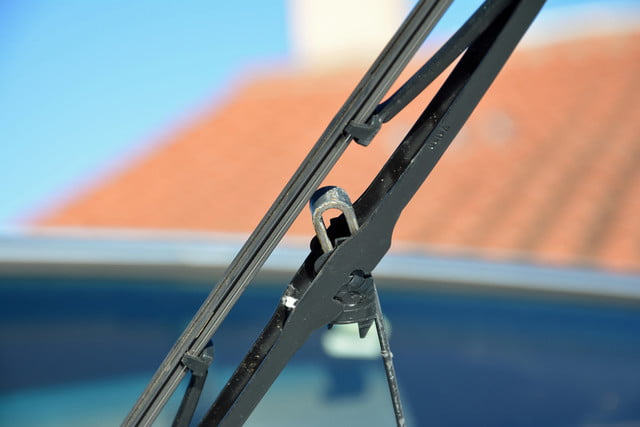
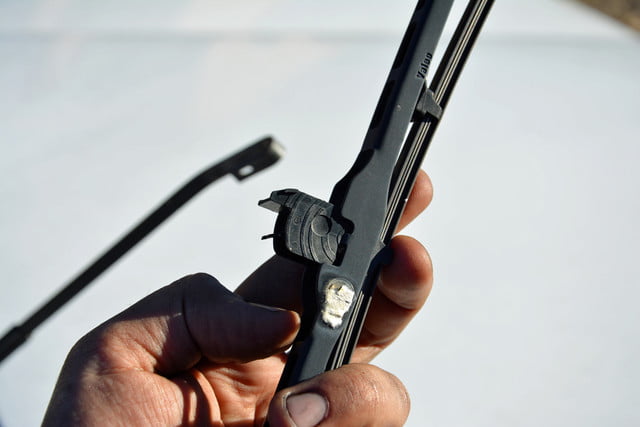
There are no tools required to change a set of wiper blades. Each blade is mounted on a wiper arm, which is a piece of metal with a curved end. First, lift up the wiper blade (it’s spring-loaded) so it’s almost perpendicular to your windshield. The blade should move freely. Rotate it 90 degrees and push down on the middle part of it, where it’s attached to the arm. In most cars, you’ll need to squeeze a plastic tab while you push. It takes a small amount of effort to get the blade loose. Work it around the end of the wiper arm to remove it entirely.
Step 3: Fit the new blades
Grab your new blade, slide it onto the wiper arm, and insert the plastic part in the middle into the loop at the end of the arm. You’ll hear a distinct clicking sound when the blade is properly installed. Again, this shouldn’t require a tremendous amount of effort.
Return the wiper arm to its original position and you’re done! It’s really that simple. Repeat the process to install the second blade and turn on the wipers when you’re done to make sure everything works as it should. If your car jettisons a loose blade, it’s better to have it happen in your driveway than when you’re cruising at 75 miles per hour on the freeway. While you’re at it, top up your washer fluid and, while you’ve got the hood open, check your oil.
Editors’ Recommendations
- How to rotate your tires, and why it’s important
- Who needs Jiffy Lube? Here’s how to change the oil in your car
- What is Android? All your questions about the operating system answered
- Want to join the Android Army? Here are all the cars with Android Auto
- How to take good photos with your phone
 AIVAnet