


Apple Begins Selling Refurbished iPhone 7 and iPhone 7 Plus Models in United States, Starting at $499
Apple today has added refurbished iPhone 7 and iPhone 7 Plus models to its online store for the first time in the United States.
iPhone 7 models are available in all three storage capacities, including 32GB for $499, 128GB for $589, and 256GB for $679, reflecting savings of 10 percent off Apple’s current prices for brand new models. All five colors are currently in stock, including Black, Jet Black, Silver, Gold, and Rose Gold.
iPhone 7 Plus models with 32GB or 128GB of storage are available for $599 and $689 respectively, which is also 10 percent off. There are no 256GB models in stock. Available colors include Black, Gold, and Rose Gold.
Apple says all refurbished iPhone models are thoroughly inspected, tested, cleaned, and repackaged with a new white box and all manuals and accessories. Apple also installs a new battery and replaces the outer shell, making it nearly impossible to distinguish between a refurbished and brand new iPhone.
Any refurbished iPhone model comes with Apple’s standard one-year warranty effective on the date the device is delivered. The warranty can be extended to up to two years from the original purchase date with AppleCare+, at a cost of $129 for the iPhone 7 and $149 for the iPhone 7 Plus in the United States.
All in all, customers can save somewhere between $50 and $80 on the iPhone 7 and iPhone 7 Plus this way. Those looking for an even better deal, and who are okay with a little wear and tear, may wish to consider Virgin Mobile’s pre-loved iPhone 7 and iPhone 7 Plus models, which start at $299 and $349 respectively.
Related Roundup: iPhone 7Tag: refurbishedBuyer’s Guide: iPhone 8 (Neutral)
Discuss this article in our forums
Instagram Launches New Type Mode for Stories
Instagram today announced the launch of a new “Type” mode in stories, a feature that the company was previously testing with a small number of users.
Type mode is designed to allow Instagram users to share text-only posts in Instagram Stories, and the feature is similar in design to the Facebook option that lets you accentuate text-only posts with large fonts and colorful backgrounds.
According to Instagram, Type uses creative text styles and backgrounds to allow users to turn their “most random thoughts into something colorful and expressive.”
Type mode can be accessed by opening up the Instagram Stories camera and selecting “Type” next to normal under the record button.
Tap “Type” and write whatever comes to mind — your favorite lyrics, a silly thought or a random idea — and play with different styles to change the look and feel. Then, you can pick different background colors, highlight words and phrases or add a background photo.
The new styles introduced with the Type feature can also be used when adding text to any photo or video, and as with all Stories posts, content will disappear after 24 hours.
Type content is part of Instagram version 30 for iOS, which can be downloaded from the App Store for free. [Direct Link]
Tag: Instagram
Discuss this article in our forums
Ticwatch E review update: back in black
A little while back, we reviewed the Ticwatch E and S, two of the most affordable Android Wear devices around. For $159, the more affordable Ticwatch E suffered a rather unfortunate setback though — for what seemed like no reason, the watch bugged out and the screen began flickering with the bottom portion flashing white. Though only our unit (to our knowledge) exhibited this behavior, we still took it as a small cautionary tale.
Review
Ticwatch S and E review: Affordable Android Wear
Smartwatches are still a bit of a tough category; there are so many in the market now, but it’s hard to say that they have really penetrated the lives of the masses. Android Wear opened …
Instead, our review focused on the $199 Ticwatch S, which was undoubtedly the sportier of the two. With a bright neon green-yellow color, it definitely didn’t blend in with many outfits.
All things considered though, the core functions of the Android Wear experience were there — even down to things like GPS and heart rate monitoring. We just had to deal with the look of the S, while the more stylish and more accessible matte black Ticwatch E had to sit that review out.

We reached out to Mobvoi and they replaced the Ticwatch E, which I then used for the week after CES. I have to admit — while I might not be the biggest proponent of fully touchscreen smartwatches anymore, the E is probably the best entry point for anyone looking to dip their toes in the Android Wear ocean.
The Ticwatch E is probably the best entry point for anyone looking to dip their toes in the Android Wear ocean
We already made the assertion in the full review that design matters in the case of S vs E. Despite knowing the Ticwatch S was plenty capable, the look and feel left a lot to be desired. That is mostly remedied by the Ticwatch E — our unit is a matte black body with a black silicone band that will not get dirty under normal wear and tear like our S unit did. Though scuffs and dents might occur over time on this completely plastic body, at least they will not be glaring flaws on the black finish.

Where the Ticwatch S, as David Imel put it in the full review, screams “I WORK OUT” to just about everyone, the E is more subtle. It worked with pretty much any wardrobe, even those that were more fitness oriented. It isn’t like you’re missing out on much in the fitness realm either — Mobvoi’s app for tracking fitness is nice and rather Apple-esque, though most users probably have their own fitness ecosystems they prefer to install via the Android Wear Play Store.

I made an effort to use the watch for my current obsession: sleep tracking. My favorite Android sleep app, Sleep as Android, works perfectly with this watch but takes up a lot of the battery life when monitoring sleep with continuous heart rate readings. On average, I lost about 50 percent overnight, though I got detailed graphs of my sleep in the app. Battery life from the 350 mAh hasn’t changed — it will barely make it to a day and a half when regularly taking in notifications. For my sleep tracking to work, I had to make sure to charge it up before I went to bed. If I wanted to comfortably get through the following day then it required a recharge in the morning too.
The sleeping example reminded me one of the reasons why Android Wear can be an asset. Its look and operation is due for a complete overhaul, but with the right tools and apps the wrist-mounted OS can be incredibly useful.

There are also other better looking versions of the Ticwatch E than this matted black on black. If you are trying to go for a specific look, there are choices for around the same cheap price. But this black edition is one I can recommend to anyone trying to get into smartwatches that doesn’t want anything too big or bulky or flashy. Our review scores and thoughts remain the same, but at least we were able to get the full experience with the Ticwatch E this time.

Here’s the bottom line: if you are looking for a starter smartwatch and don’t mind Android Wear or that the build quality may one day reflect the price, the Ticwatch E is a compelling offering.
Now, let’s get cracking on that Ticwatch 3.
buy ticwatch e from amazon
Nuro wants to make pizza delivery guys a thing of the past
For decades, ever since the “horseless carriage” came to fruition, engineers and scientists alike have dreamt of a future filled with self-driving vehicles. And in an age where traffic fatalities, particularly ones caused by inebriated or incompetent drivers, are still a rampant, risk, autonomous vehicles are perceived as the solution to eliminating such problems.
But like all new technologies, many if not all need to endure growing pains and there are a lot of considerations that need to be accounted for since autonomous vehicles require some big-time changes. This is why autonomous vehicles aren’t quite yet readily available. But these growing pains are the perfect times for experimentation and they clearly haven’t stopped two ex-Google engineers, Dave Ferguson and Jiajun Zhu, from developing their own self-driving car.
Ferguson and Zhu founded a new startup called Nuro, a company that seeks to reinvent the idea of the self-driving car, even though the self-driving car doesn’t quite exist just yet. While self-driving cars are looking to take over the taxi, livery, and trucking industries, Nuro is aiming to produce self-driving cars for last-mile delivery services. Meet its latest concoction, the unofficially named, “R1 prototype.”
Nuro
This means Nuro’s vehicles are specifically being developed to take on the roles of delivery drivers. Yup, Nuro appears to want to make pizza delivery guys and Seamless couriers a thing of the past, all in an effort to reduce traffic congestion and the number of people on the road, which in theory could reduce the total number of traffic accidents.
With services such as Seamless or even Amazon Same-Day-Delivery increasing by demand, this means the number of couriers needed to cater to said demand will likely increase. So far, a study by marketing firm McKinsey discovered that the market for “last-mile delivery services” was last valued at over $86 billion, with huge year-over-year growth rates.
Speaking of which, Amazon sees so much potential in the last-mile-delivery service industry, they are not only working with drones. More recently, Amazon recently filed a patent for an “autonomous ground vehicle,” suggesting their rumors of self-driving robots are reigning true. On the other side, last August, Ford announced its partnership with Domino’s, collaborating on pizza deliveries using self-driving cars.
So Nuro isn’t alone with its vision. But they’re also not resorting to a collaboration with a pre-existing automaker, such as Uber’s self-driving Volvo fleet, Lexus’ and Toyota’s fleet of self-driving testers for Google, or as aforementioned, Ford’s new fleet with Domino’s.
“Local commerce is the first application. The vehicle will transport goods between and among businesses, homes, and neighborhoods,” Nuro spokesperson Emma Esrock told Digital Trends.
“Particularly, we’re interested in the last mile of transportation. That element contributes to 30 to 50 percent of the total logistics cost of goods transportation. In solving that problem, we realized we could create an entirely new kind of vehicle designed purely for goods transportation and reduce this cost. And, this sort of vehicle could also be created sooner, more efficiently and safer than passenger transportation. Because of its flexible interior, the vehicle can be re-configured and personalized for purpose in that delivery.”
Instead, Nuro is creating its own self-driving car, completely from the ground up. Upon first glance, it doesn’t seem like anything more than a rounded box on wheels. It does have a forward-facing windshield. But behind it is where the R1’s operational equipment lies. And it doesn’t have to be if nobody’s technically going to be driving in it, and thus being seen in it. Instead of a passenger compartment, the car’s interior space can be customized to suit a company’s needs. The interior is then accessible by four gullwing-style doors.
Details about what exactly powers it and how fast it can go aren’t yet available. But according to The Verge, researchers initially wanted the R1 to be small enough to drive on sidewalks. In the end, however, Nuro ultimately decided to make the R1 road-worthy. As it stands, it’s about as tall as a Toyota Highlander (with its antenna support), but about half as wide.
“The unmanned vehicle is custom-designed from the ground up to be safer, nimbler and more efficient than anything on the road. It features lightweight materials, narrow width, custom hardware for redundancy and a breakthrough design to keep what’s outside even safer than what’s inside,” Esrock said.
As of now, the Nuro is about ready to be launched, Esrock said that we should expect to see these in your neighborhood, both “urban and suburban,” shortly.
Nuro Founders, Dave Ferguson (left) and Jiajun Zhu (right).
Editors’ Recommendations
- Ford will power Postmates’ on-demand delivery service with self-driving cars
- Boxy Toyota e-Palette concept is designed to transport both people and pizzas
- Good luck getting out of a ticket with Ford’s A.I.-enabled police car
- Voyage finds the perfect place to test autonomous cars — a retirement village
- Horseless carriages are now driverless, thanks to Waymo’s taxi service
This ‘drone gun’ can down rogue quadcopters with the pull of a trigger
With drone ownership continuing to rise, it’s little wonder you get the occasional oaf flying their bird in places they shouldn’t. Think airports, sports stadiums, government facilities, and the like.
Rogue flights like these have spawned a whole new industry that’s growing alongside the consumer drone market. It involves technology that helps the authorities to quickly and safely take down quadcopters and other remotely controlled flying machines in locations that are off-limits.
Australian firm DroneShield first came to our attention in 2016 with the fearsome-looking DroneGun, an almighty shoulder-mounted contraption that jams the signal between the rogue drone and its operator, bringing the copter slowly back to terra firma.
This week the team unveiled a more compact version called the DroneGun Tactical (below).
DroneShield
At 56 inches in length and with a less bulky body, the Tactical is much more portable than the earlier design (below). The operator only needs to point the device at a drone and pull the trigger. This should jam the drone’s signal, causing the machine to automatically return to its owner, allowing the authorities to identify and question the pilot. If it’s important to bring down the drone more quickly, the jammer can interfere with the drone’s GPS system, forcing it to pretty much land on the spot.
DroneShield CEO Oleg Vornik told Digital Trends the Tactical was developed “following close collaboration and feedback from a number of NATO militaries,” adding, “We consider it the best in class globally, with stronger power, lighter weight and top-of-the-line ergonomics.”
DroneShield
One compromise that has been made with the more compact design is the Tactical’s 0.62-mile (1 km) range, half that of the bulkier DroneGun, which is still available. DroneShield’s latest anti-drone device weighs 15 pounds (6.8 kg) — a little more than the DroneGun — and according to its maker requires no technical training to use. The new model can also disrupt a wider range of frequencies, giving it a greater chance of downing that rogue drone whatever the make or model.
“A significant challenge in the creation of the unit was to remove the backpack and miniaturize the components into a form factor to fit on a rifle, which our engineering team has been successful at,” Vornik said.
The Tactical is available now “for tens of thousands of dollars per unit,” and can be bought in the U.S. by organizations cleared by the government.
If it’s as effective as it claims to be, the DroneGun Tactical could certainly be useful in particular scenarios such as crowded events, while other solutions that put up a “drone shield” that can also detect and down nearby drones, such as DroneShield’s Sentry platform or this one from British firms Drone Defence and Eclipse Digital Solutions, would be more practical for places like prisons.
Editors’ Recommendations
- Drone-owning Brits face clampdown as government moves to make skies safer
- During the Drone Rodeo at CES, the fastest pilots race for aerial supremacy
- The DroNet algorithm teaches drones to navigate city streets like cars
- Drone-catching eagles aren’t such a good idea after all
- Drone-operating gang’s prison delivery service lands its members in jail
Nest Hello doorbell now shows a March shipping time frame
You can still get a free Google Home Mini if you preorder by Feb. 20.
 Nest Hello — the Alphabet-owned answer to the Ring Video doorbell (among other competitors) — is now slated to ship sometime in March.
The fine print on the Nest Hello preorder site was recently (and quietly, because on the internet no one can hear you scream) was changed to reflect the new shipping schedule. While a firm date has never been given, it previously said to expect it in February.
A slippage of a date that was never publicly nailed down in the first place? Maybe. But more likely is that Nest is just getting its ducks in a row. And it makes sense, as Nest also is offering a free Google Home Mini if you preorder by Feb. 20. That basically would have left a week beyond that for the connected doorbell to ship. And, so, the fine print has changed. (You might still see display advertising with the February time frame. Ducks are hard to wrangle sometimes.)
In any event, you can still preorder the Nest Hello for $229. As for when in March it’ll ship? Stay tuned.
See at Nest
More: How Nest Hello can out-doorbell Ring
For the record: I wasn’t crazy. (Also not a huge surprise, or a big deal.) pic.twitter.com/hIq5TevJJI
— Phil Nickinson (@mdrndad) February 1, 2018
Deal: Get unlimited talk, text, and data from ROK Mobile for just $50 a month!

Tons of data, cheap prices, MVNO ROK Mobile’s offering the cheapest Unlimited data plan that runs on the “nation’s most reliable network.”
Anyone interested in an affordable unlimited data plan with top-notch nationwide coverage should check out this offer from ROK Mobile.
Now you can bring your own CDMA-compatible phone to ROK Mobile and pay just $50/a month for unlimited talk, text, & data on the “nation’s most reliable network” (AKA Verizon’s network). $50 is an awesome deal and rings in $25 a month cheaper than Verizon’s $75 Unlimited plan. Plus, with the ROK unlimited data plan, you’ll even get extras like roadside assistance included.
Unlimited Plans: ROK vs. major carriers
- Unlimited talk & text & high-speed LTE data: Speeds may temporarily slow down at 20GB only during times of high network traffic. This soft speed limit known as data deprioritization is common across carriers: Sprint’s is 23GB, AT&T/Verizon’s 22GB and T-Mobile’s 50GB.
- Video streaming in SD: 480p streaming with the option of turning ‘data stretcher’ feature off for higher streaming speeds. Only Sprint’s Unlimited data plan offers HD video streaming. T-Mobile, AT&T and Verizon’s base Unlimited plans have SD streaming.
- Access to 30 million Wi-Fi hotspots via MyROK App: This is not tethering, but the option to use more Wi-Fi access points. ROK does not offer tethering aka mobile hotspots.
- No contracts or credit checks required: Most of the carriers no longer offer service contracts and most of the prepaid carriers don’t run credit checks or have contracts due to the fact that phones and services are paid for upfront
- Roadside assistance: This is a unique feature to ROK and could save you the cost of an annual membership for a motor club.
See at ROK
Understanding camera aperture and why it matters
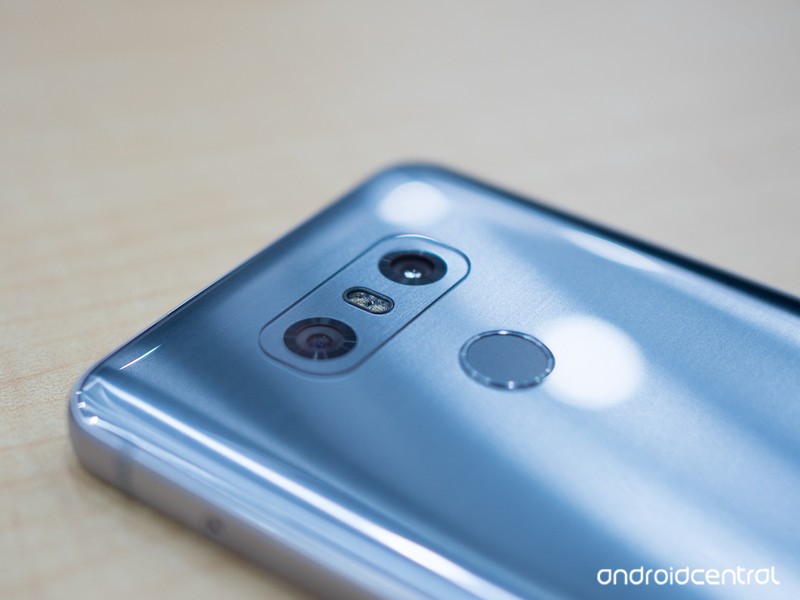
Aperture is a fun word to say, a hard word to spell, and that thing phone makers love to tell us about. But what is it, really?
For the past three years or so, every time a phone is announced and they get to the part about its camera, the word “aperture” gets thrown around. With the Galaxy S9 unveiling right around the corner, you’re about to hear it again. And if rumors about a camera lens with an aperture you can adjust are true, we’ll be hearing at least 200% of the recommended dose of aperture talk. But what does it mean? What is it exactly?
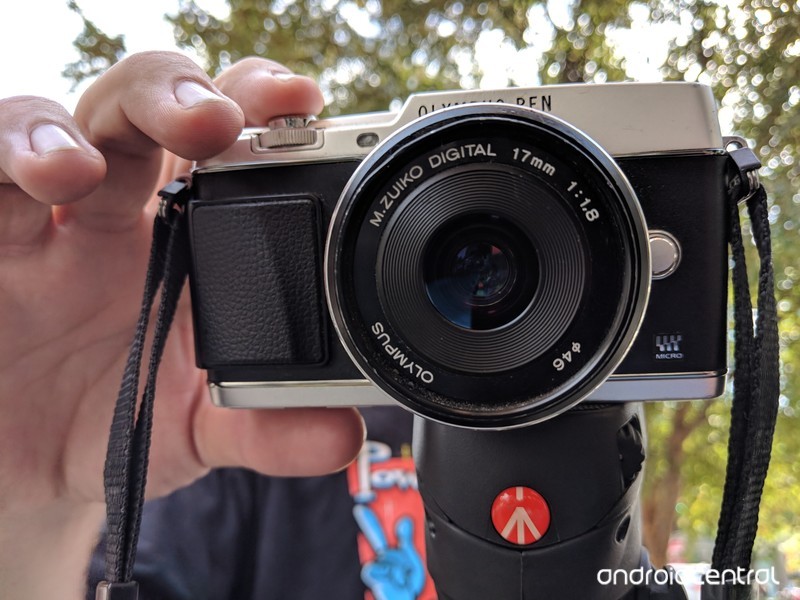
In its simplest form, an aperture is a hole that light travels through. When talking about photography, the “hole” is the opening in front of a lens (not the lens diameter itself), and the word aperture takes a bigger meaning and becomes a setting that the photographer can reference. It’s one of the three basic pillars of image capture, along with ISO and shutter speed, and while the science and math involved make the aperture setting important for a long list of reasons, the two most important to anyone taking a picture are the focal point and exposure. Ready to dig into all of that until it makes sense? Great! We are, too.
Photography’s love triangle
Earlier I mentioned that aperture is one of the three pillars of photography along with ISO and shutter speed. Together, the three settings are known as the exposure triangle and each can have a dramatic effect on how good a photograph looks. They affect more than the exposure (brightness) of a picture, so don’t let the name fool you — together they are the biggest factor in making a picture look great or horrible.
Any change to aperture, shutter, or ISO affects all three settings.
The three settings need to be balanced, so you really can’t talk about one without explaining a bit of what the others can do. A camera needs to be able to freeze a moment in time and recreate the right colors in the right places and be able to define the right edges, and aperture, ISO, and shutter speed are the three settings that make it happen. You simply can’t adjust one setting without adjusting at least one of the others if you expect to take a great photograph.
ISO
ISO is a measurement of the sensitivity of your camera’s sensor to light. Way back when actual film was used, you bought different ISO-rated film because there were no sensors and ISO was a non-adjustable part of an image’s exposure. We have things a good bit better now. With a modern digital camera, we can control the sensitivity of the sensor on the fly. Technically, we’re controlling the level of post-capture gain applied to the signal because that’s easier, will greatly lengthen the life of the sensor, and provides identical results.
A lower ISO means less noise.
Ideally, a lower ISO is better because that means there is less noise (pixels that aren’t a recreation of the real-life setting) in the final result for any post-processing to filter out. When processing has to remove noise it does so based on the pixels around it that aren’t noisy and makes an educated guess. Less guessing means a better photo. But it’s not practical to use a super-low ISO setting most of the time because the shutter speed and/or aperture opening can’t compensate.
Increasing the ISO setting raises the sensitivity to light, which allows you to take a photo using less light from any source. There are three things to remember about the ISO setting:
- The lower the ISO number the less sensitive the sensor is to light. The higher the ISO number the more sensitive the sensor is to light.
- The signal picks up more noise as it becomes more sensitive. That means lower ISO numbers have less noise and higher ISO numbers have more noise.
- When you can’t open the aperture wider or can’t slow down the shutter, you use a higher ISO to “freeze” motion and take a picture that’s not blurry.
Shutter speed
Shutter speed is the measurement of how long the shutter stays open when you take a photo or capture a frame of a video. When the shutter is open light is coming in, so faster shutter speeds can’t collect as much and the exposure is lowered. Of course, the opposite is true and a slower speed results in a higher exposure. Think of exposure when used this way as the brightness or darkness of the photo after everything is done and you’ll have a handle on what it means.
Lower is faster when talking shutter speeds.
While the shutter is open the sensor is collecting data about everything it can “see.” When any part of what’s framed in front of the sensor is moving, the result will be blurry, so most of the time a faster shutter speed is better for getting a sharp and in-focus photo.
- If you decrease the shutter speed (also known as a faster shutter), you need to raise the ISO or open the aperture to increase the exposure. But your photo will be sharper with a faster shutter.
- If you increase the shutter speed (a slower shutter), you might need to lower the ISO or close the aperture to decrease the exposure. But your photo will be less sharp and maybe even blurry with a slower shutter.
Every camera has a shutter, even your phone. Film cameras need an actual mechanical curtain to open and close, but many digital small-sensor cameras (including your phone) just time the capture of data as the shutter. This is why you can turn the shutter sound on or off on many phones; nothing is really moving to make the noise, it’s just generated by the software and timed to the shutter release.
Aperture
Aperture is the measurement of how open (or closed) the iris of a camera lens is. It’s measured in f-stops, which are an expression of the ratio of the focal length (distance from the focusing point on the lens to the front of the sensor) to the diameter of the iris (the hole in front of the lens). You don’t need to remember that or do any math, but you do need to know that a lower f-stop number is a wider aperture and that allows more light to go through the lens and reach the sensor.
- A more narrow aperture (higher f-stop number) needs a slower shutter or a higher ISO setting to increase the exposure.
- A wider aperture (lower f-stop number) needs a faster shutter or a lower ISO setting to decrease the exposure.
As you can see, the aperture is only one part of what makes a properly exposed photo. But like shutter speed and ISO, aperture also has an effect on sharpness. Each part of the exposure triangle also changes another element of your photo when they are adjusted. Changing ISO can increase noise, changing shutter speed can increase motion blur, and changing aperture changes what’s called depth of field.
Everything is not portrait mode
You might be wondering why the aperture on your camera isn’t just super-low to let in all the light it can. Well, besides making the photos overexposed in many cases, the depth of field would be too narrow.
The right depth of field can make a good picture great.
A depth of field is the distance between the closest thing in a photo that’s in focus and furthest thing in a photo that is still in focus. A camera lens can only bring things into focus at one spot. Anything outside of that exact point is not in focus and blurred outwards from the center point in the shape of the aperture. The parts that appear to be in focus to our eyes are in the depth of field.


When something is far enough away, the difference between a f/5 aperture (left) and a f/25 aperture (right) is minimal as long as the equipment can adjust the ISO and shutter speed enough to compensate. Your phone can’t and the result would be noisy. Very noisy.
Ignoring aperture, ISO, shutter, and exposure the biggest diameter depth of field a lens is capable of creating is called its circle of confusion. The diameter of the depth of field increases the further the lens is from the point it is focused on until you reach the circle of confusion. That means taking a picture of something across the street has a wider depth of field that taking a picture of something a few inches away with the exact same settings. To our eyes, a lens focused on something far enough away will appear to have a full-width depth of field where everything we can see is in focus, but camera sensors can process what is in front of it far better than our eyes can.
What we see versus what we get
What matters most s what we can see, not what the lens can capture.
The depth of field is what determines which areas in a photo are in focus. Normally, we want a picture that is clear and sharp throughout, but with an obvious point that draws our eyes. The photographer needs to make sure the subject is framed in a way that draws the eye to it, but the depth of field is what makes that spot more “crisp” than the rest of the photo. Ideally, everything is in focus and we can’t see where the actual point of focus drops off and instead we just perceive a slight difference. Photography is part optical illusion along with part art and part everything else.
In short, the people working for a company who makes camera lenses have a lot to consider and a lot of very complex math to sort out. When they are designing a very tiny fixed lens in a smartphone, it all gets even more complicated. And it’s very important because, above all, we want our pictures to look great no matter what numbers are thrown at us.
Awesome portraits
Portrait photography is an exception to the general rule. When you have a single subject — that could be one person or a pet or a group of friends or anything else — that you want to stand out against a simple but pleasant background, a portrait photo can look incredible if done correctly.
Normally, a portrait uses a wide aperture to create a narrow depth of field. Along with proper exposure and slightly tweaked color, this creates a result where the subject looks isolated from the background. This is easy for a camera with a bigger faster lens and full manual controls, but not so easy for something like a smartphone.
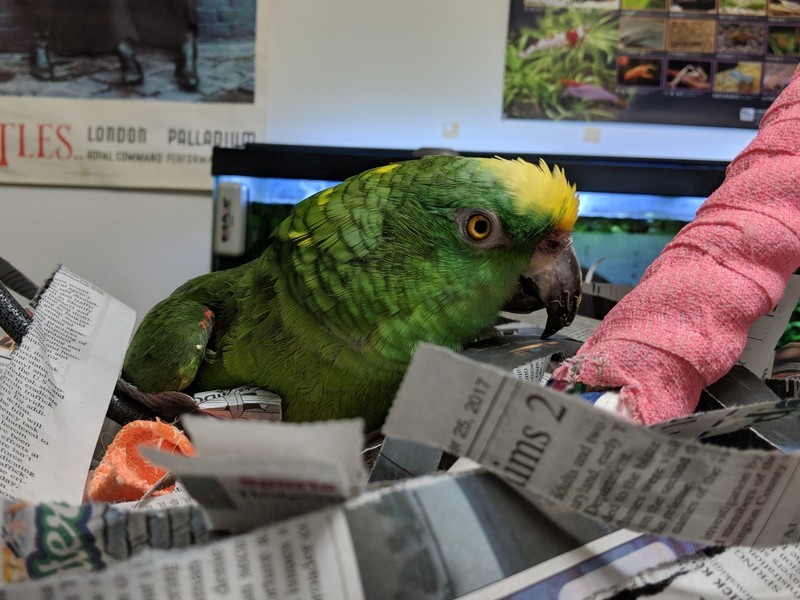
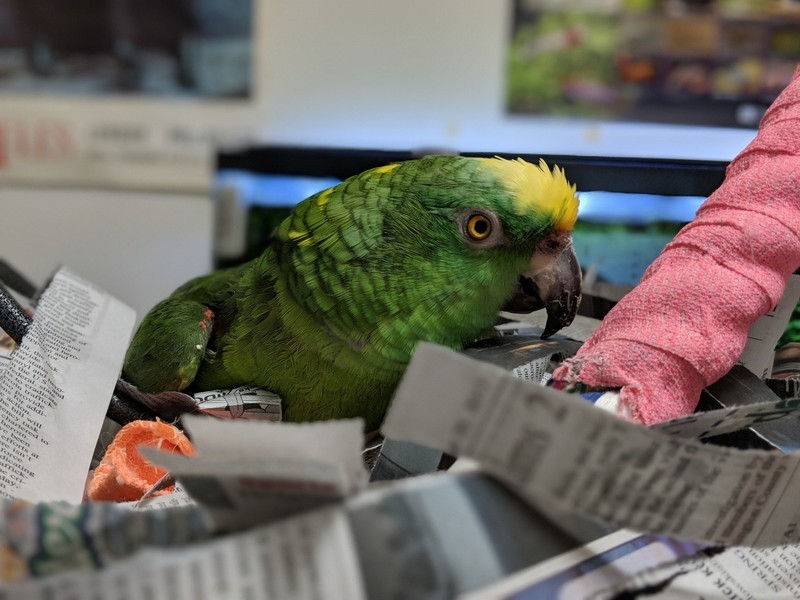
The Pixel 2 uses a pure software solution to take normal photos (left) and Portrait Mode photos (right) at the same time.
Different companies are trying to do portraits in different ways. Google and Huawei are using machine-learning along with capable hardware to create portraits through software and processing. Samsung is focusing (pardon the pun) on hardware first to give multiple angles and focal lengths to the image processor. Apple is doing both. Neither is new, we’ve seen multiple lenses and software-adjustable depth of field from companies like Nokia, ZTE, LG and more for the past five years, but technology has moved forward and the results are a lot better.
Notice I said “better” and not perfec. While it’s possible to get a great portrait photo from any of the capable flagship phones, most photos are average at best. They all seem to miss the subtlety at the edges of the depth of field and apply a uniform blur to the background, making things look a bit unnatural. Creating a depth of field effect that looks good every time is tough, but we’re getting there.
An adjustable aperture on a smartphone?
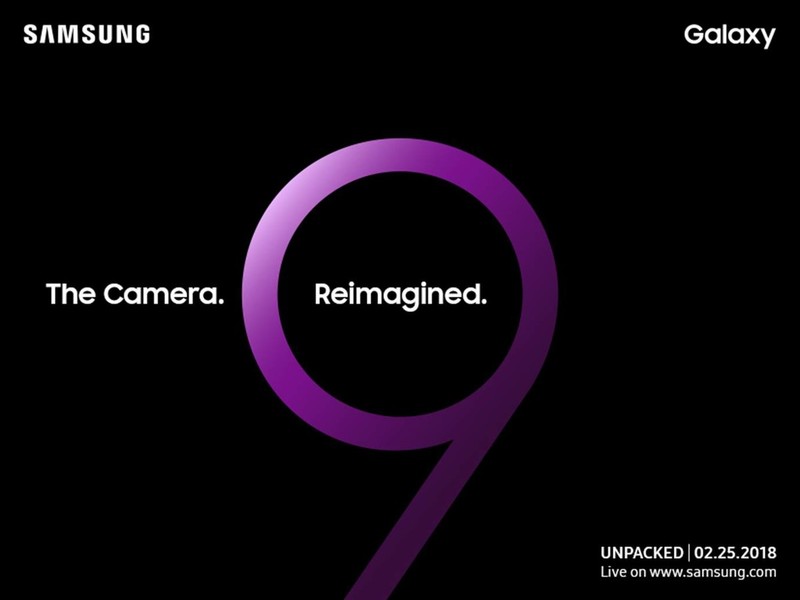
If the rumors are true, we’ll see a camera that has a user adjustable aperture on the Galaxy S9. Details are sparse so we don’t know if this means an actual mechanical way to open or close the iris on the lens cover or software that can control the depth of field effect.
I’m betting this means a way to adjust the focal point like we’ve seen from plenty of companies and a way to adjust the actual depth of field effect versus just blurring some parts of the photo after processing. Smartphone veterans will remember that Nokia’s Refocus feature did something very similar to what I’m describing. Modern hardware should be able to acquire all the data needed much faster than we saw in 2013 and taking photos won’t take as long or be as fiddly.
No matter how Samsung delivers an adjustable aperture, if they do it’s easy to understand why. It all goes back to the depth of field.
2017’s hardware should be a lot better at adjusting a depth of field that 2013’s was. And 2013’s hardware wasn’t bad at all.
Most small lenses designed for the types of image sensors our phone use are shaped and ground so that they are sharpest with a depth of field somewhere between ƒ/5.6 and ƒ/8. This is very narrow and doesn’t allow for a lot of light, but it cuts back on chromatic aberration making the colors your camera reproduces as close to the original as possible. Using a fixed aperture system set at even f/5.6 is not going to produce photos that are well-exposed without a high ISO (remember, this means a lot of noise) and/or a slow shutter (which means blurry photos) so the aperture is widened and a bit of sharpness is exchanged for a much more flexible system.
As cameras in our phones inch closer to ƒ/0.5 (the theoretical maximum according to Sidney F. Ray’s Applied Photographic Optics) more and more sharpness in normal photographs is sacrificed. It’s difficult to slow the shutter enough to allow for proper exposure and produce photos that are properly focused and sharp, so ISO is increased and the SNR (signal-to-noise ratio) gets higher and higher. And this does nothing to address the narrow depth of field when taking normal or wide-angle photos.
We’ve seen pixel sizes grow to compensate and camera circuitry is built to deal with noise a lot better than it used to be, but if you’re a company who wants to focus on using hardware for better photos and not software, the next logical step is to perfect a way to use multiple apertures. I’m not sure exactly what to expect from Samsung with the Galaxy S9’s camera, but Samsung needs to take the next step and is more than capable of doing it.
Take better pictures
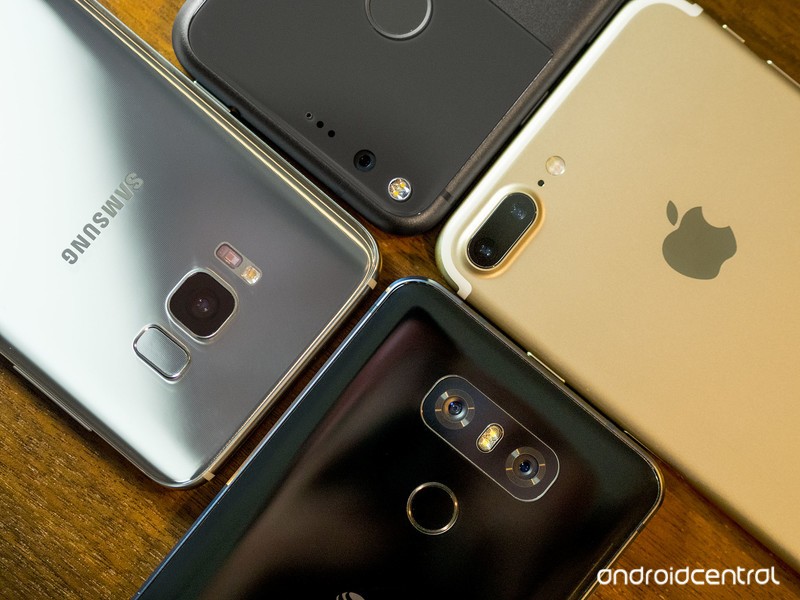
Now you know a little bit about what aperture is and how ti affects the pictures you take. So get out there and take some!
And remember the next time someone on a stage tells you that this awesome new phone has an amazing f/something aperture, there’s more to a great camera. A lot more.
Anker is offering a variety of its Bluetooth speakers for up to 43% off
Prices are only good for one day!

There are three different versions included in this sale, and you can’t go wrong with grabbing any of them. The most affordable is the Anker SoundCore mini, which is down to $16.99 from $29.88. It offers 15 hours of playback time and in addition to Bluetooth, it accepts a microSD card or an Aux cord. It’s small and portable, but only the black version is on sale today.
Next up is the Anker SoundCore Sport, which is down from its regular $40 price to just $24.99. It offers around 10 hours of music playback per charge, but it’s designed to resist water, dust, and sand. You can get it muddy, snow-covered, or worse, and then simply wash it off so it looks new again.
The biggest option is Anker’s SoundCore Sport XL which is sitting at $41.99. This speaker normally sells for closer to $70 and features two 8W drivers and dual passive subwoofers. You’ll get the best sound out of this option, but it also costs the most of the three available right now.
These prices are only good for one day, so don’t miss out!
See at Amazon
Is the Galaxy Note 8 too big of a smartphone?
The Note 8 is big, but it’s not unwieldy.
Samsung’s Galaxy Note line stands out from the crowd for a lot of reasons, but one of its most iconic features has always been its large size. The original Galaxy Note from 2011 shocked the industry with its “massive” 5.3-inch display, and now with the Note 8, we’re up to a 6.3-inch panel with a narrow 18:9 aspect ratio.

The large footprint of the Note 8 makes it great for watching movies, playing games, and browsing the web, but how does its size affect folks with an active lifestyle?
One of our forum users recently said they had to return the Note 8 because it was too big for them while hiking, running, and biking, and the responses from the community are a bit surprising.
SpookDroid
01-30-2018 03:25 PM“
I’ve gone hiking and through snow and to the beach a bunch of times and never had I had an issue with the Note 8 feeling too big or being in the way while hiking and the phone in my pocket. When it comes the the beach, yeah, just rinse it with clean water if you got seawater on it and you definitely want a screen protector/case unless you want the sand to leave scratches everywhere, but I…
Reply
pinkvikchick
01-30-2018 04:15 PM“
I run, maybe avg 30 miles a week. I’m 5′-3″ and have an arm band when it’s hot and in my jacket pocket when it’s cold. Never felt like it was too big.
Reply
amyf27
01-30-2018 06:58 PM“
Where do I start? Use Mine for hiking for indoor workouts for cycling workouts for walking dogs all over the place I have no problems at all with it
Reply
gernerttl
01-30-2018 09:28 PM“
I’ve gone hiking, biking, to the beach, and camping with mine and I didn’t feel it was two big. I had an S8+ and an iPhone 6 Plus previously though, so I was already used to the size.
Reply
With all that said, we’d now like to hear from you – Have you ever found the Galaxy Note 8 to be too big of a phone?
Join the conversation in the forums!
Samsung Galaxy Note 8
- Galaxy Note 8 review
- Galaxy Note 8 vs. Galaxy S8+
- Which Note 8 color is best?
- Complete Galaxy Note 8 specs
- Join our Galaxy Note 8 forums
Verizon
AT&T
T-Mobile
Sprint
Best Buy
 AIVAnet