


Watch the 2018 NBA playoffs from every angle, thanks to Intel, TNT, and VR
You’ll soon be able to get closer to NBA playoff action, as well as your favorite team. Intel on Tuesday announced a multiyear partnership with Turner Sports to bring live NBA on TNT games from the second half of the 2017-2018 NBA regular season to virtual reality. The partnership is also aimed at making history by bringing live games from the NBA playoffs to virtual reality for the first time ever.
Intel’s VR foray into live NBA games will begin at the 2018 NBA All-Star Game in Los Angeles on the weekend of February 16 to 18. Following All-Star Game weekend, Intel will bring VR to “marquee games” from NBA on TNT in the second half of the NBA regular season. The schedule is full of must-watch games, including a 2017 Western Conference Finals rematch between the San Antonio Spurs and Golden State Warriors.
Will Funk, executive vice president of property marketing and corporate partnerships for Turner Sports, told Digital Trends that Intel will also handle the VR live-stream for numerous games during the 2018 NBA playoffs. During the 2017 NBA playoffs, TNT broadcasted multiple games from every round, including the conference championship. “We will do at least some of the conference finals games [in virtual reality],” Funk said.
Sports in VR have been generally underwhelming, but being able to choose different perspectives around the arena to watch the game from has been its saving grace. Production company NextVR has been live-streaming NBA games in VR since the 2016-2017 NBA season , allowing fans to watch games from a courtside seat, under the basket, and occasionally right atop the hoop. Intel, Turner, and the NBA are still testing out camera angles, but hope to take fans even further into the action.
“We want the partnership with Intel to be another one where we can push the envelope forward, and take us to places we haven’t been with the VR experience,” Jeff Marsillo, NBA vice president of global media distribution, told Digital Trends. The NBA used Intel’s freeD technology during the 2017 NBA All Star Game to create highlights you can pause and view from different angles and depths in 3D. There are plans to bring that same technology to Intel’s NBA on TNT games in the future, which will allow fans to pause a Lebron James dunk in VR, for example, and view the three-time NBA champion’s exploits from every angle.
NBA on TNT is as popular for its on-air commentating crew as it is for the games it broadcasts. Intel’s NBA on TNT VR games will have the “TNT look and feel,” according to Funk, but no decisions have yet been made on whether Shaquille O’Neal, Charles Barkley, or any of the other NBA on TNT talent will be part of the VR experience.
You’ll be able to dive into Intel’s VR offerings this NBA season via the upcoming NBA on TNT VR app available for the Google Daydream and Samsung Gear VR. The app will be cable-authenticated, so you’ll need to have a TNT subscription in your cable package in order to watch these games in VR. There are currently no plans to offer a free preview.
Editors’ Recommendations
- NBA expands its live-streaming of games in VR for upcoming season
- Truly run the neighborhood with our ‘NBA 2K18’ MyCareer Guide
- The Kyrie Irving trade makes the ‘NBA 2K18’ cover situation awkward
- The NBA has an AR app that lets you test your jump shot anywhere
- ’NBA 2K18’ review
Google Wait Times feature saves you from waiting in line at restaurants
Nothing ruins your dinner like a long wait. Luckily, Google understands, and is here to save you from the monster that is your hungry self. The latest feature from the search giant is aptly titled “Wait Times,” and as the name suggests, will let you know how long you ought to expect to wait to get your meal, drink, or favorite baked good. So if you don’t want to hire a TaskRabbit to stand in line for you, simply pull out your phone and monitor how busy your favorite restaurant is, and swoop in when the line is the least intimidating.
“When it comes to a saucy bowl of pasta or a perfectly cooked steak, people are willing to wait in (long) lines for a taste of their favorite comfort foods,” wrote Quang Duong, a Google Maps software engineer. But just because you’re willing doesn’t mean you have to. Once Wait Times rolls out on Google Search (and later on, Google Maps), you’ll be able to track live updates regarding the popularity of your common haunts. So if you see that the waitlist is an hour long at 7 p.m., you can check back at 8 instead of wasting 60 minutes standing in line.
In order to check out Wait Times, all you need to do is search the restaurant on Google, open its business listing, and scroll down to the Popular Times section. From there, you’ll actually be able to see the real-time estimated wait time. And if you tap on any of the now interactive hour bars, you’ll be able to see the estimated wait time for that particular time of day. If you scroll left and right, you’ll be greeted with a summary of each day’s wait times underneath the hour bars, allowing you to plan ahead and never waste time in a line.
Duong noted that the wait time estimates are all contingent upon “anonymized historical data,” which is similar to how Google computed the previously launched Popular Times and Visit Duration features. So if the thought of going hungry while other patrons waltz in and out of your neighborhood pizzeria sends you into a rage, just check Wait Times on Google and avoid those anger management courses.
Editors’ Recommendations
- With the iKettle, you’ll never need to wait for the kettle to boil
- Cooler Cannon is the beer-tossing icebox you’ve been waiting for
- Is the Nissan Leaf all the EV you need, or should you wait for Tesla’s Model 3?
- Temi is a home robot that follows you around, waiting to do your bidding
- Yuneec’s latest UAV is the all-purpose camera drone you’ve been waiting for
Gomer is a soft-robotics A.I. hoping to bring some cheer to your life
Why it matters to you
Have the Gomer robot pick up an egg for you and don’t worry about the egg getting crushed.
The characterization of robots as cold, unfeeling objects doesn’t seem quite as accurate as it may have a few decades ago — at least, not from a personality perspective. After all, the introduction of artificial intelligence has made some of these bots seem more human, capable of responding to natural language commands and even cracking a joke now and again. But despite these internal shifts in robot functionality, their external appearance still seems a bit, well, robotic. After all, as helpful as your Echo may be, it is more about information than actual physical help. But that may change with the introduction of the Gomer. This “soft robotics-powered hand and friendly A.I. personality” claims to be the first interactive home robot on the market.
Capable of holding and carrying soft objects (like food), recognizing friends, expressing emotions, and even playing games, the Gomer hopes to come closer to fulfilling the role of “friend” in your life, rather than simply your personal assistant. Thanks to its open API, the bot is constantly learning new skills to become even more useful to owners. But perhaps the unique thing about this particular bot is its soft-robotics technology. Gomer is said to be the first time this technology has been made available in homes, and the robot’s flexible grip can pick up anything from a delicate egg to an odd-shaped toothbrush, as well as thin objects like an iPhone.
Gomer’s built-in A.I. system is also said to be able to recognize human expressions and convey a variety of emotions itself. Said to be capable of talk, understand, and learn from humans, this robot becomes more realistic as it gets older. According to the development team, as Gomer continues to interact with its owners, it begins to develop a unique personality.
The bot features a 720p head-mounted camera and is capable of moving upward of 1.5 miles per hour, which means it ought to be able to keep up with a meandering pace. Plus, Gomer has a two-way speaker, allowing you to communicate with the bot even from a distance.
Available as of Tuesday, November 7 on Indiegogo, you can pre-order Gomer for $229. Shipments are currently slated to begin in March.
Editors’ Recommendations
- AI robot Musio may not have a pulse, but it has the ability to understand users
- Watch a robot named YuMi conduct Andrea Bocceli, and prove no job is safe
- Temi is a home robot that follows you around, waiting to do your bidding
- Artificial robot muscle may look creepy, but it’s incredibly versatile
- Robot hand is dexterous enough to screw in a lightbulb, turn a screwdriver
Google and Aclima show you how bad air pollution in California can be
If seeing is believing, then Google is here to convert us all — at least, as far as air pollution is concerned. In an attempt to better understand local air quality, Google teamed up with environmental intelligence company Aclima, mapping air pollution throughout California using Google Street View cars outfitted with air quality sensors. The company published initial results of this collaboration earlier in 2017, but now, Google wants to give Californians even more detail about their air quality (or lack thereof). Now, you can view the air pollution levels in three distinct areas of the West Coast — San Francisco, Los Angeles, and California’s Central Valley.
Google’s Street View cars traveled 100,000 miles and 4,000 hours to collect the data to determine how air quality changes by block, by the hour, and by day. The hope is that the results can be used by scientists and air quality specialists to help local organizations, governments, and regulators “achieve greater air quality improvements and solutions.”
In their explorations of Los Angeles, the cars found that congested highways, local streets, and even weather patterns contributed to blowing pollution inland.
In looking at the San Francisco Bay Area, Google found that a significant proportion of air pollution came from cars, trucks, and construction equipment, and industrial polluters like refineries and power plants. Even street-level pollution patterns reflected these sources.
Finally, in the Central Valley, Google and Aclima discovered that the interstate traffic that runs along Interstate 5 and Interstate 99 contributed significantly to air pollution. And even though the Central Valley is largely rural and boasts a significant agricultural population, even this industry creates quite a bit of air pollution. Google pointed out, “weather conditions and topography can trap air pollution between the coast and the Sierra Nevada mountains resulting in a chronic ozone and particulate matter levels that exceed public health standards.”
Google isn’t keeping this information and its data visualizations behind lock and key. Rather, the company is allowing air quality scientists to request access to the data. Thus far, more than 1 billion air quality data points have been analyzed, but it seems that much more information is soon to come. “Air quality impacts our planet and our health,” Google noted. “We hope this information helps us build smarter more sustainable cities, reduce climate-changing greenhouse gases and improve air quality for healthier living.”
Editors’ Recommendations
- LG AS401WWA1 PuriCare air purifier review
- Google Home Max hands-on review
- Google Home Max Hands-On Review
- Nikon D5600 review
- ‘Made for Google’ program could guarantee your next accessory isn’t a dud
Lenovo Moto G5S Plus review
Research Center:
Lenovo Moto G5S Plus
The budget phone market is seriously heating up, and while there was once a time when the Motorola Moto G was the most-loved and best-reviewed budget device out there, now there are a ton of great options. The likes of ZTE, Huawei, and Oppo all offer seriously great budget phones, making it a slightly harder decision for those that want a great device at a great price.
Lenovo, through its Moto brand, however, isn’t taking the competition lightly. The company recently took the wraps off a new generation of Moto G – the Moto G5S and Moto G5S Plus, the latter of which offers a slightly larger display and a dual-lens camera.
Are those upgrades enough to make the Moto G5S Plus the new default for budget phone shoppers? We put it to the test to find out.
A very “Moto” design
The first thing you’ll notice about the Moto G5S Plus is its design, and it’s very familiar. It looks almost identical to the previous Moto G5 Plus, save for the two camera lenses peeking through the glass on the back.
Christian de Looper/Digital Trends
Christian de Looper/Digital Trends
Christian de Looper/Digital Trends
Christian de Looper/Digital Trends
The front of the device, as you would expect, is covered largely by the display, but underneath that you’ll also find a fingerprint sensor. While we generally prefer a fingerprint sensor mounted on the back because it feels more natural, Motorola has given the fingerprint sensor a lot of functionality – like the ability to tap it to go home, and even go back or multitask by swiping left or right. You can also activate Google Assistant by holding it, which is a very nice feature. Activating these gestures gets rid of the on-screen navigation controls, which some might prefer. We haven’t seen any other manufacturer add such gestures.
In use, the phone felt solid, and things like the power button were easily accessible with your thumb. That power button lives on the right edge of the phone underneath the volume rocker, which is still low enough on the edge to be reachable with your thumb.
In use, the Moto G5S Plus is actually a very capable phone.
On the left edge you’ll find the SIM card slot and MicroSD card slot, while on the top is the headphone jack, and on the bottom, is the Micro USB port. That’s right – no USB-C port here, which is a little frustrating. It’s 2017, and Micro USB is on the way out – there’s no good reason to include it on new phones. We’re starting to see competitors in this price range, like the ZTE Axon 7 Mini, offer USB-C – so it’s a bit disappointing that Lenovo hasn’t hopped onto the USB Type-C train.
On the back, as mentioned, you’ll find the dual-sensor camera, which comes in the form of a pretty big camera bump. While we’re not fans of a big camera bump, it doesn’t look all that bad here. It’s the same camera bump you’ll find on plenty of other Moto devices, but bigger than what you’ll see on devices like the iPhone or even similarly priced phones like the ZTE Axon 7 Mini.
Sure, there are a few quirks in the phone’s design – like the Micro USB port – but in general the phone looks and feels quite nice, and felt comfortable and natural to hold.
Performance
Of course, design can only get you so far – it’s what’s under the hood that really counts. The Lenovo Moto G5S Plus comes equipped with a Qualcomm Snapdragon 625, coupled with either 3GB or 4GB of RAM, depending on the amount of storage you go for. We’re testing the 64GB storage and 4GB RAM variant – though you can also get a 32GB storage and 3GB RAM version.
Christian de Looper/Digital Trends
These specs are pretty much on-par with other phones in this price range. The Honor 6X offers a Kirin 655 processor, which is also a midrange chip, and 3GB of RAM, while the ZTE Axon 7 Mini offers a less powerful Qualcomm Snapdragon 617 and 3GB of RAM.
In use, the Moto G5S Plus is actually a very capable phone. It’s fast and responsive in all but the most processor-intensive tasks, like 3D gaming, and it even held its own in most gaming situations, if you can look past the odd stutter every now and then.
It’s easy to see the “6” in the Snapdragon 625’s name and doubt its capabilities – but as this device proves, while midrange, the chip is able to handle the vast majority of tasks the average person will throw at it. In Asphalt 8 the phone was more than able to handle the 3D graphics without any stutters, while playing Shadowgun was a very smooth process, with only the occasional and forgettable stutter to remind us that this isn’t a flagship device.
Real-world use is more important than benchmarks, but benchmarks are still a good indicator of a device’s longevity. Why? Performance isn’t always about how a phone performs today – it’s also about how a phone will be able to handle the next generation of apps that will hit the Google Play Store. The better a phone performs, the more likely it is that it will continue to perform well next year. So how did the Moto G5S Plus perform? About as well as you would expect. Here’s a quick rundown of the benchmark scores it achieved:
Geekbench 4: 815 single-core, 3993 multi-core
AnTuTu: 63,802
3DMark Slingshot Extreme: 461
These results aren’t flagship-quality, but they’re still pretty darn good. The phone comes in at $280, which is a somewhat open price-point with not a whole lot of competition. Still, budget standouts include the Honor 6X, which hit 56,585 on AnTuTu and comes in at $200, and the Samsung Galaxy J7 Max, which comes in at $294 but still didn’t beat the Moto G5S Plus with a score of 57,996.
In general, the Lenovo Moto G5S Plus is an excellent performing phone for the price. In fact, we would argue that it’s the best-performing phone in the sub-$300 price range, which is no small feat. Sure, it’s not a flagship-tier device – but for the price it’s an excellent-quality handset.
Display and battery
The Lenovo Moto G5S Plus comes equipped with a 1,080 x 1,920-pixel LCD display, and while we would always prefer an OLED display, it looks pretty good. Colors were generally nice and bright, while viewing angles were excellent and glare was kept to a minimum. For most uses, the display definitely has a high enough resolution, and while it may get noticeably pixelated during mobile VR use, this phone isn’t really built for that and actually isn’t Daydream-ready anyway.
Christian de Looper/Digital Trends
The display is on-par with other devices in this price range, but some are a little better. While the ZTE Axon 7 Mini keeps the same resolution as the Moto G5S Plus, it swaps LCD for AMOLED. The Honor 6X, has the same resolution and display type as the Moto G5S Plus.
The lower-than-flagship resolution has a positive impact on battery life too, as there aren’t as many pixels to power. The phone offers a 3,000mAh battery, which is the same capacity as the smaller Moto G5S. Regardless, it was more than capable of getting us through a day of relatively heavy use, and you shouldn’t expect it to fall under 20 percent in a day of normal use.
On top of the better-than-average battery life, the phone also comes equipped with Lenovo’s TurboPower fast charging, which the company claims will give it 6 hours of power in 15 minutes of charging. We didn’t time it, but we can say without a doubt that the phone charged quickly, which is nice for those on-the-go.
Camera
The Lenovo Moto G5S Plus is the first Moto G to offer a dual-camera, both sensors coming in at 13-megapixels with an 8-megapixel front-facing camera. So how does it perform? Well, it depends what you want to do with it.
The lower-than-flagship resolution has a positive effect on battery life too, as there aren’t as many pixels to power.
The camera app is really quite good. It’s fast-performing and offers a solid amount of control, including a capable manual mode. That’s good news for the photographers out there who want more control over their shots, and it puts the camera ahead of the Axon 7 Mini, which performed pretty slowly in our review of the camera.
In use, the camera is solid but lacking in some areas. For starters, using the two lenses produces some lackluster results. You can take photos and adjust depth after-the-fact, but edges are rarely sharp, and adjusting depth after taking the photo rarely changed that. We would almost have preferred that Lenovo stick with a single-lens camera and focus on making that as good as it could be, rather than simply adding another lens for the sake of it.
Still, standard photos themselves weren’t all that bad. As someone who uses a Google Pixel XL as my daily driver, it’s rare that I’ll be impressed by a phone’s camera – but for a budget phone the Moto G5S Plus does well. Colors were a little dull at times, but details were there, and the camera generally performed well in low-light situations thanks to the bump from an f/2.2 aperture in the standard Moto G5 to a f/1.7 aperture in the G5S Plus. Basic shots seemed to be a little less colorful than those taken with the Honor 6X, but still decent for the price.
While the camera is capable of shooting 4K video at 30fps, we think it’s a little more notable that it can shoot 1080p at 60fps – meaning you’ll be able to slow it down for some cool effects.
This is a budget phone, so it’s not fair to expect a flagship camera – and you won’t get one. You will, however, get a camera that’s generally capable, and while the hardware was a little hit-and-miss, the software really exceeded our expectations.
Software
Motorola phones have long offered near stock Android software – a trend that harkens back to the days when the Motorola brand was owned by Google. The same is true in the Moto G5S Plus, and as a dedicated Pixel user I can safely say that I felt right at home.
That doesn’t mean that Lenovo hasn’t added a few Moto touches – just that they’re kept to a minimum. Perhaps the most notable addition is the “Moto” app, which is basically a way to control “Moto Actions,” or gesture controls like “chopping twice for the flashlight,” and “Moto Display,” which allows you to control the discrete notifications that you’ll get when the screen is off. It’s a nice addition – it’s subtle, and it offers features that genuinely improve the overall Android experience, especially for those willing to learn a few gesture controls.
The Moto G5S Plus runs Android 7.1 Nougat out of the box, though Lenovo plans to upgrade to the latest Android 8.0 Oreo “soon”.
In general, we loved the stock experience on the Moto G5S Plus. While it isn’t totally stock, the additions that are there are welcome tweaks.
Warranty, pricing, and availability
The Lenovo Moto G5S Plus comes with a one-year limited warranty, which pretty much only covers defects – not wear and tear due to aging or any damage caused by an accident. That’s not the best warranty around, but it is pretty standard.
But how much does it cost? The phone starts at $230 for the 32GB version which has 3GB of RAM (though it’ll go up to $280 soon), and you’ll have to shell out $300 for the 64GB version, which will go up to $350 soon. Both phones are available from the Motorola website right now, as well as the likes of Newegg. The phones don’t seem to be available on Amazon just yet.
Our Take
The Lenovo Moto G5S Plus once again redefines the word “budget.” It offers excellent value for money, better performance than others in this price range, and an awesome software experience. Nothing’s perfect – as shown by the camera – but for the price, this is about as good as it gets.
Is there a better alternative?
In this price range, there aren’t any better alternatives. The Moto G has proven time and time again that buying a budget phone doesn’t mean having to get something sub-par. While phones like the Honor 6X and ZTE Axon 7 Mini are decent phones, they just don’t compare to the full package that is the Lenovo Moto G5S Plus.
Lenovo Moto G5S Plus Compared To
HTC U11 Life
Moto X4 Android One
Sony Xperia XZ1
LG X Venture
Moto X4
Alcatel Idol 5S
Lenovo Moto G5 Plus
ZTE Axon 7 mini
Meizu Pro 6
Huawei Honor 8
Nextbit Robin
Huawei Honor 7
Motorola Droid Turbo
Sony Xperia Z3
LG G2
How long will it last?
The Moto G5S Plus should last a full two years, if you take care of it. It does not offer an IP rating to speak of, so you’ll want to keep it away from water. While it will slow down after a year or so of normal use, you should be on track for a standard two-year upgrade cycle.
Should you buy it?
Yes, you should. The Moto G5S Plus is the best phone in its price range. If you’re looking for a flagship phone with top-tier specs, then this probably won’t tick all the boxes, but if you have around $300 to spend, this is the one for you.
Editors’ Recommendations
- Moto G5 and G5 Plus: Everything you need to know
- Nokia 6 vs. Moto G5 Plus
- Moto X4 review
- Moto X4 vs. Moto Z2 Force: Which Moto reigns supreme?
- Moto X4 hands-on review
Leap into more immersive VR feet first with ‘Mythbusters’ host’s Vortrex shoes
Using a headset to experience virtual reality content is a uniquely immersive experience — until you try to move around and find yourself confined in on way or another. Now, a team helmed by MythBusters star Jamie Hyneman is attempting to crowdfund an ambitious peripheral that could solve this problem.
Vortrex Shoes operate using a very simple principle: They allow the wearer to maintain the illusion of moving around while staying in one spot. This means that if they are embroiled in a VR experience, they can walk around naturally without the need for a huge amount of space around them.
The idea dates back to the 1980s, when Hyneman bolted drill motors to the back of a pair of rollerblades in an effort to invent a new form of personal transportation. As the VR boom was just dawning in 2010, he began working with Edmond J. Dougherty — an engineer who was part of the team that created Skycam, the technology that is used to gain unique camera angles during NFL games.
Since then, Hyneman and Dougherty have produced several different iterations of their design. Now, the project has been developed to the point where an Indiegogo campaign was set up to fund the next steps.
This particular project differs from the vast majority of crowdfunding campaigns, as backers aren’t actually purchasing the product itself. “It might work,” reads the blurb. “It might not. We’ll know soon.”
Since there is a chance that Vortrex might not come to fruition, backers can’t actually claim a pair of skates as a reward. Instead, there are various different Hyneman-approved survival kits, depending on how much cash in being offered, according to a report from Road to VR.
This isn’t to say that the team behind the project doesn’t expect it to be a success. The plan is for the campaign to fund the final prototype, at which point a full production run would likely follow.
The Vortrex system is being built such that it should be compatible with as broad a range of software as possible. The footwear will function as a gamepad, translating movements into standard inputs, but drivers and software development kits will also be made available to developers who want to implement more tailored support.
The campaign will run for the next month, and seeks to raise $50,000.
Editors’ Recommendations
- Pimax ‘8K’ headset bests original Oculus in Kickstarter funding
- Awesome tech you can’t buy yet: 8K VR, smoke-free fires, a drone for your home
- Awesome tech you can’t buy yet: Eskates, snow bikes, a better measuring cup
- ‘Everybody’s Golf’ review
- Crowdfunding conundrum: Why the magic device you backed may never show up
Wacom’s new Pro Pen 3D looks to draw in artists and creative professionals
Wacom, known for its pen tablets and touch-sensitive displays for creatives, has introduced a new pen for creative professionals, particularly those working within 3D applications. The aptly named Pro Pen 3D does away with the eraser found on older pens in favor of a third button on the grip. The default behavior allows 3D artists to easily tumble or rotate objects while they’re working on them, without having to put down the pen or reach for the keyboard.
It may seem like a simple change, but the Pro Pen 3D is a direct response to customer requests for a three-button stylus. Wacom says it is designed to work in popular 3D applications like Pixelogic ZBrush and Autodesk Maya. Digital Trends was given a sneak peek of the new stylus at Adobe Max earlier this year, where Wacom demonstrated how it can improve 3D workflow by providing a more seamless and natural way to manipulate on-screen objects.
One potentially unfortunate change is the loss of the eraser, which allowed digital illustrators to flip the stylus over just like a pencil to undo brush strokes. As Wacom explained to us, however, its customers have simply stopped using the eraser. While the act of turning the pencil over in one’s hand was a natural analog for traditional artists, those familiar with working digitally found it unnecessarily cumbersome compared to simply hitting a keystroke to toggle the eraser tool while keeping the pen tip on the tablet.
Fortunately, all of the buttons on the Pro Pen 3D are fully customizable through Wacom’s driver, which means the stylus isn’t limited to 3D applications. If they really need it, users can easily program the third button to switch to the eraser tool in their favorite applications, like Adobe Photoshop.
Other than the new button and a sleeker appearance thanks to a slimmed-down aluminum barrel and the removal of the eraser, the Pro Pen 3D is essentially the same on the inside as the Pro Pen 2 before it. The pen tip features the same 8,192 levels of pressure sensitivity for very precise control. It sells for $99 and is available now directly from Wacom.
Editors’ Recommendations
- Google introduces Poly, an easy-to-use 3D object and scene repository
- Introduce your kids to the magic of 3D printing with Toybox
- 3D-scanning project will document the skeletons of 20,000 vertebrates
- Check out the 25 best Nintendo 3DS games available right now
- 3D-printed stainless steel is up to 3 times tougher than alternatives
Logitech Craft review
On the surface, Logitech’s new Craft keyboard looks like a run-of-the-mill, low-profile wireless keyboard with a copycat Microsoft Surface Dial bolted on (Logitech calls it the Crown). In practice, it’s much more than that, offering a surprising amount of control for such a seemingly simple addition to a standard keyboard.
As this keyboard is primarily targeting creatives who rely on applications like Adobe Photoshop, we are approaching our Logitech Craft review from that perspective. The keyboard also offers benefits for non-creative uses, but for these non-creatives, the $200 price tag might be harder to swallow.
The keys to success
The design of the Craft is simple but effective. Beyond the creative applications of the Crown, Logitech has taken steps to make this a great keyboard for typing. Typing enthusiasts (yes, they exist) aren’t likely to give up their beloved IBM Model F, but after banging out a couple thousand words with the Craft (including this article), we can confirm that it does feel quite nice. The keyboard also has a nice weight to it with very sticky rubber feet, so it won’t slide on your desk, even if you fire off a hotly worded email in all caps
Bill Roberson/Digital Trends
Bill Roberson/Digital Trends
Bill Roberson/Digital Trends
Bill Roberson/Digital Trends
Logitech redesigned the keycaps with a circular indent to help guide your fingers into the right position. The company says this helps with accuracy, but we’re not sure if it makes a huge difference. At any rate, it does feel quite comfortable, and the keys offer a good amount of resistance and spring back quickly. They are also backlit, and the light will turn on automatically when your hands approach the keyboard and off again when you remove them. Given that the Craft is wireless, this probably helps save a little battery life (which Logitech claims is good for one week).
The Craft connects over Bluetooth Low Energy or via Logitech’s Unifying receiver. There are no batteries to replace; instead, simply plug the keyboard in via USB Type C (a cable is included) and you can continue to work while it charges.
A crowning achievement
The Craft’s most notable feature is the Crown, a free-rotating input dial that resides on the upper-left corner of the keyboard. In addition to turning it, it can be pressed like a button and is touch sensitive. Purely from a design perspective, it makes the keyboard look a little off balance as it leaves a lot of empty space along the top bar. Other than the Crown, there’s just the battery status light on the right.
The Craft offers a surprising amount of control for such a simple addition to a standard keyboard.
Logitech told Digital Trends it went through numerous other ideas, including a touch interface similar to the Touch Bar on the MacBook Pro, but after listening to input from creatives, it ended up with the single dial on the left side. The idea is to keep your right hand on the mouse and with your left hand on the keyboard where it can reach the Crown and common keyboard shortcuts, all at the same time and while your eyes remain forward on the monitor.
This scaled-back approach is a bit different from bespoke creative control interfaces like Palette and Loupedeck, which offer multiple dials, nobs, and buttons. Instead, Logitech relies on a custom driver to make the Crown more versatile than it looks.
It begins with context sensitivity, and the Craft ships with specific commands for several applications from Adobe and Microsoft. In Adobe Photoshop, for example, simply tap the side of the Crown to move through the a list of commands displayed at the bottom of the screen, which will change depending on which tool is selected. Simply rotate the dial to adjust the selected parameter, which might be opacity, blend mode, or brush size. Remove your hand from the Crown, and the onscreen display fades away. In a web browser, you can use the Crown to cycle through your open tabs.
Bill Roberson/Digital Trends
In addition to preinstalled application profiles, you can program the keyboard manually for other applications. Currently, this is somewhat limited: You can set custom keystrokes for turning the dial or pressing it, but you can’t set multiple different parameters to cycle through by tapping it.
At $200, it isn’t exactly cheap, but it does provide value for the right users.
In Adobe Lightroom Classic, which is not yet officially supported, we set the dial to adjust the currently selected slider, but we still had to cycle through sliders using the standard keyboard shortcuts (or clicking on them with the mouse). Even so, using the Crown felt like a much more natural way to make adjustments — although it was a tad slow for making big changes, as it took the slider an oddly long time to catch up to the dial. We expect this could be solved by official Lightroom support from Logitech in the future (should they decide to offer it). The company also said it will be offering an SDK that will allow developers to add native support for the Crown.
One small detail we really like is how the Crown provides two different styles of movement, based on context. In the sort of infinitely-variable parameters found in Photoshop, like adjusting brush size, it turns freely and smoothly. In other situations, such as switching tabs or turning up the volume, a physical ratchet mechanism engages that provides satisfying click points and good tactile feedback. This makes a huge difference in actual use and feels much better than the vibration-based haptic feedback of the Surface Dial.
Is it worth it?
Logitech’s streamlined and simple approach means the Craft gives added control and flexibility without complicating the experience. At $200, it isn’t exactly cheap, but it does provide value for the right users — namely, photographers and video editors. It’s a great keyboard all around — there isn’t anything that’s directly comparable — but it is in creative applications where it really shines.
That said, it does offer some benefits to non-creative tasks. Rotating the Crown to turn up volume or adjust brightness, or even using it just to scroll down a long list of emails in your inbox, is a surprisingly refreshing experience — even if it’s not altogether faster than using keyboard shortcuts. The Craft comes with profiles for Microsoft Excel, Word, and PowerPoint.
Right now, the only thing really holding it back is the lack of native support for more applications. In particular, we would really like to see profiles for Adobe Lightroom and Apple’s creative apps (Photos, iMovie, Final Cut Pro). However, even with its current limitations, the Craft has certainly grown on us. It will be hard to go back to a standard keyboard.
Editors’ Recommendations
- 6 best products showcased at Adobe MAX 2017 conference
- Logitech Craft with ‘creative input dial’ is crowned new flagship keyboard
- What’s the difference between Lightroom CC and Lightroom Classic?
- Macphun Luminar 2018 review
- Adobe’s new Lightroom leverages the cloud for cross-platform photo editing
LG V30+ coming to T-Mobile November 17
All yours for $130 down and $30/month for 24 months.
The V30 is one of LG’s best and most refined smartphones in a number of years, and as you’d probably expect, you can pick the handset up through a number of different carriers. LG also announced the V30+ alongside the regular V30, and after first debuting on Sprint and then U.S. Cellular, the slightly upgraded variant is now making its way to T-Mobile.

In case you forgot, the main difference for the V30+ is that it comes equipped with 128GB of internal storage as opposed to the regular V30’s 64GB. Both phones can be expanded up to 2TB with a microSD card, but for customers that want to have as much storage space as possible out of the box, the V30+ is the handset for you. Additionally, T-Mobile’s version of the V30+ comes bundled with a free pair of LG QuadPlay headphones.
T-Mobile will start selling the V30+ on November 17, and just like the V30, it features a 600MHz band to connect to gigabit speeds when they’re made available.
You’ll need to hand over $130 down and then $30/month for 24 months for the V30+, making it $50 more expensive than the regular V30.
LG V30
- LG V30 review: The no-BS flagship
- Top LG V30 camera features
- Full LG V30 specs
- LG V30 vs. G6 vs. GS8
- The V30 is the first phone to support 600MHz spectrum
- Join our LG V30 forums

Best Cases for Amazon Fire Tablet HD 10

The Amazon Fire HD 10 may be more affordable than most tablets, but you’ll still want to keep it protected with a case!
The Amazon Fire HD 10 (2017) is the latest generation of Amazon’s popular line of affordable tablets. It’s got Alexa built in and runs all the Android apps from Amazon’s own app store, along with easy access to Amazon Books, Music, Games, and everything else Amazon has to offer!
With all that the Fire HD 10 can do, you’ll want it on you at all times — which also means you should probably keep it protected from harm with a case. Here are the best cases for the Amazon Fire HD 10!
- Amazon Tablet Case
- MoKo Folding Case
- Fintie Keyboard Case
- MoKo Kids Shock Proof Case
Amazon Tablet Case
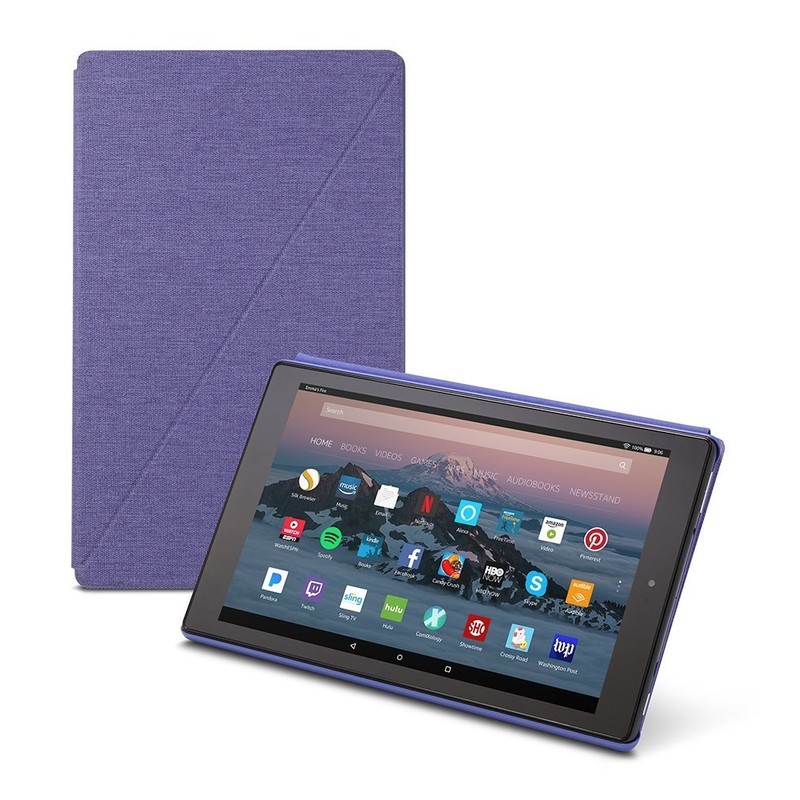
It makes sense to start with Amazon’s own accessory for its tablet, so that’s what we’ll do.
Amazon offers a pretty classic and slim design for its case, featuring a full cover for the front of the tablet with magnetic closures to keep things securely shut when you aren’t using it. You’ll be able to automatically wake or put the tablet to sleep by simply opening or closing that cover, too, which is super convenient.
Made of premium fabric with a microfiber interior, your Fire HD 10 will be well protected. It’s also able to be folded into a kickstand for hands-free viewing — perfect for watching movies or even using Alexa!
You can get yours for $40 in your choice of four colors!
See at Amazon
MoKo Folding Case
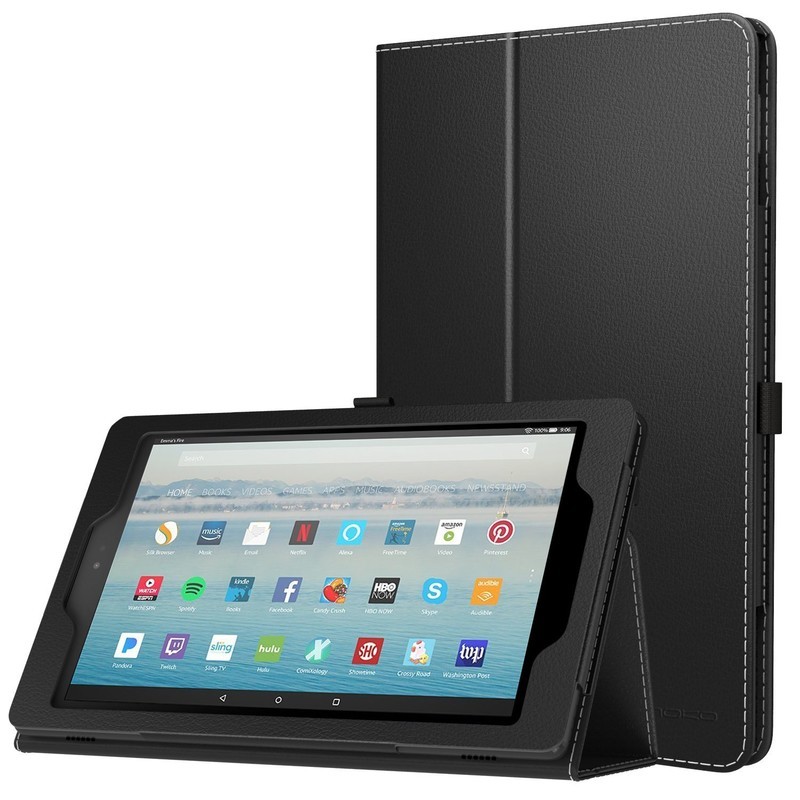
Looking to save some dough on a basic case for your Fire HD 10? MoKo has you covered with its folding case that offers great protection at a discount price.
It’s a pretty standard folding case that offers a front cover that doubles as a folding kickstand for hands-free viewing. It’s made of premium PU leather with a microfiber interior and a magnetic closure and stylus loop (stylus not included).
You can get yours in a solid color for $15 or a fun picture pattern for $18. It’s also backed by a lifetime warranty by MoKo.
See at Amazon
Fintie Keyboard Case
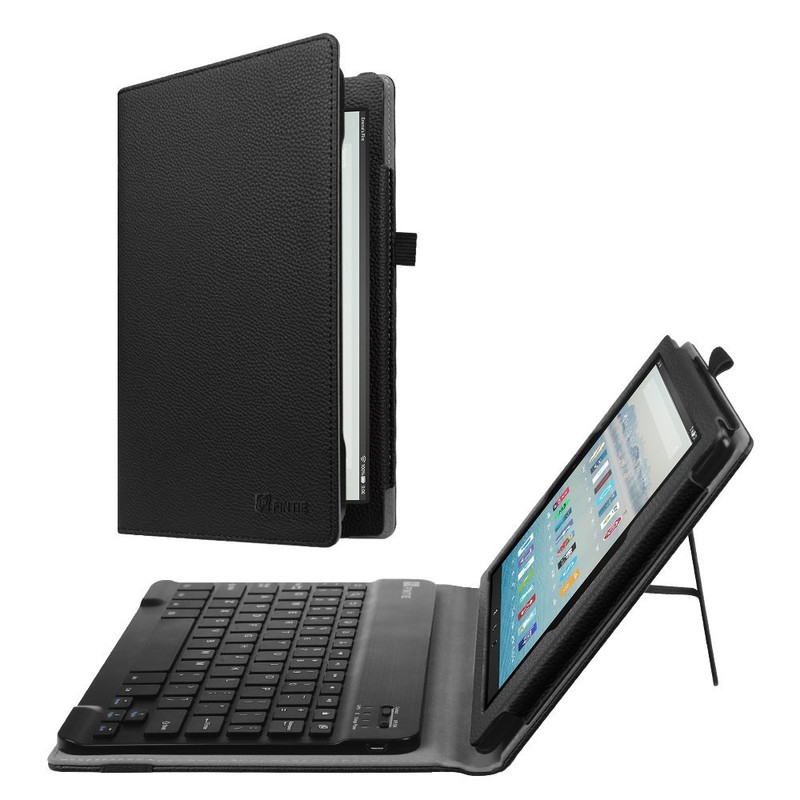
Looking to get a bit more functionality from your tablet case? You might want to consider the Fintie Keyboard Case, which includes a full Bluetooth keyboard on the inside of the cover.
The keyboard is super slim and detachable via magnets, so you can take the keyboard out if you won’t need it. But when you do, it’s there with a great experience provided by a spring mechanism under each key to ensure a tactile response with every keystroke.
The case itself is also made of premium synthetic leather with a microfiber interior to keep your tablet protected. Availble in six stylish options, you can get this case starting at just $35.
See at Amazon
MoKo Kids Shock Proof Case

MoKo also makes a reliable Fire HD 10 case specifically designed for kids — or I guess anyone who’s particularly prone to dropping things.
No, this one is definitely for the kids. It’s been constructed with an interior sleeve made of shock-absorbing silicone and a rigid polycarbonate shell on the exterior. MoKo doubled up on the silicone in the corners to provide even better drop protection for those vulnerable parts of the tablet.
The case features a handle that can be folded over and used as a kickstand in both a horizontal or vertical orientation. This case is available in three fun colors and will let you give your tablet to a little one without having to worry about it getting destroyed.
See at Amazon
To protect and save your Fire HD 10!
Do you buy a case for all your tech? Does the Fire HD 10 deserve a case? Let us know in the comments!
Amazon Fire tablets
- Amazon Fire 7
- Amazon Fire HD 8
- Amazon Fire 7 Kids Edition
- Amazon Fire 8 Kids Edition
- Amazon Fire HD 10
See more at Amazon
 AIVAnet