


Samsung’s huge 49-inch gaming monitor is an ultrawide dream
What’s better than dual monitors? An “ultrawide” display, that make games more immersive and multitasking easier than a standard widescreen monitor. But Samsung wasn’t satisfied with that. Its massive 49-inch QLED gaming monitor heralds an entirely new style — let’s call it “super ultrawide” — which can do the work of complex three-monitor setups. While it might look a bit awkward, it could be just what some gamers are looking for.
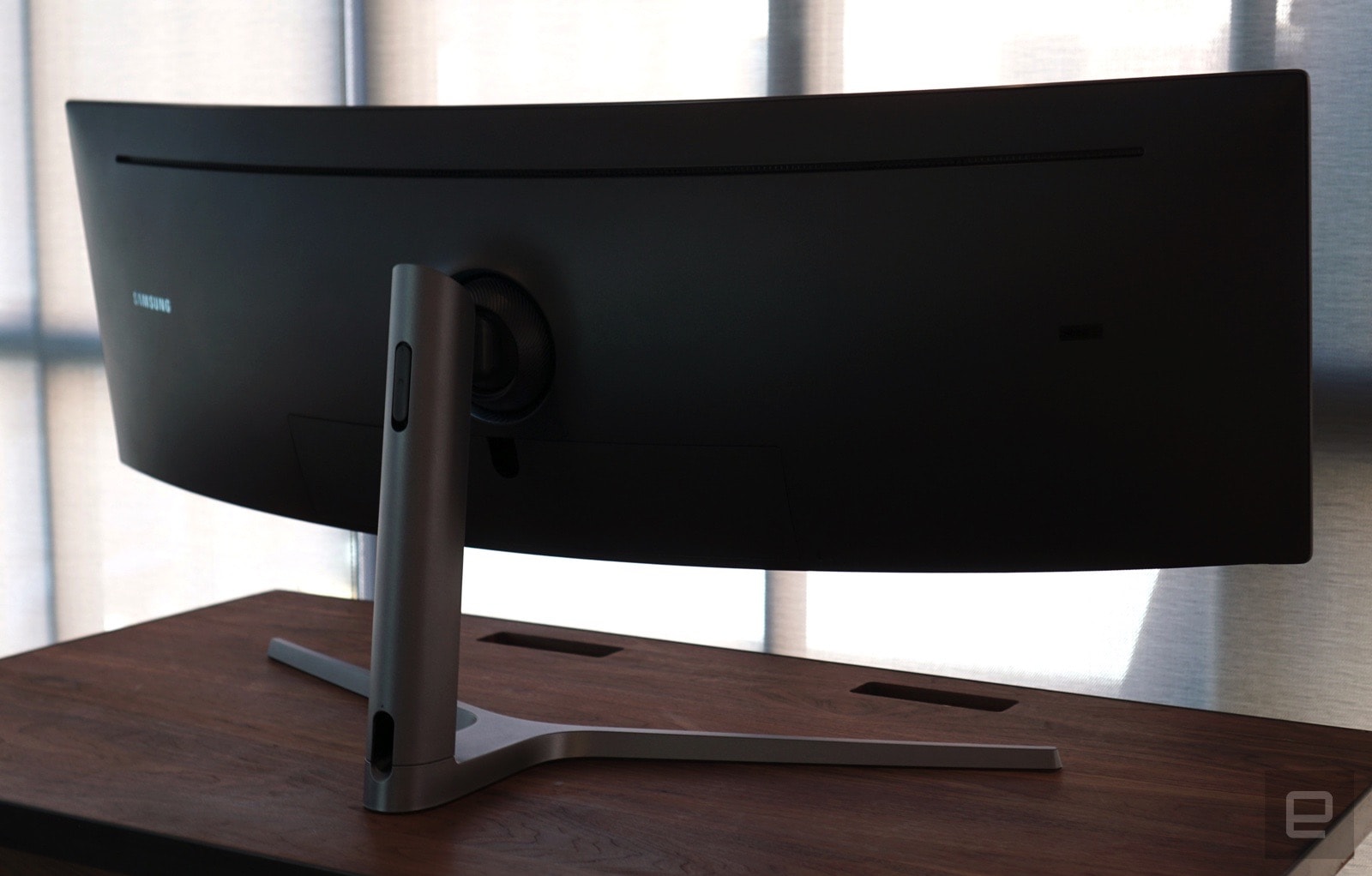
As you can imagine, Samsung’s 49-inch behemoth makes an impression. I use an ultrawide Dell screen on my gaming rig, so I’m familiar with giant displays. Still, this monitor surprised me with the amount of desk space it took up. Its 32:9 ratio is noticeably bigger than 21:9 monitors, which typically feature 34-inch or 27-inch screens. It’s base is also larger than most other displays, and the screen’s sides jut much farther out — almost comically so. Once I sat down in front of it though, I could easily see the appeal. It offers the most real estate I’ve seen in a single desktop display.
The monitor’s 3,840 by 1,080 resolution is a bit odd. Ultrawide monitors typically feature either 2,560 by 1,080, or 3,440 by 1,440 pixels, for a comparison. It also features a deep curve (1800R), which makes it easy to see all sides of the screen. The display has two HDMI ports and two DisplayPort connections (one of which is a MiniDisplayPort). There’s also a USB 3.0 hub on the back with three ports. The on-screen configuration menu is also a step above what we typically see today from other monitors. It’s large, easy to read, and clearly lays how to get to various settings.
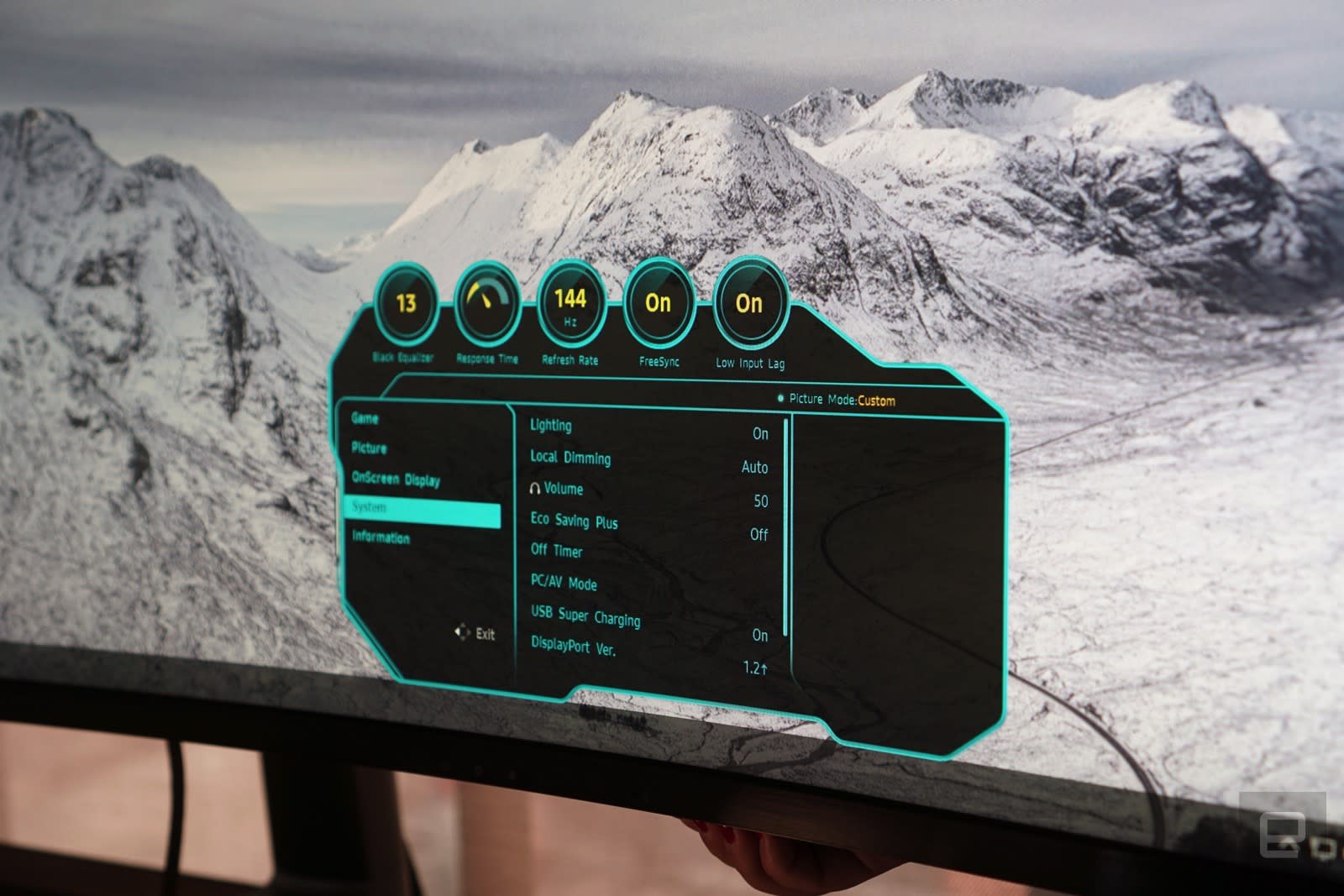
Gamers will definitely appreciate the monitor’s fast one-millisecond response time and 144Hz refresh rate. Both of those features will make first-person shooters like Call of Duty and Overwatch more responsive and perform more smoothly. As with most modern screens, it also sports HDR capabilities, as well as support for AMD’s Freesync 2 standard. The latter feature smooths out game performance so there’s no screen tearing. It’s also a part of Samsung’s new “Quantum Dot” QLED gaming lineup, which means it uses nanoparticles to deliver better lighting and color representation than typical LED screens.
I’ve tested plenty of gaming monitors over the years, but I was particularly eager to try out Samsung’s 49-inch display simply because its so unusual. And it didn’t disappoint. During a brief demo in New York City, I had a chance to play Battlefield 1 and Mass Effect Andromeda, both of which looked fantastic. The display had no problem keeping up as I moused around during firefights; Colors looked astoundingly realistic and the bright HDR elements popped off the screen. There was also plenty nuance in darker scenes, which was especially useful for Battlefield’s harrowing open mission.

Devindra Hardawar/Engadget
Mostly, I was impressed by how immersive the monitor felt. It effectively replicated the feeling of gaming on a three monitor setup, except I didn’t have to deal with annoying bezels in the middle. It was just pure screen. It’s one of the reasons I fell in love with ultrawide displays in the first place — Samsung’s new monitor just takes that sense of immersion to the extreme. Both games also took advantage of the unique resolution, but your mileage will vary on other titles. If you can get a game running on three monitors simultaneously, chances are it’ll look good on this screen.
You can do much more than just game on Samsung’s new screen. I was able to fit three full-sized windows side-by-side during my demo. It could be very useful for content creators who need to work in timeline focused apps for video and audio editing. I only wish there was a bit more vertical space. While I could comfortably read most websites on the screen, I was a bit disappointed by just how much I had to scroll up and down. Still, that’s an issue I could get around by zooming out, or tweaking Windows’ display scaling settings. You can also have the screen display two inputs side-by-side — something other ultrawide monitors can do, but is more practical with a 49-inch display.
At $1,499, Samsung’s 49-inch gaming monitor is surprisingly competitive with ultrawide monitors. Dell’s highest resolution 34-inch Alienware screen is also available for the same price, while LG’s latest model currently sells for just $1,000. Yes, these are certainly much pricier than normal-sized gaming monitors, but they’re not that much more expensive if you’re trying to put together a dual or triple-monitor setup.
If you’re a gamer looking at ultrawide monitors, it’s worth considering this unique Samsung screen. It’s unusual, but it also delivers an immersive experience like no other display.
The Essential Phone’s camera may be getting a lot faster
When Andy Rubin’s Essential Phone came out in September, our review called out its poorly-performing camera while also noting that there were two new updates to improve things in the week we had the device. Now, Essential users are getting another upgrade for the phone and Camera app that brings impressive performance to the device, including a speed boost of 40 percent in regular or low light.
According to Essential, they’ve been able to improve image quality via post-processing software updates. They’ve also upgraded the 360 photography system by adding spacial sound to the four ambisonic microphones in the Essential phone, along with a countdown timer so you know when to start taking the shot. The update also brings better brightness and performance in low-light, the ability to use the volume up and down keys as shutter buttons, and other bug fixes.
That’s not all, though. “Several additional improvements are in the works (more HDR improvements, live 360 streaming to Facebook and Periscope, animated 360 stills and filters, Portrait Mode and Pro Mode) and will continue to roll out through updates on Google Play,” wrote Director of Software Engineering Michael Kolb. The update comes with system build NMI81C and should roll out sometime today.
Via: DroidLife
Source: Essential
Alexa helps you reserve a ride with car2go’s carsharing service
You can now order a car2go by commanding Alexa to find the nearest one and reserve it. The pay-by-time carsharing service is the latest automotive-related company to get a skill that integrates it with Amazon’s voice assistant, following BMW and Nissan.
The skill allows users to vocally ask about the nearest car2go vehicle, reserve it for up to 30 minutes or cancel it. While that limits your searches to whatever’s close by — instead of, say, cross-referencing for a slick Mercedes if you wanted something bigger than the company’s standard smart car — but hey, sometimes you don’t want to spend more effort snagging a car than barking at your smart speaker.
Source: Car2go (PDF)
Facebook Messenger’s Apple Music Chat Extension for Recommendations and Sharing Songs Now Rolling Out
Facebook’s Messenger service was today updated with a new Apple Music chat extension, allowing Messenger users to link to Apple Music content to share songs and directly within the Messenger app.
The extension can be accessed by tapping on the “+” icon next to the text bar to add Apple Music to a conversation. There’s also an option to interact directly with the Apple Music chat bot to ask for music recommendations.
Apple Music subscribers can listen to full tracks from Apple Music, while non-subscribers are able to share and listen to 30 second clips from any music track. There’s an option directly within Messenger to sign up for Apple Music.
This feature appears to still be rolling out to users. While Engadget has access, we’re not yet seeing full functionality.
Facebook first announced plans for both Spotify and Apple Music integration in Messenger in April of 2017. The Spotify chat extension has been available for months ahead of the launch of the Apple Music extension.
Tags: Facebook Messenger, Apple Music
Discuss this article in our forums
Carpool Karaoke Episode Starring Linkin Park’s Chester Bennington to Air Next Week
Linkin Park singer Chester Bennington, who passed away in July, filmed an episode of Apple Music’s Carpool Karaoke: The Series just before his death. It was unclear whether or not that episode would eventually air, but Linkin Park announced today on Facebook that the episode starring Bennington will indeed be shown.
In the Facebook post, the band says the episode will be streamed for free on the Linkin Park Facebook page “this time next week,” suggesting a debut on Thursday morning.
Apple did not advertise the Chester Bennington episode when it previewed next week’s Carpool Karaoke episodes on YouTube, so it is not clear if the episode will be available solely on Facebook or if it will also air on Apple Music.
The episode will be the only episode of Carpool Karaoke: The Series that can be watched outside of Apple Music, and by releasing it on Facebook, Apple ensures it will be available to all of Chester Bennington’s friends, family, and fans at no cost with no subscription required. Other episodes of Carpool Karaoke require an Apple Music subscription.
Chester Bennington’s episode also features Linkin Park band members Joe Hahn and Mike Shinoda, along with Ken Jeong, known for his role as Ben Chang on the NBC sitcom Community.
Tags: Apple Music, Carpool Karaoke
Discuss this article in our forums
Uber Removing Apple-Granted API That Could Have Let it Record a User’s iPhone Screen
When the Apple Watch was first released, Apple gave Uber what’s known as an “entitlement” to run a special API to improve performance of the Uber app on the wrist worn device.
That entitlement made headlines today when security researchers told Gizmodo that Uber could have used it to record a user’s iPhone screen even with the Uber app just running in the background.
In a statement, Uber said the entitlement was used for an old version of the Apple Watch app and was provided to Uber because the original Apple Watch couldn’t render maps.
“It was used for an old version of the Apple Watch app, specifically to run the heavy lifting of rendering maps on your phone & then send the rendering to the Watch app,” an Uber spokesperson told Gizmodo, saying that early Apple Watches couldn’t handle this process alone. “This dependency was removed with previous improvements to Apple’s OS & our app. Therefore, we’re removing this API from our iOS codebase.”
The entitlement is no longer necessary and Uber is planning to remove it from the iOS codebase, according to both the statement given to Gizmodo and a tweet from Uber head of security and privacy communications Melanie Ensign.
According to security researcher Will Strafach, who first brought attention to the issue, Apple does not often give out entitlements. Strafach said he could find no other apps on the App Store that have the permissions that the Uber app has.
API was used to render Uber maps on iphone & send to Apple Watch before Watch apps could handle it. It’s not in use & being removed. Thx!
— Melanie Ensign (@iMeluny) October 5, 2017
Strafach says there is no evidence that Uber ever misused the entitlement, but it could have been utilized to monitor activity on an iPhone, recording passwords and other personal information. “Essentially it gives you full control over the framebuffer, which contains the colors of each pixel of your screen. So they can potentially draw or record the screen,” another security researcher, Luca Todesco, told Gizmodo.
Uber says the app is no longer connected to anything in the company’s current codebase, but users will likely be wary anyway as there have been other privacy concerns with the Uber app. There was a feature that allowed riders to be tracked for up to five minutes after a trip, and Apple CEO Tim Cook even went so far as to threaten to remove the app from the App Store after it was found to be secretly recording the UDID of iPhones to identify them even after the Uber app had been deleted.
Tag: Uber
Discuss this article in our forums
Microsoft Edge arrives on iOS and Android devices in preview
Why it matters to you
If you wish Windows 10 worked better with your phone, Microsoft Edge for iOS and Android might be the answer.
Microsoft is bringing Windows 10’s internet browser to more mobile devices. The Redmond, Washington-based company announced that Edge would launch on iOS and Android smartphones on Thursday, October 5.
Folks who have enrolled in the Windows Insider Program — Microsoft’s open testing platform for pre-release distributions of Windows — get first dibs. Starting October 5, they’re eligible to sign up for the Microsoft Edge Preview, which will automatically distribute new builds of Edge as they become available.
The Edge apps for iOS and Android are consistent with their desktop counterpart’s minimialist aesthetic, but they aren’t ports of Windows 10’s Edge. Microsoft says they’re built from the ground up to take advantage of the platforms’ unique features. The iOS version uses Apple’s Webkit rendering engine instead of Microsoft’s EdgeHTML, for example, while Edge on uses Google’s Chromium. And both versions let you change the default search engine and block pop-ups and cookies, toggle form saves, and clear browsing history.
Unsurprisingly, Edge for iOS and Android integrates tightly with Windows 10. The apps pulls your bookmarks, tabs, ebooks, favorites, and Reading View from the cloud, and Microsoft says future versions will sync passwords and browsing history across your signed-in devices.
“By far, the majority of our Windows 10 users have iOS and Android phones,” Joe Belfiore, vice president of Windows Experience, told ZDNet. “But there’s no good system to unify PCs with these phones. These two […] apps will knit all this together for all our customers.”
Edge will evolve throughout the testing period, Microsoft says. Support for iPads and Android tablets is in active development, as are Microsoft Cortana-powered recommendations and the desktop Edge’s pen highlighting features. Continue on PC — the Windows 10 service that lets you start browsing the web on a Windows 10 device and pick up where you left off on a phone or tablet — will launch on October 17, when the final Windows 10 Fall Creators update becomes available.
Edge for iOS and Android are available in the U.S. starting October 5, with additional languages and countries to come in the next few weeks. If you’re already a member of Microsoft’s Windows Insider Program and have the latest Windows 10 Insider build installed, you can sign up for access here.
Coinciding with the rollout of Edge for iOS and Android is the Microsoft Launcher, a rebranded version of Microsoft’s Arrow Launcher for Android. The home screen replacement app, a graduate of Microsoft’s internal Garage accelerator, features a real-time feed of important events, top news, recent activities, and favorite contacts; customization options like a background switcher, adjustable grid layout, and programmable gesture shortcuts; and Continue on PC features that highlights recently opened documents.
The Microsoft Launcher is available now for Android devices from the Google Play Store.
Microsoft Edge arrives on iOS and Android devices in preview
Why it matters to you
If you wish Windows 10 worked better with your phone, Microsoft Edge for iOS and Android might be the answer.
Microsoft is bringing Windows 10’s internet browser to more mobile devices. The Redmond, Washington-based company announced that Edge would launch on iOS and Android smartphones on Thursday, October 5.
Folks who have enrolled in the Windows Insider Program — Microsoft’s open testing platform for pre-release distributions of Windows — get first dibs. Starting October 5, they’re eligible to sign up for the Microsoft Edge Preview, which will automatically distribute new builds of Edge as they become available.
The Edge apps for iOS and Android are consistent with their desktop counterpart’s minimialist aesthetic, but they aren’t ports of Windows 10’s Edge. Microsoft says they’re built from the ground up to take advantage of the platforms’ unique features. The iOS version uses Apple’s Webkit rendering engine instead of Microsoft’s EdgeHTML, for example, while Edge on uses Google’s Chromium. And both versions let you change the default search engine and block pop-ups and cookies, toggle form saves, and clear browsing history.
Unsurprisingly, Edge for iOS and Android integrates tightly with Windows 10. The apps pulls your bookmarks, tabs, ebooks, favorites, and Reading View from the cloud, and Microsoft says future versions will sync passwords and browsing history across your signed-in devices.
“By far, the majority of our Windows 10 users have iOS and Android phones,” Joe Belfiore, vice president of Windows Experience, told ZDNet. “But there’s no good system to unify PCs with these phones. These two […] apps will knit all this together for all our customers.”
Edge will evolve throughout the testing period, Microsoft says. Support for iPads and Android tablets is in active development, as are Microsoft Cortana-powered recommendations and the desktop Edge’s pen highlighting features. Continue on PC — the Windows 10 service that lets you start browsing the web on a Windows 10 device and pick up where you left off on a phone or tablet — will launch on October 17, when the final Windows 10 Fall Creators update becomes available.
Edge for iOS and Android are available in the U.S. starting October 5, with additional languages and countries to come in the next few weeks. If you’re already a member of Microsoft’s Windows Insider Program and have the latest Windows 10 Insider build installed, you can sign up for access here.
Coinciding with the rollout of Edge for iOS and Android is the Microsoft Launcher, a rebranded version of Microsoft’s Arrow Launcher for Android. The home screen replacement app, a graduate of Microsoft’s internal Garage accelerator, features a real-time feed of important events, top news, recent activities, and favorite contacts; customization options like a background switcher, adjustable grid layout, and programmable gesture shortcuts; and Continue on PC features that highlights recently opened documents.
The Microsoft Launcher is available now for Android devices from the Google Play Store.
Google Pixel Buds hands-on review
Research Center:
Google Pixel Buds
Google made a lot of predictable announcements at its October 4 hardware event, such as second-generation Pixel smartphones and new additions to its Google Home portfolio. One of the more unexpected (aside from life-logging Clips) was Google Pixel Buds: Tethered wireless earbuds that give you the power of the artificially intelligent Google Assistant.
An odd fit with a not-so-stylish design
Pixel Buds are wireless earphones in that they connect to your phone via Bluetooth rather than a 3.5mm headphone jack. They connect to each other by a wire, however, so they aren’t true wireless earbuds like Apple’s AirPods or Bragi’s The Headphone.
Julian Chokkattu/Digital Trends
Julian Chokkattu/Digital Trends
Julian Chokkattu/Digital Trends
In our first impressions handling them, they look and feel unnecessarily large. The fit feels odd at first because it’s not sitting in your ear canal, and that means it’s not snug. Google told us it would feel like a better fit the longer we wear it, so we’ll have to wait and see if that’s true. There’s an adjustable loop (via the wire) at the top of the earbuds to help keep them in place.
We like the color options for the Pixel Buds: Clearly White, Just Black, and Kinda Blue. But we’re not yet sold on the design. The Pixel Buds’ bulbous size makes them feel as though they could fall off at a moment’s notice. We’ll have to use them for a lot longer for a final verdict.
Google Assistant and instant translation
The main draw for these earbuds is access to the Google Assistant . Tap and hold the right earbud to start talking to Assistant and it will respond to whatever you ask. You can ask it for the weather or directions (your phone will detect if you’re walking and give you walking directions), place a call, play a song, send a message — essentially almost anything you can ask the Google Assistant on the phone is fair game with the Pixel Buds.
It’s doesn’t sit in your ear canal, and that means it doesn’t feel snug.
This was hands down our favorite part of the headphones. There’s zero delay between when you press and hold on the right earbud and when you can start talking, and responses were speedy. It felt futuristic.
A single tap on the right earbud will play and pause tracks, and this is what had us worried a little bit. There was a clear one to two second delay between the tap and when the music actually paused. We found ourselves tapping again just to make sure it paused, only to hear the music pause and play again. It was a little frustrating, and we’re hoping that time delay gets shaved down before release.
You can swipe your finger left and right on the earbud to increase or decrease the volume, and it did the job instantly.
Julian Chokkattu/Digital Trends
The other exciting feature with the Pixel Buds works in tandem with Assistant: Instant translation via Google Translate. Tap and hold the right earbud and say “help me speak Japanese,” or one of the 40 supported languages. On your Pixel 2 smartphone, you’ll see the Google Translate app open up but with a unique interface specifically when it detects the Pixel Buds are connected. Tap and hold the right earbud and say a phrase, and the smartphone will then speak the phrase in the language you request. You’ll need to be holding the phone in front of the person you’re chatting with so they hear the translation from the speaker.
The person you’re chatting with can then tap the icon on the smartphone screen and say a phrase in their language, and you’ll immediately hear the translated sentence in your ear. The on-stage demo was impressive, but it didn’t exactly translate the same way in our short experience (pun intended).
Assistant’s responses were speedy without delay.
Simple phrases and sentences worked really well, but anything more technical ended up with a few errors. Think about it — you’re still using Google Translate, which is an excellent and useful translation tool, but it’s no secret that it struggles with complicated translations. The Pixel Buds and Translate struggled with places and names as well.
It’s undoubtedly an exciting feature, but it’s not really new and no one has gotten it perfectly right yet. We don’t think the Pixel Buds will either, but Google’s attempt is a huge step closer. We’ll have to do more testing to see how it fares.
The Pixel Buds will play audio from any Android phone running Android 5.0 Lollipop or higher, and from iPhones running iOS 10 and higher. To make use of the Assistant, you’ll need an Android phone that’s running Android 6.0 Marshmallow and higher. If you want the instant translation feature, you’ll have to purchase a Pixel 2 or Pixel 2 XL smartphone, but it will likely expand to other devices in the future.
Sound quality and battery
We didn’t get much of a chance to really listen and inspect the audio capability of the Pixel Buds, but from what we heard we can tell you with certainty that they get loud. Incredibly loud. Sound was balanced, without sounding tinny or bass-heavy, though we’ll need to do more testing for a final verdict.
Google said the earbuds should last for 5 hours of listening time on a charge, which isn’t amazing for tethered wireless buds, but the portable charging case can charge you can get up to 24 hours of listening time in total. The case uses pogo pins to wirelessly charge and there’s a button you can press to see how much battery the earbuds have when they’re in the case.
Google Pixel Buds Compared To
B&O Play Beoplay E8
Bragi Dash Pro
Jabra Elite Sport
Advanced Sound Model 3
V-Moda Forza Metallo Wireless…
Here One
Optoma NuForce BE6i
Nuheara IQbuds
Erato Muse 5
Bragi The Headphone
Jaybird X3
Apple AirPods
Sol Republic Amps Air
NuForce BE Sport 3
Bragi Dash
We’re not fans of the case, though, for a few reasons. It’s wrapped with this nice, soft fabric, but it feels as though the fabric was placed over cardboard. The case feels cheap and flimsy. It was also not easy to quickly open it — you may need to make use of your fingernails because of how it closes. When you put the Pixel Buds in the case, you also have to wrap the short wire and place it a certain way. It needs to be faster than this — I should be able to plop my earbuds in and continue on with my day, as you can with Apple’s AirPods or other true wireless buds, without the need to pay attention to how the wire is folded.
Availability and price
The Pixel Buds will set you back a whopping $159, and we think that’s absolutely bonkers. It’s a ridiculously high price for earbuds that aren’t fully wireless. We’re not sure the instant translation is worth the high price, though we are pretty happy with how Assistant handled itself.
The Pixel Buds are available for pre-order now — but it looks like they’re already out of stock.
Polaroid (yes, that Polaroid) now has four new camera drones
Why it matters to you
The new Polaroid-branded drones don’t have any unusual features — except maybe the $50-$300 price point.
Polaroid’s iconic rainbow stripes have arrived on an entirely new type of camera — drones. The 80-year-old film camera company now has branded four new budget Polaroid camera drones in a range of sizes and features.
The new line starts with the Polaroid PL2900, a quadcopter sporting Polaroid’s iconic rainbow stripes. The drone doesn’t launch with any crazy new features, except perhaps the $299 price point. The PL2900 carries a 720P HD camera with Wi-Fi for streaming the footage directly to an Android or Apple smartphone. Video is stabilized with a six-axis gyroscope system.
The PL2900 can fly for 10 minutes at speeds of up to 16 mph. The drone cannot keep up that speed for the entire flight, however — Polaroid lists a travel distance of only about 1,000 feet on a single charge. The listing also says batteries are not included. The drone sports a “headless mode” which allows for features like auto return, altitude hold, one button landing, and emergency landings if the signal is lost.
The first drone is joined by a second at the same price point, the Polaroid PL1000, with a shorter seven-minute flight time but speeds up to 20 mph and a different design, sporting prop guards and a red exterior.
The third in the series is a smaller version of the first, sporting the same black and rainbow design on a smaller, circular body. The Polaroid PL3000 has the same 10-minute flight time with two speed settings, maxing out at 20 mph, and keeps the 720P resolution camera. The headless mode and six-axis gyroscope is also included. The PL3000’s smaller body drops the price by $50, listing for $250.
The final announcement is the tiny, $50 Polaroid PL 1300. The small size means the little blue quadcopter only carries a 480p resolution video camera — and only for up to six minutes. Headless mode is still included and the remote has three speed settings, with a max of 20 mph.
The new Polaroid drones don’t appear to list any features that major drone manufacturers aren’t already offering, but they sit at a lower price point and qualify as budget drones (Amazon, in fact, lists the new drones inside of the Toys and Games instead of Electronics). The drones also come with a 60-day warranty and free plastic parts for a year, which means breaking a propeller will only cost shipping and handling.
Without any details on Polaroid’s official website, the new drones appear to be the product of one of Polaroid’s many license agreements that kept the company alive after it declared bankruptcy, which means the drones are branded by, but not developed by Polaroid.
The new drones start shipping October 7 from Amazon and will also be available from Target and Brookstone.
 AIVAnet