


These are the best password managers for protecting your data online
One of the best ways to secure yourself online is to use a unique password for each site and service. That makes it hard to remember them all, but you needn’t worry about that with a decent password manager. But which one should you choose? Although there are a lot of good ones out there, we scoured the web and have put together a list of the best password managers available today.
All of them do a good job of storing your passwords, but the best password managers do much more than just that. To come up with our list, we looked for more advanced feature support, like syncing your web-based passwords across devices and changing them with a mere click. Other handy features include allowing automatic sign ins to your favorite sites and granting you improved security in all facets of your data.
What does a password manager do?
Basic password managers have just one function; they save your login information for different sites so you don’t have to. Although you can save your login information in your browser, that could make you more vulnerable to data theft. It’s far better to use a standalone password manager.
They encrypt all your login information and other types of data that you might often hand over to a website, such as your address or credit card information. This allows you to not only keep your personal data secure, but organize the dizzying array of passwords that many of us have to manage.
Many password managers also help you generate unique, complicated passwords that are extremely difficult to crack. Through these two functions, password managers ensure that you have the strongest possible password, and do the hard task of “remembering” them for you. Any password manager you use should, ideally, perform both of these security functions.
Many quality password managers also include password ranking, which tells you which of your passwords are weak and which are strong, and gives you the ability to easily change the puny ones out for something more robust.
The best password managers
LastPass (Free basic version, up to $48 per user, annually)
LastPass is one of the best password managers available, and it’s free so long as you don’t mind getting by without the full suite of premium features. Once you’ve set up your master password, LastPass allows you to import all of your saved login credentials — usernames and passwords — from Firefox, Chrome, Internet Explorer, Opera, and Safari. It then allows you to delete all of the information from your computer to keep it secure, prompting you to do little more than remember your super-secure master password.
Other free LastPass features include two-factor authentication, free credit monitoring, multiple identities, and even an auto-fill feature designed to streamline your shopping. LastPass also stores your encrypted information on its cloud servers, meaning you can use LastPass on computers other than your personal PC and easily share passwords with family members. It even comes outfitted with a password generator for creating unique passwords.
Opting for the premium suite also opens up a host of additional authentication options, stellar tech support, and the ability to sync information between your desktop and mobile devices.
While LastPass is very popular and does many things well, we should also remind you that it has experienced security vulnerabilities in the past, and that newer vulnerabilities have also been discovered. LastPass is working hard to stay on top of these vulnerabilities, so we’re keeping it on the list, but its reputation has seen some tarnish lately.
Download now for:
Windows, Mac, Linux, Mobile
Dashlane (free, or $40 annually)
Dashlane’s feature set may not differentiate itself from other software on our roundup, but the program’s streamlined interface certainly does. It’s incredibly intuitive and simple, flanked with two-factor authentication and the ability to change a host of passwords spanning multiple sites with merely a few clicks.
The fact Dashlane’s memory footprint gets smaller with every update is only a plus, as is its ability to securely store pivotal notes and share encrypted passwords with emergency contacts in case you have trouble with your account. The software also allows you to store your passwords locally within an encrypted vault, or automatically sync them across your devices, Its digital wallet grants you a convenient means for tracking and making purchases at various online retailers (even if you don’t have a previous account set up with them).
You can use the software to easily scour your receipts if need be, or, if you’re unfortunate enough to have an account on a site that’s hacked, you can set the software to automatically reset your password to something else without ever having to navigate away from the interface.
Download now for:
Windows, Mac, iOS, Android
KeePass (free)
If you’re looking for a good middle-of-the-road solution you might try the freemium KeePass, which is open-source and stores your encrypted data locally without ever syncing or uploading your information online. The software uses the highly secure AES and Twofish encryption algorithms, and moreover, is portable enough to throw on a thumb drive and transfer to multiple machines with little hassle. You can also quickly configure it with multiple keys and share access among a host of authorized users, or if you want, capitalize upon its competent password generator to ensure your passwords are as unique and strong as they can be.
Although the official version of KeyPass only supports Windows, cross-platform users can use KeePassX for Linux and Mac OS. There’s also a bevy of mobile incarnations available for iOS, Android, and Windows Phone. However, its true hallmark lies in its non-existent price tag and its auto-type functionality which works with browsers, system dialogs, applications, and a wealth of other windows you would otherwise have to copy and paste into.
Download now for:
Windows, Mac, Linux, Mobile
1Password ($3/month for personal, $5/month family plan)
Another extremely popular and reliable password manager is 1Password. Although the software touts many of the same hallmarks as the aforementioned LastPass — a strong password generator, username and password storage, secure sharing, etc. — it excels when it comes to its intuitive user interface and the built-in “watchtower” service, the latter of which is designed to notify you of ongoing website breaches.
The software’s digital wallet also allows you to securely save everything from your logins and credit card information to sticky notes and network passwords. The developers are so confident in its security, they offered $100,000 as a prize for anyone who could break it.
The one-time purchase allows you to sync everything locally, but you can also use the software to sync your info between computers via Dropbox, iCloud, or another convenient method. Its biggest drawback is the lack of a free version, and the limited syncing options available through the one-time-purchase.
Download now for:
Windows, Mac, iOS, Android
Roboform (free to $20 per year)
Roboform is a very traditional password manager with features that will probably look familiar to you. It generates passwords, saves them, encrypts with AES256 bit encryption, and syncs across multiple devices. So, what makes it worthy of the list? It does all these things very well, with an updated interface that’s great for newcomers and those who may not use the internet as often — older generations in particular may find it more intuitive.
Roboform doesn’t include many extra features beyond the basics, but it does have one fun and noteworthy addition: Bookmark-like logins that automatically fill out forms for you when shopping or logging into new sites. It’s like the autofill functions in Google Chrome, but with more reliability and control.
There is a business option that offers data backup and login share options for $20 per year, which could work well for small, data-driven companies, but otherwise, the upgrade isn’t really necessary.
Download now for:
Windows, Mac, iOS, Android
Sticky Password (free to $30 per year)
Sticky Password has a particularly strong layout, no matter what device you may be using. Unlike some older interfaces, the design is clean, easy to read, and focused on the specific sites that you often use. It adds some valuable clarity to managing your passwords, especially if you have quite a few of them.
Many of the features here are familiar, including auto form fill, credit card storage, password generation, and syncing across multiple devices. You can backup data into the cloud, and delete your cloud data at any time if you are worried about security, which is a nice measure of control if you’re nervous about these companies handling your most sensitive data.
The updated version of Sticky includes a couple of new features. Notably, it now supports biometric sign-in for the master password sections, which is a welcome feature for any password manager. It also includes Wi-Fi syncing that doesn’t use the cloud, which is a lot safer for your data.
Download now for:
Windows, Mac, iOS, Android
True Key (free to $20 per year)
True Key is specifically designed for biometric logins, rather than using a master password to protect your password data. That means that it works particularly well on phones, tablets, and laptops that have either fingerprint scanners or facial recognition. It favors fast logins using these features, and if you too favor biometrics, then this is probably the manager to go with (you can also sign in with a password, email, etc. if you need to).
The free version of True Key is somewhat limited: You only get 15 passwords, which essentially restricts you to 15 sites/apps. However, the encryption and tools used to protect data are all top notch, so if you think you can manage a 15 login limit, give it a try.
Download now for:
Windows, Mac, iOS, Android
LogMeOnce (Free to $3 per month)
Although LogMeOnce’s homepage doesn’t have the most professional vibe, with its heavy use of stock imagery and an extremely hard sell on why its password manager is better than others, it does have offer unlimited password support and photo logins.
This is the feature LogMeOnce’s marketing uses to claim you never need to use passwords again. In actuality, it means not typing in a master password, but having your webcam take a picture of you when you login, and then sending it to your phone for authentication.
That’s a nice feature for those concerned about someone else trying to access their account. It’s backed up by LogMeOnce’s Mugshot feature, which takes a picture from a webcam or smartphone camera when a login is failed for whatever reason. The software also collects GPS and IP address information and emails it to the account holder, making it easier to track down someone if they attempt to login to your manager without your knowledge.
Some have reported that these features are a little buggy, and adverts in the free version make it hard to recommend LogMeOnce over some of the others on this list, but it has a unique feature set.
Download now for:
Windows, Android, iOS
Updated 09/08/2017 to confirm pricing, downloads and add LogMeOnce.
The Moona is a smart sleep system that keeps your pillow cool
Why it matters to you
Always looking for the cool side of the pillow? Look no longer with Moona.
It’s 2017, and you deserve better than having to constantly flip your pillow to find the cool side. Luckily, the team behind Moona agrees, and has launched a new “smart sleep system” that promises to both induce and deepen sleep by adjusting your head and neck temperature during your repose.
Comprised primarily of a memory foam pad that you place in your pillow case (alongside your pillow) and a water-filled hub that you place on your nightstand, the Moona works by cooling and heating the liquid, sending it between the hub and your pillow. When you first get into bed, Moona promises to being “gently cooling down your pillow,” decreasing your body temperature to help you fall asleep faster. And as your body adjusts and gradually begins to reheat your pillow, the water system will maintain homeostasis, adjusting the temperature throughout the night to help your body stay cool. After all, there is nothing worse than waking up in the middle of the night in a pool of your own sweat.
That said, Moona can take advantage of a warmer environment to wake you up gently when the time comes. Using the companion app, you can select a wake-up time and Moona can slowly warm up your pillow to get you out of bed. Apparently, this warmth “sends signals to your body and allows you to feel perfectly rested and refreshed as soon as you open your eyes.” We can’t promise that you will feel quite that chipper, but it’s certainly an interesting concept.
Like other smart sleep solutions, the Moona can also monitor your rest throughout the night, giving you a comprehensive sleep analysis to obsess over in the daylight. The pad promises to track your movements during the night, extrapolating information about your sleep quality. And because this information is presented to you in conjunction with your pillow’s temperature, you can make adjustments to the sleep pad to keep temperatures cooler (or warmer) if you find that certain environments seem to be most conducive to good sleep.
Moona also features room temperature, humidity and ambient light sensors, which allows the system to analyze the entirety of your sleep environment and present correlations between your sleep quality and your bedroom environment.
So if you’re looking for a cooler pillow (and a better night’s sleep), the Moona may be the Kickstarter project for you. You can pre-order one by backing the project for $39, with an estimated delivery date of December.
5 Best Screen Protectors for the LG V30

Keep your LG V30’s display looking pristine with a quality screen protector.
The LG V30 is shaping up to be one heck of a phone. LG has packed it with great features and packaged it in a beautifully designed chassis.
Now, we know many of you hate the idea of covering up a phone’s design with a case, but a screen protector on the other hand is one of those accessories you may not even notice — until that fateful day when your phone slips out of your hand and falls to the concrete. Save yourself from dealing with a scratched or cracked display by using a screen protector. Most kits are under $10 so, really, what do you have to lose?
- Wellci LG V30 Screen Protector
- Moko Tempered Glass Screen Protector
- IQ Shield Tempered Glass Screen Protector
- Skinomi Tech Glass Screen Protector
- Ringke Invisible Defender
Wellci LG V30 Screen Protector [2-pack]

Tempered glass is always the best way to go for keeping your phone screen protected. This two-pack from Wellci is ultra thin — at only 0.26mm thick it will maintain the original touch sensitivity and clarity of the LG V30 display.
There are a couple cutouts along the top edge of the screen protector for the front-facing camera and ear speaker, and the kit includes everything you need to ensure a clean and perfect installation the first time. Get yours for just $8.
(We know the picture above is of the G6, but Wellci assures buyers that the protectors are indeed for the V30.)
See at Amazon
MoKo Tempered Glass Screen Protectors [2-pack]

This tempered glass screen protector, just .33mm thick, comes in a two-pack and is designed to be a bit smaller than the full size of the screen to avoid bubbles and the dreaded halo effect around the edge. This should also ensure that these screen protectors are case-friendly.
The includes everything you’ll need to install both screen protectors clean, and MoKo backs their product with a lifetime warranty. Get your two-pack of screen protectors for just $8.
See at Amazon
IQ Shield Tempered Glass Screen Protector [3-pack]

IQ Shield has a great 3-pack of tempered glass screen protectors for the LG V30. It’s been precisely designed to cover the entire display, with a small cut-out around the top for the front-facing camera.
All IQ Shield screen protectors are backed by a 100% hassle-free lifetime warranty replacement program, so you can buy yours for just $8 and be confident that your V30’s screen will always be protected from harm.
See at Amazon
Skinomi Tech Glass Screen Protector [3-pack]

Skinomi is a trusted name in the phone protection game, so you can buy this three-pack of screen protectors for just $8. Each is made from quality tempered glass and feature an electro and oleophobic coated surface to prevent dust and oil from clinging to your V30’s screen.
The kit includes everything you need to ensure a clean installation, and the product is also backed by Skinomi’s lifetime warranty, so you can buy with confidence.
See at Amazon
Ringke Invisible Defender [2-pack]

Straying away from the tempered glass screen protector options, this compelling option from Ringke is unlike most screen protectors we’ve seen, in that it ensures full screen protection by wrapping around the sides of the phone to the back.
This is a film screen protector, so it’s not as tough as tempered glass — but it’s perfectly compatible with the best cases available so if you’re out to fully protect your LG V30, this might be a compelling option at $8.
See at Amazon
Do you use a screen protector on your phones?
How important is preventing scratches and cracks on your display? Let us know in the comments.
LG V30
- LG V30 hands-on!
- Full LG V30 specs
- LG V30 vs. G6 vs. GS8
- The V30 is the first phone to support 600MHz spectrum
- Join our LG V30 forums
Learn everything you need to to become a Graphic Designer!
Designing posters for events, making business cards, or creating graphics for Youtube videos all take powerful designing software to complete. The Adobe Creative Cloud is the gold standard in the design industry today, used by professionals and amateurs alike. Adobe CC is loaded with powerful programs like Photoshop, Illustrator, and InDesign, but they won’t be much good to you unless you know how to use them, and learning how to use these sophisticated software programs can be tricky. Android Central Digital Offers has the perfect solution.

Right now through Android Central Digital Offers you can receive the Graphic Design Certification School: Lifetime Subscription!
This bundle of courses gives you lifetime access to valuable training content for three of Adobe’s most popular designing programs. Regardless of your skill level coming into the courses, you will learn essential skills for using Photoshop, Illustrator, and InDesign. Here’s just a sampling of the topics covered:
- Use selection tools, work with layers, master crop and transform functions, and more.
- Apply Photoshop filters, layer styles, and explore adjustment layers.
- Understand the Type tool, blending shapes and colors, and basic effects.
- Discover transparency and graphic styles.
- Use templates and styles to speed up creating documents.
- Explore graphic file formats and print terminology.
This entire bundle would normally cost you over $1,100 but is available right now via Android Central Digital Offers for only $39. That’s right! If you act now, you can get the Graphic Design Certification School for a 96% discount!
See at Amazon
Add some royal flair to your phone with these castle wallpapers

Whether you’re stuck in the city or the suburbs, we all want to escape.
Some want to escape to the beach, some want to escape to the mountains, but you know where you should really want to escape? A castle. Castles are majestic, they’re powerful, and they’re well-fortified against revolutionary uprisings or zombie apocalypses. Okay, your mileage may vary on that one, but nevertheless, castles are for more than pretty princesses, and we’ve got some castle wallpapers for every kind of aspiring royal.

Neuschwanstein Castle is one of the most picturesque castles in the world, nestled in the mountains of Germany. A poster of it hung above my bed in college, and probably hangs on a lot of walls because it is a beautiful castle — it was even the inspiration for Sleeping Beauty’s castle at Disneyland. While most pictures show the castle draped in snow or summer splendor, this image of the castle surrounded by ruby red foliage is a certain kind of badass. Like a giant blood-red cape draped around the castles shoulders. I find myself returning to this wallpaper quite a bit between my themes.
Neuschwanstein Castle

Who says castles have to be western, with lots of turrets and towers? Shimabara Castle in Japan is a breathtaking sight in its own right. Its simple lines and symmetry instill peace and balance within visitors and viewers alike. Just imagine walking these grounds when the cherry blossoms are blooming!
Shimabara Castle

Castles in America may be a little harder to come by, but smaller castles like Boldt Castle are intimate and enchanting in their own right. Situated on an island in the middle of the Saint Lawrence River, this structure alongside the main castle was built by George Boldt as a present to his wife, but when she died, he stopped construction and never returned. Decades later, the island and the castle were purchased and restored for tourists from both Canada and New York to treasure.
Boldt Castle

If there isn’t some sort of fairytale romance film filmed at Peles Castle at some point, I might cry. Look at it. This Romanian beauty looks like it jumped straight off the page of an old Hans Christian Andersen fable! You have to wonder what majesty and mystery this castle has hosted over the years…
Peles Castle

You didn’t really think I’d have a castle roundup without a Disney castle, did you? Silly. The newest castle in the Disney Parks collection is the positively massive Enchanted Storybook Castle at Disneyland Shanghai, which is as beautiful as it is big. Visible miles from the park, Enchanted Storybook Castle hosts not one but two attractions, a fabulous restaurant, a beautiful Bibbidi Bobbidi Boutique, and a stunning stage. Day or night, rain or shine, Enchanted Storybook captivates all who visit, and while I may never have that chance, this wallpaper gives me a bit of that magic to keep in my pocket.
Enchanted Storybook Castle

Fantasy and folklore are filled with all kinds of castles in all kinds of environments, and while I may dream of castles in the sky or castles by the sea, a castle that’s carved into the icy stone of a mountain sends shivers up my spine. This epic tableau features a lone warrior coming across an impressive fortress, one which may have a fire-breathing protector. And the shadowy sculpture to the right may mean the dragon is closer than you think. Jan Philipp Eckert has a jaw-dropping gallery of illustrations, if you need more epic wallpapers to choose from.
Castle of the Lost Dragon by JanPhilippEckert

While many castles may live on long after the cities surround them fall, these castles never flourished alone. This castle is surrounded by a quaint, picturesque town, which hugs the valley while its jewel of a castle reaches every skyward. Without the castle, the city would have far less interest for travelers and feature far less protection. Without the town, the castle would be lacking in labor and nearby goods. It’s a symbiotic relationship that improves the lives and prosperity for both the crown and its citizenry.
Another Castle on valley by takaya
Updated September 2017: Links have been updated for some wallpapers and new wallpapers have been added.
LG V30 initial review: The no BS flagship

The quick take
LG’s new flagship is as much a successor to the G6 as any other handset, nailing the smartphone fundamentals and delivering speedy performance in an attractive chassis. Once again, LG’s unique dual-camera setup provides excellent low-light performance and its best wide-angle shooter yet. And best of all, there’s no additional BS — the headphone jack is alive and well, and better than ever with a Quad DAC. The fingerprint scanner is present, and easy to reach. And despite some low-light weirdness, LG’s OLED panel is genuinely impressive.
The Good
- Slick design and lightweight chassis.
- Smooth, responsive performance and great haptics.
- Excellent rear cameras, including best-in-class wide-angle shooter.
- Quad DAC delivers phenomenal wired audio quality.
The Bad
- Glass back prone to scratching.
- Display has contrast issues at darker brightness levels.
- Front-facing camera is just OK.
LG V30 Video Review
Our LG V30 video review is coming soon. Stay tuned!
Better than ever
LG V30 Full Review
Competing directly with Samsung can be a thankless task. Just ask LG, which has toiled in the shadow of its local rival for just about as long as it’s been making phones. Even the legitimately good LG G6 struggled to move the needle when pitted against the Samsung Galaxy S8. The G6 was a good phone at a good price, but it couldn’t match the space-age design and technological prowess that the S8 brought to the table, and as such didn’t do much for LG’s bottom line.
But now there’s the LG V30. As the name suggests, it’s a direct successor to last year’s V20 — the product of a very different LG, which was all about removable batteries and a chunky metal chassis. So the svelte, compact V30 is as much a successor to the G6 as any other LG phone, and it continues the no-nonsense approach of that device, while also bringing the upgrades we expect from a V-series handset: high-quality audio, great cameras, and unique new video features.
Question is, can this phone finally help LG step out of the shadow of its main competitor?

About this review
We’re publishing this review after two weeks with early samples of the LG V30.
I (Alex Dobie) have been using a pre-production version of the V30 in Berlin, Germany, and Manchester and London, UK. LG seeds these early devices to press ahead of their phones going into full production, and while they’re usually representative of the final product, this is not strictly speaking a retail-ready phone just yet — particularly so far as the software is concerned.
My V30 is a European-spec 64GB unit (LG-H930) in Moroccan Blue color. It’s running firmware version 09r, based on Android 7.1.2 Nougat, with the September 1, 2017 Android security patch.
We’ll follow up with some updated impressions when we get final devices, noting major any changes in this section.

A galaxy far, far away
LG V30 Hardware
First, let’s deal with the proverbial elephant in the room: Yep, the V30 kinda looks like a Galaxy S8. From the curved corners, minimal bezel and polished metal trim to the extra-tall aspect ratio, you might well mistake it for a Samsung phone — at least from a distance.
Up close, many differences do come into focus: The V30 has a 6-inch display, and is smaller in all directions than the S8 Plus. In addition, it uses a shorter but still pretty tall 18:9 aspect ratio. But it’s also flatter, thinner and lighter, and that gives it a distinct in-hand feel — it’s actually a bit easier to hold onto than its contemporaries from the Samsung camp. It’s nowhere near as absurdly tall as the Galaxy Note 8.
There’s a little Samsung DNA in this LG flagship, and that’s just fine.
As you’d expect from a flagship smartphone of the post-bezel era, almost all of the V30’s front face is taken up by its display. The screen is a P-OLED panel from LG Display — the first in an LG phone since 2015’s G Flex 2. Back then, LG’s OLED technology was… well, bad. Really bad. (That’s aside from the fact that the G Flex 2 was a hot mess in general — but I digress.) Regardless, I’m happy to report that the company has made a huge amount of progress over the past two years, to the point where V30’s screen is almost as good as Samsung’s SuperAMOLED. That sounds like faint praise, but I’m actually more than satisfied with what LG has brought to the table here. It’s not Galaxy S8 good, but it’s surprisingly close, and that’s an achievement in itself.
Samsung is still the king of smartphone displays, there’s no doubt about that. But LG’s latest screen, at Quad HD+ resolution, looks fantastic and punchy, and unlike some of those older P-OLED panels, is clear enough to use outdoors in bright daylight.

If anything, this display’s major weakness is in low light. It has an unfortunate tendency to crush shadow details at lower brightness levels, to the point where dark areas become illegible — and that’s not great if you’re watching Netflix by candlelight, or trying to judge exposure in a low-light photo. This is a disappointing holdover from older OLED efforts, and it’s easily fixed in software by simply raising the floor for brightness, but that’s not exactly ideal.
One reason why you may prefer the V30’s panel to Samsung’s is because of its curvature — or lack thereof. You have to look ever so closely to make out the very slight curve of the panel at its edges. Despite its organic appearance, most of the display is completely flat. But that also means you’re not dealing with any Samsung-style color shifting around the sides. The flatter display also makes the V30’s side bezels more pronounced, which might seem undesirable, but it also makes it less susceptible to accidental screen touches.
It remains to be seen how the V30’s physical hardware will stand the test of time. After a couple of weeks, mine has so far avoided any noticeable scratches hey look there’s a big scratch on the back. However, the use of Gorilla Glass 5 on both the front and back should make as resilient as possible for a phone whose surface area is made up almost entirely of glass. The phone certainly feels solid and well-put-together, despite weighing even less than the G6, at just 158 grams. You could say that its lack of heft makes it feel a little insubstantial, but at the same time it’s easier to one-hand, and lacks the awkward top-heaviness of phones like the Note 8 and GS8+.
Despite its 6-inch diagonal measurement, the V30 really doesn’t feel like a gigantic phone. The in-hand (and in-pocket) feel is closer to a 5.5-inch device with a 16:9 screen — in other words, you get a big screen, but it’s not so massive as to become unmanageable. (Once again, examples of the opposite include Samsung’s latest devices.)
There’s nothing at all surprising in the V30’s spec sheet — it’s a run-of-the-mill hardware loadout for a 2017 flagship, and that’s just fine. Running the show is a Snapdragon 835, with 4GB of RAM, 64GB of storage plus microSD expandability, and a 3,300mAh battery.
More: LG V30 specs
It’s true that more flagship phones are starting to push to 6GB of RAM, but I’ve never really felt like the V30 is weaker for its mere 4GB capacity. Apps still load lightning-fast, I’ve noticed no dropped frames, nor have app reloads been particularly problematic. It also goes without saying that Qualcomm’s latest mobile platform has more than enough power for whatever mobile gaming needs you might have.
And this is basically table stakes at this point, but yes, the V30 is water-resistant, rated IP68, so you needn’t worry about using it out in the rain, or dropping it in the sink.

As other manufacturers are finding ever more dubious reasons to kill the headphone jack, LG embraces wired audio.
It’s also great to see that there are no longer any weird regional variations in the V30’s hardware, like we saw in the G6. All V30s have wireless charging built-in, as well as LG’s famed Quad DAC for superior wired audio performance. (The only slight point of confusion: There is an LG V30 “Plus,” but this is literally the same phone, only with 128GB of internal flash. No more extra goodies besides more storage space.)
Many phones offer extra storage, but only LG can boast of the Quad DAC, and this could be a real point of differentiation for the V30. As other manufacturers come up with increasingly dubious reasons to get rid of the 3.5mm headphone jack, LG is embracing wired audio, and the results are glorious. If you have a nice pair of studio headphones, you’ll really appreciate the stronger output of the V30 — to the point where it’ll be hard to go back to anything else.
LG’s also partnering with B&O Play — hence the branding around the back on my European unit — to include some surprisingly good wired earbuds in the box.
Unfortunately, though, on-device audio is nothing special, and the single bottom-firing speaker is… just OK. The output is loud, but also tinny, and the lack of strong bass is disappointing.

f/1.6, LOG, OIS, 120°
LG V30 Cameras
LG smartphones have a strong pedigree when it comes to camera performance, and the V30 is yet another LG phone that’s defined by its photographic chops. The headline spec is a 16-megapixel main camera with optical image stabilization (OIS), behind an f/1.6 lens — a first in a smartphone camera. The secondary wide-angle shooter has a 13-megapixel sensor, like the G6, only now behind a brighter f/1.9 lens. And that makes for a powerful photographic duo, building on the strengths of the G6 and V20.
Despite its small pixels, the V30’s main camera is a dependable performer.
Despite having small, 1-micron pixels, the V30’s main camera takes phenomenal photos. The high resolution and bright lens, plus OIS, can capture sharp, clear photos even in low light, with fidelity and sharpness to match the Galaxy S8. One quirk I’ve noticed in this early firmware is that the V30 tends towards underexposing night shots in some situations, so occasionally I’ve had to manually bump the exposure up a little. Nevertheless, with a little adjustment, the V30 is neck-and-neck with the best phone cameras available.

Mercifully, LG has also pared back the gratuitous oversharpening seen in the G6 and many earlier cameras, which means more fine detail is preserved with fewer artifacts.
There’s a mess of shooting modes to explore, as is often the case with the best smartphone cameras, though most of the time you’ll just want to stick to full auto. If you want to play around with creative photo modes, the Manual shooting mode has been updated to include Graphy, a new app with downloadable ISO, shutter speed and white balance presets for different kinds of shots.
As good as the V30’s main camera is — and it is really good — the biggest improvement might actually be in the wide-angle camera. It still captures a 120-degree field of view, only now with less distortion around the edges, and with significantly improved low-light performance thanks to the brighter lens, on top of the improved post-processing afforded by the Snapdragon 835.
Of course, you’ll still get better night shots out of the main camera, but it really surprised me how usable the wide-angle was even in relatively dimly-lit indoor conditions. And that’s a meaningful upgrade, because wide-angle photography is by far the most fun thing about using an LG phone. Say what you want about portrait mode and fake depth-of-field — for my money, there’s no substitute for being able to simply press a button and instantly capture these wider, more dramatic scenes.


As for the selfie camera, the V30 does a serviceable job, with a 5-megapixel front-facer, but the end results aren’t anything special. The camera app presents you with two options — a wide-angle view, or a closer crop, which is literally digitally zoomed section of that 5-megapixel sensor. As such, there’s not much room for additional fidelity in brighter situations, which is a point of weakness compared to phones like the OnePlus 5 and HTC U11, which boast 16-megapixel selfie cameras.
LG Cine Log mode takes inspiration from techniques used by professional filmmakers.
It’s always been implied that the “V” in LG’s V series stands for “video,” and so it’s no surprise to see a bevy of extra videographic capabilities in the new phone. The new LG Cine Log mode takes inspiration from techniques used by professional filmmakers. It lets you capture footage that, on the surface, might appear more washed-out than regular video shot in Auto mode, but it’s captured a way that lets you bring out more shadow or highlight detail when you process it later. There’s also an array of presets in Cine Log mode that lets you give your footage a particular kind of look — like warm tones for an action movie, cooler hues for a more romantic look, or sepia tones for an old-timey vibe. These are more than just Instagram-style filters, they actually change the way the color is processed, and that can dramatically change the look of your footage.

I love the idea of this. But I think it runs up against the main problem faced by high-end photo features, like RAW capture, on smartphones. In order to support these high-end manual capabilities, you need a great camera to begin with. But a great camera is often so good in auto mode that there’s no real incentive to explore these more exotic shooting modes.
Personally, I’ve found the new cinematic mode more useful for its point zoom feature, which lets you smoothly zoom into any point in the frame, without the jarring motion you normally get from digital zoom in video. It’s still digital zoom, so you’ll run into a resolution wall eventually, but on a 16-megapixel shooter there’s plenty of fidelity to go around, particularly in daylight scenes.

Tweaked and tuned
LG V30 Software
The camera is clearly where most of the software effort has gone on the V30, but it’s also worth mentioning the handful of other software tweaks that lend this phone a bit more polish than the G6. Touch response has been tightened up, making the V30 feel a good deal quicker than its six-month-old forerunner. And the V30’s haptics are also much improved — vibration responses now feel much sharper, and nowhere near as rattly as its predecessors. It’s a small change, but one that contributes greatly to the presentation of the phone as a whole.
The new ‘Floating Bar’ only occasionally borders on true utility.
LG’s answer to fans missing the old second display from the V20 is the new Floating Bar — which is basically a cross between the old ticker display and Samsung’s Edge Screen. Tap the little tab on the corner of the screen to bring up app shortcut, and screen capture functions like the new GIF recorder, and music controls.
Some of the other functions of the second screen have instead been rolled over to the always-on display, which gives you quick access to settings, music controls and notification icons even when the screen is off.
For me, this is one of those borderline useful features that I never really got around to using with any regularity. There are too many taps and swipes needed to use the Floating Bar fluently, and it animates too slowly to really be a time-saver. Thankfully, LG’s made it really easy to turn off the Floating Bar once you inevitably decide it’s not for you. A simply swipe up to the top will dismiss it forever.

Speaking of borderline useful: Face unlock! LG has built out this secondary unlock method, which begins scanning as soon as you raise the phone, giving it a speed advantage over Samsung’s implementation of this feature. It’s technically impressive, though also less secure than a pattern, PIN or fingerprint. And really, with the V30’s fingerprint scanner being located in a place you can actually reach, it’s just not that necessary. Once the phone is in your hand, it’s just as easy to touch the rear-mounted fingerprint scanner.
Subtle improvements throughout the software nudge LG’s UI in the right direction.
Other software changes are fairly subtle. Some new widgets, including a larger weather widget have been added to the stock home screen app. The alternative launcher with its own app drawer has been spruced up too — it’s no longer just the old launcher from the LG G4. And the software is now based upon Android 7.1.2 — so not Oreo just yet, but at least you have the very latest version of Nougat, which brings helpful additions like app shortcut menus.

Most of the visuals of the LG UI haven’t changed a whole lot. The company’s own apps remain flat and dominated by lighter hues, with splashes of color throughout. It’s mostly clean and inoffensive, though the unfortunate trait of hiding important options behind way too many layers of settings menu has continued.
Overall, LG’s software remains a bit of an acquired taste. The company still insists on using “squircles” for its app icons, though these are easily disabled via the menus. But the LG UI slowly creeping in the right direction, and this is by far the most polished Android software the company has released to date.
Is it as pretty as what Samsung’s shipping right now? Probably not. But there’s definitely a case for saying it’s more streamlined and responsive.

All that juice
LG V30 Battery life
We’ve seen many phones this year with battery capacities around the 3,300mAh mark fuelling relatively large screens. (One notable example is Samsung’s Galaxy Note 8, which puts the same battery capacity in a phone with a 6.3-inch display.) Thanks to more efficient CPUs and displays, you can absolutely get a full day out of this kind of battery capacity, even in a phone with a large display. It’s no surprise, then, to see the LG V30 comfortably handle a full day of fairly intensive use on a single charge. The V30 has regularly gotten me to the end of a 16-hour day with up to 4.5 hours of screen-on time, with some variance depending on cellular signal strength. (In areas with weaker reception, you can knock that screen-on time down to around three hours.)
The V30’s complex video tricks are a battery sink — but otherwise, this phone has dependable longevity.
Besides using the phone in areas with poor reception — always a crapshoot with any device — the camera is predictably the main battery sink here. In particular, 4K video recording and LG’s Cine Log features will take a heavy toll on longevity. And on the few days when I was regularly making use of this stuff, I was definitely in need of a 5pm refill.

So you’re not looking at multiple days per charge, particularly if you intend to take full advantage of the V30’s unique video features. But then you wouldn’t necessarily expect that from a phone with such a svelte profile. And in regular day-to-day use, the V30’s longevity is typical and dependable, if not exceptional.
When it’s time to recharge, Qualcomm Quick Charge 3 and USB Power Delivery are both supported here, giving you plenty of options for quick refills. Neither is as fast as OnePlus’s Dash Charge or Huawei’s SuperCharge, but both allow you to reclaim a meaningful amount of power in under an hour.
And as mentioned earlier, it’s also great to see wireless charging included for opportunistic trickle charging throughout the day.
The only area of relative weakness has been standby time with the always-on display enabled. Overnight, I’ve found the V30 will lose around 10 percent charge if it’s unplugged with the Always-on Display (AOD) burning through the night, which is significantly more than some high-end rivals. It’s unclear whether this is a software glitch, or simply a trait of LG’s OLED display. In either case, you’ll probably want to make sure the V30 is charging overnight, or set an overnight timeout for the AOD.

The bottom line
Should you buy the LG V30? Yes
The LG V30 may seem like a conservative flagship, but it gets an awful lot right. There’s undeniably a whiff of Samsung about the phone’s design — nevertheless, the V30 continues the no-nonsense trend of the G6, with better build quality than ever. The display, despite some low-light issues, is a step beyond any previous LG phone in terms of quality and daylight legibility. The size is near perfect for me, providing an expansive display in a more ergonomic handset than Samsung can currently offer. And the camera builds on everything I loved about the G6, with better low-light performance, superior processing and new video tricks that I might not use all that often, but which are nice to have all the same.
The V30 precisely balances core performance and differentiating features, without resorting to gimmicks.
LG’s phones will inevitably be judged by the standards set by the company’s main competitor, and that comparison is particularly interesting this year. LG has retained all the things that make its phones unique — features like high-end video, the wide-angle camera, and the Quad DAC, while also shipping with fewer annoyances than its Samsung rivals. The fingerprint scanner is in a place you can actually reach. There’s no frustrating animation jank. And nothing approaching the obnoxiousness of Samsung’s Bixby button.
As much as I could praise the great design and camera features, there is another very compelling argument for the V30. In a world of headphone jacks going away, and weird screen dimples, and $700 phones with inexplicably bad cameras, and dumb fingerprint placements (or the lack of any fingerprint scanner at all), and bad biometrics, the V30 is a phone with absolutely no bullshit. It does everything well, and then goes the extra mile with a phenomenal camera setup that’s genuinely fun to use. And it does all that at a price considerably below its main rivals.
The V30’s going to have its work cut out going up against the Note 8s and Pixels and iPhones of the world when it launches. But for the moment, it’s easily among the best Android phones I’ve used, and has every chance of being a sleeper hit for late 2017.
LG V30
- LG V30 hands-on!
- Full LG V30 specs
- LG V30 vs. G6 vs. GS8
- The V30 is the first phone to support 600MHz spectrum
- Join our LG V30 forums
Windows 10 will give you more control over app permissions
Microsoft is aware that there are still concerns about Windows 10’s privacy, and it’s trying to put some of them to bed with the Fall Creators Update. As part of a post detailing the imminent update’s privacy improvements, the software giant has revealed that you’ll get much more control over what apps are allowed to do with your device. Where you previously only had control over location sharing, the Fall Creators Update will ask you to grant permission before accessing all kinds of potentially sensitive hardware and software features. It’ll ask to use your camera and microphone if you have a video recording app, for instance, or check before offering access to your calendar and contacts.
You’ll only get these prompts for apps installed after you move to the Fall Creators Update; you’ll have to dive into your privacy settings to review permissions for apps you already have. Even so, it’s an important boost to Windows’ privacy security levels. Much as on phones, where fine-grained permissions are already fairly commonplace, you might not have to worry as much about malicious apps spamming your contacts or hijacking the camera.
Not that Microsoft is counting solely on this to improve privacy and overall security. You now have easier access to privacy info during the initial setup process, and Windows 10 Mobile users are getting two-factor authentication that can require more than just a PIN code to unlock a phone, such as an NFC tag. None of these updates will reassure you if you’re concerned that Microsoft itself is grabbing too much info (even if it’s mainly being used for diagnostics), but they will at least deter common privacy breaches.
Source: Windows Experience Blog (1), (2)
iPhone 8 Plus vs. iPhone 7 Plus: Every New Feature Compared
Apple at its annual September event introduced the iPhone 8, iPhone 8 Plus, and iPhone X.
iPhone 8 Plus on left and iPhone 7 Plus on right
iPhone X is Apple’s new flagship smartphone, with a radically redesigned edge-to-edge OLED display and a TrueDepth front camera system with Face ID facial recognition, but it’s also considerably more expensive at $999 and up.
iPhone 8 and iPhone 8 Plus are the natural successors to the iPhone 7 and iPhone 7 Plus. The devices aren’t dramatically different, but start at $699 and share many improvements like faster A11 Bionic chips and wireless charging.
If you have an iPhone 7 Plus, or are considering purchasing one, you may be wondering how the year-old smartphone stacks up to the iPhone 8 Plus. For that reason, we’ve created a list of new and unchanged features and tech specs. Read ahead…
iPhone 8 Plus vs. iPhone 7 Plus: What’s the Same?
- Touch ID: Both the iPhone 8 Plus and iPhone 7 Plus have Home buttons with Touch ID fingerprint authentication.
- Front Cameras: The front-facing camera is a 7-megapixel sensor with ƒ/2.2 aperture, Retina Flash, and 1080p HD video recording on both the iPhone 8 Plus and iPhone 7 Plus. Front-facing Portrait Mode and Animoji aren’t supported.
- Water Resistance: Both the iPhone 8 Plus and iPhone 7 Plus have IP67-rated splash, water, and dust resistance.

- Memory: Both models are believed to have 3GB of RAM.
- Battery Life: Both the iPhone 8 Plus and iPhone 7 Plus have the same battery life, according to Apple’s testing:
• Talk: Up to 21 hours
• Internet: Up to 13 hours
• Video Playback: Up to 14 hours
• Audio Playback: Up to 60 hours - Both models have a Lightning connector but no 3.5mm headphone jack.
- Both models also support LTE Advanced, VoLTE, 802.11ac Wi-Fi, and Wi-Fi calling.
iPhone 8 Plus vs. iPhone 7 Plus: What’s Similar?
Displays: Both the iPhone 8 Plus and iPhone 7 Plus have 5.5-inch LCD displays—called Retina HD Displays—with 1920×1080 resolution. Nearly all other display tech specs are identical, including a 1300:1 contrast ratio, 3D Touch, Wide Color (P3) support, and 625 cd/m2 max brightness.
The sole difference is the iPhone 8 Plus has a True Tone display, which automatically adapts the color and intensity of the display to match the color temperature of the light in its surrounding environment.
If you are standing in a dimly lit room with incandescent light bulbs, for example, the display would appear warmer and yellower. If you are standing outside on a cloudy day, meanwhile, the display would appear cooler and bluer.
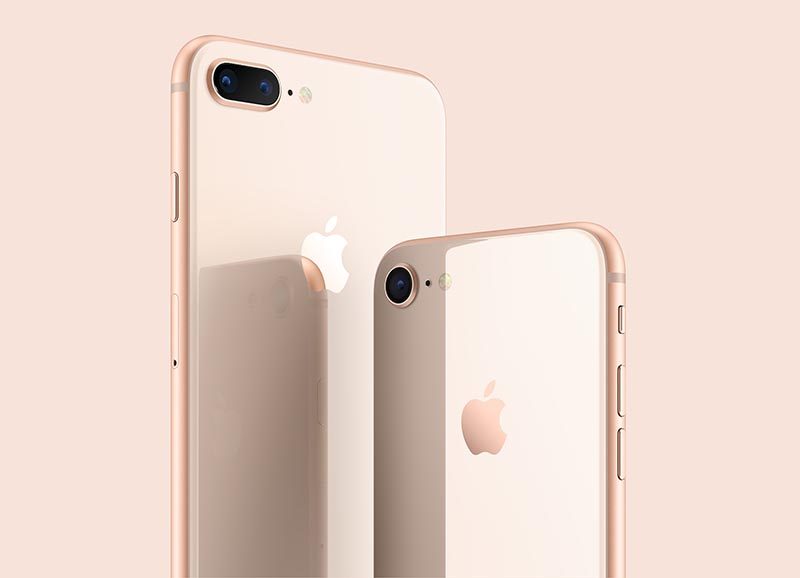
Rear Cameras: Both the iPhone 8 Plus and iPhone 7 Plus have 12-megapixel rear-facing dual cameras consisting of a telephoto lens with ƒ/2.8 aperture and a wide-angle lens with ƒ/1.8 aperture. iPhone 8 Plus has Portrait Lighting beta support, but all other rear camera tech specs are identical on paper.
However, Apple says the iPhone 8 Plus rear camera has been advanced with a larger, faster sensor, new color filter, and deeper pixels.
Size and Weight: iPhone 8 Plus is just slightly heavier at 7.13 ounces, compared to 6.63 ounces for the iPhone 7 Plus. iPhone 8 Plus is also marginally thicker—0.2mm—than iPhone 7 Plus, so some very tight cases may not fit.
iPhone 8 Plus vs. iPhone 7 Plus: What’s Different?
Glass-Backed Design: iPhone 8 Plus has an all-new glass-backed design, along with the same color-matching, 7000 Series aluminum edges and glass front as iPhone 7 Plus. Apple says the rear glass is the strongest glass in any smartphone, with a “50 percent deeper strengthening layer.”
Performance: iPhone 8 Plus has Apple’s latest A11 Bionic chip. It has two performance cores that are 25 percent faster, and four high-efficiency cores that are 70 percent faster, than the A10 chip in iPhone 7 Plus. The A11 chip also has a neural engine and a more powerful M11 motion coprocessor vs. M10.
Wireless Charging: iPhone 8 Plus supports wireless charging based on the Qi standard. The device can charge by being placed on an inductive charging pad, such as Apple’s upcoming AirPower mat or third-party options from accessory makers such as Mophie, Belkin, and Incipio.

Fast Charging: iPhone 8 Plus is “fast-charge capable,” which means the device can be charged to 50 percent battery life in 30 minutes using Apple’s 29W, 61W, or 87W USB-C Power Adapters, sold separately and included with any 12-inch MacBook and 2016 or later MacBook Pro models.
Fewer Colorways: iPhone 8 Plus comes in glass-backed Silver, Space Gray, and a new shade of Gold, while the iPhone 7 Plus remains available in aluminum-backed Black, Gold, Jet Black, Rose Gold, and Silver.
 iPhone 8 Plus on left and iPhone 7 Plus on right
Bluetooth: iPhone 8 Plus has Bluetooth 5.0, while iPhone 7 Plus has Bluetooth 4.2.
iPhone 8 Plus has 4K video recording at up to 60 FPS, while iPhone 7 Plus has 4K video recording at 30 FPS.
Conclusion
The key new features of the iPhone 8 Plus include a new glass-backed design, True Tone display, faster A11 Bionic chip, wireless charging, fast charging, 4K video recording at up to 60 FPS, and Bluetooth 5.0.
All in all, those features make the iPhone 8 Plus a considerable upgrade over the iPhone 7 Plus, which is perhaps why Apple skipped over calling it the iPhone 7s Plus. Alongside the iPhone X, it’s an option worth considering.
iPhone 8 and iPhone 8 Plus will be available to pre-order starting Friday, September 15 at 12:01 a.m. Pacific Time, with in-store availability in limited quantities starting Friday, September 22, in the first wave of launch countries.
iPhone 8 Plus starts at $799, which is $30 more expensive than the iPhone 7 Plus cost at launch. iPhone 7 Plus is now priced from $669.
Related Roundups: iPhone 7, iPhone 8, iPhone X
Discuss this article in our forums
 AIVAnet