


Logitech gives gamers a reason to like wireless mice
Ask dedicated gamers why they prefer wired mice over wireless and you’ll hear two familiar refrains: even a little wireless lag can be unacceptably high, and it’s no fun to plug in or swap batteries mid-match. Logitech may have found a way to kill both birds with one stone. It’s introducing a pair of technologies, Lightspeed and Powerplay, that theoretically make wireless gaming mice practical even if you depend on pinpoint accuracy. Lightspeed uses “end-to-end signal optimization” to cut latency down to a single millisecond, while the Powerplay system (above) relies on magnetic resonance to continuously charge your mouse. In short, it should perform about as well as a wired mouse without that pesky cord getting in the way.
The catch, as you might expect, is that you need both Powerplay ($100) and a compatible mouse to make this work. Thankfully, there are two mice to choose from: the G703 Lightspeed ($100) is the simpler, lighter model of the two, while the G903 Lightspeed ($150) adds a customizable button layout, a more ambidextrous design and mechanical elements that boost the button feel and responsiveness. All told, you’re looking at a minimum $200 to get Logitech’s ideal experience.
You’ll also have to wait a little while. Although both the G703 and G903 are shipping in June, Powerplay doesn’t arrive until August. If the one-two combo lives up to expectations, though, you’ll have the freedom of movement that a wireless mouse offers without worrying that you’ll miss a game-winning shot.
Follow all the latest news from E3 2017 here!
Source: Logitech (1), (2)
Alienware’s E3 is all about gaming monitors and accessories
It might surprise you to learn that Dell is one of the best monitor makers around. At E3 today, the company announced that it’s taking its display expertise deeper into the gaming arena with the launch of new Alienware monitors. They sport the brand’s more elaborate aesthetic, but most importantly, they pack in fast refresh rates and support for either NVIDA’s G-SYNC technology or AMD’s Freesync (which reduces image tearing and choppinesss). Additionally, Alienware is launching a new suite of accessories, and it’s bringing Intel and AMD’s most powerful CPUs to its flagship Area 51 desktop.
The Alienware 25 Gaming Monitors each sport 1080p screens, speedy 240Hz refresh rates and fast 1ms response times. And you’re in luck if you’re an AMD video card owner, as the Freesync version of the display retails for $500, compared to $700 for the NVIDIA G-SYNC variant. Otherwise, all of their hardware is the same, including a1000:1 contrast ratio and 400 nits of brightness. If you’re a fan of Alienware’s sharp designs, they’ll also fit in right alongside your existing hardware.
As for peripherals, there’s the Alienware Advanced Gaming Mouse ($50) and Elite Gaming Mouse ($90). They both feature on-the-fly DPI switching, allowing you to tweak performance for different types of games. The Elite Gaming Mouse adds some ergonomic enhancements, including the ability to change its weight. On the keyboard front, there’s the $90 Advanced Gaming Keyboard, which uses mechanical keys (with KaiHua brown switches). The $120 Pro Gaming Keyboard adds a volume roller, more elaborate RGB lighting and onboard memory for saving macro commands.
And if you’ve been holding out for more power in the Area 51 desktop, you’ll be able to equip it with AMD’s 16-core Threadripper CPU on July 27th. Support for Intel’s X-Series CPUs, including its 18-core behemoth, is coming soon.
While many of these announcements have been a longtime coming — Alienware fans have been asking for revamped monitors for years — they’re a sign that Dell is ready to devote even more to the gaming world. Finally, you’ll be able to build an Alienware system with completely matching components.
Follow all the latest news from E3 2017 here!
Watch Sony’s E3 2017 event live right here at 9PM ET
Alright PlayStation fans, it’s your turn. Sony’s E3 2017 event is going down at 9PM ET/6PM PT tonight and we’ll be there to bring you all of the news as it’s announced. If you want to watch live at home, Sony is streaming the festivities on both Twitch and YouTube. You’ll want to keep an eye on our liveblog as well. All of our insightful commentary will be there as announcements are made on stage, and we’re expecting details on The Last of Us Part 2, a new God of War, Days Gone, Spider-Man and a lot more. You can keep it locked here when the time comes as we’ve embedded the stream down below for easy access.
Follow all the latest news from E3 2017 here!
Watch live video from PlayStation on http://www.twitch.tv
‘PlayerUnknown’s Battlegrounds’ gets the polish it sorely needs
PlayerUnknown’s Battlegrounds is one of the hottest games in the PC multiplayer scene (it dominates Twitch streams), but calling it unfinished would be an understatement. There’s one map, limited movement options and many bugs — we’ve seen games all the buildings disappeared, for starters. However, the game is growing up quickly. In an interview with PC Gamer, Bluehole’s Brendan Greene (aka PlayerUnknown himself) has shown off previously teased upgrades to the last-one-standing shooter that should flesh out its experience.
The highlight is arguably the upgrade to movement. You’ll climb fences, vault over low walls, jump out of windows and even roll over a car like it’s a buddy cop movie. If you’ve ever tried to escape a house after someone tosses a grenade inside, you’ll know how important these additions could be. Also, there will finally be more than one map to play, with two more enroute (a desert map in Peru and another in the Adriatic). That’s not as bad as it sounds when the current play area is huge, but it should add some much-needed variety.
Other improvements? There will be a deeper weather system with clouds, fog and sunsets, and a bullpup assault rifle (the OTS Groza, shown above) that should spice up your gun battles if you find it in a supply drop. There are also plans to implement 3D replays that let you see just how you won chicken dinner in a given round. Greene hasn’t committed to firm release dates for any of these features, but it’s not surprising. He stresses that stability is the primary focus right now — anything else is just gravy.
Follow all the latest news from E3 2017 here!
Via: Polygon
Source: PC Gamer
App Highlight: YouTube Kids

The App
Developed by Google, YouTube Kids is an app that no doubt you have heard of as it takes the vast array of content on YouTube and ensures that only child friendly videos are delivered.
What it does
YouTube Kids allows you to confidently allow your child access to YouTube and have all the inappropriate material filtered out. Even some content that is flagged as child friendly on YouTube that makes its way through the filters that isn’t necessarily child friendly is removed from this app.
To make exploration easy, videos in the app are split into relevant categories such as: Shows, Music, Learning, Gaming and Explore. We also took out the complicated stuff to make an app even little ones can navigate — that means big buttons, easy scrolling, and instant full-screen. And when the whole family wants to enjoy their favorite videos together, everyone can watch on the big screen with Chromecast, game consoles, or smart TVs.
Why we like it
As someone who has kids that love YouTube I was horrified when they were browsing the normal YouTube app to find some of the recommendations that were popping up. With YouTube Kids I can confidently allow them to watch YouTube and not worry about foul language or inappropriate material. The interface is intuitive and simple to use and is split into categories to allow easy navigation.
How to get it
YouTube Kids is available from the Google Play Store. You can download it right here.
App Highlight: Photofy Content

The App
Developed by Photofy Inc, Photofy is one of the best photo editing apps on the Google Play Store. With over 5,000,000 installs, this is my no means a new app and is regularly updated with the latest update on June 1, 2017.
What it does
Photofy offers a vast array of photo editing features to take your pictures to that next level. From simple cropping tools to stickers and text art, Photofy has everything you need to edit your photo.


Photofy is a super-easy photo editing app for consumers and businesses that combines all the features you need in one app: Templates, Filters, Light Effects, Photo Mirror, Fit (Insta-size photos to square for easy sharing to Instagram), Text with 90+ free fonts, Meme editor, Collage maker with over 70+ free layouts, and the world’s largest collection of overlay content (50,000+ graphic elements). Create amazing photos, collages, and marketing content.
Why we like it
Photofy has some great collage features and awesome stickers and artwork that you can effortlessly apply to your photos. I also like the blur feature and given it’s all in one app makes editing extremely easy.
How to get it
Photofy is available from the Google Play Store. You can download it right here.
Mujjo’s Leather Case for the Samsung Galaxy S8 Plus is brilliant (review)

One of the best parts about owning an Apple iPhone is the third-party accessory market. A lot of people skip over Apple’s own accessories and grab a case off Amazon or from Best Buy, but when they do that, they’re missing out on what I consider the best case on the market, the Apple Leather Case for iPhone. I’ve been searching for a leather case that replicated the quality of that Apple case for years now, and I think I finally have.
For the last few weeks, the Mujjo Leather Case for my Samsung Galaxy S8 Plus has been strapped to my phone and hasn’t come off*. The biggest factors for me when choosing a case are the quality of the materials, how bulky it is, and how much protection it adds. Mujjo’s case ticks all the boxes for me.
(*I listen to music while I shower so I leave the case downstairs to preserve the long-term life of it)
The Leather Case from Mujjo is just that, leather. A lot of cases claim to be leather or “vegan” leather, but they’re really just leather substitutes or a small bit of leather with substitutes mixed in. That’s not the case here. This case is full-grain leather that goes through a tanning processes. According to Mujjo, each case is treated with aniline oils to enrich color tones.
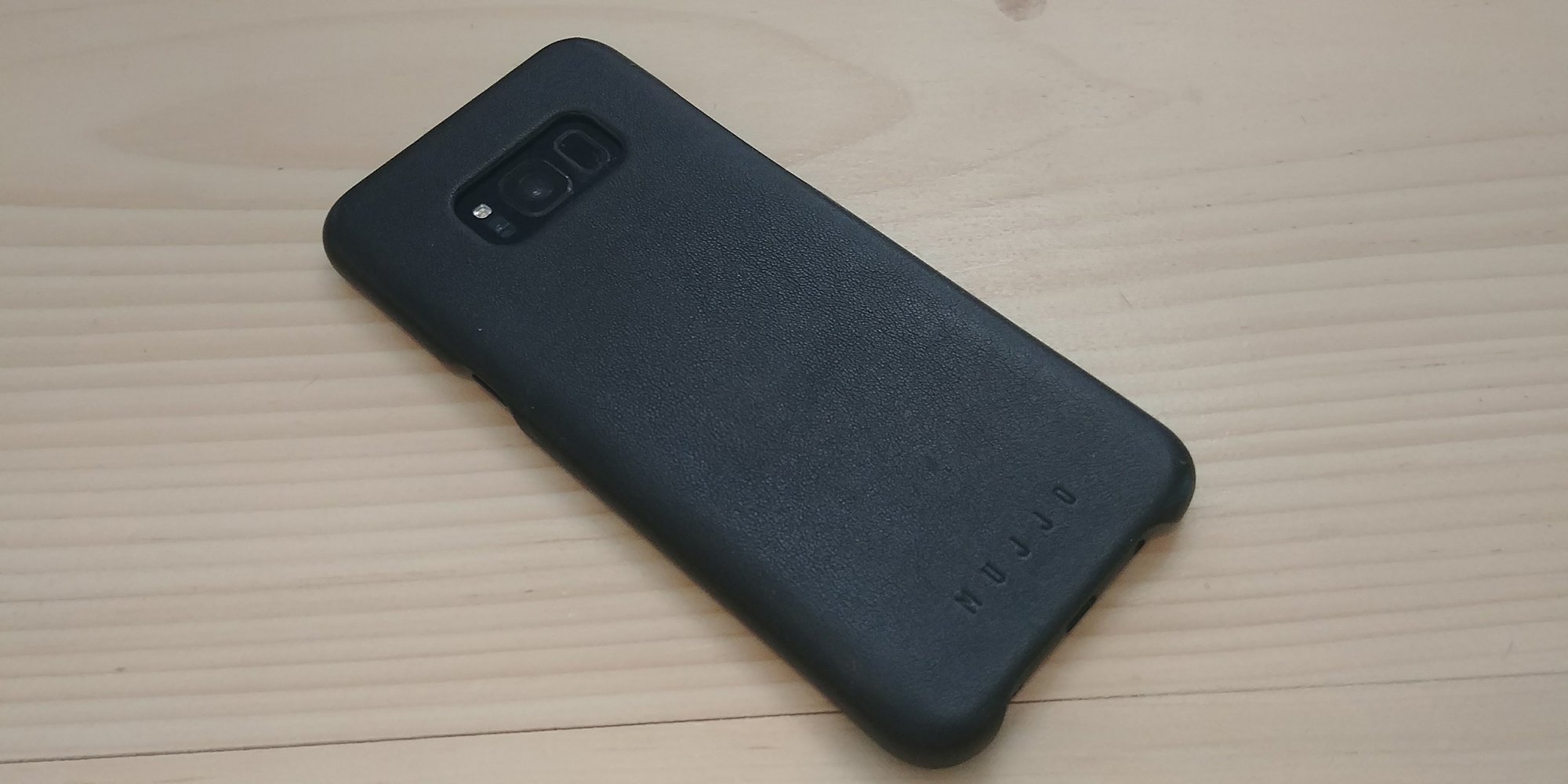 And truthfully, it feels fantastic in the hand. It’s been a few years since I’ve held an Apple Leather Case but I remember them being a bit more of a matte to the shiny Mujjo case. The Mujjo case is a little more slippery, but not to the point of being difficult to hold onto, and a little shinier but they’re both look and feel great in their own right.
In addition to feeling great because of the materials, it feels great to hold this case because it’s just so thin. Mujjo claims the case is 1mm thick, and while I don’t have tools precise enough to give me a reliable measurement, I don’t doubt the veracity of that statement. I’ve run through a million cases in my time and it’s one of the thinnest I’ve ever used for longer than a day or two. It’s just north of those snap-on cases that promise nothing but scratch resistance because they’re so thin that there’s no possible way they could protect against falls.
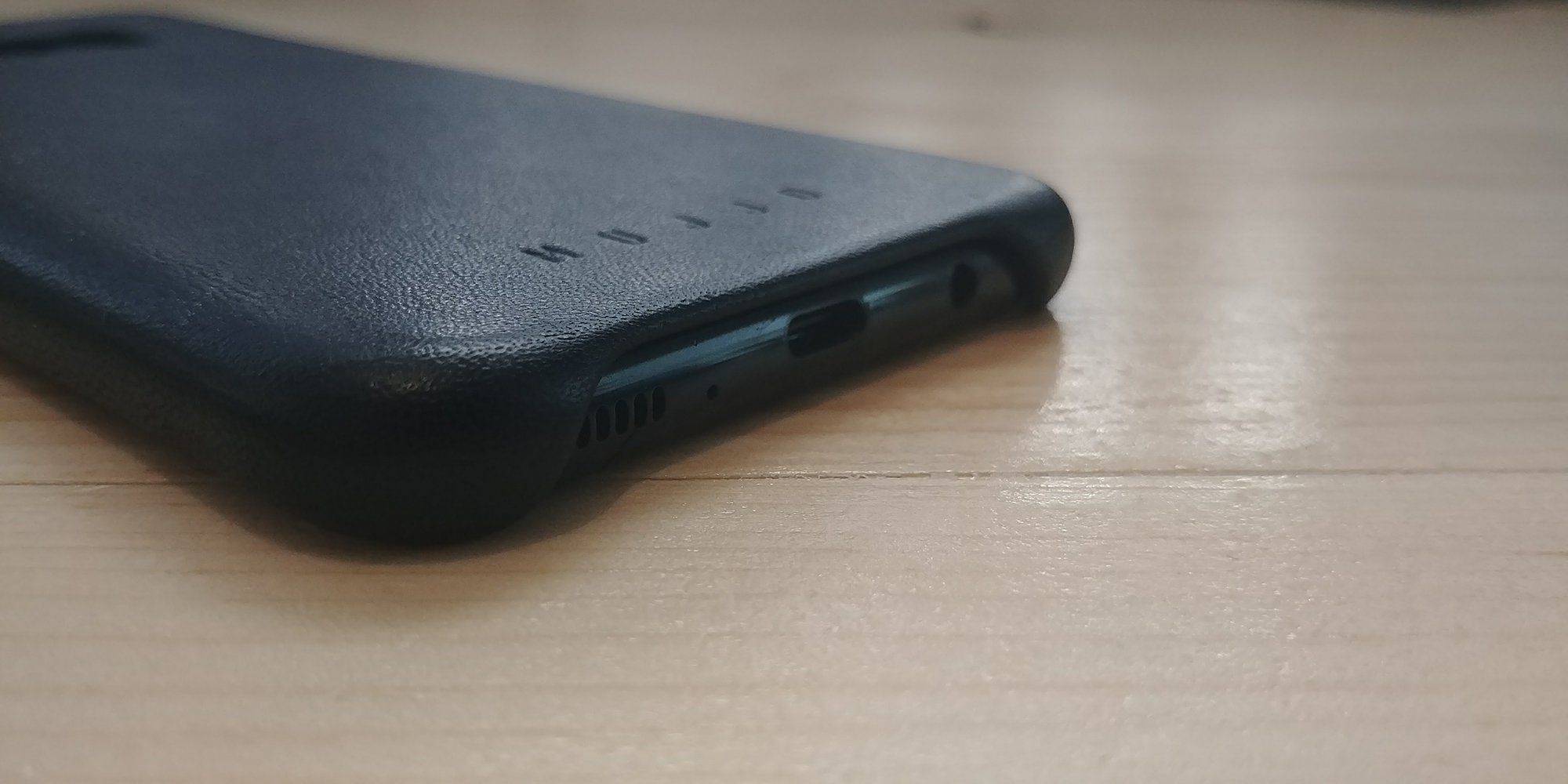 The cutouts wrap around the ports and buttons in an elegant way that shows real craftsmanship. One area where you can tell that Mujjo really knows what they’re doing is the camera cutout. Instead of using a reflective plastic border around the edge of the cutout, Mujjo kept the leather wrap here. I love this for a couple reasons, the first of which is that there’s nothing reflective to bounce the camera flash back into the lens. Secondly, the entire phone is black and it would really destroy the experience for me to have another accent color on the case.
 If you’re looking for OtterBox level protection, this obviously isn’t the case for you. But, the case provides plenty of protection for your every day falls. The Galaxy S8 was recently ranked as the most fragile phone ever, and while I hate covering up beautiful phones with cases, you’d be silly to leave your $850 investment unprotected.
Case makers have been struggling a bit trying to get the height of the sides of their cases right due to the curved screen, but Mujjo did pretty well here. I actually find it’s a lot easier to find where to swipe in from the sides of the phone with a case on as it kind of guides my hands. It also helps me find the fingerprint sensor too, which is a big plus since it’s in such a silly place on the Galaxy S8 and Galaxy S8 Plus.
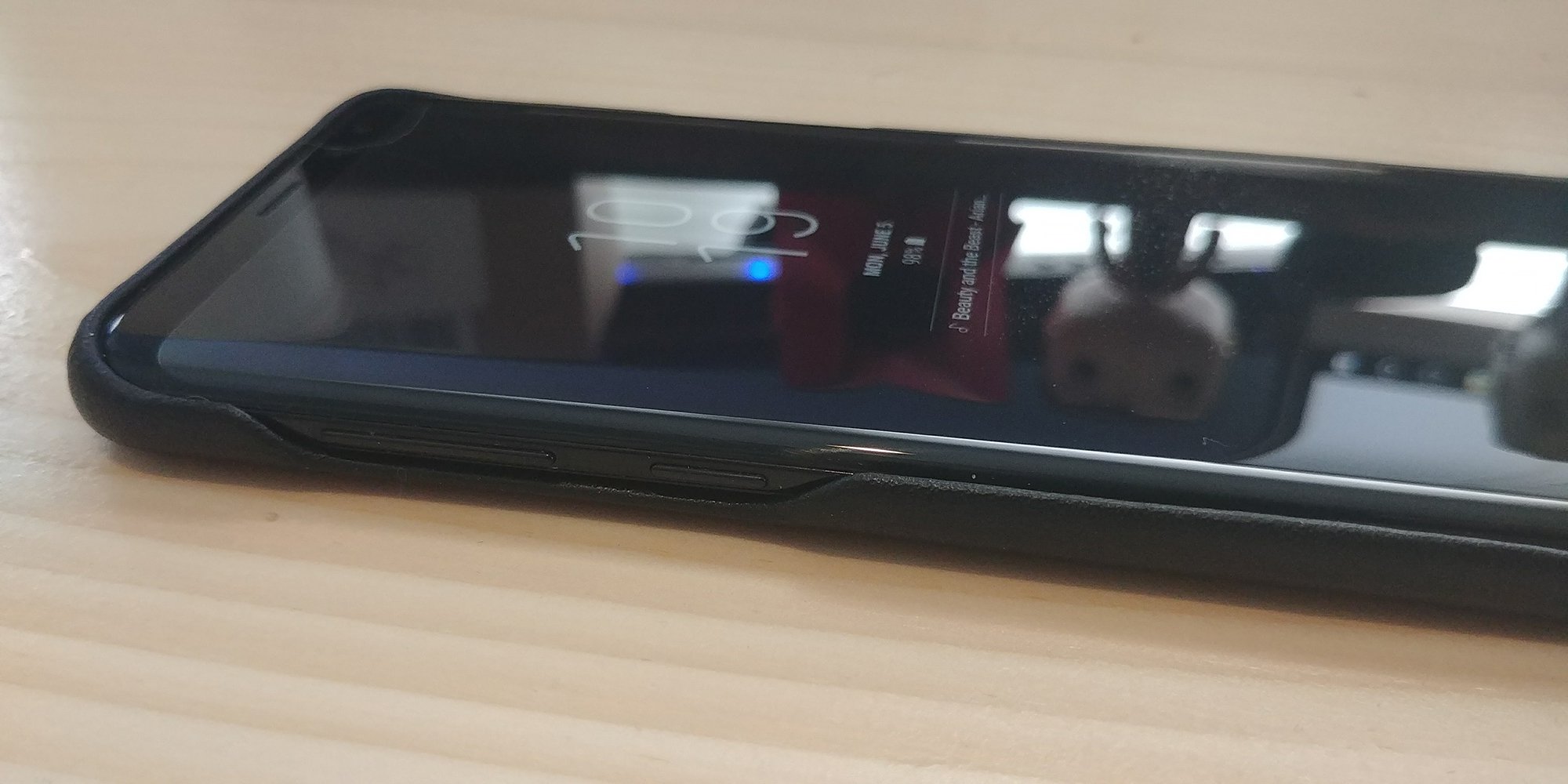 When I do reviews, I try as hard as possible to be honest about the negatives I’m seeing with products. Nothing can ever be perfect. But, I genuinely don’t have any negatives about the Mujjo Leather Case. Sure, it’s won’t be everyone’s cup of tea, but that comes down to personal preference rather than any design or material choices made by Mujjo. Hell, you can even charge your phone wirelessly with it on. Not many cases will allow you to do that.
If you’re interested in picking one up, you can head over to Mujjo’s site and grab one. They also offer them in Saddle Tan too if you don’t like the black.
HTC U11 vs Samsung Galaxy S8
For a few years now, HTC has played second fiddle to the likes of Samsung, LG, and even some newer players in the flagship smartphone game. But if there was ever a time to root for the underdog, 2017 might be the year for it.
We’ve certainly been impressed with HTC’s latest and greatest, but how does it stack up against one of the best smartphones on the market? That’s a question many are asking, and one that we’ll try to answer right now. Join us as we take a look at the HTC U11 vs the Samsung Galaxy S8!
Related Articles
HTC U11 review
1 week ago 
Samsung Galaxy S8 and Galaxy S8 Plus review: Almost to In…
April 18, 2017
Design

Though the S8’s curves are much more prominent than the U11’s, both are very comfortable to hold
While the Samsung Galaxy S8 and HTC U11 feature drastically different designs, both are made from the same materials: glass and metal. Like most other top-tier smartphones on the market, the U11 and S8 have glass panels on the front and back, and both feature curves around the edges that help with handling. Though the S8’s curves are much more prominent than the U11’s, both are very comfortable to hold.
There is a notable downside to those pretty glass panels on the back, though; both smartphones are huge fingerprint magnets, and it will take a bit of work to keep the devices smudge free and looking pristine.

In my opinion, the U11 is the more eye catching device of the two, at least when looking at them from the back. The mirror-like finish on the HTC device – or “liquid glass surface” as the company calls it – is incredibly unique. The way the color shifts and changes depending on the angle is a stunning effect, and will definitely turn some heads.
Display

Turn to the front and it’s a completely different story. The Galaxy S8 is the clear winner here, as it features a screen that’s practically edge to edge with super thin bezels. The top and bottom bezels of the device are very thin too. The Quad HD+ Super AMOLED display is gorgeous, provides punchy colors, as well as fantastic brightness and vibrancy. It really is one of the best looking displays on a smartphone to date, and is easily one of the biggest draws to the Galaxy S8.
The U11’s front panel seems a bit dated at this point
That’s not to say the U11 is bad by any stretch of the imagination, though. In fact, the U11’s 5.5-inch Quad HD Super LCD 5 display is sharp, crisp, has excellent viewing angles, and vibrant colors. While the screen itself is of excellent quality, the whole front of the phone seems a little dated at this point. The U11’s front side just seems much chunkier than what you’d find on the S8 or even the LG G6.
See also:
Galaxy S8 vs LG G6: Which is right for YOU?
May 13, 2017
One of the main differences between the S8 and U11’s displays is that they both have different aspect ratios. The S8’s 5.8-inch screen has an aspect ratio of 18.5:9, as opposed to the U11’s “normal” 16:9 ratio. Samsung managed to squeeze a taller display in a much more compact body, while the U11’s screen is a bit wider. This means you won’t run into any awkward black bars when playing games or watching YouTube videos on the U11, since 16:9 is very much the standard aspect ratio for most content for the time being.
Performance and hardware

Both smartphones are powered by the Qualcomm Snapdragon 835 processor backed by 4 GB of RAM, which means performance, unsurprisingly, isn’t an issue with either. Both devices are fast and snappy, and everything runs as smoothly as expected. Both phones also feature dust and water resistance, with an IP68 rating for the Galaxy S8 and an IP67 rating for the U11.
Unsurprisingly, performance isn’t an issue with either device
The Galaxy S8 may have the better display, but that isn’t enough to make it the superior smartphone. In fact, there are a few things where the U11 has a leg up, such as the fingerprint sensor. The scanner on the U11 is not only at a more convenient location (directly below the display), but it has been much faster and more reliable in my experience. The Galaxy S8 does feature alternate methods for unlocking the phone though, such as facial recognition and iris scanning, but that still doesn’t make up for its awkwardly positioned fingerprint scanner to the right of the camera sensor.

If you appreciate the presence of a headphone jack on your smartphone, the Galaxy S8 is the way to go. That said, the U11 offers a better audio experience with both the external speaker setup and through headphones. The weak, hollow sounding bottom-mounted speaker on the Galaxy S8 doesn’t nearly compare to the U11. The HTC device not only features a dual tweeter and woofer speaker combo, but also leverages the entire body of the phone as an acoustic chamber to provide a fuller, louder sound.

The USonic earphones that are available with the U11 sound fantastic and feature active noise cancellation, though you can also use your own wired headphones with the included 3.5 mm to USB Type-C adapter. What’s more, this adapter has a built-in DAC, so any pair of headphones will sound much better on the U11 than they would on the Galaxy S8. You should be able to drive much higher impedance headphones, too.

Another advantage the U11 has over the Galaxy S8 is when it comes to battery life. Despite both devices coming with 3,000 mAh batteries, I found it much easier to get through a full day of use with the U11. The upside to the Galaxy S8 is that it provides wireless charging capabilities, while the U11 does not. That might be advantageous for some, but if overall battery life is the more important factor, the U11 will be the better option for you.
Camera

In the past, HTC’s flagships have fallen a tad short in the camera department compared to their Samsung counterparts, but the great news is that things are finally starting to even out. In fact, the U11 has the higher DxOMark score of the two, if you’re into that sort of thing.
Both the S8 and U11’s cameras are just incredible when it comes to overall image quality. The Samsung device does crank up the colors, saturation, and contrast, which most people (including myself) don’t really mind. But if you prefer a more natural, lifelike image, the U11 does a better job.
HTC U11 camera samples

Samsung Galaxy S8 camera samples

Both cameras are packed with features, but Samsung’s pulls out ahead in this area
Both cameras are packed with features, but Samsung’s pulls out ahead in this area. Samsung decided to have a little fun this time around with the inclusion of Snapchat-style filters that we think a lot of people will really like, and the front-facing camera now features autofocus to help you take better selfies. On the other hand, the U11 is the winner in the video recording section. The HTC phone is capable of capturing 3D audio and features 5-axis image stabilization to help you record smoother-looking footage.
Software

Even though both of these smartphones are running the latest version of Android, 7.1.1 Nougat, the software experiences couldn’t be more different. Over the years I’ve preferred HTC’s Sense Android skin over Samsung’s TouchWiz, but it’s a toss-up this time around. Both software packages are good in their own ways.
Over the years I’ve preferred HTC’s Sense Android skin over Samsung’s TouchWiz, but it’s a toss-up this time around
Samsung has done a fantastic job at improving its software over the past few years. It now has a clean, minimalist look to it, with the icons, text, and colors all featuring a much more refined aesthetic. There are a bunch of other nice little touches in Samsung’s launcher, such as the unique infinite wallpapers and the ability to swipe up or down from anywhere on the home screen to access the app drawer.


Samsung’s software isn’t perfect though. The company still finds it necessary to include a ton of extra Samsung apps that basically duplicate what Google already offers. HTC addressed this problem last year with the 10, so thankfully you won’t see many duplicate apps on the U11. However, as well as HTC has done in this area, HTC’s Sense overlay could use a bit of a revamp. It hasn’t changed all that much over the last year or so, and it’s starting to feel a bit dated.
See also:
HTC 10 review
April 14, 2016
AI assistants have been growing in popularity as of late, and these two devices both come with more than one on board. Not only do both smartphones include the Google Assistant, Samsung’s device has Bixby while the U11 has HTC’s new Sense Companion. It’s nice to see competition in this space, but neither voice assistant is doing anything to differentiate itself from what Google already does for you.
Bixby feels very half baked at the moment, and the Sense Companion can’t be accessed via voice control yet. What’s more, the HTC phone will get a third voice assistant, Amazon Alexa, in the near future.
Oh, and one last thing – HTC also included a crazy, super useful new way to launch your most used applications. It’s called Edge Sense, and it lets you program your favorite apps to open by squeezing the sides of the U11. Check out the video below for a better look at what it can do:

Specifications
| Display | 5.5-inch Super LCD 5 2560 x 1440 resolution 534 ppi 16:9 aspect ratio Gorilla Glass 5 |
5.8-inch Quad HD+ Super AMOLED 2960 x 1440 resolution 570 ppi 18.5:9 aspect ratio Gorilla Glass 5 |
| Processor | 2.45 GHz octa-core Qualcomm Snapdragon 835 | U.S.: 64-bit octa-core (2.35GHz Quad + 1.9GHz Quad) Qualcomm Snapdragon 835
Global: 64-bit octa-core (2.3GHz Quad + 1.7GHz Quad) Samsung Exynos 8895 |
| GPU | Adreno 540 | Adreno 540 |
| RAM | 4/6 GB (depending on market) | 4 GB |
| Storage | 64/128 GB (depending on market) | 64 GB |
| MicroSD | Yes, up to 256 GB | Yes, up to 256 GB |
| Camera | Rear: 12 MP (HTC UltraPixel 3 with 1.4μm pixel) with ƒ/1.7 aperture OIS Front: 16 MP with ƒ/2.0 aperture, 1080p video recording |
Rear: 12 MP Dual Pixel sensor, ƒ/1.7 aperture, OIS
Front: 8 MP sensor, ƒ/1.7 aperture |
| Water resistance | IP67 | IP68 |
| Connectivity | Wi-Fi 802.11 a/b/g/n/ac Bluetooth 4.2 GPS + GLONASS NFC USB Type-C (USB 3.1) |
Wi-Fi 802.11 a/b/g/n/ac Bluetooth 5.0 GPS + GLONASS NFC USB Type-C (USB 3.1) |
| Battery | 3,000 mAh Non-removable |
3,000 mAh Non-removable |
| Software | Android 7.1.1 Nougat | Android 7.1.1 Nougat |
| Dimensions and weight | 153.9 x 75.9 x 7.9 mm 169 g |
148.9 x 68.1 x 8 mm 155 g |
Gallery

Which is right for you?
In terms of pricing, the HTC U11 undercuts the Galaxy S8 by almost $100 in the United States. You can buy the U11 from HTC’s website for $649, while the unlocked Galaxy S8 goes for $724.99 at Samsung’s website. However, if you need a carrier’s help to finance one of these phones, the S8 is your best bet. The Galaxy S8 is available at all major carriers in the U.S., while the U11 is only available through Sprint.
Buy the HTC U11 from Amazon
Buy the Galaxy S8 from Best Buy
It’s been a long time since Samsung and HTC have gone toe to toe in the flagship space. If I had to pick, it would be the Galaxy S8 but only by the narrowest of margins. While the U11 does do a few things better especially in terms of audio, I absolutely love the display of the Galaxy S8 and the way the device feels in the hand, which always ends up pulling me back to this phone.
Now it’s time to hear from you. Which is right for you, the Galaxy S8/S8 Plus or HTC U11? Cast your vote in the poll below, and speak up in the comments if there’s something you’d like to add.
Next:
Best Android phones: our picks, plus a giveaway
1 week ago
Look out Venmo! Big banks are coming for you with mobile payment service Zelle
Why it matters to you
Regular users of Venmo and other mobile payment services will soon have another option in Zelle, which is backed by major financial institutions.
Update: Zelle is finally here. The Venmo competitor will start rolling out to customers in the U.S. over the course of June.
Well, it certainly took them long enough, but it looks like the largest financial institutions of the United States are finally up to the challenge of challenging Venmo, PayPal, and the other mobile payment services that have long made direct deposits or check writing between friends a thing of the past.
In October, a number of leading banks, regional lenders, and credit unions, including behemoths like JPMorgan Chase, Bank of America, and Wells Fargo, joined forces and unveiled Zelle, a money-transferring app of their own. And now, Zelle will be rolling out to customers in the U.S. over the course of the next month.
Zelle hopes that it will be able to outpace other payment platforms with its speed. While most transfers made on Venmo or Square Cash take hours or even days to complete (at least, to move money to your actual bank account), Zelle promises to be able to move funds in just minutes.
The app is built on a bank-owned payments network that includes five of the biggest banks in the U.S. (and other financial institutions as well). Using Zelle, customers should be able to send and receive payments to chosen recipients instantaneously … which, of course, sounds very familiar at this point.
The cachet of being associated with nearly 20 of the largest banks in the U.S. may be reason enough for some users to switch. Many of these institutions are now featuring the Zelle name on both their mobile apps and websites.
Big banks already have a built-in user base, one they hope Zelle will further connect. Of course, some banks were a bit further ahead of the game, and had previously established their own digital payment services. Chase, for example, has JPMorgan’s Quick Pay, but as Fortune reports, the plan is to “use the Zelle name prominently alongside their established names as Zelle catches on.”
“Fragmentation has been frustrating for consumers. Inconsistent experiences, have made it difficult to send and receive money between banks,” said Paul Finch, CEO, Early Warning Services, in a statement about Zelle’s launch. “Zelle unites the financial community behind a single, real-time P2P payments experience for millions of consumers. Together, we are removing friction from finance, allowing money to move seamlessly between accounts in minutes. This revolution in money movement will create for consumers a viable alternative to checks and cash.”
You can check out a full list of Zelle’s partner institutions here.
Google just made its Android keyboard even smarter than before
Why it matters to you
Gboard’s newest updates include phrase suggestions, emoji drawings, and more.
If you’ve ever looked at your smartphone’s keyboard and thought to yourself, “This is hard,” Google is here to help. On Monday, June 12, the tech giant announced that Gboard for Android is getting an upgrade. Not only is Google continuing in its efforts to improve typing quality with machine intelligence, it’s also introducing “new ways to get creative and cut down text time.”
So what can you expect? First off, in the emoji search box of Gboard, you can now tap the emoji handwriting icon and sketch out your version of your favorite emoji — from there, Google will recognize what you were trying to convey, and return results for your emoji of choice. If nothing else, it could be a good way to test your artistic skills, and see just how true to form you can be while drawing on a smartphone.
To help you be more efficient at texting, Gboard also now features phrase suggestions that can predict what your next line in a text conversation may be. If, for example, you start typing “looking forward,” Gboard will suggest that you complete that phrase with “to seeing” or “to it” as you type. Currently, this functionality is supported only in English, but Google says that it will be rolling out to more languages in the near future. We should point out, of course, that Apple users already have this function in iMessages.
Google has also made improvements to searching in your keyboard — you’ll now be able to check out multiple results at once. Moreover, Google notes, “on a card, you can click through to go to Maps, call a business, or watch a YouTube video. Just press the G or arrow -> magnifying glass in the suggestion strip to start searching.”
Finally, the latest Gboard update supports 200 languages, and the company is adding suggestions and gesture typing for Azerbaijani (Iran), Dhivehi, French (Belgium), Hawaiian, Maori and Samoan, and simple keyboards. To test all these new features out, head on over to the Google Play Store and be sure that you’re running version 6.3 of Gboard.

