


T-Mobile rolls out new prepaid plans and free MLB streaming
Why it matters to you
T-Mobile’s new prepaid plans are cheap, and its free MLB.tv streaming benefit and Apple Care+ discount aren’t bad deals, either.
You can’t stop the inevitable march of progress. In T-Mobile’s case, that means new prepaid plans and subscriber benefits.
This week, the self-coined “Un-carrier” announced revamped prepaid offerings with unlimited talk, text, and a bucket of data: Simply Prepaid and One Prepaid.
The carrier’s Simply Prepaid plans cost $45 or $55 for 4GB and 6GB of data, respectively, and includes many of the same features available to T-Mobile’s postpaid customers. Wi-Fi calling is included, as is a mobile hot spot and unlimited music streaming.
More: T-Mobile takes the wraps off its new Un-Carrier Next Service
The $75 One Prepaid offers all the benefits of Simply Prepaid with the addition of on-device 4G LTE, coverage in Mexico and Canada, and 200MB of roaming data, but with caveats. Hot spot speeds are limited to 3G, and the resolution of streaming video is downgraded to “DVD quality” (HD video passes are available for $3 each).
Prepaid plans aren’t the only things T-Mobile rolled out this week. Postpaid subscribers to the carrier’s Jump plan get Apple+ coverage for the discounted rate of $12 a month per device. That’s in addition to Jump’s other highlights: The freedom to upgrade your smartphone once you’ve paid 50 percent of the previous model’s cost, and insurance for loss, theft, and accidental damage.
Apple+ coverage, normally $130, includes 24/7 priority access to “award-winning” technical support via chat or phone, hardware service with genuine Apple parts, a discounted $29 service fee for iPhone screen damage, $0 for battery maintenance, and an Apple-certified repair or replacement at Apple Stores and Apple Authorized Service Providers.
More: T-Mobile covers nearly as many people as Verizon and will commit to 5G in the future
To cap off the revamped plans, T-Mobile announced a new subscriber benefit on Tuesday: A free year of MLB.tv baseball streaming. All prepaid, postpaid, and business subscribers get unlimited access to the service, which normally runs $113 a year (and an additional $20 for MLB at Bat mobile phone streaming).
Customers have until 4:59 a.m. ET on April 5 to sign up for the promotion. Once registered, they’ll need to sign into to the MLB.tv app or website before 4:59 a.m. ET on April 11 to retain the free subscription. Free access expires on February 28, 2018.
In addition to the MLB.tv subscription, T-Mobile’s gifting a free Vudu baseball movie rental, a $2 Dunkin’ Donuts gift card, and 30 percent off Groupon Local purchases (up to $40).
More: T-Mobile’s new One plan, with no hidden fees, is rolling out now
T-Mobile has been adding steadily to the pile of benefits its customers already enjoy.
Mobile Without Borders extended T-Mobile coverage to parts of Mexico and Canada. Binge On and Music Freedom provided access to a number of streaming video and music services that don’t count against data caps. And in December, T-Mobile announced Digits, a new service that provides a single phone number that works across smartphones, tablets, and even wearables like smartphones.
These moves come on the heels of a range of network improvements. In December, T-Mobile announced that it covers 313 million people in the U.S. — one million shy of Verizon’s coverage — and that its current generation of cellular can now achieve a faster theoretical speed (1Gbps) than every other major carrier in the U.S.
Moto X 2017: News and rumors
Why it matters to you
Lenovo has offered solid budget and midrange options under the Moto brand as of late, and hopefully the Moto X can continue that trend.
It looks like the much-loved and somewhat iconic Moto X may not be dead just yet. Once known as Motorola’s flagship, the Moto X could soon be reborn as a more midrange phone now that the Moto Z has taken over as the brand’s top-tier device.
Here’s everything we think we know about the Moto X’s return.
More: Lenovo Moto G5 Plus review
Design
Late last year, a new phone dubbed the “Moto X 2017” was first leaked online by prolific rumor purveyor @OnLeaks. Renders show a curved, chamfered handset somewhat resembling Lenovo’s Moto Z. Unlike the Moto Z, this device appeared to have a screen measuring 5.2 inches in length rather than the traditional 5.5 inches. It also retained a 3.5mm audio jack.
TechDroider followed that up with a series of photos showing a similar phone that very heavily resembled the Moto Z — only without the pins for Moto Mod functionality at the back. Moto Mods are something that Lenovo has said will remain consistent in top-tier Moto phones for the foreseeable future, so the Moto X wasn’t expected to support them anyway.


Most recently, a user on Google+ posted images of a device claimed to be the new Moto X. If it is, these are the clearest shots we’ve seen yet of Lenovo’s new midrange handset. While the exterior falls in line with prior reports, the one critical difference is the dual-camera design at the back. The phone in TechDroider’s leaks had only a single shooter, but these photos show two side by side, along with a flash underneath that has since been fully integrated into the lower portion of the circular housing.
In general, the device seems to be a mishmash of other Moto phones. For example, it has the same metal chassis that can be seen on the Moto M, as well as a front-mounted fingerprint sensor just like the one found on the new Moto G5. The camera also sports a similar design to that of the Moto Z.
Specs
That Google+ leak included a photo of the device’s recovery mode, which gives us a basic idea of the hardware that could power Motorola’s upcoming midrange offering. According to the image, we’re looking at a Qualcomm MSM8953 — in other words, a Snapdragon 625 — paired with 3GB of RAM and 32GB of flash storage.
For reference, the Moto G5 Plus that just launched in the United States features the same processor, alongside 2GB of RAM and 32GB of storage in its base-level, $230 configuration. Spend $50 more, and the G5 Plus can actually be had with double the memory and storage, which would put it firmly above the specs listed here, despite purportedly being Lenovo’s “budget” smartphone.
At this time, we still have no idea on a timetable for release. It’s likely we’ll see continue to see images and specs leaked between now and its eventual launch, so stay tuned for more news.
Article originally published in November by Christian de Looper. Kyle Wiggers contributed to this report. Updated on 03-28-2017 by Adam Ismail: Added Google+ leaked photos and specs.
Lenovo boosts the VR capability of its ThinkStation P-Series with latest refresh
Why it matters to you
Designers and content creators looking for a new workstation that supports high-quality virtual reality now have a new option with Lenovo’s latest ThinkStation refresh.
Lenovo is expanding its family of workstations capable of delivering high-quality virtual reality with the launch of its new ThinkStation P320 solution. Revealed during the Develop3D Live event on March 28, it’s actually a refresh of the ThinkStation P310 tower and small form factor desktop workstations. The internals have been updated with the latest Intel Xeon processors, the most recent Nvidia Quadro graphics cards, and more.
Here are the hardware details of the new P320 refresh:
Form factors:
Tower and Small Form Factor
Processor options:
Intel Xeon E3-1200 v6
Intel Seventh-Generation Core i3/i5/i7
Operating system:
Windows 10 Pro 64-bit
Windows 7 Pro 64-bit
Ubuntu
Red Hat Enterprise Linux
Graphics (SFF):
Up to 2x Nvidia Quadro P1000 cards
Graphics (Tower):
Up to 1x Nvidia Quadro P4000 card
Memory:
Up to 64GB DDR4 @ 2,400MHz (four slots)
Storage Types:
3.5” SATA 3 7,200RPM HDD up to 4TB
3.5” SATA 3 7,200RPM Hybrid up to 2TB
2.5” SATA 3 SSD up to 2TB
M.2 PCIe SSD up to 1TB
Storage capacity (Tower):
4x 3.5” HDD or Hybrid (16TB max)
4x 2.5” SSD (8TB max)
2x M.2 PCIe SSD (2TB max)
Storage capacity (SFF):
2x 3.5” HDD or Hybrid (8TB max)
3x 2.5” SSD (6TB max)
2x M.2 PCIe SSD (2TB max)
Power supply:
210 watts (85-percent efficient)
250 watts (85 percent efficient)
400 watts (92 percent efficient)
Connectivity:
Wireless AC (Intel 8265)
Bluetooth 4.0
PCI / PCIe Slots:
1x PCI3 x16
1x PCI x4 (x16 mechanical)
2x PCIe x1
Ports (front):
2x USB 3.1 Gen1 (5Gbps)
1x Microphone jack
1x Headphone jack
1x 29-in-1 SD card reader (optional)
1x 9-in-1 SD card reader (optional)
1x eSATA port
1x 1394 IEEE Firewire port
Ports (back):
4x USB 3.1 Gen1 (5Gbps)
2x USB 2.0
1x Serial (optional)
1x VGA
2x DisplayPort
1x Ethernet
1x Audio line-in
1x Audio line-out
1x Microphone line-in
Flex module options (supports up to 4):
Thunderbolt 3 Type-C
9.0mm Slim optical drive
SD card reader
1394 IEEE Firewire
eSATA
Tower dimensions:
6.9 x 16.8 x 14.8 inches
Small Form Factor dimensions:
4.0 x 15.5 x 13.3 inches
As with the older ThinkStation P310 models, owners can customize the P320 refresh before making the final purchase. Unfortunately, Lenovo didn’t provide specific seventh-generation Intel Core CPU information at the time of this publication. However, the company did produce a rather lengthy list of preloaded software for Windows 10 and Windows 7, so don’t expect a clean, bloat-free “Signature Edition” install right out of the box.
More: Lenovo’s Yoga 720 packs gaming-grade graphics into a 2-in-1
“Offering Pro VR certification gives those working in industries where the workstation is already recommended a more accessible avenue into VR,” Lenovo said Tuesday. “This certification gives ThinkStation P320 users an opportunity to add virtual reality more easily into their workflow without requiring an initial high-end hardware and software investment.”
Lenovo didn’t provide pricing, but as a point of reference, the ThinkStation P310 tower workstation has a starting price of $719 and is based on the Core i3-6100, i5-6500, and i7-6700 processors. The small form factor version has the same starting price, but offers a much larger processor selection. Expect the same customization capabilities with Lenovo’s new P320 workstation refresh.
Drones could use an invisible license plate to track unauthorized flights
Why it matters to you
Drone safety has long been a hot topic but DJI’s approach suggests offering a way for authorities to identify a drone’s owner without giving pilot data out to a disgruntled neighbor.
Drones could someday have a sort of invisible license plate that allows local authorities to determine who the unmanned aerial system (UAS) belongs too. Pitched by Chinese drone manufacturer DJI, the concept for an electronic identification system for small drones is just one of many ideas as the Federal Aviation Administration looks into potential ways of identifying drone users.
DJI suggests drones should use the radio equipment already on board most systems to transmit a unique registration number. That number would identify the drone owner to law enforcement in the event of a complaint or flight through a restricted area. Areas with restricted drone flight, such as airports, could use radio equipment to read that number and report the ID number to the authorities. Since identifying the drone would require access to a database linking each number with a name, the invisible license plate approach would be less likely to be abused outside of law enforcement, DJI suggests.
More: DJI study says drones are already saving over one life a week
“The best solution is usually the simplest,” DJI wrote on Monday. “The focus of the primary method for remote identification should be on a way for anyone concerned about a drone flight in close proximity to report an identifier number to the authorities, who would then have the tools to investigate the complaint without infringing on operator privacy.”
The paper was submitted to the Association for Unmanned Vehicle Systems International, a group collecting perspectives on possible identification systems. In 2016, Congress asked the FAA to come up with a system for identifying drone operators, with the deadline still two years out.
DJI says their approach is simple, yet still maintains the privacy of the drone operator. The company says drones are often used in cases with legitimate needs for confidentiality, such as an energy company surveying potential locations for new wind farms. With legal drones often coming under gunfire and their pilots often on the receiving end of threats, DJI feels the identification system should not disclose the owner’s identity to the general public.
The drone manufacturer proposes the invisible license plate instead of a transmission system that attempts to track all the airborne drones in real time. Besides just being a very complex way to monitor drones, the idea would also expose details about the drone to more than just the local authorities.
“No other technology is subject to mandatory industry-wide tracking and recording of its use, and we strongly urge against making UAS the first such technology,” the white paper reads. “The case for such an Orwellian model has not been made. A networked system provides more information than needed, to people who don’t require it, and exposes confidential business information in the process.”
The radio frequency “license plate” instead allows authorities to read the ID number (even in scenarios when a printed number would be too difficult to read on a small, quick drone), without disclosing information about legally flying drones to the general public.
Forget turning photos into paintings, this software copies another photo’s style
Why it matters to you
Photo edits could be getting faster with artificial intelligence, thanks to research from Adobe and Cornell that copies the style of one photograph and applies it to another.
Turning a photo into a painting is now simple thanks to artificially intelligent apps like Prisma, but research from Adobe and Cornell University suggests that style transfers could work from photo to photo. The research team developed a deep photo style transfer program that used a reference image to adjust the original image, mimicking the reference photo’s lighting and colors — even the weather, time of day, and season.
The research, published on March 22, builds on the artificial intelligence behind applications like Prisma, but instead aims to apply photorealistic effects instead of making that photo look like a certain painting style. Previous efforts to conduct automatic style transfers from photo to photo were either inconsistent in style matches or unable to handle a variety of different photos without obvious distortions. Photo-to-photo style transfers often resulted in distorted lines and perspectives, so instead the team from Adobe and Cornell developed a system that only considers color and lighting.
More: Adobe is working on software to cut out the background from any photo
The new method, along with disregarding everything but that color and light information, also segments the photos into different parts, so the light in the sky of the reference picture is applied to only the sky in the second picture, even if the sky takes up a different amount of space than in that reference image. Since the system segments aspects, the effect is applied to the sky, not to the same area the sky takes up in the reference photograph.
By separating out the parts of the image and considering only color and light data, the software was able to successfully take a photo of a cityscape taken on a cloudy day and turn it into a cityscape at dusk, even turning the lights on inside some of the buildings. Since the system considers color, effects like shooting during golden hour could be mimicked, along with turning a summer photo into a fall scene.
The potential software appears to be more consumer-oriented than something that might make its way into Photoshop or Lightroom, but the program leaves opens up some interesting avenues. If a snapshot of a kitchen can be turned into a magazine-worthy image by copying the style of a professional interior photograph, what happens to that professional photographer’s career? Where is the line between style transfers of classic paintings and copying current copyrighted work?
The provided samples appear much more realistic than comparable programs, though many of them still have a few oddities. The researchers said their approach produced more photorealistic results than previous attempts, but identified further areas to develop the program, including enhancing the image segmentation and developing the system to run in real time.
Facebook’s new Town Hall feature makes it easier to find your elected rep
Why it matters to you
With Facebook’s Town Hall feature, finding your rep is as easy as pressing a button.
Civic engagement is hard. Really hard. A recent study found that millennials in 2016 were significantly less politically engaged than previous generations. While the cause is subject to debate, the effect is clear: Declining voter turnout. But Facebook is trying to turn things around with Town Hall, a new feature that will allow the social network’s users to locate, follow, and contact local state and federal government representatives.
Town Hall, which can be accessed via Facebook’s slide-out menu on mobile and the web, makes it easier for users to find, follow, and connect with your local representative. It provides a list of politicians at the local, state, and federal level, and buttons to follow their respective Facebook pages or contact them via text message, phone call, or email. Facebook said it is working to address gaps in information, such as missing phone numbers from reps without Facebook pages.

More: Facebook has a battle plan: Here’s how the social network will fight fake news
Some of Town Hall’s features have made their way into Facebook’s News Feed. If you like or comment on a post made by an elected official, a new feature in the comments section will provide a quick way to call, message, or email the rep. If you choose to do so, you’ll be prompted to share a post indicating that you’ve contacted the representative.
Those posts won’t be shared publicly — Facebook’s limiting visibility to those who already liked or commented an elected official’s post. The social network said that is to prevent the News Feed to become too politicized.
Facebook’s also offering Election Reminders. Thanks to upgraded civic data infrastructure, the company now automates reminders for thousands of elections across the U.S. They will appear for all state, county, and municipal elections in the U.S. for areas with a population of more than 10,000 people.
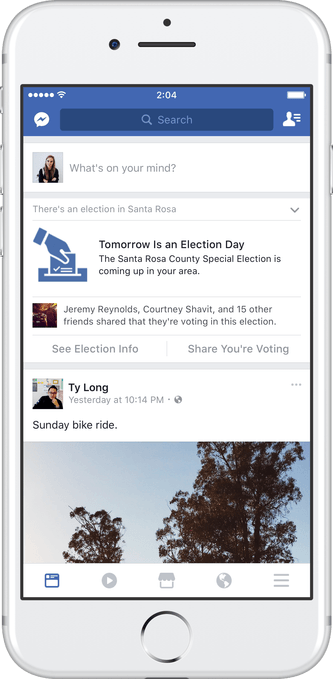
More: Facebook Messenger puts the camera front and center in revamp
Facebook, which has been running national election reminders at the top of News Feed since 2008, claims it has made an impact on voter turnout. According to the journal Nature and the the social network’s research, its 2010 message impacted real-world turnout by 340,000 votes.
The new features are a part of Facebook’s wide-ranging effort to increase civic engagement.
More: Challenge your friends within Facebook Messenger with Instant Games
“Giving people a voice is a principle our community has been committed to since we began,” Facebook chief Mark Zuckerberg wrote in a 6,000-word outline of the social network’s mission. “As we look ahead to building the social infrastructure for a global community, we will work on building new tools that encourage thoughtful civic engagement. Empowering us to use our voices will only become more important.”
Facebook wants people to use its app for messaging again with new Stories feature
Facebook is adding Stories to its core app, and over 1.6 billion people will now get to know Snapchat, whether they realize it or not.
For years, Facebook has been about sharing with everyone — and doing a million other things, from selling products to joining groups to marking yourself as safe during emergencies. All of these things, together, have led to the service being the most-used Android app in the world, and overall the most popular digital platform on earth, with over 1.6 billion people hitting some form of Facebook’s wide berth every day.


But since Facebook split Messenger from its core app, to participate in one-on-one communication you have to leave the app. Well, no more. Facebook has announced that it is adding Stories to its core app, taking a lot of Snapchat and a bit of Instagram and giving it a new front-and-center placement. Stories, which is rolling out worldwide to all Facebook mobile users on Android and iOS, is similar to what you see on Instagram (and Snapchat, of course) today. It is a feed of photos and videos that string together to form a 24-hour diary, replete with filters and other camera frills.
Facebook is acknowledging that filters, and the camera itself, is quickly replacing text as the important status update in peoples’ days. The new camera interface will be available, as with Snapchat and Instagram, a swipe away on the left side of the app, and will offer live filters and effects (many of which will be sponsored) that can be added to photos and videos. They can either be added to one’s story, which can optionally be shared to the main Facebook feed, or sent using Direct, to a single person or group of people. Either way, the content will expire within 24-hours.

Direct is an interesting addition, because it ostensibly makes the core Facebook app a competitor to its own Messenger, along with WhatsApp and Instagram, all of which incorporate their own versions of private messaging. It’s unclear whether Facebook plans to consolidate these things down the line, or just slowly add asynchronous story sharing to all of its apps, but it will be interesting to see whether people actually want this to be in the core Facebook experience.
Here’s what we’re playing in VR this week!

There’s always something new and interesting to play.
Whether you’re recovering from a Summer Sale hangover or you’re in desperate need of something new to keep your kids distracted while you figure out a good vacation schedule, there’s a lot happening in the VR world right now. New apps and games are being released on an almost daily basis, and keeping up with that is a lot of work.
To lend a hand, we’ve assembled a short list of the fun things we’re playing this week, so you’ve got something quick to glance at while you sort out the rest of your week in the real world.
Read more at VR Heads!
The Android O Developer Preview is made for developers — it’s right in the title

Not even Google thinks you should try the Android O developer preview if you’re not a developer.
It’s really cool that Google released a preview of Android O for everyone. Google has always made sure that developing for Android has almost no barriers and anyone can use the tools that they need to do it without paying any special developer fees or using specific equipment. If you’re trying to attract as many great ideas as you can, this is a good way to do it.
There is a side effect, though. Seeing something called an Android O preview of any kind is both a temptation and invitation for people with no need to check out the new APIs and no plans to ever write an Android app to install it. People like you and me who just want to flash it to our phone because it’s new. And sometimes that doesn’t end well because the software Google is offering isn’t ready for primetime.
What is a developer preview?
It’s not Google’s fault if we install a developer preview build of Android on our phone and things get all kinds of buggy. It says developer preview right on the download link and Google even tells you it’s strictly something cobbled together so developers — people writing apps for Android or building things that run or work with Android — can see what’s changing so they are ready.
Caution: Developer Preview 1 is for developers only and not intended for daily or consumer use. See the release notes before installing it on your device. Enrolling in updates by Android Beta is not supported in Developer Preview 1.
The emphasis is theirs, not ours, and this is simple language that tells us to back off and think before we do anything. Developer Preview 1 isn’t even part of any beta software program just yet and nobody at Google will be surprised if everything here crashes and burns.
So why does Google release it to everyone?
This is the good part and the bad part.
Google says this is for developers, and Google wants all of us to be a developer. Or at least make being a developer accessible for all of us.
Google wants everyone to have access to all the developer tools and the Android O dev preview is yet another development tool.
Android development is a bit like the wild west. Anyone and everyone can do anything they like, and only a few places have specific rules that need to be followed in order to distribute your work. Every development tool from Google, including early access to future versions, is free and accessible for everyone. Google knows the next great idea may come from someone without the means to buy into a paid developer program and it wants that person to have the tools they need to build that great idea.
It’s fair to gripe about a lot of things Google does when it comes to Android: it has a less than ideal license, all major development is done in private, and the platform distribution method not being the greatest are just a few. But there’s one thing it does really well: You and I have the same access to developer tools as any Fortune 500 company does.
The Android O developer preview is just another one of those development tools.
Keep these things in mind
It’s not Google’s fault that we get enticed to give a first developer preview a try on our phones. It’s our own fault, as nobody is saying we should even try it. But trying it isn’t the worst thing we could do, especially if we think ahead.
If you’re going to try it anyway, keep a few things in mind.
- The Developer Preview 1 is not meant for you to install on a phone you’ll use every day. Put it on a spare phone if you have one.
- Every device you can try it on also has a custom recovery available. Take advantage of that and use it to back up your current system so you have an easy way to go back. If you like to try this sort of thing you should have an unlocked bootloader anyway.
- If you don’t know how to use a custom recovery to backup and restore the running system, are you sure you want to be fooling with a developer preview?
- You don’t have to install this one, and if you do there isn’t much to see just yet. Future builds should be moved to the Android Beta program and will be more stable and easier to install.
Finally, it’s OK not to care about it. Android O is something you probably won’t see for at least a year unless you have a phone or tablet direct from Google. Some changes will look really great. Some will make your phone more secure. But none of them mean what you have now will work any differently than it did last week.
Besides, we can install it and talk about it for you. Let us deal with bad software!
Android O
- Everything new in Android O
- Should you put Android O on your phone?
- How to install the Android O Developer Preview
- Android O isn’t in the Android Beta Program yet
- Join the Discussion
 AIVAnet