


Microsoft wants Windows 10 hardware makers to get creative in 2017
Why it matters to you
Microsoft wants makers of Windows 10 devices to step up their respective games this year, which should bode well for users of those products.
During Microsoft’s WinHEC conference in Shenzhen, China, the company revealed what it wants to see from Windows 10 device makers in 2017. Microsoft seeks to grow the modern computing experience by putting an emphasis on delivering detachables, convertibles, and ultraslim devices this year. Microsoft also wants these devices to be complemented by gadgets and peripherals that highlight what it calls “hero experiences.”
Microsoft defines “hero” as a major feature only offered with Windows 10. For instance, Windows Hello can be used with fingerprint scanners and face-recognition-capable cameras. There’s also Cortana, which enables users to search the web, set reminders, schedule appointments, and more using voice commands. Windows Ink is another “hero” feature, one that supports stylus-based input.
More: Microsoft’s Project Neon visual design has Windows 10 developers revved up
Microsoft discovered that devices are more attractive to buyers when they support features like facial recognition and pen-based input. But they also need to drive long-term consumer satisfaction. That means using great processors, batteries promising 10 hours of uptime or more, and fast boot times. The image quality needs to be superb, and apps should load almost immediately. Screens should be based on IPS panel technology and sport a default resolution of no less than 1,920 x 1,080.
Finally, Microsoft wants to see ultraslim, 2-in-1, and all-in-one (AIO) PCs starting at 8.82 inches thick. The mobile units should include a precision touchpad, while all new Windows 10 devices in 2017 should showcase innovations provided by manufacturers such as special hinges and borderless frames.
Microsoft expectations for 2017 can be broken down into five categories:
PCs for the Modern Creator:
These devices should consist of 2-in-1 detachable or convertible form factors. They should include user-facing and world-facing cameras, and support Active Pen technology. They should also support simultaneous touch and pen inputs as well.
—————
Modern Peripherals for Everyone:
These devices should support Cortana, Windows Hello, and Windows Ink. The packaging will have specific labels so that consumers know the device is compatible with a specific Windows 10 hero feature.
—————
PCs to Power Mixed Reality:
Microsoft wants this batch of devices to push the form-factor envelope with creative 2-in-1 and backpack designs. OEMs need to think about using processors with multiple threads. Discrete GPUs will be supported initially, followed by integrated GPU support toward the 2017 holiday season.
—————
PCs for the Gamer & Media Fanatic:
These devices should include VR-ready graphics chips that support DirectX 12, and screens supporting High Dynamic Range and a wide color gamut. Devices should also support Xbox peripherals and feature a “standout” design to win customers over visually.
—————
IoT Devices for Verticals:
Microsoft will focus on smart manufacturing, smart retail, and smart homes in 2017. The company will roll out new features for these three verticals in Creators Update, set to arrive in the spring.
It looks like 2017 will be an interesting year for Windows 10 and Microsoft’s customers. as interesting new form factors and peripherals hit the market. As the presentation revealed, these devices will support special Creators Update features, virtual reality, augmented reality, and the hero features provided in Windows 10.
Patent shows an external battery for the Apple Watch to improve its charge
Why it matters to you
You would get more use of your Apple Watch on a daily basis with an external, portable battery.
One of the most common complaints about the Apple Watch is its battery life. What good are GPS and step tracking, after all, if your battery is dead? Luckily, Apple appears to be working on a solution. A patent published by the U.S. Patent and Trademark Office shows a portable charger that can be embedded in the watch’s wristband or attached to an existing band.
The filing “Charging apparatus for wearable electronic device” describes an external battery with “more cells” that will either partially or fully charge a paired Apple Watch. It transfers power using induction, a two-way design that uses an inductive coil to facilitate the flow of electricity — the same technique employed in the Magnetic Charging Cable that ships included with every Apple Watch.
More: Apple Watch Series 2 review
When it comes to the battery’s placement, Apple proposes several solutions. It could fit under the watch’s body in order to protect its “sensitive internal components,” or made curved so it could fit around a watch band’s interior. Or it could be embedded directly into an Apple Watch band accessory.
Perhaps anticipating that such a battery could affect the watch’s suite of sensors and generate an uncomfortable degree of heat, Apple’s proposing mitigating measures. A translucent window would allow the passage of light from, say, the Watch’s heart rate sensor, and a series of sensors would limit the battery’s charge rates when the Watch was being worn.
Apple’s not the first to entertain the idea of an external watch battery. The Wipowerband, a polypropylene plastic band, packs a 250 mAh high-density rechargeable cell that attaches to the Apple Watch’s standard connector. The silicon Reserve Strap, meanwhile, slots a tiny inductive charger with a lithium polymer cell between your wrist and the watch.
More: Apple WatchOS 3 review
Apple has tried to work around the Apple Watch’s power constraints in other ways, historically. The latest version of the Apple Watch’s operating system, watchOS 3.1, features battery optimizations, and the Apple Watch Series 2 was made slightly thicker than its predecessor in order to accommodate a larger battery.
In our review of the Apple Watch Series 2, we found it more than adequate for the average person. Moderate-to-light use got it through a day and a half, roughly, and sometimes a bit more. But we had to charge it most nights.
Apple says its watch offers “all day battery life” — up to 18 hours of normal use, which it defines as “90 time checks, 90 notifications, 45 minutes of app use and a 30-minute workout with music playback from Apple Watch via Bluetooth, over the course of 18 hours. That is certainly on par with the competition, but here is hoping the company engineers a better solution in the future.
The difference between BlackBerry and BlackBerry Mobile

It’s time to make a few things clear: there’s BlackBerry the software company, and there’s BlackBerry Mobile, the hardware vendor.
As we move into the month of CrackBerry’s 10-year anniversary, and the return of CrackBerry Kevin, we thought it was important to highlight a few key differences between the BlackBerry we knew and the one we’re likely going to continue writing about.
From CrackBerry:
Late last year, BlackBerry signed a software and brand licensing deal with TCL granting them the rights to design, manufacture, sell and provide customer support for BlackBerry-branded mobile devices. Additionally, TCL is managing all sales and distribution and will serve as a global distributor of new BlackBerry-branded mobile devices along with their dedicated sales teams. Effectively, this means TCL is designing, building and marketing BlackBerry Smartphones for themselves, not for BlackBerry. BlackBerry is supporting TCL in this partnership, but TCL is now driving the Android-powered BlackBerry Smartphone train in almost all markets globally.

This helps distinguish BlackBerry the software company — yes, the one that still builds secure Android versions and various Android apps in addition to mobile device management solutions across multiple platforms — from the TCL-owned BlackBerry Mobile, which builds the actual phone hardware.
Again, from CrackBerry:
When it comes to Mercury, the accurate statement would be to say that BlackBerry Mobile is officially unveiling the BlackBerry Mercury at Mobile World Congress on February 25th. It would be incorrect to say that BlackBerry is.
From a journalistic perspective, this is an important distinction, because the people we’re dealing with at BlackBerry Mobile — owned by TCL — are different from those at BlackBerry proper. But for you, the user, it’s also important, since BlackBerry Mobile now controls the facilities for building BlackBerry hardware, and the two companies will work together on software updates. While it’s not clear at this point whether BlackBerry itself will control the bulk of the software update or if that will be under the purview of BB Mobile, the companies have assured us that the BlackBerry proper will have final say over the digital signature of each build, ensuring the high mark of security is maintained on all future devices.
It’s important for the user to know the difference, since BlackBerry Mobile now controls the facilities for building BlackBerry hardware, and the two companies will work together on software updates.
BlackBerry ‘Mercury’ will be a test of that new relationship; BlackBerry itself has, for a number of years now, distanced itself from the actual production of its smartphones, but now that responsibility is entirely out of its hands. TCL, the company that has turned Alcatel (formerly Alcatel OneTouch) into a reputable hardware vendor across the world, knows what it’s doing, and based on the devices we’ve used — the DTEK50 and DTEK60 — and ones we’re about to — ‘Mercury’ — we’re pretty confident things are only going to get better for the BlackBerry hardware brand in 2017 and beyond.
Cleaning up the Confusion: What you need to know about BlackBerry and BlackBerry Mobile
Google Hands Free is dying, and this Reddit thread perfectly encapsulates our frustrations with Google
It looks like the pivot isn’t going well.
Back in March of last year, Google announced a Bay Area only test of a service called Hands Free. It was an alternative payment solution for people who thought taking their phone or wallet out of their pocket was a lot of work. The “hands free” part came from you having this new app on your phone and saying the words “I’ll pay with Google” at the register. When those words were recognized, you signed your initials and the transaction was suddenly complete.
These jabs at Google perfectly illustrate some of the things a lot of users view as mistakes made by Google recently.
Hands Free only worked at a handful of stores in the Bay Area, and never really expanded beyond the initial trial group, which might have something to do with why the service most people have never heard of just announced it’s shutting down.
It’s possible we’ll see some similar features baked into Android Pay at some point in the future, but for now there’s no value in getting excited about that potentially happening. Instead, take a look at this snippet from the Reddit thread where this sunset announcement was shared — and know you aren’t alone in being frustrated with Google right now.
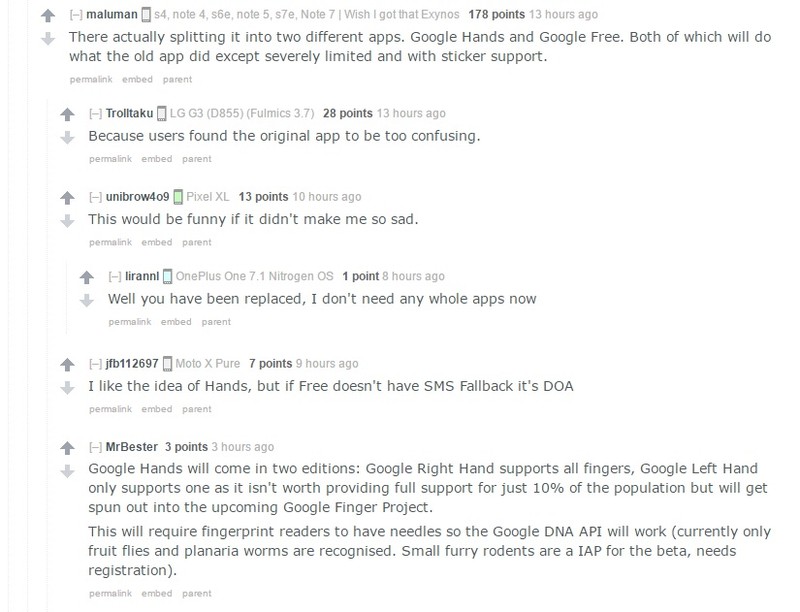
While admittedly hilarious, these jabs at Google perfectly illustrate some of the things a lot of users view as mistakes made by Google recently. Take a look at Allo and Duo, or rather don’t because it’s clear by the app ranking no one is using Allo, and it’s not clear anyone ever actually opened Duo again after the first day it was available.
The bulk of the features available in these two apps would be amazing in Hangouts, but that product is supposed to be weirdly re-positioned for business use even though to many people already use it for personal communication. Meanwhile, there’s a lot of folks hooked up to Google right now that are just happy Google Voice isn’t actually getting killed off like so many rumors claimed. It’s hard to get messier than this situation.
There’s no harm in trying something new, in fact with a company the size of Google there needs to be a constant exploration of new things. Hands Free sounds like a neat experiment that ended in a decision to use that tech elsewhere, which is a thing that happens sometimes. And it really would be cool to see this tech show up in Android Pay some day instead of continuing to break down individual features into separate apps.
What to do when games don’t line up in Daydream

It’s irritating when things don’t line up in Daydream View, but there are some things to check when it happens.
You’re all ready to sit down and knock out some rival wizards in Wands after checking out some videos when suddenly your headset doesn’t seem to be working properly. When the game or app opens up, it isn’t displaying correctly and you’re definitely unable to enjoy it the way it is meant to be played. If this has ever happened to you, you’re probably aware of just how irritating it is. If this happens, there are a few things to check.
Read more at VRHeads.com
Android users will have to wait a while longer for Outlook Mobile’s add-ins
It’s too bad that Android users weren’t prioritized for an update that brings native Evernote, Giphy, and Trello integration.


Microsoft is celebrating two years of Outlook mobile with a new feature. Unfortunately, it’s only for your iPhone-using friends for now, but at the very least, here’s a preview of what’s to come in three concise GIFs.
Outlook mobile now features add-ins, essentially extensions or plug-ins that help integrate other services into the email app. The initial batch of add-ins includes Evernote, GIPHY, Nimble, Trello, Smartsheet, and Microsoft’s own Dynamics 365 and Microsoft Translator.
It’s unclear how add-ins will work on Android. On iOS, you have to enable them from the settings panel (as exhibited in the screenshot above). On the plus side, once they’re turned on you can use them on Outlook for iOS, as well as Outlook 2016 or 2013 for Windows, Outlook on the web, and Outlook 2016 for Mac. The desktop apps actually offer more add-ins than the ones mentioned in the original blog post. You just can’t use them on Android — yet.
Get pumped for the big game with our Super Bowl themes!

ARE YOU READY FOR SOME FOOTBALLLLLLL?????!!!!!!!
The parties are prepped. The commercials are cued. The fans have completely taken Houston — as an Austinite, you can have it, by the by. Super Bowl LI is Sunday, and that means it’s time to give the teams their theming due. Only one team may walk outta Texas with a ring, but both teams and their fans can deck their phones in these simple, sporty themes on their Android phones.
So, I say again: are you ready for some football?
Atlanta Falcons

If you told me at the beginning of the season that the Atlanta Falcons would be in the Super Bowl, my response wouldn’t’ve been “Who??”. In addition to delicious, delicious Coke and terrible, terrible traffic, Atlanta also has a pretty good football team, and a color scheme after my own heart: black, white, silver, and a beautiful blood red.
- Falcons Wallpaper, courtesy of /r/Falcons – There are both red and black variants of the wallpaper. I like the color of the red, but some may prefer the darker version.
- Whicons
- 1Weather
- A launcher that supports icon packs, or an app like Awesome Icons that will create app shortcuts with custom icons on your home screen. These instructions are drafted using Nova Launcher, but you could use Action Launcher or the launcher of your choosing.
Long-press a blank space on your home screen.
Tap Wallpapers.
Tap Pick image.

Navigate to your downloaded team wallpaper and tap it.
Tap Set wallpaper.
Open Nova Settings.

Tap Look & feel.
Tap Icon theme.
Tap Whicons.

Return to the home screen and long-press your app drawer shortcut.
Tap Edit.
Tap the icon box to edit it.

Tap Whicons.
Scroll down to N (for NFL) and tap the Atlanta Falcons icon.
Tap Done.

Long-press a blank space on your home screen.
Tap Widgets.

Drag a 4×2 1Weather Tabbed widget to the top of your home screen.
Set Background color to Transparent.

Set Accent to Black.
Tap Done.

Long-press a blank space on your home screen.
Tap Widgets.
Drag a 4×1 Jack’s Music Widget to the bottom of your home screen.

New England Patriots

The New England Patriots are one of the best teams in football and they’ve got a lot of rings and titles to show for it. They’re also got a lot of scandals over the last twenty years to show for it, too, from recording teams they could beat easily anyway to Deflategate. But it’s the Patriots!! The Patriots have have one of the best names in the league and the best colors: Red, White, Nautical Blue, and New Century Silver. New Century Silver should’ve been a Pixel color. Just saying.
PATRIOTS! TO THEMES!
- Patriots Wallpaper, courtesy of /r/Patriots
- Whicons
- 1Weather
- Jack’s Music Widget – Before starting this theme, open Jack’s Music Widget app once and enable Notification Access for the app using the button at the top of the app as a shortcut to the proper page in Settings. You can also set the Widget style to Clear.
- A launcher that supports icon packs, or an app like Awesome Icons that will create app shortcuts with custom icons on your home screen. These instructions are drafted using Nova Launcher, but you could use Action Launcher or the launcher of your choosing.
Long-press a blank space on your home screen.
Tap Wallpapers.
Tap Pick image.

Navigate to your downloaded team wallpaper and tap it.
Tap Set wallpaper.
Open Nova Settings.

Tap Look & feel.
Tap Icon style
Tap Whicons.

Return to the home screen and long-press your app drawer shortcut.
Tap Edit.
Tap the icon box to edit it.

Tap Whicons.
Scroll down to N (for NFL) and tap the New England Patriots icon.
Tap Done.

Long-press a blank space on your home screen.
Tap Widgets.
Drag a 4×2 1Weather Tabbed widget to the top of your home screen.

Set Background color to Transparent.
Set Accent to Red.
Tap Done.

Long-press a blank space on your home screen.
Tap Widgets.
Drag a 4×1 Jack’s Music Widget to the bottom of your home screen.

Mozilla shutters its connected devices division
Mozilla will close its gadgets division, laying off some 50 employees working on products for connected devices (like smart TVs, for example) in the process. While the company wouldn’t comment on the specific number of employees affected, it offered the following statement:
“IoT is clearly an emerging technology space, but it’s still early. We have shifted our internal approach to the IoT opportunity to step back from a focus on launching and scaling commercial products to one focused on research and advanced development, dissolving our Connected Devices initiative and incorporating our IoT explorations into an increased focus on Emerging Technologies.
This is much like our approach to Quantum which emerged from Servo/Rust. We continue to grow our headcount and investment across all of Mozilla, including investments in new areas like IoT, VR, AR and Decentralized Web.”
It sounds like the company is doing what it can to make sure employees land as gently as possible. Mozilla said it’s working to transfer affected workers to other positions internally and that if one isn’t available, it will provide “severance, extended benefits and outplacement services.”
“Although we believe it is the right strategic decision for Mozilla, we recognize that it will impact people’s lives and are are committed to supporting their well-being. People are the reason why we can get anything done — this isn’t lost on us — and we did not make this decision lightly.”
As CNET reports, the firm doesn’t appear to be struggling financially. Recent tax returns show that through partnerships with Yahoo, Yandex and Baidu the company made $421 million.
Via: CNET (1)
Tim Cook to Receive Newseum’s 2017 Free Expression Award
Apple CEO Tim Cook was today named the recipient of the Newseum 2017 Free Expression Award in the Free Speech category.
According to the announcement, Cook is being recognized for both creating technology with a “profound impact” on communication and for using his position to “take a public stand” on issues like racial equality, privacy, the environment, LGBT rights, and more.
The Newseum, based in Washington, D.C., aims to explain and defend free expression and the five freedoms of the First Amendment through a range of interactive museum exhibits.
Cook will be accepting the award at an event set to be held at the Newseum on April 18, 2017.
Alongside Cook, U.S. Representative John Lewis, Executive Director of Becket Law Kristina Arriaga de Bucholz, ABC News Chief Global Affairs Correspondent co-anchor Martha Raddatz, Playboy founder Hugh Hefner, and Hatch Beauty Chairman Christie Hefner will all receive awards this year.
Note: Due to the political nature of the discussion regarding this topic, the discussion thread is located in our Politics, Religion, Social Issues forum. All forum members and site visitors are welcome to read and follow the thread, but posting is limited to forum members with at least 100 posts.
Tag: Tim Cook
Discuss this article in our forums
AmpMe’s speaker-linking app adds access to your Spotify library
When AmpMe arrived in late 2015, the app that links phone and tablet speakers for a more robust audio setup only played tunes from SoundCloud. Shortly after launch, an update added the ability for users to access any locally stored music through the app. Now the company is piping in songs from the biggest streaming service of them all: Spotify.
As you might expect, AmpMe says the ability to tap into Spotify’s massive song library was the most requested feature. All you have to do is add your credentials for that streaming service in the AmpMe app and you’ll be able to get the music going quickly. Of course, the app not only syncs phones and tablets for a multi-speaker setup, it also works with those portable Bluetooth speakers as well. In terms of where you can pull music from, AmpMe is still limited to SoundCloud, Spotify, YouTube and your local files so it will be interesting to see if the company continues to add more options in the future.
As part of today’s update, the app will also let you know when a fellow AmpMe user has joined your mobile audio “party.” The software automatically detects any “parties” that are going on nearby, making it easy to join so long as you already have the app installed. AmpMe will also sync with any connected Bluetooth speakers that are part of the festivities. If you’ve yet to give the device-syncing app a go, you can download it now via the App Store or Google Play.
Source: iTunes, Google Play

