


August Smart Lock, connected Wink hub work together to secure your home
Why it matters to you
As the Internet of Things grows larger, ensuring that devices are compatible is increasingly important. In this case, it helps keep your home all the more secure.
Smarts and safety are now going hand in hand thanks to a new integration between August’s Smart Lock and connected home app Wink. As the Internet of Things continues to grow ever larger, finding ways to bridge the gap between various things is becoming ever more important. This latest partnership certainly serves as a step in the right direction.
August has been ahead of the game for quite some time when it comes to timely integrations. After all, it was one of the first to play nice with Apple’s HomeKit platform and similarly was an early adopter of Amazon’s Echo. That said, while it’s made an effort to be compatible with these big brands, it hasn’t been quite as quick to integrate with smaller platforms. But that is changing with Wink.
More: Hey Siri, lock my door! How the ‘August’ secured my smart apartment
Starting now, if you have an August smart lock, you will be able to monitor it remotely and unlock it no matter where you are. You can also keep tabs on activity in the vicinity of your smart lock by way of the Wink app, which means you’ll always know who’s coming into or going out of your home. And with Wink’s Shortcut function, you can lock your door, turn out the lights, and set the temperature for the evening all at once. Really, it’s this level of connectivity that makes the new smart home integration worth it — of course, even prior to the partnership, you could control your August from your phone. But now, you can control a lot more all at once.
To set up the integration, head over to Add Product in your Wink app and select the Locks category. Choose August Lock and ensure your smart lock has been installed and properly configured in the August app. From there, you should be able to follow the prompts to sign in with your August account and allow Wink to access the lock. You can check out Wink’s support page for more information.
‘Fire Emblem Heroes’ players keep reinstalling to get favorite characters
Why it matters to you
If you don’t like the random characters in Fire Emblem Heroes, there’s a way to get around it.
Fans of the newly launched Fire Emblem Heroes game have started using an interesting strategy to start off with their optimum team composition: repeated reinstalling. Thanks to the random nature of starting characters, players have begun downloading the game over and over, in order to find their favorites.
Fire Emblem Heroes is a “Gacha” game, one where randomly generated outcomes form a major part of the gameplay. Since the starting heroes are also randomized, it makes sense for some players to restart the game over and over to find their preferred characters, rather than actually playing it.
More: Fire Emblem series will get four new Nintendo games by 2018
This is a doubly viable strategy in Heroes because not only are the characters you get from your first orb purchases random, but so are their stats. As Kotaku explains, you can have two of the same hero with wildly different stats, which means that restarting the game can be a strategy that can save you a lot of time.
Unlocking a character the traditional way requires in-game currency, which can take a long time to build up, or cost a lot of real-world money to generate quickly. This is in every sense of the word an exploit, but some would argue that employing so much random generation in a game is an exploit of the players themselves.
While it’s not too dissimilar a technique to the one used in Pokémon games or others with random generation in them, this Fire Emblem trick does require a little more effort. Players must play through the game’s tutorial, spend their orbs, and if they don’t summon the characters they want with good stats, they have to uninstall the game, re-download it, and go through the whole process again.
Sprint switched LTE Advanced on for the iPhone 7, Galaxy S7, and more
Why it matters to you
If you own an, iPhone 7, Galaxy S7, or one of four other phones and are on Sprint’s network, you’ll now get as much as double the data speed.
Sprint users with a flagship phone are about to get access to a much faster internet. Sprint confirmed it switched on three-carrier aggregation, essentially meaning that owners of those phones will be able to use the faster LTE Advanced network.
So which phones are capable of accessing the new, faster speeds? For starters, the iPhone 7 and iPhone 7 Plus will be getting the feature, as well as the Samsung Galaxy S7, S7 Edge, LG V20, and LG G5 — all of which will be joining the HTC Bolt, which was capable of LTE Advanced out of the box. Despite the fact that seven devices have the feature enabled, a total of 13 devices are capable of using Sprint’s LTE Advanced — all they need is for Sprint to flip the switch.
More: T-Mobile may be following Sprint and Rogers to offer RCS in Google Messenger
According to Sprint, enabling LTE Advanced gives users up to a hefty 200Mbps, which is quite an improvement over the two-carrier aggregation, which brings 100Mbps. The way it works is that it uses multiple LTE bands to improve speeds — so in theory, it’s basically the more LTE bands, the faster the speed.
The new data speed will only be available in select locations for now, including San Francisco, Dallas, Minneapolis, Chicago, Cleveland, and Kansas City, Missouri.
Sprint first announced it would be bringing LTE Advanced to some handsets in some areas back in September, but at the time the system was only rolling out to Chicago and Kansas City, with automatic software updates coming and a later date. Two-carrier aggregation is currently available in more than 250 markets around the U.S. — and Sprint says that three-carrier aggregation, or LTE Advanced, is now available in more than 100 markets. If you have an LTE Advanced-enabled phone, you should be able to use it to its full potential in most major cities.
Kodi update brings new skins, higher Android version requirement, and 4K optimizations
One of the best ways to watch streaming content just got a big update.
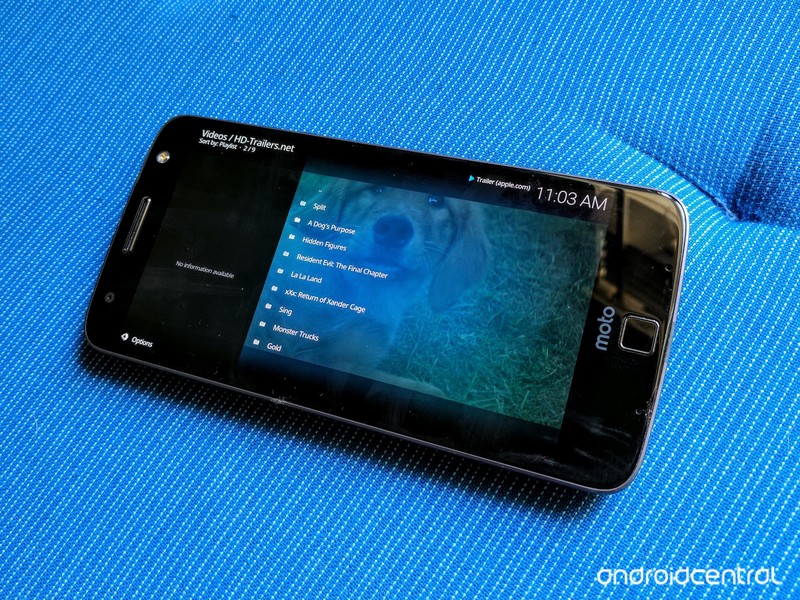
If you’re a Kodi fan, you might have noticed the app looking a bit different after this week’s update. Kodi 17, which has the positively super codename of Krypton (h/t Android Police), brings a new default skin and a handful of changes under that nifty new wrapper, including enhancement to help 4K content and more supported audio pass-through.
Kodi 17’s new default skin is called Estuary, with the touchscreen version being called the ever-so-slightly-creepy-sounding Estouchy, and they replace Confluence as the default skins with a lot of soothing teal and black. In addition to the skin change, there are several enhancements specific to Android, one of the most important being that the minimum Android version is being bumped from 4.2 to 5.0. If your Android media center is below Lollipop, it’s not getting Krypton. Considering Jelly Bean 4.2 is over four years old, it’s not unreasonable to drop support for it.
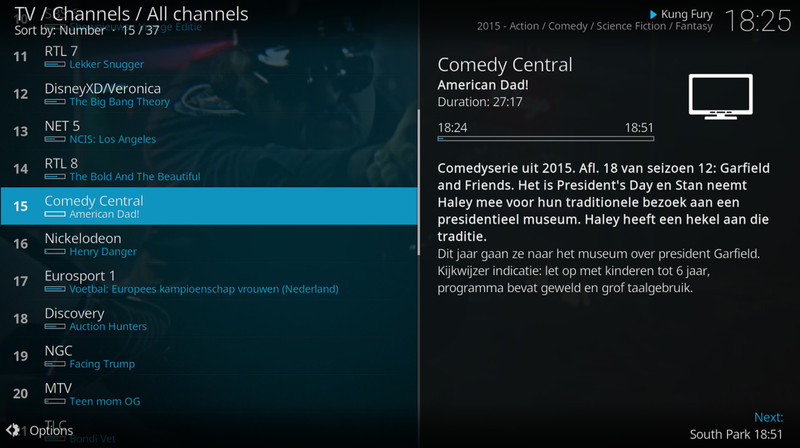
For those who can get the Krypton update, you get the new default skin, improvements to Live TV and PVR, more codes and subtitle support for the core player, better HDR decoding and output on beefier devices, and audio pass-through support for a bevy of DTS and Dolby audio profiles. Kodi 17 ‘Krypton’ is live in the Google Play Store, ready to up your media streaming experience.
Everything you need to know about Kodi
Best Android reading apps for kids
- Best Overall
- Best free service
- Best for learning vowels
- Best for making reading fun
Best overall
Hooked on Phonics

See at Play Store
When it comes to teaching children to read, one particular program has been doing a great job for two decades: Hooked on Phonics. This curriculum is now available on your phone or tablet, and it comes with its traditions in tact. These include ebooks, games, and reading lessons.
There are 24 progressive learning lessons. They start with easier concepts like learning vowels, simple compound words, and and two syllable words. Each lesson ends with a specific story that uses the words your child just learned, ensuring that they have properly absorbed the lesson in front of them.
Bottom line: Hooked on Phonics delivers an excellent system right to your smartphone, giving your child all the tools to being a proficient and confident reader.
One more thing: Great for kids 3-7, but Hooked on Phonics does focus on the basics of learning to read.
Why Hooked on Phonics best
Hooked on Phonics delivers an excellent all-round system for teach your child how to read.
Hooked on Phonics is stellar at what it does, in part because of how much it has to offer. From learning the sounds of the alphabet and sight reading, to being able to confidently read complicated sentences. Everything is broken down into bite-sized chunks that make it easy for them to stay involved, without getting frustrated as they learn.
While the full version of the app requires a subscription, you do get access to the first three lessons, and the first story involving the concepts in those lessons. While paying for a subscription isn’t ideal for everyone, by trying it out first you can check to be sure that it works for your child before purchasing the full version.
Hooked on Phonics also takes into account the fact that your children’s school has certain standard. Their program syncs up to Federal and State reading proficiencies for 1st grade. It can also be used on multiple devices, and with multiple accounts so that each of your children can enjoy it separately.
Best Free
Sight Words and Reading

See at Play Store
An integral part of learning to read confidently is being able to identify words and sounds. This definitely includes learning vowels as early as possible. Sight Words and Reading is made for pre-K and Kindergarten children who are still learning their sounds, identifying letters, and mastering simple sentences.
All of the learning in Sight Words is in a game format, making it engaging for your child for any stretch of time. The colors and illustrations are bright to help draw in and keep the attention of your tot as well. During the course of the games in the app, children are introduced to 300 common words helping to expand their vocabulary.
Bottom line: Sight Words and Reading is an awesome process to get your child excited and engaged at a variety of fun games, all while learning to read. There are a variety of games, and a great vocabulary to get them ready for the rest of their lives.
One more thing: The developers of this app provide a variety of other apps that can help your child to build on the foundation created with this app.
Best for vowel sounds
Starfall Learn to Read

See at Play Store
Learning to read is easier with a friend, and in this case it’s Zac the Rat. He takes your child on a reading adventure that is built up of several different kinds of games created to keep your child motivated. These include games that require children to recognize items when given a word, helps them to learn to spell, and plenty more.
Starfall Learn to Read takes special consideration to help your child learn their vowel sounds. Since vowels can be tricky, especially for kids, they provide examples of words with short and long vowels. By focusing on these primary concepts, they are then able to easily master later concepts.
Bottom line: Starfall Learn to Read makes sure that your child masters the fundamental concepts of reading. This includes a variety of games to keep them engaged, and emphasis on learning the vowel sounds required to master the English language.
One more thing: This app was created by Starfall, a charity that believes in motivation children through exploration, positive reinforcement, and play.
Conclusion
There are plenty of amazing apps that can help your child to become a strong and confident reader. However, the best all around system is still Hooked on Phonics. It offers the largest variety of exercises to help your child master reading in English while making things fun and keeping them engaged.
While it does require a subscription to access the full system of lessons, if your child has been struggling with the basics this is a great way to help them catch up to their peers in school. Making learning fun is integral to their system and it ensures that they’ll want to keep coming back to the app to keep learning.
Best overall
Hooked on Phonics
See at Store
When it comes to teaching children to read, one particular program has been doing a great job for two decades: Hooked on Phonics. This curriculum is now available on your phone or tablet, and it comes with its traditions in tact. These include ebooks, games, and reading lessons.
There are 24 progressive learning lessons. They start with easier concepts like learning vowels, simple compound words, and and two syllable words. Each lesson ends with a specific story that uses the words your child just learned, ensuring that they have properly absorbed the lesson in front of them.
Bottom line: Hooked on Phonics delivers an excellent system right to your smartphone, giving your child all the tools to being a proficient and confident reader.
One more thing: Great for kids 3-7, but Hooked on Phonics does focus on the basics of learning to read.
Don’t want to call Congress? Use this app instead! 🏛
Countable is the best free app for contacting your Congress member and staying privy to the politics happening behind the scenes.

Last week, I wrote a little ditty on the apps you can install to easily keep privy with what’s going on in the world. I had mentioned the app Countable, which keeps you up to date on what’s going in Congress.
This week, I’m imploring you to download it, especially considering what happened last week in the United States with regards to immigration policy. Politics and policy-making may not be your thing or whatever, but there is always legislation happening that affects you, even if it’s merely tangential. All it takes to start paying attention is checking in with the app once a day. After a while of interacting with the Countable community, I guarantee you’ll eventually find something to say.
Every view on an issue


Parsing what’s happening above you and on behalf of you can be difficult to do when you’re also juggling the events of your daily life. Countable is helpful because it’ll keep you informed even when you don’t have the time to delve into the particulars. I like the daily notifications what my representatives are voting on in my state, though the app is also good for researching what’s what.

For instance, say you’re wondering what’s happening in the realm of public transportation. You can tap on the Issues category in the Countable app to bookmark it and then see what it is exactly that Congress is voting on that’s related. The topic page will have a “featured” bill — typically, the one that’s up next up on the voting block— but if you have some time to swipe through, you can also read up on what’s coming in the pipeline. I also like to use Countable as an aid for when I have the time to go diving into archived news articles and hackneyed Wiki pages.
I know they typically caution that you don’t read the comments, but skimming the Opinions section of each individual bill page is a great way to get the tl;dr version of what people are saying about the matter.
Countable has already had three years on the market, which means you can safely bet that enough time has elapsed for there to be enough active users. I know they typically caution that you don’t read the comments, but skimming the Opinions section of each individual bill page is a great way to get the tl;dr version of what people are saying about the matter.
Immediate access to Congress

There are a number of policy-making apps already in the Play Store, but many of them are meant to serve as a reference tool. Countable is different in that it actually connects you to your representatives, without having to endure the awkward one-way conversation that typically happens with a voice mailbox.
All you do is select “Yea” or “Nay” on each bill, and then Countable will send an email on behalf of you. You can tack on a custom message if you choose, but it’s nice that it isn’t required. The only caveat of this particular feature is that you have to input your address, though that’s to help confirm to the representative you’re contacting that you live in their district.
After you’ve voiced your opinion, Countable will file that matter away in your personal profile, where you can keep track of the issue and see how it fares over time.
Yes, it’s buggy
I can’t sit here and pretend that the Countable app hasn’t frustrated me a few times with its delayed touch response and general bugginess. Thankfully, the team at Countable is looking to completely rewrite the app for Android users. In the meantime, you can install the app to receive notifications, if the app starts to bug you, simply peruse the topics at hand online at the Countable website.
Google Now Launcher to be discontinued by Google
Goodbye, Google Now Launcher.
Google’s first launcher, the launcher that shipped with the Nexus series and that helped define what much of the theming community views as ‘stock’, will be retiring soon. Google Now Launcher will be pulled from Google Play and from the Google Mobile Services package that allows manufacturers to install it out of the box on their phones. With the Pixel Launcher as the shiny new launcher in the Google stable, I suppose it was inevitable that GNL would be put out to pasture.

A discontinued launcher on a discontinued phone.
Google Now Launcher will be unpublished in the first quarter of this year, according to an email obtained by Android Police, and it will be pulled from GMS in March, after which no new devices will be approved to ship with it installed.
What does this mean for millions of Nexus users and many others who downloaded Google Now Launcher from the Play Store?
Not too much. GNL will continue to be updated via the Google app, but once you’ve moved on to a new device, you’ll have to switch to a new launcher. This would be a great time to check out our Best Android Launchers and try something new, like Nova Launcher.
What if I want Google’s launcher?
While there is certainly hope that Google Now Launcher leaving Google Play opens up a hole in Google’s lineup for the Pixel Launcher to fill, but there’s no evidence yet that the Pixel Launcher will be coming to a non-Pixel near you. So long as you install GNL before the app is unpublished, you can enjoy Google’s launcher as it stands right now.
Another interesting note from the email is that it reminds manufacturers that they can add a Google Now page to their own launchers using Google Search Launcher Services library. Adding a Google Now page to other launchers has been a big dream for a lot of third-party launchers, and while this isn’t available to Google Play Developers, it being available for manufacturers gives hope that we could see a Google Now page replace pale imitations like BlinkFeed and Flipboard Bulletin on manufacturer launchers.
The best Android launchers
No, Google hasn’t cancelled Pixel production
An email sent to someone on Reddit claimed that Google had stopped Pixel production. It hasn’t, so chill.
Reddit is useful for a lot of things, but it’s also very good at fomenting alarm when none is necessary. That became apparent this week after an email to a customer that, three months earlier, had ordered a Google Pixel had it cancelled with a warning that “Google will be ceasing production of their Google Pixel line and we will not be receiving further inventory of this phone. Therefore we will not be able to fulfill your order for the selected product. We apologize on the behalf of TELUS and Google for this inconvenience.”

Obviously not the email you want to read after ordering a phone, especially one as in-demand as the Google Pixel. The company that sent the email on behalf of TELUS, Mobileaxs, operates as a dealer for the Canadian telecom, fulfilling corporate and enterprise orders, so it’s unlikely it would be privy to Google’s production strategy, not to mention TELUS’s own company-wide inventory.
In a response to Android Central, Google confirmed that the email was incorrect, and that production of the Pixel has not ceased. “We’re really excited by the demand for the Pixel XL in Canada. Telus is currently out of stock of the Pixel XL. We’re working with our partners to restock inventory across our retail channels and we can confirm that production of the Pixel has not stopped.” The Pixel XL, the larger of the two Google phones, has been harder to come by than its smaller counterpart in recent months.

TELUS also confirmed independently to Android Central that it has no intention of halting Pixel sales:
TELUS is currently out of stock of the Pixel XL. We’re working with Google to restock inventory across our retail channels as quickly as we can. Google has confirmed that production of the Pixel and the Pixel XL has not stopped. We are in the process of updating our retail channels to ensure our customers have the latest information about their Google Pixel orders.
So there you have it. Nothing to see here, except for sustained high demand for the best Android phone you can buy.
Google Pixel + Pixel XL
- Google Pixel and Pixel XL review
- Google Pixel XL review: A U.S. perspective
- Google Pixel FAQ: Should you upgrade?
- Pixel + Pixel XL specs
- Understanding Android 7.1 Nougat
- Join the discussion in the forums!
Google Store
Verizon
Sony’s Full HD HDR TVs are the perfect companion for your PS4
While most of the attention is on 4K or Ultra HD televisions when talking about HDR – high dynamic range – Sony has pulled the covers off something rather more unique: Full HD televisions that also support HDR.
So far, HDR has followed 4K, i.e., higher resolution TVs, and that was certainly the story through 2016. Now there is a selection of 2017 Sony Bravia TVs that offer HDR without that bump in resolution. That should mean cheaper prices and it also means smaller sizes, but still bringing the advantage of that dramatic visual experience that HDR offers.
- What is HDR, what TVs support HDR, and what HDR content can I watch?
There are a number of different models, starting with the Sony Bravia RE40, a 32-inch entry-level 720p TV with the added benefit of HDR and the RE45, a 40-inch Full HD TV with HDR.
Then we step up to the WE61 and WE66 which basically repeats this position with a 32-inch and 40-inch model, but at this level it adds in smart TV functions (using Sony’s own platform) and giving you Wi-Fi with access to YouTube, for example.
The pick of the bunch, however, is the WE75. This offers the same features as the WE66, a Full HD HDR panel, but this one is Triluminos and comes in 43 and 49 in sizes. That leads to better colours than the WE66: we’ve seen them side-by-side and the WE75 is definitely the better looking display.
The problem, of course, is that most HDR content is coming hand in hand with 4K. Netflix and Amazon Video offer those technologies, but there’s no way of knowing what you’ll see on a Full HD HDR TV.
The PS4, with its HDR gaming, is naturally one place that you’ll get the benefits and we suspect that YouTube will also offer you HDR video without the need for that higher resolution.
So these TVs might make a perfectly affordable companion for your PS4 gaming and at a size better suited to the bedroom or dorm room. Of course, we’d wait until we’ve given one a full review before buying, just so we know exactly what content will get that HDR boost.
There’s currently no word on pricing or availability, but we’re expecting low prices.
‘Hearthstone’ tournament has 48 teams vying for $300,000
Blizzard has revealed more details about the Global Games, its new Hearthstone eSports competition format that pits teams, rather than individual players, against each other. The tournament will feature 48 teams, each from a different country, competing in a series of round-robin tournaments online.The top four teams left standing will compete face-to-face in the Global Games Final Tournament later in the year.
Hearthstone, a card-based fighting game that’s not unlike an electronic version of Magic: The Gathering, has proven to be popular on the eSports scene, especially the banter-laden team games. It appeals to both casual gamers and pros because it’s relatively easy to learn and find opponents. At the same time, it requires sophisticated strategies at the highest levels.
The format will pit powerhouse nations like the US against much smaller ones, including Peru and Belgium. Blizzard says that teams will seeded by their respective countries (based on winter season points) with the first team member being the top-ranked player, and the other three chosen from a pool of eight by the Hearthstone community. The tournament will run a best-of-five format, class versus class format, with each team player representing two classes of cards.
Top players including Edwin “HotMEOWTH” Cook and Russian world champ Pavel Beltukov, will compete for $300,000 in the competition. So far, no dates have been announced, but you can check out the video below for action in last year’s championships.
Source: Hearthstone

