


Verizon says the company is ‘committed to an open Internet’

Verizon has announced that while it is challenging the FCC’s Open Internet Order, the company is committed to an open Internet, stating that not only is it right for consumers but also vital for the business to remain successful. The network has provided example policies in which it stands by, regardless as to what the outcome is for the approaching appeals case against the FCC’s decision to reclassify broadband services as Title II or common carrier services.
“We have invested billions in businesses that depend on the ability to reach customers over the networks and platforms of others. We invested in digital ad technology through our $4.4 billion purchase of AOL and own content through properties like the Huffington Post, MapQuest, and TechCrunch. We have an expanding presence in the digital media and entertainment space; Verizon Digital Media Services helps content companies deliver their services in digital form to any screen or device, anywhere in the world.”
So, just what policies would Verizon be in supporting in its case to fight for net neutrality? The company would vouch in favor of no blocking of lawful content, no throttling of traffic, no paid prioritization, and finally general conduct standards. Verizon also urges Congress to provide the FCC with improved and updated tools to better tackle the advancement of the Internet and deploy up-to-date rules.
Interestingly, Verizon believes that fighting against net neutrality in the name of net neutrality is the way to go.
Press Release
Net Neutrality: a path forward
NEW YORK, March 21, 2016 /PRNewswire/ — Today, Craig Silliman, Verizon’s executive vice president, public policy and general counsel, posted the following position statement on the current challenge to the FCC’s Open Internet Order. The full post is below and can be found here http://www.verizon.com/about/news/net-neutrality-path-forward
Verizon is committed to an open Internet. It’s what’s right for consumers and is vital to our business.
Why? We have invested billions in businesses that depend on the ability to reach customers over the networks and platforms of others. We invested in digital ad technology through our $4.4 billion purchase of AOL and own content through properties like the Huffington Post, MapQuest, and TechCrunch. We have an expanding presence in the digital media and entertainment space; Verizon Digital Media Services helps content companies deliver their services in digital form to any screen or device, anywhere in the world.
These investments would be at risk without an open Internet. Now more than ever, we see protecting an open Internet as a business imperative that is inextricably tied to our future success.
In addition, we are a network company. The foundation of Verizon’s success has been network excellence, and we invest $17 billion every year so that consumers can continue to consume more of the content they want.
In crafting a policy framework, we therefore think it is important that policymakers both catalyze innovation in over-the-top services and encourage investment in networks that serve as their platform.
So what should that policy framework look like? These questions will come up again soon when the D.C. Circuit court of appeals rules in the challenge to the FCC’s decision to reclassify broadband services as Title II or common carrier services. We don’t know how the court will rule. The court could reverse the FCC completely, uphold the FCC completely, or issue a mixed decision.
So we think that now – before the court decides – is the time for us to make clear what Verizon stands for and what kind of policies we support, regardless of the outcome of that case:
- No blocking: we support rules that prevent providers from blocking lawful content, applications or services.
- No throttling: we support rules that prevent providers from intentionally slowing down or throttling Internet traffic based on the traffic’s source, destination or content.
- No paid prioritization: we support rules that prevent providers from charging content providers a fee to deliver their Internet traffic faster than the Internet traffic of others.
- General conduct standard: we support a general conduct rule that would prevent unreasonable conduct by broadband providers where there is actual harm to consumers or to competition.
We can support these rules because we believe they are fair, even-handed, good for consumers and essential for us and others to thrive going forward. We can’t predict how the court will rule. But if history is any guide, we can expect more conflict and more uncertainty over the scope of the FCC’s authority and whether the current statute provides the tools the FCC needs to adopt these rules. The only way to avoid this depressing redux is for Congress to act.
In the past we have criticized the FCC for applying outdated rules to the fast-moving Internet ecosystem. We still think that’s true, but let’s be fair: Congress hasn’t updated the FCC’s toolbox for over 20 years, so the FCC is working with the only tools it has, however inadequate. Congress can give the FCC the tools it needs to do this properly and on a legally sustainable basis. It should do so.
Fortunately, there is a real chance that Congress will deal with these issues soon. There is strong bipartisan interest in these issues and strong leadership in the relevant committees. We applaud these bipartisan efforts and encourage Congress to move forward so that we finally have clear and enforceable open Internet rules once and for all.
Verizon Communications Inc. (NYSE, Nasdaq: VZ) employs a diverse workforce of 177,700 and generated nearly $132 billion in 2015 revenues. Verizon operates America’s most reliable wireless network, with more than 112 million retail connections nationwide. Headquartered in New York, the company also provides communications and entertainment services over America’s most advanced fiber-optic network, and delivers integrated business solutions to customers worldwide.

Android Wear 1.4 review: Marshmallow brings more features with less polish
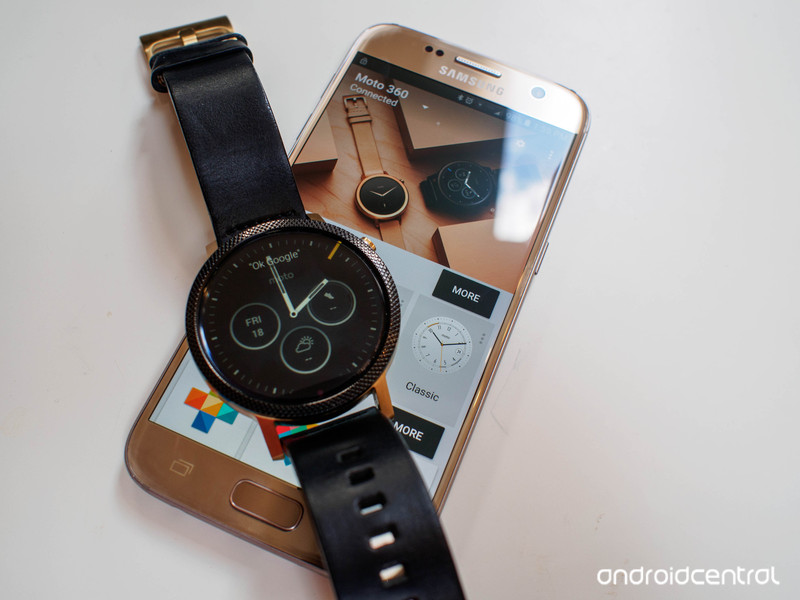
There’s a lot to like about Android Wear, but the path forward looks a little fractured.
If the purpose of Android Wear is to offload some of the things we reflexively check our phones for every day to the wrist, this last year is evidence enough that Google has succeeded. When used correctly, these wrist computers become stylish extensions of your phone that absolutely get you to check your phone less every day. It’s a platform that has seen slow and steady growth thanks to over a dozen quality hardware offerings in various shapes and sizes, but it’s clear Google isn’t going to stop with what we have seen so far.
The next step is to make Android Wear something that is more than a notification dumpster at the end of your arm, and more of an interactive experience that complements the Android interface. Long term, it’s clear the goal is to offer Android Wear as something you can use without a phone at all, but not to a point where you’re actually replacing your phone with a watch.
This is our Android Wear 1.4 review.
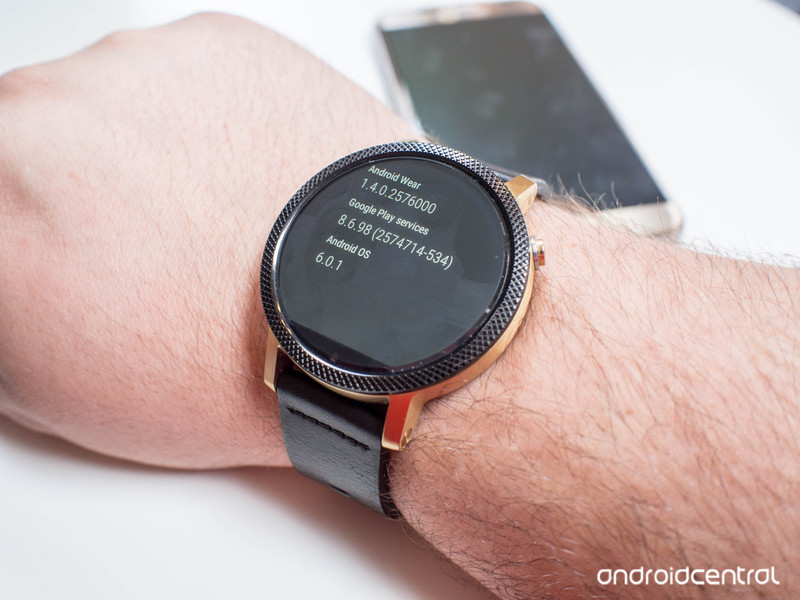
About this review
We’re writing this review after several weeks of using Android Wear 1.4 (Build MEC23G) on a Moto 360 (2015) paired to the Samsung Galaxy S7. Android Wear 1.4 is available on 7 watches from multiple manufacturers at the time of this writing, with further updates expected over the next couple of months. While this review has been primarily written from the perspective of a round watch, square watches with Android 1.4 have been used as well.
Read More: These are the best Android Wear smartwatches
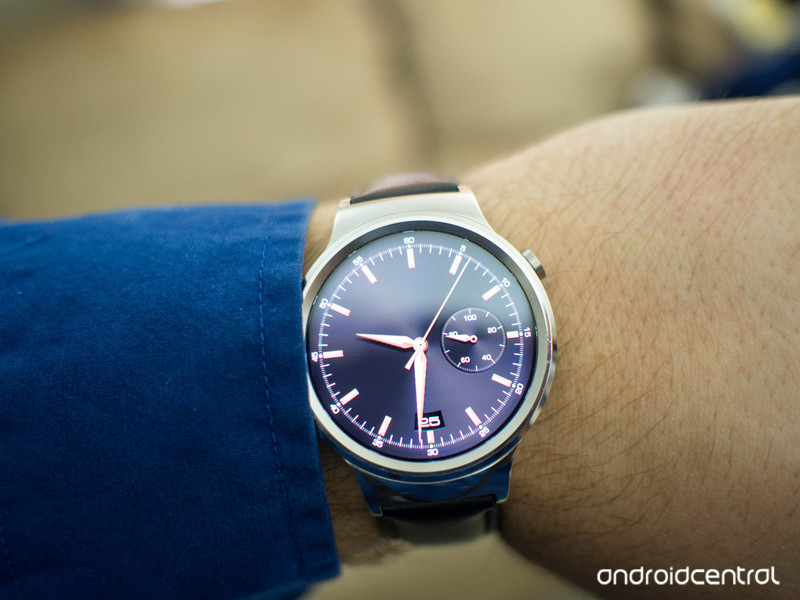
Phantom buzzing that never ends
Android Wear Interface
Visually, little has changed in the jump from Android Wear 1.3 to Android Wear 1.4. Google has settled on what they feel is best for the wrist, and the upgrade to Android 6.0 under the hood was more about making that interface work a little better. What has changed is the number of options you have when navigating that interface. Previously, Android Wear was designed to be a touch or voice interface. You could swipe around through the entire interface, or you could speak and jump to whatever part of the interface you wanted. Voice works great if you’re in a quiet space and want to get somewhere quickly, but doesn’t work well when you’re out and about. Touch works great if you have a hand free, but because you’re wearing the watch on your wrist you are effectively using two hands to navigate the entire interface. Google solved this by extending gestures, which now allow you to navigate the entire interface.
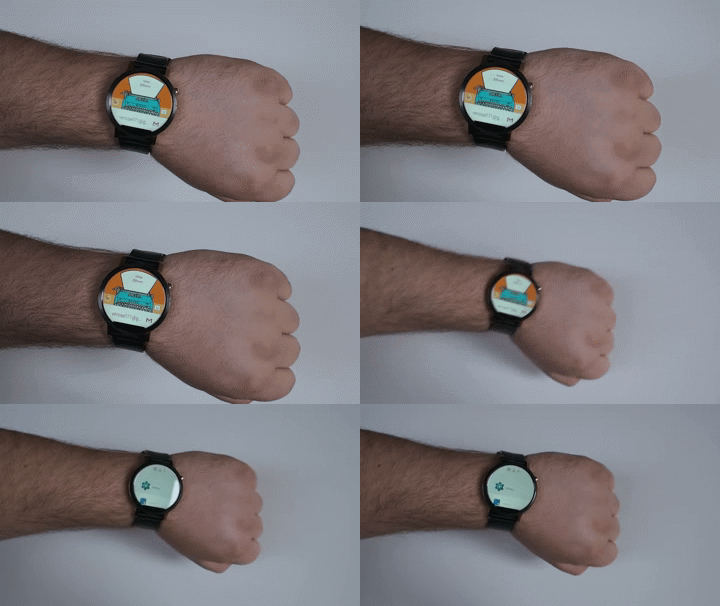
Google initially used gestures to allow users to jump back and forth between notifications on the watch, but now there are gestures for travelling left and right in the interface, as well as a select function when you don’t have a finger free to tap. This means you can more easily launch an app with an arm full, or if you’re in a hurry to get somewhere. What you won’t be with these gestures is discrete. You can quickly shift your arm to access a single notification or to launch an app, but you’re unlikely to use this to navigate all the way into the setting menu for anything. It’s a fantastic addition to the overall experience once you adapt to the gestures so you aren’t wildly swinging your arm around to select something.
For some watches, the interface has grown to include a dialer and the ability to make and receive calls through the watch. While the Moto 360 (2015) lacks the speaker to make this work, our own Jerry Hildenbrand had this to say from his experience with the Huawei Watch:
You’re now able to do things like enable voice feedback in the settings menu and have what you’re seeing and doing read back to you, or play music from Google Play Music directly through the watch speaker. But what has people the most excited is the ability to make and receive phone calls using the speaker and mic on your watch.
When you first use the phone app on the watch, you’re asked for permission to route headset audio through your watch as well as allow access to contacts. After that, you can use the phone app (or a voice command like “call mom”) to make a phone call. Don’t expect the same call quality you would get from a premium Bluetooth headset, but in general it works really well. Of course you can also receive calls, and you can choose to answer directly through the watch or decline and send a message.
Remember, though, unless your watch has its own LTE SIM card you’ll need to be in range of your paired phone to talk to your people.
Android Wear 1.4 mostly feels like Google is extending out from what they already know works in order to see what else watches can be used for. Adding gestures and speakers feel almost like an experiment to see if people want to use these things moving forward. The only watch we’ve seen built around this experience so far was pulled from the shelves days after it was launched due to a manufacturing defect (and is just now returning to stores after a 4-month delay). We’ll no doubt see more Android Wear watches with LTE onboard later this year, but for right now it’s unclear how useful the ability to speak to your wrist is going to be for a lot of users.
Adding steps and tightening screws
Android Wear interactions
The early days of Android Wear felt a great deal like Google’s goal was to have everything handled by the app on your phone. Native apps on your wrist are never going to be as capable as the apps on your phone, and so it made sense to see this experience where Android Wear was almost another display for your phone.
With Android Wear 1.3 we saw that shift a little, allowing Google Maps to run as a full app on your wrist in order to better function as a mechanism for turn-by-turn directions. We’ve seen a couple of other apps make their way to the wrist, in order to take advantage of the Android Wear always-on display mode. If your to-do list is on your wrist even when the screen is dim, the watch consumes less battery power and you can glance when you need it. This balanced approach makes sense as long as you’re not trying to play games on your phone, and generally extends the functionality of the watch.
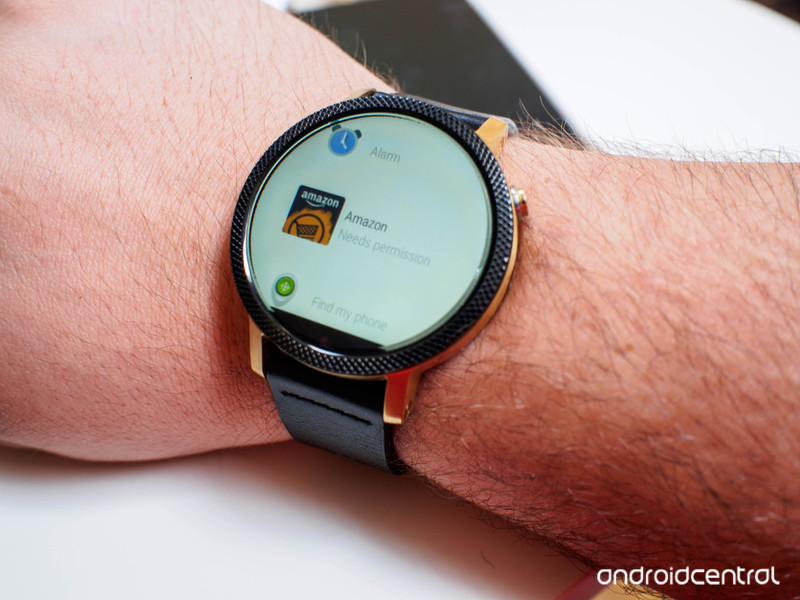
Android Wear 1.4 is based on Android 6.0, and that means the same permission system that exists on Android now exists on your watch. Instead of making it so permissions were managed through the Android Wear app on your phone, permissions are managed on the watch directly. Apps that you have installed on your phone with an Android Wear component will sync to your wrist when connected to the Android Wear app, but in order to use that app on your wrist you need to approve the watch-specific permissions. It’s a nice safety measure that keeps apps from doing things like accessing the microphone on your watch when you don’t want it to, and that’s important. This does mean the initial setup for some of these apps takes a lot longer than they would have if the app wasn’t installed directly on the watch.
One big example is the Amazon shipping app, which has an instruction set like this:
- Tap the app on your watch
- Tap the Permission request pop-up
- Tap the Accept option in the Permission request
- Wake your phone so the app can confirm the new Permissions
- Swipe away the notification telling you about the features you just activated
- Use the app
Granted, after this you never have to do any of this every again, but it’s a lot to ask a user to do for an app on their watch. This is an extreme case, but it’s also an app that a ton of people have on their phones. This process could use a little streamlining, especially as more app developers start to consider moving their app to the wrist. On the other hand, it makes malicious use significantly more complicated.
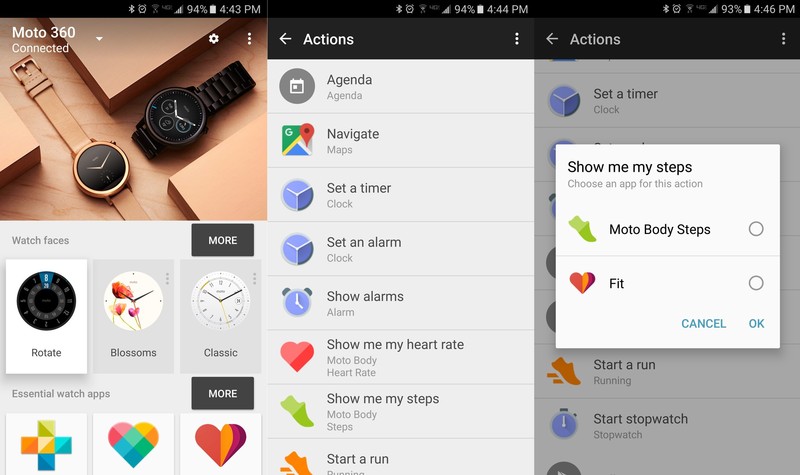
With everything happening on the wrist you may find yourself asking what the Android Wear app is mostly used for now, and the answer is basically shortcuts. While the Android Wear app is still fantastic at managing the initial setup process for every Android Wear watch, and you can quickly choose which watch face you want to use from the app, the only other big thing you do with the app now is manage shortcuts. We have lots of apps that do lots of things on our phones, and the ability to choose which one you launch when asking your phone to perform a specific task is important. If you don’t want to use Google Maps for navigation, or the default clock app for managing alarms, this is where you set up different defaults for those behaviors. The Android Wear app gives you the entire list of actions, and you assign as needed.
If Android Wear really is preparing to create an environment where the watch and phone don’t need to be connected all the time, these are the steps necessary to make that happen. It’s a little less convenient right now for the folks who never plan to separate the two, but as the platform grows into the next year these user experience decisions will start to make a lot more sense.
Not better, but not worse
Android Wear The bottom line
Where the last big update to Android Wear was all about polishing what Google had already built, Android Wear 1.4 is building for what happens next. Some of it feels a little unfinished right now, and that’s something Google should have handled a little differently, but the core of this experience is better than ever. When paired with your watch of choice, it’s a great way to extend Android and make it more convenient to interact with the things happening on your phone.
The biggest question is whether Android Wear is really ready to be a standalone platform with an LTE-enabled watch, and it’ll be a while before we have a real answer to that question.

Supreme Court will review Apple damage claims against Samsung
If Apple wants Samsung to cough up a lot of money for allegedly violating its patents, it’s going to have a real fight on its hands. The US Supreme Court has agreed to review the damage claims in Apple’s design patent lawsuit against Samsung, giving the Korean firm a chance to reduce the sizeable payout it’d otherwise have to make. This doesn’t guarantee that Samsung will get what it wants, and this will likely postpone (if not cancel) an imminent retrial over the damages. Also, it’s notable that the review won’t challenge the patents themselves.
However, the review could still represent a big milestone in patent disputes like these. It may decide whether or not plaintiffs can demand that a company give up all the profits it made from selling infringing products, or if other factors can limit those penalties. If Samsung prevails, tech firms may have less incentive to sue in the first place — they’ll know that the possible windfall could be much smaller.
Via: FOSS Patents
Source: Supreme Court (PDF)
I lost a weekend playing ‘Miitomo,’ Nintendo’s first smartphone game
So here it is: Miitomo is Nintendo’s first smartphone app. It’s a social interaction game that’s… kind of existed before. Tomodachi Life was a surreal 3DS title populated by your own avatar, as well as StreetPass users, friends and any other Miis you made. It’s not a conventional game: You don’t move around a world collecting things or defeating things. This time, though, Nintendo is opening up this weird, wonderful universe of conversations, customizable clothing and interactions to anyone with a smartphone. There’s no Mario, mushrooms or ink-spitting guns (yet), but the app is already number two in the App Store and it’s rocketing up Google Play’s charts as well. It launched last week in Japan, where I live, so this is how I spent the weekend. Welcome to the time (and battery) sucking word of Miitomo.
Once you’ve downloaded the app, it’s time to make your character. You can build from scratch, or use an automated tool that will create a (horrifically ugly) one based on a selfie. I’m still in the process of tweaking my Miitomo, nudging the nose up, making the eyes more kawaii — it’s a narcissist’s dream come true. (To be fair, someone also said I looked like Donald Trump, so changes had to be made.)
After you’ve sorted out the face, it’s time to move on to personality and mannerisms and pick your voice. From there, the action begins in your Miitomo’s house. First, you make friends. You can connect in person (matching symbols in the app when in close proximity), or in classic social media fashion, linking your Miitomo account to your Twitter and Facebook logins to seek out anyone already using the app.
That’s a big part of Miitomo’s appeal: While Miiverse on the Wii U and Tomodachi Life on the 3DS were social titles, you could only be social with people who owned the same Nintendo hardware. Here, everyone with a smartphone can join in, and it’s more fun that way. I already have some Facebook friends who I know haven’t owned a Nintendo console since the SNES, and they’re… very active. It’d be great to see my family playing Miitomo, too.
I’m still in the process of tweaking my Miitomo, nudging the nose up, making the eyes more kawaii — it’s a narcissist’s dream come true.
Once you’ve crafted the perfect avatar, he or she will start quizzing you. About food, life, what you did last night and more. The questions are brilliant, broad, occasionally weird and sometimes deep. The app launched in Japan with its English mode fully functional — which was a smart move. Friends can see these answers, and then like them or respond inline. Tapping on a friend’s head will send you to their room where you can hear more about them, see what they’re wearing or exchange secret personal information that only they’ll see. These questions gravitate towards slumber party confessions, but it’s so Nintendo-esque and sweet, I want to answer, even if it’s barely an acquaintance, like a Twitter friend you’ve never met IRL.
The sounds and music within the app are also unmistakably Nintendo. Cute tinkly melodies play in the background. I like it enough, apparently, that I’ve found myself turning off Spotify while playing the game on the train. The computer-generated voices are unusual highlight, too. They’re customizable, in a voice-modulation kind of way, and Miitomos will read out what they’re saying. (Switch to the Japanese language and they’ll read out Japanese as well as English in an awkward, accent-heavy way. Still adorable.) Some basic word recognition within the app will also trigger petite gestures and animations. Think: licked lips for the mention of food, “money eyes” at the mention of gifts. And yeah, sometimes the animations are random and downright confusing.
Perhaps the biggest sign that Nintendo is beginning to grasp the value of bringing its games and products to smartphones is the “Miifoto” feature. As you go about dressing your character (you’ll need in-game currency to buy more things, or you can win certain pieces in mini-games), your character will suggest you take a photo of your new look. If you choose to tweak the picture, you can add up to four other Miis (either ones you’ve made or Miitomo friends), change the expressions, poses, body positioning, insert stamps, or even layer the whole thing on top of a real photo you’ve taken yourself. It’s addictive and smart: There’s a row of share buttons to send the results to Twitter, Facebook, Instagram and Line (the WhatsApp of Japan.) To repeat, it’s really, really, addictive.
Thanks to early bonuses and sign-up presents, I had no shortage of in-game money to spend on fashion upgrades. (Early favorite: a kitty that hangs out on your shoulder.) However, there’s no such thing as free lunch. Welcome to in-app payments. At the moment, what you can spend real money on is limited to clothing, from socks through to scarves and hats, but if the game expands to better represent the 3DS title, you’ll likely see items to help spruce up the interior of your fictional house, or even send presents to your BFFs (MiiFFs?).
As I’ve mentioned, since this is the grand-opening week for Miitomo, I found myself with plenty of coin from the start — but I can soon burn through it on mini-games. At the start, I didn’t even realize there was a normal shop where I’d pay more but definitely get something new to wear instead of risking it on a game of chance.
The current mini-game is a drop-chute challenge: you let go of your Miitomo and see it bounce between an assortment of pinball bumpers and ramps, hoping that they land on a platform housing that cat sweater you’ve been coveting. It’s 500 coins a drop. So, all those coins can soon disappear. Consider this a warning. Nintendo distributes more coins and game vouchers (valid for one play on the mini-game) for being social, talking to your friends, exchanging answers and commenting. This ensures I’ve never been far away from earning enough to buy something new… or taking my chances on the pachinko-pinball game.
Miitomoさん、40%マジでしょうか!(◎_◎;)
A photo posted by Engadget Video (@egjpv) on Mar 18, 2016 at 8:31pm PDT
As a heads-up, the app itself isn’t perfect. There’s a power-saving mode built into the game itself, which understandably doesn’t bode well. Those crisp graphics, Mii loading and communications really hammer your battery. My Japanese colleagues noted the same thing.
The game doesn’t share resources well either; skip between the game and email, music, whatever, and the app has to reload. Every. Time. It’ll boot back to where you were, but not without a few seconds of loading. It’s a little jarring.
If social games, weird hats and weirdly strong propensity for making everything cat themed, leave you cold, remember that this isn’t Nintendo’s only foray onto your phone. The company is planning four more mobile games to launch later this year. These titles are supposed to be games in a more traditional sense, although I’ll say it now: I don’t want to play Mario on a touchscreen. I’ll take some cats ear accessories instead.
Tesla explains how Model 3 reservations will work
Want to be one of the first people to own and drive a Model 3? Tesla has some simple advice: get down to one of its showrooms at opening time on March 31st. That way you’ll get “a better spot” in its pre-order queue and the best chance possible of receiving a car in late 2017, when production is scheduled to begin. Well, almost the best chance possible. Tesla says it’ll be giving special priority to its existing EV customers — a thank you to early adopters with a Model S or Model X sitting on their driveway.
If you can’t get down to a store, fear not — Tesla says you’ll also be able to make a reservation online, starting at 8:30pm PT when it formally unveils the new vehicle. Each region will have its own queuing system and deliveries will start first on the west coast, where Tesla is headquartered, before moving east. Once the US has been sorted the company will expand internationally into Europe, Asia-Pacific and right-hand drive markets.
“It is not possible to ship to all regions simultaneously because regulators in each part of the world have slightly different production requirements,” the company explained in a blog post. “Staggering deliveries in this way also allows us to provide the best possible customer experience.”
One last point; to complete a reservation, you’ll need to put down a deposit of $1,000 USD. That amount will fluctuate, however, depending on where you live — in Europe, for instance, you’ll need to shell out €1,000, while Brits have to deal with a £1,000 downpayment. Not the fairest currency conversion, but then it’s only a slice of the full price anyway.
The Model 3 is an important car for Tesla. The vehicle will fulfil its goal of an electric vehicle that’s truly affordable to the public. Admittedly, not everyone can afford a $35,000 car, but it’s certainly cheaper than the Model S and Model X, and that price tag is considered a “sweet spot” for triggering widespread EV adoption. The Model 3 will face some tough competition, however, from vehicles such as the Chevy Bolt, another electric vehicle that will cost around $30,000 after tax credits in the US.
Soon, we’ll know exactly how the two stack up. March 31st is a mere 10 days away — we’ll be there reporting all the news as it happens.
Source: Tesla (Blog Post)
Casio’s first Android Wear smartwatch arrives March 25th
You no longer have to choose between Android Wear and a watch that can survive your epic hiking adventures. Casio has revealed that its first smartwatch, the WSD-F10, will be available on March 25th through multiple outlets (including Amazon and the Google Store) for $500. That’s a lot to pay when rival Android watches can cost half as much, but Casio is betting that the rugged, water-resistant design and outdoor-friendly features are worth the extra outlay. On top of perks like a pressure sensor, compass and loads of custom software, the WSD-F10 can last for up to a month on battery in a basic digital watch mode — handy for that long summer camping trip. Our only real reservation when we tried it at CES was its chunky, utilitarian look, but that’s par for the course in the outdoor watch category.
Source: Casio (PR Newswire)
U.S. Supreme Court Agrees to Hear Samsung’s Appeal of $548 Million Settlement Paid to Apple
A nearly five-year-old design patent trial between Apple and Samsung has reached a new level, as the U.S. Supreme Court today agreed to hear Samsung’s appeal of a lower court decision that ordered the South Korean electronics maker to pay a $548 million settlement to its Cupertino-based rival in December.
According to Reuters, Samsung plans to appeal what it believes are “excessive penalties” for allegedly “copying the patented designs of the iPhone,” including the smartphone’s rounded rectangular bezel and colorful grid of icons. The 2011 lawsuit targeted select Galaxy-branded smartphones and tablets.
Samsung has already paid the $548 million settlement to Apple, but it can obtain reimbursement if the U.S. Supreme Court reverses or modifies the original judgment. Apple had urged the high court to deny the appeal, accusing Samsung of raising issues that do not “deserve review” in an effort to prolong court proceedings.
The appeal will likely delay a damages retrial that was scheduled to begin later this month in the Northern District of California, according to FOSS Patents.
Tags: Samsung, Patent Trials
Discuss this article in our forums
Apple’s Dispute With the FBI Over Encryption Dates Back to Debut of iOS 8
Ahead of Apple’s court date with the Federal Bureau of Investigation tomorrow, Bloomberg has taken a dive into the company’s history with the FBI to chart the buildup to the heated battle over security and encryption on smartphones. The timeline begins with Apple’s introduction of iOS 8 in June of 2014, with Apple subsequently providing the FBI early access so the law enforcement agency “could study how the new system would change evidence-gathering techniques” ahead of the public release of iOS 8 in September of that year.
High-ranking officials at the FBI quickly learned that iOS 8 introduced a new form of encryption into the software that prevented any government agent, or Apple itself, from accessing data stored on the smartphone.
With that significant change in iOS 8, the relationship between Apple and the FBI began to destabilize, but the government didn’t have enough backing to support legislation that would help it bypass the encrypted features of the new iOS. But with the San Bernardino terrorist attack last December, the FBI had a foothold to help it take the encryption issue public.
“The reason the relationship went south is the government was expecting some degree of accommodation on the part of the technology companies,” said Timothy Edgar, the former director of privacy and civil liberties for the White House National Security Staff from 2009 to 2010. “They were expecting the companies to essentially back down and not go forward with new security measures that would make it impossible for you to access devices or communications. They were caught off guard by basically being told to get lost.”
According to one of Bloomberg’s sources, the government’s first cause for concern with Apple’s encryption actually began all the way back in 2010 when the company launched the encrypted video messaging service FaceTime, followed by iMessage in 2011. With the apps making it impossible for the FBI to even peek into criminal activity, the government was rapidly being made aware of “how much of a premium Apple put on privacy.”
A few attempts at legislation that would allow the FBI to access encrypted data on smartphones with a court order were made sometime in 2013, but subsequently abandoned following the Edward Snowden controversy that year. According to Timothy Edgar, the former director of privacy and civil liberties for the White House, “there was a real split” in the administration regarding the encryption legislation.
When it became clear that the administration wouldn’t support a new law that would help investigators gain access to iPhones and other devices, many FBI agents became frustrated and disappointed. Some recalled that the bureau was pilloried for not connecting the dots to prevent the Sept. 11, 2001, terrorist attacks, according to Leo Taddeo, the former special agent in charge of the New York FBI special operations and cyber division.
That sequence of events and the subsequent San Bernardino shooting ultimately led the government to take the issue public and seek a court order for Apple to unlock Syed Farook’s iPhone, leading to Tim Cook’s non-compliance letter, and the court date with the FBI on March 22. According to Edgar, now a senior fellow at Brown University, “Lawyers think privacy is you can’t listen to my conversation without a warrant; technologists think privacy is you can’t listen to my conversation, period. It’s hard to reconcile those two points of view.”
Apple has said that if the courts rule in favor of the FBI in the encryption case, it’s ready to take the issue all the way to the Supreme Court. More recently, some Apple engineers have stated that if the company is forced to unlock the San Bernandino iPhone, they may decide to not comply with the ruling.
Check out Bloomberg’s full story for more of the history between Apple and the FBI ahead of tomorrow’s court date.
Note: Due to the political nature of the discussion regarding this topic, the discussion thread is located in our Politics, Religion, Social Issues forum. All forum members and site visitors are welcome to read and follow the thread, but posting is limited to forum members with at least 100 posts.
Tag: Apple-FBI
Discuss this article in our forums
The amazingly eye-catching novelty watches of Baselworld 2016
Baselworld brings together the world’s biggest watch and jewellery makers in a celebration of luxury, in the Swiss town of Basel. Naturally there’s a heavy leaning towards the traditions of the Swiss Watch industry, but there’s a growing sense of smart technology too.
The two sides of the watch world come together surprisingly harmoniously. Shouting about hundreds of years of history and showing jewel-encrusted timepieces that are incredibly rare and complicated, is as exciting as the latest silicon valley technological innovation.
Baselworld 2016 had more smartwatches than previous years, something we expect to see in the future. With more established brands like Tag Heuer and this year Tissot moving to connect your watch to your smartphone, the industry is definitely listening and responding to the latest trends.
But rarely do those watches catch your eye like a flying tourbillon or grand complication. The real magic of Baselworld is not in this increasingly familiar smart technology, it’s still very much in the obscure novelty.
Here are some of the amazing watches that caught our eye at Baselworld 2016.
Tesla Model 3 should sell out fast, here’s how to guarantee you get one
Tesla is all set to take the wraps off its latest electric car, the Model 3, on 31 March. This will be the first affordable Tesla and as such is expected to sell out fast. But there is a way to make sure you don’t miss out.
Tesla has published details on how to pre-order a Model 3 on the day it gets revealed. Since the car won’t even begin production until late 2017, the waiting list will grow over time so it will pay to get in there early.
Tesla customers will get priority, so if you already own one getting to the front of the list will be easy. For those new to Tesla the next best place in the queue can be attained by going into a Tesla shop to pre-order. Lastly you’ll be able to place your reservation order online on 31 March.
But don’t just expect to be able to place that order if you’re half-heartedly considering buying a Model 3. Tesla will require you to put down a deposit of £1,000, or $1,000 in the US. The final sale price is expected to be around $35,000.
Each region will have a separate waiting list. The first place to take deliveries will be the west of North America. Tesla will then work its way east. This will be followed by Europe, APAC and right-hand drive markets.
Check back on 31 March to get full coverage of the launch event. Until then swat up on everything there is know about the Tesla Model 3 and more in the link below.
READ: Tesla: Everything you want to know about Model 3, Model Y and more
 AIVAnet