


Xiaomi Mi 5 review – CNET
The Good The Xiaomi Mi 5 has a sleek, lightweight design with a beautiful finish that’s as good as any high-end phone. Great camera and dual-SIM features will let you use this as a travel phone too. It’s top-of-the-line hardware at a low price.
The Bad There’s no microSD card slot like the Samsung Galaxy S7, or removable battery like the LG G5.
The Bottom Line Xiaomi’s impressive Mi 5 has the features to stand up against the very best, but it’s a shame it won’t be officially available worldwide.
Spending the better part of my two-week vacation testing a phone seems like a terrible idea, but like my colleague Jessica Dolcourt, who took the Samsung Galaxy S7 for a spin in London and Berlin, I took the Xiaomi Mi 5 with me into the frigid, beautiful north — first to Iceland, then to London, where I also got a chance to compare it directly to the Galaxy S7.
The result? The Mi 5 is terrific, especially when you consider that Xiaomi’s new flagship phone costs significantly less than the Samsung Galaxy S7 and LG G5, without compromising on its most important features. It’s fast and has a good camera. And thanks to its two SIM card slots, I was able to roam on data with a local carrier, while still being able to use my phone number from back home in Singapore.
Xiaomi Mi 5 dazzles with low price and ceramic…
See full gallery


1 – 5 of 17
Next
Prev
When I pulled out the pretty, lightweight Mi 5 in public, curious strangers who had never seen a Xiaomi phone before asked what it was — many mistook it for a Samsung Galaxy.
The Mi 5 does lack unique extras such as the Galaxy S7’s waterproofing and the LG G5’s modular capabilities, but then it is half the price. It’s just a shame that Xiaomi will only sell it to people in China and India. Other regions could use a handset like this.
There are actually three Mi 5 models
Xiaomi’s Mi 5 doesn’t just come in one flavor — while all three do look alike, the difference lies mainly in the hardware specs. The most powerful version, dubbed the Mi 5 Pro, has the highest-end parts and a ceramic rear instead of contoured glass. Check out the table below for the key differences.
Xiaomi Mi 5 model comparison
| Xiaomi Mi 5 (32GB) | Xiaomi Mi 5 (64GB) | Xiaomi Mi 5 Pro (128GB) | |
| 1.85GHz quad-core Qualcomm Snapdragon 820 processor | 2.15GHz + 1.6GHz quad-core Qualcomm Snapdragon 820 processor | 2.15GHz + 1.6GHz quad-core Qualcomm Snapdragon 820 processor | |
| 32GB | 64GB | 128GB | |
| 3D Glass | 3D Glass | Ceramic | |
| 1,999 yuan ($305, £220 or AU$425) | 2,299 yuan (355, £245 or AU$470) | 2,699 yuan ($415, £295 or AU$575) |
Feature-packed and good looking
The Mi 5 is a beautiful device with a curved backing, a glass or ceramic finish and a premium feel. The rounded rear makes it comfortable to hold and I didn’t lose my grip once even while wearing thick gloves. The phone is slightly smaller than the S7, but with a slightly larger 5.15-inch full-HD display. It fits snugly in your pocket. The screen is pretty bright, and a built-in feature adjusted the display to make it readable even in the bright outdoors. It works, and it works marvellously.
 View full gallery
The Mi 5 has a brilliant 1,920×1,080-pixel display.
Sarah Tew/CNET
Great camera and zippy processor
Photos are never more important than when you’re capturing memories of the trip of a lifetime. The Mi 5’s 16-megapixel camera didn’t let me down. I was impressed with the phone’s lowlight performance, though it’s not as good as the Samsung Galaxy S7 (I tested both myself in London and Barcelona). The rear camera takes beautifully bright pictures in good lighting, though colors can be a tad too saturated at times.
While the Galaxy S7 camera edges the Mi 5’s, this camera can hold its own — you won’t be disappointed. Check out the gallery below for an in-depth look at the camera features and test shots.
Xiaomi Mi 5’s camera shines in international…
See full gallery


1 – 5 of 10
Next
Prev
To keep costs low on its flagship phones, Xiaomi usually uses a slightly older processor, reserving the newest chip for its top-of-the-line Pro model. That wasn’t the case here; all three phones get the latest Qualcomm Snapdragon 820 processor, though the 32GB model isn’t quite as fast, with a lower clock speed.
LG Cam Plus Release Date, Price and Specs – CNET
The G5 is gearing up for its retail launch on April 1, and with it comes two accessories from LG that will take advantage of the handset’s unique modular design. One of which is the Cam Plus, that you can attach to the phone after removing the G5’s bottom bezel. Though exact pricing and release information hasn’t been unveiled yet, LG says the components will be available some time after the flagship’s launch.
The Cam Plus is essentially a camera grip, which physically gives you a better handle on the phone when you take pictures. It has a toggle switch to launch the camera, a digital-zoom dial, a physical shutter button, and a video recording button. In spirit, it’s much like the Incipio Focal camera case or the Snappgrip for the Apple iPhone.
Attaching the component is easy enough. You need to press the button on the left edge, which unlocks the bottom chin. Pull the bezel out and take off the removable battery. Detaching the battery does take a bit of wrangling, and there were a lot of times when I was afraid I’d break the battery off. But once you remove it, hook the battery onto the grip and snap the whole component back into the device. The grip itself includes a 1,200mAh battery that can add to the G5’s own 2,800mAh battery.
Editors’ note: This piece was originally published on February 21, 2016 and has been updated with deeper analysis.
Get a better handle on photos with LG G5’s…
See full gallery


1 – 4 of 11
Next
Prev
The Cam Plus does add bulk to the handset, so I couldn’t exactly walk around with both of them together in my back pocket. I wouldn’t recommend keeping it on the G5 all day, and plus there’s no headset jack). But it did make it easier and more comfortable for me to hold while I was out taking photos. The tactile buttons are also reminiscent of your typical point-and-shoot, so the button controls were intuitive to understand. One button I had trouble with was the toggle switch. It was too small to use quickly, so I ended up just launching the camera with the touchscreen more often.
After spending a couple of days with it, I imagine the Cam Plus for someone who is determined to get the most out of their G5’s camera, who knows they’ll take a ton of pictures, and also kind of want an excuse to use the handset’s modular design. Depending on the price, I myself wouldn’t spend more than $70 on it (or £50, AU$94).
However, if you’re not a photo enthusiast, you certainly won’t be missing out on much. You can still use the device’s camera just fine without it, and if you plan on just taking shots here and there throughout the day, I’d save myself the purchase.
Xiaomi’s new TV is a 65-inch curved Samsung monster with 4K
Xiaomi has announced a new TV, but this isn’t just any old television set. We’re talking about a 65-inch curved experience with Samsung technology under the hood. Oh, and there’s 4K playback support thrown in for good measure. Say hello to the Android-powered Mi TV 3S Curve.

What makes this new TV rather special is the ultra-thin 5.9mm thick metal body. It’s ridiculously thin. Not only that, but you have the Mi TV soundbar with an independent 6-piece sound system. If you’re not a fan of Mi’s standard TV line-up, or prefer curved displays, the company’s first entertainment viewer will be right up your street.
The 65-inch Mi TV 3S will set you back RMB 8,999 ($1,380), which includes the Mi TV soundbar.

Sprint leak prices the LG G5 at $24 a month
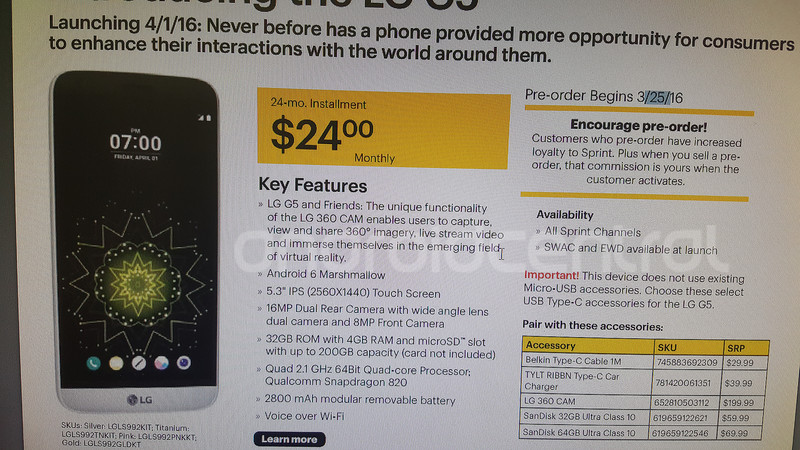
Preorders start March 25, with the phone officially available April 1.
While we’re still waiting on official word from Sprint regarding its pricing for the LG G5, we’ve gotten word from this week’s Sprint Playbook on what we can expect the phone to cost. Just $24 a month for 24 months will get the LG G5 into your hands. That’s a total of $576 over the life of the contract — a good bit cheaper than the $688 outright price that AT&T has listed.
In addition, Sprint’s got the LG 360 CAM — that’s the 360-degree camera “friend” that shares the same ecosystem as the LG G5 — listed at $199.
Thanks, anon!
LG G5
- LG G5 hands-on
- LG G5 complete specs
- LG G5 CAM Plus module
- LG G5 B&O Hi-Fi audio module
- The G5 has an always-on display
- LG G5 keeps the SD card, shuns adoptable storage
- Join the LG G5 discussion

LG 360 CAM to retail at $199, say Sprint, B&H

LG’s handheld 360-degree camera — the aptly named LG 360 CAM — will retail for $199, according to a preorder listing on B&H Photo, as well as in a leak from Sprint. The 360 CAM is part of the “friends” ecosystem that comes alongside the LG G5, which will be available starting April 1.
The camera is LG’s answer to the personal 360-degree video game, which also will see an entry from Samsung this summer, in addition to the non-mobile 360-degree shooters we’ve seen from other companies.
See at B&H
LG G5
- LG G5 hands-on
- LG G5 complete specs
- LG G5 CAM Plus module
- LG G5 B&O Hi-Fi audio module
- The G5 has an always-on display
- LG G5 keeps the SD card, shuns adoptable storage
- Join the LG G5 discussion

LG 360 VR listed at $199, according to online retailer

LG’s play for virtual reality will cost you a couple hundred dollars, according to an early listing at B&H Photo. The LG 360 VR is listed at $199, same as the LG 360 CAM handheld 360-degree camera. The two work in concert with the LG G5 as part of the “Friends” ecosystem of products.
And the 360 VR goggles themselves are powered by the G5, plugging in via USB-C. The phone then powers what you’re seeing, which essentially is a better version of Google Cardboard. It’s more 360-degree viewing that it is true VR. But it’s also done in a smaller faceprint than the likes of Samsung’s Gear VR, which straps the goggles and phone to your face. LG splits things up via the USB-C cable, making it more lightweight (and arguably less weird-looking). It’s also not as light-tight and immersive, however.
LG has worked with Google on the 360 CAM, which should be excellent for Street View content, as well as running all the current Google Cardboard apps.
See at B&H
LG G5
- LG G5 hands-on
- LG G5 complete specs
- LG G5 CAM Plus module
- LG G5 B&O Hi-Fi audio module
- The G5 has an always-on display
- LG G5 keeps the SD card, shuns adoptable storage
- Join the LG G5 discussion

Moto X Play is now receiving Android 6.0.1 in Canada

The Android 6.0.1 update is now pushing out for Moto X Play owners in Canada. This update brings along with it a number of changes, including some new emoji for you to check out. The update has only just started pushing out, so it may be a day or two before it arrives on your phone. With this update, you can expect the following changes:
- Android Security updates
- Unicode 8.0 Emoji support
- Stability improvements
If you want to manually check for the update, you can head into your Settings, About Phone and check for updates.
Discuss the Android 6.0.1 update in the forums

Google trolling Android devs a week ahead of April Fools’ Day

Google is damn near legendary when it comes to its April Fools’ day pranks — but it looks like it’s gotten an early start this year. Or, erm, 13 years from now. Logging into the Android Developer Console and heading on over to the reviews section finds the following, from Alex Scott on his “Nexus Space” device — aka the Nexus 16, with its 130GB of RAM, which is sure to benchmark more than 9,000:
Best app in Space! I love using AC News & Forums for Android™ in space, however, I wish it had better support for Space Design when in zero-g and will definitely give 6 planets when it does!
The review is only visible in the Dev Console — or via telescope, perhaps, as ol’ Spaceman Alex is cruising along at about 27,600 kph, some 400 kilometers in altitude.

No idea if this is just an early troll, or a premature troll — the “Learn More” link goes to a search for April Fools’ Day, so we’re leaning toward the latter — but in any event it’s a good one.
Update 10:45 a.m. EDT: And … it’s gone!
Thanks, Kingsley!

Todoist now lets you use natural language to create new tasks

The Todoist team has returned with yet another substantial Android app update. In this latest release, pushing Todoist up to version 9, we’re looking at a much more refined experience. Users of the platform will now be able to take full advantage of implemented support for external keyboards, like Bluetooth accessories or the Pixel C.
As well as that we have what the team calls “intelligent input,” which is a natural parsing system. What this will allow users to do is parse projects and task assignees using natural language, such as “Write an article to cover the Todoist 9 update #AwesomeApps +RichEdmonds.”
But that’s not all, here are some other improvements the team has implemented in version 9 of Todoist:
- Project sorting: sort your tasks in a certain project by name, date, priority or assignee with a single tap
- Pinch to add tasks anywhere inside a project
- Sub-tasks and sub-projects are now easier to handle by working directly with their parent task
- Gorgeous empty screens now show productivity stats like completed tasks for the day
- Sharable Todoist Zero screens will appear when users complete all tasks on their list
- Updated notification sync: notifications read on other platforms/devices will now be dismissed automatically from your Android device
- Faster sync: syncing is now up to four times faster so that users can spend less time waiting and enjoy an increased battery life
- Attachments: Todoist now makes necessary photo rotations on Android and syncs the proper horizontal/vertical orientation across all platforms
- Extended undo options for drag and drop, project sorting, and ‘move to history’
- Updated formatting options for tasks, projects and comments, including emoji shortcuts (:smile:, :scream:, :crying_cat_face:, etc.)
It’s quite the update and one we’re sure fans of the app will appreciate. You can download Todoist from the Play Store to try out these new features.

The best media streamers: What our editors are using

Cutting the cable cord is something many of us dream about, but it’s still a big ask. Today’s digital media streamers and the content services they provide access to bring us closer than ever, though, and there’s a bunch of great choice out there.
It also doesn’t necessarily matter which ecosystem you find yourself in as there’s a product out there for you. The big players like Google, Amazon, Apple and even Microsoft all have a presence on some kind of product that’ll sit in front of your TV. Not to mention it’s hard to think of something that doesn’t get Netflix in 2016.
So, if you’re on the hunt for a new something get your stream on, why not check out this little list. We’ve rounded up some of Mobile Nations’ finest to tell you about what they’re using, and why.
Phil Nickinson – Google Chromecast

There simply is no easier — or economical – way to stream music or movies (or apps, for that matter) if you’re using Android or iOS. Period. For $35 (there are sales all the time) you get a tiny disk that plugs into your TV or receiver — or into a spare speaker if you’re using Chromecast Audio.
And the brilliant move here is that Chromecast does the heavy lifting. Your phone, tablet or computer (Chromecast works with all three) initiates the stream, but doesn’t have to remain connected. So you don’t have the range issues of Bluetooth for music. And now that Google Play has pretty much caught up with everyone else in terms of content, there’s no reason not to use it if you’re on Android. That Google has included iOS is just icing on the cake.
And it’s simple to use. Once it’s hooked up it just lives there, then you look for the Chromecast icon in apps or in your browser. Pairing multiple speakers in Chromecast Audio isn’t quite as easy as using Sonos — but it’s so much lighter on the wallet. I use it. My wife uses it. My kids use it.
You should, too.
See at Google
Ara Wagoner – NVIDIA Shield TV

I thought the Chromecast was all I needed. I thought not having to hassle with remotes was heaven. I was wrong. I was so wrong. Because with Android TV I can browse so much better and waste so much more time. It’s truly a wonderful time to be a procrastinator.
Now, don’t get me wrong, the NVIDIA Shield Android TV is still expensive. If it hadn’t been a very generous friend’s Christmas present, I likely would never have talked myself into buying it. It’s expensive, but so worth it. I love using it — to the point that I have to push the remotes away in order to get my tasks done before I get sucked into another half a season of Good Eats.
And while the bundle with the free remote is excellent, I actually prefer using the controller to navigate the Leanback UI of Android TV. It’s much better at quick scrolling, and I like the heft in my hand, even if I don’t actually play any games on my Shield TV. Browsing on the Leanback UI is often easier than browsing on my phone, when I would struggle to find something to cast to my TV. And I still have the Chromecast ability built-in so that I don’t burn a Google Play Music authorization on the Shield TV.
See at Amazon
Russell Holly – Google Chromecast

I’ve always got my phone or tablet nearby, so my Chromecast and Chromecast Audio setups are a no-brainer for me. I have multiple Chromecast Audio unist setup as a group throughout the house, and a Chromecast or Google Cast-enabled Android TV box on every television.
The interface is what sells it for me. Every app I use supports Cast. When I have friends over, they can quickly add videos to a public queue and have some fun with it. Video quality is just about the same across all of the apps, and on the off chance that there’s enough people to play games it’s plenty easy to setup and enjoy.
It’s an experience that grows over time, and works with just about everything. It’s also dirt cheap, compared to the other streaming boxes. As ecosystems go, Chromecast has everything I need.
See at Google
Rene Ritchie – Apple TV

If you live in Canada, your options when it comes to streaming media are few and far between. Amazon isn’t here. Neither is Hulu or HBO Go, Showtime or many others. iTunes is. So is Netflix.
That’s why I’ve been using an Apple TV all day, every day, for the last few years. It does iTunes, which no other boxes can, and it does Netflix better than pretty much everything else. And it does AirPlay, which is awesome.
The new Apple TV has a few rough edges still — it was late in coming but still feels rushed — but even now it has almost everything I want in a streaming box. Well, except for Canadian broadcast apps, which the networks have failed to release.
There’s as good a content as a Canadian can get, and iOS games and apps to round it all out. Apple is also iterating quickly, so my investment feels like just that — an investment.
See at Apple
Adam Zeis – Amazon Fire TV

I was always just a cable TV guy. I never dove into Roku or Apple TV or anything like that, but then the Amazon Fire TV came along. I started out with the Fire TV Stick (which offers mostly all of the same features as the box) and quickly upgraded to the full-on Fire TV. It’s got the Stick beat in that there’s a bit more juice to it, it has more RAM, and it can be hardwired rather than run just over Wi-Fi — which means better streaming and less buffering.
I’ve been into the Amazon ecosystem for years, so buying into their streaming service was a no brainer. I have plenty of movies for myself as well as a slew of TV shows and movies for my kids. I love that I can quickly run through my watchlist and throw on a show for the kids without being at the mercy of whatever is on live TV. The Plex app on Fire TV works like a champ as well, so I can stream media that’s already on my server at home. Renting movies is a breeze too, and even family game night has been stepped up thanks to the Fire TV.
If you really want to geek out, you can go so far as to install Kodi (formerly XMBC) on the Fire TV Stick and Fire TV, giving you a whole new world of streaming possibilities — but we’ll save that for another post.
See at Amazon
Lory Gil – Apple TV

I am completely connected to the Apple ecosystem with a MacBook Pro, iMac, iPhone, iPad, iPod touch, Apple Watch, and fourth-generation Apple TV. The Apple TV allows me to, not only watch movies, television shows, and music that I’ve rented or purchased from iTunes, but I can also stream content from Netflix, Hulu, HBO Now, and dozens of other channels.
I don’t have a cable subscription, so these media streaming apps are my main source of entertainment. On top of streaming content, I can also view pictures I’ve uploaded to iCloud and listen to podcasts. And, because my computers are all connected to Apple TV via iCloud, I can stream content directly from them without having to plug anything in or perform any additional steps.
See at Apple
Stephane Koenig – Mini PC

A mini-PC, like in my case, a Tronsmart Ara X5, because for around $120 you have a PC that can play most things in hardware and future things in software or hybrid mode. And it can stream from all major streaming services.
It can decode NATIVE content so does not require on-the-fly transcoding (which is usually rubbish). It runs Windows 10 so is mostly familiar. It can run Kodi, Media Player Home Cinema, has no porblem connecting to NAS’s or local large hard drives. It can also manage a small network easily and consumes about 2W when idle.
Richard Devine – Xbox One

The Xbox One isn’t technically a media streamer, I understand that, but it does combine my favorite video content services with the ability to play games and Blu Ray movies. I still love my Blu Ray collection and if a movie is released that I actually care about, I will still buy it this way.
With the Xbox One I can play games as well as access content from Netflix, YouTube and Amazon Prime. I rarely bother with digital purchases, though Microsoft’s store front is OK if there’s something I maybe want to rent rather than buy.
The Netflix and Prime apps on Xbox One are pretty good, I can control it with my phone or laptop if the controller is out of reach and it does pretty much everything I want. I do also have a Chromecast and an Amazon Fire TV in the house, but most of the time it’s the Xbox One that gets used.
See at Microsoft
That’s what we’re using, but what about you? If you’re fond of an alternative we didn’t feature be sure to share it with us in the comments below!

 AIVAnet