


What’s the Android N easter egg? We still don’t know

So we’ve go the Android N Developer Preview. We’ve new factory images for a handful of devices. We’ve got a bunch of new little features to play with.
One thing we don’t yet have, however, is the Android N easter egg.
That’s not a huge surprise, on one hand, because the Android N easter egg could very well give away what the nickname will actually be.
We’ve been playing a Marshmallow-themed version of Flappy Bird for a while now, and Lollipop before that. KitKat brought a giant K, then android-themed tiles. Jelly Bean was — you guessed it — a cascade of jelly beans. Ice Cream Sandwich saw the introduction of Nyan Cat!. Honeycomb was a black-and-blue neon bee. Gingerbread was a creepy (but wonderfully drawn) zombie cookie.
You get the idea. So what do you think the N nickname will be? Take our poll!

Google Docs now lets you quickly jump between headings

Google Docs users on both mobile and the web have a handy way to quickly jump between sections of their documents. The new document outline view will give you a quick glance at the different sections of a document, broken up the headers that appear within. And if you haven’t manually inserted headers, the feature intelligently tries to detect divisions in your document and automatically fill in the outline. Once filled in, users can quickly hop to any section with a click.
On desktop browsers, the document outline will be available in a pane on the left side of the screen. For those on mobile, however, things work a little differently. Once you start scrolling through a document, you’ll see a navigation handle pop up. If you touch the handle, a list of the sections in the document will pop up, allowing you to quickly scroll to specific headings.
The feature is currently rolling out, so it may take some time to appear on both the web and mobile for all users.

Android N adds a potentially life-saving feature

Emergency Info gives you a place to show allergy, blood type, emergency contacts and other vital details.
Nobody likes to think about it, but if you’re involved in an accident or medical emergency, your phone might be the first place a first responder looks for vital information. In the new Android N developer preview, Google is making it easier for owners to show medical details and personal contact info, as well as details of an emergency contact.
Here’s how it works.
When you set up a new phone on the first N developer preview, the final stage in the setup process lets you see additional, optional steps. Right now the only one is “Emergency Information.” Tapping this lets you fill out personal, medical and contact details. These include your name, address, date of birth and important medical info like allergies, bloody type, any medications you might be taking, and additional medical notes. You can also specify your organ donor preference, and select one of your contacts as an emergency contact.

If you skip this at setup, you can find it under Settings > User at any point in the future.
Then, if any of this stuff is needed, first responders can find it by tapping the “Emergency” button on a locked phone, then double-tapping the “Emergency Info” button that appears. (A single tap will prompt you to tap again.)
It’s worth remembering that Android N is still a developer preview, and this stuff could well change in the months running up to the final code drop. Nevertheless, it’s an important feature to include in the base OS, and one that could well save lives.

How to enroll in the Android Beta Program

Google is making it easier than ever for anyone with a (relatively) current-generation Nexus device have a test of the Android N Developer Preview, as part of the new Android Beta Program. The short version is that you’ll no longer have to manually flash a factory image to use the beta software. You can enroll a Nexus device online, receive an over-the-air update, and go about your business.
Here’s what you need to know:
The following devices can take part in the Android Beta Program:
- Nexus 6
- Nexus 9
- Nexus 5X
- Nexus 6P
- Nexus Player
- Pixel C

To enroll a phone or tablet in the Android Beta Program, go to google.com/android/beta. You’ll see a list of your eligible devices.
Once you’re in the beta program you’ll get an update every 4 to 6 weeks, Google says, until the public launch of N, sometime in the third quarter of this year.
To un-enroll a device from the beta program, just go to that same site — google.com/android/beta and chose “UNENROLL DEVICE.” Warning: The device will receive another over-the-air update that puts it back on the latest stable public version of Android. It also will factory reset itself and wipe any data. Repeat: You will lose whatever data is on the phone (and not backed up) when you exit the beta program.
And know that there will be bugs. Things will break. This is a Developer Preview.
Otherwise, that’s it. Google’s made it easier than ever to take part in a developer preview program. The question now is whether you should.

Google’s Android Beta Program is now available for developers
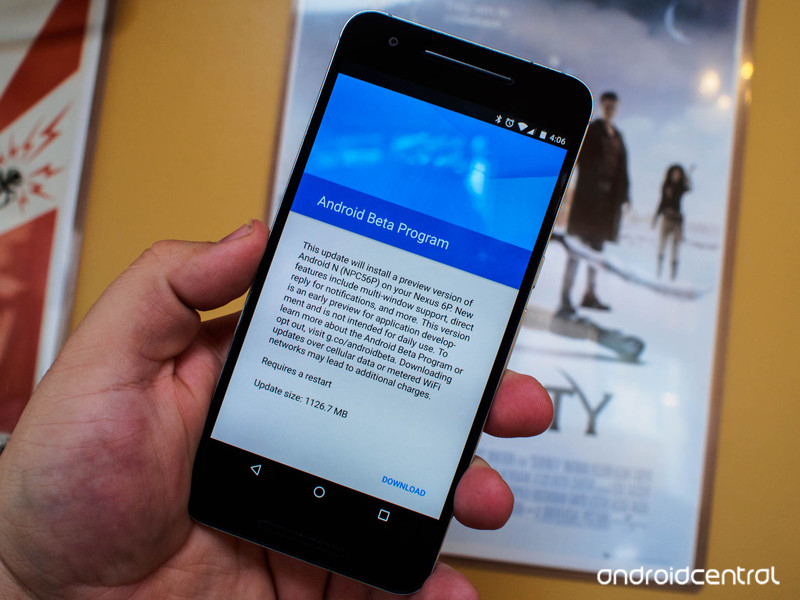
Google’s new Android Beta Program, which allows developers an easier way to download test releases of Android, is now live. The current program is for preview releases of Android N for select Nexus devices, and offers updates over-the-air.
From Google:
Devices that you opt into the program will receive an over-the-air (OTA) update to the latest beta version of Android N. The updates that you’ll receive as a part of this program are unstable pre-release versions, and may contain errors and defects that affect your device.
You may remain in the Android Beta Program beyond the N release to preview future Android N maintenance releases (MRs). If you choose to do so, you will automatically get an OTA update to pre-release versions of the MRs as they become available. At the end of the program, you will begin to receive regular public updates.
Right now, the Android Beta Program is available for the Nexus 6, Nexus 9, Nexus 5X, Nexus 6P, Nexus Player, and Pixel C.
Please note: this is not meant to be an easy way for normal people to get their hands on the latest Android features early. The Beta Program is target at developers, and is meant to make it easier for them to test their apps against an early version of the next version of Android. Things are guaranteed to break.

Canadian banks are finally putting customers first in mobile payments rollout
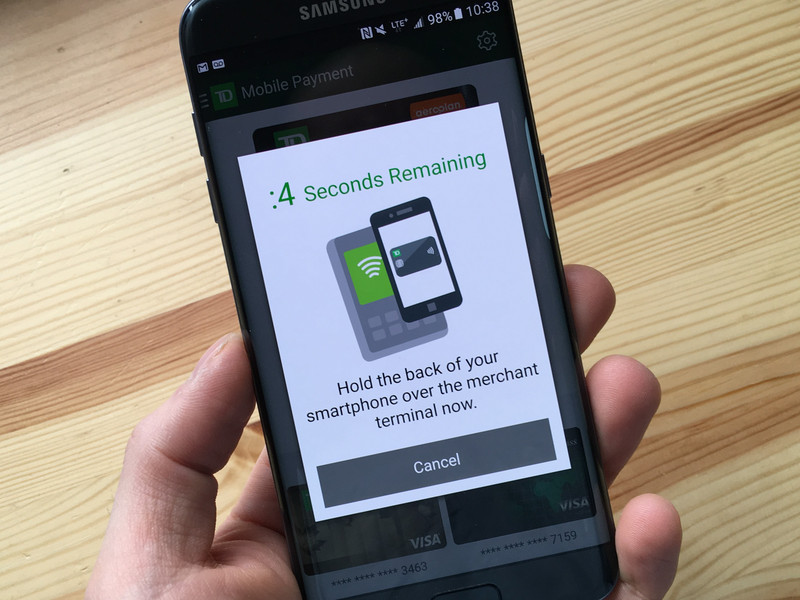
Banks are finally figuring out that they need to serve the customer when it comes to mobile payments. But is it enough?
Yesterday, I used my smartphone to pay for a pizza slice. Big deal, right?
But it was a big deal. See, the phone I used, the Galaxy S7 edge, isn’t publicly available (yet another reason I love this job), and the SIM card is just your run-of-the-mill variety.
I bank with TD Canada Trust, Canada’s second-largest bank by customers (and market cap). Until last week, having an unreleased phone or a SIM card without a Secure Element would have prevented me from using TD’s app to make mobile payments. But slowly, the Canadian financial sector is waking up to the reality that customers come first, and convenience, not closed systems, is what is going to advance the industry as a whole.
Last week, TD updated its Android app to support a technology called Host Card Emulation, or HCE, which was co-developed between Google and two payment companies, Visa and MasterCard. HCE takes the highly sensitive (and secret) credit card information, which has traditionally been stored on an NFC-compatible SIM card with a Secure Element, and moves it safely to the cloud.
That minor change is important for a number of reasons. Traditionally, banks had to work with carriers and manufacturers to certify specific devices for use with their mobile payment solutions, an untenable workflow in a vibrant mobile ecosystem like Canada’s. A Bell customer, for example, could discover that her Sony Xperia Z5 was incompatible with her CIBC banking app because the three players in the chain — Bell, CIBC, and Sony — didn’t follow through on their obligations to consumers.
Under this system, it also meant that new devices — even popular ones, like the latest Galaxy smartphones — would take months to be certified, preventing early adopters, often the ones most excited about the prospect of transitioning to mobile payments, from using the service.
With HCE, that all changes. While only TD Canada Trust and RBC Royal Bank currently support Host Card Emulation in their apps, the only prerequisite is an Android device running version 4.4 KitKat or newer; even Nexus devices, which were previously locked out of the certification process, are supported.
To the average consumer, all this tech talk is noise; they just want to know if their smartphone will be able to make payments at touchless payment terminals around the country. Increasingly, that answer is yes, which is a good thing. Unfortunately, there are still serious issues throughout the ecosystem.
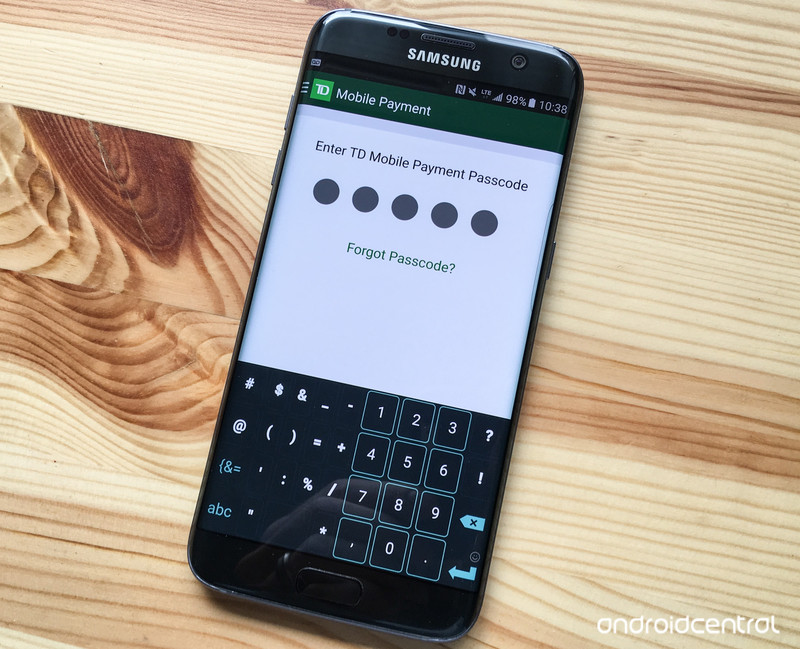
For one thing, unlike Samsung Pay, Android Pay and Apple Pay, banks are still relying on good ol’ PIN codes for authentication, which misses the added security and convenience of the myriad devices shipping with fingerprint sensors, dating all the way back to the Samsung Galaxy S5. Sure, while only devices running Marshmallow and above technically support Google’s Imprint API, implementation of Host Card Emulation without biometric authentication is like eating a piece of pie and being told you have to chase it with raw broccoli.
TD and RBC together make up some 30% of Canada’s consumer banking market, but the other big banks, namely Scotiabank, CIBC, BMO, Desjardins, National and a few others, either offer no mobile payment solution, or still rely on the aging, device-specific infrastructure that debuted back in 2013. Quick to adapt these institutions are not.
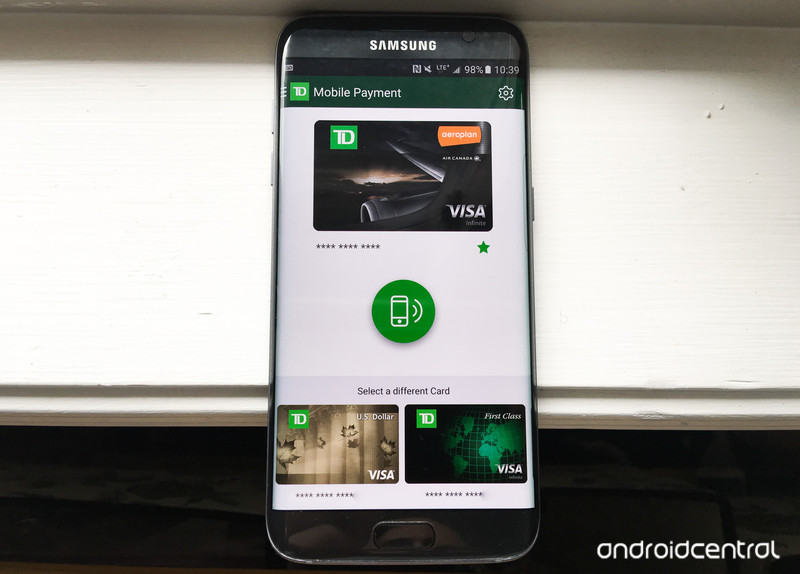
Furthermore, despite improvements to the apps themselves, they are still just that: apps. Android Pay and Samsung Pay integrate directly into the operating system, removing the friction between removing the phone and initializing the payment. Canadians are used to seamless card-based transactions — we’ve had both chip-and-PIN and touchless payments for years — so forcing customers to open a third-party app and enter a separate PIN feels clumsy.
At this point, though, given how tightly the banks are trying to control their respective mobile payment solutions across both Android and iOS (on the latter, by trying to negotiate higher interchange fees before approving Apple Pay), a Host Card Emulation-based solution is likely the best we can expect for the time being. Later this year, when Samsung Pay rolls out, we hope the banks are more amenable to negotiation. It would be a shame to see a repeat of what iOS users have been dealing with on the Apple Pay side.
Now, if you’ll excuse me, I’ll be making mobile payments with my unreleased Galaxy S7 edge.

First details of Telltale’s episodic Batman game to be revealed on March 18

If you want to be among the first to learn details about Telltale’s upcoming episodic game featuring Batman, mark March 18 on your calendar. The developer will open up with the first concrete information on the game as part of a SXSW Festival panel that will be streamed on Twitch starting at 5:30 p.m. Eastern Daylight Time.
Telltale’s blog post hints that the game will deal with “the complex life and mind of Bruce Wayne, the duality of his own identity, and the struggle of responsibility in saving a city overcome with corruption and villainy.” Kotaku Australia got a few more hints from Telltale’s CEO Kevin Bruner:
“Our Batman series is looking fantastic. I think it might become one of the best things we’ve ever done. I can’t go into much detail, but the Batman team is amazing and they are really on top of it. It’s not like any other Batman game out there. This game really explores all aspects of Batman, not just the the “fighting in the suit” side of him. There’s a lot of subplots to explore and some really amazing choices that have a big impact on the story being told. I really think it might be the peak of the mountain for us so far.”
Telltale just started a new three-part episodic series, The Walking Dead: Michonne, and has an unannounced project based on the Marvel Comics universe still in the works, along with a second “season” of its Game of Thrones series.

Samsung Gear VR gets social with user profiles, new multiplayer games and more

The Samsung Gear VR is due to get a social boost thanks to some new features and games that are headed for the VR headset soon. Starting tomorrow, March 10, Gear VR owners will be able to set up their own social profiles and connect with friends by searching for their Oculus username or real name. You’ll then be able to easily kick back with friends to watch video or team up in new social games.
The new games include “Social Trivia” and “Herobound: Gladiators,” Oculus says. As you’d expect, Social Trivia pits you against friends or strangers in a battle of knowledge. Herobound: Gladiators, on the other hand, lets you band together in groups of four to battle goblins and demons.
Outside of gaming, Gear VR owners will also be able to start private rooms to watch Twitch or Vimeo streams with people they know in Oculus Social. And beginning next week, users will be able to connect their Facebook account to Oculus Video to personalize the 360 video feed based on pages they like and people they follow.
Are you looking forward to getting a little more social with your Gear VR time? Let us know what you think of the updates in the comments below!
Samsung Gear VR

- Gear VR review
- Five Gear VR games that shouldn’t be missed
- Inside Samsung’s Gear VR web browser
- Gear VR vs. Google Cardboard
- Where to buy Gear VR
Amazon AT&T Best Buy Samsung

Sony’s A6300 is a step forward for mid-tier mirrorless cameras
Sony had the right idea with its A6000: It made a powerful mirrorless camera and sold it at a relatively affordable starting price. And people loved it, with Sony claiming it’s been the world’s best-selling mirrorless camera since it came out two years ago. Now the company is following up with the A6300, a $1,000 (body-only) shooter with top-of-the-line specs designed for photographers and videographers alike. We’ve seen this formula play out well for Sony with some of its other recent models, but now it’s hoping for similar results on a camera that doesn’t cost north of three grand.
For starters, it features a newly developed 24.2-megapixel APS-C sensor, a Bionz X processor, 11-fps continuous shooting, ISO range of up to 52,000 and 4K video in Super 35mm format. To give you an idea of how confident Sony is about the A6300’s Ultra HD (3,840 x 2,160) capabilities, the company says this is the best 4K video quality it’s ever put in any consumer camera. Those are strong words considering Sony already has some excellent mirrorless models, including the A7R II and A7S II. To be fair, though, those are full-frame, not APS-C.
Part of what makes the A6300 great for both stills and movies is Sony’s refined 4D Focus, which locks in on subjects in a mere five hundredths of a second, according to the company. The camera’s autofocus system is so fast that, at times, I actually had a little trouble keeping up with it. This was particularly noticeable when I was in continuous shooting mode, since the camera would try too hard to focus on moving subjects. The reason for this is that there’s a high-sensitivity AF option enabled by default, but you can fix that by switching to either medium or slow (I preferred medium).
Nevertheless, the prowess of the A6300 is helped by its 425 phase-detect points, compared to the 179 found on the A6000. That, combined with the 4D Focus, makes the A6300’s AF twice as fast as the A6000, according to Sony. And it shows. As someone who’s tested a handful of cameras over the past several months, Sony’s latest mirrorless shooter is definitely the fastest one I’ve tried. Canon’s EOS M3 and Olympus’ E-M5 Mark II are two solid alternatives to the A6300 (and cost about the same too), but don’t expect either of them to be quite as speedy as Sony’s camera.
Altogether, the A6300 exceeded my expectations. As I mentioned in a previous article about the camera, I didn’t think it was capable of making me forget higher-end models like the A7R II or A7S II, both of which I’ve used before on a regular basis. But it did. Taking pictures with it is a breeze, and if you’ve used a Sony camera before, you’ll feel right at home. You won’t have trouble finding menu settings you’re comfortable with, and the dials are similar to those found on other Alpha cameras.
Something to note, per Sony, is that even though the A6300 seems to be the obvious replacement for the A6000, it isn’t. The manufacturer doesn’t have any plans to discontinue that older and popular mirrorless camera, which is good news for people who don’t want to spend more than $1,000 on this newer model. For the rest of you — those who are looking to get serious about photography — the A6300 could be a better choice.
I will say, however, that the A6300 performs better when paired with Sony’s new E-Mount lenses, called G Master. During the time I shot with the A6300, I leaned heavily on G Master glass — namely, the FE f/1.4 85mm GM and FE f/2.8 24-70mm GM, plus existing Sony lenses such as the Vario-Tessar 16-70mm and FE 70-200mm. Not surprisingly, the best images I took were with G Master lenses, as you may be able to tell by checking out EXIF data from my samples.
The 85mm G Master lens in particular makes it possible to capture stunning, bokeh-filled pictures and videos. It was definitely my favorite of the two. While there’s no denying that Sony’s new lenses make a difference in image quality, the A6300 has no trouble performing well with non-G Master glass, like that 16-70mm I mentioned earlier.
When Sony announced the G Master series last month, it said the goal was to offer lenses that were optimized for stills and videos, rather than only focusing on the former. Thankfully for those invested in the Sony camera ecosystem, these do not disappoint. You’d hope so too, considering the cheapest G Master glass (f/1.4 85mm GM) costs $1,800, while the f/2.8 24-70mm is $2,200. There will be a f/2.8 70-200mm as well, scheduled to release in May, though Sony hasn’t said how much it will cost. The G Master launch won’t completely alleviate Sony’s weak lens lineup, then, but it’s a step in the right direction.
Sony has done a tremendous job with the A6300. It’s small, sleek, fast and, most importantly, captures impressive photos and video. Paired with the right lenses, the A6300 has no trouble matching up with its more expensive Alpha relatives or even some mid-tier DSLRs. If you can afford them, I’d recommend spending the extra cash on G Master lenses — the image quality you get makes them worth it. Just don’t feel like that’s a necessity, because the camera is still good enough with less expensive E-Mount optics.
To view the sample images in full-resolution, click here.
Facebook nabs face-swapping app Masquerade to take on Snapchat
The face-swapping filter on Snapchat is getting plenty of use as of late, and Facebook is joining the fray as well. Zuckerberg & Co. bought the popular app Masquerade (MSQRD) that offers a similar feature. Masquerade’s CEO Eugene Nevgen confirmed the move in a blog post, explaining that the company is going to “join forces with Facebook and bring the technology to even more people.” Financial details weren’t disclosed for the transaction that brings Facebook the technology to apply filters to videos.
Tech Insider reports that Facebook will still keep Masquerade as a separate app, but plans to integrate the face-swapping tech into its own software as well. Masquerade offers event-specific filters for things like The Oscars, so it’s easy to see why Menlo Park would be interested in the software. For example, you can transform yourself into Leonardo DiCaprio and give your own acceptance speech. If you’ll recall, Facebook also packs in add-ons like stickers and photo filters, and now it’s jumping on the face-swapping bandwagon, too.
Via: Tech Insider
Source: Masquerade

