


Anonymous declares ‘total war’ on Donald Trump
Donald Trump is in the sights of hacktivist collective Anonymous again. On March 4 the group, posted a video declaring “total war” on the presidential candidate. It hopes to not only bring down many of Trump’s sites, but also halt his presidential bid by uncovering and exposing embarrassing information. “We need you to shut down his campaign and sabotage his brand,” said a Guy Fawkes-masked individual in the video.
Trump has been targeted because according to the masked activist, “your inconsistent and hateful campaign has not only shocked the United States America, you have shocked the entire planet with your appalling actions and ideas.”
Using the #OpTrump hashtag, the collective is asking for help to bring down TrumpChicago.com on April 1. It also plans to target personal and business sites like donaldjtrump.com, trump.com, trumphotelcollection.com and the candidate’s online presidential destinations including donaldtrump2016online.com and citizensfortrump.com.
The collective has already posted unverified personal information about Trump and staff, including his social security number.
This is the second time Trump has been targeted by the group. Anonymous posted a message to the candidate in 2015 regarding his comments concerning Muslims.
Via: Business Insider
Source: Anonymous
360fly hopes you’ll livestream mobile VR video
There’s no shortage of 360-degree cameras to add a dash of virtual reality to your adventure videos. However, livestreaming that portable VR hasn’t been realistic for most people… at least, not until today. 360fly has teamed up with Livit to offer livestreaming VR to most anyone with one of 360fly’s cameras and a modern smartphone. So long as you have Livit’s Android or iOS apps and a high-quality data link, you can share VR video as it happens — that bike ride should be considerably more immersive. You’ll need to shell out at least $399 for 360fly’s gear ($499 if you’re waiting for the 4K model’s release in April), but it could be easy to justify if ordinary action cameras just won’t cut it.
Source: 360fly
Apple to Attend EU Hearing on Tuesday to Discuss Taxes
Apple, Google, McDonald’s, and IKEA representatives will be in Brussels on Tuesday to discuss their tax deals in Europe, reports Reuters.
The hearing will be hosted by the European Parliament’s tax committee, but the lawmakers do not have the power to order any changes, according to the report. Nevertheless, the meeting should raise some important questions about each company’s compliance with EU tax rules in the past and present.
Apple is one of several multinational corporations that have been targeted for possible corporate tax avoidance in Europe. In September 2014, the European Commission formally accused the iPhone maker of receiving illegal state aid from Ireland, where it has reportedly paid a reduced tax rate of around 1.8% on it overseas profits.
Apple operates multiple subsidiaries in Ireland to pay significantly less tax outside of the U.S., where it earns up to 60% of its revenue. The company’s $64.1 billion in profits generated from 2004 to 2012 could be subject to a higher 12.5% tax rate, in which case it would owe more than $8 billion in back taxes.
A decision in the tax probe was originally expected in late 2015, but the European Commission’s request for additional information has pushed the investigation into 2016. Last week, EU competition chief Margrethe Vestager told reporters “don’t hold your breath” in terms of when the commission will make a decision.
Apple previously said it pays all of its taxes and added that it would appeal any decision made against the company.
Update: While Reuters says the hearing will take place on Wednesday, the European Parliament’s website states the meeting will start on Tuesday at 15:00 CET.
Note: Due to the political nature of the discussion regarding this topic, the discussion thread is located in our Politics, Religion, Social Issues forum. All forum members and site visitors are welcome to read and follow the thread, but posting is limited to forum members with at least 100 posts.
Tags: corporate tax, European Commission, Europe, Ireland
Discuss this article in our forums
Possible iPhone 7 Plus Dual Camera Module Depicted in New Images
Amid rumors suggesting the larger-screened iPhone 7 Plus will be differentiated from the iPhone 7 with a dual-lens camera system, multiple images depicting a dual-camera part that could be used in the device have surfaced.
This morning, Taiwanese site Apple.club.tw [Google Translate] shared images of a dual-camera module potentially destined for the iPhone 7 Plus, which matches earlier images of a dual-camera module shared in January by Chinese site Chuansong.me [Google Translate] and highlighted over the weekend by French website Nowhereelse.fr. Similar camera module photos have also been spotted on Chinese social networking site Weibo (login required).
Image via Chuansong
All of the images appear to depict the same camera module, featuring a dual-lens setup with a narrower lens in a larger enclosure on the left and a wider lens in a smaller enclosure on the right, along with two cables that would allow it to attach to the logic board of an electronic device.
 Image via Weibo
Because images of the module first started showing up in January, it might be easy to dismiss it as a part for another smartphone, but January is also the month we got our first look at an alleged iPhone 7 backlight component, suggesting early parts have perhaps been in production for several months already.
We can’t confirm this is a component that will be used in the iPhone 7 Plus, but in addition to lining up with dual-camera rumors, it is labeled with an “821” part number, which Apple has used in the past. With rumors suggesting Apple has been experimenting with dual-camera modules from several manufacturers, there’s a good chance this is a genuine part.
 Image via Apple.club.tw
Apple is said to be preparing to introduce a dual-lens setup in at least one version of the iPhone 7 Plus. Current rumors point towards the launch of an iPhone 7 and two variants of the iPhone 7 Plus, one with a single camera and one with two cameras. It isn’t known if this is just a prototyping phase or if Apple actually intends to release two versions of the iPhone 7 Plus, but rumors do agree that while we may see dual cameras in the iPhone 7 Plus, the 4.7-inch iPhone 7 will continue to use a standard single-lens camera.
Apple’s dual-lens camera system is said to take advantage of technology acquired from LinX Imaging, introducing 2-3x optical zoom capabilities for images that are clearer, brighter, and with more detail, especially in low light conditions. Apple will likely launch the iPhone 7 and 7 Plus in September of 2016.
Related Roundup: iPhone 7
Tags: apple.club.tw, chuansong.me
Discuss this article in our forums
Zagg’s iPhone and Apple Watch Mobile Charging Station is Functional, but Not Pretty
Zagg’s Mobile Charging Station for the Apple Watch and iPhone is both a portable charging platform and a backup battery for your Apple products. With its 5,000 mAh battery, the Mobile Charging Station is meant to be used while away from a power source. It has enough capacity to provide a full charge for both an iPhone and an Apple Watch, with a little juice left over.
There are a few features that set the Mobile Charging Station apart from other portable charging solutions, including a cord management system and a unique pop-up design that charges the Apple Watch in landscape mode and folds flat for travel, but on the downside, it is expensive and unattractive.
Design
Zagg’s Mobile Charging Station is not an attractive accessory, but it is functional. Made from black plastic with red plastic accents, the Charging Station has a pop-up charging platform for the Apple Watch, allowing it to be charged in landscape mode, and it includes a built-in cable management system.
It’s clear aesthetics weren’t on the top of the priority list when it came to creating the Charging Station. It feels well made, but at the same time, the materials used feel cheap, and the thick black plastic certainly doesn’t match or complement the iPhone or Apple Watch.

In a bag, backpack, or purse, the Charging Station is portable enough, but it’s not pocketable due to its thickness. In width and height, it’s similar in size to the iPhone 6s Plus, but it is more than twice as thick. It’s all plastic, black outside and red inside, with a soft padded strip on the bottom to keep it from damaging desks and other surfaces.

The two halves of the Mobile Charging Station come apart so the charging cables for the iPhone and Apple Watch can be inserted. The Apple Watch charger goes in first, with the USB end plugged into the USB port marked with the Apple Watch symbol. From there, the cord can be wrapped around the center island, which accommodates the full 2 meter cable length. Once the Apple Watch cord is wound up, the charging puck is placed inside the designated slot, which, as mentioned, is adjustable from flat to a 90 degree angle.

Zagg includes a Lightning cable for the iPhone, which is shorter than the standard cable. The iPhone cable does not wrap around the center island, instead plugging directly into the USB slot at the top and routing out through the bottom. There’s actually quite a bit of cord left when using it this way, and I did wish the cable had been made somewhat shorter. I rectified this by using a 1m Apple Watch charging cable and my own 1m iPhone cable, which could be wrapped around to make it shorter.

With both the iPhone and Apple Watch cables in place, the top of the Zagg Mobile Charging Station can be snapped back on, hiding the cords and leaving just the end of the Lightning cable and the Apple Watch charger exposed. The two halves of the Mobile Charging Station are held together with magnets that are strong enough to keep it from coming apart in a bag or backpack. Getting the cords in and out of the Mobile Charging Station is relatively simple, and the cord management system works well.

Both closed-loop and open loop Apple Watch bands fit on the pop-up Apple Watch charger, and open loop bands can also be charged while lying flat across the top of the Mobile Charging Station. The pop-up Apple Watch charger is a clever design element that makes it easy to charge an Apple Watch when on the go, and it’s nice to have support for Nightstand mode. An Apple Watch and an iPhone can both charge at once, with the iPhone charging through the Lightning cable at the bottom of the dock while the Apple Watch charges on the Apple Watch charging puck.

While the Apple Watch has a clever stand to charge on, the same isn’t true of the iPhone. I wish Zagg had built in some kind of iPhone stand to prop up the iPhone to give this accessory more utility, but there’s just a plain Lightning cable. On the top of the Mobile Charging Station, there’s an LED that gives an approximation on how much battery life is remaining, and there’s a button that needs to be pressed to initiate charging when a device is plugged in. There’s also a micro-USB port for charging the Station itself.

My biggest gripe with the Mobile Charging Station relates to how it charges. When the 5,000 mAh battery inside is dead, it needs to be charged using an accompanying 6-foot micro-USB cable, which is long, thick, and ugly. It’s thick enough that it doesn’t wind up well, and long enough that it completely negates the convenience of having my iPhone and Apple Watch cords wrapped up.
When I travel, am I supposed to take this thick, unwieldy micro-USB cord with me? Without a micro-USB cord, I can’t use the charger for more than a single day, and when traveling, I don’t want to bring Zagg’s super thick micro-USB cord. Obviously one can solve this problem with a different micro-USB cord because most of us have oodles of them lying around, but Zagg’s cord choice here is simply baffling.

Taking into account the cord, the best use case for the Mobile Charging Station seems to be on a desk where it has a permanent charging position, with the option to remove it for day trips, long work days, school, and other times where charging might be required mid-day.
Battery Life
There’s a 5,000mAh battery in the Zagg Mobile Charging Station, enough to provide one full charge to an iPhone 6s Plus and an Apple Watch when charged at the same time. With smaller iPhones like the iPhone 6s, the battery will go further, and thus this is best suited towards iPhone users with smaller capacity devices.
In my testing, the Mobile Charging Station charged my iPhone 6s Plus at a satisfactory rate. I plugged in a completely dead iPhone at 5:08 p.m., and by 5:55, it was at 50 percent battery life. At 7:25, it was charged to 100%. I drained my iPhone again, but the leftover battery life in the Charging Station was only able to charge it to 3%.

I saw similar numbers when charging my iPhone and Apple Watch at the same time. Both were completely dead at 5:41, and I plugged them in to the fully charged Charging Station. At 7:24, my Apple Watch was fully charged and my iPhone was at 95%.
Zagg claims the Mobile Charging Station can deliver one full charge to an iPhone and an Apple Watch, and that was true — I got exactly one full charge for both, but no more than that.
As for the Mobile Charging Station itself, it took a couple of hours to charge from empty to full using the included micro-USB cable.
When charging my devices with the Mobile Charging Station, I did notice a high-pitched whining sound once or twice. It’s not something that’s audible from across a room, but if you’re sitting next to the accessory, it’s noticeable.
Bottom Line
Zagg’s Mobile Charging Station, like several of the mobile Apple Watch chargers on the market, is of questionable use. Zagg did a good job with the cable management features and the pop-up Apple Watch dock, but those features and the built-in battery make the Mobile Charging Station much bulkier than a standard 5,000 mAh battery pack and much more expensive.
Zagg is charging $79.99 for the Mobile Charging Station, a price that seems unreasonably high for a hunk of plastic and a 5,000 mAh battery. For comparison, Anker sells a 10,000 mAh battery on Amazon for $21.99, and it’s the same general size as the Zagg Mobile Charging Station. Sure, it doesn’t offer cable management or a pop-up holder for the Apple Watch charger, but it’s double the power at a third of the cost. Are the extra features the Mobile Charging Station offers worth $55? I’m not sure.

I wasn’t a fan of the design of the Mobile Charging Station because it in no way matches the aesthetic of my Apple Devices, something I tend to look for in an Apple accessory. Others may not mind the look, and even with the price premium, I can see where the Mobile Charging Station may be useful as a no-hassle desktop charging accessory that gives users the option to grab it and go on a day when extra power is needed.
Pros:
- Keeps cords organized
- Clever pop-up Apple Watch charging function
- Nightstand mode supported
- Charges Apple Watch and iPhone simultanously
- Offers pass-through charging
Cons:
- Design is not attractive
- Thick and bulky, not pocketable
- Expensive
- Micro-USB cord for charging is thick and unwieldy
- 5,000 mAh battery doesn’t offer much power for the price
- Occasional high-pitched noise when charging
How to Buy
Zagg’s Mobile Charging Station can be purchased from the Zagg website for $79.99.
Tag: Zagg
Discuss this article in our forums
Apple Seeds Seventh Beta of iOS 9.3 to Developers and Public Beta Testers
Apple today seeded the seventh beta of an upcoming iOS 9.3 update to developers and public beta testers for testing purposes, one week after seeding the sixth iOS 9.3 beta and more than three months after the public release of iOS 9.2, the last major update to iOS 9. iOS 9.3 has been in testing since January 11.
The seventh iOS 9.3 beta is available as an over-the-air update and through the iOS section of the Apple Developer Center (developers only).
As a major update to the iOS 9 operating system, iOS 9.3 introduces several new features. There’s a Night Shift mode to reduce the amount of blue light iOS users are exposed to in the evening by shifting the iPad or iPhone display to a warmer (yellower) color spectrum, and there are several features designed to improve the iPad for Education program, such as multi-user login. Multi-user login, while an appealing feature, is limited to MDM customers and is not available to the general public.
Subscribe to the MacRumors YouTube channel for more videos.
Multiple apps and features are also seeing updates in iOS 9.3. Apple News includes more personalized recommendations, faster updates, a landscape view on the iPhone, and support for in-line video, while Health includes an Apple Watch-style “Activity” view, Notes has an option to password protect individual entries, and third-party apps can add songs to Apple Music.
Apple Music for CarPlay offers “New” and “For You” sections for better music discovery in iOS 9.3, and a Nearby Feature in CarPlay Maps offers more information about points of interest that are close by. Paired with watchOS 2.2, an iPhone running iOS 9.3 is able to support multiple Apple Watches, and for iPhone 6s users, there are new Quick Actions for Weather, Settings, Compass, Health, App Store, and iTunes Store.
This is likely to be one of the last betas of iOS 9.3 we’ll see before it is released to the public. Apple is planning to launch iOS 9.3 in the spring, perhaps following an event that is scheduled to take place on March 21.
Related Roundup: iOS 9
Tag: iOS 9.3
Discuss this article in our forums
1byone’s $20 waterproof Bluetooth speaker is a nugget of excellence
As fun as phones, headphones, and fancy speakers are to review, some of my absolute favorite reviews come from price conscious technology. Not everyone has a ton of excess money to
Simply Wallpaper: Beautiful wallpapers delivered to your device [Review]
If you like to keep your device as stock as possible, the only choice you have for customizing it is by changing its wallpaper. You can do a Google search
Save up to $100 on a customized Moto X Pure Edition
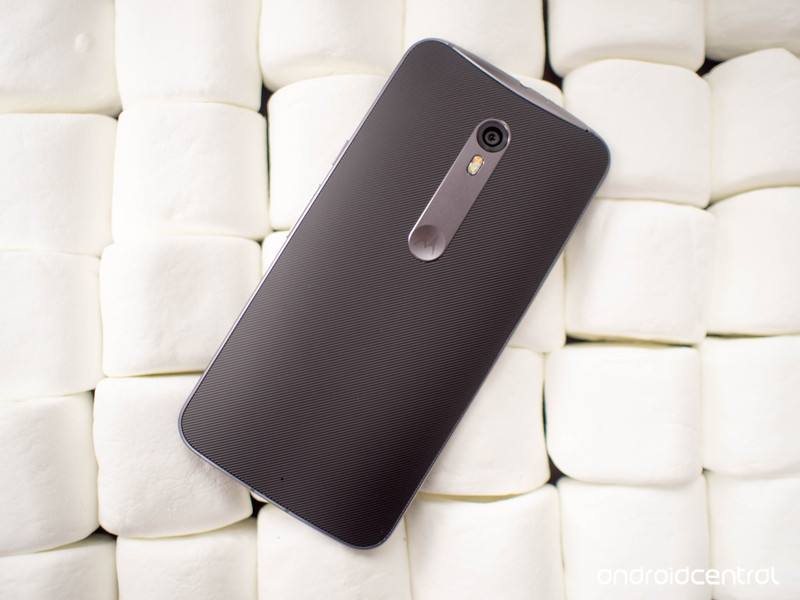
If you’ve been eyeing the Moto X Pure Edition, you may be interested to hear Motorola is currently offering up to $100 off the price for a limited time. You can grab the 16GB version for $299 or the 32GB for $399, a savings of $100 and $50 respectively. One of the big selling points with these phones is the ability to customize it the way you like by picking colors for the front, back and accents. You can even have your phone engraved and add a custom greeting if you wish.
This deal is only good from now through March 17, so don’t wait too long to place your order. Which colors will you select on your custom Moto X Pure Edition? Let us know in the comments!
See at Motorola
Moto X Style (Pure Edition)
- Our comprehensive review
- Moto X Pure Edition specs
- Moto X Pure Edition custom backs: silicone, wood, and leather
- Versus: Galaxy S6 | iPhone 6
- The latest Moto X Style news
- Discuss in our Moto X Style forums
Motorola Best Buy Amazon

The perfect Smart Home: What our editors are using!

In 2016 we’re closer than ever to living in the home from Back to the Future.
OK, Back to the Future was set in 2015 and while we’re not at the stage of hydrating pizzas and video wall windows, we are living in a world where it’s perfectly reasonable to connect our homes to our smartphones. None of this stuff is cheap, but it’s also not astronomically expensive, meaning that every single one of us can feel just a little bit like we’re living in the future.
The Smart Home market has grown a whole lot in recent years. Big names such as Nest, Samsung’s SmartThings and Philips Hue have risen to become more mainstream products, and Sonos is almost a household name when it comes to wire-free, home-filling music.
But there’s also a bunch of other stuff out there from less well-known brands that’s just as good and just as worthy of attention. We’ve rounded up some of the Mobile Nations editors to talk a little about what they’re using in their own homes, and why.
So, without further ado!
Phil Nickinson – Ring Video Doorbell and Amazon Echo

One of my current favorite connected home products also is the newest in my humble abode. The Ring Video Doorbell (which has been marketing the heck out of itself lately) is worth every penny of its $199 price tag. (And $30 a year for six months worth of backup recordings.) Yes, that’s a lot for a doorbell. But what it’s bought me is piece of mind. Installation was a breeze, and the Ring slow-charges just fine on my existing low-voltage wiring from the previous doorbell.
With the Ring I know when my kids get home. Or when they get close to home. Or when they’re trying to escape the home. I know when anyone comes near the front door, at any time of day, from anywhere in the world. When packages are being delivered. If someone tries to swipe something off my porch before I can get to it. But more important is that when I’m traveling my wife and kids can see who’s at the door without actually having to open the door or look through the window. That’s a big deal, and it’s better for my piece of mind than I thought it would be.
This isn’t quite as serious a dedicated security system, but it’s a perfectly easy way to keep an eye on things.
See at Amazon

The Amazon Echo may be the best — and most important — connected device you can have in your home today. While companies such as Google and Apple have things like Brillo and Weave and HomeKit, nothing’s really taken off. Meanwhile, Amazon has swept in with a singular product — a Bluetooth/Wifi-connected speaker that gains new functions weekly.
And Echo has personality in the form of “Alexa,” the default female voice you interact with. That goes a long way toward moving Echo from a member of the Internet of “Things” to a truly connected experience.
And in March 2016 Amazon unleashed a couple new devices in the Echo family — Dot, which is a smaller, Alexa-powered, speaker-less controller; and Tap, a portable Alexa-powered Bluetooth/Wi-Fi speaker.
If you had to pick just one connected device for your home, this would be what I’d go for.
See at Amazon
Russell Holly – Nest Smart Thermostat

The Nest Learning Thermostat does exactly what it promised to do. The schedule it built based on my usage keeps my home comfortable and saves me energy almost every month. The only time I mess with is to turn it off when the weather is so nice outside I’d rather open all the windows. It took a couple of months to get there completely, but never needing to mess with my thermostat is exactly why I bought Nest.
I’ve also found Nest is the central point in my connected home. It tells my Hue Bulbs to occasionally turn on and off when I’m not around to make it look like I’m home. Using my smart deadbolt tells Nest when I’m not home automatically. I’m only scratching the surface of what I can connect to Nest in my personal setup, and that excites me. I can expand at my own pace, and know those products only make my Nest smarter and more capable.
That’s really what it comes down to for me. A gadget that doesn’t need to be babysat, and makes my life easier. It’s only of the few “Internet of Things” devices that actually delivers on that promise consistently.
See at Amazon
Ara Wagoner – Philips Hue

Hue lights are an easy way to ease into home automation, especially since they use regular lightbulb sockets and have a lot of compatible apps, such as the app I use: Hue Pro. I have mine in the bathroom, and I have modes set up so I’m not blinding myself turning the lights on while getting ready for bed.
They’re also a godsend when I have a headache, because I’m not fiddling with the lights trying to find a dim profile. They’re expensive, but they’re easy and well-supported. While there are cheaper smart lights out there, Hue has a ‘it just works’ factor to it. It has cross-platform support on the programming side, and works with several home automation services, including Amazon Echo.
See at Amazon
Rene Ritchie – Philips Hue and iHome WiFi Smart Plug

At its very best, the future is indistinguishable from magic. It’s what we’ve dreamed about since childhood and can’t believe we can finally do. That’s the feeling I get from Philip’s Hue Lights.
I have over a dozen of them now — in my studio, my living room, my kitchen, my hall, and my bedroom. And thanks to integration with Apple’s HomeKit, I can control them all, or each one individually, with Siri and my voice. It’s not “Tea, Earl Grey, hot” just yet, but it is “Hey Siri, turn my studio lights purple.” It’s also “Hey Siri, red alert” and “Hey Siri, crash the compound!”
Basically, it’s any light in any color at any time I want. In bed at night, it’s also any lights I may have left on instantaneously going off. In other words, it’s the future, and it really is indistinguishable from magic.
I have Philips Hue and they’re awesome, but I also have LED panels I use for podcasting that don’t have the same built-in connectivity. So, I turned to the iHome iSP5 WiFI Smart Plug.
With the iHome iSP5 WiFI Smart Plug, I can plug in anything — space heater, fan, fountain, massive bi-color LED panels, whatever — and have the same kind of HomeKit and Siri-powered voice control as I do with Hue. And, because I named them cleverly, I can say “Hey Siri, turn on the studio lights” and both Hue and the LED panels go bright.
It’s amazing because, if I forget to turn the lights on before I strap the podcast mic and headphones on, or I forget to turn them off after I leave the room, I just speak to turn them on or off them, and I’m all set. It’s not the Star Trek computer quite yet, but it’s incredibly convenient, and almost indistinguishable from magic.
See at Amazon
Serenity Caldwell – Nest Cam

I picked up a Nest Cam over the holidays, and over the last few months it’s become one of our most-used gadgets — more than my Hue lights, thermostat, Sonos system, or smart plugs. Why? Puppy-watching. While we ostensibly installed a Nest Cam in our house for home security, in reality, the always-on HD camera quickly became a way for my fiancé and I to watch the antics of our two rescue dogs when we were away.
The Nest Cam offers 1080p wide-angle video, audio, and a remote microphone and speaker — though after one attempt to tell our dogs “Off!” the couch that resulted in both of them wandering around for an hour trying to figure out where the mystery voice had come from, we haven’t used that very much. Its night vision options and “enhanced” zoom picture not only let us scout for intruders while we’re on a trip — they also allow us to take obnoxious screenshots of our dogs in various sleeping positions. (If you have animals, night vision is especially hilarious: Rather than red-eye, pet eyes turn a blinding white, giving them a demonically-possessed look.)
Notifications that send on motion and sound let us know when the pups are up and barking, and Nest’s (paid) video archive gives us the peace of mind that if a burglar does get in (or a puppy does something cute) we’ve got it all on tape.
See at Amazon
Georgia Dow – Ecobee3

The only thing better than controlling my Ecobee3 Wi-Fi thermostat with my iPhone is… controlling it with my Apple Watch! Even though it’s still early days and there’s lots of room for improvement, being able to control my thermostat from my iPhone or Apple Watch is also absolutely amazing.
The idea that I can monitor and control the climate in my house from the kitchen table, from bed, from the back porch, or from far away is something straight out of science fiction.
See at Amazon
Kevin Michaluk – Sonos

Life with background music is simply better. The problem is, I don’t have the time to figure out what to listen to, and even if I did put in the time to build a music library of all my favorite playlists I’d probably end up divorced because my high-school favorites would be judged as pretty atrocious in 2016 (don’t be surprised if you catch me whistling Aqua tunes from time to time).
I’ve been living with Sonos since 2012, and in my first full year with it I listened to more music than I had the previous 15. I could never go back to life without it. Both at work and at home, I love having background music playing all the time, which I can crank up to 11 from my phone or computer whenever the need arises. With Sonos’ app supporting services like Google Play Music (which now has Songza’s playlists integrated into it) or Spotify or Apple Music (now supported by Sonos) it’s easy to pick out playlists or genres of music to suit every one of my many moods in an instant. I’m not picky in one I listen to. I just want good music, and I like hearing new music I never heard before.
What really sells Sonos for me is that my wife loves it. She has zero patience for tech that’s annoying or difficult to use. Sonos connects to a lot of music services, but in doing so is still easy to control. Plus, with different music in different zones, she can listen to her music while she’s in the bedroom while I’m upstairs on the treadmill listening jogging to Barbie Girl (don’t judge). 
See at Amazon
Adam Zeis – SmartThings

For years I stumbled around with various smart / connected home devices, but it wasn’t until I found SmartThings that I really got carried away. The SmartThings Hub not only works with SmartThings devices, but a slew of other connected devices as well. In addition to the door sensors, motion sensors, water sensors, locks, temperature sensors and proximity sensors, my SmartThings hub also works with my Hue lights, Sonos, Amazon Echo and other connected devices in my home.
For me, SmartThings really changed the way my connected home works, and the possibilities for getting things done remain endless as new devices are added to the SmartThings portfolio.
See at Amazon
Simon Sage – Philips Hue

Hue has a lot of smart lighting products, but the LightSrip Plus has been my favorite to date. In addition to tying in with whatever other hue bulbs you have around the house to create a cohesive atmosphere, the LightStrip can provide even, consistent, and indirect lighting from around corners. The Plus model manages whites better than the previous LightStrip, and can be extended out to 10 meters.
When it comes to the Hue system overall, it’s easy to get swept up in the novelty of it all. After all, it’s easy to convince visitors that you live in the future when you turn your entire living room into a lava lamp with a few taps on your phone. The more subtle conveniences bubble up over time, though. Turning on all of your lights at once without fiddling with single switches is convenient, especially if you rock the dimmer switch.
The difference between working in an environment with cool white light and warm light was a lot more noticeable than I was expecting it to be. It’s gotten to the point where I can’t imagine having a home without Philips hue in it.
See at Amazon
Daniel Bader – Kwikset Kevo smart lock

Your front door lock is the first thing you touch before coming home, and the thing that protects you while you’re away. That’s why Kwikset’s Kevo smart lock has become such an integral part of my quickly smartening home.
What’s so good about the Kevo is that it looks and functions like a regular front door lock. You can use a standard Kwikset key inside of it and never have a clue of its potential.
But when you connect it to your phone, the magic begins. You can assign people permanent or temporary eKeys while you’re away, so all they have to do is have their smartphone nearby and touch the doorknob to engage the lock. Similarly, when your smartphone is within range, the deadbolt can be triggered from within the app.
The Kevo isn’t perfect, but the beauty of cloud-enabled smart home equipment is that it can be improved with firmware updates. The Kevo hasn’t let me down yet, and it’s become a valuable member of my smart home.
See at Amazon

 AIVAnet