


Mobile Nations Weekly: S7, SE, W10M, and even BB10

Deciding, releasing, updating, and event…ing.
So you’ve read the Samsung Galaxy S7 reviews and you’re wondering if you should go buy one. Well, here’s some more data to help inform your decision: should you get the standard S7 or the S7 edge? Should an S6 owner upgrade to the S7?? Is the Galaxy S7 camera really the best? And should you just wait for the Note 6?
The past two weeks have been all Samsung, but things are about to get crazy with an Apple event on March 21st. What are are we expecting there? Probably the 4-inch iPhone SE, a new 9.7-inch iPad Pro, software updates, and maybe a few cutting references to the fight between Apple and the FBI.
But if Windows is more your thing, it was a big week on the mobile front with the full public roll-out of Windows 10 Mobile. A total of 18 different phones got the update, but owners of some lower-end and older high-profile devices were left out in the cold. And in big app news, Twitter for Windows 10 Mobile arrived, bringing a bunch of long-awaited features to the mobile platform.
Now, that’s not everything — not by a long shot. Keep going for more of this edition of Mobile Nations Weekly!
Android Central — S7palooza
We’re well into the swing of the Galaxy S7 and S7 edge being available, and there’s still so much to talk about. Verizon is now offering an annual upgrade program for the new phones, while SD card makers are duking it out to offer great deals to accompany your new phone.
We’ve been exploring the larger decisions around the Galaxy S7 and S7 edge, such as which model you should pick, whether it’s worth the upgrade from last year and if it might even be an upgrade from a six-month-old phone.
The LG G5 is back in the news after a bit of a lull following its announcement, as we now have details on pre-orders, more information on the cost of its modules and how carriers are going to sweeten their deals for the phone.
- Camera shootout: Galaxy S7 vs. iPhone 6s Plus vs. Nexus 6P vs. Lumia 950
- The Android N Dev Preview can wreck your Nexus
- If you’re not using Google Opinion Rewards, you’re Androiding wrong
- Samsung Galaxy S7 edge versus Nexus 6P
- Samsung Galaxy Note 6: Imagining the next Note
CrackBerry — Core updates

The past week was a pretty eventful one for BlackBerry, all things considered. We got several core app updates for BlackBerry 10 including Twitter, BBM and what has now become a hotly debated update for Facebook that caused BlackBerry to reiterate their strong commitment to the BlackBerry developer community. Plus, we’re now seeing the first real signs of BlackBerry 10.3.3 being released.
- Twitter for BlackBerry 10 updated to fix image display issues
- BlackBerry reiterates their strong commitment to the BlackBerry developer community
- BlackBerry OS 10.3.3 is now one step closer to release
iMore — March event madness!

Monday March 21st sees the first Apple Event of 2016, where Tim Cook, Jony Ive, and company are widely expected to announce a new 4-inch iPhone SE, a new 9.7-inch iPad Pro, some new Apple Watch bands, and the final versions of iOS 9.3, watchOS 2.2, and tvOS 9.2. New Macs? We’ll have to wait and see!
iMore will be there live to bring you back all the action, so make sure you keep it locked and re-loaded! And if you’re curious what’s been happening with the ongoing battle over encryption and privacy, check out all our FBI vs. Apple updates.
See you Monday!
- iMore 500 — we celebrate 8 years of podcasting with amazing guests
- How iPhone captures such true-to-life photographs
- What no indie developer wants to hear about the App Store
- http://www.imore.com/apple-march-event
Windows Central — At long last
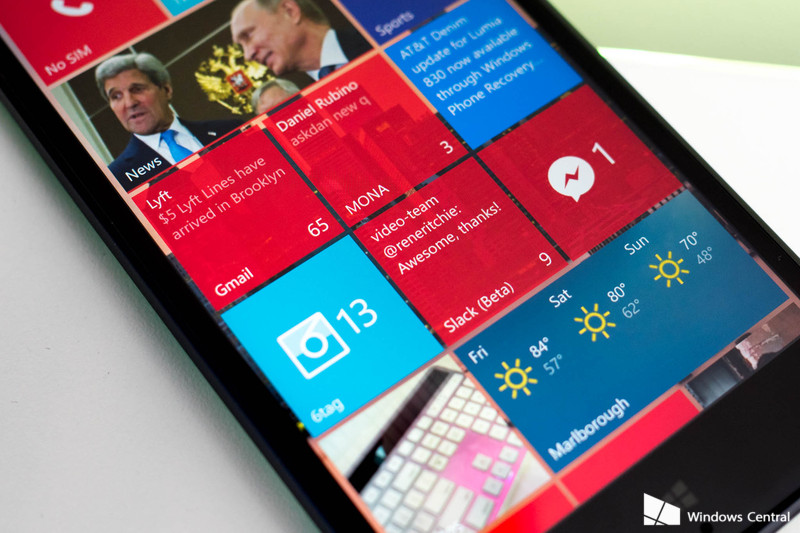
Microsoft had a rather substantial week as Windows 10 Mobile is now officially official. Rollout of the OS upgrade for Windows Phone 8.1 began at 10:10am on Thursday and landing on 18 different Windows Phone models. Of course, not everyone was thrilled as older devices with 512MB of RAM and the Lumia 1020 were left in the cold.
Windows 10 and Windows 10 Mobile for Insiders were also updated in the Fast Ring to build 14291 with Extension support for the Edge browser, improved Maps and driving, and much more.
Twitter released their app for Windows 10 Mobile after months of being on the PC desktop. The app launched with high praise from users with smooth scrolling, excellent performance and an exclusive dark theme. Twitter promised more updates to add new features in the coming months.
Speaking of apps, we caught our first glimpse of the new Bank of America app for Windows 10 and Windows 10 Mobile. The app is set to launch on Monday, March 28 right before Microsoft’s Build conference.
- How to update your older Windows Phone to Windows 10 Mobile
- Xbox in your PC: The Universal Windows Platform is premature, but not evil
- Windows 10 build 14291 for PC: Everything you need to know
- Windows 10 Gems: Get in better shape with Garmin Connect

AC editors’ apps of the week: Fenix, Cartwheel, Eve: Gunjack and more

Our weekly app picks
It’s Appday Sunday and that means we’re back with more of our favorites to share. Every week we bring a handful of great apps to the table and share them with everyone. Sometimes they are new apps, sometimes old standards, but every time they are apps we love to use.
Give these a look and then take a minute to tell us all about the apps you are using and love so we can give them a try. We all find some of our favorites right in the comments on these posts!
Russell Holly — Eve: Gunjack

There’s a whole lot of people in my immediate social circle getting Gear VR headsets this week, and with that comes the questions about what games they absolutely must install right now. While we’ve worked hard to assemble several great lists of apps for folks getting started on the Gear VR, I find myself always coming back to Eve: Gunjack.
Set in the Eve Online universe as a side story to Eve: Valkyrie, Gunjack puts you in an exterior turret on a large ship as the last line of defense. Move quickly, shoot the things, win the points. It’s an adrenaline rush, and with a decent set of headphones you can truly get lost in this game.
Eve: Gunjack is available in the Oculus store, which we can’t link to because it’s only accessible through your Samsung phone after you’ve connected it to a Gear VR.
Jen Karner — Playstation Network

I spend a lot of my time playing video games, whether that means on console, PC, or my smartphone. Really though, I’ve always been a PlayStation gal at heart. They won me over early, what can I say? So when I finally managed to pick up a PS4, I was pretty stoked to realize there was an app that could let me access my system even when I’m not near a computer.
The PlayStation app lets me access tons of content direct from my phone. My favorite is the ability to purchase a game using the app, and have it downloaded, installed, and ready for me by the time I get home. There’s also the ability to see my notifications, check my wall, and chat with friends through PSN. You need a PS4 and a Sony Entertainment Network account to use all the features, but if you’re a console gamer with a soft spot for PlayStation, it’s worth checking out.
Download: PlayStation App (Free)
Phil Nickinson — Flyover Country

Where am I? Where am I going again? What the hell is that under us? And more important — when’s lunch? Those are the usual thoughts when I wake up midway between Points A and B, 30,000 feet (more or less) overhead. Lunch usually takes care of itself in one form or another (be it liquid or otherwise), but what’s passing by on the ground can be harder to figure out. Sometimes the IFE map helps, or one of those online flight-tracking sites. But Flyover Country takes things two an entirely different level.
You put in two points — generally where you’re taking off, and where you’re going. And it fills in the blanks, using info from a number of sources. You get all sorts of points of interest, the ability to track yourself via GPS, and to save information offline. And it’s not just for planes — choose car/foot mode and it drills down to a tighter area. It’s a bit of a science experiment (this whole thing is funded by the National Science Foundation), and a bit more fun. Give it a go.
Download Flyover Country (Free)
Andrew Martonik — Cartwheel by Target

Pretty much everyone is a deal hunter of some sort, looking for for coupons, specials and discounts wherever you shop. If you’re that kind of person and shop at Target with any frequency, the Cartwheel app needs to be on your phone.
The Cartwheel app is all about coupons and discounts for items at Target — but instead of finding paper coupons or tracking them down all over the internet, they’re all in one place. Browse through recent or popular coupons or search for something specific, and when you find one (or 10) you like you can load them all up in the app. Next time you’re at the store, you simply show a barcode on your phone to apply all of your selected coupons at once, saving you anywhere from five to 50 percent on each item. The coupons can even be combined with other in-store deals and your Target card five percent discount.
Just like any other coupon system there can be a bit of a false economy in that you may be tempted to buy things you wouldn’t have otherwise … but if you’re already shopping at Target, it’s worth having this app installed to check out when you’re ready to head to the store.
Download: Cartwheel by Target (Free)
Ara Wagoner — SMS Backup & Restore

My dad’s Moto X 2013 is getting a little long in the tooth, but until it completely stops working I don’t see him buying another phone, so when he mentioned that he’d been seeing a bug where his Wifi wouldn’t automatically connect anymore, I decided that before I direct him to our [best unlocked](The best unlocked Android phones http://www.androidcentral.com/best-unlocked-android-phones) or [best cheap Android phone guides](The best cheap Android phones http://www.androidcentral.com/best-cheap-android-phones) I should help him factory reset the device once to give it a spring cleaning.
After backing up his photos and his Google Keep notes, we needed to back up his text messages. I had never bothered backing mine up since my contacts were saved and most of my messaging happens through Hangouts, so we downloaded SMS Backup & Restore, installed the plug in that allowed it to backup to Google Drive, and executed a backup. When we wiped the device and restored his cloud backup, every message came back. The only hiccup was that since he was sending his group texts as individual SMS instead of MMS, the texting groups he kept for organizing the office Happy Hour was lost, instead leaving 31 individual threads. And I’m not sure I can blame SMS Backup & Restore for that. But the app looked good, was easy to maneuver, and worked as advertised.
Download: SMS Backup & Restore (Free, In-app purchases)
Alex Dobie — Fenix

The recent controversial changes to Twitter’s official timeline — paired with other longstanding annoyances — have had me searching for a new Twitter client for Android, and the one I’ve settled on is mvilla’s Fenix, a slick, Material-style app that puts photos front and center. An intuitive tabbed interface lets you switch between your timeline, mentions and direct messages, while the slide-out menu on the left gives quick access to other areas. Multiple accounts are supported, and there’s even a neat “dark mode” feature for those wanting to save battery power on AMOLED devices. That’s just some of the customization supported in this very full-featured app.
Priced at $5.69, you’ll need to fork out a bit more than you might be used to, but the polish and feature set of Fenix more than justifies the price of admission.
Download: Fenix for Twitter ($5.69)
Jerry Hildenbrand — United States Constitution

The next time you need to get all constitutional on social media, be prepared. You can read the full text of the United States Constitution, including all the amendments and articles, right on your phone. There’s even a table of contents and resizable text options. As a special bonus, historical and important documents like Jefferson’s Wall of Separation letter and King’s “I have a dream” speech are reproduced in full complete with background information.
There aren’t any apps to help understand it all, but at least you can know what it says.
Download: United States Constitution (Free)

The Public Access Weekly: What’s this?
Y’all. This week was SXSW and GDC and we are tired. So let’s dive right on in so I can go back to trying to take a nap on my keyboard.
Last week, I gave a shout out to the three Public Access authors who have had their stories republished on the Engadget home page — which is something we started doing recently both because we want to highlight particularly engaging articles from Public Access and because we want people to know about Public Access itself.
However, given some of the comments on those stories, it would seem that many readers are unfamiliar with our Public Access page so consider this your introduction:
Hi.
This is our Public Access community page. You may have noticed it in our top navigation bar, or in the drop down Sections menu.
So.. what actually IS this?
Public Access is a page for articles written by Engadget readers, users and commenters. Anyone can sign up to become a contributor, and Public Access contributors can write stories on any number of technology or computer-related topics including gaming, entertainment, streaming, apps, fitness devices, PC building and maintenance and more. Public Access is for you to share your thoughts, opinions, experiences, advice and feelings on technology: How it affects your day-to-day life, how it helps you accomplish things (or drives you crazy), or what you’re most excited about.
How is this different than the Engadget home page?
Well, for starters, contributors to Public Access are not professional journalists or writers (for the most part); they are not Engadget employees and are not paid for their articles. They’re just enthusiasts, like you, who wanted to share their thoughts and stories. You can tell when you’re reading a Public Access story because every Public Access article will have a header that looks like this:
Hm. Okay. What if I want to sign up?
That’d be swell! You can register for an account here, but please fill out the entire form correctly (and sincerely) lest you be accidentally marked as a spambot.
Still have questions, comments, or concerns about what Public Access is or does or who it’s for or how to use it? You can leave your thoughts in the comments here, email us or reach out to us on Twitter (it helps if you include the #PublicAccess hashtag).
Looking for something to read? Check out:
Anonymous declared total war on Donald Trump, we declared it a story, and you declared it a serious topic of conversation — With over 400 comments (and counting), this story is provoking quite the debate.
Smartphones have been boring lately, but since tech seems to exist on a 10-15 year cycle of major shifts we should be due for something truly exciting soon, right? Right? This story tackles the tech developments that may push the next innovative development in smartphones.
We did a story on the amount of CGI used in Deadpool, and the general consensus is: Don’t care. Still rad. Would watch again.
You mean they didn’t actually flip this car?! We are shocked. Shocked, I tell you!
Looking for something to write about? Mull over:
Monday is Apple’s next big announcement event, and folks in the comments here are discussing the possibilities: What is going to be announced? Are our predications are correct, or way, way off? What do you think Apple will announce on Monday? What do you hope they don’t announce? Look into your crystal ball and predict what they’re going to reveal next week.
All I can think about right now is sleep, and how little I got of it last night. These Philips Hue bulbs are supposed to mimic natural light to help you get a good nights rest. Have you ever used a tech device designed to help you sleep, such as smart lights or an alarm that wakes you at the optimal moment? How well do they work? Asking for a friend who hates getting up in the morning. Not me. (Okay, yeah, it’s me).
Microsoft announced it would be opening up its network gaming capabilities so devs with Xbox One and Windows 10 games can play online with other platforms (both console and PC). Getting to a true place of crossover gaming however requires the developers to participate as well, with Rocket League being the first to take advantage. So… how soon will it be before all gaming embraces the idea of cross over play? Will we ever be truly platform agnostic? And what kind of crossover game play (or game) do you want to see most and why?
6 floating buildings powered by the sun
By Cat DiStasio
As the earth’s population grows and land becomes more scarce, people are looking to bodies of water to support new types of structures. And if you’re designing a building to float on water, it makes sense for it to be self-sufficient, with its own off-grid energy generation capabilities. Some incredible designs for solar-powered floating buildings have surfaced in recent years, from humble houseboat-like abodes to floating farms that harness the sun’s energy to produce food without eating up valuable land. Read on for more ways architects and designers are combining solar power with floating architecture to stretch resources and make the most of renewable energy.
 AIVAnet