


Adjust your screen color in the Android N Developer Preview
You spend hundreds of dollars on a new phone. You take it out of the box and the display looks yellow. What do you do?
Your options used to be limited: you could take the shiny new phone back and hope the second one doesn’t have that tint, assuming that the store will let you do the exchange. You could root it and use a color calibration tool in a third-party ROM or root app. Or you could keep the device and hope a future system update fixed the color calibration.
No more. Now, we can calibrate the display to our own liking in the Android N Developer Preview.
Unlike Night mode, this is the first time screen calibration has appeared in a Developer Preview, and as such there’s always a chance that this feature may not make it to the final build. It may also change over the course of the Developer Preview, and it would be welcome as there are some improvements that can be made to the tool as it stands now.
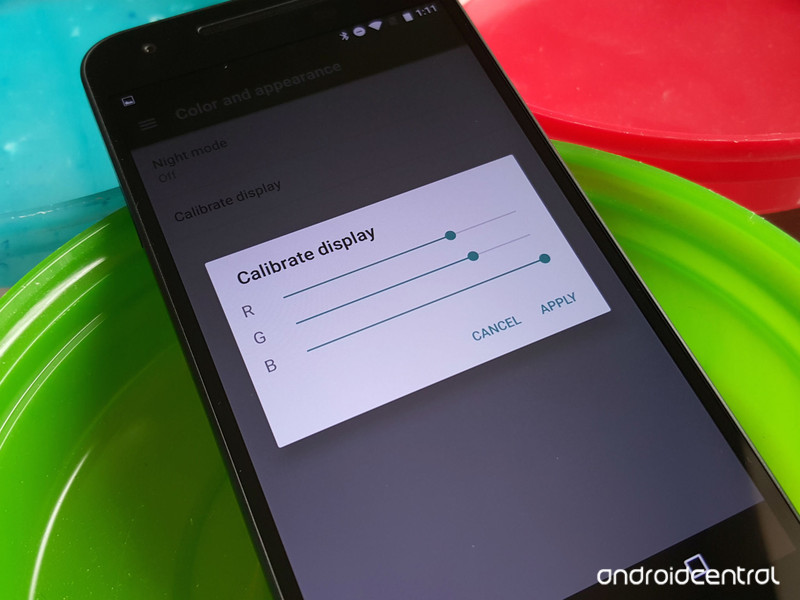
In the System UI Tuner, there’s a new category called Color and appearance. It hosts Night mode and an option to Calibrate display. When you tap Calibrate display, a screen will pop up with three bars: Red Green and Blue. All bars are automatically set at full, so if you want to increase the blue in your screen, you’ll bring the red and green down rather than pull the blue further up.

At the moment, the controls are a bit hit or miss, and at least part of that is because you can’t see the changes until you hit Apply. Thankfully, if you went overboard with your corrections, there’s a 10-second window to preview your changes, and if you don’t accept them in that window, they’ll revert to their previous settings.
It may take a few tries to get it right, between not seeing the results till you apply and the controls not being as fine as some people may like, but it’s more than we had before, and there’s always room to improve it with feedback. Remember that, folks: the Android N developer preview is about giving feedback, so if you see something you think needs changing, say so. You can submit feedback in the main settings tab by tapping the menu button and selecting Help & feedback.
Android N Developer Preview
The Android N Developer Preview is just that — a developer preview. It is not intended for daily use. That doesn’t mean it’s not cool, and that you shouldn’t poke around. But know that things will break. Tread carefully. (And have fun!)
- What’s new in Android N
- All Android N news
- About the Android Beta Program
- Download system images
- Android N easter egg
- Join the Discussion

Samsung’s experimental headphones send electric impulses to your brain
Not to be outdone by Sony’s experimental Future Lab hardware, Samsung is showing off a trio of projects from its C-Lab teams. The most intriguing of these three is definitely the Entrim 4D hardware. It looks like a basic pair of over-hear headphones, but they use electrical signals to trick you brain into feeling a sense of motion.
In the back of the two headphones are two slightly damp sponges that cover up the electrodes; these electrodes and the sponges line up just below your ears. The technical term for what these headphones do is “Galvanic Vestibular Stimulation,” but basically the headset sends electric signals to a specific nerve in your ear. Samsung showed off the headphones in conjunction with a Gear VR to show off a demo of a car racing around a track. First, you’d watch the VR video with the motion simulation off to get a baseline. But then, the Entrim 4D effect kicks in, and as the car went around the curves, both my head and stomach felt the unexpected and familiar feeling of motion.
While it was a bit of a disorienting feeling, it definitely added a sense of realism to the experience. And Samsung believes that such effects can actually help combat motion sickness that people often feel when trying VR. The team believes that there’s a “mental discrepancy” between seeing things in virtual reality and not feeling the other senses kick in to complete the picture, and something like the Entrim 4D might help to make VR even more realistic and less disorienting.
A video posted by Engadget (@engadget) on Mar 14, 2016 at 11:20am PDT
Samsung also had a few other more lighthearted, app-based projects to show off. The Hum On app lets you hum a melody into your smartphone speaker; it’ll then record the melody and play it back to you with a piano-like sound. From there, you can pick a number of genres (think rock, R&N, symphony) and fill out the sound of your melody with some background instruments and effects. It’s a classic weird Samsung app, but musicians might appreciate the ability to quickly hum a melody popping into their head and have it saved for later review.
‘Hum On’ turns your hums into actual music compositions! @SamsungMobile #SXSW #EngadgetSXSW @mmsuperflyjr https://t.co/zg7Efc4xXu
— Engadget (@engadget) March 14, 2016
The last app on display was called Waffle, and it’s a collaborative social app. One person starts a waffle by adding a picture and sharing it to a group of friends. You can add text and draw on the image, like Snapchat lets you. But it gets more interesting when your friends start contributing. They basically add photos all along the outside edge of your picture, making a large grid of images (hence the Waffle name). It’s a cute but entirely inessential app, though it’s possible that users could find ways to make some visually interesting collages.
As these projects are in the experimental phase, it’s not clear when they might be out as fully-fledged products. A beta of the Waffle app is already in the Google Play Store, but there was no word on when Hum On would be out. Similarly, it’s not clear if or When Entrim 4D will become an actual, shipping product. The team behind it is already working on another version that has more electrodes to help create a more realistic sense of rotational movement. I”m not sure if I want VR to get that real, but it’s worth trying out at the very least.
Mallory Johns contributed to this report.
Source: Samsung
Mr. Robot has an FBI consultant to make hacking look authentic
A long line of people snakes through the halls until it winds down a flight of stairs. Over a thousand fans anxiously wait for the doors to open inside the Austin Convention Center. They’re here to see the creator and lead actors of Mr. Robot, the most compelling TV show about hackers in recent memory.
A little later, the crowd now settled inside a massive ballroom roars as the Mr. Robot trio — Sam Esmail, Rami Malek and Christian Slater — walked onto the stage at SXSW Interactive to talk about the authenticity of coding in the psychological thriller. Dozens of smartphone-wielding hands went up in the air to record the moment in synchronicity.
Mr. Robot has made nerd culture popular. What seemed like a niche show about computer geeks at the time went on to win Golden Globes and Critics Choice awards this year. When it first aired on USA Network last summer, it predictably drew in a thriller-loving audience while the poignant portrayal of a deeply troubled hacker named Elliot Alderson captivated more code-illiterate viewers. But, above all, Mr. Robot connected widely with coders and hackers who finally found accurate representation of their skills.
That connection is one of the main drivers of the show. “I grew up a nerd,” says Mr. Robot creator Sam Esmail on stage at SXSW. “A lot of my friends are nerds and coders in InfoSec. Some of them are hackers. I made a poor attempt at hacking in college and was on academic probation. I wanted to tell a story about that culture because I found those people very interesting. I was watching all this cheesy crap — TV shows and movies — some of it I adore but they’re not great at representing who those people are and what that world looks like and what hacking really is.”
Mr. Robot tackles the world of hacking in a way that hasn’t been done in mainstream culture before. The show uses real codes that have gone through a rigorous vetting process. Esmail works with tech experts including people from InfoSec; a cyber security expert (who was recently promoted to being a writer on the show); and an FBI crime unit consultant to get the computer language right. They help ensure that the plots are grounded firmly in reality.
“We go heavy on the tech details,” Esmail says. “My production designer hates me because we create all these screens and at the end of the day we only see a few seconds of it.” He believes doing intensive groundwork adds to its credibility. Once the codes are worked out, what makes those lines look believable is the absence of a green screen that is often slapped on later for a pseudo complex code to flash on the screen. So the actor pretends to furiously type lines of code while shooting a scene. “They’re not seeing what they’re typing which actually throws me off,” he says. “On top of that there’s some bullshit on the screen which doesn’t make sense anyway. It was really important to us to add credibility.”
Rami Malek, who plays the show’s protagonist Elliot, types in the parts of the actual codes on the screen as the camera rolls. It’s a choice that lends to the believability of his character, which steers clear of the clichés. “A ‘nerd’ is an outcast and is bullied — that’s not true to life,” Esmail says. “There’s something there that people are missing. [Rami and I] talk about the darkness of it. Part of the reason Elliot is on the computer all the time is that he’s lonely. It’s not because people don’t won’t to talk to him … There’s something about him and his insecurities.”
It’s those vulnerabilities that make Elliot relatable. “I was drawn to this incredibly complicated character, a guy that was suffering and struggling to survive in his own skin,” Malek says. “We’ve shot some scenes in the pilot, where I remember [Elliot] staring at Angela’s [his childhood friend on the show] Facebook account and wishing he had that life. It really got me sad … We can all relate to being distanced by technology and the manicured Facebook pages that we create. I think people have found his honesty very endearing.”
Through the first season, the show exposes Elliot’s inner demons while tackling the larger hacking issues that have made headlines over the past few years. For the second season that’s currently being shot in New York, Esmail says the theme will be encryption and privacy. “Elliot committed a crime in the first season,” he says. “We’re going to see the ramifications of that in the second season.”
“The problem is that people don’t understand the nuances of that debate between Apple and FBI.”
Dealing with “rights to privacy” feels like a natural progression for the show. It also mirrors current events like Apple’s feud with the FBI, a parallel that Esmail discusses candidly. “Privacy is going to be a huge issue in the next decade,” he says. “The problem is that people don’t understand the nuances of that debate between Apple and FBI. We talked to our FBI consultants about this and they have a very strong point of view that encryption should allow for this sort of third-party side door thing, which I’m opposed to. I’m on Tim Cook’s side.”
When asked if the encryption theme is an intentional commentary on Apple’s case, Esmail says the idea was baked into the show before the incident. But he hopes that the theme will contribute to the debate and could potentially help people see both sides of it. It’s that kind of handling of sensitive but significant topics that has led to the popularity of Mr. Robot. “I love that all my nerds out there are getting into it,” Esmail says. “I love that they appreciate the authenticity of tech. Those are the people that I grew up with. So that means more to me than anything else.”
[Image credit: Heather Kennedy, Getty Images (top); Peter Kramer, USA Network, Getty Images (center)]
Microsoft will let Xbox, PC gamers play online with other platforms
It finally happened. Microsoft is officially opening up its network gaming capabilities, allowing developers to have Xbox One and Windows 10 games play online with other console and PC platforms. Yes, we could soon live in a world where Xbox One and PlayStation 4 players could fight each other to the death outside of comment sections (if Sony actually agrees to cooperate). It’s entirely up to developers to implement this cross-platform capability, but I wouldn’t be surprised if it ends up getting widely adopted. Psyonix’s Rocket League will be the first game to take advantage of the feature, starting with Xbox One/PC network play later this spring.
“Cross-network play has been the number-one most requested feature our community has asked for since Rocket League was first announced on Xbox One, and now that we are able to pursue complete online unity on all platforms, today’s announcement is a dream come true,” Psyonix’s Jeremy Dunham said in a blog post today.
Chris Charla, director of Microsoft’s Independent Developers for Xbox program, also noted that gamers will have the option to only play against other Xbox Live players, if they wish. And he also says the “invitation is open” for other networks to participate. All eyes will be on Sony to see how it responds at GDC this week.
Source: Microsoft, Psyonix
PlayStation Vue TV streaming is now available across the US
Sony is launching PlayStation Vue nationwide across the US, shaking off the “passion project” image that’s haunted the service since its inception. If you live outside Vue’s existing seven markets, however, you’ll notice that channel availability and pricing is now a little different. Sony is pushing into the rest of the country with three smaller bundles called Access Slim, Core Slim and Elite Sim, the cheapest of which offers around 55 TV channels for $29.99 per month. That’s slightly less than the regular Access tier, with the difference being that you’ll only get on-demand content from ABC, FOX and NBC. There’s no live viewing for these networks.
Sony hasn’t explained exactly why Vue’s channel offerings now differ from place to place. It might be that the company was trying to thrash out deals that would have covered the whole of the US, but eventually compromised after failing to come to an agreement. The argument being that eventually, it’s better to have some kind of service than no service at all.
Although this new national offering is weaker than what you would get from Vue in New York or San Francisco, it does come with a cheaper price-tag, which could attract subscribers who want to keep watching after their free trial. Sony has also promised that in the future, live and on-demand CBS programming will be added for customers in “select cities.”
If you’re new to PlayStation Vue, the general idea is that you can get traditional TV channels over the internet, without the convoluted contracts and bundles that normally come with cable. It’s only available in the US right now, although since its launch Sony has slowly added new channels like Disney and ESPN, as well as support for non-PlayStation hardware like the Amazon Fire TV and Google’s Chromecast. A nationwide expansion shows that Sony is serious about Vue, although to date there’s been little indication that the service will ever be launched internationally.
Source: PlayStation Blog
Google wants you to livestream Android games
Google is about to introduce some behind-the-scenes frameworks that should make playing and sharing Android games considerably easier. On top of expanding Android game recording to let developers add the feature themselves (due in the “coming months”), it’s adding a live streaming feature. If you want to share your Alto’s Adventure exploits on YouTube as they happen, it’ll be an option. Details aren’t available as I write this, but it could do a lot to expand the live game streaming community beyond console and PC players.
Also, Google is making use of Android app streaming to reel you in to those games. It’s offering a special marketing format, the Search Trial Run Ad, that lets you try Android games in the browser for up to 10 minutes — you don’t have to jump to the Play Store and download the title first. As you’d guess, you’ll get an invitation to install the game afterward if you’re enamored with the experience. While it’s a calculated marketing ploy, it could help a lot if you’ve ever been curious about a game but didn’t want to commit to installing the whole thing right away.
Source: Android Developers Blog
‘Fallout 4’s’ first DLC trailer is big on killer robots
If you’ve already explored every nook and cranny of Fallout 4, you’ll soon have some new territory to cover. Bethesda announced today that its first piece of DLC, Automatron, will launch on on PC, Xbox One and Playstation 4 on March 22. And if you couldn’t tell by the title or trailer below, it’s all about robots. It centers on a new villain, the Mechanist, who unleashes killer machines across the Commonwealth. Luckily, you’ll also be able to build your own bots to fight back. The DLC will run you $10, or you can snag the Fallout 4 season pass for $50 (early buyers got that for $30).
Skype for Web lets you make calls to mobile phones and landlines
Skype for Web arrived last summer, delivering voice and video calls alongside IM-style chatting in your browser. To deliver more functionality, the web-based version of the service is getting a few updates that will make it work more like the desktop and mobile apps. First, you can now call landline or mobile phones with Skype for Web. Before now, you could only dial up other Skype users, so this is certainly a welcome addition. This means you’ll be able to make those international calls as needed, but you’ll have to buy some credits or a subscription to employ the feature.
The web version of Skype also added that handy guest feature that allows you to invite anyone to join a call, even if they don’t have an account. YouTube links will play right in the conversation window as well, and the addition of notifications should help you miss fewer messages. If you’re looking to give it a shot, you can sign in here to take Skype for Web for a spin.
Via: 9to5Mac
Source: Skype
The LucidSound LS-30 is a gaming headset for the style conscious
Last month when I was putting together a list of gaming headsets worth buying, I spent a lot of time reading about audio quality. Which headsets delivered the best highs and lows for music, how clear were the sound effects and how immersive was the surround sound? There was also plenty of talk of how each headset looked and, though plenty were deemed passable, “beautiful” and “gorgeous” are words I didn’t hear often. Though there’s a plethora of attractive high-end headphones on the market, the same can’t really be said for gaming headsets. LucidSound, the new company from the founders of headset maker Tritton, is aiming to change that. Its $150 LS-30 headset packs clear, balanced sound into a pair of gorgeous cans that don’t scream “LAN party at my house!”
The LS-30 oozes quality the moment you take it out of the box. Perhaps that’s why I was disappointed to see that LucidSound didn’t include a carrying case. How was I supposed to keep these beautiful sleek lines perfect? What kind of torments would my gear bag wreak upon its brushed metal chassis and shiny black ear cups? Well, that’s the thing: I’m not supposed to put the LS-30 in my bag. I’m supposed to wear the damn thing proudly because the point is to make a fashion statement.
And what a statement it is. While many headsets stick with bright colored plastic, the LS-30 has a brushed aluminum build, with a graceful swoop of metal circling each ear. The headset feels a tad heavy, and that’s thanks in part to the generous padding. The leather ear cups surround my ears perfectly and the cushioned band sits snugly against my scalp, making for a fit that I would describe as “pampered.”
The outside of each ear cup is a grooved plastic surface that reminds me of a vinyl record. It’s not just a nice aesthetic touch, though: The LS-30’s controls are built right into those shiny discs. On the right cup, you can turn the disc back and forth to adjust game volume, or click the button in the middle to mute it entirely. The same controls apply on the left cup for the mic. At least, that’s how it’s supposed to go.
I spend most of my time on my laptop, so it made sense to use the LS-30 there so I could listen to music and videos while I work. All I needed to do was plug in the wireless receiver and I should have been good to go. However, even with the headset charged up and turned on, nothing came through at first. I spent a few minutes fiddling with the volume controls and resetting the dongle before I finally heard some music. But something wasn’t right: The buttons had been swapped, placing the mute for the mic on the right side with the game volume. Not a dealbreaker, but also not intuitive.
When I asked LucidSound if this was something that could be corrected, I was informed that the headset wasn’t really meant to be used for PC gaming, a statement supported by the description on its website. The LS-30 is a console gamer’s headset, compatible with PS4 and Xbox One as well as the older PS3 and Xbox 360. Good thing about those last two: I only have a PS3 and a Wii U right now, with the latter lacking the optical port needed to interface with this headset.
Despite its stated incompatibility with my Windows machine, the LS-30 still performed admirably. While wearing it I listened to some tracks on Spotify, including the Hamilton cast recording, some Imogen Heap and the Mad Max: Fury Road soundtrack. I was immediately struck by how absolutely even and smooth the music sounded. It was pleasant and bright, with no underwhelming highs and definitely no overwhelming lows.
It was nice to hear a well-balanced headset, especially one configured as such right out of the box. However, if you do favor bass or treble, there’s an equalizer button on the right cup that lets you switch it up. A series of tones will tell you which you’ve chosen: One beep for normal, two for bass and three for treble. Similar audio cues exist for the mute button, with an upward chime signifying “on” and a downward chime to tell you when you’ve just muted the headset.
The ear cup controls combined with the clear communication from the headset really made for a pleasurable user experience while I was using it with my PC. However, the LS-30 is really meant to shine on a game console, and that takes a little more setup than simply plugging it into the USB port.
It’s not overly complicated: You plug the USB receiver into the console, and then attach the included optical cable into both the receiver and the back of the system. The hardest part was getting to the rear of my PS3 to plug the cord in. I changed the audio source on the PS3 to “optical,” and the system pre-selected the proper channels. Easy. The only real issue is having to go into audio settings whenever you want to switch back and forth. This was a real bummer when I fired up Mass Effect (notorious for its long load times) and had to back out of the game before I could try it with the headset.
So how did it sound? The crunch of Commander Shepard’s boots in the snow came through crystal clear, along with every rifle blast and explosion. I toggled through the various equalizer settings to discover that yes, the bass boost did an admirable job of pumping up the low-end but never overwhelmed the rest of the range. It was just more noticeable. The same goes for the treble boost, though I wouldn’t recommend it. While high-end sound effects and voices stuck out more, it wasn’t really pleasant to listen to.
Given its space setting Mass Effect tends to favor more mechanical, metallic sounds. So I played a few other games with the LS-30, including Dragon Age: Inquisition and Assassin’s Creed: Revelations. Sounds like the whisper of clothing and the jangle of armor were incredibly audible and distinct. Fantasy and historical settings are well-served by the LS-30’s default sound profile, though I found myself toggling between balanced and bass-heavy for Mass Effect’s science fiction theme.
I don’t often play online with others so I can’t really say how the boom mic performs in team settings, but the audio I picked up from it was loud and clear. The mic built in to the left cup is also no slacker: At the office I could hear people talking in the next cubicle with no problem. It’s actually a great way to eavesdrop on people, as they’ll assume that you’re listening to music on your headphones and can’t hear them. But only if you were the type of horrible, sneaky person who’d do that. (I confess nothing to my coworkers.)
What type of person am I? Well, I’m a person who could wear the LS-30 for hours. It feels great on my ears and I like the way it sounds. I’m disappointed that it’s not optimized for PC use, because the majority of my headset use is on a computer, either listening to music while I work or playing a game on my laptop. When I’m playing a console game, I’m playing it in my living room, so a wearing a headset isn’t necessary unless it’s 2am and I’m trying not to bother my neighbors with loud gunfire. In that case, I don’t really need my headset to be stylish because there’s no one around to impress. I just want to it to be because I’m also the type of person who puts on pants even when I don’t leave the house. Sometimes it feels good to look nice. And the LS-30 looks very, very nice.
We’re live at GDC 2016!
SXSW Interactive isn’t the only tech event happening this week. Over the next few days, we’ll also be in San Francisco, bringing you the latest news from the Game Developers Conference 2016. The 30th edition of the show will feature more virtual reality than your brain can handle, as well as plenty of other stuff from the traditional gaming world. While the official GDC Expo doesn’t start until March 16th, there are already panel discussions happening today, and Sony’s big exhibition is tomorrow. PSVR launch date and pricing, anyone?
 AIVAnet