


‘On Ice’ is the latest Spotlight Story from Google
Google has released a new Spotlight Story, “On Ice”, which takes you on a 360-degree journey following the star of an ice show as he finds competition from an unlikely rival. Spotlight Stories are a new way to tell stories, making them more interactive and putting you inside them.
This film was directed by Shannon Tindle, and created in collaboration with Evil Eye Pictures. From the YouTube description:
“On Ice” tells the story of an over-the-top, sci-fi themed ice show and its star, who suddenly finds he has competition for the spotlight from an unlikely rival.
You can watch this story on your computer, smartphone or in your Google Cardboard viewer if you want. Be sure to check it out and let us know what you think of it.

How one carrier almost ruined a perfectly good Galaxy S7

Carriers are still junking up Android phones, and the Galaxy S7 on AT&T is no exception.
It should surprise no one that the carrier-branded versions of the Galaxy S7 come loaded with carrier-branded apps and software. In our reviews of the standard and edge versions of the Galaxy S7 we had Verizon devices and noted the software there, but AT&T decidedly has taken the crown with annoying crapware.
Here’s what comes on an AT&T Galaxy S7, directly out of the box:
- AT&T Locker: Cloud storage from AT&T.
- AT&T Protect Plus: Cloud backups, device locator and “Pro Tech support.”
- Device Help: Essentially a wrapper for the att.com help pages
- DirecTV: AT&T purchased satellite TV company DirecTV in 2015, and now their app is right here for you
- Drive Mode: Sets auto-replies to texts and calls straight to voicemail when moving faster than 25 mph
- myAT&T: Access your AT&T account
- Plenti: A rewards program in conjunction with Exxon, Macy’s Hulu, and others
- Smart Limits: Parental controls on times, calls, data, and more
- Usage Manager: Track data usage by app
- Visual Voicemail: View your voicemails with your eyeballs
You can tell which apps are AT&T apps because they almost universally have terrible old icons and designs. With the exception of Usage Manager and Visual Voicemail, all of the apps are easily disabled, but none can be uninstalled.

You can tell which apps are AT&T apps because they almost universally have terrible old icons and designs.
But the real most amazing moment here? When you pull down the notification draw and sitting under the Quick Settings toggles, brightness slider, and Quick Connect prompt is a big black widget for DirecTV. It’s not a notification — it doesn’t get pushed down as more notifications roll in. No, this is an advertising prompt to download the DirecTV Quick Remote app (at least it’s from Google Play) and sign up for DirecTV. And it doesn’t go away until you act on it — either by downloading or signing up, or by tapping the gear icon in the top right corner and then tapping the Disable button.
We get it, AT&T, you spent a lot of money on DirecTV and want to make sure that your customers that have it get a good experience with the GS7, and those that don’t know that it’s an option. But this is a bit over the top — an ad should not be pushing notifications down past the upper half of the screen by default. And that’s not even mentioning the janky AT&T Protect Plus notification prompt in there at launch too.
We’ve been begging for years for fewer and better apps from carriers. We’re already coping with Samsung’s duplicative options — I don’t need or want third level installed-by-default choices for backups, cloud storage, security, rewards, and all that, and I suspect very few other subscribers do either. Focus on the unending task of improving your networks and customer service. Then we can talk about what apps you should be installing by default on my new phone.
Samsung Galaxy S7 and S7 edge
- Galaxy S7 review
- Galaxy S7 edge review
- Galaxy S7 edge with Exynos: A Canadian perspective
- Here are all four Galaxy S7 colors
- Details on the Galaxy S7’s camera
- The SD card is back on the GS7
- Join our Galaxy S7 forums
AT&T Sprint T-Mobile Verizon

TheScore eSports celebrates its anniversary with a brand new look
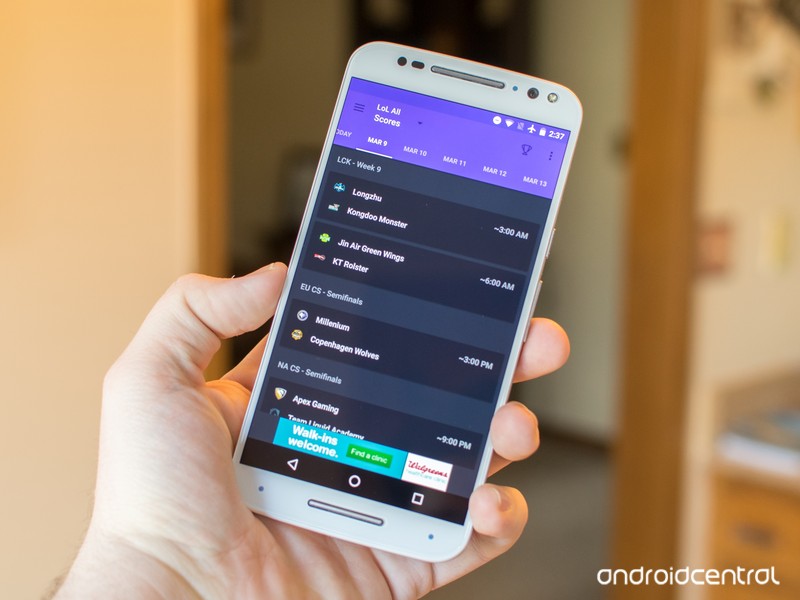
TheScore, which tracks a number of different sports, is celebrating the first anniversary of its dedicated eSports app with a brand new design. With this new design, theScore eSports makes it even easier to follow the latest news on competitive games like League of Legends, Dota 2, and Hearthstone.
Here’s what you’ll find in theScore eSports 2.0:
- NEW: A totally fresh design for your favorite esports app! Following the news, scores and stats from your favorite teams has never looked so beautiful.
- Bug fixes and optimization
You’ll find theScore eSports 2.0 on the Google Play Store now.

LG G5 arrives in Canada on April 8, comes with bundled camera grip on some carriers
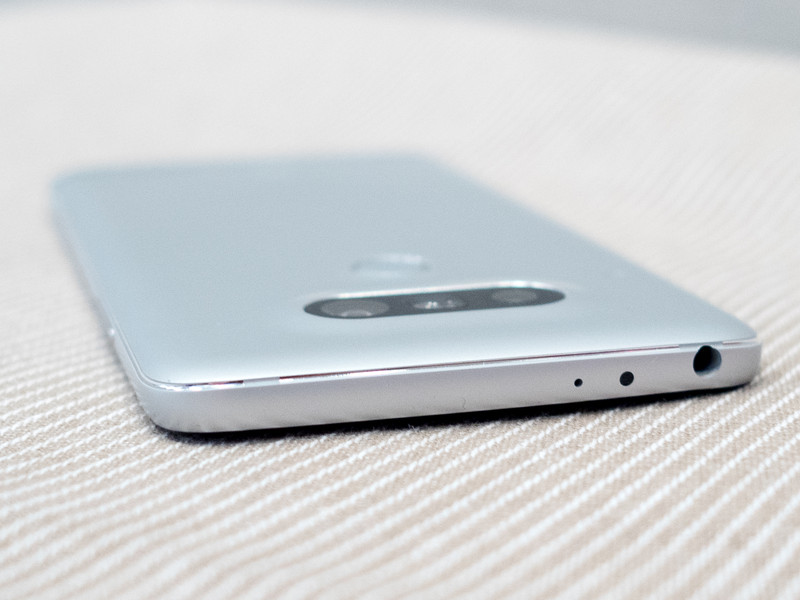
The LG G5 is set to hit Canadian carriers on April 8, according to a press release issued by the company today.
The Snapdragon 820-powered handset was one of our favourite devices of Mobile World Congress, recognized for the ambition of its modular design.
While the press release doesn’t mention the price of the G5 itself, nor the availability of its Friends, the suite of accessories unveiled alongside the handset earlier this month, LG says that it will be available at Rogers, Bell, Telus, Fido, MTS, SaskTel, Eastlink, Videotron and Wind Mobile.
Rogers (and its flanker brand, Fido) will even be offering a bundle with the device: the company tweeted this morning that it plans to offer LG’s Cam Plus camera grip with each pre-order.
Get a FREE LG CAM Plus with a 2-year activation when you reserve the all new LG G5: https://t.co/qLMGuBErN9 pic.twitter.com/TWVHjnuuZL
— RogersBuzz (@RogersBuzz) March 8, 2016
It’s unclear whether additional carriers will offer the same Cam Plus deal, but we’ll update this post when we know more.
LG G5
- LG G5 hands-on
- LG G5 complete specs
- LG G5 CAM Plus module
- LG G5 B&O Hi-Fi audio module
- The G5 has an always-on display
- LG G5 keeps the SD card, shuns adoptable storage
- Join the LG G5 discussion

Buy a Samsung Galaxy S7 from AT&T and get a second for free

To go alongside the launch of Samsung’s latest and greatest, AT&T is offering an intriguing deal through which customers can pick up a free Galaxy S7 with the purchase of another S7 or S7 edge. As you’d expect, there are some caveats to be aware of, however. The biggest hitch is that both phones must be purchased on AT&T Next, and the free phone is only available if you’re activating it on a new line.
Of course, you’re still on the hook for the sales tax on both phones, and you’ll have to pay that up front. To cover the cost of the second phone, AT&T says that you’ll receive a total of $695 in bill credits over 30 months.
Are you planning to pick up a Galaxy S7 or S7 edge from AT&T? If so, let us know in the comments below if you’ll be grabbing a second phone with this offer.
Samsung Galaxy S7 and S7 edge
- Galaxy S7 review
- Galaxy S7 edge review
- Galaxy S7 edge with Exynos: A Canadian perspective
- Here are all four Galaxy S7 colors
- Details on the Galaxy S7’s camera
- The SD card is back on the GS7
- Join our Galaxy S7 forums
AT&T Sprint T-Mobile Verizon

Taking ‘super resolution’ photos on the Nexus 6P

Adding another feature to your Nexus 6P camera requires another app, but it’s well worth it.
Every once in a while we see a camera mode in a phone that doesn’t exist elsewhere. It’s not usually a big deal, but over the last couple of months we’ve seen a number of requests for “super resolution” modes on cameras that didn’t include the feature natively. This is a little tricky, as super resolution photos occur when you take several photos at the normal resolution of your sensor and stitch them together into a single photo with a resolution that is several times larger than your existing sensor. There’s a lot more to it than that, but for the purposes of smartphone photography it lets you take a single photo at 40 to 50 megapixels. This isn’t a mode you’d want to use all the time, but it never huts to have more tools in your belt.
An app called Camera Super Pixel lets you take these super resolution photos on Google’s Nexus 6P, as well as several other Android phones that lack the feature natively. Here’s how it works.
We’ve seen native super resolution modes on several phones in the last year, most recently the Asus ZenFone Zoom. In our testing with most of these phones we’ve found that the feature works well enough to get a cool photo every once in a while, but conditions really have to be perfect. There’s usually a noticeable delay between tapping the shutter button and seeing the photo, and features like HDR and image stabilization are usually available in this mode. When dealing with an app that has not been heavily optimized by the manufacturer for this particular feature, it’s easy to assume these same problems and a couple other issues will crop up.

The first thing you need to know about Camera Super on the Nexus 6P is the two full seconds between tapping the shutter button and saving the photo. It’s going to happen every time, and there’s nothing you can do about it. The camera on the Nexus 6P already isn’t particularly fast, and when you take that 12MP sensor and try to take 49MP photos, there’s going to be a delay. That delay means you need to be perfectly still to avoid screwing up the photo, which means your best shots are going to come from a tripod. Even then, you’ll find you can’t take photos of things in motion. Super Resolution seemed like a great idea when capturing this amazing sunrise at the beach, but zooming in reveals a whole lot of mess in the waves.
You also lose HDR+ in this Camera Super Pixel app, which means compared to your normal stock app colors can appear washed out in many situations. This isn’t as noticeable when taking photos of scenery or of faces, but when vibrant colors are involved it usually stands out a little if you compare side by side. It also means low light photos aren’t as good in this mode, since HDR+ is what helps the sensor Google uses stand out in that area. You can still catch a killer sunrise or sunset, but if you’re looking for a compare on your phone or on Facebook it’s unlikely you’ll think the Super Resolution shot is better. Since the Nexus 6P doesn’t include image stabilization, there’s nothing else to lose here.

While it’s not magic, and there are some flaws in this capture mode, the photos you get that do turn out are exceptional. Perfect photos for setting as a wallpaper on high resolution monitors, or sending off to get printed if that’s your thing. It takes some practice to use right, and there will never be a time when you use this to take a quick photo, but it’s a worthwhile app to have in your drawer for when you see something you want to capture in a way that can be deeply appreciated anywhere. To see the full resolution of these photos, check out the link here.
Download: Camera Super Pixel (Free with ads)
Nexus 6P
- Nexus 6P review
- 5 things to know about the Nexus 6P
- Read the latest Nexus 6P news
- Learn about Project Fi
- Join our Nexus 6P forums
- Nexus 6P specs
Google Store Huawei Best Buy

The Hunger Games: Mockingjay Part 2 now available on Google Play

Fans of The Hunger Games series can now get their hands on the final entry in the franchise’s movie lineup with the digital release of Mockingjay Part 2. The finale, which follows protagonist Katniss Everdeen as she leads a group of rebels in the final battle for Panem, is now available on Google Play for $20 in HD or $15 in standard definition.
Bundled with the movie are bonus featurettes, including a “making of” documentary, along with a deep dive into the land of Panem and a look at the Mockingjay Armor. Finally, fans of the whole series can also pick it up in its entirety with The Hunger Games 4 Pack, which also includes plenty of bonus content.
Do you have a favorite entry in The Hunger Games series? Chime in and let us know in the comments below.

Android Central Fireside Chat — Galaxy S7 edition!

Fire, phones, alcohol, and the Android Central Editorial team. What more could you want?
It’s not often the entire editorial team at Android Central is at the same place at the same time, and it’s even more rare that those times aren’t spent working well into the night to deliver the best words, photos, and videos we can to our readers. Somehow, we managed to get everybody together, and more than that, we had the time to pull up a few seat next to a fire and talk about what was on everybody’s minds: the Samsung Galaxy S7 and Galaxy S7 edge. Granted, we talk about phones a lot when we’re together, that’s just what we do, but this time we captured our combined thoughts on the phones on camera for posterity.
Grab a drink of your own and have a listen to Andrew, Phil, and Alex talk Galaxy S7 and S7 edge. If you pay close enough attention, you’ll even see Jerry, Russell, Derek, and Dan float through the chat at various points.
For bonus points, check out the outtake we caught from the 360fly camera we were testing during the recording.
Samsung Galaxy S7 and S7 edge
- Galaxy S7 review
- Galaxy S7 edge review
- Galaxy S7 edge with Exynos: A Canadian perspective
- Here are all four Galaxy S7 colors
- Details on the Galaxy S7’s camera
- The SD card is back on the GS7
- Join our Galaxy S7 forums
AT&T Sprint T-Mobile Verizon

Digit’s savings service now has an iOS app that sets your money aside
Digit – the web app that basically serves as an automated savings plan – now has an iOS app for iPhone, iPad, and the Apple Watch.
Don’t feel bad if you’re completely incapable of setting aside money, because according to a tonne of recent studies, it’s not common for Americans under the age of 35 to have any savings at all. But Digit hopes to change that.
It’s a US-based service that launched last year. It monitors your spending habits, and when you can afford to, moves money from your checking account. You’re still able to withdraw funds without being hit by fees, but the idea is that Digit will automatically figure out when and how much to save based on your lifestyle, allowing you to set aside for a rainy day.
The web app is simple. Just sign up on Digit’s website to use the service, then connect your checking account, and allow Digit to analyse your income and spending. It transfers some money (usually $5 to $50) from your checking account to your Digit savings every two or three days. Until now, you had to send text messages via SMS to interact with the web app.
You could text “bills” to see upcoming expenses, “withdraw” to transfer money, etc. Now, however, you can use Digit’s iOS app instead. It offers a keyboard with built-in Digit commands. You can tap the “+” icon next to the keyboard to see what Digit can do. You can also edit your profile.
Aside from adding interest payments, the service hasn’t changed much since launch. It is free and doesn’t require a savings account at your financial institution. It works with over 2,500 banks and credit unions, comes with a no-overdraft guarantee, and uses “state-of-the-art” security measures. Also, the FDIC-insures all funds up to a balance of $250,000.
Digit uses 256-bit bank-level security and won’t store your bank login. And as we mentioned earlier, you can use Digit to transfer money from your Digit savings back to your checking account. It allows unlimited, fee-less transfers.
Game of Thrones’ first season 6 trailer is finally out – watch it here
It is a glorious day.
Game of Thrones is set to return 24 April, and to whet your appetite for the big premiere, HBO has just graced us with the new season’s first full-length trailer. It’s almost 2 minutes long and is set to James Vincent McMorrow’s “Wicked Game”. The whole thing is exciting beyond words.
We’ll still attempt to use words to explain what’s going down in the trailer, however. It kicks off with the heir to Stark house lying dead in a pool of frozen blood, after having been stabbed – to death? – during the end of season 5 last year. We also hear the words “he’s gone” in a voice over.
GoT | HBO
Is he really dead? Most people don’t think so, but we’ll have to wait until April to learn more. The trailer also shows Daenerys Targaryen being captured, Bran Stark coming across the leader of the White Walkers (Night’s King), Ser Davos fighting the Night’s Watch, a battling Targaryen soldier, and Tyrion Lannister introducing Sansa Stark to the “great game”.
There’s a lot more going on too. Watch the trailer to see for yourself.
 AIVAnet