


LG Watch Urbane hits the Google Store for $349
style=”display:block”
data-ad-client=”ca-pub-8150504804865896″
data-ad-slot=”8461248232″
data-ad-format=”auto”>
(adsbygoogle = window.adsbygoogle || []).push();
The latest edition to the Android Wear mafia has made its self available through the Google Store today. The highly anticipated LG Watch Urbane is now available to help your drain your bank account a further $349, a full $100 more than the Moto 360 usually lists at (it is on sale for $179 by the way). Would be buyers have the option to choose the silver housing version or the gold housing version. (looks more copper or bronze to me)

Either watch housing option is available for order, but don’t expect it to hit your doorstep next week. Looks like they will start leaving the warehouse on May 8th. We have seen early orders of devices leave and arrive sooner than listed in the past though. According to the country availability page for devices, the LG Watch Urbane orders are only being accepted for Australia, Canada, France, Germany, Hong Kong, Ireland, Italy, South Korea, Spain, United Kingdom and the United States. My heart-felt apologies to everyone else at the moment. It at least has a broader scope of availability than the LG G Watch R has at the moment.
The exterior of the watch design is the bulk of your purchase as the innards are sporting the same Snapdragon 400, 410mAh battery, 1.3-inch 320×320 P-OLED display and 4GB of storage. In the box you will get the watch, charging cradle, Micro USB charging cradle, travel adapter and your usual reading material.
Interested? Bounce to the Google Store and get and order in. Otherwise, for those in the states, you can give it a few days and see if it hits Verizon as I expect it to or other store shelves before the shipping timeline.
The post LG Watch Urbane hits the Google Store for $349 appeared first on AndroidSPIN.
Google Store has gone down in Australia, LG Watch Urbane to blame?
style=”display:block”
data-ad-client=”ca-pub-8150504804865896″
data-ad-slot=”8461248232″
data-ad-format=”auto”>
(adsbygoogle = window.adsbygoogle || []).push();
The Google Store has gone down in Australia, and conveniently the same day that the LG Watch Urbane was launched on it. Coincidence? I think not. At the moment, we’re only able to confirm that the Google Store in Australia is down at the moment, but the U.S. version appears to be still working – if yours is down too, we’d love to hear from you in the comments. What’s most interesting is that there isn’t a splash to inform you that the Google Store has gone down, rather that the Google Store is not yet available in that region, which seems pretty ironic seeing as that shouldn’t be the case (unless we’ve been spontaneously cut off by Google).
If this is really due to the launch of the LG Watch Urbane and somehow overloading the servers with prospective buyers, I would be supremely surprised – while in the U.S. the device launched for a relatively fair $349 USD, the device is launching at $459 AUD, a full $160 more than the LG G Watch R which is currently discounted. Whatever the real cause is, those who are actually trying to get their hands on the LG Watch Urbane will have to be patient just a little longer.
What do you think of the LG Watch Urbane? Let us know your thoughts in the comments below.
Source: Google Store
The post Google Store has gone down in Australia, LG Watch Urbane to blame? appeared first on AndroidSPIN.
LG Watch Urbane now available in the Google Store
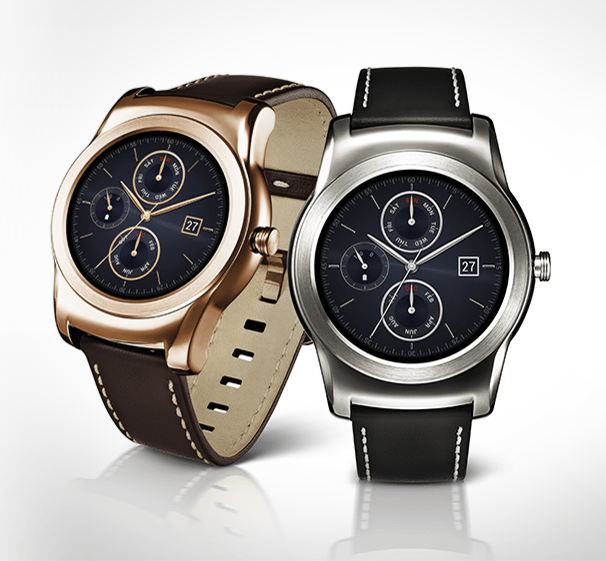 LG’s stylish Watch Urbane has finally become available to purchase in the Google Store, so if you’ve been waiting for your chance to pick one up, the wait is finally over. It’s carrying a $349 price tag, similar to what we were expecting, so no surprises there.
The Watch Urbane sports a Snapdragon 400 CPU with 512 MB of RAM, a 1.3-inch P-OLED display with a 320 x 320 resolution, IP67 certification for dust and water resistance. And, of course, it’s running on the Android Wear platform. The biggest selling point, though, is the design of the watch. With a gold or silver face and a sophisticated leather band, this is easily one of the most attractive Android Wear designs we’ve seen.
Another side effect of this release is that the G Watch R’s price has taken a dip down to $249, so if the Watch Urbane is too rich for your blood, the older model is slightly more affordable now.
source: LG Watch Urbane
Come comment on this article: LG Watch Urbane now available in the Google Store
LG Watch Urbane now available at Verizon Wireless

As expected, Verizon Wireless has now made the LG Watch Urbane available for $349, which is the same price as the Google Store. From what we can tell, it appears to be online only. Unfortunately the gold version isn’t showing, but that might change over the next few hours.
Two day shipping is also free, which is better than what the Google Store if offering. Even better, Verizon is shipping now so you will get your watch even sooner. Google is showing May 8th for shipping at of the time of this post.
Are you ordering one?
source: Verizon Wireless (Silver)
Come comment on this article: LG Watch Urbane now available at Verizon Wireless
Facebook Messenger takes on Skype and Hangouts with video calling feature
 Facebook is rolling out a new feature to their Messenger platform to take on the likes of Skype and other video chatting services. You’ll now be able to make video calls to your friends through Messenger, offering a completely platform agnostic way to keep in touch with friends and family.
Sure, Hangouts and Skype both offer easy ways to video chat with people on other operating systems, but it involves swapping usernames and sometimes downloading appropriate apps. Facebook has its foot in the door, as a vast majority of its users have Facebook already installed, and a good chunk of them are using its Messenger service.
Will you be using Facebook Messenger to make video calls, or are you sticking to whatever you’re using now?
source: Facebook
Come comment on this article: Facebook Messenger takes on Skype and Hangouts with video calling feature
Don’t expect to see the ASUS ZenWatch 2 before 2016
 ASUS is preparing their highly anticipated ZenWatch 2 for release sometime “soon,” but “soon” to ASUS doesn’t mean by the end of 2015. According to CEO Jerry Shen, the watch won’t be ready for debut until 2016 at the earliest. No word on what part of 2016 he’s expecting, but I would imagine we should see it within the first few months of the year, with that being over 3/4 of a year away.
An interesting note he made, however, was that ASUS plans to release two versions of the ZenWatch 2. One model will be for men, and one for women. Seems like a no-brainer move in retrospect, but I guess most companies think that a majority of their products at geared at men, so they’ve never bothered making female-specific models. Of course, when companies do make products targeted at a more feminine audience, they tend to be a disaster. Anybody remember the HTC Bliss?
We may not have anything official until 2016, but we’ll keep you updated as we learn more about the watch.
source: Android Authority
Come comment on this article: Don’t expect to see the ASUS ZenWatch 2 before 2016
Humble Tin Man Games Mobile Bundle expands to twelve games

The latest Humble Mobile Bundle, co-hosted by Tin Man Games, has grown to twelve games. With any donation, you receive four games. Matching or exceeding the average, which currently stands at $6.69, nets an additional six games. Then, donations of $9 or more adds another two games.
Any donation:
- Judge Dredd: Countdown Sector 106
- Slaves of Rema
- Siege of the Necromancer
- An Assassin in Orlandes
Average donation or more:
- Trial of the Clone
- Curse of the Assassin
- Fighting Fantasy: Caverns of the Snow Witch
- Sultans of Rema
- Zombocalypse Now
- Appointment with FEAR
Donation of $9 or more:
- Ryan North’s To Be Or Not To Be
- Fighting Fantasy: Starship Traveller
Those feeling extra charitable and donating $35 or more receive a Tin Man Games shirt and button. The charities benefited by this Humble Mobile Bundle are SpecialEffect and AbleGamers. Both charities work to provide people with disabilities access to video games.
Source: Humble Bundle
Come comment on this article: Humble Tin Man Games Mobile Bundle expands to twelve games
Simplifying widgets with DashClock Widget (Monday Makeover)
T
here is a plethora of apps out there that allow you to customize just about every single thing on your android smartphone without even rooting. That is why we have started the weekly series “Monday Makeover.” Each week we will take one of these customization apps and talk about setting it up, discuss the features of it, and show you how you can make your android device truly one of a kind. Last week we talked about HD Widgets. This week we are taking a look at DashClock Widget.
What is DashClock Widget?
The idea behind DashClock Widget is simple: have a single widget to notify you of the things you care about. The basic widget shows just a clock, but you are able to add extensions to view notifications about the apps you choose. You can see how many unread emails you have, how many appointments you have today, how many calls you have missed, and anything else you can imagine. The best part is that DashClock Widget is open source so any developer can create an extension for it. That means that the Play Store is full of extensions that can add even more usability into the single widget. You can get things like weather, battery percentage, and CPU usage from add-ons from the Play Store.
Why should I use DashClock Widget?
If you like the glanceable nature of widgets but do not want numerous amounts of them crowding up your homescreen space, then DashClock Widget is definitely for you. You can combine all of those widgets into one and still see the information that is most important to you. This also means that you will not have to swipe through your homescreens to find the widget you are looking for because they are all on one page.
How do I use DashClock Widget?
 This widget is extremely simple to setup and use. After downloading, go to your widgets and select “DashClock” and place it on your homescreen. From here, you will be taken into the DashClock settings. You will see the “Extensions” page where you can add, remove, rearrange, and customize the extensions that are displayed in the widget. You can remove and extension you want by tapping the three dots to the right of each one and selecting “Remove” from the popup menu. In the same menu, some extensions might have a “Settings” option for you to do some further customization. For example, the Gmail extension has settings that let you choose for which accounts and which label to show the unread count. Tapping “Add Another Extension” at the bottom shows you all of the possible extensions you have have on the DashClock widget. You can rearrange extensions by tapping and holding the “handle” to the left of them and dragging them where you want.
Tapping “Extensions” at the top opens another menu with more customization options. Under “Appearance,” you can change how the widget looks. By sliding your finger across the screen, you can change the style of the clock half of the widget and the date half.
If you use DashClock widget as Daydream on your device, you can customize its appearance under the “Daydream” menu. You can change the text color and animation as well as turn “Night mode” on and off.
If you are looking for more control over the DashClock widget, the “Advanced” menu offers some more options. You can choose what app opens when you tap on the clock. You can also choose where the Settings button is on the widget. For the widget on your homescreen or lockscreen, you can change how transparent the background is, what color the text is, and whether or not the clock is shown.
Where do I get DashClock Widget?
DashClock Widget is free to download in the Play Store. You can also find hundreds of other extensions in the Play Store for free. I would recommend spending some time looking at different extensions because there are several out there that are very useful to have which are not included in the DashClock Widget itself.
If you are like me and love the glanceable information that widgets provide but do not like having lots of them crowding your homescreen, do yourself a favor and check out DashClock Widget. I had heard of it before, but never used it. However, now I will be using it on every phone I buy. It does what it promises and does it extremely well. Are you going to try out DashClock Widget or have you in the past? Tell us what you thought of it in the comments! While you are down there, please leave some suggestions for apps you would like to see featured in a future Monday Makeover. Have a great week!
The post Simplifying widgets with DashClock Widget (Monday Makeover) appeared first on AndroidGuys.
Daily Roundup: Hackers read President’s email, eSports injuries and more!

In today’s Daily Roundup, read how Russian hackers were able to read some unclassified email from President Obama. Meanwhile, one of eSports’ biggest stars, Hai Lam, is retiring due to a repetitive strain injury and a Halo gaming tournament is canceled because the game is still broken. Read all these stories and more below.
Russian hackers scooped up the President’s unclassified email

Russian hackers may have had more success in breaching the White House network than first thought. New York Times sources understand that intruders who got into the White House’s unclassified system managed to collect some of President Obama’s email. They didn’t compromise the account itself, and they didn’t snap up the classified messages passing through the President’s BlackBerry.
One of eSports’ biggest stars retires with repetitive strain injury

If you’re into eSports, then it’s highly likely that you would have heard of Hai Lam. He’s best known as the Mid Laner and captain of Cloud9, which is regarded as the best US eSports team for the popular online multiplayer game League of Legends. Nonetheless, just less than a week after his team finished second in the North American Championship Series, Cloud9’s shot caller has announced he’s getting out of the game.
‘Halo’ tournament canceled because Xbox One game is still broken

Halo: Combat Evolved may have been one of the first console shooters to hit the competitive gaming circuit but a recent tournament was derailed because almost six months later, The Master Chief Collection is still broken. The official Halo eSports league, Halo Championship Series, had to cancel the first online cup of the regular season over the weekend due to connectivity issues.
Want the best Apple Watch display? Get a Sport model

Splurging on a gold or steel Apple Watch might get you a fancier timepiece, but there’s one thing you won’t get: the best possible display. DisplayMate has taken a close look at the OLED screen in the smartwatch, and it notes that sapphire carries its share of drawbacks over the toughened glass in the Watch Sport. While you’re still getting colorful, sharp visuals, the higher-end Watch’s sapphire reflects almost twice as much light and washes out the picture in very bright conditions.
Samsung app helps Alzheimer’s patients remember their families

If you’ve seen Still Alice, you know how important a smartphone can be for an Alzheimer’s patient – it helps jog memories that might otherwise be lost. Samsung is clearly aware of this, as it just released a dedicated Backup Memory app to stimulate the memories of early-onset patients. The Android tool uses Bluetooth to detect when friends and family running the app are nearby. If they are, it’ll both identify the person and show user-uploaded photos and videos that recall past events.
Car headlights of the future won’t blind other drivers

Carnegie Mellon’s work on headlights has made an appearance here before, where it’s near-future smart headlights would parse raindrops and ‘cancel’ them out, projecting light around the rain drops, substantially improving visibility. But that’s just one of many tricks that the Carnegie Mellon University Robotics Institute’s smart headlights are now capable of. The newest iteration’s feedback system continuously looks at what your headlights are doing, processing and thinking about how to shine better.
Police can spot differences between identical twins by melting DNA

Believe it or not, police have a real problem with identifying suspects who are identical twins – unless you’re willing to spend a month sequencing genes, DNA samples are all but useless. They may be far more effective in the future, though, as British researchers have developed a technique that melts DNA to identify what few differences exist. The team has determined that heating genes will break hydrogen bonds that form due to a person’s environment and habits.
Filed under: Misc
[Op-Ed] Google’s Project Fi is a minor stepping stone to changing the way people connect
style=”display:block”
data-ad-client=”ca-pub-8150504804865896″
data-ad-slot=”8461248232″
data-ad-format=”auto”>
(adsbygoogle = window.adsbygoogle || []).push();
I know we didn’t get out the news that Google announced their MVNO service earlier this week, but to sum it up, Project Fi is Google’s jump to the carrier side of the industry. The service rides over free Wi-Fi connections around the globe and can piggy back off Sprint and T-Mobile cell towers. From my understanding, you get both Sprint and T-Mobile network coverage on one device versus having to choose which carrier you want to back it up. I might be wrong though. As it sits right now, you need to request an invite to join the testing of Project Fi and the required device is a Nexus 6. As far as pricing goes, you pay $20 a month for unlimited calling and messaging and then tack on $10 per GB of data. Unused data for the month gives you a credit back to your account that you can apply to the next month of service as apposed to the current model where you either lose it or roll over massive amounts that you never tap into.
 The announcement was pushed by both carrier partners, the Nexus 6 manufacturer, Motorola and Google. As with any big announcement there has been mixed thoughts and feelings. Most of it ties to desires of unlimited data, the carriers involved and the single device option. However, many of those thoughts are very limited in grand scope of things.
If we talked about each part separately we would see a different story entirely. I can understand the unlimited data argument being a valid one from a select few power users who, more or less, abuse that ability to begin with. I am not saying they all do, but some certainly take advantage of the plan with torrents, streaming Netflix and Pandora all day all the time. Project Fi is certainly not an option for them looking to dramatically cut their bills down.
On a carrier stand point we can easily see how T-Mobile and Sprint play in the mix. Simply put, both carriers are the only two that already have Wi-Fi calling up and running. T-Mobile has been working on it for a number of years and Sprint has been following suite. While only a select few handsets are supported, the simple fact they do is the answer. AT&T is supposedly working on Wi-Fi calling with the last reports stating that it would arrive sometime in 2015. With both Sprint and T-Mobile supporting the ability to handle calls and messages over Wi-Fi already, it makes complete sense on why Google opted to work with both of them for their MVNO service at launch. If AT&T gets on board with the ability it isn’t out of the realm of possibility that Project Fi will open up on their network as well. There is probably a lot more to it, like network leasing, advertising, branding and coverage too.
So how about the Nexus 6 being the only supported device. Well, Google is in complete control of the device for one. Next we know that the Nexus 6 is one device that sports the chipset needed to run on multiple networks out of the box. Add in that most Nexus 6 owners, and people who even know that Project Fi exist, are going to be at least semi-technical individuals and you have the makings for a really great crowd based MVNO service start up.
The future of Project Fi as I see it
I see a lot of things happening with the service before the year ends. We know Motorola is on board and supportive of it. This should bring a few things – first, it should bring a wide range of devices and prices to the service, mainly the Moto X, Moto G and Moto E. Those three alone will cover all users price point needs and screen size needs. With all of them being fairly stock Android and Motorola doing a good job at updates, it should put their devices in even more hands. The next thing I see is Lenovo getting in on the mix – after all, they do own Motorola. That puts, either more Moto devices, or Lenovo devices, in the hands of people overseas. That does leave the question as to which cell carriers in other countries will jump on the bandwagon though. However, with much of the service being geared towards Wi-Fi, it would be possible to partner with internet providers for calls and messages before a carrier ever got involved.
 It is hard for me to not think about other projects Google is involved in and how Project Fi ties into it. For instance, how about Project Ara? You know, Google’s modular phone. That project will certainly have Project Fi access. While we know that project is going to be tested in Puerto Rico, it is hard to think that Google isn’t already working to put the low cost plan into action down there as well. That will cut the argument for a specific device out of the equation since you will basically build your own phone how and when you want to.
Then their is Google Fiber and Project Loon. Fiber is a no brainer really and you could essentially have a Nexus 6 home phone for $20 a month. Project Loon could feasibly put phones in the hands of people in places where internet wasn’t only a pipe dream, but so was calling a neighbor, friend, family member or doctor. Consider the Android One initiative paired with Project Fi and Project Loon. That mixture of innovation could land devices and service in the hands of the 4 billion people Google is after.

Will Project Fi be for everyone? No. No service is ever for everyone. In my situation it could save me a bit of money. I am either at work, which has Wi-Fi or at home, which has Wi-Fi. My few travels around town aren’t spent playing online or with data intense apps. Any out of town travels are usually to places with no service, on purpose, or places where I know I have a Wi-Fi connection anyways. I do pay for unlimited data currently, on T-Mobile’s $100 for two lines plan, but rarely use over 2GB a month. Mathematically, I would spend between $30 and $40 a month for my line on Project Fi and the same for the wife. Ultimately that would save us $20 to $40 a month on our bills. For others out there, it could save even more.
Like everything Google does, we are the testers and the project has a bigger picture that we aren’t privy to. I feel Project Fi has a definite place and direction in the sphere that is Google and will ultimately become a service that will either be your primary provider, or, at the very least, become a viable option to cut cost in life when we need it.
What are our thoughts? Do you see the potential future of Project Fi, or are you seeing it as a failure before it starts because of its launch state?
The post [Op-Ed] Google’s Project Fi is a minor stepping stone to changing the way people connect appeared first on AndroidSPIN.
 AIVAnet