



Latest Android distribution numbers have been posted, Lollipop now up to 3.3%

Google has just posted the latest Android distribution numbers, and the biggest change we’re seeing from last month is that Lollipop has now reached 3.3% of all Android devices. Lollipop has struggled to even register on the charts in the past two months or so (only reaching about 1.6% of devices last month) and now it’s continuing to grow ever so slightly.
Jelly Bean has held the top spot for quite some time now, totaling 42.6% of Android devices. KitKat isn’t far behind, though, with 40.9% of devices (up from 39.7% from last month). Next on the list is Gingerbread, totaling 6.9%, down from 7.4% from last month. Ice Cream Sandwich is also on the decline, only being installed on 5.9% of devices, which is down from 6.4% from last month. Lastly, we have Froyo, which hasn’t budged for the past few months, holding a sturdy .4% of the chart.

It’s certainly not encouraging to see any devices run on a version before Jelly Bean, but at least we can say that KitKat and Lollipop are on the rise. Android 5.0 Lollipop has been steadily rolling out to a number of different devices, including the LG G3, HTC One M7 and M8, Samsung Galaxy S5, Samsung Galaxy Note 4 and Edge, Motorola Moto X and G and many more. The update to Lollipop will only continue to make its way to devices from here on out, so we’ll definitely see another spike in the chart in next month’s numbers.
What are your thoughts on the latest distribution numbers? If you’re running an older version of Android, has it been dragging down your overall experience of Android? Let us know your thoughts in the comments.

Upcoming Steve Jobs Book Promises ‘Sensational’ New Stories, Launches March 24
 There’s a new Steve Jobs book set to be published later this month, penned by Brent Schlender, a reporter who interviewed Jobs several times throughout his life and became close to him, and Rick Tetzeli, Executive Editor at Fast Company. Called Becoming Steve Jobs, the book aims to go beyond existing myths and stereotypes about Jobs, giving a look at a man who was only human, who “wrestled with his failings and learned to maximize his strength over time.”
The book explores the story of how Steve Jobs made the transformation from an arrogant young man exiled from Apple to the visionary leader that skyrocketed Apple to fame. Schlender and Tetzeli interviewed many of Steve Jobs’ friends, family, and inner circle, to get access to never-before-told stories. Tim Cook, Jony Ive, Eddy Cue, Ed Catmull, John Lasseter, and Robert Iger all contributed to the book. It also draws on the experiences Schlender had with Jobs in interviews across many years.
Schlender and Tetzeli make clear that Jobs’s astounding success at Apple was far more complicated than simply picking the right products: he became more patient, he learned to trust his inner circle, and discovered the importance of growing the company incrementally rather than only shooting for dazzling game-changing products. .
Daring Fireball‘s John Gruber received an advanced copy of Becoming Steve Jobs and called it “the book about Steve Jobs that the world deserves.” According to Gruber, it’s an accurate retelling of the life of Jobs, with a “significant amount of new reporting. Some stories, he writes, “are going to be sensational.”
The book is smart, accurate, informative, insightful, and at times, utterly heartbreaking. Schlender and Tetzeli paint a vivid picture of Jobs the man, and also clearly understand the industry in which he worked. They also got an astonishing amount of cooperation from the people who knew Jobs best: colleagues past and present from Apple and Pixar — particularly Tim Cook — and his widow, Laurene Powell Jobs.
A hardcover copy of Becoming Steve Jobs can be pre-ordered on Amazon.com for $21.78. There’s also a Kindle edition and an Audible version.

Watch our Galaxy S6 and S6 edge hands-on video!

The Galaxy S6 and S6 edge are very much official now, and through all of the news and our own coverage we completely understand if you happened to miss our comprehensive hands-on preview video. Well that’s okay, because we wanted to show it off once again — we’re pretty darn proud of it, and we think you’ll enjoy it too.
Give it a watch, and when you’re done you can circle back and get all of the GS6 info you can handle right here.
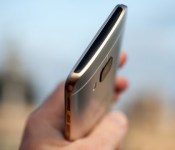
Relive our HTC One M9 video preview!
While the jury’s still out on the HTC One M9 — and likely will be for a little while now — it’s probably a good idea to take a couple extra minutes and give our initial preview a gander. We spent a solid 36 hours with the M9 here in Barcelona, Spain. It’s perhaps an imperfect device (what isn’t, really), but still addresses a number of issues we had with 2014’s HTC One M8.
The question is how does it stand up to more through use. We’ll find out soon enough, to be sure. For now, enjoy.
Samsung Galaxy S6 vs. Motorola Moto X 2014

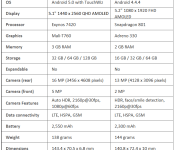
The Galaxy S6’s spectacular new screen boasts a QHD screen with 577 ppi, dominating the Moto X’s 1080p screen of 424 ppi. The Moto X’s screen still looks fantastic nonetheless and Motorola has taken full advantage of AMOLED technology with Active Display and off-screen notifications, as Samsung apparently has with the S6.
Samsung is using their own Exynos chip to power the S6, which beats the older Snapdragon 801 chip found in the Moto X in terms of speed and 64-bit capabilities, but Motorola has done a fantastic job optimizing their processor to make the Moto X one of the snappiest phones on the market.
It’s easy to say that the Galaxy S6 beats the Moto X in terms of camera performance, with the new Moto X under-performing even compared to 2014 flagships.
Both of these phones are capable of quick charging, with the Moto X capable of charging up to 80% in 15 minutes, and the Galaxy S6 “giving you four hours of use in a 10 minute charge” according to Samsung’s announcement.
Both of these phones use metal materials on the frames, however Motorola allows you to choose which type of back you want, ranging from leather, wood, to about all the colors on the rainbow for plastic.
Like many flagships in 2014, the Moto X is water resistant, even though submersing the device for a long period of time is not recommended. The Galaxy S6, strangely enough, is not.
Neither phones offer expandable memory or removable batteries, and the Moto X offers one front facing speaker above the screen while the Galaxy S6 speaker is located on the bottom of the device.
The post Samsung Galaxy S6 vs. Motorola Moto X 2014 appeared first on AndroidGuys.
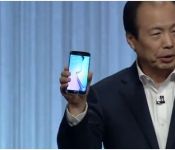
The Unpacked Galaxy S6 and Galaxy S6 Edge event now available to watch whenever you want

Didn’t get a chance to catch “What’s Next” from Samsung? Or maybe you did watch it, but your baby was screaming the whole time and you missed most of it. Either way, you can watch it anytime you wish since it’s now available on YouTube. Hit the break for the complete Unpacked Event and see what Samsung has in store. Hint, it’s the Galaxy S6 and Galaxy S6 Edge.
Click here to view the embedded video.
Don’t forget, you can Chromecast this video to your TV or favorite it and easily open it from your Android TV YouTube app.
Be sure to check out our complete Mobile World Congress 2015 coverage.
Come comment on this article: The Unpacked Galaxy S6 and Galaxy S6 Edge event now available to watch whenever you want
Hands on with the Lenovo Vibe Shot
brightcove.createExperiences();
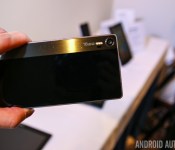
Lenovo introduced a couple of new smartphones and tablets at MWC 2015 yesterday, all offering something beyond what, from the outside, looks like fairly standard packaging. While the others focus on the audio experience with Dolby ATMOS on-board, the Lenovo Vibe Shot, as the name suggests, moves the emphasis to the camera experience it offers. We got to spend some time with the device, and here is our first look with the Lenovo Vibe Shot!

On the design front, it is understandable if you mistake the Vibe Shot for a slim point and shoot digital camera when looking at it from the back, obviously done on purpose to achieve that effect. The device offers a premium look and feel, with a metal frame sandwiched by two Corning Gorilla Glass 3 panels. For its specifications and price, the design language and build quality of the Vibe Shot is fantastic, and its compact size compared to the general size range of most smartphones nowadays allows for a great, comfortable handling experience.

On the hardware front, the Vibe Shot features a 5-inch IPS LCD display, with a resolution of 1920 x 1080, resulting in a pixel density of 441 ppi. The display is very vibrant and with a good color saturation, and should provide a great viewing experience overall.

Under the hood, the Lenovo Vibe Shot packs a 1.7 GHz octa-core 64-bit Qualcomm Snapdragon 615 processor, backed by the Adreno 405 GPU and 3 GB of RAM, which should be more than enough to keep everything running smoothly. 32 GB of internal storage is available, further expandable via microSD by up to 128 GB. Lastly, the device packs a rather large 2,900 mAh battery, which comfortably allows for more than a full day of use.

The Vibe Shot runs Android 5.0 Lollipop out of the box, and while it’s great to have the latest iteration of Android on-board, the user interface features nothing that will remind you of a stock Android experience, with the highly-customized Vibe UI on top.

Finally, we come to what is expected to be the biggest selling point of the Lenovo Vibe Shot, the camera experience. It’s not just the look that Lenovo is trying to recreate with the Vibe Shot, but the overall picture taking experience itself, with the availability of a dedicated tactile shutter button placed at the right spot, and a physical toggle to switch between “Smart” and “Pro” modes. On the specifications front, the device comes with 16MP auto-focus rear-facing camera with a 6-piece modular lens, an infra-red auto focus, tricolor flash, OIS, and 16:9 BSI sensor, while the front-facing camera is a 8 MP unit, which should allow for some good high-quality selfies.

The Smart mode is basically akin to an auto mode, and adjusts the settings of the camera the best that it can to cater the shot, allowing you to just focus on taking the shot. The Pro mode, on the other hand, puts everything in your control, giving you the ability to manually adjust all the settings including ISO, white balance, aperture, shutter speed, and even depth of field, all things that you would expect from a normal camera.


So there you have it – a quick look at the Lenovo Vibe Shot! While it is too early to comment on the quality of images, the camera-centric nature of this smartphone does leave us very excited to put it through its paces.
Stay tuned with Android Authority as we continue to bring you more from Lenovo, as well as more great coverage from MWC 2015!
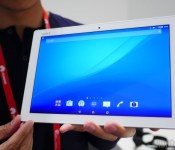
Sony Xperia Z4 Tablet first look!
brightcove.createExperiences();
Flagship season is upon us, but noticeable in its absence is the latest flagship smartphone from Sony, which has now been pushed back to accommodate Sony’s move away from their bi-annual release cycle. Nevertheless, Sony hasn’t come to MWC 2015 without its own bag of goodies, with the waterproof Xperia M4 Aqua, as well as the highly-anticipated latest addition to their high-end tablet lineup. At MWC 2015, we got to spend some time with the device, and here is our first look at the Sony Xperia Z4 Tablet!

Ever since the launch of the Xperia Z3 Tablet Compact, we were wondering what Sony would do with regards to a tablet in the 10-inch form factor, with the answer arriving in the form of the Xperia Z4 Tablet. What Sony has done wonderfully well with both their flagship smartphones and tablets is to further refine the design language and build quality, even after it felt like things couldn’t get any better with the previous iteration. Not to mention the jump in specifications associated with the difference in generations.

This holds true for the Xperia Z4 Tablet as well, which actually shares the design language of its smaller predecessor, and somehow manages to be even thinner and lighter than what was found with previous generations, with a thickness of just 6.1 mm, and weighing 389 grams. As far as the specifications go, apart from boasting the latest and greatest in terms of processing power, the display of the Xperia Z4 Tablet has been upgraded to a Quad HD resolution.

In terms of design, the iconic large silver power button, along with the volume rocker, is found on the right side of the device, and like previous generations, comes with a soft touch plastic back that allows for some good grip. Of course, holding onto the device is quite comfortable not only because of the back cover material, but because of how thin and light this tablet is, despite its 10.1-inch display size.

As mentioned, the specifications of the tablet have been updated to suit the times, with the Xperia Z4 Tablet packing a Qualcomm Snapdragon 810 processor, backed by the Adreno 430 GPU and 3 GB of RAM. In terms of storage, 16 GB and 32 GB are available built in, further expandable via microSD card. Everything under the hood is also well protected from the elements, with the Xperia Z4 Tablet also coming with the marquee feature of the high-end Xperia line, an IP65/68 rating for resistance to dust and water.

While the device still packs a 8 MP camera as seen on its predecessor, the front-facing camera has been upgraded to a 5 MP unit, which is great for any video chatting you may do or to take selfies with your tablet, if that is something you do. As far as the rear camera is concerned, there is no flash available, but you should still be able to get some decent look shots in good lighting conditions with this tablet.

On the software side of things, the latest iteration of the minimalistic Xperia UI is found on top of Android 5.0 Lollipop, the influence of which is evident in the redesigned notification drop down and the new Overview screen. The Xperia UI has always been as close to stock as you can get when it comes to OEM skins, but there are some useful additions made by Sony that make their way over to the Z4 Tablet as well, such as Small Apps, to help with multi-tasking and to take advantage of the large screen real estate.
So there you have it – a quick look at the Sony Xperia Z4 Tablet! It is yet another wonderful device offering from Sony, that brings with the best of the previous generations in a more refined, thinner, and lighter body, while packing the latest and greatest when it comes to power and display prowess.
Stay tuned with Android Authority as we bring you more from Sony, as well as all our other great coverage from MWC 2015!
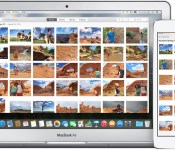
iCloud Photo Library: What You Need to Know [Mac Blog]
With today’s launch of the public beta of OS X 10.10.3 and the new Photos app for Mac, a number of users are now getting their first tastes of Apple’s replacement for iPhoto and Aperture. The release will also complete the rollout of Apple’s cross-platform iCloud Photo Library service, offering users an easy way to keep all of their photos stored in the cloud and synced across their devices. Various pieces of the service have been in beta since iOS 8.0 was made available to developers last June.
What Is iCloud Photo Library?
While Apple has offered some iCloud photo services such as Photo Streams for some time, iCloud Photo Library is a new service still in beta that moves the user’s entire photo and video library into the cloud. The service is part of Apple’s push to make it as easy as possible for users to switch among Mac and iOS devices throughout the day, making the user’s photos are available on all of their devices and ensuring any changes get quickly synced across devices.

Initially planned to launch as part of iOS 8.0, Apple pushed the service back to beta ahead of the public release as the company continued to refine the service and work on cross-platform capabilities. The Mac portion was also not ready for the public release of OS X Yosemite last October, but with the new Photos app for Mac ready for launch, all of the pieces are falling into place for iCloud Photo Library.
Read more 

When and where to buy: HTC One M9

HTC announced its latest flagship Android experience, the One M9, at Mobile World Congress on March 1. According to HTC, the handset will begin trickling out to a number of carriers starting as soon as this month.
We’ve gathered up links and details for the various U.S. wireless providers; these will help if you’re interested in signing up for additional information or want to pre-register for your own device. Pricing has yet to be announced by any party however we’ll update this page over time.
Carriers
Retailers
The post When and where to buy: HTC One M9 appeared first on AndroidGuys.

