


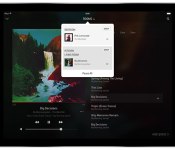
Sonos makes it easier to switch between rooms, retools tablet app

Sonos app updates arrived regularly over the past few months, and with the most recent version, the company makes a welcome improvement. Room control now resides at the top of the interface throughout the app, providing easy access to the speakers you have scattered throughout your house. Before now, switching between or grouping setups could only be accessed from the Now Playing screen. This feature was in beta for a bit, but version 5.3 is ready for everyone. The update also delivers a redesigned tablet UI and the ability to quickly swipe back and forth between what’s playing and browsing your library — rather than having to tap back a few times. Swiping down on the Now Playing window goes straight back to browsing, and then doing so from left right will access the menu with the full list of connected music sources. On the surface, these may seem like minor tweaks, but if you’ve spent any time with the Sonos controller app on iOS or Android, these are certainly welcome improvements.
Filed under: Portable Audio/Video, Software
Source: Sonos

Enter the HTC SweepStakes Promotion to win a HTC One M9

If you’ve followed our coverage of Mobile World Congress 2015, you’ve probably noticed that HTC has released its latest flagship smartphone, the One M9. As you would expect, the M9 features the latest Qualcomm Snapdragon 810 processor, 3GB of RAM and BoomSound speakers on the front of the device along with a refinement of the all-metal body. If you would like the chance to win a HTC One M9 before they even go on sale to the public, HTC are holding a SweepStakes promotion to do just that. We have the link after the break.
As promised, the link to the contest is just below. There are some requirements sadly, namely that you must be a US resident, and be 18 or older. Competition entries must be received by March 24th, with the winner to be randomly drawn by an administrator. You can enter by clicking the link below and filling in your details. Good luck!
HTC One M9 SweepStakes Promotion Link
Come comment on this article: Enter the HTC SweepStakes Promotion to win a HTC One M9

Flipboard update brings topics, magazine management tools and bug fixes

Flipboard for Windows Phone has been updated with a “topics” feature that allows you to discover new content based on your interests. You can find new stories based on tags you select as your interests, with over 34,000 topics available across categories such as technology, science, business, politics, sports and many more.

Motorola bundles Moto X Pure Edition and Sol Republic’s Tracks Air headphones for $449

From now until March 10, you can get the 16GB Moto X Pure Edition along with Sol Republic’s Tracks Air Bluetooth headphones for just $449 from Motorola’s website in the U.S. The bundle value is a $250 discount on the original retail price of both products.

Bittorrent Sync Pro lets employees share folders from their PCs

Bittorrent’s done beta testing its cloud-alternative Sync tool, so it’s now releasing not just the stable version, but also a Pro one for businesses. Sync 2.0 still lets you share folders saved on your computer using web links, but it also comes with an assortment of new features. These include the ability to link all your devices (PCs, phones and tablets) using a single private account, the power to share folders from any of those linked devices, and being able to grant a person access to your folders just once (he can access them instantly later on), among many other improvements.
The Pro version also lets you access all your folders in all your linked devices, assign other people as the “owners” of particular folders and to keep an account in “Synced” mode, which enables it to keep its contents updated without you having to manually do so. The Pro version does cost money ($39.99 per year per users), as you might have guessed, but your office can try it our for free for 30 days.
Filed under: Misc
Source: Bittorrent Sync, Sync 2.0
Meet NVIDIA’s $200 SHIELD console, a true Android game changer
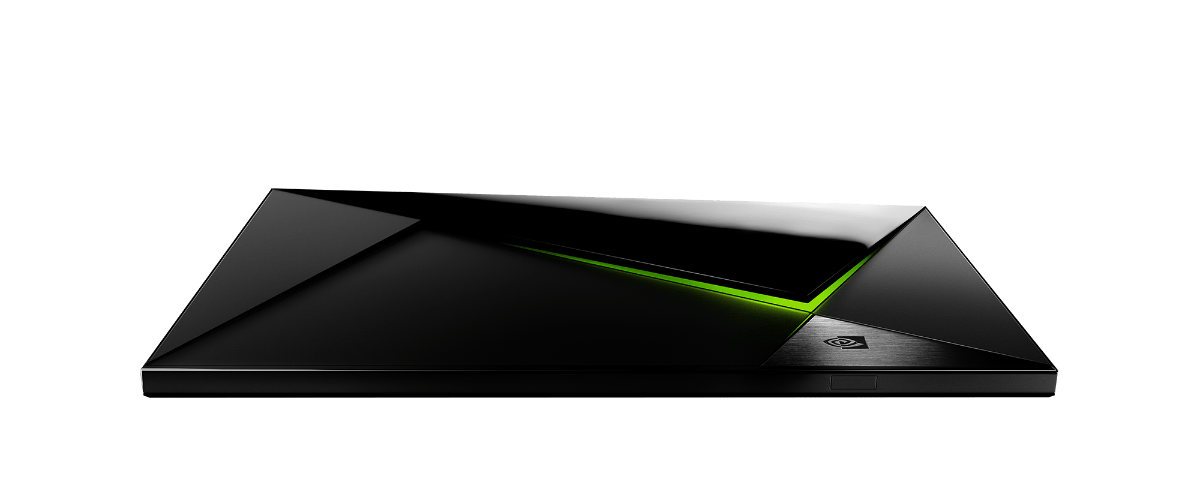
NVIDIA is changing the way we game on Android yet again. After starting off with the Shield portable gaming and entertainment console in 2013, NVIDIA followed up with a downright monster Shield Tablet. Then, as 2015 was getting underway, they went and introduced a new processor that runs circles around everything.
So, the next logical step? Why not marry everything in an Android-powered game console that features the Tegra X1 chipset.
Powered by Android TV, the NVIDIA SHIELD changes things all over again. The unit can not only game like a mother, it will also deliver video, music, apps, and so much more. That video? That will be 4K, if you don’t mind.

It just gets better, too, as the device connects with NVIDIA GRID, the game-streaming service that houses killer titles in the cloud. Think Netflix for top-tier gaming, delivered at 1080p with 60 frames per second.
The NVIDIA SHIELD launches in May with a kick-ass $200 price tag; there will be more than 50 titles optimized for the SHIELD when it debuts. Games include Crysis 3, Doom 3: BFG Edition and Borderlands: TPS. Toss in support for streamed console games Batman: Arkham Origins, GRID 2 and Metro: Last Light Redux and you can see why we’re so amped.
As if you need more reasons to get geeked over the NVIDIA SHIELD, there are a number of leading game devs already working to deliver content.
The SHIELD will be available starting at $199 with a controller; however, optional accessories include additional controllers, a remote control and a stand enabling the device to stand vertically.
Just the specs ma’am
- Processor NVIDIA® Tegra® X1 processor
- 256-core Maxwell™ GPU with 3GB RAM
- Video Features 4K Ultra-HD ready with 4K playback and capture up to 60 fps (VP9, H265, H264)
- Audio 7.1 and 5.1 surround sound pass through over HDMI
- High-resolution audio playback up to 24-bit/192 kHz over HDMI and USB
- High-resolution audio up-sample to 24-bit/192 kHz over USB
- Storage* 16 GB
- Wireless 802.11ac 2×2 MIMO 2.4 GHz and 5 GHz Wi-Fi
- Bluetooth 4.1/BLE
- Interfaces Gigabit Ethernet
- HDMI 2.0
- Two USB 3.0 (Type A)
- Micro-USB 2.0
- MicroSD slot
- IR Receiver (compatible with Logitech Harmony)
- Software Updates SHIELD software upgrades directly from NVIDIA
- Gaming Features NVIDIA GRID™ game streaming service
- NVIDIA Share
- NVIDIA GameStream™
- Power 40 W power adapter
- Weight and Size Weight: 23 oz / 654 g
- Height: 5.1 in / 130 mm
- Width: 8.3 in / 210 mm
- Depth: 1.0 in / 25 mm
- Operating System Android TV™, Google Cast™ Ready
- Included Apps PLEX
The post Meet NVIDIA’s $200 SHIELD console, a true Android game changer appeared first on AndroidGuys.

Super-efficient ‘Vulkan’ leaves your games more graphics power

Psst: the games you play might not look as good (or run as smoothly) as they could. In many cases, the overhead from graphics standards gets in the way — Apple went so far as to develop its own technology just to make sure that iPhones and iPads could live up to their potential. That bottleneck may not exist for much longer, however. The alliance behind the OpenGL video standard has given a sneak peek at Vulkan, an open standard that lets app writers take direct control of graphics chips and wring out extra performance on many devices, whether it’s your phone or a hot rod gaming PC. The software isn’t a magic bullet (developers still have to make good use of it), but it could easily lead to richer visuals and smoother frame rates without demanding beefier hardware.
Vulkan is still in a preview stage, but it already has some pretty noteworthy support. Valve sees the tech as crucial to Steam Machines, which have to produce gaming-worthy 3D graphics with modest processing power. AMD, ARM, Imagination and NVIDIA also see Vulkan doing wonders with their platforms, although Microsoft’s efforts are going towards DirectX 12. In short, you’ll probably see better graphics on many platforms — not just in a few gaming-friendly gadgets.
Don’t miss out on all the latest from GDC 2015! Follow along at our events page right here.
Filed under: Gaming, Software, Mobile
Source: Khronos Group

Pulpi Rescue for Windows Phone – battling an angry school of fish

Pulpi Rescue is a fast paced Windows Phone puzzle game that has you eliminating fish as they storm the beaches where pulp, who I believe is an octopus, is located.
Regardless as to what type creature the main character is, the Windows Phone game includes two gaming modes to keep you busy, decent graphics and a game pace that has a little zip. I will warn you that the game is plagued with ads for other gaming titles from the developer but if you can look past these ads, Pulpi Rescue has potential.

Best selfie sticks for iPhone

Not all iPhone selfie sticks are created equal. That’s why we did our homework and figured out which ones really are the “best”!
I’ve recently come to terms with selfie sticks and that they actually have a place in mainstream society. But that doesn’t mean I’d trust just any old selfie stick with my iPhone. Some are made with shoddy materials and others have mounts that could potentially scratch your casing. Not good.
After testing numerous selfie sticks with both my iPhone 6 and 6 Plus, these are the ones I’ll recommend without hesitation to any iPhone owner.
Name games

The selfie sticks I’ve listed are the ones I think are the best of the best in their categories. There aren’t a lot of other selfie sticks out there to choose from, but many are the same sticks from different resellers. The only difference is the label and price. For example, I purchased a selfie stick from Selfridges in London for $50 — it’s pictured in the photo above. The same stick can be had on Amazon for around $15 through another reseller. Ouch.
Testing criteria
Here are the things I looked for when testing selfie sticks for iPhone:
- It’s well constructed and can fully support the weight of your iPhone.
- A good spring loaded mount that has rubber grips so it doesn’t scratch the edges of your iPhone.
- Extends over 30 inches.
- Collapses to under 9 inches.
- Bluetooth or headphone jack shutter support is a must.
- Go with Bluetooth selfie sticks that have Bluetooth built in instead of a remote, it’s just less of a headache.
1. Sellfie

Best lightweight selfie stick
This little beauty is made of super light weight carbon fiber material and can hold up to 7.7 lbs. Sellfie fits any iPhone model, including the 6 Plus — I even had my Apple leather case on it. The mount on the Sellfie has high quality rubber on the edges so you don’t have to worry about it scratching up your iPhone. Sellfie works for up to 40 hours and 6 standby days.
Sellfie is also compatible with Android. You can even pair an iPhone and Android phone simultaneously. To switch between them, just hold the camera button down for 2 seconds and the light will change color to indicate what device it’s connected to.
- $50 – Buy now
2. Looq S

Best non-Bluetooth selfie stick
If you don’t want to have to worry about charging your selfie stick, the Looq S is for you. Just plug the Looq into your headphone jack and the button on the handle acts as a remote shutter. The Looq collapses down to about 8.5 inches and has a sturdy mount that does a decent job protecting your iPhone.
- $34 (currently on sale for $24) – Buy now
3. Solo Stick

Best compact travel selfie stick
The Solo Stick doesn’t come apart for packing or carrying, it simply collapses down and you’re done. It can get 20 hours of use and up to 3 days standby. A full charge takes less than an hour. It’s also got my favorite mount out of all the selfie sticks I tried. The rubber is thick around the edges and provides plenty of padding so you know your iPhone won’t get scratched while using it.
- $44.99 – Buy now
Your favorite?
The selfie sticks above are the ones I came away completely impressed with. I felt my iPhone was safe and didn’t have any issues pairing and using them. If you made a selfie stick decision, which one did you decide to go with? Let me know in the comments!
<!–*/
.imageleft
float: left;
margin: 0 25px 0 0;
.imageright
float: right
margin: 0 0 0 25px;
.screenshot-16×9
height: auto;
width: 88.97%;
.screenshot-16×9.imageleft,
.screenshot-16×9.imageright
width: 50%;
.screenshot-4×3
height: auto;
width: 66.66%;
.screenshot-4×3.imageleft,
.screenshot-4×3.imageright
width: 50%;
/*–>*/
Sonos updates its iPhone and iPad app with a better rooms menu and more
Sonos has updated its app for the iPhone and iPad to version 5.3, which includes a number of improvements to help owners of the company’s connected speaker products.
Some of the features included in this Sonos 5.3 update were previously released in a beta version in February. They include:
- Managing the music in all the rooms in the home is even faster. We made the menu for the rooms in your house available from any screen of the Sonos App so customers can effortlessly move their music around their home.
- New dedicated screens for Now Playing and music discovery on iOS and Android tablets makes toggling between screens more intuitive for a better tablet experience.
- Improved navigation for search and browsing makes it easier for customers to find and listen to their favorites and queue up more music at the same time.
-
The track progression bar is now prominently displayed within the Now Playing screen below the album art. Customers can drag it to whatever point in the song they want to play.
- Free Download now

