


Review: The Inateck BTSP-20 Water-resistant Bluetooth speaker

Before I get started, I figured I would mention that portable speakers aren’t usually the sort of thing that I’m terribly interested in. I’ve always viewed portable speakers as unnecessary (from a personal perspective) and never really looked at them as being able to offer a satisfactory experience. As such, I have usually either listened to my music (anything from Roxette to AC/DC to Weird Al) via headphones or through my PC speakers. But the other week I was sent the Inateck BTSP-20 Bluetooth Speaker to review, and I’m more than pleasantly surprised with it. I might even go so far as to say that I have become a big fan of the BTSP-20.

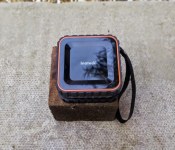
As you can see from the images, the BTSP-20 is pretty small and square. On the top of the speaker are the Power, Call and Volume Up/Down buttons. The BTSP-20 weighs in at 300 grams with dimensions of 85 x 85 x 46mm. The speaker has a plastic casing with a rubberized tread running around the edges which help it to stay put on less than solid surfaces. Handily, the BTSP-20 has an Ingress Protection Rating of IPX5, with the upshot that the speaker is protected against jets of water from a distance of 3m for up to 3 minutes. For me, the water-resistant feature has meant that the BTSP-20 has been used all over the house, even in the bathroom, changing tracks via the waterproof Galaxy S5. It came with me wherever I went, for playing music as well as taking calls (more on that later). Another useful feature is the built-in lanyard, which makes it easy to hang the speaker from door handles or hooks. It should go without saying that the speaker is very portable, fitting in many jacket pockets, as well as taking up hardly any room in a backpack.

The BTSP-20 is a simple, user-friendly device that connects quickly and easily to your smartphone, tablet or whatever other Bluetooth capable device you are pairing it with. It’s just a case of holding the power button on the BTSP-20 for a couple of seconds, after which a short jingle plays to let you know that the speaker is on. There is also a little LED on the front of the speaker which flashes red/white when the device is powered on, but unable to connect to a host. When properly paired with a host device, the LED will show a steady white. After powering it on, you can instruct your smart device to pair with it, then you’re free to choose your favourite music player to send content to the speaker.

So how loud is the BTSP-20? Well, Inateck states that it has a 3w speaker, and it seems plenty loud for its intended purpose of being a small, portable speaker. I’ve put it through its paces for a couple of weeks now, and I can honestly say that I’ve not once wished it could be louder. The speaker does a good job of filling a small room with clear vocals and a surprisingly decent amount of bass for an overall satisfying experience. This is much better than listening to tinny, distorted music on your smartphone. Much, much better.

Earlier, I mentioned that I had used the BTSP-20 to take calls. This is made possible thanks to the built-in microphone on the speaker. Once the speaker is paired with your smartphone, when a call comes in, all you have to do is press the phone button on the top of the device to accept the call and you are free to begin talking. The sound is good, much better than simply using the loud-speaker on your smartphone, and the person I spoke to on the other end of the call was impressed by the quality of the sound the microphone passed on.

Inateck claims that the BTSP-20 is capable of up to 5 hours of continuous playback on their official product page. That’s exactly what my experience was which I reckon is pretty good for its rechargeable 500mAh battery. It only takes 2 hours for the BTSP-20 to fully charge from 0 to 100 percent.

A question I like to ask when reviewing a device is – Would I buy the item for myself? On this occasion, I would have to say yes. It’s a well-made speaker, user-friendly and provides great sound for its size. I’m still gobsmacked by the amount of bass it outputs, as well as the clarity of the overall sound.
My only slight complaints are that the speaker can be turned off too easily, one quick (accidental) press of the power button and speaker is off. In my opinion, one should have to hold the button in for 2-3 seconds before powering off just to guard against accidental power downs. The other is being unable to change tracks via the speaker. There is no ‘Next’ or ‘Previous’ buttons on the speaker, and this detracts slightly from its usefulness. Apart from that, I’m supremely happy with the Inateck BTSP-20 Bluetooth speaker. The build quality and the sound that Inateck has managed to generate from such a small speaker is just astounding. As such, I can whole-heartedly recommend the BTSP-20.
You can find the Inateck BTSP-20 on Amazon (UK) for £29,99 ($46), and here is the official product page.
Click here to view the embedded video.


Come comment on this article: Review: The Inateck BTSP-20 Water-resistant Bluetooth speaker

Samsung Galaxy S6 Edge Color Comparison
brightcove.createExperiences();
After testing the waters with the Galaxy Note Edge, Samsung went all in with the concept with its flagship Galaxy S6 Edge, that features not one, but two curved display extensions. Adding to it the more premium build quality with its metal and glass unibody glass construction, the Galaxy S6 Edge is sure to catch the eye of anybody that comes across it. The device is also available in a variety of colors, and to help make your choice easier, here is a quick look at the Samsung Galaxy S6 Edge color comparison!

Like its non-edged sibling, the Galaxy S6 Edge is also available in white pearl, black sapphire, and gold platinum, and while the blue version found with the Galaxy S6 doesn’t make its way over, a color exclusively for the S6 Edge is green emerald.

We start with the green emerald version, as it is the most stand out color of the lot, and is also unique in its exclusivity with the Galaxy S6 Edge. The translucent element because of the glass panels are seen here, which gives the phone a very different look, and it is one my favorite options. Though unconventional, the green emerald version is still quite subdued, and not nearly as flashy as the blue version of the Galaxy S6.

If you are looking for a more ornate look, the gold platinum color option might be the one for you. This is definitely the flashiest option available and is sure to turn heads, but the metallic look also fits right in with the new metal and glass unibody construction and adds to the premium nature of this device.

Moving on to the more traditional options, we have black sapphire and white pearl. The black version does have a bluish tinge to it, likely because of the translucency created by the glass panels on the front and back. It looks really nice, and different from other black phones, and is definitely the safe bet if you’re in the market for a traditional, clean and simple look. The white pearl comes with a tone that you’d expect from a white version of a phone, and is another great choice for those not wanting anything too flashy.


So there you have it for a quick look at the various color options available for the Samsung Galaxy S6 Edge! Vote in the poll or let us know in the comments section below about which is favorite color option, and stay tuned with Android Authority as we continue to bring you more great coverage from MWC 2015!
Google Drive version 2.2 update brings drag and drop functionality and more

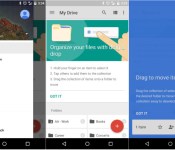
Google is pushing out yet another update to an app, and this time it’s Google Drive’s turn. The update to version 2.2 brings some basic drag and drop functionality to the app, along with a slight change to the navigation menu.
Up until now, moving files around in Google Drive was sort of a hassle. In previous versions, you’d need to select a drop down menu and choose the location to where you wanted to move your file. But in the update to version 2.2, you can now drag and drop files wherever you’d like. After you receive the update, Google will show a brief tutorial card towards the top of the app, explaining how to do so. To move files, simply hold down on an item, then drag it to your desired location. Before you move the file, Drive will let you know how many files you have selected towards the bottom of the screen, which will prevent you from moving more files than you’d like.
Next, the new update brings a full-height navigation drawer. In the version prior to this one, the navigation drawer would slide out under the action bar up top. Now the drawer reaches the top of the screen, much like we’ve seen in a few other Google apps.
Those are the only changes we’re seeing so far, so if you find any others, feel free to comment below. The update is rolling out in the Google Play Store right now, but if you don’t want to wait for it, you can sideload the apk file by following this link.


Should you try out the Photos for Mac public beta?

Is Photos for Mac ready for its public closeup? Pretty close — but don’t go in without a backup.
Apple released its first public beta of OS X 10.10.3 on Monday, and with it also comes the first public crack at Photos for Mac. The temptation to upgrade for people enrolled in Apple’s public beta program is great, especially for those using iCloud Photo Library on your iOS device, but should you?
Are you a tech junkie? (And do you have a backup?)
My general counsel on the matter is a cautious yes — if you have a good backup of your Mac and your photographs. I’ve been running OS X 10.10.3 since the first developer beta and it’s remarkably stable for a preview release; Photos, similarly, is about as solid as an OS X beta app can be. I’ve experienced a few crashes here and there, and I’m sure Apple hasn’t ironed out all the memory leaks it’d like to take care of before its formal public release, but it’s perfectly solid to take for a spin.

But that’s dependent on one thing: a good backup. On the off-chance that your Mac runs into a horrible bug with Photos or otherwise in the course of your day-to-day interaction with OS X 10.10.3, you don’t want to put your data at risk, too. If you’ve backed up your information, however, and you really want to play with Photos for Mac, I see no real reason to not join the Appleseed Beta program and download the release.
Are you my mother?
If you’re familiar with betas (and the bugs they occasionally contain) and their workings, there’s not much harm in downloading OS X 10.10.3. But that doesn’t mean you should pre-update your tech-repair-challenged friends and family’s computers with the beta. Apple is likely to officially release OS X 10.10.3 in the next month or two; there’s no reason not to wait to update your mother’s computer until that point in time.
Already have the beta installed?
Let us know how you’re getting along with Photos for Mac — and if you have any questions about the app — in the comments.

NVIDIA’s got a new GPU monster, and it’s called Titan X

NVIDIA just announced the Titan X, its latest powerhouse graphics card, at Epic Game’s GDC session this morning. And boy, it sounds like a monster: According to NVIDIA CEO Jen-Hsun Huang, it’s now the world’s most powerful GPU with more than 8 billion transistors (a bit of a jump from the 7 billion in last year’s Titan Z). Titan X is powered by the company’s new Maxwell architecture, and it packs in 12 gigabytes of VRAM, just like the Titan Z. NVIDIA isn’t revealing much else about the new GPU yet — it has its own conference in a few weeks, after all — but at this point it sounds like the video card we’ll all be pining for this year.
While it may seem strange for Huang to tease the Titan X at another company’s event, he had a good reason: It’s powering a new VR experience called Thief in the Shadows, a joint effort between Epic, Oculus, and Weta Digital, which puts you in the shoes of someone exploring the dragon Smaug’s treasure-filled cave from The Hobbit.

Don’t miss out on all the latest from GDC 2015! Follow along at our events page right here.
Source: NVIDIA

NVIDIA’s got a new GPU monster, and it’s called Titan X
NVIDIA just announced the Titan X, its latest powerhouse graphics card, at Epic Game’s GDC session this morning. And boy, it sounds like a monster: According to NVIDIA CEO Jen-Hsun Huang, it’s now the world’s most powerful GPU with more than 8 billion transistors (a bit of a jump from the 7 billion in last year’s Titan Z). Titan X is powered by the company’s new Maxwell architecture, and it packs in 12 gigabytes of VRAM, just like the Titan Z. NVIDIA isn’t revealing much else about the new GPU yet — it has its own conference in a few weeks, after all — but at this point it sounds like the video card we’ll all be pining for this year.
While it may seem strange for Huang to tease the Titan X at another company’s event, he had a good reason: It’s powering a new VR experience called Thief in the Shadows, a joint effort between Epic, Oculus, and Weta Digital, which puts you in the shoes of someone exploring the dragon Smaug’s treasure-filled cave from The Hobbit.
Don’t miss out on all the latest from GDC 2015! Follow along at our events page right here.
Source: NVIDIA

HBO and Apple in Talks for $15/Month Apple TV Streaming Service Launching in April
HBO is in talks with Apple over a partnership that would see its upcoming standalone web-only subscription television package available on the Apple TV, reports Michael Learmonth, writing for International Business Times. CNBC has also confirmed that Apple and HBO are in talks in the video tweet posted below.
BREAKING: Sources tell @JBoorstin that Apple & HBO are in talks for Apple TV to be a launch partner for 'HBO Now'.
https://t.co/hQd9AzA3Xr
— CNBC Now (@CNBCnow) March 4, 2015
Apple could potentially be one of HBO’s launch partners for its web-only service, which may be called “HBO Now.” News of HBO’s web-based subscription service first surfaced in October of 2014, after HBO CEO Richard Plepler shared the company’s plans at an investor presentation.
The service, aimed at cable cutters, will allow users to access HBO content without a cable subscription for a set monthly fee. With the launch of a cable-free subscription service, HBO will become the first major premium content provider to cease limiting its television and movie offerings to cable subscribers.
According to Learmonth, HBO’s web-only subscription will launch in April alongside the premiere of the fifth season of Game of Thrones, which takes place on April 12. The service is said to cost $15 per month, which is roughly how much it costs to subscribe to HBO through a cable company. A partnership with Apple would allow the service to be watched on the Apple TV, much like the existing version of HBO’s service, HBO Go. HBO Go is available to all existing HBO subscribers on a variety of devices like the iPad and Apple TV, but it requires an HBO subscription through a cable or satellite provider.

Cable companies like Time Warner and Comcast have long been reluctant to offer piecemeal pricing and companies like HBO have previously avoided moving away from traditional cable models in order to preserve the status quo and avoid upsetting existing revenue streams.
The introduction of HBO’s service will be a major victory for cord cutters, and it could encourage other content providers to introduce similar offerings. Content providers’ reluctance to shift away from traditional models has been one of the major factors that’s prevented Apple from establishing deals for its own service in the past.

New update to Slingshot app lets you interact with new users around the globe

Facebook has issued a new update to the Slingshot application which now makes user discovery less cumbersome. The app now gets a new “Explore” option which lets you discover people around the globe.
It’s much like Snapchat, which is Slingshot’s primary industry rival. If you’re worried much about privacy, you can turn off the Explore feature from the settings to be left out from results.
Once you tap Explore and if you like what you see there, you can choose to follow the particular user or simply check out what other users have to offer. It’s a very handy discovery feature, which will ensure that your experience with the app is enhanced.
Here’s what Facebook had to say about the new addition – “Explore is a place to discover funny, inspiring and creative people from across the globe. It features popular people who are active on Slingshot. You can view their shots and then decide who you want to follow. If you don’t want to be featured in Explore, you can turn on Approve Followers in Settings.”
Source: Slingshot Blog
Come comment on this article: New update to Slingshot app lets you interact with new users around the globe

Google Hangouts version 3.0 update brings performance and stability improvements

An update to Google Hangouts is beginning to roll out to Android users today. The update, which brings the app up to version 3.0, features mostly performance and stability improvements along with a few aesthetic enhancements. Oddly enough, the jump up to version 3.0 doesn’t bring as many changes as one might expect.
According to Google’s Dennis Kiilerich, the main focus of this update is to improve stability and performance issues. Additionally, Google has addressed feedback and suggestions that users submit to the company. Kiilerich also explains that they’ve added a ton of under the hood improvements that will allow them to add more features going forward.
Other than performance improvements, one main change we’ve noticed is the updated contact card. Much like we saw in the new Google Contacts preview from yesterday, the contact card now shows information from the user’s Google+ profile, including recent conversations, people in common and recent Google+ posts. Other than that, we’re not seeing too many other changes in the way the app looks.
Follow the Google Play link below to check for the new update. If you don’t feel like waiting, you can follow the apk link below to sideload the update by yourself. And if you see anything new in the Hangouts update, let us know what we missed in the comment section!

Xbox games are coming to Microsoft’s augmented reality headset

If you watched Microsoft’s announcement of its Hololens augmented reality headset and wondered if you’d play Xbox games with it, well, wonder no longer. Today at its Game Developers Conference presentation, Redmond announced that games would be en route to the device and that the APK should be available come its Build conference late April.
Developing…
Don’t miss out on all the latest from GDC 2015! Follow along at our events page right here.
Filed under: Gaming, Home Entertainment, HD, Microsoft

