


Fandango Announces Apple Watch Movie Ticket App [iOS Blog]
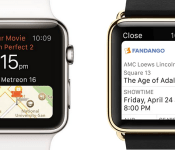
Fandango announced late last night that its popular movie ticket buying service will be featured in a full-fledged Apple Watch app when the device launches on April 24.
Eagle-eyed viewers may have caught a glimpse of the app in yesterday’s debut of the new ad for the Apple Watch, but the company’s announcement brings more details on the online ticketing service’s upcoming app for Apple’s new wearable.
Ticket purchasing and checking out will still occur on Fandango’s official website, according to the company, with the new Watch app acting mainly as a retainer for a user’s purchased tickets. Following the syncing of a user’s account on the Apple Watch, a “mobile barcode ticket” will appear on the Watch app, which the company says can be scanned by the ticket-taker at a movie theater for “easy access to the theater.”

“Fandango continues to build award-winning iOS apps that leverage Apple’s latest technologies including Siri and Passbook, enabling fans to easily discover new movies, get the latest trailers, information and buy tickets,” said Fandango President Paul Yanover.
“We’re excited to be one of the first apps available for Apple Watch, which takes movie-going to a whole new level by providing quick access, once you’ve purchased tickets, to movie times, theater location and more movie info conveniently on your wrist. We think the Apple Watch will ignite consumer excitement and help build momentum for the category.”
The Fandango Apple Watch app won’t just function as a glorified movie ticket, however, but will also remind users of upcoming showtimes related to their ticket purchases, provide directions to the theater, detail information on a chosen theater’s amenities, and include a running “countdown-to-showtime” clock for those killing time before a matinee.
As the company points out, the launch date of the Apple Watch, and subsequently of the Fandango Apple Watch app, lies just a week ahead of the May 1 opening for Marvel’s Avengers: Age of Ultron, and thus the numerous summer blockbusters premiering over the next few months.
Though ticket purchasing is still reliant on the Fandango website, and it’s unclear whether every theater will accept the scannable barcode tickets, the simplicity of the new Fandango Watch app definitely looks like something movie-goers planning to invest in an Apple Watch should be excited for.
The Apple Watch will be up for pre-order on April 10, before its official launch two weeks later on April 24. Following yesterday’s “Spring Forward” event, MacRumors has more information regarding the Watch’s battery life, band options, and a curated list of all the new videos and most important news stories from the event.
Samsung and Lamborghini team up to bring Gear VR experience to the Huracan

At the Geneva Motor Show 2015, Lamborghini is present and showing off their new Huracan automobile. To help give potential customers a feel for what the car is like, the automaker partnered with Samsung to create a virtual reality experience using Samsung Gear VR devices. Paired with Samsung Galaxy Note 4 phones, Lamborghini is giving attendees the chance to strap on Gear VR, some headphones, and plunk down in a Huracan that is on display to experience how it feels to drive the supercar.
The experiences made available through the Gear VR include driving along a cliff edge on the coast of Italy, through the town of Amalfi, or taking in a lap or two on the Imola race track. In the video below, Samsung and Lamborghini capture the impressions of the experience by participants. They seem to be quite impressed with the ability of Gear VR to put them in the middle of the action and when combined with the sounds, they truly felt immersed in the experience.
Click here to view the embedded video.
source: SamMobile
Come comment on this article: Samsung and Lamborghini team up to bring Gear VR experience to the Huracan
Here’s how to easily compare the Apple Watch case sizes using your iPhone
If you’re looking for a way to easily compare the sizes of the different Apple Watch cases to see how each will fit your wrist, you can now do so right from the comfort of your iPhone.
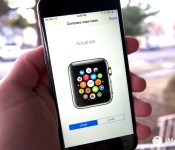
In the Apple Watch section of the Apple Store app for iPhone, there’s a page that displays the actual size of the 38MM and 42MM watch cases, allowing you to easily compare the two before you venture to an Apple Store to try one on for size.

To get to the size comparisons, you simply need to open the Apple Store app on your iPhone. From there, tap “Learn More” on the Apple Watch banner on the storefront, then tap “View Pricing” in the upper right-hand corner of the screen. Finally, tap “compare case sizes” from the price comparison screen and you’ll be presented with the option to toggle between the 38MM and 42MM watch cases at actual size.
The process is a bit convoluted, but it serves as an easy way to get a glimpse at how each size will look on your wrist before you get a chance to try on out in person on April 24.
<!–*/
<!–*/
<!–*/
.devicebox
background-color: #5CB8DB;
border: 1px solid #E2E9EB;
float: right;
display: block;
margin: 0 0px 10px 10px;
max-width: 350px;
overflow: hidden;
width: 50%;
.devicebox h3
background: #8D98BD;
color: #fff;
font-family: “camptonmedium”,sans-serif;
font-size: 20px;
margin-bottom: 0;
margin-top: 0;
padding: 0;
text-align: center;
.devicebox h3 a
display: block;
line-height: 30px;
padding: 0 10px;
.devicebox h3 a:hover
background: #7e88aa;
text-decoration: none;
.devicebox .video
margin: auto;
border: 0px;
.devicebox p,
.entry-content .devicebox p > img,
.devicebox img
margin: 0px;
padding: 0px;
.devicebox,
.devicebox a,
.devicebox a:active,
.devicebox a:hover,
.devicebox a:link,
.devicebox a:visited,
.devicebox p,
.devicebox ul,
.devicebox ul li,
.devicebox li
color: #fff;
.devicebox a:hover
text-decoration: underline;
.devicebox p,
.devicebox ul,
.devicebox ul li,
.devicebox li
border-width: 0px;
font-family: “camptonlight”,sans-serif;
font-size: 16px;
padding: initial;
.devicebox ul
margin: 0;
padding: 0.5em 1em 1em 30px;
.devicebox ul li
display: list-item;
.devicebox ul,
.devicebox ul li,
.devicebox li
line-height: 24px;
list-style: disc outside none;
.devicebox ul li:before
display: none;
.devicebox ul + p
padding: 0px 15px 15px;
line-height: 1.25;
.field-items p:last-of-type + .devicebox,
.slide p:last-of-type + .devicebox,
.article-body-wrap p:last-of-type + .devicebox
float: none;
margin: 0 auto 30px;
max-width: 700px;
min-height: 225px;
position: relative;
width: 100%;
.field-items p:last-of-type + .devicebox .video,
.slide p:last-of-type + .devicebox .video,
.article-body-wrap p:last-of-type + .devicebox .video
bottom: 0px;
left: 50%;
position: absolute;
right: 0px;
top: 30px;
.field-items p:last-of-type + .devicebox .video_iframe,
.slide p:last-of-type + .devicebox .video_iframe,
.article-body-wrap p:last-of-type + .devicebox .video_iframe
height: 100%;
padding: 0px;
.field-items p:last-of-type + .devicebox ul,
.slide p:last-of-type + .devicebox ul,
.article-body-wrap p:last-of-type + .devicebox ul
width: 43%;
.field-items p:last-of-type + .devicebox h3 + p,
.slide p:last-of-type + .devicebox h3 + p,
.article-body-wrap p:last-of-type + .devicebox h3 + p
bottom: 0;
left: 50%;
position: absolute;
right: 0;
top: 30px;
.field-items p:last-of-type + .devicebox h3 + p img,
.slide p:last-of-type + .devicebox h3 + p img,
.article-body-wrap p:last-of-type + .devicebox h3 + p img
height: auto;
min-height: 100%;
min-width: 100%;
@media all and (max-width: 500px)
.devicebox
float: none;
margin: 0;
max-width: 100%;
width: 100%;
.field-items p:last-of-type + .devicebox .video,
.slide p:last-of-type + .devicebox .video,
.article-body-wrap p:last-of-type + .devicebox .video
left: 0;
position: relative;
top: 0;
.field-items p:last-of-type + .devicebox .video_iframe,
.slide p:last-of-type + .devicebox .video_iframe,
.article-body-wrap p:last-of-type + .devicebox .video_iframe
padding-bottom: 56.25%;
.field-items p:last-of-type + .devicebox h3 + p,
.slide p:last-of-type + .devicebox h3 + p,
.article-body-wrap p:last-of-type + .devicebox h3 + p
left: 0;
position: relative;
top: 0;
.field-items p:last-of-type + .devicebox ul,
.slide p:last-of-type + .devicebox ul,
.article-body-wrap p:last-of-type + .devicebox ul
width: auto;
/*–>*/
/*–>*/
/*–>*/

Netflix stuffed its video service into an NES cartridge

Netflix’s experimental Hack Days often lead to wonderfully off-the-wall projects, but its latest might have produced the best example yet. Engineers Guy Cirino, Carenina Motion and Alex Wolfe have whipped up DarNES, a hack that turns the original Nintendo Entertainment System into a Netflix playback machine. The ’80s-era console is unchanged — the real trickery is inside a special 256KB cartridge. You probably wouldn’t want to go on an Orange is the New Black marathon given the chunky 8-bit graphics, but it’s nice to know that you can.
There are some other sweet projects emerging from Hack Day. BEEP harasses you into focusing on the TV, Netflix Earth shows activity around the world, Net the Netflix Cheats makes sure you only watch what your partner also wants to see, and Say Whaaat!!! shows subtitles for missed dialogue. Few if any of these will reach official apps, of course, but that’s part of the point — Netflix is taking the pressure off so that engineers can rejuvenate their creativity.
Filed under: Gaming, Home Entertainment, Internet, HD, Nintendo
Source: Netflix Tech Blog
Samsung Galaxy S6 Edge vs LG G Flex 2 quick look
brightcove.createExperiences();
In the battle for unique form factors and design, Samsung and LG have been going head to head, albeit with different concepts in mind. How do these devices fare when pitted against each other? We find out, as we take a quick look at the Samsung Galaxy S6 Edge vs LG G Flex 2!

If you’re looking for a high-end smartphone that pushes the boundaries in terms of design, your best bet is with these two smartphones. While Samsung is working with extending display real estate with curves, or edges, LG’s unique offering boasts a display that is curved from the top to bottom, making it more ergonomic in its use. That said, while they are distinctive, they do retain elements of their respective lines.

In the case of the of the LG G Flex 2, that comes in the form of the button layout placed at the back below the camera unit and ultra-thin bezels up front, both signature design language elements of current LG flagships. Borrowing from its curved sibling, the original G Flex, the G Flex 2 also comes with a self healing back, that is even better this time around. The significant curve from the top to bottom helps with the ergonomics, with the handling experience further helped by the overall reduction in size from its rather unwieldy predecessor.

On the other hand, there is no mistaking the Galaxy S6 Edge for anything but a Samsung device, with the physical home button up front, integrated with a fingerprint scanner, and flanked by capacitive back and recent apps keys, returning once again. Samsung has made big moves in the build material though, moving away from plastic, to a more premium look and feel with its metal and glass unibody design. Of course, the unique feature with regards to the S6 Edge is in its name, with the device featuring not one, like the Galaxy Note Edge, but two edges on either side of the display.

A 5.5-inch display on the G Flex 2 comes with a higher resolution than before at 1080p. There are no issues with this display when it comes to brightness, with the curve allowing for a slightly more immersive experience. Color saturation on this screen is adequate, and can be further adjusted in the Settings menu. The Galaxy S6 Edge on the other hand features a smaller 5.1-inch screen, but with a higher Quad HD resolution. Super AMOLED brings with it the deep blacks and vivid colors that we all love. Brightness and viewing angles are fantastic, and the two edges also make for a seamless swiping experience. Both are fantastic displays, but the preference has to be given to the Galaxy S6 Edge when it comes to the display.

The LG G Flex 2 is the first widely-available smartphone to feature the Qualcomm Snapdragon 810 processor, backed by the Adreno 430 processor, along with 2 or 3 GB of RAM depending on which storage option, 16 GB or 32 GB, you choose. Many expected the performance to be off the charts, but that unfortunately this didn’t translate to real world use, even if the blame might lie more with the software optimization, as opposed to the prowess of this processing package. Samsung chose to pass on Qualcomm this time around for their flagship smartphones, instead favoring their in-house octa-core Exynos 7420 processor, backed by 3 GB of RAM. The performance is absolutely fantastic on this device, definitely helped by a more streamlined software experience.

As mentioned, the G Flex 2 comes with 16 GB or 32 GB of internal storage, with the option for expandable storage via microSD also available. The Galaxy S6 Edge features 32 GB, 64 GB, and 128 GB versions, but unfortunately, no expandable memory is to be found. In both cases, the battery is non-removable, with the G Flex 2 boasting the bigger 3,000 mAh unit, compared to the 2,600 mAh battery of the Samsung device.

The LG G Flex 2 packs a 13 MP rear shooter with a laser auto focus and OIS+, and while it proves to be quite capable, especially when it comes to outdoor photography, there were some issues when it came to shots in deteriorating lighting conditions, or even when just indoors, with an evident loss in detail and sharpness. OIS+ does make a difference though, especially in keeping the shot steady while recording video. On the other hand, the Galaxy S6 Edge features a 16 MP rear camera, with a setup similar to what is found on the Galaxy Note 4, which was one of the best smartphones cameras of 2014. As such, the expectations are quite high from the current Samsung flagships, and we can’t wait to put them through their paces.

The G Flex 2 runs Android 5.0 Lollipop, but the interface is definitely more G UI than Lollipop, with major changes limited to just the Recent Apps screen and the notification dropdown. There are a lot of useful features like Knock Code, but as we saw with the Asian version of the device that was used for the review, the software is too cluttered, and resulted in a less than ideal experience.

Samsung did listen to its consumers, not only with regards to build quality and material, but also when it came to the software experience, with a lighter, more streamlined iteration of TouchWiz, on top of Android 5.0 Lollipop. That said, while some aspects of Lollipop are to be found, the user interface is still TouchWiz through and through, just not as cluttered and packed with unnecessary applications and features. If you do find yourself missing these applications though, they can be downloaded as and when you need them.
Specs Comparison
| Samsung Galaxy S6 Edge | LG G Flex 2 | |
|---|---|---|
| Display | 5.1-inch Quad HD Super AMOLED display 577 ppi |
5.5-inch Full HD Curved P-OLED 403 ppi |
| Processor | 2.1 GHz octa-core Exynos 7420 processor Mali-T760 |
2 GHz 64-bit octa-core Qualcomm Snapdragon 810 processor Adreno 430 GPU |
| RAM | 3 GB | 2 GB/3 GB |
| Storage | 32/64/128 GB not expandable |
16/32 GB, expandable up to 128 GB |
| Network | 4G / LTE / HSPA+ 21/42 Mbps | 4G / LTE / HSPA+ 21/42 Mbps |
| Connectivity | Wi-Fi 802.11 a/b/g/n/ac, Bluetooth 4.1, NFC, A-GPS / Glonass, USB 2.0 | Wi-Fi 802.11 a/b/g/n/ac, Bluetooth Smart Ready (Apt-X) 4.1, NFC SlimPort, A-GPS / Glonass, USB 2.0 |
| Camera | Rear 16 MP with OIS. Front 5 MP wide angle lens |
Rear 13.0MP with OIS+ with Laser Auto Focus Front 2.1MP |
| Battery | 2,600 mAh | 3,000 mAh |
| Dimensions | 142.1 x 70.1 x 7 mm 132 grams |
149.1 x 75.3 x 7.1-9.4mm 152 grams |
Gallery


So there you have it for a quick look at the Samsung Galaxy S6 Edge vs LG G Flex 2! Both smartphones utilize curved display technology in completely different ways, but both pack a pretty mean punch when it comes to specifications and features, so it all comes down to which you think is the best choice for you.

Mention of multi-window functionality found in Android code commit

Google has just announced Android 5.1 Lollipop, which brings HD voice support, a new Device Protection mode and a number of bug fixes to the mobile OS. If you’re thinking that the enhancements made in 5.1 don’t satisfy enough of your needs, you may want to be patient. Google seems to have a bigger feature in the works, which will possibly make its debut in a future version of Android.
In a new discovery found in an AOSP framework commit, Google references the term “multiwindows” numerous times. As you can see from the image below, the Android commit doesn’t unveil too many details regarding the new multi-window functionality. It references a bug caused by tapping outside of the “stack boundary”, but details beyond that are few and far between.

Other than this screenshot, we unfortunately have no other clues as to what this will bring to Android. As for a timeframe? Google I/O is coming up in May, so there’s a possibility we could hear something about it then. However, that’s all just speculation at this point.
While TouchWiz may not be everyone’s favorite Android skin, Samsung has proven that its multi-window functionality can be extremely useful in some cases – especially on devices with large screens. This could really benefit Google’s Nexus 6, seeing as how the handset barely has any features that take advantage of its giant screen.
So what do you think, could you get some use out of a multi-window feature if it came to AOSP?
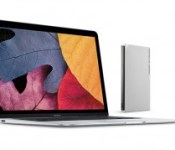
LaCie Announces First USB-C External Hard Drive Supporting New MacBook [Mac Blog]
 LaCie on Tuesday announced the Porsche Design Mobile Drive as the world’s first external hard drive with a built-in USB-C port. The LaCie Mobile Drive features a reversible cable that supports Apple’s latest MacBook with USB-C technology, delivering data transfer speeds up to 100 MB/s for quickly transferring photos, videos and other files or backing up with Time Machine.
“The LaCie™ Mobile Drive features a USB-C port — the user-friendly connector of the future. This new technology makes the LaCie Mobile Drive incredibly easy to connect, since both ends of the cable are identical and the connector is reversible. As a result, there is no need to worry about which end goes to which device or about plugging it in upside down.”
The LaCie Porsche Design Mobile Drive is made with a 3 mm-thick solid aluminum enclosure designed to match the look of Apple’s latest MacBook and other anodized aluminum products. The external hard drive will be available next quarter in 500GB, 1TB and 2TB capacities, and also includes an adapter with standard USB 3.0 (Type-A) or USB 2.0 ports for backwards compatibility with older Macs or USB-equipped devices.
Pricing information was not disclosed.

Shifty Jelly pushes Pocket Casts into the Material Design era

Today, what is arguably the best podcast player for Android devices becomes even better with its latest update, v5.0. Shifty Jelly, the developer of Pocket Casts, is pushing an update to its app that revamps it with Material Design. Pocket Casts already looked great but Material Design makes it beautiful. I have been been using the app with the update for a few minutes and can confirm that everything expected of Material Design, such as use of color and fluid animations, is present.
Hit the break for the changelog, gallery, and download links.
What’s New:
- Material Design! We agonised over jokes/puns using the word ‘material’ for hours, but in the end we spared you. I still have ‘Material Girl’ playing on loop in my head though

- Swipe episodes to mark as played/unplayed. Viva la revolución!
- New Audio Effects: Volume Boost and Silence Removal. If you can’t guess what the first one does then you’re beyond help.
- Up Next list now in your mini player, swipe across to see what’s coming up and quickly add more.


Come comment on this article: Shifty Jelly pushes Pocket Casts into the Material Design era
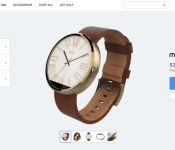
You can now customize your Moto 360 using Moto Maker

Months after leaks, Motorola has finally enabled Moto Maker support for the Moto 360 smartwatch. Customers can pick any combination of bands and body when purchasing the wearable, offering a unique customization experience like no other.
Available body variants include Light Finish and Dark Finish which are both offered for the base price of $249.99. The Champagne Gold unit will cost an additional $30 at $279.99. As far as the bands are concerned, you can get the 23, 24 and 18mm metal bands for an extra $50. The 22mm Stone Leather, Black Leather and Cognac Leather bands are offered for free. So you can get a Champagne Gold body and combine it with Cognac Leather band for just $279.99.
The 24mm metal mono link band will reportedly have delayed shipping, but all the other bands appear to be in stock. The options here are not as versatile as the Moto X, but it’s a welcome addition to allow customers to pick their own materials and design. Hit the links below for more details.
Source: Motorola Blog, Moto Maker
Come comment on this article: You can now customize your Moto 360 using Moto Maker
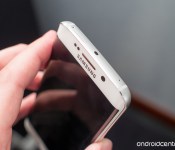
Samsung Pay on the Galaxy S6, and why it matters
Magnetic Secure Transaction tech is very cool, and baked into every Galaxy S6 and Galaxy S6 edge.

As much fun as it is to talk about the bottom of the Galaxy S6 edge and what Samsung sacrificed in order to gain its beautiful new design language, it was recently pointed out in the forums that very little time has been spent on one new feature in particular. With Google announcing new plans for the freshly named Android Pay and Apple Pay now out in the world, Samsung purchasing a small mobile payment company and embedding their technology into the Galaxy S6 and Galaxy S6 edge may not seem like a big deal.
Where things get interesting is how Samsung is planning to use its new tech, and the surprising number of places that will support Samsung Pay without even being aware of it.
 AIVAnet