


GET THIS LOOK: Moonshine 2.0
The team behind the Moonshine icon pack has pushed version 2.0 to the Play Store, adding a ton of new stuff. First thing to notice upon launching the Moonshine app is the new Material Design Dashboard. You will be presented with all of the free icons in one section, and to the left of that we are given a section of their recently added icons. Overall the app looks great, and even gives us 10 new Material Design wallpapers to choose from as well. You can apply Moonshine icons to your homescreen launcher directly from the app, or you can apply it within the settings of the many launchers it supports.
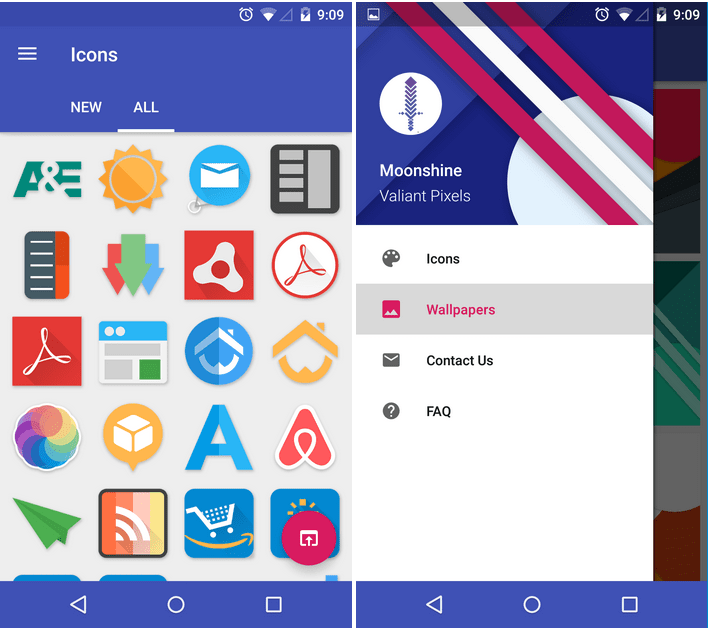
You can download Moonshine for free in the Play Store link below
The post GET THIS LOOK: Moonshine 2.0 appeared first on AndroidGuys.
HTC One M9 Review
The Bottom Line
- Metal construction improved
- Two tone coloration is subtle, keeps phone neutral
- Handling is better with less slippery material choice on back, lip on sides
- Display at 1080p is not missing a step
- BoomSound speakers still stellar
- Battery life just above average
- Sense 7 brings great speed and accessible handling
- Theme Engine is robust and fun
- Ultrapixel front-facing camera makes great sense
- Phone is thicker than before
- Sharper edges might displease some users in handling
- Camera experience very uneven even in well lit situations despite move to 20.7 megapixels
- Low light performance takes a major hit
- New sense contextual elements might be annoying to some users
A lackluster camera hinders what is otherwise an attractive and speedy package in the newest HTC flagship, the HTC One M9.
(function($)
$(document).ready(function()
$(“#aa_bottom_line .aa_bl_pros_cons”).each(function()
var aa_bl_pc=$(this).find(“.aa_bl_pc”);
var aa_bl_pros=$(this).find(“.aa_bl_pros”).height();
var aa_bl_cons=$(this).find(“.aa_bl_cons”).height();
if(window.innerWidth > 480 && aa_bl_pros != aa_bl_cons)
if(aa_bl_pros > aa_bl_cons)
aa_bl_pc.height(aa_bl_pros);
else
aa_bl_pc.height(aa_bl_cons);
)
);
)(jQuery);
The latest addition to the flagship HTC One series brings with it more maturity in the design and software experience, along with a shift in focus with regards to the Ultrapixel camera, even if it’s not completely gone. When a jump between generations is evolutionary in nature, the question that is on everyone’s mind is whether the latest iteration does enough to differentiate itself from the rest, including, and maybe especially, its own predecessors. That’s what we find out, in this comprehensive HTC one M9 review!
Design

In recent years, complaints have been few and far between when it comes to the design and build quality of HTC products, and this goes doubly for the flagship One series. The company’s now iconic design language returns with the new HTC One M9, this time essentially molding together the best features of the M7 and M8 into a single device.

A sharper edge returns with the M9 and rises to meet the panel up front, resulting in a deliberate separation between the two sides. The frame has also been given a coat of paint, with the main version of this phone sporting a subtle hint of gold that isn’t too gaudy, and blends in well enough to create a phone that is actually quite neutral in its coloration. The new edge certainly helps with the phone’s grip, but also means that the M9 is a bit meatier than its predecessor.

As with past iterations of the One family, the front facing BoomSound speakers are a design headline of the HTC One M9, bringing with it a great audio experience for media consumption that is rivaled by few other smartphones on the market. The camera optics up top might look a little bigger this time around too, thanks to the Ultrapixel camera that now is found on the front. And yes, the black bar housing the HTC logo is still found below the display. While the black bar may be a bit of a sore point for users, it’s really not that much of a bother.

Turning to the back, we are greeted by a brushed metal design, given the same subtle tone down that was seen with the One M8. The material feels better this time around though, so fear of the device slipping out of your hand isn’t as prominent as it may have been last year with the One M8. Coupled with the new edges on the sides, this might be one of the best HTC One phones in terms of handling. When it comes to the camera optic package, HTC now packs a 20.7MP rear shooter, this time forgoing both Ultrapixel and Duo camera setups.

As far as the button layout is concerned, the power button and volume rocker are all found on the right side of the device. The power button is textured differently from the others, which helps with recognition, but one thing that we noticed is that it is actually a bit too low on the phone. This might not be an issue for left handed users, but when trying to wake the phone with the right hand, you have to reach down a little lower than might be fully comfortable. This is a tradeoff to having the power button on top though, definitely making it the better of the two options.

All in all, HTC continues to create one of the loveliest designs with their flagship devices, and the One line could be credited as the shining (almost quite literally) example of how a flagship device could be constructed. Though it got a smidge thicker, and the sharper edges will cause a bit of a pinch in the hand, it all contributes to the handling experience. There’s no denying how good the phone looks, how much better it feels now, and how the old adage of “if it ain’t broke, don’t fix it” applies here, and we applaud HTC for sticking to their guns and keeping the design of the One M9 pretty familiar for that very reason.
Display

HTC also sticks to a tried and tested display experience provided by a 1080p panel that will look and feel incredibly familiar to anyone who has used a flagship phone from the past year or so. At 5 inches, this screen also pumps 441 ppi, adhering to the standard that we’ve been enjoying for quite some time now. Though Quad HD is the new fad these days, HTC seems to understand that it could hurt battery life, and preferred not to risk that happening with their current flagship. That being said, you’d be hard pressed to notice much of a difference at this screen size.

Colors still look quite rich, though the blacks on this Super LCD3 screen might fall short of the contrasts found on AMOLED panels. At least this review unit shows a warmer display than previously observed in HTC One devices, which isn’t a negative, but rather just a detail worth mentioning. Keeping the display size at 5 inches was a good choice, as its narrowness makes up for the additional real estate found at the top and bottom of the device. Text looks as sharp as it should, and media consumption and gaming are a blast on this display.

Perhaps one day we will get a display with a Quad HD resolution in a HTC One device, but it seems that this phone is about the experience and not about the raw specifications, and with how nice the display continues to perform at these specifications, we’re not complaining.
Performance

In the case of the One M9, under the hood you’ll find a quad-core Qualcomm Snapdragon 810 processor, clocked at 2 GHz, backed by an Adreno 430 GPU and 3 GB of RAM for graphics and multi-tasking. As you would expect from the latest and greatest, the HTC One M9 packs a lot of power and speed. As good as the processing package may be, a contributing factor allowing for this performance is the latest iteration of the HTC Sense UI.

Even though the Snapdragon 810 has received some flak since its availability with the LG G Flex 2, the HTC One M9 does well to showcase its power with a software experience that is spartan enough to consistently perform. Transitions in and out of the general interface are smooth, and a noticeable shortening of certain animations further lends to the flying speed of this next iteration of the interface. Even multitasking is a breeze, as HTC opted to keep their grid layout as the default recent apps screen, instead of the card-based interface introduced with Android 5.0 Lollipop.

One aspect of this processor that has received a lot of criticism lately is something that has to be addressed. I don’t perform a lot of heavy benchmark tests anymore, instead giving more importance to the day to day experience, but new reports have suggested that the device tends to get really hot during such tests. This obviously hasn’t been the case for me, but it has to be said that the phone does get very warm under certain kinds of load, such as when gaming for extended periods of time, or when using the phone with a turbo charger. It may not have been enough to put the phone down in discomfort, but it is still quite noticeable.
Hardware

Hardware takes on a pretty similar outlook as found in previous iterations, with the media consumption experience still taking center stage, with 32GB of storage built in that can be further expanded up to 128GB.

As mentioned above, the BoomSound speakers return but this time are backed by Dolby enhancements, which can be easily found in the setting screen. A simple tap of the option will change the mode from Theater to Music and back, allowing for a bit of an equalizer effect that can bring out better sound, depending on what you’re doing. This front-facing speaker combination still stands as one of the best out there for everything from music and videos to gaming, and it is still quite surprising that not a lot of other OEMs are jumping on this bandwagon. The speakers even work well for speakerphone calls, and the call quality is still as good as it should be, with no dropped calls or complaints on either side during a call, while on the T-Mobile network.

It has to be mentioned that this is an international model of the One M9 and as such, I’ve not been able to use LTE with it. HSPA+ has been very reliable though as the type of 4G connectivity I’ve been using, but it is something to watch out for, especially when it comes to picking up an unlocked international version.

The only real bit of plastic still available on the One M9 is up top and it houses the IR blaster, serving as a remote controller for TVs and set-top boxes. The One M9 does make for a pretty cool remote, as you can also get a quick glance as to what else is on via the TV application.
Turning on the phone from the prone position can still be done using the Motion Launch gestures, which detect the phone being brought up first, after which you can double tap the screen to wake, swipe a number of ways for other functions, or hit the volume down button to quickly get to the camera.

Finally, an embedded 2,840 mAh battery brings with it a somewhat above average battery life to the phone. Typical day to day moderate usage makes the phone last up to a day and a half with ease, though the power user will likely have to take advantage of the power saving modes and the fast charging capabilities that come with it. As an example, with a day that was full of gaming and picture taking, the battery died just past the 10 hour mark. Basically, we’re still looking for a better outlook in the battery life department, and it seems fast charging is the consolation prize we’ll be given until that time comes.
Camera

The camera has always been a big point of contention when it comes to the HTC One series since its inception, but this time around, Ultrapixels and their claims of good low light performance are now relegated to the front of the device, to serve as an enhancement when it comes to taking self-portraits. Not surprisingly, this is a great move on the part of HTC, with this camera fitting perfectly into its new role. Even without the use of a flash to fill in the darkness, this front-facing unit works better than the competition for getting good shots in poorly lit situations.

Of course, the real story here is the 20.7 MP optics that is now found at the back of the phone. Starting with the camera software, you’ll find quite a few different options here including split capture and photo booth that return from the Desire line, which are a couple fun ways of capturing memories. If you actually miss the Duo Camera for its depth of field capabilities, a Bokeh mode tries to alleviate this by using the more conventional method of taking multiple shots of the same scene in order to make the subject pop. It works pretty well, and the speed of capture further proves that this is a better method than last year’s oddly uneven Duo camera. Video capabilities now include 4K recording, though the lack of optical image stabilization could result in some shaky footage.

While you’d expect the move to a higher megapixel count to equate to a much better experience than found in the M8, we are sad to say this isn’t the case. This is because the way the phone processes picture data is about the same as before, and that’s not a very good thing. Even smaller pictures from the Ultrapixel optics would be fine if the noise was processed in a better manner, but the poor post processing of the data in the 20.7 MP pictures are exacerbated when zoomed in.
An f/2.2 aperture is not too shabby, but the camera still has to opt for the highest ISO limit of 1600 to fill in the darkness, which will inevitably lead to noise in the pictures. Zooming into the photos shows a lot of artifacts accompanying the noise as well, including a smudging effect that is supposed to help, but only makes the photo look less accurate in detail.

Though a higher megapixel count might be nice for the general user, the camera still suffers from the same low light issues as its predecessors. In much better lighting situations, more usable photos can be had, but there are issues there as well, mainly with exposure. HTC opts for the typical metering based on the point of focus, but this doesn’t take into account what is around that point, resulting in often blown out portions of pictures, or the opposite, if you choose to focus and expose on a much shinier portion of the scene. It’s almost as if the scene itself has to be perfect, or at least have even lighting in order to yield a great shot. That said, good photos are definitely possible with the One M9, but are certainly not as common as we would like. HDR does help a little bit to even out the exposures, but it isn’t a practical feature to use, especially when the shutter speed has to be very slow to get a decent shot, requiring you have to keep steady for a long time before processing even begins.


One thing that we are eager to test out is the supposed Pro mode that is coming to the One M9, where photos will be taken in RAW format, but the mode won’t be made available until a future update. The reason why I want to test the Pro mode is to take a RAW photo and do my own post processing in a program like Lightroom, which might help show just how important it is to process picture data properly.
Software

I have already mentioned that the software is simply a very fast version of Sense powered by the Snapdragon 810, but the new version of HTC’s UI has a few new tricks up its sleeve. A general look at the interface will be very familiar, with the vertical app drawer, darker tones all around, and the inclusion of the Blinkfeed second screen feature all continuing in this iteration of Sense. Worth mentioning is the fact the for some reason, the default HTC keyboard is something I’m not a big fan off, as typing on it felt slower than on others, with an auto correct experience that was uneven at best.

Blinkfeed is still one of the best second homescreen additions available, and its customization certainly adds to it, allowing you to pick and choose exactly which publications and feeds you would like to get new stories and updates from. Now, there are a few contextual additions like food recommendations, that pop up especially around meal times of the day, with certain blocks that will appear to suggest places to eat. This might not be too useful for everyone, but at least the effect isn’t too invasive. The one thing that might be a little intrusive is the feature that puts these recommendations on the homescreen in a “Morning Bundle.” While it is something you can turn off, I’ve had it on since receiving this unit, and I actually haven’t seen it pop up yet, which is a bit odd.

Sense itself jumps to version 7.0, but while things remain largely the same aesthetically, this update brings with it two new features, the Home widget and the Themes engine. The Home widget is basically a place where you can find your most used applications, and it changes based on your contextual location. It works fairly well, keeping in mind how often you use certain applications in multiple locations. The folders that accompany it provide an easy spot for your most recently downloaded applications, along with a folder for suggestions on what to install next, which could be useful, but can thankfully be turned off if you don’t want it there.

The Themes engine is perhaps our favorite addition to Sense, as it changes more than just the colors of the UI, and is one of the most customizable first party iterations we’ve seen on a flagship device. While there are already a bevy of themes available in the store, you can also create your own by taking your homescreen wallpaper and letting the theme engine find the colors to match it. This is a pretty powerful customization tool that we feel many users will take advantage of.

Apart from these key additions, HTC keeps Sense fairly simple but still very elegant. The contextual suggestions in both Blinkfeed and in Sense Home can all be turned off, so that eliminates any problems people may have with them, and the Themes engine is a bright spot for what is already one of our favorite iterations of Android, because of not only how fast it is, but also given the fact that it is one of the most accessible for the general Android user.
Specifications
| Display | 5-inch LCD, Full HD (1920 x 1080), 442 ppi |
| Processor | 2 Ghz quad-core Qualcomm Snapdragon 810 |
| RAM | 3GB |
| Camera | 20MP rear cam with sapphire cover lens, UltraPixel front cam |
| Battery | 2,840 mAh |
| Storage | 32GB with microSD slot (up to 128GB) |
| Networks | 2G/2.5G- GSM/GPRS/EDGE:850/900/1800/1900 MHz
3GUMTS (varies by region): 850/900/1900/2100 MHz 4GLTE (varies by region) |
| Sensors | AmbientLight Sensor, Proximity Sensor, Accelerometer, Compass Sensor, Gyro Sensor, Magnetic Sensor, Sensor Hub |
| Connectivity | Bluetooth 4.1 with aptX, Wi-Fi 802.11 a/b/g/n/ac, HTC Connect, DLNA, HDMI MHL 3.0, CIR, NFC, micro-USB 2.0, GPS, GLONASS |
| Software | Android 5.0 with Sense 7.0 |
| Dimensions | 144.6 x69.7x 9.61 mm, 157 grams |
Gallery
Pricing and Final Thoughts
Official price points for the HTC One M9 are slowly trickling in, and the phone is available for pre-order now. We expect the price of the One M9 to come at the premium price for contracts and at least $600 off contract, which is typical for flagship devices. Competitors in the same bracket include the different flagships coming out this year like the Samsung Galaxy S6. Its predecessor, the HTC One M8, has to be mentioned here as well, as it might soon be available for a bargain, especially if you think that its successor hasn’t really done enough to distance itself from its past.

So, there you have it – an in-depth look at the HTC One M9! As has been true for previous generations, the latest HTC flagship brings with it a beautiful package, with lovely software, and only one gaping hole in the camera experience. While it isn’t the worst shooter in the high-end market, it does feel a few steps behind the competition. For many users, this feeling might permeate throughout the device, as much of the One M9 feels quite familiar. Of course, others may consider this familiarity a good thing, at least as far as design and software is concerned.
Further refining what made the One M7 and One M8 so desired keeps this phone looking and feeling great, and underneath the surface, users can be sure that they’re getting a top notch user experience in the speedy, functional, and not too cluttered Sense UI. The One M9 is still a compelling choice for a daily driver, as long as the budding smartphone photographer can look past the camera deficiencies. Though a rethinking of their camera processing might be in order, we fully applaud HTC for sticking to their guns in basically all other aspects of this phone, as veterans and newcomers alike can enjoy the best that HTC has to offer in the One M9.
New Zealand used NSA data to spy on rival trade leader candidates

Want to understand why far-reaching, poorly scrutinized spying programs are dangerous? Here’s why. The Intercept and the New Zealand Herald have obtained a document showing that New Zealand used the US National Security Agency’s XKeyscore surveillance system to spy on other countries’ candidates for the World Trade Organization’s director general role. The 2013 snooping campaign searched for keywords in communications that referenced New Zealand’s own candidate (Minister of Trade Tim Groser, above), the competition and the WTO itself. Any relevant results were passed on to a “trade team” within the country’s surveillance agency, the Government Communications Security Bureau, which is rather alarming when the leadership run had nothing to do with national security.
It’s not clear what the exact motivations were, and even the WTO is only learning about the spying thanks to the leak. However, The Intercept postulates that New Zealand was worried about who was likely to win the directorship, or trying to cheat by understanding what Groser’s rivals were doing. If these or similar theories are accurate (officials aren’t commenting), the spying would represent a major abuse of power — it would have turned large-scale eavesdropping into a political tool.
[Image credit: Roslan Rahman/AFP/Getty Images]
Filed under: Internet
Source: The Intercept
iPhone 6 vs. HTC One M9

The iPhone 6 debuted in September 2014 and the HTC One M9 is just about to hit the shelves, but for the next 6 months they’ll be going head-to-head.
That means a lot of people are going to be comparing them and wondering which to go home with. As luck would have it, Phil Nickinson and the team at Android Central have just posted their complete HTC One M9 review. Both have great build-quality, great screen quality, and more. But they also have a lot of differences, including the differences between Android and iOS. If you’re a longtime HTC owner, the One M9 might just be enough to keep you. If not, it might give you reason to switch to iPhone. Either way, here’s what you need to know!
HTC One M9
I have to admit, I’ve always had a soft-spot for HTC. I loved my Treo Pro back in the day, and have always preferred HTC’s hardware to Samsung’s. I’ve really been cheering for them for the past few years, and while they done some gutsy stuff, it hasn’t really clicked with the market. While my heart hopes the third One is the charm, it sounds like it’s really just a better one.
The HTC One M7 was the company’s best phone. The M8 also was its best phone. Both had flaws. The M9 does as well. The question we have to ask ourselves year after year is about the sum of the parts. The M9 is mostly familiar, both in form and function. But HTC still has some serious work to do in the camera department. It’s perhaps a little overdramatic to say that it’s an anchor pulling the ship down, but it’s definitely an oar stuck in the water. And with all the advances from its competitors over the past we’ve just about reached that point in which it’s extremely difficult to overlook that compromise.
So if you already like the HTC One, there’s more to like, but probably not enough to make you switch.
iPhone 6
Unless you dislike Apple or really need to run Android, I still firmly believe the iPhone 6 should be the go-to phone for most people, most of the time. It’s got a great — and newly enlarged — screen, excellent camera, high-quality apps, features like Apple Pay and compatibility with the Apple Watch, not to mention Apple’s increased focus on privacy and security and all the potential benefits that come with it.
Yes, there’s also a second generation 64-bit processor and motion coprocessor, improved cameras, and faster cellular and Wi-Fi networking. But none of that power matters as much as the empowerment the new iPhone has to offer.
With the iPhone 6 — and the simultaneously released iPhone 6 Plus and iOS 8 — Apple hasn’t just made the iPhone bigger and better, they’ve made it something more capable and more accessible.
So if you were hoping for more or for different from HTC, you might well want to consider giving the iPhone 6 a try.
AT&T pushing Android 5.1 to its Nexus 6

The launch of Android 5.1 was met with software updates for various Nexus 6 variants. The handset on T-Mobile, Sprint, and Verizon networks are all roaming the country with the latest version of Android. The Nexus 6 for AT&T, however, was left without the update until now.
Various owners of the device operating on AT&T’s network are reporting that the carrier is pushing the Android 5.1 software update to their handsets.
While forcing an update has been questioned for years, there does seem to be a workaround to get the update as quickly as possible. Performing a factory reset seems to cause the software update to appear during the setup process.
Via: AndroidGuys
Come comment on this article: AT&T pushing Android 5.1 to its Nexus 6
How to fix ‘iTunes Store unavailable’ error on Apple TV

Apple TV has a problem with errors. It gives them when they don’t really exist. Luckily, once you know the system is broken, you can work around it.
One of the biggest things that complicates Apple TV — and iTunes in general — is the content delivery networks that serve up all the movies, TV shows, music, apps, and podcasts. Which individual server has what and when can lead to search results not populating and purchased content not showing as available. It can even lead to the dreaded ‘iTunes Store currently unavailable’ for some TV shows when it’s perfectly available for others. Here’s how to fix it.
How to work around an ‘iTunes Store not available’ error on Apple TV
If you go to the purchased section of iTunes TV shows and try to play an episode, and you get the above error, try this instead:
- Scroll up to “See more on iTunes”
- Click to go to the show listing in the iTunes Store
- Click on the same episode there
- Play away
Nine times out of ten, it really is that simple. The episode is there, and it’s available, it’s just having trouble in the purchased section.
And yes, this is the same solution to playing episodes you’ve been notified are available but just aren’t showing up in the purchased section.
Hopefully the next Apple TV update update will fix this, and the “Network connection” false-positives as well.
Weekly poll results: which gallery app do you use most?

Gallery apps are one of the many pre-loaded apps that most manufacturer’s will give you their own special version of.
Samsung has the Samsung Gallery, Motorola has the Motorola Gallery, and so on. While we call many of the apps that manufacturers load onto our phones bloatware, these galleries are not counted among them. But as we’ve gone through our latest series on Android photography, we wondered just how many of our readers were indeed content with the standard gallery, and how many had moved on to an app with more functionality, like automatic backup in Photos or the ability to browse through cloud services in QuickPic. So, as we do every week at Android Central, we put it to a vote.
And it was a photo finish… just not for first place.
US Navy’s latest diving suit saves helium, space and weight

The US Navy has just unveiled a new diving suit prototype, and aside from being more efficient than older models, it also helps conserve helium. See, the agency’s current suit uses Fly-Away Mixed Gas System (FMGS), which releases gases the diver exhales into the sea, including huge amounts of oxygen and helium. According to the Navy scientists that designed the new version, it “modifies the current helmet and rebreather,” and tests prove that it can drastically reduce the consumption of the noble gas– important in the midst of a global helium shortage. While we can make do without balloons or squeaky voices in parties, the gas is also used for more important purposes, such as operating MRI machines and the Large Hadron Collider.
Since the new suits need a lot less helium, they don’t take up as much space in vessels, which means divers could ultimately use smaller vehicles. These doesn’t only translate to lower costs: it could also allow personnel to escape dangerous situations or first responders to get to hard-to-reach locations more quickly.
Source: US Navy
 AIVAnet