



Samsung’s Gear VR with Oculus to go ‘full consumer’ by year’s end

The Samsung Gear VR is said to get a full consumer push by year’s end, at least according to Oculus CTO John Carmack. Speaking at the Game Developers Conference he said, “Internally, some would have preferred it to be called a ‘developer kit,’ but Samsung doesn’t do developer kits.”
Carmack made mention of this during his talk at the conference, called “The Dawn of Mobile VR.”
Originally set to work with the Note 4, Oculus as already announced a model is in the works that pairs with the new S6 and S6 Edge. That said, the consumer version of the Gear VR won’t be much different than that of the current/innovators editions. But according to Carmack, the VR set won’t just be for gaming purposes.
“People kinda like photos and videos,” he said. “We can do photos and videos with virtual reality in a way that is very powerfully better than what you get with traditional headsets.”
Carmack declined to give a more specific time window for the Gear VR’s launch, but said Samsung would be ready to “go out and do their blitz.”
“When everything is ready, ads will be everywhere,” he said. “Oculus is going forward as hard as we can, trying to sell as many units as possible with the next Gear VR.”
He continued.
“The truth is, we don’t yet know what the best applications are going to be. There’s a lot to explore here. This is a legitimate opportunity.”
With HTC and Valve set to release their Vive VR set by the end of the game, the end of 2015 is gearing up to be the start of the VR movement. Which camp are you in?
source: Re/Code
Come comment on this article: Samsung’s Gear VR with Oculus to go ‘full consumer’ by year’s end
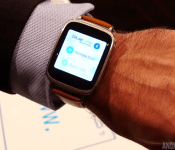
Hyundai updates Blue Link app with Android Wear support

Hyundai’s Blue Link app, which lets users control their cars from an Android Wear device, is now live in the Play Store. The Blue Link app gives users the ability to remotely start, lock and unlock their cars, and even find the parking location in a crowded parking lot. They’ve made navigation pretty simple, too. All of the features and controls can be accessed by using a couple of taps or voice commands directly from the Android Wear-powered device. Here are all of the features the Blue Link app provides:
- Remote Engine Start
- Remote Engine Stop (Only available when vehicle is in remote engine start mode)
- Remote Door Lock / Unlock
- Remote Flash Lights / Honk Horn
- Car Finder
- Call Roadside
- Call Blue Link
The app is compatible with all first and second generation Hyundai cars with Blue Link services installed, and unfortunately can’t be retrofit into cars without the technology built-in. We went hands-on with Hyundai’s Blue Link app at CES 2015, where we got to demo all of the features first-hand. If you’d like some more information on the Blue Link app, check out our hands-on video from CES 2015.
Anyone out there own a Hyundai car with Blue Link capabilities? If so, would this be reason enough to pick up an Android Wear device? Let us know your thoughts in the comment section.

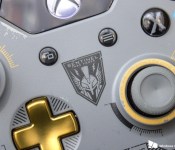
Upcoming wireless adapter will connect current Xbox controllers to PCs

Microsoft announced plans to release a wireless adapter for current Xbox game controllers that will allow them to be used wirelessly on Windows PCs. The adapter will be sold sometime later in 2015 but a price point was not mentioned.
LG’s mobile chief hints at design overhaul for upcoming G4
In an recent news conference, the head of LG’s mobile division, Cho Juno, said that the company is aiming for a design overhaul on its upcoming G4 handset, departing from the look and feel of last year’s G3.
Apple reportedly targeting September to begin iPad Pro production
According to a new report from Bloomberg, Apple is targeting a fall release for its rumored 12.9-inch iPad Pro, with production starting in September.
Bloomberg says:
Production of the 12.9-inch-screen iPad is now scheduled to start around September because of delays involving the supply of display panels, said one of the people, who asked not to be identified because the details aren’t public.
As Bloomberg notes, this news comes after it was previously reported that Apple was targeting early 2015 to begin production of the larger iPad sibling.
Apple has long been expected to reveal a larger version of the iPad in order to appeal to more niche markets in creative fields. However, no concrete details about the device have been nailed down yet. A 12.9-inch display has been rumored for a long time, but there have also been reports of a 12.2-inch device under the name iPad Air Plus. In any event, we likely have a while to go before any official announcement.
Source: Bloomberg

Xbox Live and ID@Xbox are coming to Windows 10

If the news of Xbox games coming to HoloLens and Elite: Dangerous hitting Xbox One this summer wasn’t nearly enough, Microsoft has a few other tidbits to share from this year’s Game Developers Conference. First up: Redmond is bringing the Xbox Live SDK to Windows 10. It’s part of the universal apps push that the outfit’s making with its new operating system, and will give game developers of any size access to a “vast majority” of Xbox Live’s services. It wouldn’t be the first time Microsoft’s done something like this, but let’s hope it doesn’t turn into another disaster like Games for Windows Live was. The post on Xbox Wire also mentions there will be a new tier of the company’s online gaming service coming as well that specifically allows “any developer to engage with the Xbox Live community.” We’ve reached out for clarification of exactly what that translates to.
Next we have word that the ID@Xbox program is expanding to Windows 10 as well, meaning the amount of indie developers on the platform (most likely mobile) should see an uptick in the future as well. Oh, and from this point on, all Xbox accessories will be compatible with Win10, with a wireless adapter coming for the Xbox One controller later this year. In case you thought Microsoft’s dedication to melding its console with your PC via the Game DVR was the last you’d see, it seems like it was actually just the beginning. Where do we go from here? That’s anyone’s guess at this point, but Build and the Electronics Entertainment Expo aren’t far off.
Don’t miss out on all the latest from GDC 2015! Follow along at our events page right here.
Filed under: Gaming, Home Entertainment, HD, Microsoft
Source: Xbox Wire

Apple Putting Banners Up at Yerba Buena Center Ahead of March 9 Event
Apple began its efforts to decorate the Yerba Buena Center for the Arts in San Francisco yesterday, putting up the scaffolding that would allow workers to hang colorful banners and logos, and as of today, the first decorations have gone up.
Starting this morning, workers were spotted in the basket of a bright orange cherry picker, placing a banner across the glass of the Yerba Buena Center for the Arts where Apple will hold a special “Spring Forward” media event on March 9. The initial banner panels, which include Apple’s iconic Apple logo, use the same general colors that were seen on the event invite, in shades of green ranging from pistachio to honeydew.
 Image via @RaceJohnson
Workers have only just begun decorating the event center and it’s likely the building’s entire side will feature the same graduated lotus flower Apple design that was seen on the invitation, so colors should expand from green to blue to purple over the next few days as the company finishes preparations for Monday’s event.
Apple’s “Spring Forward” affair is said to be focused on the Apple Watch, and the company is expected to unveil additional details about the device, including information on battery life, pricing, and a launch date. Apple may also be planning to use the event to unveil the 12-inch Retina MacBook Air and/or refreshed 11 and 13-inch MacBook Airs.
The event will kick off on Monday, March 9 at 10:00 a.m. Pacific Daylight Time. Apple plans to provide live coverage of the event on its website and through a channel on the Apple TV, and MacRumors will also be covering the event with both a live blog here on MacRumors.com and through our MacRumorsLive Twitter account.
Download and install latest Hangouts 3.0 APK
An update is being pushed to Hangout users, with a few minor tweaks and enhancements. Here are the changes:
- Snooze notifications button moved to top
- Long-pressing a message includes View Profile option
- Improved contact cards
- Mint green accents in new areas
The post Download and install latest Hangouts 3.0 APK appeared first on AndroidGuys.
Review: The Inateck BTSP-20 Water-resistant Bluetooth speaker

Before I get started, I figured I would mention that portable speakers aren’t usually the sort of thing that I’m terribly interested in. I’ve always viewed portable speakers as unnecessary (from a personal perspective) and never really looked at them as being able to offer a satisfactory experience. As such, I have usually either listened to my music (anything from Roxette to AC/DC to Weird Al) via headphones or through my PC speakers. But the other week I was sent the Inateck BTSP-20 Bluetooth Speaker to review, and I’m more than pleasantly surprised with it. I might even go so far as to say that I have become a big fan of the BTSP-20.

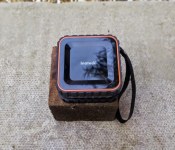
As you can see from the images, the BTSP-20 is pretty small and square. On the top of the speaker are the Power, Call and Volume Up/Down buttons. The BTSP-20 weighs in at 300 grams with dimensions of 85 x 85 x 46mm. The speaker has a plastic casing with a rubberized tread running around the edges which help it to stay put on less than solid surfaces. Handily, the BTSP-20 has an Ingress Protection Rating of IPX5, with the upshot that the speaker is protected against jets of water from a distance of 3m for up to 3 minutes. For me, the water-resistant feature has meant that the BTSP-20 has been used all over the house, even in the bathroom, changing tracks via the waterproof Galaxy S5. It came with me wherever I went, for playing music as well as taking calls (more on that later). Another useful feature is the built-in lanyard, which makes it easy to hang the speaker from door handles or hooks. It should go without saying that the speaker is very portable, fitting in many jacket pockets, as well as taking up hardly any room in a backpack.

The BTSP-20 is a simple, user-friendly device that connects quickly and easily to your smartphone, tablet or whatever other Bluetooth capable device you are pairing it with. It’s just a case of holding the power button on the BTSP-20 for a couple of seconds, after which a short jingle plays to let you know that the speaker is on. There is also a little LED on the front of the speaker which flashes red/white when the device is powered on, but unable to connect to a host. When properly paired with a host device, the LED will show a steady white. After powering it on, you can instruct your smart device to pair with it, then you’re free to choose your favourite music player to send content to the speaker.

So how loud is the BTSP-20? Well, Inateck states that it has a 3w speaker, and it seems plenty loud for its intended purpose of being a small, portable speaker. I’ve put it through its paces for a couple of weeks now, and I can honestly say that I’ve not once wished it could be louder. The speaker does a good job of filling a small room with clear vocals and a surprisingly decent amount of bass for an overall satisfying experience. This is much better than listening to tinny, distorted music on your smartphone. Much, much better.

Earlier, I mentioned that I had used the BTSP-20 to take calls. This is made possible thanks to the built-in microphone on the speaker. Once the speaker is paired with your smartphone, when a call comes in, all you have to do is press the phone button on the top of the device to accept the call and you are free to begin talking. The sound is good, much better than simply using the loud-speaker on your smartphone, and the person I spoke to on the other end of the call was impressed by the quality of the sound the microphone passed on.

Inateck claims that the BTSP-20 is capable of up to 5 hours of continuous playback on their official product page. That’s exactly what my experience was which I reckon is pretty good for its rechargeable 500mAh battery. It only takes 2 hours for the BTSP-20 to fully charge from 0 to 100 percent.

A question I like to ask when reviewing a device is – Would I buy the item for myself? On this occasion, I would have to say yes. It’s a well-made speaker, user-friendly and provides great sound for its size. I’m still gobsmacked by the amount of bass it outputs, as well as the clarity of the overall sound.
My only slight complaints are that the speaker can be turned off too easily, one quick (accidental) press of the power button and speaker is off. In my opinion, one should have to hold the button in for 2-3 seconds before powering off just to guard against accidental power downs. The other is being unable to change tracks via the speaker. There is no ‘Next’ or ‘Previous’ buttons on the speaker, and this detracts slightly from its usefulness. Apart from that, I’m supremely happy with the Inateck BTSP-20 Bluetooth speaker. The build quality and the sound that Inateck has managed to generate from such a small speaker is just astounding. As such, I can whole-heartedly recommend the BTSP-20.
You can find the Inateck BTSP-20 on Amazon (UK) for £29,99 ($46), and here is the official product page.
Click here to view the embedded video.


Come comment on this article: Review: The Inateck BTSP-20 Water-resistant Bluetooth speaker

Samsung Galaxy S6 Edge Color Comparison
brightcove.createExperiences();
After testing the waters with the Galaxy Note Edge, Samsung went all in with the concept with its flagship Galaxy S6 Edge, that features not one, but two curved display extensions. Adding to it the more premium build quality with its metal and glass unibody glass construction, the Galaxy S6 Edge is sure to catch the eye of anybody that comes across it. The device is also available in a variety of colors, and to help make your choice easier, here is a quick look at the Samsung Galaxy S6 Edge color comparison!

Like its non-edged sibling, the Galaxy S6 Edge is also available in white pearl, black sapphire, and gold platinum, and while the blue version found with the Galaxy S6 doesn’t make its way over, a color exclusively for the S6 Edge is green emerald.

We start with the green emerald version, as it is the most stand out color of the lot, and is also unique in its exclusivity with the Galaxy S6 Edge. The translucent element because of the glass panels are seen here, which gives the phone a very different look, and it is one my favorite options. Though unconventional, the green emerald version is still quite subdued, and not nearly as flashy as the blue version of the Galaxy S6.

If you are looking for a more ornate look, the gold platinum color option might be the one for you. This is definitely the flashiest option available and is sure to turn heads, but the metallic look also fits right in with the new metal and glass unibody construction and adds to the premium nature of this device.

Moving on to the more traditional options, we have black sapphire and white pearl. The black version does have a bluish tinge to it, likely because of the translucency created by the glass panels on the front and back. It looks really nice, and different from other black phones, and is definitely the safe bet if you’re in the market for a traditional, clean and simple look. The white pearl comes with a tone that you’d expect from a white version of a phone, and is another great choice for those not wanting anything too flashy.


So there you have it for a quick look at the various color options available for the Samsung Galaxy S6 Edge! Vote in the poll or let us know in the comments section below about which is favorite color option, and stay tuned with Android Authority as we continue to bring you more great coverage from MWC 2015!
 AIVAnet