



Apple Email Campaign and Online Store Update Highlight Holiday Gift ideas
Apple today revamped its online store and sent out emails to customers in preparation for the upcoming holiday shopping season. The new holiday promotion emphasizes gift ideas with a focus on iOS devices, Macs and Beats audio hardware.

Immediately below the tagline “From one gift come many,” Apple places its focus on its iPad line of tablets, which recently were refreshed with the iPad Air 2 and the iPad mini 3. The company promotes the utility of the devices, noting how people can use the tablets to complete a variety of tasks, including choreographing a recital or exploring the North Pole.
Apple next highlights the Mac with an advertorial that entices people to create the next holiday classic in a subtle reference to last year’s award-winning “Misunderstood” holiday commercial. Other showcased products include the Apple TV, new Apple Store gift cards, the iPhone and Beats by Dr. Dre audio accessories.
Apple traditionally offers a Black Friday sale to kick off the holiday shopping season with modest discounts on its product lineup. Apple has yet to announce its 2014 Black Friday promotion, but the company last year offered Apple Store gift cards with the purchase of select items including iOS devices, Macs and various Apple-related accessories.

When it comes to GoPro’s new Hero4 camera, silver is the new black

GoPro cameras have come a long way in the last couple of years. Not only are they a lot smaller (my once “slick” HD Hero2 looks enormous compared to the new Hero4), but also the resolution they can record has finally reached full 30 fps 4K. Not bad considering I don’t even own a 4K TV yet. Sure, there are phones that can record 4K, but not with the same versatility and control of an action camera. GoPros have actually recorded 4K (albeit only at 12 fps) since the Hero3, but it’s taken until now to deliver a decent frame rate without severely compromising the (already medicore) battery life. This means the company has possibly reached something of a glass ceiling when it comes to its top-billing feature (resolution). Maybe we’ll see 8K next year, or 4K at 60 fps, but I honestly feel most of us are a long way from either wanting, let alone needing that. So what’s a camera company to do?
If you followed our announcement post for the Hero4 line, you’ll know that the answer is: Add usability features. Though, I’d argue many might have been just as happy with a healthy boost in battery life instead of some new functions. Now that I’ve had a few weeks getting to know the new cameras (the Black and Silver additions at least; I’ve yet to try the new Hero base model), I actually think the killer feature isn’t even on the most expensive camera GoPro makes; it’s the touchscreen on the Silver.

Backing up a bit: For the uninitiated, GoPro used to have a simple “budget, mid-level and flagship” model range. These were called White, Silver and Black, and the feature set got better as you went up in price, but each model could always do everything the one below it could. The cameras all looked the same too (unless you looked real close), so you never felt cheap for rocking out with a White. At the same time, it meant you had to know which one you were taking with you if, like many, you had more than one camera (you gotta be able to shoot your ride from multiple angles now, right?). Recently, though, GoPro changed things up a bit, releasing a new “Hero” entry-level camera (note, no “4”) while introducing the Hero4 in Silver and Black editions ($400 and $500, respectively). Another first was that the Black wasn’t just the Silver with a few more features or camera modes. The Silver has a touchscreen display on the back, while the Black edition does not. This makes the Hero4 Silver much easier to use, and way more consumer friendly. The trade-off: There’s no full 30 fps 4K (it tops out at 15 fps) if you want that screen.
Anyone who’s used one of these cameras will know that the menu system has never been that great. It involves a lot of clicking, then often missing your option and having to go round again. It’s gotten better with the Hero4, thanks to bringing another button into the mix — but it’s still more or less the same. Experienced users might be thinking, “Use the app; it’s much easier.” It is. But sometimes the WiFi doesn’t connect, or you don’t have/can’t use your phone. There’s also the remote, of course, but that costs an extra $80, and won’t let you see your shot. The Silver’s touchscreen, on the other hand, is always there, easy to use and doesn’t suffer any lag (app users will know exactly what I’m on about). Not only did this camera suddenly get easier to use, but my video and photos are better because I can see what the camera is seeing so easily.
#fivemin-widget-blogsmith-image-976616display:none; .cke_show_borders #fivemin-widget-blogsmith-image-976616, #postcontentcontainer #fivemin-widget-blogsmith-image-976616width:630px;display:block;
 trydocument.getElementById(“fivemin-widget-blogsmith-image-976616″).style.display=”none”;catch(e)
I was worried that the screen might have a direct impact on battery life, but so far the effect seems negligible. There’s a small button next to the screen that lets you turn it off (instead of waiting for it to time out), and I wager that being able to get your shot set from the get-go pays dividends. No more grabbing shots twice, setting it to record accidentally (all those one-second selfie clips) and so on. There’s also the fact that you can instantly watch clips, photos and time lapses without having to fiddle with the app, or offload an SD card. Being able to delete duff clips quickly means you’re also less likely to run out of memory card space (especially handy if time-lapses are your thing).
There’s more to talk about than that screen, of course. The new Night Lapse, and Night Photo modes definitely add some creative options, and the “HiLight Tag” feature is probably really handy; I just don’t find myself remembering to use it yet. For me, the problem with tagging is that it requires you to tap the side button — which presupposes you have access to the camera. You can also use the remote for this though — if you have one. Maybe I’ll get in the habit, but it hasn’t happened yet. Let’s be clear: The Black edition does do all of the above, it just doesn’t have that screen. But, of course, does have that 4K 30 fps mode. There’s one other trick the Black has over the Silver, and that’s shooting 1080p at 120 fps. If you’re at all into silky-smooth slow-motion, then that’s going to be a really tempting feature. Me? I’m OK with 1080 at 60 fps (or dropping to 720p if I really need to). As you can probably tell, for my usage habits, I’m finding that Silver really is the new black. Don’t forget, it’s a full $100 cheaper, too!
#fivemin-widget-blogsmith-image-976616display:none; .cke_show_borders #fivemin-widget-blogsmith-image-976616, #postcontentcontainer #fivemin-widget-blogsmith-image-976616width:630px;display:block;
 trydocument.getElementById(“fivemin-widget-blogsmith-image-976616″).style.display=”none”;catch(e)
That’s not to say I’d take two Silvers over one of each. That 4K/30 fps resolution has uses beyond just pixel-matching a 4K TV. For example, if you’re recording something you might want to use software to stabilize after, then with 4K you have more image real estate to play with (for the crop that software stabilization can require). The same goes for drone flying. For the most part, I’ve had the Black edition strapped to a drone. Not only do I think the aerial vistas you get from the air are more deserving of the higher resolution, but also should the landing gear or props get in view (easily done when throwing a Phantom 2 around in the air — as you’ll see above), then you’ve got more margin for cropping them out. Maybe not the best way to deal with the issue, but for my amateur needs it works.
There’s a logical conclusion here, and one that I fear I’ll have to wait the best part of a year to enjoy. I have everything crossed that the GoPro Hero4+ will bring 4K/30 fps and that touchscreen together on one device. For now, though, it’s the Silver that’s getting the most amount of fresh air.

Win 1 of 3 Samsung SSDs for your laptop [GIVEAWAY]


You know what sucks? Waiting for your hard drive to catch up while moving files around or saving large documents. Or worse, having your hard drive flat out crash on you. Samsung feels your pain so that’s why they’re huge advocates of solid-state drives. Heck, we are too. We’ve tested out a few of them around the offices and find them to be painless to install and deliver on the promises.
// <![CDATA[
(function(d, s, id) var js, fjs = d.getElementsByTagName(s)[0]; if (d.getElementById(id)) return; js = d.createElement(s); js.id = id; js.src = "//connect.facebook.net/en_US/all.js#xfbml=1"; fjs.parentNode.insertBefore(js, fjs); (document, 'script', 'facebook-jssdk'));
// ]]>
Want one? Of course you do!
As you can tell from the headline, we’re going to give away three of the 840 EVO models. Thanks to the awesome team over at Samsung SSD we have three 1TB (one terabyte) hard drives for laptops ready to roll. You know you’re interested so read on to learn how to win one of them.
How to enter
- We’re giving one away to a random person who comments below this post. Simply leave a message telling us what you would do with all of that space. Are you backing up your music, videos, or photos? Do you have a massive torrent collection that needs archived? Let us know how you’d employ 1TB of space!
- We’re giving another one of the hard drives away for anyone who follows AndroidGuys on twitter and tweets the following message: I want to win a 1TB SSD drive from @AndroidGuys #goodbyewaiting
- The third one will be given to whoever shares this post on their Facebook wall.
This promo will run from November 18-22 (midnight) with the winners selected and notified within the following 24 hours.
Fine print: This contest is limited to residents of the United States. We know this alienates a decent amount of our readers and do apologize.
// <![CDATA[
(function(d, s, id) var js, fjs = d.getElementsByTagName(s)[0]; if (d.getElementById(id)) return; js = d.createElement(s); js.id = id; js.src = "//connect.facebook.net/en_US/all.js#xfbml=1"; fjs.parentNode.insertBefore(js, fjs); (document, 'script', 'facebook-jssdk'));
// ]]>

The post Win 1 of 3 Samsung SSDs for your laptop [GIVEAWAY] appeared first on AndroidGuys.
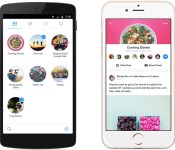
Facebook Introduces New Standalone ‘Groups’ App [iOS Blog]
Facebook today announced a new Facebook Groups app, which is designed to let Facebook users access and interact with the Facebook groups that they have joined.
Facebook has long had a groups function, where families, clubs, workplaces, and more can band together for a custom sharing experience. The groups feature lets people post and share content that is exclusive to the group, which can be open, closed, or private.
According to Facebook, its new dedicated Groups app is designed to help people “share faster and more easily” with all of their groups, as group interactions are typically buried under other functionality in the standard Facebook app.

This app gives you a dedicated space for you and your groups.
See all of your Facebook Groups in one place. Discuss, plan and collaborate easily and without distractions. Follow your groups here or on Facebook, whichever is easier for you.
– Create a group for just about anything.
– Share information, post photos and links, and stay in touch.
– Discover and join new groups for whatever you’re into.
The main view of the Groups app displays all of a user’s groups, with the most recently visited group listed at the top. New groups can be created from within the app with the “Create” button, and the app also delivers notifications on group activity. There’s also a discover feature to suggest new groups to people based on pages that they’ve liked.
While Facebook removed messaging functionality from its main app to redirect its users to the Facebook Messenger app, the company says that groups will continue to be accessible from the main Facebook app as well as the new Groups app.
Facebook’s new Groups app can be downloaded from the App Store for free. [Direct Link]
EE TV review: a decent set-top box with too many strings attached

EE has evolved rapidly since it became a household name two years ago after switching on the UK’s first 4G mobile network. Today, it’s more than just a carrier, with a home broadband business and a selection of own-brand mobile devices, among other things. And now, EE’s decided to turn its hand to home entertainment, having recently launched the EE TV set-top box. Free and available only to customers of EE’s mobile and broadband services, it’s essentially a Freeview DVR with a few tricks up its sleeve. Tying into EE’s primary focus on mobile, one of the fancier features is the box’s ability to stream live and recorded video to multiple smartphones and tablets simultaneously. But is a free DVR with a couple of advanced capabilities enough of an incentive to get you signed up for the required services (which is sort of the point)? Not really, no.
To be a leading telecoms brand, you need to get involved in the four main connected utilities: landline, broadband, mobile and TV. Virgin Media, TalkTalk and now EE offer the full quartet, but Sky and BT aren’t far behind, with the mobile-shaped holes in their lineups looking like they’ll be filled soon enough. Vodafone’s planning an aggressive expansion next year too, starting with its own broadband service and later, some form of TV offering. The issue EE has right now is that it’s competing with established TV providers, and while its set-top box might have some unique features, there’s nothing you can actually watch on it you can’t find easily elsewhere.
Content

When it comes to available content, EE TV doesn’t have a lot to brag about. It’s a Freeview player, feeding off the 70-plus TV channels and 25-odd radio stations that are broadcast subscription-free across the UK. EE TV doesn’t cost anything itself, so the fact that it doesn’t include access to premium channels isn’t exactly surprising. The only problem with that, though, is that the vast majority of people already have Freeview at home, whether it’s built into their TV or picked up by a box sitting beneath it. And, I imagine those who don’t currently receive Freeview are unlikely to sign mobile and home broadband contracts just to get hold of EE’s set-top box.
Rival telecoms Sky, Virgin Media, BT and TalkTalk are either broadcasters in their own right, or at least offer a wide range of channels you simply won’t find on Freeview. You have to pay for the privilege, of course, but in that sense, all four are true TV providers. EE, on the other hand, is merely offering a piece of hardware as a bonus to customers who sign up for its mobile, broadband and, by default, landline services. The conundrum, then is, by not attaching a value to something, how are you to judge its worth? Now, EE can’t rightly charge a subscription for its Freeview box, but with no premium content partners, it’s completely reliant on the perceived value of its box’s feature set.

I get that the company’s trying to mould a product ecosystem, but there’s one thing I’m certain of: EE isn’t a “quad-play” provider just yet. EE TV isn’t a service. It’s a DVR, and one you can’t even buy — more of a “thank you” for choosing EE as your mobile and broadband supplier. Needless to say, I can’t quite figure out the strategy here, but maybe there isn’t one to miss. Perhaps it’s just a case of doing something because you can.
In addition to live TV, EE’s box can also tap into various catch-up, on-demand and similar services via apps. Pickings are unfortunately slim at the moment, though, with BBC iPlayer, BBC Sport, Demand 5, YouTube and Wuaki.tv as the only notable launch partners. Better than nothing, I guess, but hardly something to get excited about when familiar names such as ITV Player and 4oD aren’t even on board yet. I mean, EE’s own movie-rental service EE Film (available on mobile devices through desktop browsers) isn’t accessible through the box. Also, after speaking with the company, it doesn’t sound like there are any immediate plans to port over EE Film, either. Instead, users are invited to try Wuaki.tv, a competing service.
EE has said that in time, more apps will begin populating the store. That’s great and all, but for now, EE TV is by no means a one-stop shop for all your viewing needs. If you have any form of connected home-entertainment gear — a smart TV, games console, set-top box, Roku, Now TV, Amazon Fire TV, Chromecast, et cetera — then you already have access to so many content portals that EE’s selection is irrelevant in comparison. It’s also worth pointing out that YouView boxes (retail or BT-/TalkTalk-issued) have plenty more apps, including Netflix, and some of the same basic DVR features as EE TV. It’s not clear exactly how EE intends to bulk out the app catalogue, but really it’s got one of two options: Pay big names like Netflix and Amazon Prime Instant Video to get on board, or employ the riskier tactic of hoping they see enough value in EE TV that they invest in development themselves.
Hardware

I’ll spare you all the gritty details of what’s inside the Netgem-made set-top box, mainly because the clock speed of its processor doesn’t tell you anything about what it can actually do. One component that is worth mentioning, however, is the 1TB hard drive, which EE says is capable of storing approximately 600 hours of standard-definition video or half that of HD content. With dimensions of 200 x 200 x 38mm, EE TV is quite a neat little box that should slot nicely into even the most minimalist of living room TV setups. On the flip side, my TV stand is a cavernous mess of consoles, speakers and other equipment, and yet I easily found a home for the additional box, though I’m not sure my Xbox 360 appreciates its new hat.
If you happen to have a dedicated sound system, chances are you’ll be able to plug EE TV into it, thanks to a mix of digital and RCA audio-out ports on the back of the box. These are joined by a coaxial-in port for plugging in your aerial, and coaxial-/HDMI-out ports for hooking the thing up to your TV. There’s also a small SCART connector, should you need it, but you’ll have to ask EE to send you a free cable as it’s not included in the packaging. To get the box online, you can use an Ethernet hardline or the built-in dual-band 802.11b/g/n WiFi.

Now, unless you’re seriously picky about the stuff that fills your entertainment centre, I doubt the outward appearance of EE TV is something you’re going to care much about. That being said, it’s not unattractive as far as small, square boxes go. It’s crafted from a combination of shiny and matte black plastics, which gives it a pleasant visual texture that’ll be familiar to anyone who owns an Xbox One or PS4. The only other design accents are an EE logo and relatively large light (which radiates green when on and red on standby) on the front of the box, as well as a wide, square grille on top that lets you peek through at the components.
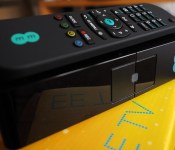
The EE TV remote also has a certain amount of character to it. Its corners are rounded and square in equal measures, and it’s bound in a textured, rubbery plastic. While this cladding makes it look nicer than your average remote, I get the impression it would end up noticeably scuffed if it spent a few months being pushed around my coffee table. All the important buttons are clustered around a central directional pad, and I only mention the layout because I found myself navigating it like a touch-typist after just a couple of days.
User Experience

When it comes to actually using EE TV on a day-to-day basis, you’ve kinda gotta take the rough with the smooth. In some situations, it functions better than you might expect it to, and then it goes and disappoints elsewhere. The initial setup process, for one, is extremely quick and easy. When you first switch the box on, you connect it to your EE router via WiFi or Ethernet, then set up a PIN for the child-safety measure. If you choose to enable this, adult channels, anything marked with a parental guidance notice and content recorded after the 9 PM watershed will be locked to the little ones. Following these steps, you can choose to set up the “Replay” recording feature (more on this later) right off the bat, or not, and then you’re good to go.
EE says the set-top box’s main menu was designed with mobile functionality in mind, and it’s true that the EE TV apps look almost identical to the TV UI. The interface employs the same “content-first,” image-driven approach that’s common to entertainment-focused devices and services nowadays — the Xbox One and BBC iPlayer UIs are a couple of examples that instantly spring to mind. EE’s put its own little twist on things, of course, with the brand’s familiar teal colour scheme, soft font and simple icon style permeating every inch of the UI.
The main menu itself consists of four “panes,” for lack of a better word: On Demand, Live TV, Recordings and Replay (in that order). The On Demand section is where you hop into apps like Wuaki.tv, but Live TV is always the first thing you see when you turn the box on. It consists of a live feed of the last channel you were watching, flanked on two sides by smaller, static frames that tell you what’s currently airing on the five primary terrestrial channels. Icons off to the right of this arrangement let you load up the electronic programming guide (EPG) — which the “Guide” button on the remote does from anywhere. From here, you can also check out what’s on the radio or step into the live-channel sorting office. From here, you can view all channels in order, or sort them by popularity or content type, which is handy if you’re specifically looking for movies, sports or kids programming, as a few examples.
The Recordings and Replay panes are laid out in a similar way. Recently recorded content is given pride of place in dedicated windows, but there’s always a deeper menu beyond for sorting and categorizing. It’s all very easy to understand, and is cleverly built so you can always filter and find the content you want in only a few “clicks.” What’s more, it’s impressively fast, meaning you can fly between panes without any noticeable input lag. It slows down slightly in the deeper sorting menus, but not to the extent that it even approaches frustrating. All sounds good so far, right? Well, as slick as the menu system is, you’re almost certainly going to be spending much more time flicking through the EPG, cruising for something to watch. And, unfortunately, the EPG is so sluggish it drives me to distraction.
Pressing the Guide button on the remote brings up the EPG instantly, but it then takes a second or two to populate the listings for the eight channels in the grid. Page down, and you have to wait another second for those listings to load, and so on. This kind of downtime is almost more annoying because the rest of the user interface is so fast. I have no idea why this information isn’t constantly being cached in the background so the full directory is available whenever you might want it. And if there’s a technical reason this can’t be done, I don’t believe it. When you are watching a channel, you can bring up mini EPGs by prodding the directional pad. One pops up on the left side of the screen, and shows you what’s on other channels, while the other rises from the bottom of the screen and tells you upcoming programming on the channel you’re watching. Both of these are fully populated straight away, making the slow, main EPG even more of a curiosity.
There are plenty of other good and bad points to highlight about the EPG. It consumes the screen when you summon it, but it’s semitransparent so you can still see the channel you’re currently on through it, which is a nice touch. The programme details pop-up, like the EPG itself, takes a second to load when you hit the information button on the remote, but here you’ll also find when subsequent episodes of that particular show are being broadcast over the next seven days. You can schedule recordings or reminders from within this overlay, which is charmingly intuitive. In fact, anywhere you might conceive the record command to have an effect, it does. The first option that presents itself, however, is to record the entire series of a programme, which means you’re always another button press away from just recording that one episode.
Advanced features

As EE TV is a DVR, the idea is that you’ll do more than just watch TV on it, such as recording content to the box for consuming it whenever you fancy. You can pause and rewind live TV, of course, but the box’s main selling points revolve around its advanced features. Like the general user experience, though, these snazzy functions come with their own limitations.
Replay
Replay is a really neat feature that lets you select up to six channels to record 24/7. (Well, almost, as for some reason Replay won’t record anything aired between 3 AM and 5 AM in the morning.) You can tell the box to keep the last six, 12, 18 or 24 hours of content before it starts deleting the oldest recordings to make room for the new. With Replay disabled, all four of the box’s tuners are available to you, meaning you can record up to four different channels at once. Switch the feature on, and two of those tuners are reserved for Replay, while the other two are still free for you to record up to two other channels at the same time. Replay content has its own section in the main menu, making it all easily searchable, but you can also cycle through past broadcasts in the EPG and launch recordings from there. This is particularly handy if you’ve missed the start of something you want to watch, because you can simply jump to the beginning of the broadcast.

There’s no denying this is a great feature, and one you won’t find on other set-top boxes, but it’s more of a half-feature due to the limited selection of channels you can select to “Replay” — in other words, it’s not available on every Freeview channel. In fact, only the well-known terrestrial providers are supported, with the entire channel selection as follows:
- BBC 1/2/3/4
- CBBC/CBeebies
- BBC News & BBC Parliament
- ITV1/2
- Channel 4/E4/Film4/More4
- Channel 5
Now, I get that these are all popular channels, but the limitation is still frustrating to me. I’d like to revisit some of the budget flicks that air on Movie Mix at 2 AM on a Wednesday morning, but I can’t. There is technical reason for this, though, as EE explained to me. Freeview channels are broadcast in groups, known as multiplexes. What Replay does is record a whole multiplex, which only uses one tuner, and then splits the individual channels out at the box level. Thus, you can only record two different multiplexes at any one time, so EE chose to offer the most popular “as a starting point.” Even with this understandable explanation, though, somehow this limitation feels like a broken promise. Oh, and you also can’t record any HD versions of the channels listed above. This, too, makes sense, as EE needs to limit how much hard drive space Replay content occupies. Still, more fine print.
What I find most frustrating about the Replay feature is that recordings can’t be saved permanently. If Replay captured a particularly good film you wouldn’t mind watching again, for example, there’s no way to rescue it from being deleted when the next cycle rolls around. You just have to hope it’s being aired again soon so you can schedule a proper recording.
Mobile streaming
EE TV’s most-hyped feature is the ability to stream video to up to four devices at once, though one of these will always be your main TV. The EE TV apps for Android and iOS look and behave like the big-screen UI. In this sense, whatever tablet or phone you’re using becomes an EE TV in its own right. You can schedule recordings through the app, use your phone as a secondary remote and “fling” anything you’re watching on a mobile device to the TV in one swipe. It’s extremely hard to pick fault with the mobile integration, because everything just works flawlessly. Give the app a “fling” command, for example, and the video source will jump from your tablet to the TV in the blink of an eye.
I managed to persuade a few friends to come round and help me put the multi-screen feature through its paces. Two tablets, one phone, one person on the TV remote and one goal: to break it. I had everyone jumping from recordings to live TV — pausing, rewinding, fast-forwarding, flinging, channel surfing and doing everything in between. And, apart from very short buffering times when switching between video sources, which is completely understandable, the system never faltered once.

The truth is, I don’t have much use for the feature, but I can imagine there are a few families out there fighting for the remote right now that would appreciate it. Everyone going their separate ways to huddle around small screens might not be the most family-friendly activity, but at least everyone gets the same, smooth experience. Like everything else, though, testing out the feature led me to discover one annoying restriction. Streaming HD content, whether live or recorded, is only supported on devices that can process the high-def Freeview MPEG-4 signal directly, none of which I own (most newish Apple hardware does, by the way). Also, I know the multi-screen functionality is intended for getting the most out of your mobile devices, but I don’t see why EE couldn’t have built an app for PCs and Macs, too. I’m told this is under consideration.
While EE TV is the only set-top box on the market that can stream to four different devices, Sky and Virgin do have comparable services, with the benefit of these being you don’t have to be connected to the same WiFi network as your box at home. The Sky Go app allows up to two devices (including computers) to stream video over any WiFi or cellular data network — it’s pulling content from the cloud and not your specific set-top box, you see — or up to four if you pay the piper for Sky Go Extra. You can’t get at any of the recorded content on your Sky+ box, but you do have the ability to access premium channels and tons of on-demand content. Virgin Media’s TV Anywhere service does exactly the same thing, though the selection of channels and on-demand content is different, and you can only register a maximum of two devices. So, yes, EE TV is the only box that will stream recorded video to mobile devices, but the functionality is far from revolutionary, and you can get similar and arguably better services from other providers.
Wrap-up

If you look at EE TV merely as a product, then it’s got a couple of cool features that make it better than your average DVR. The user interface is well-designed and really fast to navigate, though thinking about the lethargic EPG is enough to keep you awake at night. Replay is something I’ve used more than I expected to, especially when I’ve missed the start of a broadcast, but I can’t help but want the feature to be available to all channels, not just the ones EE’s preselected. The mobile-streaming functionality deserves praise because it works fantastically well. Despite various technical limitations EE doesn’t advertise, I can see why people might want to buy this DVR to upgrade their Freeview experience. And therein lies the fundamental problem: You can’t just buy it.
I was confused about the proposition before I even started using EE TV, and I have to say I still just don’t get it. I don’t see how people are expected to get excited about the product when it’s so inaccessible. You have to be a mobile customer of Orange, T-Mobile or EE (contract or PAYG) and sign up for an EE broadband contract, which means you also need an EE landline. Even if you’re an existing customer who fits these criteria, you have to sign up for a new 18-month broadband contract to become eligible to receive a box. I understand the premise: EE TV has some cool features, and being “free,” it’s an incentive for people to buy into EE’s service ecosystem. There’s a further lure for mobile data guzzlers, too, as anyone on a 4G EE plan that signs up for broadband gets an extra 10GB or 20GB of data, depending on their current tariff.
But, really, does anyone care? EE could throw in a lottery ticket, a pair of sunglasses and a calculator, but none of that is going to stop you from looking at what you’re going to be spending each month for your landline, mobile and broadband. Don’t get me wrong; EE TV is a capable piece of hardware that’s being given away for free, but at what cost? I think consumers are too savvy to pay attention to this dangling carrot, instead focusing on what contracts are going to cost them in the long run. And, after all, it’s just a fancy Freeview DVR, not a conduit for any kind of premium content you can’t get elsewhere. The box itself is a satisfactory piece of hardware, but the hoops you have to jump through to get one just don’t seem worth the hassle, unless all the required EE services happen to be the best value option for you.
Filed under: Home Entertainment, HD, Mobile
Source: EE

Google Play Services 6.5 adds new map features and fit API’s

Now rolling out to the Google Play Store, the Google Play Services has been updated to version 6.5 and adds in some nice new features to a variety of apps.
For Google Maps, this update to Google Play Services 6.5 brings in a new API that includes a toolbar to make it quicker to get turn-by-turn directions by automatically giving directions to a destination. It also adds in a lite-mode that will allow developers to add thumbnail images of maps in their app.
Google Drive also benefits from this update, with the ability for developers to add public and private custom file properties to a file. It also reportedly makes syncing Drive files more battery friendly and quicker.
Finally, Google Wallet adds in an API to allow developers to add a button that shows ‘Donate with Google’, whilst Google Fit’s API update means it’s easier for developers to support pauses in their apps or workouts with multiple activities.
You should see the Google Play Services version 6.5 rollout to the Google Play Store in your respective countries soon.
The post Google Play Services 6.5 adds new map features and fit API’s appeared first on AndroidGuys.

Android One not off to the greatest start

Android One, Google’s answer to get low cost smartphones into the hands of the next billion, seems to be off to a slow start. Micromax, Karbonn, and Spice offered Android One handsets in India from mid September. According to IDC, 8 million smartphones were shipped into India, and only about 2.5% of them were Android One devices.
One of the reasons for the lukewarm reception could be that the devices were initially only offered online, while the target demographic probably doesn’t have internet. Let’s also not forget that Google’s former division, Motorola, is on fire with the Moto E and Moto G. Than there is Xiaomi. However, both of these companies are offering their devices online too.
IDC does see sales picking up in November and December, plus Google plans on expanding into Indonesia, the Philippines, Pakistan, Bangladesh, Nepal and Sri Lanka shortly.
source: India Times
Come comment on this article: Android One not off to the greatest start

Logitech Announces New AnyAngle Case for iPad Air 2 and iPad Mini [iOS Blog]
Logitech today announced a new AnyAngle protective case designed for Apple’s iPad Air 2 and iPad mini, which includes an “any-angle” foldable cover that can be adjusted to multiple viewing positions for reading, watching movies, and more.
Designed to “complement the thin and light aesthetics” of the iPad Air 2, the AnyAngle case includes a rubberized frame that wraps around the edges of the iPad to protect it from drops and bumps, and the adjustable front cover protects the display from scratches and cracks. The back of the case is entirely clear to show off the iPad’s design while still protecting it from damage.

The AnyAngle case has a hidden hinge built into it that enables the front cover to be adjusted to any angle within a 50-degree range. A set of magnets secures the cover to preserve the chosen angle even when the iPad is being moved, and the hidden hinge ensures that the cover remains in place as a stand with no tipping or sliding. The convertible cover stand has been designed to fold up behind the iPad for a minimalist look in both stand mode and when laying flat for reading.

Logitech’s AnyAngle case for the iPad Air 2 and the iPad mini comes in multiple color combinations to fit a wide range of personalities, including classic black, gray, yellow, violet, and teal. It will be available in the U.S. beginning later this month for $59.99.

Huawei’s 2015 lineup revealed!!!

It looks like Huawei has a few pretty exciting handsets in the pipeline for next year. One is the Ascend Mate8 which is the successor to the venerable Mate7. The Mate8 will have a 2K resolution display, the new Kirin 930 chipset and should be available next fall, retailing for about $650.
That’s not the only high powered handset in Huawei’s stable though. The Ascend D8 should be the companies flagship handset next year, it will feature a 5.5″ screen with a 2K resolution. The Ascend D8 is rumored to have 4 GB of RAM, a 64-bit Kirin 950 processor and 64 GB of internal memory crammed inside. This powerhouse should land sometime in May and retail for about $800.
There will also be successors to other handsets in Huawei’s lineup as well. One of Huawei’s most popular handsets, the Ascend P7, will get a successor called the P8, which should be announced at CES in January. The Ascend P8 is rumored to sport a 5″ screen with a 1080p display, a Kirin 930 chipset (the same as the Mate8), 3 GB of RAM and retail for about $490. Throughout the year we should see numerous other handsets released as well, such as the Ascend 5, 5X, 7 and 7X. Prices should start at $115 for the entry level Ascend 5 and increase up to $320 for the more powerful Ascend 7X. It looks like Huawei is bringing their A game for 2015 with a strong lineup. Just about anyone should be able to find a handset that pleases them in Huawei’s lineup.

Source PhoneArena
The post Huawei’s 2015 lineup revealed!!! appeared first on AndroidGuys.

Upp comes to the UK with the promise of hydrogen-fuelled device charging

If your smartphone dips into the red while you’re out of the house, why scrabble for a portable battery when you can recharge with hydrogen? That’s the sales pitch being made for the Upp, anyway. Intelligent Energy’s first fuel cell charger is now available in Apple Stores across the UK, as well as on the Upp website. It gives power-hungry gadget fans a cleaner way to keep their devices topped up, but inevitably, there are some caveats. For one, the Upp charger will set you back a whopping £149, an amount that far exceeds the asking price for a handful of portable batteries. For another, the device is a little large and cumbersome; this isn’t something you can just slide into a handbag or jacket pocket.
So what’s the advantage? Well, unlike regular portable batteries, you don’t need to remember to recharge the Upp. Instead, the fuel cell relies on swappable cartridges that can be picked up for £5.95 a pop from one of Apple’s stores. The hope is that, should the idea take off, you’ll be able to duck into any supermarket or convenience store and pick one up at a moment’s notice. The charger supports most USB-enabled devices and individual cartridges will, the company claims, keep a smartphone juiced for a week. There’s even an app for checking usage, optimizing cartridges and finding stores that sell refills. Right now though, the Upp feels like a niche product with low availability and a high price of admission. Only the most avid hydrogen fans and charging connoisseurs need apply.
Filed under: Peripherals
Via: Business Wire
Source: Upp
 AIVAnet