



Some OS X Yosemite Users Still Experiencing Wi-Fi Connection Issues Even After 10.10.1 Update
 Yesterday, Apple released OS X Yosemite 10.10.1, which brought improved Wi-Fi reliability after a number of users reported connection issues with the new operating system. However, Computerworld reports that a number of users on Apple’s support forums are still claiming to have issues with Wi-Fi even after updating to OS X 10.10.1, with some saying that they are still not able to connect at all while others note that their Wi-Fi has remained significantly slow.
The largest thread on Apple’s support forums discussing the Wi-Fi problems in OS X Yosemite has grown to 1,120 replies with more users reporting issues with a number of Macs and a variety of router types. Members of the MacRumors forums have also reported problems with Wi-Fi after updating to 10.10.1 even when using their computer in different areas. One user even reported Wi-Fi issues with the iMac with Retina 5K Display and the newest Time Capsule networking device.
Currently, some users are finding success with performing a clean install of Yosemite, running their routers in “Access Point” mode, switching their connection a 2.4 GHz band, or running a user-created script to restart OS X’s Wi-Fi Monitor. However, there appears to be no general solution for users still having Wi-Fi issues. In addition to Wi-Fi issues, other users are reporting problems with OS X Yosemite’s Dark Mode on non-Retina displays, unstable Bluetooth connections, and high CPU utilization.
Apple has not issued an official statement on the reported users issues, although Apple support representatives have instructed users to remove excess preferred networks in the Network section of System Preferences and to reset the System Management Controller. It is likely that Apple will issue more fixes with forthcoming software updates to OS X Yosemite, although there is currently no timetable as to when those updates might come.

Uber and Spotify join forces to improve your ride with music

Uber and Spotify have announced a new partnership to help make Uber rides even better. If you have a Spotify premium account and your Uber ride is enabled with Spotify music through their vehicle’s sound system, you can select the music to stream during your ride or even remotely control selections during the ride. The fun starts when you request an Uber ride. Look for a music bar in the Uber app when you get matched with an Uber ride. If present, you can tap on the music bar and choose a song or playlist from your Spotify account. When your ride starts, the music will start up on its own.
To kick off the new partnership, Uber and Spotify are going to provide some artist ride-alongs and live sessions with artists Andrew W.K., The Sam Willows, Ximena Sariñana, Ansiktet, Professor Green, Diplo, Matt and Kim, Ricki Lee, Kevin Drew and Jake Owen. You will have to be in one of the ten cities where the service is rolling out to initially. These include London, Los Angeles, Mexico City, Nashville, New York, San Francisco, Singapore, Stockholm, Sydney and Toronto. Uber and Spotify say they will be rolling out to more cities in the future.
An update to the Uber app is rolling out starting today. Once you get the update, you have to connect your Spotify account. For Android users, Uber has not quite completed the work to control music through the Uber app, so you will have to jump over to your Spotify app to control things once your ride starts.
Click here to view the embedded video.
source: Uber
Come comment on this article: Uber and Spotify join forces to improve your ride with music

Android TV apps will be screened by Google before being available in the Play Store

It seems that Google is changing things a bit with its new Android TV platform compared to Android in other places. According to Google’s app distribution page, under Android TV it says the following:
Before distributing apps to the Play Store on Android TV devices, our team reviews apps for usability with a DPAD (apps) and Gamepad (games only) and other quality guidelines.
Now before everyone gets all huffy and puffy about how Android is supposed to be open and that Android Wear doesn’t have these types of guidelines, think about this: Android TV is much different in terms of functionality and interaction. While Android phones and Android Wear you interact with directly with a touchscreen, Android TV is all by remote. Not only does this require a different type of interaction, but it can cause issues if not implemented properly. Also, Users are not going to want to swim through as many small-time developer apps as they would for phones and Wear. In my opinion, I applaud Google for taking the extra step to check the apps heading to their new platform to ensure a good experience. If you remember Google TV, many apps were buggy and didn’t work well, and they ended up putting that platform down. So they want to do things different this time around.
It’ll be interesting to see how developers react to this and how the experience on Android TV differs from that of Google TV.
via Android Police

The post Android TV apps will be screened by Google before being available in the Play Store appeared first on AndroidGuys.

No surprise: Samsung will cut number of models released by 25 to 30 percent
 In case you hadn’t heard, Samsung isn’t doing too great. Sure, it’s still top of the Android ladder, but its poor financial performance this year has it harshly assessing its strategy going forward. Now one of the things that Samsung is often associated with is inundating the market with an assortment of devices at different price points, effectively saturating all parts of the market and vastly increasing its chances of profit. While this didn’t work in 2014, Samsung will cut number of models that it produces, aiming to create more components that can be shared across models, so that the economies of scale work more in their favour.
In this way, Samsung will need to cut down their number of released models by 25 to 30 percent, which is a pretty big number when you think about how many mid and low range devices they release on a yearly basis – the Galaxy Core, Galaxy Ace, and Galaxy Mega just to name a few. And with the news that Samsung intends to make the Samsung Galaxy S6 from scratch, perhaps we shall see Samsung create an innovative flagship device like the one that saw it rise to prominence in the first place.
What do you think about Samsung cutting down on its yearly offerings? Let us know your thoughts in the comments below.
Source: Wall Street Journal via engadget
//<![CDATA[
ord = window.ord || Math.floor(Math.random()*1E16);
document.write('‘);
//]]>
The post No surprise: Samsung will cut number of models released by 25 to 30 percent appeared first on AndroidSPIN.
Activity trackers to help decide personal injury cases

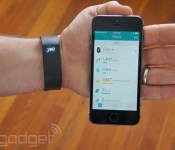
Don’t look now, but the activity tracker on your wrist may be the key to victory in the courtroom — in the right circumstances, at least. A Canadian woman embroiled in a personal injury claims case will soon use Fitbit data as evidence that an accident significantly limited her activity levels. She’ll wear a smart band for several months to determine whether or not she’s sufficiently active for someone in her age group and job. If she’s clearly behind the curve, she may have strong proof that she deserves compensation.
The tracker only provides limited information and likely won’t be the only piece of evidence, but it promises to be far more accurate than having a doctor testify based on a short observation. And if the statistics are deemed admissible, they could set an important precedent (at least, in Canada) for injury cases — and not just for claims like this. Insurers couldn’t force you to wear a smart band, but they might compel you to hand over data you’d already collected if they’re suing over possible insurance fraud. In that sense, fitness data is a double-edged sword. While it might save your hide in certain legal battles, it could be a smoking gun in others.
Filed under: Wearables
Via: The Verge
Source: Forbes

Google Keep gets shareable tasks and notes

My wife and I sit every Sunday and go through what we need from the grocery store before she goes shopping. This often is a mix of talking, texting, sharing written lists, etc. I have tried for us to share Google Keep lists, but there was no easy way to import the list sent via Hangouts into Google Keep.
Well Google has fixed this with their latest update. Now you can share notes and lists, and watch live as another user interacts with it and checks things off a la Google Drive style. This is super handy when creating shopping lists, or even things that need to be done around the house, or projects for work, etc.
Searching for notes has now become easier too as you can filter notes with things like colors, notes with images, and more. The update is rolling out starting today, so be on the lookout for the update.
Will you use this feature? Does this make you want to switch from your current notes/lists app to Keep?
The post Google Keep gets shareable tasks and notes appeared first on AndroidGuys.
Apple’s Eddy Cue Shows Off Apple Pay at Panera Bread, Bloomingdale’s, and Disney Store in News Segment
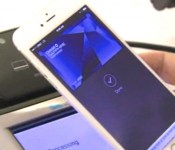
Earlier tonight, KTLA 5’s The Tech Report aired a segment (via AppleInsider) centering around Apple Pay, which featured Apple’s SVP of Internet Software and Services Eddy Cue using the mobile payments solution around Santa Monica. The segment, which can be viewed here, followed Cue and reporter Rich Demuro as the Apple executive utilized his iPhone 6 Plus and Apple Pay to purchase a meal at Panera Bread, sunglasses at Bloomingdale’s, and merchandise from the Disney Store.

For their meal at Panera Bread, Cue is shown utilizing Apple Pay inside of the restaurant’s official app to pre-order food simply and securely. At Bloomingdale’s, Cue is shown using Apple Pay and his iPhone at a payment terminal to purchase sunglasses, which he is required to sign for. However, Cue was not required to sign for the two dolls he purchased at the Disney Store with Apple Pay. Cue then notes that users will sometimes be required to sign for more expensive purchases made with Apple Pay in-store.
The pair also visit an Apple Store to discuss Apple Pay on the company’s new line of iPads. While users can’t make in-store purchases with the iPad, Cue points out that users can still make in-app purchases with Apple Pay and Touch ID on the tablet.
Cue also spoke on the security of Apple Pay and how tokenization helps keeps credit card numbers away from malicious users:
You’ve seen these hacks that are happening in the systems where thousands of credit cards are getting exposed, and so you have try to protect that number. Well, with Apple Pay, the number that’s being given to the terminal is a one-time number that’s created for that transaction.
A report from The New York Times over the weekend shed some light on Apple Pay’s early successes, noting that the service doubled mobile wallet transactions at Walgreens and accounted for 50% of tap-to-pay purchases at McDonalds. Whole Foods shared earlier this month that it processed 150,000 Apple Pay transactions between October 20 and November 6, and the service has increased consumer interest in the mobile payment area in general. Apple currently has 36 retail partners that accept Apple Pay in their stores as the service is available at more than 200,000 retail locations.
Watch faces auto shift in ‘Always On’ mode on the LG G Watch R, here’s how to compensate for it

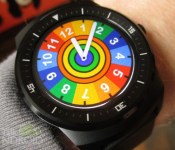
If you own the LG G Watch R, you might have noticed that your watch faces seem to shift ever so slightly when in the dimmed “Always On” mode. Then when the face fully lights up, it goes back to center, especially with apps like Facer. You’re not alone in that a lot of people have noticed it. It appears to be by design as a way to prevent screen burn in. The only problem is that some faces look horrible as you can see in the image above. You want to utilize the “Always On” display so you can enjoy your watch face, but seeing white around the sides just ruins the experience. There is no way to turn this feature off (you wouldn’t want to), but there is something that you can do to compensate for it.
Even though the G Watch R is round, all the custom faces are still part of a square-shaped image file. Any custom face that you want to use on this device needs to have a black background, Now when the watch face shifts slightly, it won’t be as noticeable. The only exception would be if the watch face is primarily white and doesn’t have a border around it.
The problem lies in that if you find a watch face on facerepo (or some other sharing site) that you really like, it’s a little bit of a pain to fix. You need to extract the image from the .zip or .face file and do some Photo Shop magic by replacing the white part around the circle with black. The .zip files should be able to be opened via any archive software, but I was only able to open the .face files with 7-Zip. You can also change the .face extension files to .zip and it will then open with any archive software.
All the images for the watch face will be in the Images folder. You only need to concern yourself with the main face, which is usually the largest file in terms of bytes. Unfortunately it won’t have an extension, so some photo editing programs might not recognize it. You can certainly add .png (or jpg) to the file name and give it a shot, but I found that Paint Shop wasn’t able to open them. However, I found that GIMP (free open source) was able to with the changed extension or even without changing the extension. I don’t have Photo Shop or any other software so I can’t speak for them. Your mileage will vary.
Once you have a black background, you can save it as a .png file and replace the image in the Facer app (or similar app), and you should be good to go. Here’s what the image files look like before (left) and after (right)….


And here’s what the new black background version looks like on the G Watch R in the “Always On” dimmed mode with the same upward shift…..

It is a little bit of a pain to do, but if you really like a face, it’s not too much work. Alternatively, you can always ask the creator of the watch face to do it for you.
Note: A transparent background may also work, but there can’t be any odd colors at the edges of the watch face graphic. The example watch face in this post had some white spots at the top edge so it didn’t work. It’s actually much easier to replace the background with black than crop out a selection and copy it to a transparent background, in my opinion.
I hope this guide helped you, and if you notice any other tricks, please let me know in the comments and I will be sure to add it to the post.
Come comment on this article: Watch faces auto shift in ‘Always On’ mode on the LG G Watch R, here’s how to compensate for it

BitTorrent now lets any artist offer paid bundles

BitTorrent’s experiments with paid music and video bundles have clearly seen some early success — and accordingly, it’s opening up the floodgates. The peer-to-peer service now lets any artist apply to distribute content through paywall-based downloads, whether they’re releasing music, apps or movies. As before, the allure is the sheer flexibility that artists get in deciding not just what you pay for, but when you pay for it. A musician might let the first 500 downloaders listen to an album for free, for instance, but can ask latecomers to pay for some or all of the songs. They also get 90 percent of the revenue instead of the 70 percent they get from most online music services, so there’s a chance they’ll take home more money if they produce a hit.
The company’s Straith Schreder notes that these new bundles won’t all be released right away; instead, they’re being sent in “batches” to ensure a smooth rollout. Still, this wider launch could make a big impact on media distribution. Performers like Taylor Swift and Thom Yorke regularly criticize services like Spotify and iTunes for not just giving artists less money, but frequently dictating an all-or-nothing approach to selling content. Now that BitTorrent’s paid platform is available to everyone, you could see more artists shy away from conventional publishing when it’s either unprofitable or too restrictive.
[Image credit: Duncan Geere, Flickr]
Filed under: Home Entertainment, Internet, Software, HD
Via: TechCrunch
Source: BitTorrent

Get in the spirit with these winter wallpapers for your Android

It’s the time of year to feel jolly and what better way to get into the spirit than with the hottest festive winter wallpapers for your Android device.
Here you’ll find the best wallpapers that will have you feeling the Christmas spirit and embracing that winter weather outside.
All you have to do is click on the wallpaper you want, download to your device and set it as your wallpaper.
The post Get in the spirit with these winter wallpapers for your Android appeared first on AndroidGuys.
 AIVAnet