



Ford, UPS and Visa want net neutrality, but they won’t tell you that

It’s not just tech giants (and President Obama) pushing for a tougher approach to net neutrality — other outlets want reforms, too. A trio of regulatory filings reveal that representatives from Bank of America, Ford, UPS and Visa spoke to FCC commissioners multiple times this year to press for stricter net neutrality under the banner of an advocacy group, the Ad Hoc Telecommunications Users Committee. The companies tell Bloomberg Businessweek that they weren’t taking particular stances on the issue, and were only concerned about getting their customers a “fast and reliable connection,” as Ford puts it. However, the filings suggest otherwise — the Ad Hoc members gave the FCC material explicitly asking for the internet to be reclassified as a public utility, as the President wants. So why the he-said-she-said discrepancy?
Simply put, the companies want to avoid the scorn of their telecom partners. Internet outfits like Netflix have nothing to lose by arguing for net neutrality in public, but bank and vehicle makers just might; they’d rather not put a big deal into jeopardy by voicing their opinion. A group like Ad Hoc lets these corporations argue for a neutral internet (which they say protects against internet providers double-dipping on access fees) without officially linking themselves to the cause. You won’t see them running pro-neutrality ads or testifying in hearings, then, but it’s clear that support for fairer internet regulation extends well beyond Silicon Valley.
[Image credit: AFP/Getty Images]
Filed under: Internet

Nexus 6 review, Lisa Kudrow talks ‘The Comeback’ and other stories you might’ve missed

This Saturday, why not sit back, kick up your feet and let us bring you up to speed on all the latest tech news. Over the past seven days, we spoke with Lisa Kudrow about “The Comeback,” reviewed the Nexus 6, investigated the legal issues behind Aribnb, and more. It’s all just a click away, folks. Oh, and be sure to subscribe to our Flipboard magazine!
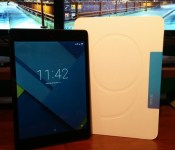
Google Nexus 9 Review

Google has taken both their tablets, the Nexus 7 and Nexus 10, and combined them into a single powerhouse. The Nexus 9, which Google debuted on October 15th alongside the Nexus 6 and Android 5.0 Lollipop, is a top of the line device due to its killer hardware and build quality. The Nexus 9 doesn’t have all the extra features, but it does come with Android 5.0 Lollipop out of the box, the 64-bit NVIDIA Tegra K1 processor, and 2 GB of RAM to power it all. Let’s jump right into the Google Nexus 9 review.
Design
The Nexus 9 has three color options available: indigo black, lunar white,and sand. It also has two storage options: 16 or 32 GB. There is an LTE version available, but it is only available in indigo black with 32 GB of storage. The device I have is the 16 GB indigo black version.
This Google tablet is constructed by HTC, who is well-known for their premium design quality on their One series. With a first glance at this device, you can tell that it is made by HTC, but it still has the familiarity of a Nexus device. The Nexus 9 comes with an 8.9 inch display in a 4:3 ratio, that I think makes the tablet easier and more enjoyable to hold.

The Nexus 9 is a very solidly built device, and that is due to the surrounding chassis that is constructed of metal. It is squared off, yet slightly angled towards the display away from the back of the device. Coming in at 7.8 mm thick, it gives enough real-estate to rest your fingers on comfortably without touching the bezels and accidentally touching the display.

On the right side of the frame are both the power button and volume rockers. HTC did a great job of hiding the buttons, and it makes the edge look seamless. This is both good and bad. While it makes the device look as sleek as ever, it also is a chore to find which button to press. Since the buttons are near flush with the chassis of the device, it tough to know if you are on the volume rockers or power button until you press them.
The back of the device has the classic Nexus soft-touch feel that can be seen on previous Google devices. While it is a fingerprint magnet, it is definitely worth it. The soft-touch back makes the device very easy to hold without the fear of dropping it.

Display
Google has stepped up their display quality in 2014. The Nexus 9 packs an 8.9 inch IPS display with a resolution of 2048 x 1536. The ppi for this device comes in at 281, which is higher than Apple’s iPad Air 2 at 264 ppi

The display which is a 4:3 ratio, looks its best when it is showing dark content, especially while watching movies. Since the device doesn’t have a 16:9 ratio, videos will naturally have black bars on the top and bottom of the video to compensate for the extra space. Darker games and movies look amazing on the Nexus 9, but once content has brighter and flashier graphics, the display doesn’t pop as well.
Aside from content, Android 5.0 Lollipop takes full advantage of the display and everything Google branded looks great and very crisp. You can tell that the Google-based apps are optimized for the 4:3 ratio.
While the Nexus 9 excels at displaying darker content and its own operating system, it also is very good at displaying text. The IPS display isn’t very bright or saturated, so it makes it easier on the eyes while reading.
Sound
This category is just for this device, since the Nexus 9 is HTC made. The Nexus 9 features HTC’s own BoomSound speakers on the front panel of the device, one on the bottom and one on the top to create a stereo effect. Front-facing speakers have been one of the more popular features to come on devices since HTC made it popular, and for good reason.

Front-facing speakers is a feature I think all devices, especially tablets need to have. I am glad Google included this, and they are loud. The sound is very crisp, even at loud volumes. Mids and highs come through very well, and low-end/bass is better than average. When bass gets too low, it drones out, but that is expected from such small speakers.
My only complaint about the speakers on the Nexus 9 is that they are sunk down into the front of the device. As you can see in the picture, it leads to dust being caught in the speaker grill.
Performance
This tablet sports top-notch specifications that render the device ‘future proof’. Google went with the 64-bit NVIDIA Tegra K1 dual-core processor that is clocked at 2.3 GHz. It’s supported by 2 GB of RAM and the all-new Android 5.0 Lollipop.
This is a stock-Android device, so there is no bloatware, just pre-installed Google apps. There is nothing this device can’t handle. On all my previous Android devices, I always tend to modify the animations speed in the developer options and set it at .5x, but this is the only device I decided against it.With the updated Android OS, navigation is as smooth as ever and transitions are always at a high frame rate.
I found myself using the multitasking button more than ever due to how smooth Android 5.0 Lollipop is on the Nexus 9. It is quick and painless switching between apps, and like I stated earlier, the animations and transitions make it everything more enjoyable.
The device does take a little longer to open and close heavier apps/games such as games like Leo’s Fortune. When more screen-intensive apps are open, expect the processor to get warm. It isn’t anything too outrageous.
Battery
The Nexus 9 sports a modest 6700 mAh battery that can travel the distance, but it also can be underwhelming. The battery life will definitely be determined on how you use this device, which can be said for all devices.
One thing the device has going for it in the battery department is the excellent standby time. While I consistently use my tablet, it is left to idle the majority of the time during my busy schedule (working, sleeping, and going to school). I will lose around 1-2% over a 8-10 hour period, which is very good.
While the standby time is great, I expected more optimization due to the new ART run-time and the latest 5.0 update. I will give Google a beak on the Nexus 9, due to the fact that Lollipop just got released, and more updates will ensue. Not only did battery life not live up to my expectations, the charging time is the worst part. It regularly takes hours to charge the device, especially if you are down on the 10-15% range.
I can expect around 4-6 hours of screen on time with normal to heavier usage on one charge. Once I start pushing the Tegra K1, there is a steep drop in battery life. Below are some battery statistics screenshots from my device.


Conclusion
Overall, this tablet is one of the best Android tablets I’ve seen, and is the only one to offer a pure Android experience. If you are an Android-enthusiast there is no question; this is the device you want. Between the awesome Tegra K1 processor and prompt updates, you can’t go wrong.
There is not an area that the device falls behind the competition, and the majority of things that are wrong with it are very fixable via software updates. Android 5.0 Lollipop brings the ultimate Android experience with some bugs, but it is still fairly new. I expect the performance of the Nexus 9 only to improve. Google has brought me back into the tablet world with how well this device performs and I would definitely recommend the Nexus 9 to anyone.
If you are in the market for a tablet, this one won’t come at the cheapest price. The 16 GB version is $399.99, the 32 GB version is $479.99, and the LTE version is $599.99.

The post Google Nexus 9 Review appeared first on AndroidGuys.
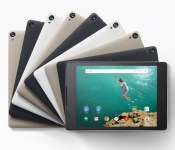
Amazon has Temporary $50 Nexus 9 Discount
 For anyone waiting to get the Nexus 9 for the Holidays, it might be best to strike now. Amazon is offering the black 16 GB Nexus 9 for a $50 discount, dropping the price to $350 from $400. There are limited supplies, so it would be best to hit the sale quickly. At the time of this writing, there were 55% of the discounted tablets claimed. So hurry up, and go get your Nexus!
The deal is on Amazon, but just in case you don’t know much about the Nexus 9, here’s a link to Google’s page on the device:
Come comment on this article: Amazon has Temporary $50 Nexus 9 Discount

WhatsApp read alerts can be disabled

There was a recent explosion about people complaining that WhatsApp was sending read to the sender after a message had been viewed by the receiver.
Panic broke out as people worried about getting in trouble for not replying to a message after reading it. Fear for the dreaded “You are ignoring my messages, why don’t you care about me” argument raged around the internet.
Okay, not really, but the read alerts or read receipts as WhatsApp calls them became a concern to a few users.

WhatsApp apparently heard their users concerns and added an option into the settings menu to disable “Read receipts”. While disabling this option, you won’t be able to see if someone else reads your messages, but you can’t have your cake and eat it too.
This option is available in version 2.11.44 which is currently only up for download from WhatsApp website or here, but it should be hitting the PlayStore soon. The update also adds HeadUp notifications to WhatsApp with a rectangular icon versus a circle icon.
The post WhatsApp read alerts can be disabled appeared first on AndroidGuys.

You can play Penn & Teller’s wonderfully uneventful ‘Desert Bus’ in VR

Ask veteran gamers about the least eventful title you can play and they’ll probably mention Desert Bus. The legendary minigame from the unreleased Penn & Teller’s Smoke and Mirrors has you driving from Tucson to Las Vegas on a featureless road… in eight hours of real time. That may not sound like much fun, but it’s considered a classic challenge — and now, you can play it in virtual reality. Shiny Shoe has released Desert Bus VR, a recreation that lets you experience the purposefully unexciting trip through an Oculus Rift DK2 headset. You can now see the bus door when you stop for passengers that never come, or look behind you when you’re towed back home after a crash.
If you have the curiosity (and stamina) to check it out, you only need a Windows PC with enough horsepower to drive Oculus’ VR gear. And don’t worry if you’d rather not immerse yourself in monotonous mass transit. If you’re reading this in mid-November, you watch others drive at Desert Bus for Hope, which is using the original game to raise funds for Penny Arcade‘s Child’s Play charity.
http://www.twitch.tv/desertbus/embed
Source: Desert Bus VR
 AIVAnet
