


[Deal Alert] 20,000 mAh Limefuel LP200X Dual USB External Battery Bank
The holidays are quickly approaching. That means a lot of things for a lot of people. For many it means lots of family gatherings, travel, and events. That means you might find yourself stuck in situations where you will need power at your finger tips without wanting to leave your phone or tablet tethered to a wall socket, if a wall socket is even present. It also means you are probably on the prowl for deals on gadgets and gizmos for the tech nut in the family. No matter your reasoning, the 20,000 mAh Limefuel LP200X external battery bank is sure to fit into the mix somewhere in your life this holiday season.

The LP200X brings you massive amounts of portable power to charge up even the most power-hungry user out there. It offers dual USB out puts so you can charge up your phone and tablet at the same time. Or, if you are feeling generous, help charge up someone else’s phone or tablet. It features a digital read on a small screen so you always know how much power is left in the battery. Add in the fact it also has a built-in flashlight and you have the makings for a great emergency backup device.
The Limefuel LP200X has made another appearance on one of our favorite deal sites at a super low $34.99 price tag here in the US. If you live outside the US, you can partake in the deal, but it will set you back a little more at $54.99. Either way you are saving some money as the LP200X retails at $85. Hit the links below and get one ordered.
Limefuel LP200X 20,000 Mah battery bank (US) $34.99
Limefuel LP200X 20,000 Mah battery bank (International) $54.99
//<![CDATA[
ord = window.ord || Math.floor(Math.random()*1E16);
document.write('‘);
//]]>
The post [Deal Alert] 20,000 mAh Limefuel LP200X Dual USB External Battery Bank appeared first on AndroidSPIN.

Verizon Readjusts its ETF Policy, Full $350 Due for the First 8 Months
Early Termination Fees are probably one of the more annoying aspects of a carrier agreement. They are a necessary evil that we have all had to live with if we chose to do a contract agreement for a discount on a device purchase. The simple truth is carriers don’t make squat on a customer’s account until the contract is nearly over. Hence the need to recoup those costs if said customer decides to quit paying the bill or cancel service. It is also a reason why some carrier service plans run a little higher than others and also why some have started offer device installment plans instead of, or along side, contract accounts.

Verizon has had a fairly large ETF pay-off, $350 per-line. As time went on during your contract you were granted $10 off this termination fee per-month. This decrease started the very first month of your contract. Mathematically speaking, over the course of your 24 months you would knock that ETF down to $120 on the 23rd month with it getting wiped out entirely on your final month. The new policy on the other hand, is going to be shifting that depreciation. Now, the full $350 will remain in effect for the first 8 months. After that it will slowly dwindle by $10 a month for 11 months. On the 19th month, that will increase to $20 a month for the next 4 months. In the end, the 23rd month of your 24 month contract will still carry a $140 ETF charge vs the previous $120.
I am not all that surprised at the move myself. If you consider the price tags of some of the flagship devices that we have been seeing when it comes to their off-contract pricing I am certain Verizon has seen a few take advantage of cost difference. Take for instance the off-contract price tag of the Samsung Galaxy Note 4, $699.99. With a contract you can get it for $299.99. If you cancelled immediately and paid off the contract fee, you technically get the Note 4 for $50 less. If you wait out the contract a couple of months, then you are technically saving even more. Obviously if you cancel and don’t pay your ETF then you are hosed as the device will soon find its self on a blacklist and become unusable. By shifting this $10 discount out by 8 months it ensures Verizon ends up staying in the green versus the red on devices and accounts.
What are your thoughts on the shift to the ETF policy?
Source: Droid-Life
//<![CDATA[
ord = window.ord || Math.floor(Math.random()*1E16);
document.write('‘);
//]]>
The post Verizon Readjusts its ETF Policy, Full $350 Due for the First 8 Months appeared first on AndroidSPIN.

Android 5.0 Lollipop Targeted for HTC One M7 and M8 GPE Devices Next Week
HTC has been working pretty furiously to provide timely updates to their devices to the latest Android OS builds available. With Android 5.0 Lollipop HTC stated that they would have updates starting within 90 days of the publicly available OS from Google. It has only been a week and a number of manufacturers have already started to push updates out. Motorola being one and NVIDIA with the Shield Tablet on the 18th being another. Lastnight a target timeline was tweeted out by HTC’s vice president of product management, Mo Versi.

He makes note that the GPE HTC devices are targeted to get their hands on Android 5.0 Lollipop updates early next week. It is just a target timeline, so things could go south and not be ready though. It shouldn’t be all that surprising since Google Play Edition devices are more or less stock Google OS versions of flagship devices. It is still good to see them getting into the mix so quickly regardless.
Anyone out there sporting a GPE One M8 or HTC One M7 ready to see the official update?
//<![CDATA[
ord = window.ord || Math.floor(Math.random()*1E16);
document.write('‘);
//]]>
The post Android 5.0 Lollipop Targeted for HTC One M7 and M8 GPE Devices Next Week appeared first on AndroidSPIN.

ASUS ZenWatch in Stock in the Play Store for $199.99
The ASUS ZenWatch made its appearance on the Play Store yesterday with the exception that it couldn’t yet be ordered. Fast forward to today and now you can shell out a cool $199.99 and pick up sixth Android Wear powered smartwatch to hit the Play Store. The ASUS ZenWatch follows along the square screen design, but with a bit more of an elegant look than some of the other competitions. It still sports a 320 x 320 AMOLED display the 1.2GHz Snapdragon 400 processor and 512MB’s of RAM.

The ZenWatch is a bit different in its visual design with a slightly curved display and a bit more of a visually elegant design mix of brushed aluminum and leathers. It also has a few little additions that make it a bit more interesting. Like simply placing your hand over the display to dismiss calls, Tap Tap and Find my phone and custom watch faces. Take a quick watch of the video from ASUS to see it in action and to also catch the link for a chance to win one too.
With so many Android Wear choices out now, it all comes down to the little things in the design and abilities to get your money. While I don’t own one yet, the ZenWatch has been the one that keeps drawing me in. What are your thought on this one? Anyone out there pick one up from a retailer already?
Head to the Play Store to take a closer look and get one ordered.
//<![CDATA[
ord = window.ord || Math.floor(Math.random()*1E16);
document.write('‘);
//]]>
The post ASUS ZenWatch in Stock in the Play Store for $199.99 appeared first on AndroidSPIN.

Moto 360 Now Available Through T-Mobile Online, Hits Stores November 19th
T-Mobile has announced that the Moto 360 can now be picked up beginning today online for the usual $249.99 price tag. As with all thing Uncarrier, you can get it for $0 down and pay $10.41 per month with the final payment being $10.56 of the 24th month.

As you can see in the image above, it is only for the black and stainless steel variant of the device. If ordering online through the carrier isn’t your cup of tea, T-Mobile will also be selling the Moto 360 in select stores on November 19th. It will carry the same price tag and also in the black stainless steel combo.
Bounce on over to T-Mobile.com right now if you want to place an order.
Source: T-Mobile
//<![CDATA[
ord = window.ord || Math.floor(Math.random()*1E16);
document.write('‘);
//]]>
The post Moto 360 Now Available Through T-Mobile Online, Hits Stores November 19th appeared first on AndroidSPIN.

T-Mobile Announces LG G Watch R for Launch on November 19th
T-Mobile just made the Moto 360 available online for customers to pick up as of today with select stores set to carry the Android Wear powered device on November 19th. On the same day T-Mobile will also be making the LG G Watch R available. The G Watch R is the other round-faced Android Wear device that has is own interesting appeal to it with the Plastic OLED display that is said to give it better clarity in sun light and from acute angles.

T-Mobile will be offering this slightly more expensive, $299.99, Android Wear device with $50 down and the same $10.41 monthly payments and final payment of $10.56 that the Moto 360 carries. They don’t mention it being, or becoming, available for online purchase, just that it will be in select stores November 19th.
Will you be holding out for the 19th and making you choice in-store, or have you already hit the purchase button on the Moto 360 from T-Mobile?
Source: T-Mobile
//<![CDATA[
ord = window.ord || Math.floor(Math.random()*1E16);
document.write('‘);
//]]>
The post T-Mobile Announces LG G Watch R for Launch on November 19th appeared first on AndroidSPIN.

Samsung Galaxy Note Edge Debuts on T-Mobile for $0 Down
Samsung’s latest oddity, the Galaxy Note Edge, is finally officially available through T-Mobile starting today. The second screened Note device is being offered for $0 down and carries a monthly payment of $36.25. The Note Edge is certainly the more interesting of devices launched this year by Samsung with its 5.6-inch Quad HD+ display at 2560 x 1440 and its 160 pixel edge screen, hence its name.

Internally you will speed along your day with a 2.7GHz quad-core process and 3GB of RAM. You also get 32GB or storage with 128GB micro SD card support too. The rear camera is 16MP with a 3.7 MP front shooter with 120 degree Wide Selfie mode. Mix in the 3,000 mAh battery that offers 32 hours of talk time with fast charging ability (50% charge in about 30 minutes) and you have an all day strong device that does a heck of a lot. Take a look at an impressions video from Mr. Marques Brownlee to get a better understanding of what makes the Edge screen pretty darn cool.
The Galaxy Note Edge is available at T-Mobile.com and at participating retail stores starting today. You may want to give a call to your local store before swinging in to make sure they have them in.
Source: T-Mobile
//<![CDATA[
ord = window.ord || Math.floor(Math.random()*1E16);
document.write('‘);
//]]>
The post Samsung Galaxy Note Edge Debuts on T-Mobile for $0 Down appeared first on AndroidSPIN.

Staples Begins Accepting Apple Pay in Retail Stores
 As of today, popular office supply store Staples has begun accepting Apple’s Apple Pay payments service in its retail stores across the United States, according to information shared with MacRumors.
Staples now offers its customers access to Apple Pay, a new service that will transform mobile payments with an easy, secure and private way to pay. In Staples over 1,400 stores in the United States, Apple Pay works with iPhone 6, iPhone 6 Plus and Apple Watch, upon availability.
When Apple Pay was first announced, Staples was listed as one of the retailers implementing in-store support for the payments service “later this year” along with Anthropologie, Free People, Sephora, Urban Outfitters, and Walt Disney World.
Staples has been an eager Apple Pay partner, initially promising support for the service back in September. The Staples iOS app has included Apple Pay support since it first launched on October 20, and when Staples announced Apple Pay integration, it said that in-store availability would be rolling out “within a few weeks.”
Apple first teamed up with Staples last year, with the two striking a deal that saw Staples selling Apple products in its U.S. stores for the first time beginning in September. Since then, Staples has gone on to heavily promote Apple products both online and in stores, offering frequent deals.
With the addition of Staples, Apple Pay now has 34 retail partners, including competing office supply store Office Depot and other major retailers like Macy’s, Disney, Foot Locker, Petco, Walgreens, and Toys R Us. Apple Pay is also accepted in any store that supports NFC contactless payments.
Retailers have largely been silent on the popularity of Apple Pay during its first month of availability, but Whole Foods’ chief information officer told The Wall Street Journal that the company had processed 150,000 Apple Pay transactions in the 17 days following its October 20 debut. That equates to an estimated one percent of all Whole Foods transactions.
AT&T Offering $50 Bill Credit for iPhone Upgrades Made Through Apple Online and Retail Stores [iOS Blog]
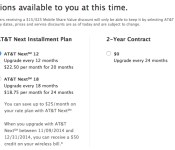
AT&T is now offering a $50 bill credit to customers who purchase a new iPhone from the Apple Online or Apple Retail Stores. Neither company has marketed the deal but an AT&T spokesperson confirmed the existence of the promotion to MacRumors. The purchase and financing of any iPhone model that Apple sells, including the 5c, 5s, 6 and 6 Plus, qualifies the buyer for the credit.
The $50 credit promotion, which runs through the end of the year, does have a number of requirements which should be easily met for most existing AT&T customers:
– The iPhone must be purchased on an existing line as an upgrade.
– The iPhone must be financed on an AT&T Next installment plan.
– The iPhone must remain active and in good standing on Next for 45 days.
$50 Bill Credit Offer: Ends 12/31/14. Must remain in active and in good standing on Next for 45 days to receive bill credit on your AT&T mobility bill within 3 bill cycles. Upgrades only. Requires iPhone to be purchased via AT&T NextSM and activated on a qualifying AT&T voice and data wireless service plan. Offer may not be combinable with other credits, discounts and offers. Offer and terms subject to change and may be discontinued at any time without notice.

Customers looking for an unlocked phone should wait for the bill credit to be applied to their account before paying off the AT&T Next financing and unlocking their phone through AT&T’s unlocking process.
The promotion launched earlier this week and is scheduled to run through December 31st, but the fine print notes that AT&T can discontinue it at any time.
How to Enable Family Sharing in iOS 8 and OS X Yosemite [iOS Blog]
With the release of iOS 8 and OS X Yosemite, Apple has included a new Family Sharing feature that allows multiple users to easily share content and interact with each other. Most notably, Family Sharing allows up to six family users to share purchases made from the iTunes, iBooks, or App Store. The feature also allows families to contribute to a unified photo album or calendar, share locations, use Find My iPhone to find a lost device, and set parental controls for children.
Prior to the debut of Family Sharing, a user looking to share a downloaded app with someone else would have to give out their Apple ID account information. That information would also have to be entered when updating an app, requiring users of shared apps to log out of their own Apple ID and log into the original Apple ID used to download the app. With Family Sharing, users have immediate access to each other’s music, movies, TV shows, books, and apps, as content can be downloaded with a single tap.
Before You Start
A user needs to be running iOS 8 or higher and have a valid iCloud account in order to use Family Sharing, with OS X Yosemite required for Mac access. Prior to turning on Family Sharing, ensure that you are ready to designate yourself or another user to be the Family Organizer in the Family Sharing group. The Family Organizer will be responsible for all iTunes, iBooks, and App Store purchases made by the Family users in the group.
Also, ensure that the Family Organizer has a valid payment method linked to their iTunes account. In the desktop iTunes application on the Mac, this can be done by going to Menu Bar -> Store -> View Account. On an iOS device, this can be done by going to App Store -> Scroll to Apple ID on bottom of “Featured” tab -> Tap on Apple ID -> View Apple ID -> Payment Information. Only the Family Organizer needs to have a valid payment method attached to their iTunes account.
Steps to Enable Family Sharing
1. Go to Settings -> iCloud -> Set Up Family Sharing to begin setup as the Family Organizer.
2. Tap on Get Started. Ensure that the email listed on the Share Purchases screen is correct.
3. Ensure that the information listed on the “Payment Method” is correct. If it is not, change the payment method by going to App Store -> Featured tab -> Apple ID -> View Apple ID -> Payment Information.
4. Choose to share your location with your family users by tapping “Share Your Location” or decline the option by tapping “Not Now”.
You have now enabled Family Sharing for the Family Organizer. To begin adding users to the Family Sharing group, follow the steps below.
Steps to Add Family Members
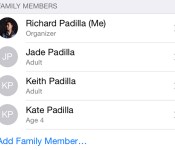
1. To add a Family Member, tap on “Add Family Member” in the main menu.
2. From the Add Family Member screen, you can send an invitation to another user’s iCloud account to join a group. Alternatively, you can ask another user to enter the Family Organizer’s iCloud password to join a group.
3. If you have chosen to send an invitation, the invited user will see a push notification on their iOS device asking them to join a Family Sharing group. Once a user accepts the invite, they will be prompted to share their purchases and location. The user will also appear in the Family Sharing main menu.

4. By default, users invited to Family Sharing will be recognized as adults and will not need permission to purchase content. However, the Family Organizer can also create an Apple ID for a child by tapping the highlighted option at the bottom of the Family Sharing menu.
5. Creating an Apple ID for a child will ask the Family Organizer to input a birthday and accept a Parent Privacy Disclosure. The Family Organizer will also be required to input the security code for the primary card being used.
6. Next, the Family Organizer will be able to enter a name and create an email address, password and security questions as seen in a typical iCloud setup process.

7. Afterward, the Family Organizer will be able to turn on Ask to Buy. Ask to Buy allows a child user to send a purchase request for an app, song or book to the Family Organizer, who can then approve or deny the request. The Family Organizer can also choose whether to share the location of the child’s device. Once setup is completed, the child user will appear in the Family Sharing menu.
Sharing Purchased Content

Family members can access each other’s apps, books, songs, movies, and TV shows and download content to their own devices. To download a family member’s shared content, users can head to the Purchased tab in the iTunes Store app, the iBooks app, or the App Store app. From there, users can select a family member and view a list of purchased content that is available for download. To hide a purchase, go into the Purchased tab, swipe the content you want to hide to the left, and select “Hide”.
Apple notes that there are certain types of content that cannot be downloaded by other users in a Family Sharing group. Non-shareable content includes songs added to iTunes Match from outside of the iTunes Store, in-app purchases, items that are no longer available on the iTunes Store, and apps that are marked as non-shareable in their App Store descriptions.
Family Calendars and Photo Albums

In addition to allowing purchased content to be shared, Family Sharing allows multiple users to contribute to a single calendar or photo album. To add to the calendar, family members can go to the Calendar app and select “Family Calendar” in the list of options before creating an event. The Family Organizer can also view and edit the calendar permissions of each family member by selecting “Calendars” and tapping the “I” symbol next to the Family Calendar.
To enable shared photo album functionality, all family members must have iCloud Photo Sharing turned on in Settings -> iCloud -> Photos -> iCloud Photo Sharing. Once that setting is enabled, the Family photo album can be viewed in Photos -> Shared -> Sharing -> Family. A user can add photos to the shared album by tapping the + sign in the upper right corner, and all family members receive a push notification when a new image is added.

Sharing Locations and Find My iPhone
Users in a Family Sharing group can also keep track of each other’s locations through the Find My Friends or Messages app. The Find My Friends app will display the location of all family members on a map and give details on their current city and distance.

Similarly, if a family member’s Mac, iPhone, iPad, or iPod touch is lost and needs to be tracked down, other users in the group can see the whereabouts of each device in the Find My iPhone app. Once a device is selected, users can choose to play a loud sound on the device, enable Lost Mode to lock the device, or choose to erase the entire device.
Things to Be Aware of
While the ability for a Family Sharing group to track down a lost device with the Find My iPhone app is useful, there are a few issues to be aware of. For example, any user in the Family Sharing group, including child users, can choose to lock a device with their own passcode or erase a device entirely without needing permission from other users. Any user can also choose to play a loud sound on a selected device which cannot be automatically silenced even with the “Do Not Disturb” feature turned on.
Though all three options are useful in the event of a device becoming lost, each could also be turned on accidentally, resulting in lost data or unexpected disturbances. Because of these potential oversights, it is recommended that you ensure that each member of your Family Sharing group uses the Find My iPhone app responsibly.
Another factor worth considering is that all Family Sharing members must use a single credit card or debit card for all App Store purchases, which is controlled by the Family Organizer. If App Store credit is applied to the account of a Family Sharing member, the credit will be used before the Family Organizer is billed for a purchase.
It’s also worth noting that in order to secure an Apple ID for a child, the parent or Family Organizer must have a credit card on file in order to verify that the person creating the child’s Apple ID is an adult. Apple will not accept a debit card.
Troubleshooting
Since its debut with iOS 8, a number of users have had issues with Family Sharing and shared app purchases. Most problems have centered around a message stating “Redownload Unavailable with This Apple ID” when trying to download apps or other content. Members on Apple’s Support Communities and CNET‘s Jason Cipriani have reported that logging out and back into iCloud has fixed the problem.
Other users have also found out that the designated Family Organizer needs to have the same Apple ID logged into iCloud and the App Store for purchases to be shared. Also, keep in mind that not all apps support Family Sharing, and specify whether they do in their App Store description. If users are unable to download shared purchases, it is also important to ensure that the payment method on the Family Organizer’s account is up to date by going to App Store -> Featured tab -> Apple ID -> View Apple ID -> Payment Information.
 AIVAnet