


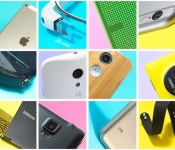
Meet Engadget’s new buyer’s guide picks: iPad Air 2, Note 4 and more!

New iPads. A new Galaxy Note. New Google… everything. Chalk it up to the holiday shopping season, but we’ve been mighty busy reviewing new gadgets lately. Which means, it’s high time we update our buyer’s guides. This time around, we’re replacing the iPad Air with, you guessed it, the second-gen edition. Interestingly, though, we’ve declined to add the iPad mini 3 — we still think that for most people the cheaper iPad mini 2 is the smarter buy. Oh, and we got rid of a couple tablets too: Since the Nexus 7 and the 2013 Kindle Fire HD have both been discontinued, it doesn’t make sense to keep recommending them.
As for smartphones, say hello to the Galaxy Note 4, the best big-screen handset you can buy. In addition we’re adding Sony’s Xperia Z3 flagship and the Moto G in the budget category. In the wearables category, we still recommend the Moto 360, particularly given a recent update that improved battery life, and also the fact that it’s more reasonably priced than the new LG G Watch R. Finally, you’ll notice we haven’t added any laptops this month. That’s because we’re currently testing a bunch of Ultrabooks, Chromebooks and gaming laptops, and it’s too soon to say which ones we like best. Good thing we update this guide so often. Will we add Samsung’s new, lower-end Chromebook 2? Maybe the Lenovo Yoga 3 Pro? Will the Nexus 6 and Microsoft Band make the list? Check back soon to find out.
Filed under: Announcements, Apple, Samsung, Sony, Lenovo
Source: Engadget Buyer’s Guide
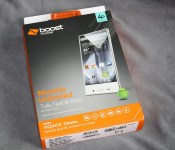
Sharp AQUOS Crystal: Hands-on with the Bezeless Phone from Boost Mobile
When Sharp announced the AQUOS Crystal Android phone it stirred some interest with me for a number of reasons. The design being a big one, but also the implementation of the audio during calls and the inclusion of some camera software to help you take better photos. As interesting as the device is, it isn’t without it flaws for the mid-range price tag it carries along with it.

It has been quite a while since Sharp got rolling with a consumer phone that found its way to the states. Sharp actually has a number of phones across the globe, but mostly they are pretty standard designs. The AQUOS Crystal carries a 5-inch edge to edge to edge screen. It doesn’t get four edged because there is a pretty hefty bezel at the rear of the phone.
Design
The device carriers its self well with a 5-inch 1280 x 720p resolution display. With the lack of side and top bezel it makes the devices physical footprint quite small, even though it is slightly thicker than the Galaxy S4. While I say it is bezeless, it still has a tiny frame around it. After all, something has to hold the screen in place. There is no ground breaking purpose behind the screen fitting in to the edges, but it certainly does make for a stunning look. One would think that you might accidentally press apps, actions, letters or anything else often without an edge on the screen, but the fact of the matter is you simply don’t. At least, I never had any issue during my time with the device.

 It is interesting that the glass over the screen offers some sharp edges. Not as in they will cut you sharp, but sharp angles cut along the sides. I would lean towards these being part of the devices name as it reminds me of the looks of a natural forming crystals.
On the front of the device you have your front facing camera and a variety of sensors. They are all located at the bottom, rather than the top since there is no bezel to place them.

 The volume rocker placement is slightly down from the top on left hand side of the device like many device. The power button is located on the top right hand side similarly to where HTC has been placing the power button. It is very close to the right edge of the screen which does make it a little awkward to access easily without fumbling with the device. The top left hand side is where you will find the headphone jack and on the bottom is where the mic and micro USB charging port is.

 The rear of the device offers up a textured back-plate. The texture doesn’t cover the entire back-plate, which is a little odd to me. It stops just short of where the flash and camera lens are located, which is dead center and stacked. At the bottom rear of the AQUOS is where you will find the speaker grill and your external speaker.

Behind the backplate you will find your SIM card slot and micro SD card slot. The 2040 mAh battery is non-removable. Once your SIM and SD card in place, you will probably never have another reason to pull the back plate off. Which is a good thing because it is ultra thin and flimsier than Samsung’s.
Hardware
Inside the Sharp AQUOSCrystal get a quad-core Qualcomm Snapdragon 400 processor clocked at 1.2GHz, 1.5GB RAM and 8GB internal storage with a touch ofver 4GB of user available storage for apps and such. It runs a fairly stock build of Android 4.4 KitKat with a few pre-installed carrier apps, in this case, a few Boost Mobile apps.
Beyond the bezzleless screen, the AQUOS has a few features that are really the more interesting selling points of the device. Unlike the more traditional phones on the market, the AQUOS Crystal doesn’t have an ear piece to hear those that call you. Rather the whole screen acts as a resonating speaker. This allows you to hear your callers no matter where your ear is placed, so long as it is on the screen somewhere. While I am familiar with the technology behind it and know that this sort of bone conduction resonating sound is quite spectacular, I was pretty skeptical on how well it work. It actually worked really really well no matter where I held the phone on my ear.

As for cameras, the device sports a 8MP rear shooter with flash and a 1.2MP front shooter. The rear camera is average for the device’s price point. It isn’t stellar, but I have certainly used worse cameras with higher mega pixels in more expensive devices. The big selling attributes aren’t for its resolution, but more so for its added features like Framing Adviser that lays a template on your screen to help you frame your shots.


You also have Night Catch that will help catch those photos in low light situations, along with Sequential Shots, Shutter Detect and Panorama.
The front shooter is a bit of an enigma if you ask me. Since there is no bezel around the top of the device, Sharp had to place the front shooting camera in the bottom of the device. A nice warning message pops up when you switch to the front camera alerting you to this fact and that you should flip the device over. Being that there is no shutter button, simply tap the screen to take the photo, there is no real issue taking photos right side up or upside down as the image in the gallery will be correctly orientated in the gallery anyways.

Little kickers
Sharp put a few little, somewhat useless, flares in the device. For screenshots you can do the usual power + volume down option that many of us are used to doing. However you can turn on ‘Clip Now’ which lets you swipe across the top edge of the screen to take a quick screen shot. it can be tricky to get correct and I ran into personal issues where it would attempt to take a screen shot when all I was trying to do was pull down the notification window. Clip Now does give you some additional functions though, like it captures and creates an embedded URL for easy sharing.


 Frameless Effect is another interesting feature. This feature gives you a few settings to toggle for some on-screen visuals. You can choose from three different light visuals that will display around the edge of the device’s screen when you turn the screen on. You can also activate the Flashing Alarm, which flashes a white light around the edge of the screen when you alarms are going off. Finally you have a wave light of sorts that goes across the screen when you plug it in to charge.


 Personal experience, wins and loses
For the price tag on Boost Mobile and Sprint, the Sharp AQUOS offers a fairly smooth experience thanks to Sharp keeping the Android OS very minimally modified. It won me over with the clarity of the screen and sound quality from the glass. Couple that with the Harmon Kardon audio add-on for Bluetooth and headphone connections and you have a great audio performer.


 The devices 2040 mAh battery is adequate enough to get your through a day of usage. The standby by time cleared 2 days with me only checking emails and clearing notifications with anywhere between 2 to 3 hours of screen on time. Attempting to use it as often as my primary device I easily got through 14 to 16 hours of medium usage.
There were a number of things that got under my skin a little. keeping the price point in mind they are fairly minor. Getting the notification shade to pull down was sometimes tricky due to the lack of bezel at the top of the screen. It is something you learn to work with and eventually get better at dragging it down. Items that need touch action near the top corners or edges of the screen are also sometimes tricky to appropriately hit. Again, something that I eventually got used to.
I feel the power button placement should not have been at the top of the device, or at least the top right hand side. It would have been better suited, for me at least, in the top middle or on the sides. Its current location works well if you use your left hand and index finger, but if you are right-handed it is awkward to press and you might find yourself pressing the volume keys and squeezing the sides harder than normal to reach it.

 The only other gripe I have, which could be due to design or potential defect with the review unit I have in hand, is the light bleed around the screen in low light situations. It isn’t blinding nor does it appear to washout any of the screens color, but it is a bit annoying and noticeable on all three sides. You can see it in the image below with the device held at slight angle.

Final thoughts
This is the first phone from Sony to hit the US in a very long time. It isn’t being targeted are a high-end device so I didn’t expect that caliber of functionality or build quality. At $150 out-of-pocket (on Boost Mobile) it is quite the fun and interesting device to use. It handles your apps, games and more quite easily and does so with crisp clear images on the 720p screen. While I wish the camera was slightly better, I can’t fault it considering the price tag. Even with the light bleed that I had,the touch issues and the awkward power button placement, it performed well. It is easily worth picking up if you are on a budget and looking for a solid device with some perks for Sprint, Boost Mobile or Virgin Mobile. I think Sharp could take this to the next level and go mid-ranged and follow-up with a high-end variant in a year or two if that is their goal.
Check out the Sharp AQUOS Crystal at Sprint, Boost Mobile and soon to be on Virgin Mobile.


//<![CDATA[
ord = window.ord || Math.floor(Math.random()*1E16);
document.write('‘);
//]]>
The post Sharp AQUOS Crystal: Hands-on with the Bezeless Phone from Boost Mobile appeared first on AndroidSPIN.

Civilization Revolution 2 Slides on to the Play Store as a Straight up Paid Title
In the world of mobile gaming, developers are preferring the in-app purchase route vs a straight up full content title for a one time purchase. 2K Games has opted for the latter route with the release of Civilization Revolution 2.

The mobile variant of the widely popular turn-based strategy game has been out for iOS since July as the follow-up to the first Civilization Revolution. Civ Rev 2 is the first one to make its way to Android as well as being the first one built specifically for Mobile. With that, the graphics have been dramatically enhanced compared to the first run title and looks to be a bit more representational to the PC titles.


The release brings in a number of leaders like Lenin and Lincoln to choose from on your conquest to build the greatest civilization possible. I have never been a big fan of the titles, so I won’t attempt to go into any details about it. I do see a number of comments on the Play Store stating they are having login issues though. Not that claimed issues by others has stop many people from buying a title though. If you want to grab the new Civilization Revolution 2 title, hit the link below. Be prepared to drop $14.99 and make sure you have time to download the 447MB game files.
Civilization Revolution 2 on the Play Store
//<![CDATA[
ord = window.ord || Math.floor(Math.random()*1E16);
document.write('‘);
//]]>
The post Civilization Revolution 2 Slides on to the Play Store as a Straight up Paid Title appeared first on AndroidSPIN.

ASUS Zenwatch to launch in the United States this Sunday, November 9

ASUS has announced that its first ever Android Wear device, the Zenwatch, will launch in the United States this Sunday, November 9. The unit will initially be available to purchase exclusively at Best Buy for $199. However, it is expected to make its way onto the Play Store in the not-too-distant future.
In terms of design, the Zenwatch sports an aluminium unibody and is essentially a more elegant version of LG’s G Watch, ASUS’ offering comes with a ‘real’ leather strap, which can be purchased in a variety of different colors.
In addition to being one of the most unique, the Asus Zenwatch is also one of the most powerful Android Wear devices on the market to date, packing a 1.63-inch AMOLED display with a resolution of 320×320 pixels, 512MB of RAM and 4GB of internal storage.
If you’re planning on grabbing a Zenwatch be sure to let us know in the comments section below.
Source: TechCrunch
Come comment on this article: ASUS Zenwatch to launch in the United States this Sunday, November 9

Asus ZenWatch on sale November 9, report says
The first Android Wear smartwatch from Asus is slated to go on sales in the United States on Sunday, November 9, says TechCrunch. Reportedly, the wearable will carry a $199 price tag, however it’s not clear how or where it will be sold. We might assume the major online retailers and possibly a carrier or two…. Read more »
The post Asus ZenWatch on sale November 9, report says appeared first on SmarterWatching.


Read the rest at SmarterWatching.com!
The post Asus ZenWatch on sale November 9, report says appeared first on AndroidGuys.

Wear Mini Launcher [‘Watch’ This App]
Accessing apps on smartwatches can be a pain. If voice activation or scrolling through different lists just to find an app is something you can’t stand, then it may be time to take a look at Wear Mini Launcher. It’s an app that allows you to access your apps from anywhere simply by swiping from the… Read more »
The post Wear Mini Launcher [‘Watch’ This App] appeared first on SmarterWatching.
Read the rest at SmarterWatching.com!
The post Wear Mini Launcher ['Watch' This App] appeared first on AndroidGuys.

United Airlines Spending $120 Million on Upgrading New Jersey Airport Terminal with iPads [iOS Blog]
New Jersey’s Newark Liberty International Airport is set to receive a $120 million upgrade to United Airline’s main terminal with some of the funds going towards iPads, Bloomberg reports. The airline is planning to offer Apple iPads to customers at certain locations around the terminal, namely restaurants and cafes. Similar upgrades have been utilized by other airlines in high-density airports like LaGuardia in New York.
“From our perspective what we’re looking for, and what we look for in all of our hubs, is something that’s going to be a benefit for our customers — something that’s going to make the time they spend in the airport more productive, more enjoyable, comfortable,” Mary Clark, a spokeswoman for the airline, said in a telephone interview.
As more and more airlines strip away the privileges of air travel to save money, focus is shifting towards ground amenities. By 2015, United plans to have every restaurant and gate seat in Terminal C outfitted with an iPad. The tablets will allow customers to check flight times and updates, browse the internet, buy food, and make retail purchases with a fifteen minute delivery guarantee.

Over the course of the next eighteen months, the Newark tunnel upgrade will add 55 dining venues, 10,000 power outlets, and 6,000 iPads to improve the customer experience in United terminals.
“It’s really become an expectation in society today to have these amenities,” said Alan Bender, professor of aeronautics, airline management and economics at Embry-Riddle Aeronautical University. “U.S. carriers are catching up to where they should be for their passengers, especially for their business passengers, and most especially for their international business passengers.”
In 2012, Newark’s Airport was rated the fifth worst in the United States according to a Travel & Leisure survey that ranked the country’s twenty-two biggest airports on problems such as delays, concessions, and amenities. Plans are already in motion to change that statistic, as The Port Authority of New York and New Jersey plan to spend $8 billion on upgrades to LaGuardia, JFK, and Newark airports over the next decade.

Spotify Connect for Computers Turns An iPhone Into a Remote Control for Mac [Mac Blog]
 Spotify on Friday added a new feature that allows subscribers to use an iPhone or iPad as a remote control for playback on their Mac. The new feature is available for free as part of Spotify’s $9.99 monthly premium subscription.
We’ve just released a great new Premium feature, which lets you play Spotify through your computer, using your phone or tablet as a remote. Use the Spotify app to control the sound. It’s brilliant if your laptop’s hooked up to your speakers. Or if you just don’t want to get off the couch.
Using the new Connect for Computers feature is simple, according to Spotify’s setup instructions. After downloading the latest version of the mobile and desktop app, subscribers only need to log in, tap the “Now Playing” bar and hit “Connect” to direct music from an iPhone or iPad to a computer and its connected speakers.
Spotify is among the leading music streaming subscription services, sitting behind market leader Pandora and edging out Apple’s Beats Music in App Store Revenue. Spotify recently introduced a new Family Plan feature that allows premium subscribers to add up to four additional lines for $4.99 each.

Google Genomics can store your entire genome online for a mere $25 a year

Google’s been working on its latest project for about a year and a half ago: it’s service that will store entire copies of genome. This isn’t something Google Drive can cope with – decoding DNA involves a lot of data. According to Technology Review, in raw data, one person’s genome weighs in at around 100 gigabytes. The plan is house all that DNA data online, in big ‘ole clouds where scientists will be able to run virtual experiments and collaborate with each other on bigger (hopefully disease-curing) projects. Google is battling against the likes of Amazon and Microsoft to store expansive medical data like this: the Mountain View company charges scientists and researchers $25 a year for storing a single human genome — although you’ll have to pay a little more to fiddle around with data.
“Our bird’s eye view is that if I were to get lung cancer in the future, doctors are going to sequence my genome and my tumor’s genome, and then query them against a database of 50 million other genomes,” explained Deniz Kural, whose company, Seven Bridges, stores genome data with Amazon’s cloud system. “The result will be ‘Hey, here’s the drug that will work best for you.’ “
Filed under: Storage, Science, Internet, Google
Source: Technology Review

Watch Mark Zuckerberg answer your most pressing questions

Mark Zuckerberg took time out of his busy schedule yesterday to answer some pressing questions from the public. While none of the answers are particularly surprising, it was nice to hear the young CEO directly address the concerns of its users. High on the list of people’s gripes was the decision to break out Messenger as its own app. While Facebook has addressed this issue before, it was still nice to hear Mr. Zuckerberg talk about it directly. He and Facebook still believe that the Messenger app provides a much better experience and that making it a standalone product was the right decision. Though he admitted that perhaps the transition could have gone better. If you’re interested, you can watch the entire hour-long Q&A after the break.
(function(d, s, id) var js, fjs = d.getElementsByTagName(s)[0]; if (d.getElementById(id)) return; js = d.createElement(s); js.id = id; js.src = “//connect.facebook.net/en_US/all.js#xfbml=1”; fjs.parentNode.insertBefore(js, fjs); (document, ‘script’, ‘facebook-jssdk’));
Filed under: Internet
 AIVAnet