



WhatsApp update now shows when messages have been read

You may recall that Facebook acquired WhatsApp Messenger back in February for an eye-watering $19 billion, and is only now in the process of rolling out its first major update for the service. Don’t get too excited, though, as the added functionality is not welcomed by many.
If you’re either an avid user of WhatsApp or a complete novice, I’m pretty sure you’re aware of its ‘double tick’ delivery system. If not, don’t worry. It’s simple. A grey tick on its own represents that a message has been successfully sent, while two grey ticks mean it has been delivered to the recipient’s phone. However, Facebook has decided to adapt this feature.
Now, you will notice on some occasions that both of the ticks turn blue. This indicates that the recipient has, in fact, read your message. This attribute also works in group chats; however the color will only change once all of the participants have read the message.
Unlike any other messaging service on the market, WhatsApp allows you to compare the time the message was delivered and subsequently the time it was read. Doing this is easy. All you have to do is press and hold on the blue-ticked message, and then hit the info button.
Android user’s are not required to navigate to the Play Store to update their software in order to receive this new feature owing to the fact that it’s being rolled out in stages over-the-air — so don’t get distressed if your friend receives the functionality before you do.
Source: WhatsApp
Come comment on this article: WhatsApp update now shows when messages have been read
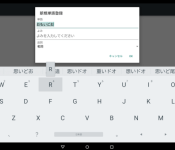
Google rolls out Material Design update for Japanese Input application

Google is in the midst of pushing out an update for its official Japanese Input application via the Play Store. This upgrade doesn’t transport much by way of new features, but it does bring Voice and Emoji input shortcut keys and an appearance transformation complying with the search engine giant’s Material Design guidelines.
Hit the break for the full changelog.
- Implemented Material Design.
- Faster access to numbers and punctuation.
- Introduced voice input and Emoji input shortcut key.
- (Lollipop) Introduced input method switch key.
- (Lollipop) Introduced new candidate window for hardware keyboard users.
- Added built-in support for hardware Japanese (JIS) keyboard (requires Android 4.1 Jelly Bean)
To install the update, simply open up the Play Store on your device, toggle the hamburger menu by swiping in from the left-hand side of the screen, select ‘My Apps’ and click on ‘Google Japanese Input’. Next, hit the update button, and the application will instantly start to download and install the upgrade from the Google Play servers. Alternatively, you can scan the QR code below to initiate the procedure.
Come comment on this article: Google rolls out Material Design update for Japanese Input application
 AIVAnet